Home / Use cases / Semantic Search for Content Websites
TutorialSemantic Search for Content Websites
Semantic site search is a search box on a content website that finds pages by meaning, so visitors reach the right article even when their words differ from the page’s wording. To add it, list which pages and fields to index and keep the index in sync through a sitemap crawl or CMS webhooks. Split pages into passages by heading, then index each passage with an embedding, its text and metadata. At query time, run hybrid search, so exact names still match, and group passages by page so one long article cannot fill every slot. Evaluate it on real visitor queries, taken from site search logs and from the searches that already bring people to the site. Judge the top results, track success at the top three and how often searches end without a click, and fix the gaps they reveal.
Semantic site search in four facts
- Content sites are best indexed as passages split by heading, with each passage keeping its page URL and title.
- Hybrid search keeps product names, people and acronyms findable while semantic matching handles paraphrases.
- Grouping results by page returns one best passage per article instead of five from the same page.
- Evaluation should use real visitor queries, not queries written by the team that built the site.
What is semantic search for a content website?
Semantic search for a content website is site search that ranks articles, guides and help pages by how well they answer a visitor’s question, rather than by shared keywords alone. It suits blogs, publications, documentation and knowledge bases.
Visitors to a content site often search in their own words. Someone asking “why is my sourdough flat” should land on an article titled “Fixing underproofed bread”. Keyword search misses that unless an editor adds synonyms by hand. Semantic search finds it because the question and the article are close in meaning.
Building it yourself gives control over ranking and content handling. Semantic site search tools compares hosted services and engines if you would rather buy than build. Stores have extra needs such as facets and merchandising, covered in semantic product search for ecommerce.
How do you add semantic search to a content website?
You add semantic search to a content website in six steps: inventory the content, sync it, chunk pages, index the chunks, query with hybrid search grouped by page, and build the interface with logging. Each step is small on its own.
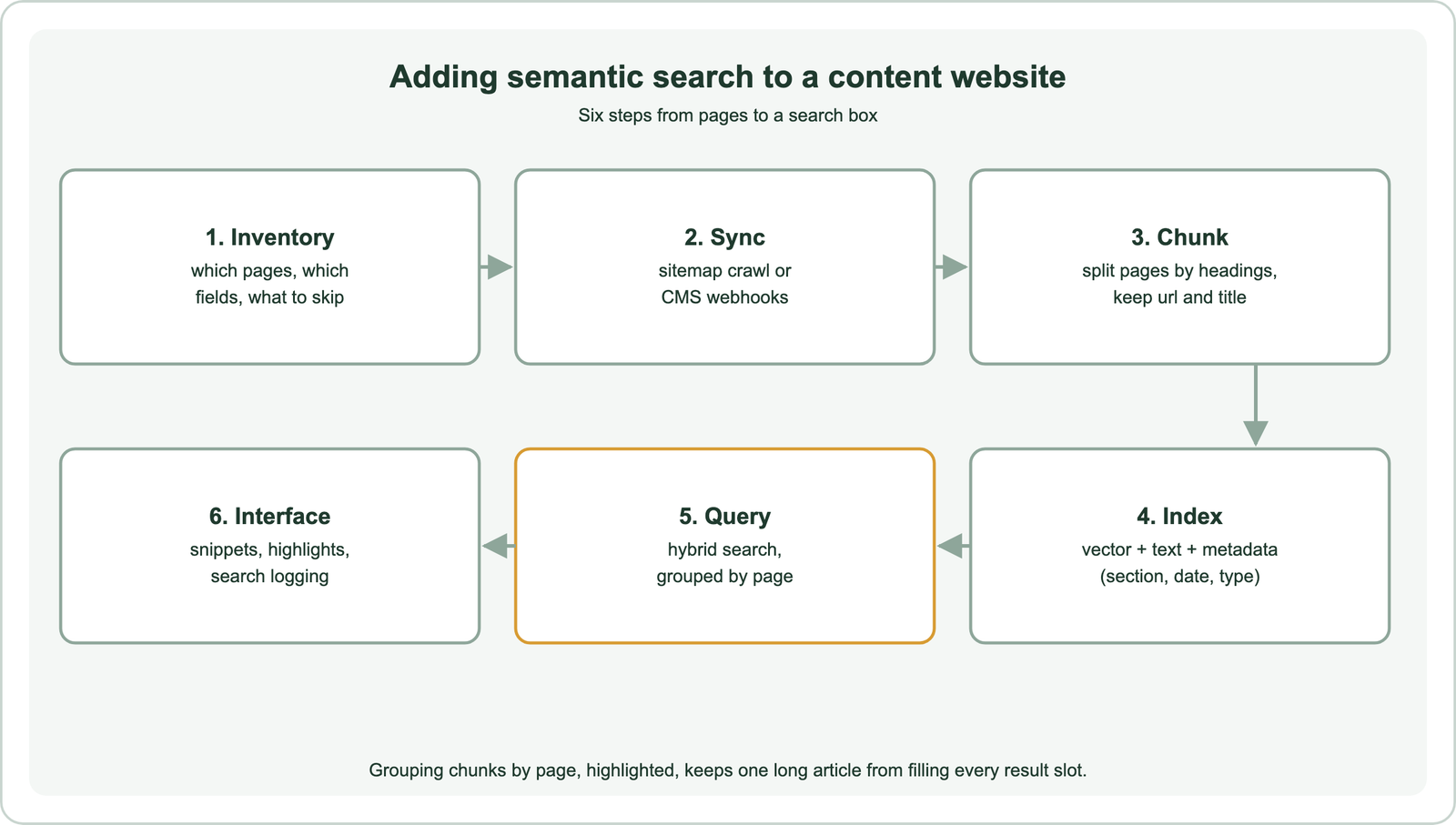
Start with an inventory. Decide which page types belong in search, such as articles and guides but not tag archives or login pages. Note which fields matter: title, headings, body, section, publish date and author. Sync is either a crawl of the sitemap on a schedule or a push from the CMS whenever a page is published, updated or removed. Push is fresher and avoids indexing stale pages. A scheduled crawl is simpler to set up and works with any platform, so many sites start there and add webhooks later.
Chunking by heading works well for content sites, because writers already structure pages around questions and subtopics. Each chunk keeps the page URL, page title and its own heading, so a result can link straight to the right section. Chunking for semantic search covers sizes and overlap.
How should a content site be indexed?
A content site should be indexed as one object per passage, with an embedding of the passage, its text for keyword search, and metadata such as URL, title, section and date. Store the URL as an exact value.
from weaviate.classes.config import Configure, Property, DataType, Tokenization

client.collections.create(
    "PageChunk",
    vector_config=Configure.Vectors.self_provided(),
    properties=[
        Property(name="url", data_type=DataType.TEXT, tokenization=Tokenization.FIELD),
        Property(name="title", data_type=DataType.TEXT),
        Property(name="heading", data_type=DataType.TEXT),
        Property(name="text", data_type=DataType.TEXT),
        Property(name="section", data_type=DataType.TEXT, tokenization=Tokenization.FIELD),
        Property(name="published", data_type=DataType.DATE),
    ],
)
Field tokenization keeps the URL and section as single values, so filtering and grouping on them is exact. Embed the heading together with the passage text, since headings carry much of a passage’s meaning. Use a deterministic ID derived from the URL and heading, so a page update replaces its chunks instead of adding duplicates.
When a page is deleted or unpublished, delete its chunks with a filter on the URL. Stale results erode trust quickly on a content site, where visitors expect search to match what they can browse. Real-time indexing and index freshness covers update strategies.
How should site search queries be run?
Site search queries should run as hybrid search, combining keyword and vector scores, and be grouped by page so each article appears once with its best passage. Short queries need the keyword side most.
from weaviate.classes.query import GroupBy

response = chunks.query.hybrid(
    query=user_query,
    vector=model.encode(user_query).tolist(),
    alpha=0.6,
    group_by=GroupBy(prop="url", objects_per_group=1, number_of_groups=10),
)
Site search queries are often one to three words, names or acronyms. Keyword matching keeps those exact, while vector matching handles longer natural-language questions. Start with a balanced alpha and tune it on your queries, as described in balancing keyword and vector scores. Grouping by the URL property returns the strongest passage from each page, which then becomes the snippet.
Add filters for explicit choices, such as a section or a date range, and consider boosting recent articles where freshness matters. Show the matching passage and heading as the snippet, and link to the heading’s anchor. Visitors judge a result in a second from its snippet, so the right passage matters as much as the right page.
What should a site search results page show?
A site search results page should show a clear title, the matching passage as a snippet, the section and date, and simple ways to narrow or reword the search. Good presentation turns correct results into clicks.
Lead each result with the page title and the heading of the matching passage, then a two- or three-line snippet with query terms highlighted. Show the section and publish date so visitors can judge freshness, which matters most for news and how-to content. Offer filters for the site’s main sections when results span several. On mobile, keep snippets short and the tap target large.
Plan the empty state. When nothing scores well, say so plainly and suggest related topics or popular pages rather than showing weak matches. Autocomplete that suggests article titles as visitors type can answer many queries before they press enter. Log every search, click and refinement with a search ID, so the evaluation loop has data to work with.
How do you evaluate semantic search quality for a content-heavy site?
You evaluate semantic search on a content-heavy site by collecting real visitor queries, judging the top results for each, measuring success at the top of the list, and fixing what fails. Repeat the loop after every change.
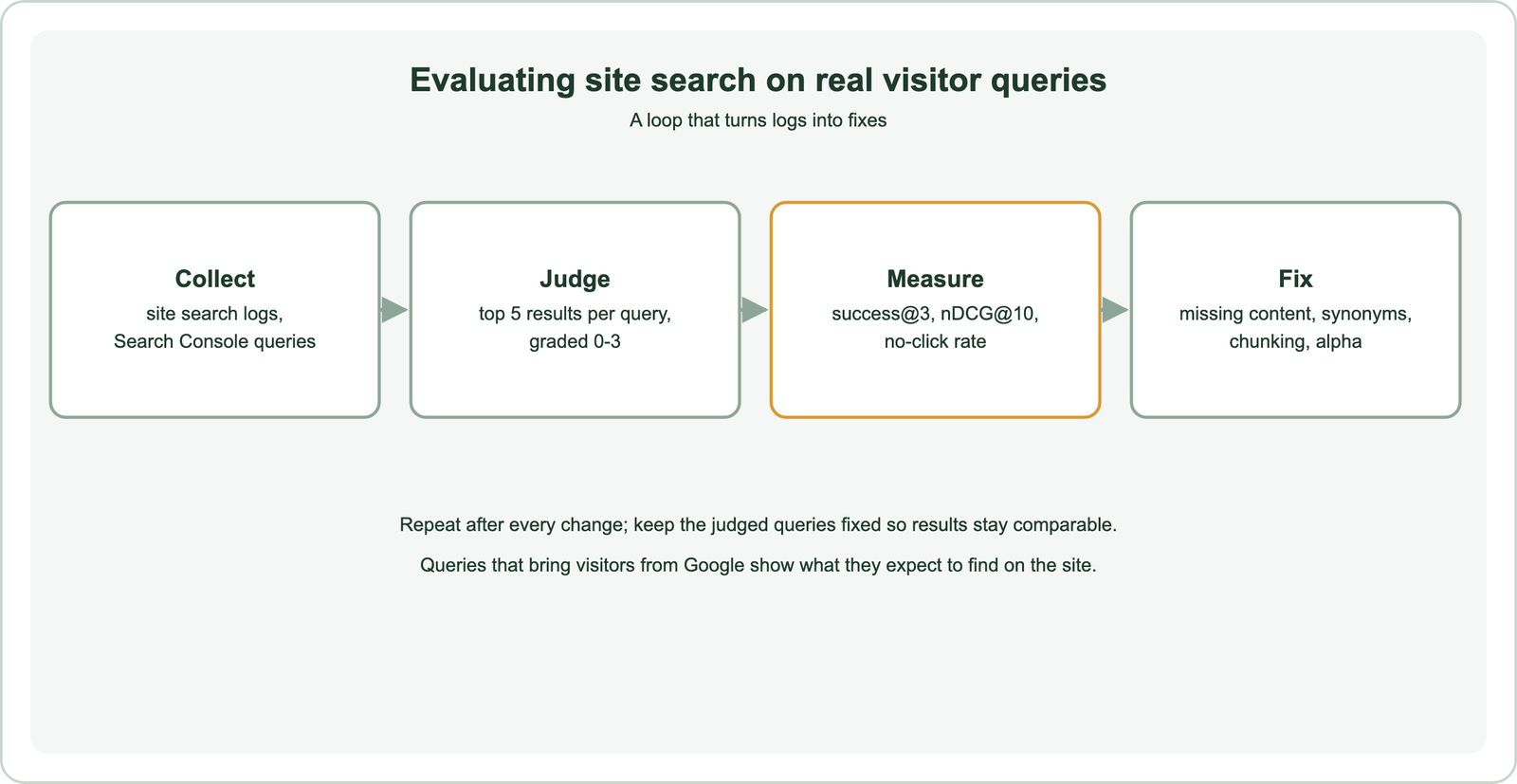
Take queries from two places. Site search logs show what visitors type once they are on the site. Search engine reports, such as Google Search Console, show the queries that bring visitors to each page, which reveal how people describe the site’s topics. Sample a few hundred, mixing frequent and rare ones, and keep their original wording.
For each query, judge the top five results on a simple scale, from not relevant to a perfect answer. Report success at three, the share of queries with a good answer in the top three, and nDCG at ten for ranking quality. In production, watch the share of searches that end without a click and the share followed by a reworded query. Search test sets and relevance judgments and online search metrics and analytics cover both halves.
What do failing site search queries usually reveal?
Failing site search queries usually reveal missing content, vocabulary gaps, poor chunking or a keyword and vector balance that does not suit the site. Each failure points to a specific fix.
A query with no good result anywhere is a content gap: write the article, or point the query to the nearest page. A query whose answer exists but ranks low may need its terms in the page’s headings, or a synonym if the site uses jargon. Results that return the right page but the wrong section suggest chunks that are too large or split in the wrong place. Exact names that rank poorly suggest lowering alpha towards keyword search.
Keep a short log of failures and fixes, with the date and the change made. Over time it becomes the best guide to what visitors want and how they phrase it, useful for editors as well as engineers. Why vector search returns irrelevant results lists more diagnostic patterns.
How can site search grow beyond a search box?
Site search can grow beyond a search box by reusing the same index for related-article suggestions and for an assistant that answers questions from the site’s content. One well-maintained index serves all three.
Embedding each article once makes “related reading” easy: find the nearest pages to the one being read, as described in semantic recommendations. The passage index also suits retrieval-augmented answers, covered in semantic search in RAG, where the assistant cites the pages it used. Help-centre sites follow the same pattern, covered in customer support and help center search.
The same building blocks appear across other use cases listed in semantic search use cases. Those include internal document search, research paper search, patent and legal search, B2B search, code search and media search.
Semantic site search lets visitors find a content site’s pages by meaning. Inventory the pages, keep them in sync, chunk by heading and index each passage with an embedding, text and metadata. Query with hybrid search grouped by page, so short name queries still match and each article appears once with its best passage. Evaluate on real visitor queries from site search logs and search engine reports, measure success at the top three and no-click rate, and fix content gaps, vocabulary and chunking as failures appear.