Home / Hybrid search / Hybrid Search vs Pure Vector Search
ComparisonHybrid Search vs Pure Vector Search
Hybrid search runs a keyword search and a vector search on the same query and fuses the two ranked lists, while pure vector search ranks only by embedding similarity. Vector search is strong on paraphrased, conversational questions. It is weak on exact strings such as error codes, part numbers, and version numbers, which an embedding model sees as near-identical. Hybrid search keeps the meaning match and adds a literal match, at the cost of a second search and a weight to tune. In this site’s own test, vector search ranked the right passage first for only 15 of 40 bare error codes, and BM25 for all 40. Hybrid search usually wins on mixed query traffic, but the right blend depends on your queries, so measure it.
Hybrid search versus vector search in four facts
- Vector search matches meaning; hybrid search adds a BM25 keyword match and fuses the scores.
- On 300 near-identical error passages, vector search found the exact code first 15 times out of 40; BM25 did 40 times.
- On paraphrased questions, a keyword-heavy blend hurt: hit@1 fell from 7 of 8 to 4 of 8.
- In OpenSearch’s BEIR benchmark, adding BM25 to a dense model raised nDCG@10 on 9 of 10 datasets.
What is the difference between hybrid search and vector search?
The difference between hybrid search and vector search is that vector search ranks results by embedding similarity alone, while hybrid search also runs a keyword search and merges both rankings into one list. Both start from the same query text. They differ in what counts as a match.
Vector search turns the query into a dense vector with an embedding model and returns the stored items whose vectors sit closest to it. That is why it finds “reset my password” for “I forgot my login”. The two share no words but sit near each other in the model’s vector space. Vector search explains the mechanics.
Hybrid search adds a second, lexical signal. Weaviate’s documentation describes it as running a vector search and a BM25 keyword search in parallel, normalizing their scores, and combining them with a fusion method. BM25 rewards documents that contain the query’s exact terms, weighted by how rare those terms are. What is hybrid search covers the concept in full.
| Aspect | Pure vector search | Hybrid search |
|---|---|---|
| Signal | Embedding similarity only | Embedding similarity plus BM25 keyword score |
| Strong on | Paraphrases, synonyms, typos, other languages | The same, plus exact names, codes, and rare terms |
| Weak on | Identifiers, version numbers, product codes | Queries where the keyword side adds noise |
| Indexes | One vector index | Vector index plus inverted index |
| Tuning | Model choice | Model choice, fusion method, and alpha weight |
| Query cost | One search | Two searches plus fusion |
How does hybrid search combine keyword and vector results?
Hybrid search combines keyword and vector results by scoring each candidate in both searches, putting the two scores on a common scale, and adding them with a weight. The weight in Weaviate is called alpha.
Weaviate offers two fusion methods. Relative score fusion, the default since version 1.24, rescales each search’s scores so the best result gets 1 and the worst gets 0, then adds them. Ranked fusion, the older default, ignores the raw scores and adds a value based on each result’s position. That rank-based method is reciprocal rank fusion, and relative score fusion covers the score-based one.
Alpha sets the balance. An alpha of 1 is pure vector search, 0 is pure keyword search, and 0.5 weighs both equally. Weaviate’s server default is 0.75, leaning toward the vector side. The documentation advises setting alpha explicitly, because client libraries do not all leave it unset and the effective weight can differ.
Weaviate Academy’s movie example shows the effect. For the query “action”, keyword search returned one film, Last Action Hero, because only its title contains the word. Vector search returned five films, including Sister Act, a looser semantic match. Hybrid search kept the exact match first and filled the list with semantic matches.
Does hybrid search beat vector search on a small support corpus?
Hybrid search beat vector search only slightly on a small, varied support corpus, and a badly weighted hybrid did worse than vector search alone. We ran the comparison ourselves to see where the differences come from.
The corpus had 36 short help-center passages: error messages, release notes, product specs, command-line flags, and everyday account questions. We wrote 24 queries with one correct passage each. Eight were bare identifiers such as ERR-4021 or 3.9.0, eight were paraphrased questions sharing no content words with the answer, and eight mixed an identifier with natural language.
Vector search used the open all-MiniLM-L6-v2 model with cosine similarity. Keyword search used BM25 with Weaviate’s default k1 of 1.2 and b of 0.75, word tokenization, and a short English stopword list. The hybrid runs fused each method’s top 10 with relative score fusion or with reciprocal rank fusion at k=60.
| Method | Identifier (8) | Paraphrase (8) | Mixed (8) | All (24) | MRR@10 |
|---|---|---|---|---|---|
| BM25 only | 8 | 0 | 8 | 16 | 0.708 |
| Vector only | 8 | 7 | 7 | 22 | 0.958 |
| Hybrid, relative score, alpha 0.75 | 8 | 7 | 7 | 22 | 0.958 |
| Hybrid, relative score, alpha 0.5 | 8 | 4 | 7 | 19 | 0.889 |
| Hybrid, reciprocal rank fusion | 8 | 4 | 8 | 20 | 0.903 |
Three results stand out. Vector search handled every bare identifier, because each code appeared once in a corpus of mostly different text. BM25 put no paraphrase first, ranking two second and missing six, as expected. And the equal-weight hybrids lost three paraphrase wins, because BM25 matched incidental words such as “account” or “files” and pulled the wrong passages up.
The test is small and hand-written, so treat it as an illustration, not a benchmark. Its value is in the per-query pattern: hybrid helps only when the keyword side carries information the vector side lacks. In a corpus where identifiers look alike, that changes sharply.
When does vector search miss exact identifiers?
Vector search misses exact identifiers when many documents share the same wording and differ only in a code, because the embeddings of those documents are nearly identical. Catalogs of error codes, SKUs, part numbers, and ticket IDs fit this pattern.
To test it, we generated 300 error-message passages, ERR-4000 to ERR-4299, from one template with six possible causes. Only the code told them apart. We then searched for 40 randomly chosen codes in three forms: the bare code, the code inside a question, and the code without its hyphen.
| Query form | BM25 | Vector | Hybrid, alpha 0.75 | Hybrid, RRF |
|---|---|---|---|---|
Bare code, ERR-4123 | 40 | 15 | 20 | 34 |
| Code in a question | 40 | 17 | 21 | 37 |
| Code without hyphen | 40 | 15 | 22 | 34 |
Vector search put the right passage first only 15 times in 40, and missed it from the top 10 entirely for 6 queries. Every hybrid run had the right passage somewhere in its top 10 for all 40 queries. But at Weaviate’s default alpha of 0.75, it still ranked the passage first only half the time. Ties were broken against the correct passage, so these counts are conservative.
The reason is the score scale. With relative score fusion, the vector side’s top result gets a normalized 1.0 even when it is the wrong code. At alpha 0.75, that wrong passage scores 0.75 from the vector side alone. The correct passage needs a high vector score too, and near-identical passages do not provide one. Reciprocal rank fusion did better here because it rewards appearing in both lists, regardless of score gaps.
Weaviate’s own guidance anticipates this. Its advanced RAG article notes that fields like medicine depend on exact terms, such as medication and disease names, that pure vector search might miss. Tokenization matters too: Weaviate’s default word tokenization splits on every non-alphanumeric character. So ERR-4123 and “ERR 4123” both become the tokens “err” and “4123” and match.
How does the alpha weight change hybrid results?
The alpha weight changes hybrid results by shifting influence between the keyword and vector scores, and in our tests the best alpha for codes was the worst for paraphrases. No single setting won both.
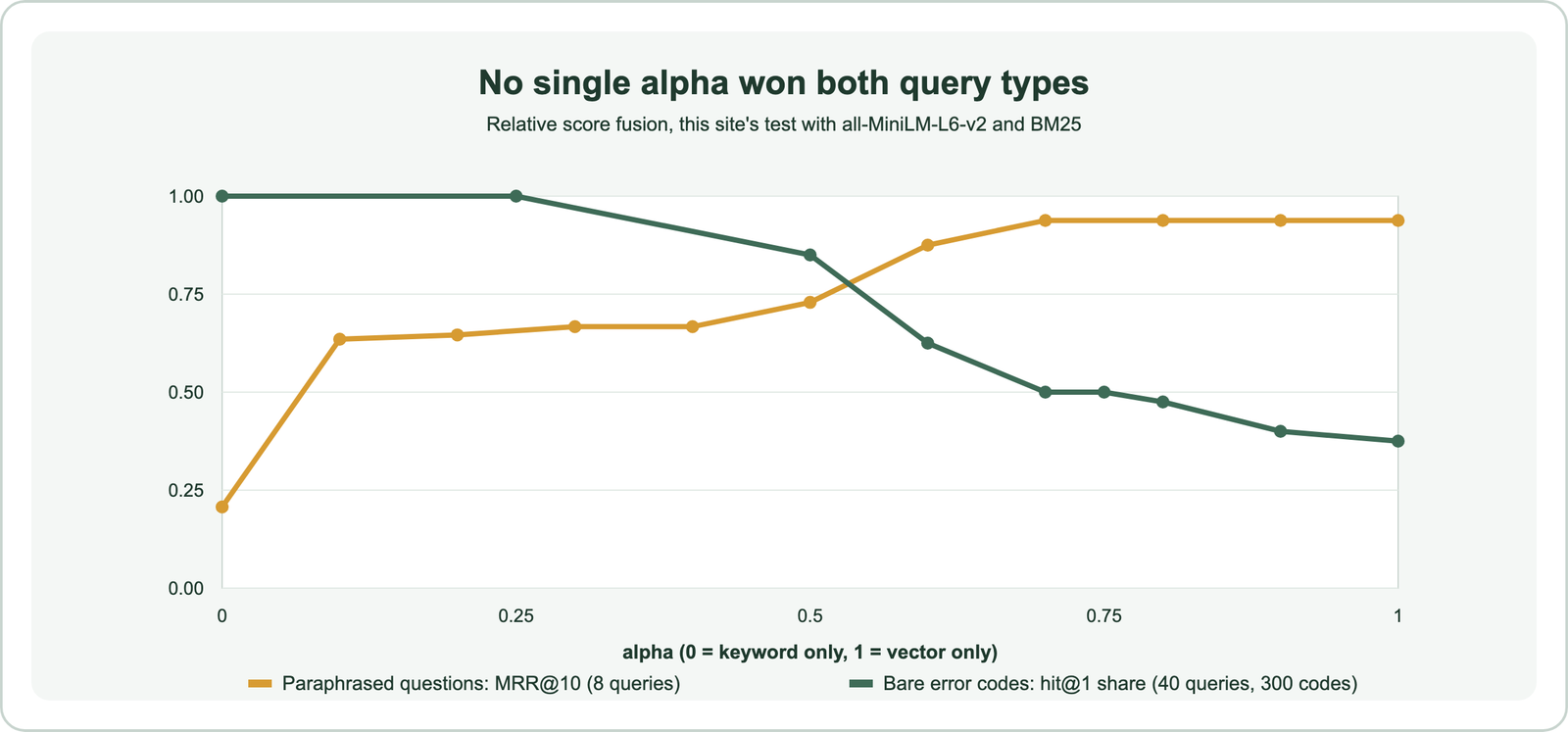
For the eight paraphrased questions, MRR@10 climbed from 0.207 at alpha 0 to 0.729 at alpha 0.5 and 0.938 from alpha 0.7 upward. For the 40 bare codes, hit@1 stayed at 40 of 40 up to alpha 0.25, then fell to 34 at 0.5, 20 at 0.75, and 15 at pure vector search. The curves cross between 0.5 and 0.6.
That conflict suggests three practical options. You can pick one alpha that fits your real query mix, measured on your own queries. You can route queries, sending ones that look like codes, versions, or quoted strings to a low alpha. Or you can use rank-based fusion, which in our catalog test placed the code first 34 times out of 40. In the support-corpus test, though, it cost the same three paraphrase wins as alpha 0.5. Balancing keyword and vector scores covers tuning in depth.
What do public benchmarks show about hybrid versus vector search?
Public benchmarks show hybrid search beating vector search alone on most datasets, though not all. The clearest published comparison comes from the OpenSearch project’s BEIR experiments.
OpenSearch tested the TAS-B dense retrieval model alone and combined with BM25 on ten datasets, nine from BEIR plus Amazon’s ESCI shopping queries. Scores are nDCG@10. Used alone, TAS-B averaged 3.52 percent lower than plain BM25. Combined with BM25, using L2 normalization and a harmonic mean, it averaged 6.7 percent above BM25.
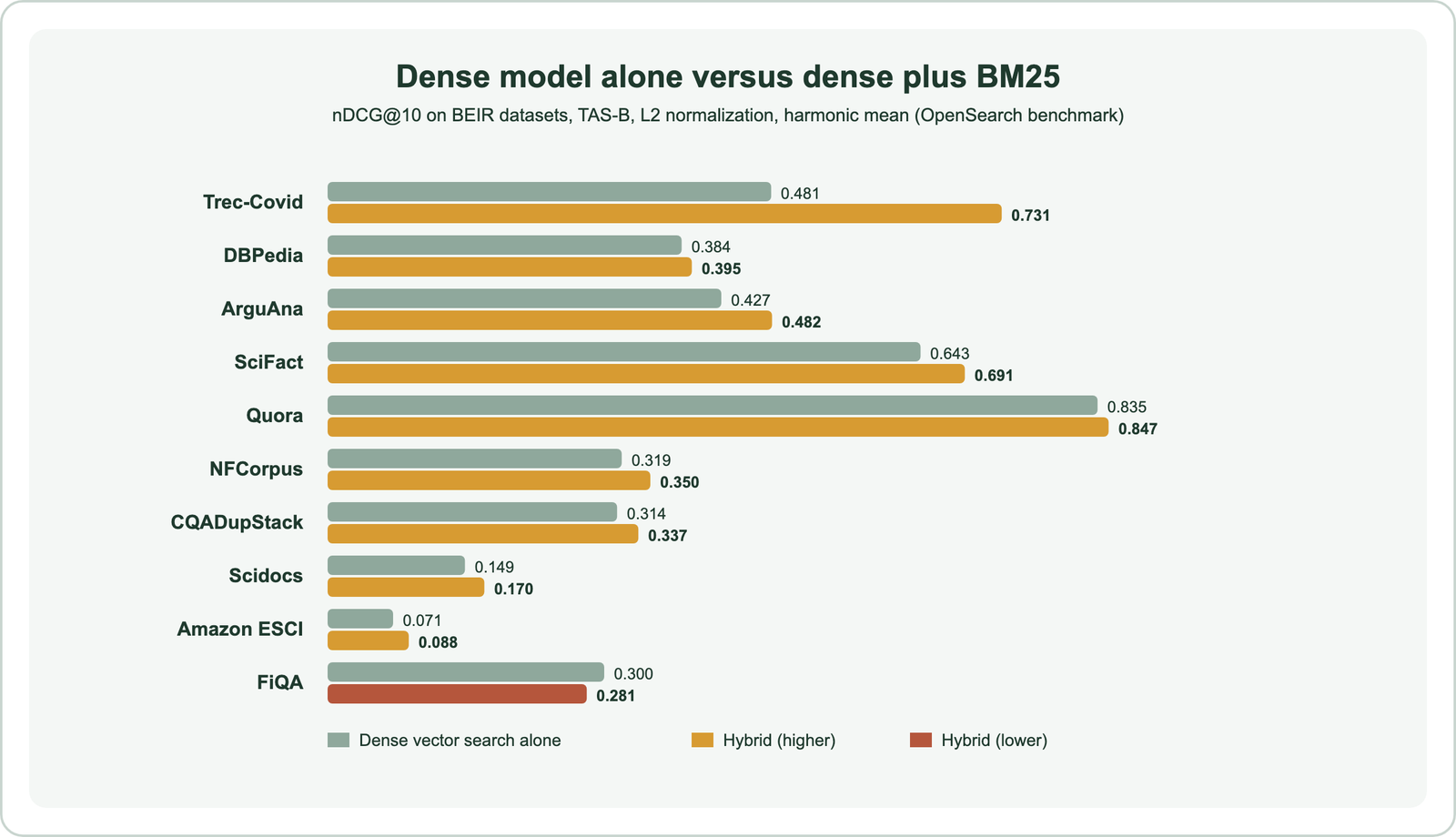
The hybrid beat the dense model alone on nine of ten datasets. The largest gain was Trec-Covid, from 0.481 to 0.731, where exact biomedical terms matter. The one loss was FiQA, a financial question set, where hybrid dropped from 0.300 to 0.281. With a dense model fine-tuned on each dataset, the arithmetic-mean hybrid averaged 14.14 percent above BM25, against minus 0.08 percent for the fine-tuned model alone.
The BEIR paper itself, by Thakur and colleagues in 2021, found BM25 a strong zero-shot baseline that many dense retrievers failed to beat outside their training domain. That is the core argument for hybrid search: the keyword side is a cheap safety net when the embedding model meets unfamiliar vocabulary. Weaviate’s web developer guide makes the converse point. With a model fine-tuned on your data, pure vector search might be good enough.
What is neural hybrid search?
Neural hybrid search is a name, used mainly in OpenSearch, for combining a neural (embedding-based) query with a keyword query and normalizing their scores into one ranking. It is the same idea as hybrid search, named after OpenSearch’s neural query type.
In OpenSearch, a hybrid compound query holds up to five subqueries, typically a match query for BM25 and a neural query for vectors. A search pipeline with the normalization processor, introduced in version 2.10, rescales each subquery’s scores. It then combines them with an arithmetic, geometric, or harmonic mean and optional weights.
The normalization choices mirror Weaviate’s. Weaviate’s relative score fusion and OpenSearch’s default min-max normalization both rescale each side’s scores to the 0 to 1 range from its own returned results. Both systems compute those statistics from the returned candidates, not the whole index, so the number of results each side returns affects the final order.
The answer to how neural hybrid search improves relevance for complex queries is the same as for any hybrid. The neural side handles intent and phrasing, and the keyword side guards exact entities. A query like “how to catch an Alaskan pollock”, Weaviate’s example, needs both: “catch” in the fishing sense and “Alaskan pollock” as a literal name.
Is hybrid search the same as semantic search?
Hybrid search is not the same as semantic search: semantic search is the goal of matching meaning, while hybrid search is one way to build it, by pairing a semantic vector search with keyword search. The terms overlap, which causes confusion.
Semantic search usually refers to search that understands intent rather than literal words. Pure vector search over good embeddings is the most common way to deliver it. Hybrid search is semantic search with a keyword safety net, so a hybrid system is still semantic, just not only semantic. Semantic search versus vector search separates the first pair of terms.
So “hybrid search vs semantic search” is less a contest than a question of whether to add BM25 to a semantic system. The answer depends on whether your users type exact identifiers, names, or jargon that the embedding model handles poorly. If they do, hybrid search is usually the better default.
What does hybrid search cost compared with vector search?
Hybrid search costs more than vector search because every query runs two searches and a fusion step, and the system maintains an inverted index beside the vector index. How much more depends on the database and data size.
Weaviate’s search documentation states the cost plainly. A vector search is one vector search per query, a keyword search is an inverted index lookup, and a hybrid search is both plus fusion. Weaviate Academy lists the one downside of hybrid search as being slower and heavier, because both searches must run. Weaviate does run them in parallel, which hides part of the latency.
The extra storage is usually modest. In Weaviate, text properties already get an inverted index for filtering and BM25, so enabling hybrid search does not add a separate system. In stacks built from two products, such as a search engine beside a separate vector database, hybrid search also means keeping two copies of the data in sync.
For most applications the cost is small next to an embedding call or a language model call. For very high query volumes, measure the latency difference on your own hardware before committing, and keep pure vector search for traffic that never contains identifiers.
How do you test which one your data needs?
You test which one your data needs by running both methods over a labeled sample of your real queries and comparing a ranking metric, broken down by query type. An afternoon of labeling usually settles it.
- Sample real queries: pull 50 to 200 from search logs, not invented ones, and keep their natural mix of codes, names, and questions.
- Label the right answers: mark the passage or document that should come first for each query.
- Tag query types: label each as identifier, natural language, or mixed, so averages do not hide a weak class.
- Run vector, keyword, and hybrid: try alpha values such as 0.25, 0.5, and 0.75, plus both fusion methods.
- Compare hit@1, MRR, and recall@k: per query type, then overall.
Read the per-type results before the totals. In our first test, the overall MRR of vector search and the 0.75 hybrid tied at 0.958. Only the per-query view showed why: the corpus lacked the near-identical codes that make keyword matching decisive. Mean reciprocal rank and recall at k explain the metrics.
If identifier queries are rare and your embedding model is strong on your domain, pure vector search may be enough. If they are common, use hybrid search with a lower alpha, query routing, or rank-based fusion. When to use hybrid search walks through the decision.
Should RAG use hybrid search or vector search?
RAG should usually use hybrid search, because questions sent to a RAG system often contain exact names, codes, or terms that the retrieved passage must match literally. A missed passage cannot be fixed by the language model later.
Weaviate’s advanced RAG guide lists hybrid search first among techniques to raise retrieval recall, alongside query rewriting and fine-tuned embedding models. Its example is medical retrieval, where medication names and diagnoses behave like keywords rather than concepts.
The trade-off is the same as in search. Hybrid search adds tuning, and a poorly weighted blend can push a paraphrase match out of the few chunks sent to the model. Measure recall at the number of chunks you actually pass. Hybrid search for RAG and semantic search in RAG cover the details.
Which databases support hybrid search?
Databases that support hybrid search include Weaviate, OpenSearch, Elasticsearch, MongoDB Atlas, and PostgreSQL with extensions, each combining an inverted index with a vector index. They differ in how much of the fusion they handle for you.
OpenSearch is a vector search engine as well as a keyword engine: its k-NN and neural queries handle vectors, and the hybrid query fuses them with BM25. A SQL database is not a vector database by default. PostgreSQL gains vector search through the pgvector extension, and hybrid search then needs a query that merges full-text and vector results.
Weaviate exposes hybrid search as a single query with alpha and a fusion type. Databases that support hybrid search compares the options, and hybrid search in SQL databases shows the PostgreSQL route.
How do you run vector and hybrid queries in Weaviate?
You run vector and hybrid queries in Weaviate with near_text for pure vector search and hybrid for the fused search, on the same collection. That makes side-by-side testing straightforward.
import weaviate
from weaviate.classes.query import HybridFusion, MetadataQuery

client = weaviate.connect_to_local()
docs = client.collections.use("HelpArticle")
query = "what does ERR-4123 mean"

vector_only = docs.query.near_text(query=query, limit=5,
                                   return_metadata=MetadataQuery(distance=True))

hybrid = docs.query.hybrid(
    query=query,
    alpha=0.25,                              # lean on BM25 for code-like queries
    fusion_type=HybridFusion.RANKED,         # or HybridFusion.RELATIVE_SCORE
    limit=5,
    return_metadata=MetadataQuery(score=True, explain_score=True),
)

for o in hybrid.objects:
    print(o.properties["title"], round(o.metadata.score, 3))
client.close()
Setting explain_score=True returns how much the keyword and vector sides contributed to each result, which helps when a hybrid ranking looks wrong. Run the same labeled queries through both calls and compare, as in the testing steps. How hybrid search works covers the query options in more depth.
Vector search matches meaning, and hybrid search adds an exact-term match on top. Our tests showed both sides of that trade: vector search alone handled paraphrases best but found near-identical codes first only 15 times in 40, while a keyword-heavy blend fixed the codes and hurt the paraphrases. OpenSearch’s BEIR results point the same way at larger scale, with hybrid ahead on nine of ten datasets. Start with hybrid search for mixed traffic, set alpha explicitly, and settle the weighting with a labeled sample of your own queries.