Home / Build it / Semantic Search in Elasticsearch: Dense Vectors and ELSER
TutorialSemantic Search in Elasticsearch: Dense Vectors and ELSER
Semantic search in Elasticsearch ranks documents by meaning using vector or learned sparse representations stored in the same index as its keyword search. There are three routes. A dense_vector field holds embeddings you compute, searched with approximate kNN over an HNSW graph. A semantic_text field lets Elasticsearch create embeddings through an inference endpoint. ELSER, Elastic’s learned sparse model, expands text into weighted terms in an inverted index. Any of them can be combined with classic BM25 keyword search through the reciprocal rank fusion retriever. Filters apply inside the kNN request, so metadata such as category or tenant narrows results. Recent versions quantize float vectors by default and, from 9.4, can use GPUs to speed up vector indexing. Elasticsearch suits teams that already run it for text search and want semantic retrieval in the same cluster.
Semantic search in Elasticsearch in four facts
- Elasticsearch’s dense_vector field supports up to 4,096 dimensions and the l2_norm, dot_product, cosine and max_inner_product similarities.
- Its HNSW options default to m of 16 and ef_construction of 100.
- From version 9.1, float vectors of 384 or more dimensions default to bbq_hnsw quantization, and smaller ones to int8_hnsw.
- Elastic’s documentation lists GPU acceleration for dense vector indexing as generally available from version 9.4.
Does Elasticsearch support semantic search?
Elasticsearch supports semantic search through dense vector fields with approximate kNN, through the semantic_text field type, and through ELSER sparse embeddings. All three sit next to its long-standing BM25 keyword search.
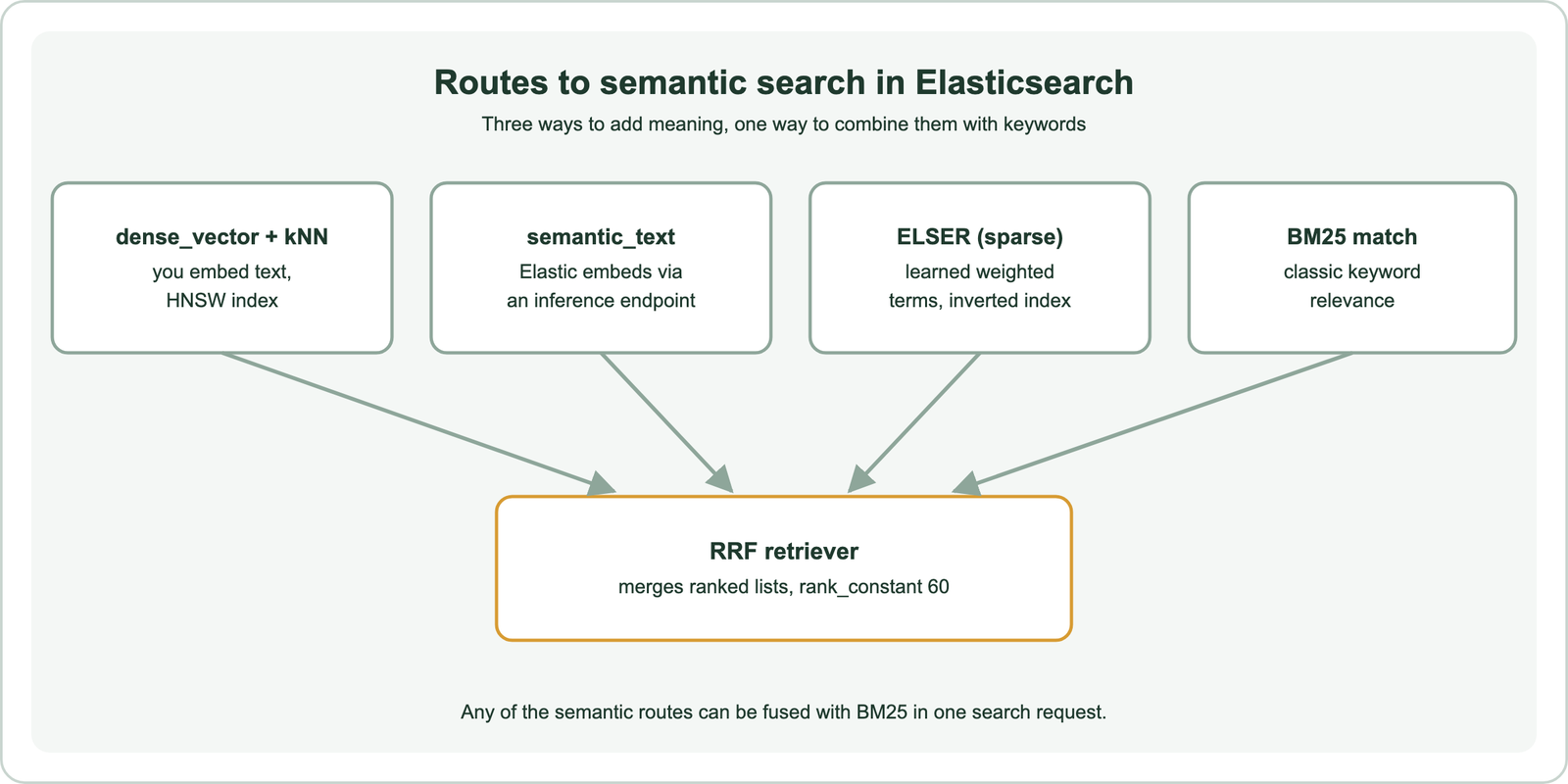
The dense_vector route gives full control: you pick the embedding model, compute vectors in your application, and send them with each document and query. The semantic_text route hands embedding to Elasticsearch, which calls an inference endpoint at index and query time, so the application sends only text. ELSER, the Elastic Learned Sparse EncodeR, produces sparse vectors of weighted terms, closer to keyword search but with learned expansion. The concepts behind dense and sparse retrieval are covered in how to build semantic search.
Whichever route you choose, results can be fused with BM25 in one request. That is a strength of running semantic search inside a search engine: mature text analysis, aggregations and highlighting stay available. The dense route is the most common starting point, beginning with the mapping.
How do you map a dense_vector field in Elasticsearch?
You map a dense_vector field by declaring its type, its number of dimensions to match the embedding model, and the similarity function used to compare vectors. Index options such as HNSW parameters and quantization can be set too.
from elasticsearch import Elasticsearch

es = Elasticsearch("http://localhost:9200")
es.indices.create(
    index="help-articles",
    mappings={
        "properties": {
            "body": {"type": "text"},
            "category": {"type": "keyword"},
            "embedding": {"type": "dense_vector", "dims": 384, "similarity": "cosine"},
        }
    },
)
Elastic’s dense_vector reference lists four similarity functions, l2_norm, dot_product, cosine and max_inner_product, with cosine as the default for float vectors. The dims value cannot exceed 4,096 and must match the model’s output. dot_product is faster than cosine but requires vectors normalized to unit length.
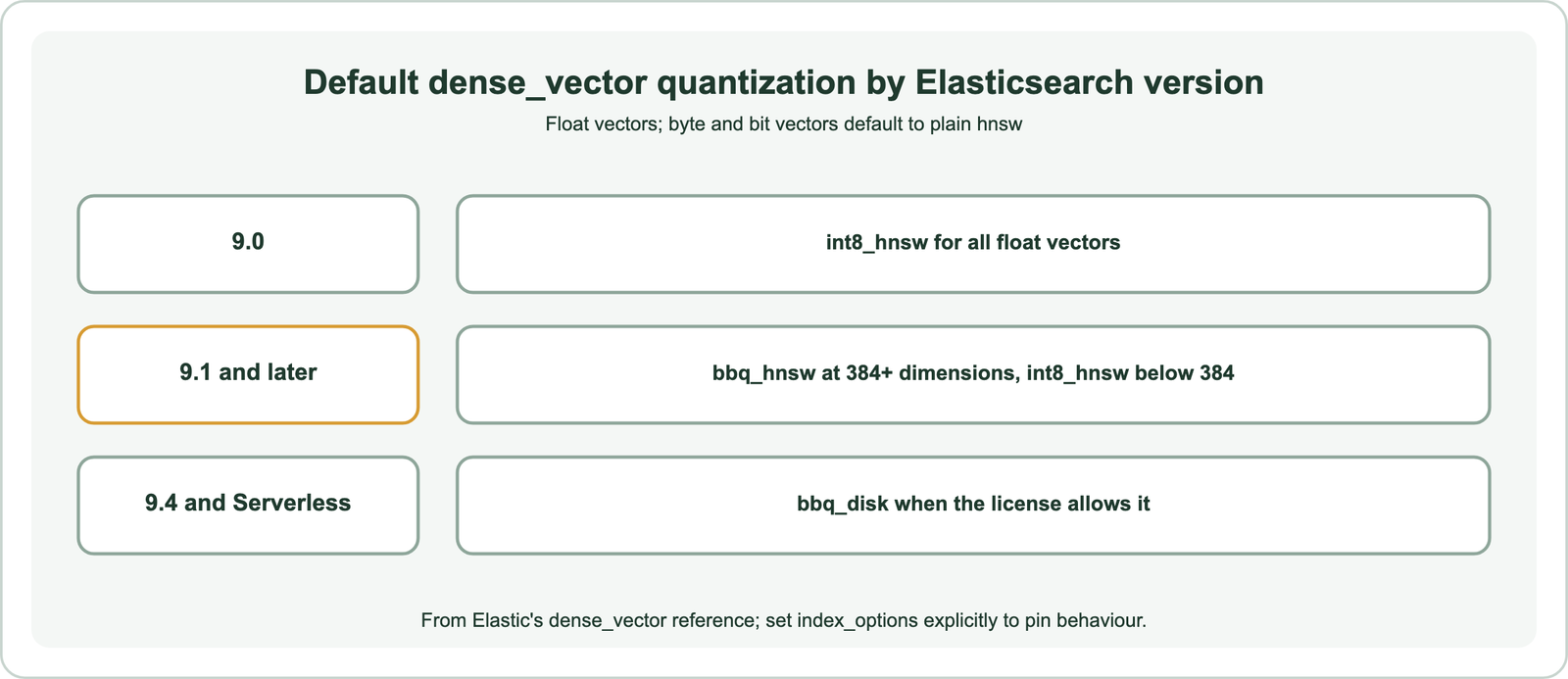
Quantization defaults have changed between versions, which matters for recall and memory. In 9.0, float vectors default to int8_hnsw. From 9.1, vectors of 384 or more dimensions default to bbq_hnsw, Elastic’s better binary quantization, and smaller ones to int8_hnsw. Setting index_options explicitly keeps behaviour stable across upgrades. With a mapping in place, documents need vectors.
How do you index embeddings in Elasticsearch?
You index embeddings in Elasticsearch by computing a vector for each document with your model and sending it in the document body, ideally through the bulk API. With semantic_text, you send only text and Elasticsearch calls the model.
from elasticsearch.helpers import bulk
from sentence_transformers import SentenceTransformer

model = SentenceTransformer("sentence-transformers/all-MiniLM-L6-v2")   # 384 dimensions
docs = [{"id": 1, "category": "billing", "body": "Refunds go to the original payment method."},
        {"id": 2, "category": "account", "body": "Reset your password from account settings."}]
vectors = model.encode([d["body"] for d in docs], normalize_embeddings=True)

bulk(es, ({"_index": "help-articles", "_id": d["id"], "category": d["category"],
           "body": d["body"], "embedding": v.tolist()} for d, v in zip(docs, vectors)))
Bulk indexing in batches is much faster than one request per document. The HNSW graph builds as segments are written, so heavy indexing competes with search for CPU. Elastic’s documentation lists GPU acceleration for dense vector indexing as generally available from version 9.4, after a preview in 9.3, aimed at exactly this cost.
The semantic_text alternative moves embedding into the cluster. You create an inference endpoint, for an Elastic-hosted model or a third-party provider, map a field as semantic_text pointing to it, and index plain text. That simplifies the application at the price of less control over model versions and batching. Semantic search in Python covers the embedding step itself. Once documents are indexed, a kNN query finds the nearest ones.
How do you run an approximate kNN search in Elasticsearch?
You run an approximate kNN search by sending a knn section with the vector field, the query vector, the number of results k, and num_candidates, the number of candidates each shard examines. A larger num_candidates raises recall and cost.
query_vector = model.encode("how do I get my money back", normalize_embeddings=True).tolist()

resp = es.search(
    index="help-articles",
    knn={"field": "embedding", "query_vector": query_vector, "k": 10, "num_candidates": 100},
    source=["body", "category"],
)
for hit in resp["hits"]["hits"]:
    print(round(hit["_score"], 3), hit["_source"]["body"])
Approximate kNN uses the HNSW graph. Elastic’s reference gives defaults of m, the maximum connections per node, at 16, and ef_construction, the candidate list size during graph building, at 100. At query time, num_candidates plays the role of ef: each shard collects that many candidates, then the best k across shards are returned. Raising it from 100 to several hundred trades latency for recall. Elastic’s examples commonly use k of 10 with num_candidates of 100.
Exact kNN is also possible, by scoring with a script_score query over all matching documents. It gives perfect recall and is practical for small indexes or heavily filtered subsets. The balance between the two is covered in choosing a vector database for semantic search. Real queries usually also need filters.
How do metadata filters work with Elasticsearch kNN search?
Metadata filters work with Elasticsearch kNN search through a filter clause inside the knn section, which restricts the approximate search to documents matching the filter. The result still returns up to k matching documents.
resp = es.search(
    index="help-articles",
    knn={
        "field": "embedding", "query_vector": query_vector, "k": 10, "num_candidates": 100,
        "filter": {"term": {"category": "billing"}},
    },
)
A filter inside knn is applied during the vector search, not to its output, so restrictive filters do not leave the result short. A query clause outside knn behaves differently: it scores separately and is combined with the kNN results, which acts more like post-filtering and can drop matches. For accuracy, put structured conditions such as tenant, language, date or category inside the knn filter.
Filters improve retrieval accuracy as much as ranking does. Restricting a RAG query to the right product version or document type removes plausible but wrong passages before any ranking. Weaviate takes a similar pre-filtering approach, building an allow-list before its HNSW search, as described in semantic search with Weaviate. The other route to meaning in Elasticsearch is sparse.
What is ELSER in Elasticsearch semantic search?
ELSER is Elastic’s learned sparse encoder, a model that turns text into a sparse vector of weighted terms, including related terms that do not appear in the text, stored and searched with an inverted index. It brings some semantic matching to keyword-style infrastructure.
Where a dense model outputs a few hundred numbers that mean nothing individually, ELSER outputs a list of vocabulary terms with weights. A document about refunds might gain weight on “return” and “reimbursement” even if those words never appear. Searching matches query terms against those weighted terms. Because the representation is terms, results are easier to inspect than dense vector scores.
Elastic presents ELSER as working without fine-tuning on your data, which makes it a quick start for English text. It is an Elastic-specific model, so the representation does not transfer to other systems the way open dense embeddings do. Teams often compare ELSER and dense kNN on their own queries, or fuse both with BM25. The fusion step is the retriever.
How do you build hybrid search in Elasticsearch?
You build hybrid search in Elasticsearch with the RRF retriever, which runs a BM25 query and a kNN search as sub-retrievers and merges their rankings with reciprocal rank fusion. One request returns the fused list.
resp = es.search(
    index="help-articles",
    retriever={
        "rrf": {
            "retrievers": [
                {"standard": {"query": {"match": {"body": "refund to my card"}}}},
                {"knn": {"field": "embedding", "query_vector": query_vector,
                         "k": 10, "num_candidates": 100}},
            ],
            "rank_constant": 60,
        }
    },
)
Each document scores 1 divided by rank_constant plus its rank in each list, and the sums decide the order. A rank_constant of 60 follows the original reciprocal rank fusion paper, explained in reciprocal rank fusion. Because RRF uses ranks, BM25’s unbounded scores and kNN similarities never need to be put on one scale. Linear combinations of normalized scores are the alternative, covered in how hybrid search works.
Weaviate offers the same idea through its hybrid query with an alpha weight and relative score fusion by default. Elasticsearch’s retriever design also allows a reranking stage after fusion, using an inference endpoint. Scale and hardware come next.
Does Elasticsearch support GPU acceleration for vector search?
Elasticsearch supports GPU acceleration for dense vector indexing, listed in Elastic’s documentation as a preview in 9.3 and generally available from 9.4. The documentation describes it as speeding up the indexing of dense vectors.
Building HNSW graphs is the expensive part of vector indexing, and it competes with search for CPU on the same nodes. Offloading graph construction to GPUs shortens bulk loads and reindexing, which matters most for large or frequently refreshed collections. The documentation places the feature on indexing, so query-time search still runs on the regular search path.
Quantization is the other scaling lever. bbq_hnsw stores compact binary codes in the graph and rescoring recovers precision, cutting memory sharply compared with float vectors. bbq_disk, available under an Enterprise subscription per Elastic’s reference, keeps more on disk. GPU acceleration for vector search covers GPUs across systems. The remaining question is how Elasticsearch compares with its fork and with dedicated databases.
How does Elasticsearch compare with OpenSearch and dedicated vector databases?
Elasticsearch and OpenSearch share a common origin but have diverged, while dedicated vector databases such as Weaviate are built around vector search rather than adding it to a text engine. The right choice depends on what the cluster already does.
OpenSearch began in 2021 as a fork of Elasticsearch 7.10.2 under the Apache 2.0 license, after Elastic changed its licensing. Since then the two have developed separate vector features, APIs and plugins, so code and mappings are not interchangeable for vector search. Semantic search with OpenSearch covers its k-NN plugin and neural search. Elasticsearch is far from outdated; vector search, quantization and retrievers have been active areas in recent releases.
Dedicated vector databases compare differently. Weaviate offers built-in model integrations, BM25 hybrid search, reranker modules, native multi-tenancy and quantization, with vector search as its core job. Elasticsearch offers deeper text analysis, aggregations and log-scale operations. Teams already running Elasticsearch for text often add vectors there first; teams starting fresh with AI retrieval often start with a vector database. The other Python tutorials cover Weaviate, Qdrant, Milvus, Pinecone, Chroma, Redis and Postgres with pgvector.
Frameworks such as LangChain and LlamaIndex include Elasticsearch stores, and the setup for files is in semantic search over documents and PDFs. Index design applies to every engine, as search index schema design explains, and switching later is covered in migrating to a new vector database.
Semantic search in Elasticsearch adds meaning-based ranking to a mature text engine. Map a dense_vector field with the model’s dimensions and a similarity, index vectors in bulk, and query with kNN using k and num_candidates; or let semantic_text or ELSER handle the model. Put metadata conditions in the knn filter so restrictive filters still return full results, and fuse BM25 with vectors through the RRF retriever. Pin index_options, since quantization defaults changed in 9.1, and consider GPU indexing from 9.4 for large loads. Choose Elasticsearch when the cluster already serves your text search, and a dedicated vector database such as Weaviate when vector retrieval is the core workload.