Home / Embeddings / Multimodal Embeddings for Image, Video and Audio Search
ExplainerMultimodal Embeddings for Image, Video and Audio Search
Multimodal embeddings are vectors from models that map text, images, audio and video into one shared vector space. Content with the same meaning lands close together whatever its form. That makes cross-modal search possible: a text query can retrieve a photo, a sound clip can retrieve a video, and an image can retrieve product descriptions. Models such as CLIP learned this by training separate encoders on matching pairs, pulling each pair together and pushing mismatches apart. Newer models extend it to audio, video and documents. In Weaviate, multimodal models plug in as vectorizers, including CLIP, ImageBind and Google’s Gemini Embedding 2, with media stored as properties and searched with near-image, near-media or text queries. The same vectors power multimodal RAG, where a multimodal language model reads retrieved images or audio directly.
Multimodal embeddings in four facts
- Multimodal embedding models place text, images and other media in one vector space, so similarity works across media types.
- OpenAI’s CLIP, published in 2021, trained image and text encoders contrastively on about 400 million image-text pairs.
- Weaviate’s multi2vec-bind module uses Meta’s ImageBind to embed text, images, audio, video, depth, thermal and inertial sensor data.
- Weaviate’s documentation states that Google’s gemini-embedding-2 embeds text, images, PDFs and audio, with audio supported through the Gemini API.
What are multimodal embeddings?
Multimodal embeddings are numerical vectors that represent content from different modalities, such as text, images, audio or video, in the same space, so their similarity can be compared directly. A sentence and a photo that describe the same scene end up near each other.
An ordinary text embedding only compares text with text. A multimodal model has an encoder for each modality it supports, trained so that their outputs line up. The vector for the words “a lion roaring”, a photo of a roaring lion and a recording of the roar all land in the same neighbourhood, while a picture of a car lands elsewhere. Weaviate’s blog on ImageBind uses this very example.
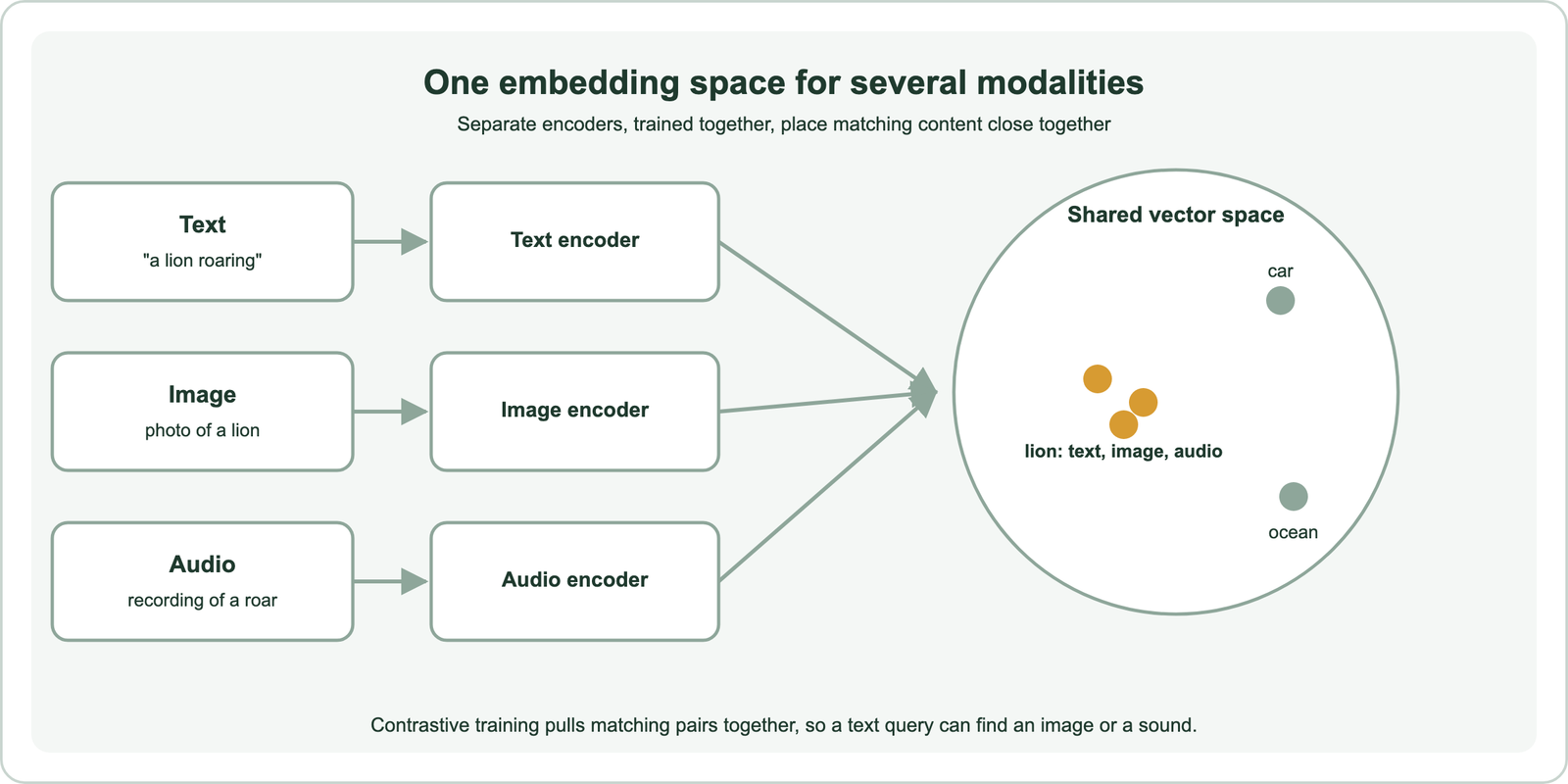
That shared space is what makes the vectors useful for search. Any modality can be the query and any can be the result. What are embeddings covers embeddings in general. The multimodal case starts with how such models learn.
How do multimodal embedding models work?
Multimodal embedding models work by training an encoder for each modality on matching pairs, such as images and their captions. A contrastive loss pulls each true pair together in the vector space and pushes mismatched pairs apart. After training, the encoders share one space.
Radford and colleagues’ CLIP paper from OpenAI, published in 2021, is the reference example. It trained an image encoder and a text encoder on about 400 million image-text pairs collected from the web. In each training batch, every image’s own caption is the positive and the other captions are negatives, the same in-batch approach used for text retrievers. The result could match images to text descriptions it had never seen paired before.
Later models extend the recipe. Meta’s ImageBind, published in 2023, binds several modalities through images: it pairs images with audio, depth, thermal and motion data, so all of them align with each other through the shared image space. Weaviate’s blog explains that this contrastive loss is what places the sound, picture and text of a lion close together. Newer commercial models are trained on text, images, documents, audio and video together. The practical question is what these models are used for.
What can you search with multimodal embeddings?
With multimodal embeddings you can search images by text, text by images, images by images, audio by text or audio, and video by any of these, all with one index. The query and the results do not need to share a modality.
- Text to image: “red running shoes on a white background” finds product photos with no matching text.
- Image to image: a photo of a chair finds visually similar chairs in a catalogue.
- Image to text: a screenshot of an error finds help articles describing it.
- Text or audio to audio: a description of a sound, or a hummed tune, finds matching recordings.
- Any to video: a text description or still image finds the video segment that shows it.
Each of these depends on the model supporting the modalities involved. CLIP covers text and images only; ImageBind and the newer Gemini, Cohere, Voyage AI and Twelve Labs models cover more. Image, video and audio search covers the applications, and semantic product search for ecommerce covers shopping with images. Audio is the modality people search for most often in this area.
How do audio embeddings work?
Audio embeddings turn a sound clip into a vector, either on its own or aligned with text, so that clips with similar content or meaning are close together. Long recordings are split into short segments first.
There are two broad kinds of audio model. Speech representation models learn from spoken audio and capture what is said and how; their vectors suit speaker and speech tasks. Audio-text models, trained contrastively like CLIP, align sounds with descriptions, so a text query such as “applause in a large hall” finds matching recordings. Multimodal models such as ImageBind and Google’s Gemini Embedding 2 add audio to a shared space with text and images. Weaviate’s documentation states that gemini-embedding-2 supports audio through the Gemini API.
Weaviate’s guide to multimodal RAG shows the pattern for long recordings: split audio into short overlapping chunks, embed each natively, and query with text or audio to find matching segments, with no transcript needed. Storing each chunk’s start and end time lets results jump to the exact moment. Transcribing and embedding the text remains an option when the spoken words are what matter. Video follows a similar path.
How do video embedding models work?
Video embedding models represent a video, or each short segment of it, as a vector that captures what is seen and sometimes heard. They either embed sampled frames or encode the clip as a whole. Segmenting is what makes long videos searchable.
The simplest approach samples frames every few seconds and embeds each with an image model such as CLIP, storing the timestamp with each vector. Dedicated video models encode short clips with motion and audio together. Weaviate’s Google integration exposes a video interval setting for Gemini models, and its client lists a Twelve Labs integration, a provider focused on video understanding. ImageBind also accepts video through Weaviate’s multi2vec-bind module.
Whatever the model, design the segments to match how people search. Short segments find precise moments; longer ones capture scenes. Store the source video, start time and end time on every segment so results link straight to the right point. Choosing a model for all of this depends on modality coverage and hosting.
Which multimodal embedding models can you use?
Multimodal embedding models you can use include CLIP and ImageBind as open models, and hosted models from Google, Cohere, Voyage AI, NVIDIA, Jina AI, AWS and Twelve Labs, all available as Weaviate vectorizers. They differ in modalities, hosting and dimensions.
| Weaviate module | Model source | Modalities noted in Weaviate’s docs |
|---|---|---|
| multi2vec-clip | CLIP, self-hosted container | Text, images |
| multi2vec-bind | ImageBind, self-hosted container | Text, images, audio, video, depth, thermal, IMU |
| multi2vec-google | Google Gemini and Vertex AI | Text, images, PDFs and audio with gemini-embedding-2; video fields |
| multi2vec-cohere | Cohere Embed | Text, images (v4 added in Weaviate 1.31) |
| multi2vec-voyageai | Voyage AI multimodal | Text, images (no interleaved input) |
| multi2vec-nvidia, -jinaai, -aws, -twelvelabs | Hosted providers | Varies by model; Twelve Labs focuses on video |
The table shows the trade. Self-hosted CLIP and ImageBind run in containers on your hardware, with no per-call fee and data kept in-house. Hosted models cover more modalities and receive updates, at the cost of sending media to the provider. Weaviate’s documentation notes the Voyage AI integration does not support Voyage’s interleaved input mode; for that, import your own vectors. Benchmarks for multimodal retrieval change quickly, so test candidates on your own media, as described in choosing an embedding model.
How do you store and search multimodal embeddings in Weaviate?
You store and search multimodal embeddings in Weaviate by declaring which properties hold each modality in a multimodal vectorizer, importing the media as blob properties, and querying with text, near-image or near-media searches. Weaviate creates the vectors at import and query time.
from weaviate.classes.config import Configure, Property, DataType
from weaviate.classes.query import NearMediaType

client.collections.create(
    "MediaItem",
    properties=[
        Property(name="caption", data_type=DataType.TEXT),
        Property(name="image", data_type=DataType.BLOB),
        Property(name="audio_clip", data_type=DataType.BLOB),
    ],
    vector_config=Configure.Vectors.multi2vec_google_gemini(
        name="media", model="gemini-embedding-2",
        text_fields=["caption"], image_fields=["image"], audio_fields=["audio_clip"],
    ),
)
items = client.collections.use("MediaItem")
by_text = items.query.near_text(query="waves breaking on rocks", limit=5)
by_audio = items.query.near_media(media="clip.mp3", media_type=NearMediaType.AUDIO, limit=5)
The configuration follows Weaviate’s multimodal guide, which uses the same module and model; the multi2vec_google_gemini helper needs a recent release of the Python client. Blob properties hold base64-encoded media. A collection can also hold several named vectors, for example a text-only vector for captions alongside a multimodal one, and queries choose with target_vector. Self-provided vectors work too, for models without an integration. A database to hold CLIP embeddings is any vector database; Weaviate adds the vectorizer so you do not compute them yourself.
What is multimodal RAG?
Multimodal RAG is retrieval-augmented generation in which the retrieved context includes images, audio or video, and a multimodal language model reads that media directly to answer. It extends RAG beyond text documents.
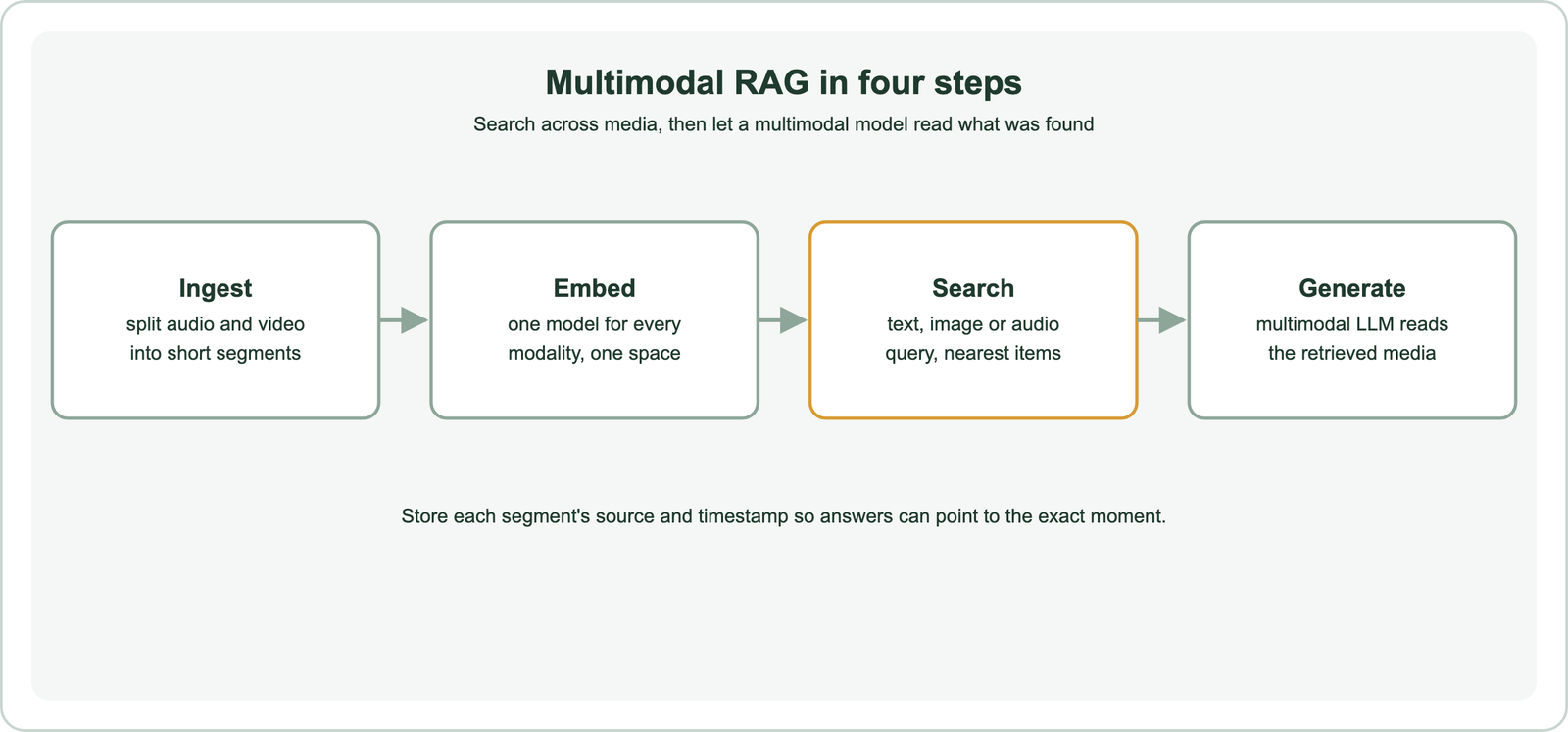
In text-only RAG, images and recordings must first become text through captions or transcripts, losing whatever the conversion misses. Multimodal RAG searches the media itself and passes it to a model that can see or hear. Weaviate’s guide describes retrieving audio segments with text queries and passing the audio to a multimodal model, which then answers from what it hears, including tone and pauses that a transcript would drop.
The same design applies to slides, scanned documents and diagrams, where layout carries meaning. Retrieval quality still decides the answer, so the usual levers apply: segment sizes, metadata, hybrid search on captions, and evaluation on real questions. Semantic search in RAG covers the retrieval side.
How do you choose a multimodal embedding approach?
You choose a multimodal embedding approach by listing the modalities you must search, deciding whether media can leave your infrastructure, and testing candidate models on your own queries and content. Modality coverage narrows the list fastest.
For text and images only, CLIP-style models are well understood and can run locally. For audio and video, choose a model that handles them natively or plan segmenting and transcription. Dimensions affect storage, as covered in embedding dimensions, and some multimodal models support truncation, covered in Matryoshka embeddings. Compression helps at scale, as in embedding quantization.
Plan for change. Switching models means re-embedding all media, which is slow for large video libraries; re-embedding when the model changes covers the process and batch embedding covers throughput. Domain-specific imagery, such as medical scans, may need specialised models, discussed in domain-specific embeddings and fine-tuning embedding models. Text leaderboards such as the MTEB leaderboard say little about images or audio. Related text concepts are in asymmetric vs symmetric semantic search, tokenization vs embedding and word vs sentence embeddings.
Multimodal embeddings put text, images, audio and video into one vector space, so search and RAG can cross media types. A sentence can find a photo, a sound can find a clip, and a language model can answer from retrieved images or audio. Models such as CLIP and ImageBind learned this with contrastive training on matching pairs, and hosted models from Google, Cohere, Voyage AI and others extend it to documents, audio and video. In Weaviate, declare media fields in a multimodal vectorizer and query with text or near-media searches. Choose by modality coverage and data handling, segment long media with timestamps, and test models on your own content.