Home / Use cases / Semantic Code Search: Finding Code by What It Does
ExplainerSemantic Code Search: Finding Code by What It Does
Semantic code search finds functions, classes and snippets by what the code does, not only by the words in their names. A developer can type “retry a request with backoff” and get the right function even when its name shares none of those words. It works by turning each piece of code into an embedding with a model trained on code and natural language, and comparing that vector with the embedding of the query. Keyword search still matters, because developers often search for exact names, error strings and file paths. A practical system therefore parses the codebase into functions and adds context such as the file path and docstring. It indexes a code embedding and keyword fields, then runs hybrid search with filters on language or repository. Weaviate supports code embedding models such as voyage-code-2 and jina-embeddings-v2-base-code through its model integrations.
Semantic code search in four facts
- Code embeddings place a function and a plain-language description of the same behaviour close together.
- Weaviate integrates code embedding models, including voyage-code-2 and jina-embeddings-v2-base-code.
- Weaviate’s tokenization guide recommends lowercase tokenization for code and identifiers that contain symbols.
- No built-in keyword tokenizer splits camelCase names, so a derived field of split words helps.
What is semantic code search?
Semantic code search is the retrieval of source code by meaning, using embeddings that represent what a piece of code does rather than only the words it contains. The query can be a natural-language description, a question, or another piece of code.
Three kinds of query are common. A developer may describe a behaviour, such as “parse a date in ISO format”, and want the function that does it. A developer may paste a snippet and ask for similar code, for example to find duplicated logic before refactoring. Or a developer may search for an exact symbol, an error message or a configuration key, where only an exact match will do.
The first two are semantic. They depend on a model that understands that “fetch”, “load” and “retrieve” describe similar actions, and that a loop with a sleep and a counter is a retry pattern. The third is lexical, and keyword search handles it best. Most real code search tools need all three, which is why code search is a natural fit for hybrid search.
Code search is one entry in the wider list of semantic search use cases. It differs from document search because code has strict syntax, invented names and a structure that a parser can read exactly.
Why does keyword search struggle with code?
Keyword search struggles with code because the words a developer types to describe a behaviour rarely match the identifiers the author chose. Names are short, abbreviated and written in styles such as camelCase or snake_case.
Consider a function called fetch_with_retry. A search for “retry a request with backoff” shares the word “retry” with it, but “request” and “backoff” may appear nowhere in the function. Another team may call the same logic resilientGet, which shares no words with the query at all. This is the code version of the vocabulary mismatch problem, made worse because programmers invent names freely.
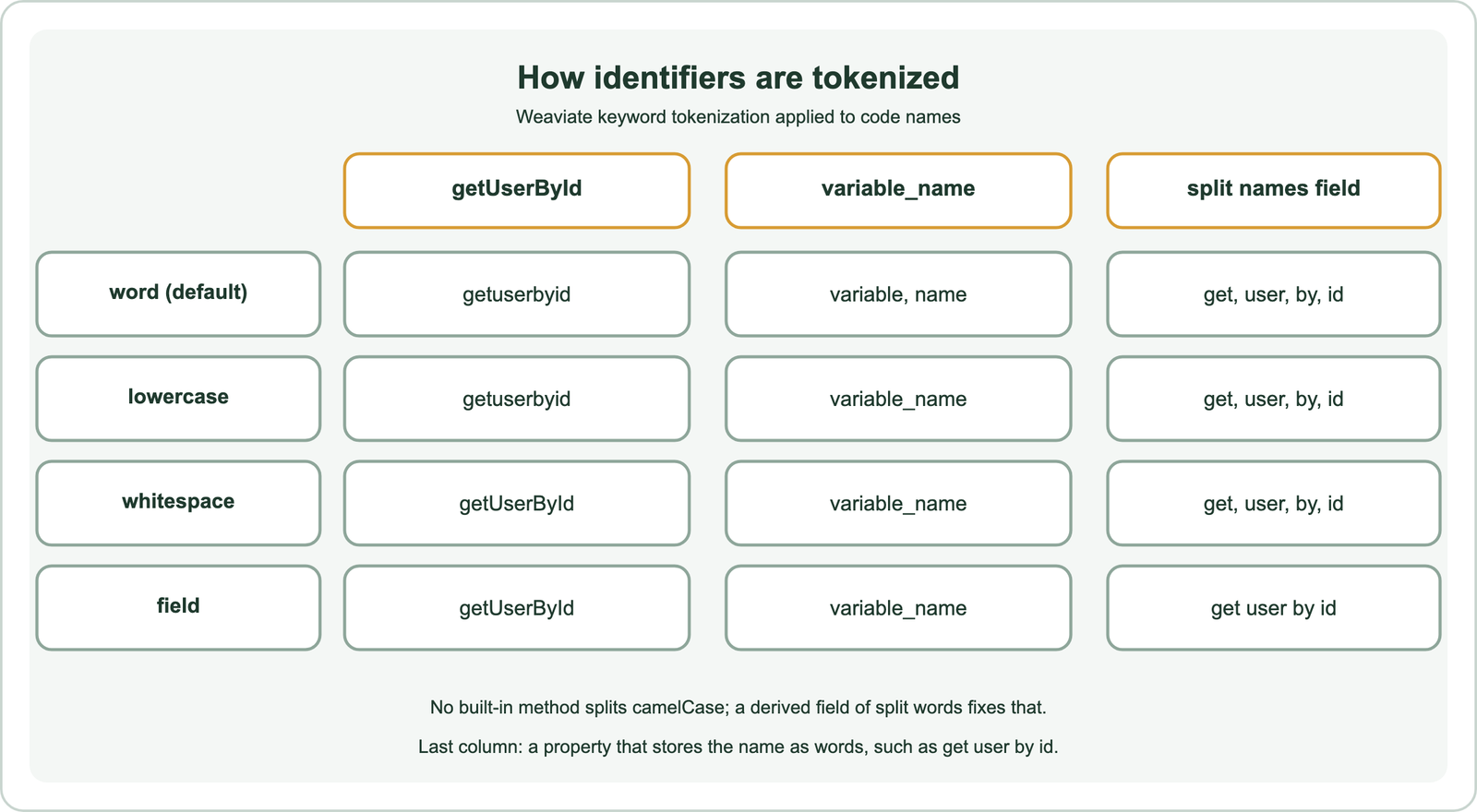
Tokenization adds a second problem. Weaviate’s default word tokenization splits on non-alphanumeric characters and lowercases, so variable_name becomes the tokens “variable” and “name”. A camelCase name has no separators, so getUserById stays one token, “getuserbyid”. A query for “user by id” therefore misses it in a plain keyword index, even though a person reads the name as those exact words.
Comments and docstrings help when they exist, but many functions have none. Embeddings close the gap by learning, from large amounts of code paired with descriptions, which behaviours and names belong together.
How do code embedding models work?
Code embedding models are neural encoders trained so that a piece of code and a natural-language description of the same behaviour produce nearby vectors. They learn from large collections of functions paired with their docstrings, commit messages or questions.
The training signal is the pairing. A function and its docstring form a positive pair, and other functions in the batch serve as negatives. This is the same contrastive recipe used by bi-encoders for text, applied to a mix of programming languages and English. The CodeSearchNet corpus, released by Husain and colleagues in 2019, collected such pairs for six languages: Go, Java, JavaScript, PHP, Python and Ruby. CodeBERT, published by Feng and colleagues in 2020, was pre-trained on natural language and code pairs from that corpus.
General text embedding models can embed code too, because code contains English words. Models trained specifically on code tend to handle syntax, library names and the link between a description and an implementation better. Picking one follows the same reasoning as any domain-specific embedding choice: test candidates on your own queries.
Weaviate lists several code models among its integrations. The Voyage AI vectorizer supports voyage-code-2, added in Weaviate 1.24.2. The Jina AI vectorizer supports jina-embeddings-v2-base-code. Weaviate also integrates Morph, which serves code and text embedding models, though Morph’s own documentation labels its embedding API as legacy.
How should a codebase be split for search?
A codebase should be split along its syntax, usually one record per function or method, with class and file context added to each record. Fixed-size text chunks cut functions in half and mix unrelated code.
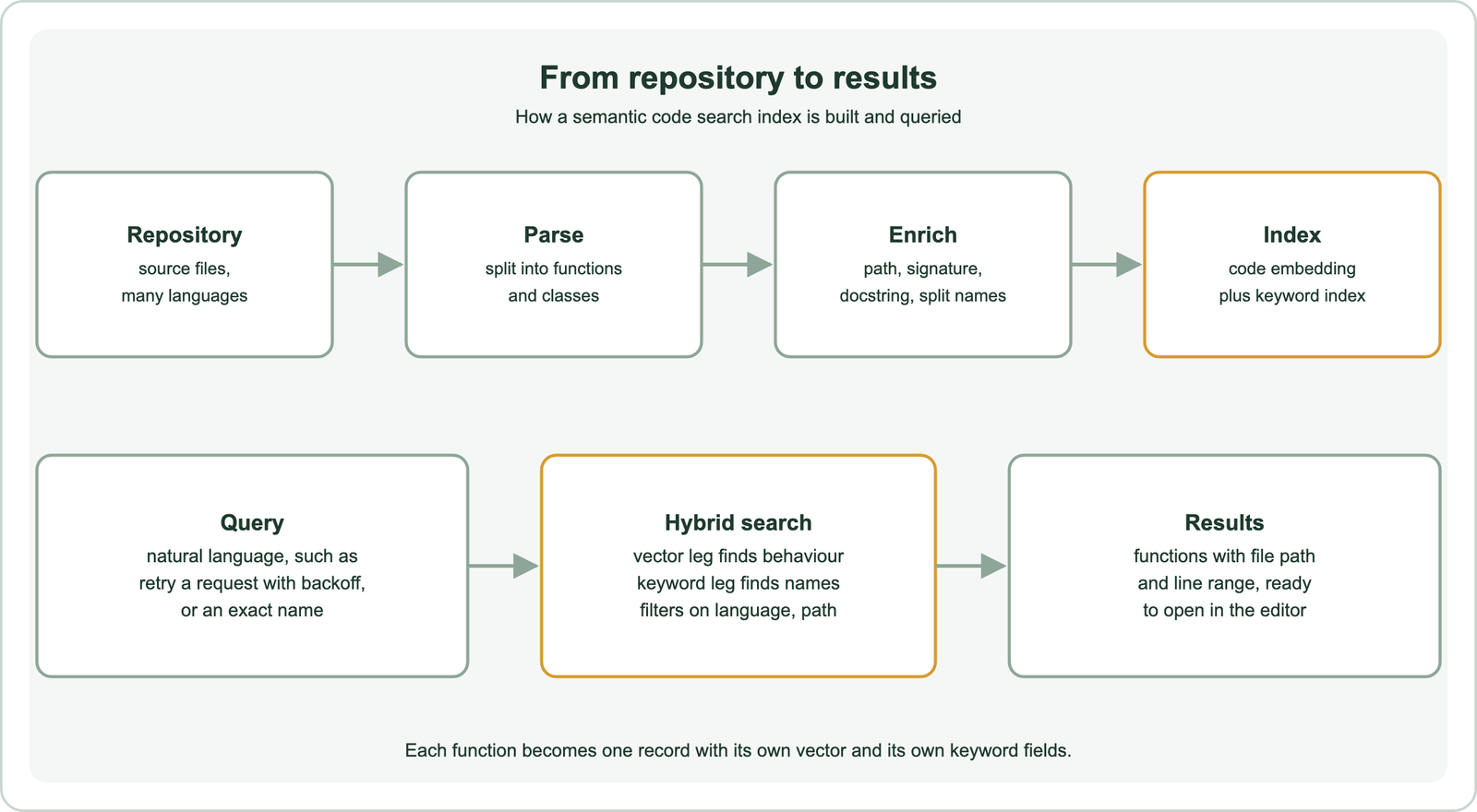
A parser makes this reliable. Tools such as tree-sitter produce a syntax tree for many languages, so an indexer can walk the tree and extract each function with its exact start and end lines. Very long functions can be split further at logical blocks, and very short ones can be grouped with their class. General advice on sizes is covered in chunking for semantic search.
Context then goes into each record. Useful fields include the repository, file path, language, class name, function signature, docstring and the code itself. Prepending the path and signature to the text that gets embedded helps the model, because a function called parse in a file named dates.py means something different from one in config.py.
Store the line range and commit with every record. Developers expect a result to open the editor at the right line, and the index must be refreshed as the code changes. Re-embedding only the functions that changed in each commit keeps the cost proportional to the change, not the repository.
Why does code search need hybrid search?
Code search needs hybrid search because developers mix two query types, descriptions of behaviour and exact identifiers, and each type is served best by a different retrieval method. Combining both in one query covers either case.
The vector leg handles descriptions. It finds resilientGet for a query about retrying requests, which no keyword method can do. The keyword leg handles names and strings. A developer searching for an exact error message or a function name wants that exact match first, and an embedding may rank a similar but different function higher. Weaviate’s hybrid search runs both legs and fuses their scores, as described in how hybrid search works.
Tokenization should suit identifiers. Weaviate’s tokenization decision guide recommends lowercase for code and technical IDs containing underscores or hyphens, because it keeps those symbols while ignoring case. For paths and exact symbols used as filters, field tokenization treats the whole value as one token. A separate property holding identifiers split into words, so that getUserById is also stored as “get user by id”, lets the keyword leg match natural queries too.
Filters narrow the search. Language, repository, directory and visibility are common filters, applied before ranking so that results stay in scope. Access control matters for private repositories, and the patterns in permission-aware search apply directly.
How do you build semantic code search in Weaviate?
You build semantic code search in Weaviate by creating a collection with a code embedding vectorizer, storing each function with its symbol, split name, path and language, and querying with hybrid search and filters. The collection definition sets the tokenization for each field.
import re
from weaviate.classes.config import Configure, Property, DataType, Tokenization
from weaviate.classes.query import Filter

def split_ident(name):                      # getUserById -> "get user by id"
    name = re.sub(r"([a-z0-9])([A-Z])", r"\1 \2", name)
    return name.replace("_", " ").lower()

code = client.collections.create(
    "CodeChunk",
    vector_config=Configure.Vectors.text2vec_voyageai(model="voyage-code-2"),
    properties=[
        Property(name="code", data_type=DataType.TEXT, tokenization=Tokenization.LOWERCASE),
        Property(name="symbol", data_type=DataType.TEXT, tokenization=Tokenization.LOWERCASE),
        Property(name="symbol_words", data_type=DataType.TEXT),
        Property(name="path", data_type=DataType.TEXT, tokenization=Tokenization.FIELD),
        Property(name="language", data_type=DataType.TEXT, tokenization=Tokenization.FIELD),
    ],
)

res = code.query.hybrid(
    query="get a user by id",
    alpha=0.5,
    query_properties=["symbol^2", "symbol_words", "code"],
    filters=Filter.by_property("language").equal("python"),
    limit=5,
)
for o in res.objects:
    print(o.properties["path"], o.properties["symbol"])
The symbol field matches exact names, boosted twice in the keyword leg. The symbol_words field uses default word tokenization on split names, so “user by id” matches getUserById. The vector from the code model matches behaviour. The pattern was run on Embedded Weaviate 1.30.5 with self-provided vectors as an API check only.
The alpha value sets the balance between the legs. Teams whose users mostly type names may lower it, and teams whose users mostly describe behaviour may raise it. Tuning that balance is covered in balancing keyword and vector scores. A general walkthrough of the client sits in semantic search with Weaviate.
How does code search compare with other search use cases?
Code search is closest to use cases where exact identifiers and loose descriptions appear side by side, such as B2B part search and legal citation search. Each shares a lesson with code.
Exact identifiers matter in B2B semantic search, where buyers type part numbers, and in patent and legal search, where citations must match exactly. Academic and research paper search shares the need to match technical vocabulary across fields that name the same idea differently.
Internal knowledge is the other link. Developer questions often span code, design documents and tickets, which brings in enterprise and internal document search and customer support and help center search. Code assistants that answer questions retrieve functions as context, which is semantic search in RAG applied to a repository.
Some use cases share less. Semantic product search for ecommerce and semantic site search rarely need syntax-aware chunking. Semantic recommendations and image, video and audio search work with looser matches than developers accept.
How should code search quality be evaluated?
Code search quality should be evaluated with real developer queries, judged relevant by engineers who know the codebase, and measured separately for descriptive queries and exact-name queries. The two query types fail in different ways.
Collect queries from the search box, chat questions and tickets. Have engineers mark the functions that answer each query. Public benchmarks give a starting point: the CodeSearchNet Challenge includes 99 natural-language queries with expert relevance judgements. Your own codebase, with its naming habits and internal libraries, is still the test that counts, as explained in search test sets and relevance judgments.
Measure the top of the list. Developers usually open the first one or two results, so precision and reciprocal rank at small depths matter most. Track exact-name queries on their own: any query for an existing symbol that does not return that symbol first is a failure, whatever the semantic score says.
Watch freshness too. A result that points to a deleted function or a stale line range erodes trust quickly. Log how often results fail to open, and treat that as a quality metric alongside relevance.
Semantic code search finds code by what it does. A code embedding model places functions and plain-language descriptions close together, so a query about retrying requests finds the retry function whatever it is called. Split the codebase by syntax, one record per function, and add the path, signature, docstring and split identifier names. Use hybrid search, because developers also type exact names, and tokenize identifiers with lowercase or field tokenization as Weaviate’s guide recommends. Filter by language and repository, keep line ranges fresh, and evaluate with real developer queries, treating descriptive and exact-name queries as separate tests.