Home / Build it / How to Design a Search Index Schema for Semantic Search
TutorialHow to Design a Search Index Schema for Semantic Search
A search index schema for semantic search defines what each stored object is, which fields are embedded, which fields serve keyword search, and which fields exist only for filters and display. The first decision is the unit of retrieval: usually a chunk of a document rather than the whole document, with the parent document’s title and ID copied onto every chunk. The second is which text the embedding model sees, because that text alone decides vector matches. The third is how each remaining field is indexed: tokenized for keyword search, matched exactly for IDs and tags, or range-indexed for prices and dates. Permissions, tenant IDs and timestamps belong in the schema from the start. A good schema denormalizes rather than joins, keeps one model per vector field, and leaves room to add a second vector later. Most of these settings cannot change after creation, so design them before loading data.
Search index schema design in four facts
- A semantic search schema usually stores one object per chunk, with parent document fields copied onto each chunk.
- Weaviate’s indexSearchable and indexFilterable are on by default, while indexRangeFilters is off by default.
- Weaviate’s best practices advise flattening related data into properties instead of relying on cross-references.
- Most Weaviate property settings, including data type and tokenization, cannot be changed after a collection is created.
What is a search index schema in semantic search?
A search index schema in semantic search is the definition of the objects a search engine stores, the properties each object carries, and how each property and vector is indexed. In Weaviate it is a collection definition; in other engines it is an index mapping.
A schema answers practical questions before any data arrives. What does one search result represent? Which text is turned into a vector? Which fields must match exactly, such as a SKU? Which must support ranges, such as a price? Which are stored only to show on screen? The answers shape both result quality and cost.
Semantic search adds vectors to the classic schema questions. A keyword engine only needs to know how to tokenize each text field. A semantic engine also needs to know which text feeds the embedding model, which model produces each vector, and how the vectors are indexed. The two halves must work together, because hybrid search reads both, as covered in how to build semantic search.
Schema mistakes are expensive to fix. Weaviate’s collection reference marks name, data type, tokenization and the inverted index flags as not mutable after creation. Changing them means creating a new collection and reloading every object. The safest order is to decide the unit of retrieval first, then the vectors, then the remaining fields.
How do you choose the unit of retrieval for a search index?
You choose the unit of retrieval by matching it to what one search result should contain, which for long documents is usually a chunk such as a paragraph or a short section. Each unit becomes one object with one vector.
Weaviate’s FAQ gives the trade-off. As a rule of thumb, smaller units give more accurate search, because one vector for a whole chapter is roughly an average that blurs its parts. More objects also mean longer imports and more memory, since every unit carries its own vector. The FAQ reports good results with paragraphs as units.
Short items need no splitting. A product, a support ticket or a FAQ entry is already a good unit. Long items such as manuals, contracts and reports should be chunked, as covered in chunking for semantic search. The file-specific steps for PDFs and office documents are in semantic search over PDFs and documents.
Chunking creates a parent-child structure: one document, many chunks. The schema must keep the link, usually with a doc_id property and a chunk_index on every chunk. That lets the application group hits by document, fetch neighbouring chunks for context and delete all chunks of a document at once. How the parent’s own fields reach the chunks is the next decision.
Should you denormalize document fields onto every chunk?
You should denormalize document fields onto every chunk, copying the title, category, author, dates and permissions into each chunk object rather than linking chunks to a separate document object. Weaviate’s documentation recommends this pattern.
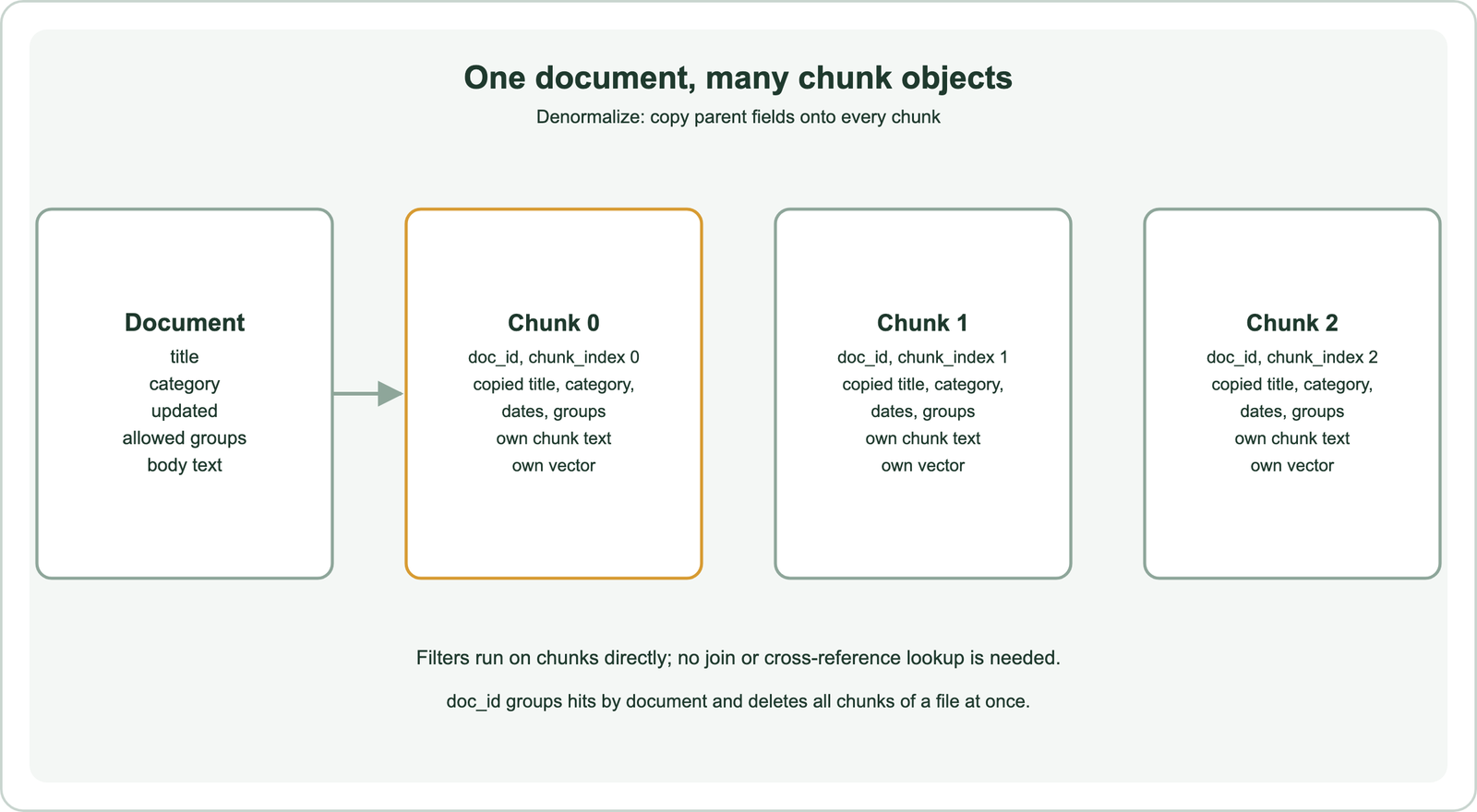
Weaviate’s best practices page lists two drawbacks of cross-references. They are not vectorized, so the referenced data does not shape the object’s vector. They are also slower to query, because each reference needs another lookup, and Weaviate is not designed for graph-like queries or joins. Its FAQ adds that resolving a reference from A1 to B1 costs about as much as looking up both objects separately.
Denormalized fields make filters fast and simple. A filter on category or date applies directly to chunks, with no join. The title can also be prepended to the chunk text before embedding, so a chunk that says “the limit is 14 days” carries “Refund policy” into its vector.
The cost is duplication and update work. If a document’s title changes, every chunk must be rewritten. In practice, documents are usually re-ingested as a whole when they change, which rewrites the chunks anyway. Weaviate’s academy course suggests keeping any cross-references low in cardinality, for example author to books rather than user to comments. With the object shape settled, the next choice is what the embedding model sees.
Which fields should you embed for semantic search?
You should embed the fields that carry the meaning users search for, usually the title and the main text, and keep identifiers, prices, dates and internal notes out of the vector. Anything embedded influences every vector match.
Embedding a SKU or a timestamp adds noise without adding meaning. The model has no useful representation for “TS-100” or “2026-09-01”, and those tokens dilute the text that matters. Such fields belong in the inverted index, where they match exactly. In Weaviate, a property can be excluded from vectorization with skip_vectorization while still being stored and filterable.
Some collections need more than one vector. A product catalogue may need one vector for the title alone, for short queries, and one for the full description. Weaviate supports this with named vectors, each with its own source properties, model and index settings. The query then chooses a target vector. The pattern is covered in multi-vector search.
Each vector field must use exactly one model, and queries must use that same model. Vectors from different models cannot be compared, so a model change means a new vector field or a new collection, as explained in re-embedding when the model changes. Text that is not embedded still needs an indexing choice.
How should text fields be indexed for keyword search and filters?
Text fields should be indexed by role: prose fields with word tokenization for keyword search, identifiers with field tokenization for exact matching, and tag lists as text arrays with field tokenization. The choice decides what a keyword query or filter can match.
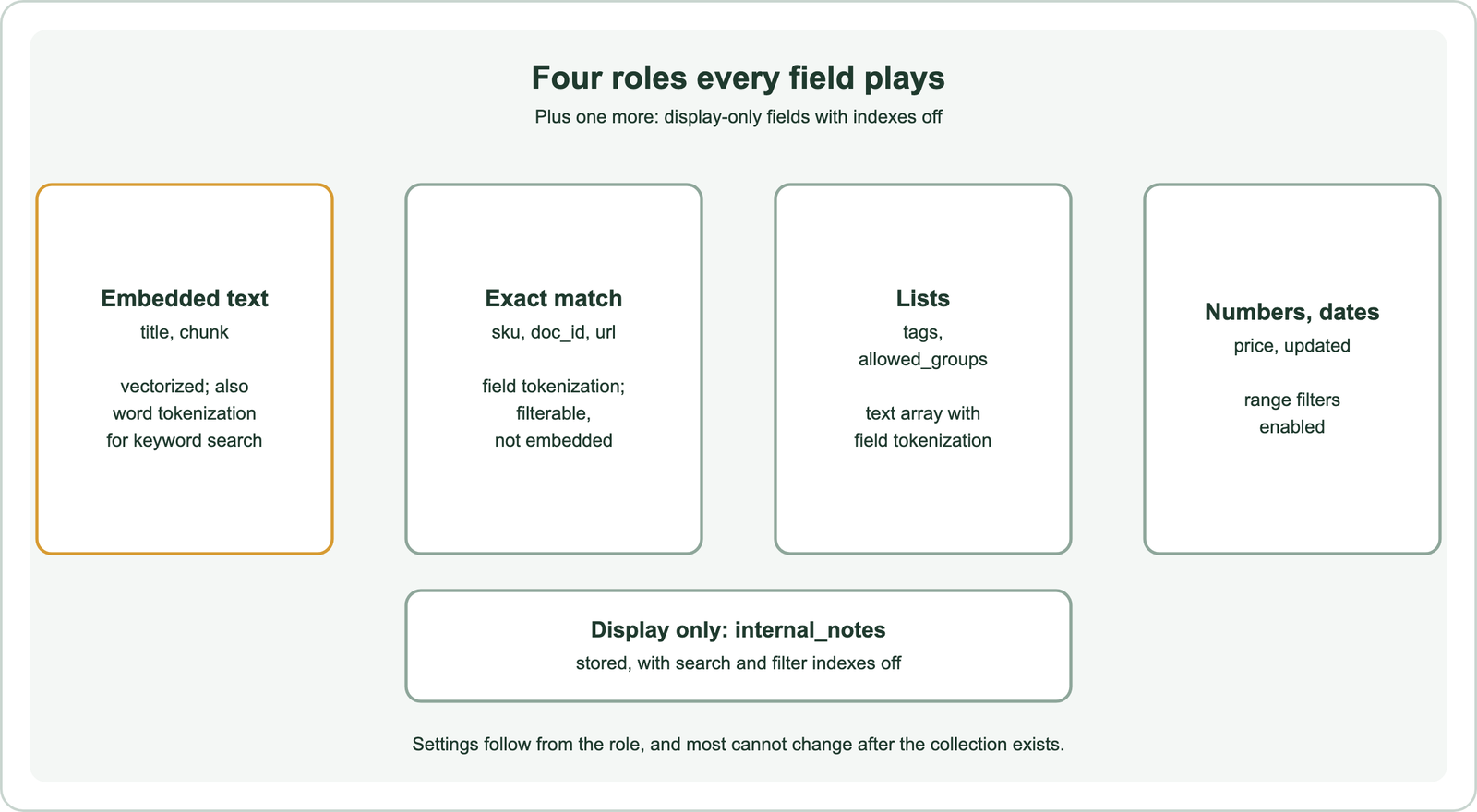
Weaviate’s academy course on schema design lays out the defaults. Text for semantic search uses the default word tokenization. Multiple separate values, such as tags, use a text array with field tokenization, so each item stays one token. Identifiers that need exact matching, such as email addresses, SKUs and user IDs, use field tokenization. Lowercase tokenization keeps symbols such as underscores and hyphens for code-like values.
The reason is matching. With word tokenization, “TS-100” splits into “ts” and “100”, and a filter for “TS-100” can match other codes that share those parts. Field tokenization keeps the whole value as one token. Weaviate’s inverted index documentation shows the same effect with “variable_name”, which word tokenization lets match “variable_new_name”.
Typo-tolerant fields, such as names typed into a search box, can use trigram tokenization. Weaviate’s documentation advises using it only on fields that need fuzzy matching, because it enlarges the index and changes filter behaviour. The tokenizers are compared in full-text search. Numbers and dates need a different kind of index.
How do you set up numeric, date and permission fields?
You set up numeric and date fields with the correct data type and range indexing, and permission fields as exact-match arrays that every query filters on. These fields never touch the vector but decide which results are allowed.
Weaviate’s inverted index documentation lists three index types per property. indexSearchable supports BM25 and hybrid search on text. indexFilterable supports match-based filters. indexRangeFilters supports greater-than and less-than comparisons on int, number and date properties, and was added in version 1.26. The first two are on by default and the third is off. Enabling range filters on prices, ratings and dates speeds up range queries.
The same documentation gives a rule for turning indexes off: if you will never query on a property, you can disable its indexes. Doing so saves disk and speeds imports. Internal notes shown only on a detail page are a typical case.
Permissions are best stored as a text array of allowed groups on each chunk, with field tokenization. Every query then adds a filter for the user’s groups. Isolation by customer can use tenants instead. The patterns are covered in permission-aware search and multi-tenant semantic search, and filter performance in metadata filtering. A complete schema shows how the pieces fit.
What does a complete semantic search schema look like in Weaviate?
A complete semantic search schema in Weaviate defines named vectors for the embedded text and typed properties for every other role, all in one collection definition. The example models product chunks with exact SKUs, tags, prices, dates and permissions.
from weaviate.classes.config import Configure, Property, DataType, Tokenization

products = client.collections.create(
    name="ProductChunk",
    vector_config=[
        Configure.Vectors.self_provided(name="content"),   # title + chunk text
        Configure.Vectors.self_provided(name="title"),     # title only, for short queries
    ],
    properties=[
        Property(name="title", data_type=DataType.TEXT),
        Property(name="chunk", data_type=DataType.TEXT),
        Property(name="sku", data_type=DataType.TEXT, tokenization=Tokenization.FIELD),
        Property(name="tags", data_type=DataType.TEXT_ARRAY, tokenization=Tokenization.FIELD),
        Property(name="brand", data_type=DataType.TEXT, tokenization=Tokenization.LOWERCASE),
        Property(name="price", data_type=DataType.NUMBER, index_range_filters=True),
        Property(name="updated", data_type=DataType.DATE, index_range_filters=True),
        Property(name="internal_notes", data_type=DataType.TEXT,
                 index_searchable=False, index_filterable=False),
        Property(name="doc_id", data_type=DataType.TEXT, tokenization=Tokenization.FIELD),
        Property(name="chunk_index", data_type=DataType.INT),
        Property(name="allowed_groups", data_type=DataType.TEXT_ARRAY,
                 tokenization=Tokenization.FIELD),
    ],
)
The two named vectors hold embeddings computed by the application. With a vectorizer module instead, each named vector would list its source properties, such as title and chunk for content. The SKU, doc ID and permission fields use field tokenization for exact matches. Price and date have range indexes. Internal notes are stored for display only.
The definition was created and queried on Embedded Weaviate as a code check, including a vector query on the content vector filtered by price, tag and group. More setup detail is in semantic search with Weaviate. Other engines express the same roles differently.
How do schema concepts map across search engines?
Schema concepts map across search engines with different names but the same roles: a vector field, full-text fields, exact keyword fields, numeric fields and metadata for filters. Weaviate, Elasticsearch, OpenSearch, Qdrant, Milvus, Pinecone, Redis, Chroma and Postgres all express them.
In Weaviate the roles are properties with tokenization and index flags, plus named vectors. Elasticsearch uses mappings with text, keyword and vector field types. OpenSearch uses the same mapping style. Qdrant stores vectors with a JSON payload and adds payload indexes for filtering. Milvus defines typed fields in a collection schema. Pinecone stores metadata alongside each vector. Redis declares text, tag, numeric and vector fields in FT.CREATE. Chroma stores documents with metadata dictionaries. Postgres uses table columns with a vector column from pgvector.
The engine tutorials show each mapping in code: Weaviate, Qdrant, Milvus, Pinecone, Elasticsearch, OpenSearch, Redis, Chroma and Postgres with pgvector. A plain-Python version is in semantic search with Python, and framework loaders in semantic search with LangChain and LlamaIndex.
The role-based design carries over when you change engines. Write the schema down as roles first, then translate it, as described in migrating to a new vector database. Engine choice itself is covered in choosing a vector database for semantic search.
A search index schema for semantic search starts with the unit of retrieval, usually a chunk carrying a copy of its document’s title, category, dates and permissions. Embed only the fields that carry meaning, with one model per vector field and named vectors when queries need different views. Index every other field by role: word tokenization for prose, field tokenization for identifiers and tags, range indexes for numbers and dates, and no indexes for display-only text. Prefer flattened properties to cross-references, put permissions in from the start, and settle the design before loading data, because most settings cannot change later.