Home / Query understanding / Typo Tolerance in Semantic Search
ExplainerTypo Tolerance in Semantic Search
Typo tolerance in semantic search is the ability to return the right results when a query is misspelled. It comes from embeddings that place small typos near the intended word, fuzzy keyword matching, and spelling correction before the search runs. Embedding models often handle a missing or swapped letter well, because they break words into subword pieces and learn from noisy text. They are less reliable for short queries, product codes, names and heavy misspellings. Plain keyword search has the opposite profile: with default word tokenization a misspelled word matches nothing at all. Trigram tokenization fixes that for chosen fields by matching three-character pieces of words. Spelling correction can repair the query first, and a did-you-mean suggestion lets the user confirm. In Weaviate’s academy example, a vector search for the misspelling “adventur” returned films while a keyword search returned no results, and hybrid search inherited the vector leg’s tolerance.
Typo tolerance in four facts
- With default word tokenization, a misspelled keyword matches no documents at all.
- Embeddings tolerate many small typos but are weaker on names, codes and very short queries.
- Weaviate’s trigram tokenization adds fuzzy keyword matching to the fields where it is enabled.
- Weaviate’s text-spellcheck module can suggest or apply a corrected query before a vector search.
What is typo tolerance in semantic search?
Typo tolerance in semantic search is the property of a search system that still finds relevant results when the query contains spelling mistakes, missing letters, swapped letters or wrong accents. It matters most in search boxes where people type fast.
Users misspell constantly. They type on phones, guess at unfamiliar names, drop accents and swap neighbouring keys. A search that returns nothing for “headphnes” or “Reliace Industries” looks broken, even if the index holds exactly what the user wanted. Every zero-result page caused by a typo is a missed answer or a lost sale.
There is no single fix. Typos can be handled before retrieval, by correcting the query. They can be handled inside retrieval, by vector search that is robust to noise or by keyword matching on pieces of words. They can also be handled after retrieval, by noticing an empty or poor result and trying again. Each layer covers cases the others miss.
Typo handling is part of query understanding, the set of steps that interpret a query before or during search. The layers are described in turn, starting with the one many semantic systems rely on by default.
How do embeddings handle misspelled queries?
Embeddings handle many misspelled queries well because the model splits words into subword pieces and has seen misspellings in its training text, so a small typo often lands near the intended word in vector space. This tolerance comes for free with vector search.
Weaviate’s academy course on search types shows the effect. A query for “adventur”, missing its final letter, was run three ways over a film collection. The vector search returned Avatar, The Avengers, Monsters, Inc., Captain America: The First Avenger and Antz. The keyword search returned no results. The hybrid search returned the same films as the vector search, because the keyword leg contributed nothing.
The reason is how text reaches the model. Embedding models use subword tokenizers, which split an unknown or misspelled word into smaller known pieces. Many of those pieces are shared with the correct word, and the model has also learned from web text full of real typos. The general relationship between tokens and vectors is explained in tokenization vs embedding.
This tolerance is useful but uneven. In the example, the results resemble the misspelling in spelling as much as in meaning, which hints at how the model got there. The vector leg recovers some typos, softens others and misses some entirely.
Where does typo tolerance in embeddings fail?
Typo tolerance in embeddings fails most often on short queries, proper names, product codes and identifiers, and on queries with several errors, where the misspelled pieces no longer resemble the intended word. Research on dense retrievers confirms the weakness.
Short queries carry little context. A one-word query with a typo gives the model only broken subword pieces to work with, and nothing around them to suggest the intended meaning. A long question with one typo is easier, because the other words still point to the right topic.
Names and codes have no meaning to fall back on. A misspelled brand, person or part number may split into pieces that resemble something unrelated. The model then returns results that are close to the typo rather than to the intended entity. Sidiropoulos and Kanoulas studied dense retrievers at SIGIR 2022 and reported that their effectiveness drops when queries contain misspellings, motivating training methods that make them more robust.
Exact-match needs make this worse. A user searching for a specific SKU wants that SKU, and a near neighbour in vector space is a wrong answer. Keyword matching handles exact terms, and with the right tokenization it can handle near-exact terms too.
How does trigram matching make keyword search typo tolerant?
Trigram matching makes keyword search typo tolerant by indexing every three-character piece of a word, so a misspelled query still shares most of its pieces with the correct word and can match it. In Weaviate this is a per-property tokenization choice.
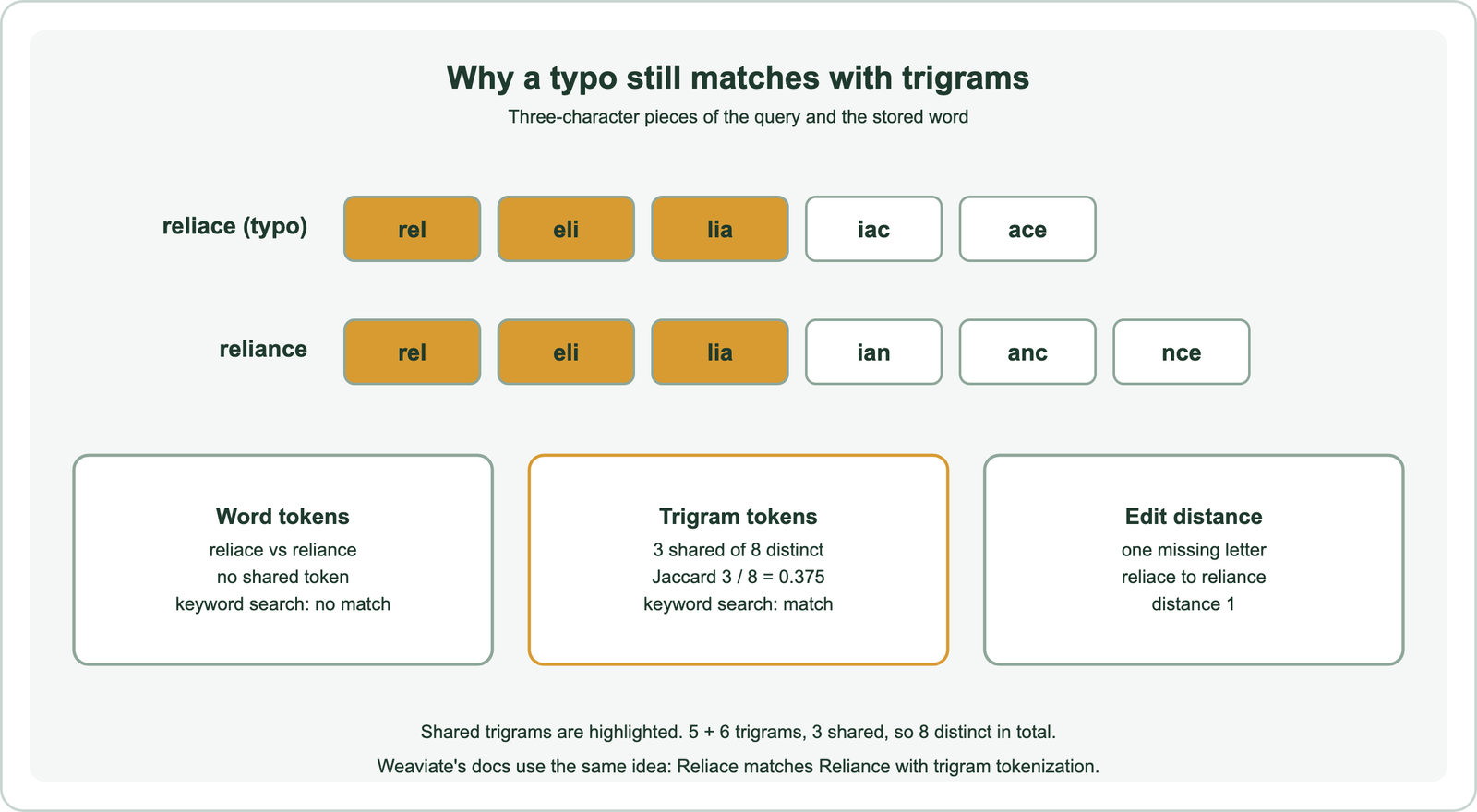
Take the typo “reliace” and the word “reliance”. As whole words they share nothing, so word tokenization finds no match. As trigrams, “reliace” gives rel, eli, lia, iac and ace, while “reliance” gives rel, eli, lia, ian, anc and nce. Three of the eight distinct trigrams are shared, enough for BM25 to score the document. Weaviate’s tokenization reference uses this very pair as its typo example.
Weaviate’s documentation lists the costs. Trigram tokenization creates larger inverted indexes, may slow queries on large datasets and changes filter behaviour, because text filters then match trigrams rather than whole words. Its advice is to enable trigrams only on fields that need fuzzy matching and keep exact-match fields on word or field tokenization.
A common pattern stores the same text twice: once with word tokenization for precise matches and once with trigram tokenization for fuzzy ones. Weaviate 1.37 also added accent folding as a preview, so “Café Crème” matches “cafe creme” without trigrams.
How does spelling correction work in search?
Spelling correction in search generates candidate corrections that are a small edit away from each query word, then picks the candidate that is most likely given the vocabulary, the query context and past queries. The corrected query is either used directly or offered as a suggestion.
Candidates come from edit distance. Levenshtein distance counts the insertions, deletions and substitutions needed to turn one word into another, and the Damerau variant also counts a swap of neighbouring letters as one edit. “Reliace” is one insertion away from “reliance”. Systems usually consider words within one or two edits of the typed word.
Ranking picks among candidates. A good corrector prefers words that are common in the index or in query logs, and words that fit with the rest of the query. Peter Norvig’s well-known short essay on spelling correction builds a working corrector from exactly these two parts: an edit model and word frequencies. Larger systems add language models and learn from pairs of queries that users retyped.
Weaviate offers this as a module. The text-spellcheck module, added in Weaviate 1.7, checks nearText queries and returns the original text, the changes and a “did you mean” suggestion. It can also extend vectorizer modules with an autocorrect flag that applies the correction automatically. Rewriting queries with a language model goes further, as described in query rewriting.
Which layer should handle typos?
Typos should be handled in several layers at once: hybrid search with a trigram field inside retrieval, spelling suggestions before it, and a fallback after it for empty results. Each layer covers a blind spot of another.
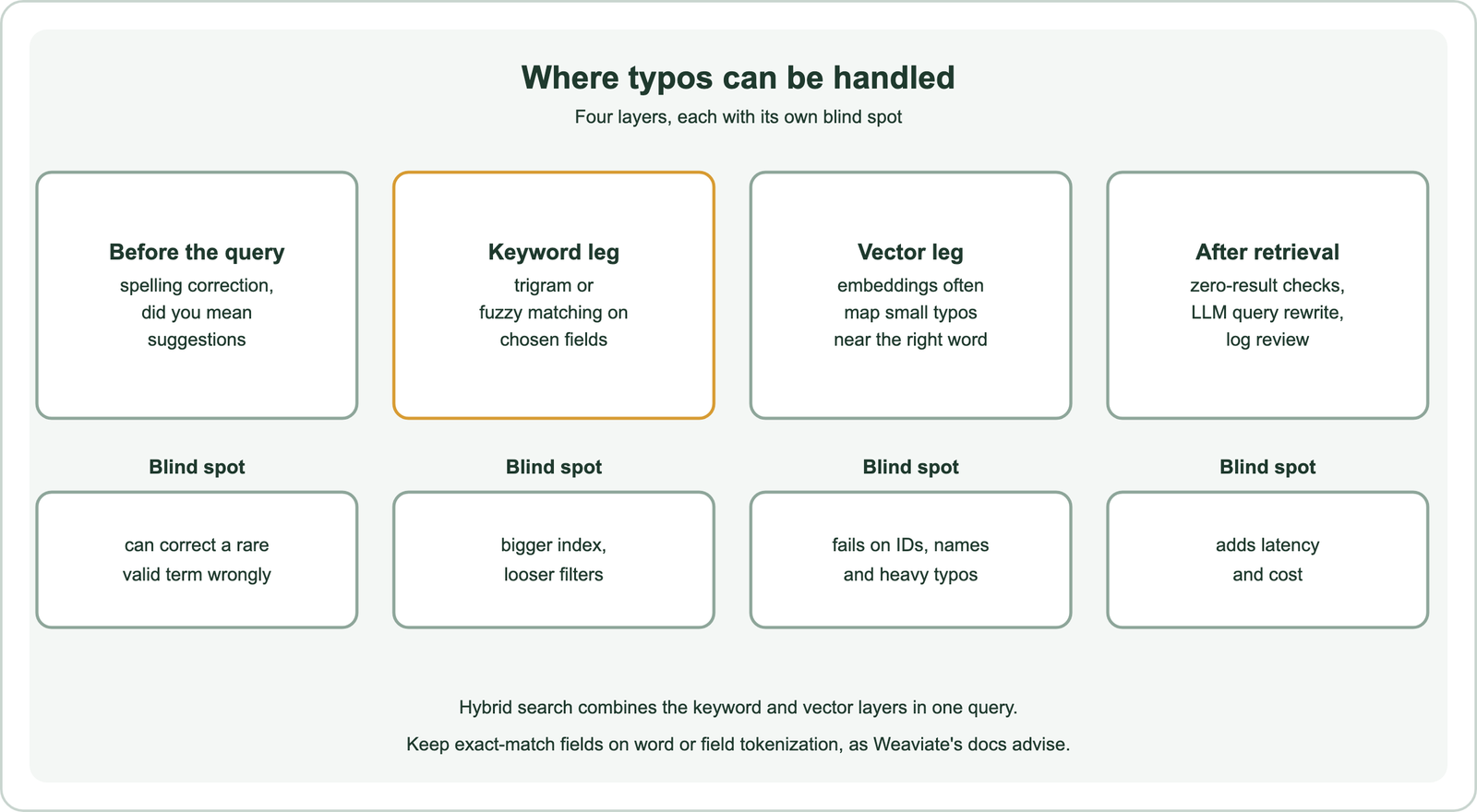
Automatic correction has a risk. A rare but valid term, such as a product name or a surname, can be “corrected” into a common word, and the user never sees what they asked for. Suggesting a correction, or running both the original and corrected query, is safer than replacing the query silently. Expanding the query with variants is related, as covered in query expansion and multi-query retrieval.
Search-as-you-type adds another case. Partial words are not typos, but they behave like them, since the last word is incomplete. Trigram fields help there too, which is why Weaviate’s documentation lists search-as-you-type among trigram use cases. Building that experience is covered in semantic autocomplete.
How do you add typo tolerance in Weaviate?
You add typo tolerance in Weaviate by storing important text in both a word-tokenized and a trigram-tokenized property, then querying both through hybrid search so the vector leg also contributes. Exact matches still rank first through boosting.
from weaviate.classes.config import Configure, Property, DataType, Tokenization

companies = client.collections.create(
    "Company",
    vector_config=Configure.Vectors.text2vec_weaviate(source_properties=["name"]),
    properties=[
        Property(name="name", data_type=DataType.TEXT),               # word: exact words
        Property(name="name_fuzzy", data_type=DataType.TEXT,
                 tokenization=Tokenization.TRIGRAM),                   # trigram: typos
    ],
)

res = companies.query.hybrid(
    query="Reliace",
    alpha=0.5,
    query_properties=["name^2", "name_fuzzy"],   # exact word matches weigh more
    limit=5,
)
A keyword search on name alone returns nothing for “Reliace”, while the trigram field returns “Reliance Industries”. In hybrid search, the vector leg adds its own tolerance, and the boost on name keeps a correctly spelled match ahead of fuzzy ones. The pattern was run on Embedded Weaviate 1.30.5 with self-provided vectors as an API check only.
Add the same text to both properties at import time. Only fields where users type names or short terms usually need the trigram copy; long body text rarely does.
How do typos affect RAG retrieval?
Typos affect RAG retrieval the same way they affect search, but the damage is hidden, because the language model writes a fluent answer from whatever passages were retrieved, right or wrong. A typo in a key name can quietly change the answer.
Users of chat interfaces type quickly and rarely proofread. If a misspelled product or person name pulls passages about something else, the model may answer confidently about the wrong thing. Hybrid retrieval with a trigram field on names, plus a check that the retrieved passages mention the entity the user asked about, reduces that risk. Rewriting the question with a language model before retrieval also fixes many typos, and techniques such as HyDE and query decomposition pass through the same rewriting step.
Intent detection can route queries by type, as described in query intent classification. A query that looks like a code or name can go to fuzzy keyword matching first, while a question goes to the vector leg.
How do you test typo tolerance?
You test typo tolerance by taking real queries with known relevant results, adding realistic misspellings, and comparing results for the clean and misspelled versions. The gap shows how much each layer recovers.
Use typos users actually make. Search logs show retyped queries, where a misspelling is followed by its correction within seconds. Those pairs are the best test data. Synthetic typos, such as a dropped letter, a swapped pair or a neighbouring key, can fill gaps, but should be labelled as synthetic in any report.
Split results by query type: names and codes, short queries and longer questions. Track the zero-result rate for misspelled queries separately, since it is the most visible failure. Rerun the test whenever tokenization, alpha or the embedding model changes.
Typo tolerance needs more than one layer. Embeddings recover many small typos, as Weaviate’s “adventur” example shows, but they struggle with short queries, names, codes and heavy misspellings. Default keyword search fails on any typo, while trigram tokenization lets it match pieces of words, at the cost of a larger index. Spelling correction based on edit distance and word frequency can suggest or apply a fix, and Weaviate’s text-spellcheck module returns a did-you-mean suggestion. Store key fields with both word and trigram tokenization, query them with hybrid search, prefer suggestions to silent corrections, and test with real misspellings from your logs.