Home / Tools / Enterprise Semantic Search Platforms Compared
ComparisonEnterprise Semantic Search Platforms Compared
Enterprise semantic search platforms are systems that index a company’s documents, chats, tickets and records from many apps and let employees search all of them by meaning. They differ from site search in two ways. They must pull content through connectors from tools such as file stores, wikis and ticket systems, and they must show each person only what that person is allowed to see. The market splits into four groups: packaged workplace search products, search built into an office suite, managed search services from cloud providers, and systems teams build on a vector database such as Weaviate. Packaged products are fastest to deploy. Building gives the most control over ranking, data location and cost. The right choice depends on where your content lives, how strict your permissions are, and how much engineering time you can commit.
Enterprise semantic search platforms in four facts
- Enterprise search platforms differ most in connectors and permission handling, not in embedding models.
- Packaged workplace search, suite search, cloud search services and custom builds are the four main options.
- Weaviate made role-based access control generally available in version 1.29.
- Weaviate’s RBAC can scope roles to tenants and assign roles to groups from an OIDC identity provider.
What is an enterprise semantic search platform?
An enterprise semantic search platform is software that gathers content from a company’s internal tools into one index and ranks it by meaning for each employee’s query. It answers questions such as “where is the latest travel policy” across every system at once.
The content is varied. A typical company keeps documents in a file store, pages in a wiki, conversations in chat, issues in a tracker and customer records in a CRM. Each tool has its own search box, and each one only searches itself. An enterprise platform replaces those silos with one search that understands paraphrases, so “time off rules” finds the “leave policy”.
Two requirements make this harder than public search. Every source has its own access rules, and results must respect them exactly. Content also changes constantly, so the index must stay in step with the sources. The general problem is described in enterprise and internal document search. Enterprise search platforms are the products and building blocks that solve it, and they share a common architecture.
How do enterprise semantic search platforms work?
Enterprise semantic search platforms work by syncing content and permissions through connectors, embedding and indexing the content, and filtering every query by the searcher’s identity. Many then pass the top results to a language model to write an answer.
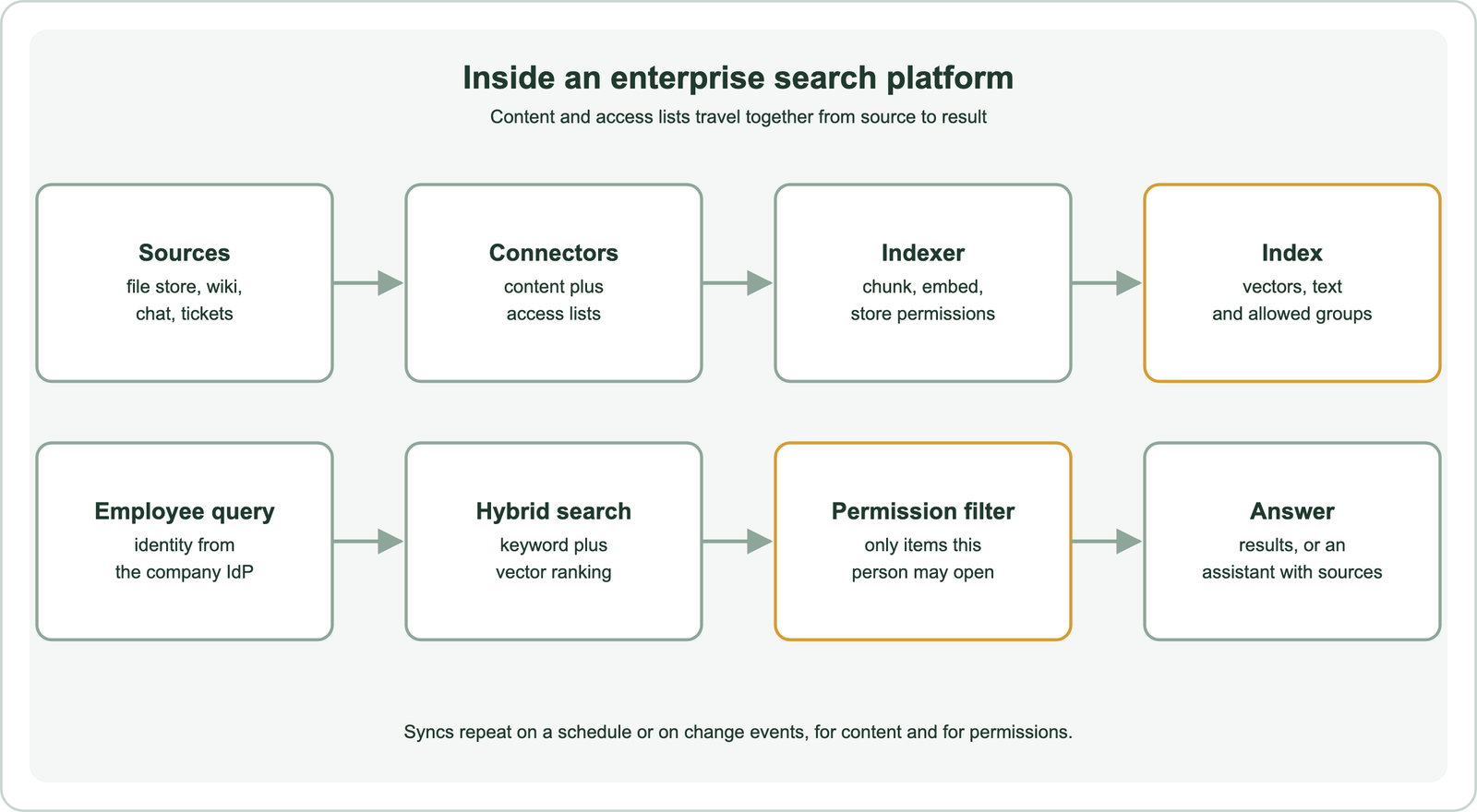
Connectors are the first component. Each one reads a source’s content through its API, along with the list of users or groups allowed to read each item. The indexer chunks and embeds the content and stores the access list with it. The sync repeats on a schedule or on change events, so edits and permission changes reach the index.
At query time, the platform learns who the searcher is from the company’s identity provider. It runs a hybrid keyword and vector search and filters out anything the person cannot open. Hybrid ranking matters here because enterprise queries are full of names, codes and acronyms, as covered in hybrid search. The four groups of platforms package these components in different ways.
What types of enterprise semantic search platforms are there?
The types of enterprise semantic search platforms are packaged workplace search, search built into an office suite, managed search services from cloud providers, and custom systems built on a vector database. They trade setup time against control.
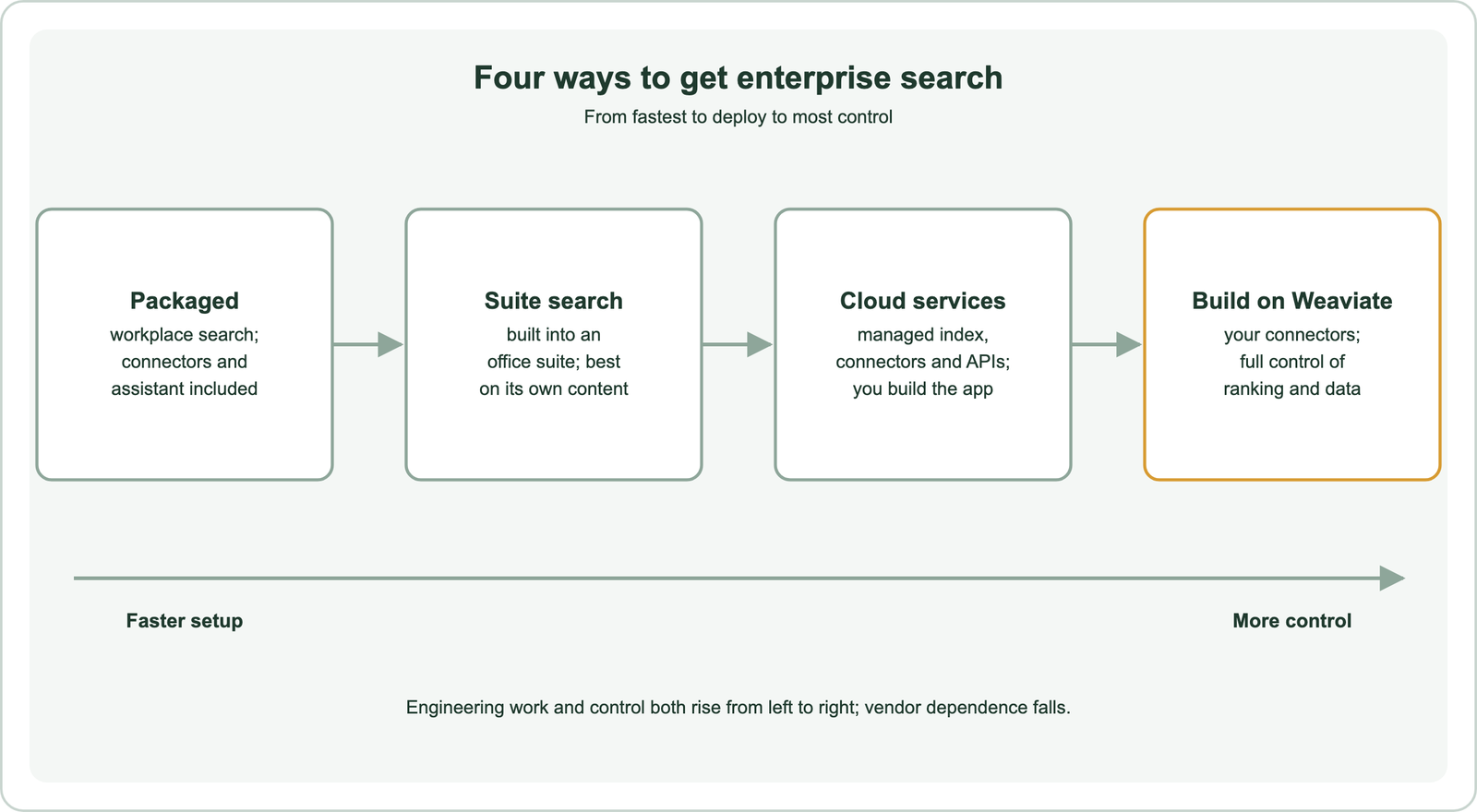
The table compares the four types on the questions that decide most evaluations.
| Type | Examples | Connectors | Permissions | Who runs it |
|---|---|---|---|---|
| Build on a vector database | Weaviate | You build or use a framework | You store and filter access lists; Weaviate RBAC controls database access | Your team, self-hosted or managed cloud |
| Packaged workplace search | Glean, Coveo | Prebuilt for common business apps | Synced from each source by the vendor | The vendor, as a service |
| Suite search | Microsoft 365 Copilot and Microsoft Search | Native for the suite; connectors for outside content | Inherited from the suite | The suite vendor |
| Cloud search services | Amazon Kendra, Google Cloud Vertex AI Search | Managed connectors plus APIs | Supported through user and group filtering | The cloud provider; you assemble the app |
Reading across the rows, connectors and permissions change more than anything else. Every type can rank by meaning, so the embedding model is rarely what separates them. What separates them is who builds the connectors, who keeps permissions in sync and who can change the ranking.
Many companies end up with more than one type. A suite search may cover mail and documents while a custom build on Weaviate serves a product or a regulated archive. Each type has its own strengths, starting with the most packaged.
How do packaged workplace search platforms compare?
Packaged workplace search platforms compare mainly on connector coverage, permission accuracy and the quality of their assistant, since all of them combine keyword and semantic ranking. They suit companies that want search across many SaaS tools without a build project.
Glean is a workplace search and assistant product. It connects to common business applications, syncs their permissions, and lets employees search and ask questions across them in one place. Its value lies in the breadth of prebuilt connectors and in learning from how people in the company use content.
Coveo is a search and relevance platform used for workplace, customer service and commerce search. It indexes content from many sources through connectors, applies the sources’ permissions, and uses machine learning on usage to tune ranking. It is often chosen where one platform must serve both internal and customer-facing search.
Packaged platforms share trade-offs. Data is copied into the vendor’s index, which matters for regulated content. Ranking can be tuned only through the controls the vendor exposes. During a trial, test the connectors you rely on most and check that a restricted file stays invisible to someone without access. The open alternatives are covered in open-source semantic search engines. Suite search takes a different route, starting from content the vendor already holds.
How does search built into an office suite compare?
Search built into an office suite compares well on that suite’s own content, because the documents, mail and permissions already live in one system. It is weaker on content outside the suite, which must be brought in through connectors.
Microsoft 365 Copilot and Microsoft Search work over content stored in Microsoft 365, such as SharePoint, OneDrive, Outlook and Teams, through Microsoft Graph. They respect the permissions already set in Microsoft 365. Microsoft provides connectors that bring outside content into Microsoft Graph, so third-party systems can appear in the same results.
For a company whose documents and mail sit mostly in one suite, this is often the shortest path to semantic search, because the content and permissions are already in place. The main risks are coverage and control. Content in other tools is only as good as its connector, and ranking cannot be changed beyond the settings the vendor provides.
Suite search also inherits the suite’s permission mistakes. If a sensitive folder is shared too widely, semantic search makes it easier to find. Audit sharing before rollout. The same issue applies to every type, as covered in permission-aware search. Cloud providers offer a middle path between buying a product and building one.
How do managed search services from cloud providers compare?
Managed search services from cloud providers compare as building blocks: they handle indexing, connectors and ranking, while you build the search interface and application around them. They suit teams already committed to one cloud.
Amazon Kendra is an AWS managed enterprise search service. It offers connectors for common sources, ranks results by meaning, and can filter results by user and group so people see only permitted documents. Teams call it through an API and build their own interface or assistant on top.
Google Cloud’s Vertex AI Search is a managed service that indexes websites, structured data and unstructured documents, and serves search and answer generation through an API. It fits teams that keep their data in Google Cloud and want Google’s ranking without running their own index.
These services sit between packaged products and custom builds. They remove the work of operating an index, but they still need engineering for the interface, the connectors they lack and the permission mapping. The wider trade-off between running your own system and paying for one is in managed vs self-hosted search. The last option keeps every part under your control.
When does building enterprise search on Weaviate make sense?
Building enterprise search on Weaviate makes sense when you need control over ranking, data location or cost, or when search is part of your own product rather than an internal tool. You take on connectors and the interface in exchange.
Weaviate provides the index and query side. It runs hybrid search that combines BM25 and vector scores, metadata filters for access lists, and multi-tenancy to isolate data by customer or business unit. It can be self-hosted or run on Weaviate Cloud, which keeps data inside your own environment when needed.
Access to the database itself is controlled with role-based access control, generally available since Weaviate 1.29 according to its authorization documentation. Weaviate’s security guide describes roles scoped to collections and tenants, roles assigned to groups from an OIDC identity provider, and audit logging of authorization decisions. Document-level permissions for end users are usually stored as properties on each chunk and applied as filters at query time.
The cost is engineering. You need connectors for each source, a sync that keeps content and permissions fresh, and a search interface. Frameworks help with loaders and pipelines. Isolation patterns are covered in multi-tenant semantic search, and API-based options in semantic search APIs. Whichever route you take, permissions decide whether the system can be trusted.
How does permission handling differ across enterprise search platforms?
Permission handling differs in where access lists come from, how fast changes reach the index, and whether filtering happens before or after ranking. These details decide whether search ever shows someone a document they should not see.
Packaged and suite platforms sync access lists from each source automatically, so accuracy depends on each connector. Cloud services accept user and group information with each query and filter on it. Custom builds store the allowed groups on each chunk and pass the searcher’s groups as a filter. In every case, group membership must come from the same identity provider the sources use.
Freshness is the common weak point. If a person loses access to a folder, results stay visible until the next permission sync. Ask each vendor how often permissions refresh, and test it. Filtering inside the search, rather than removing results afterwards, also matters. Removing results after ranking can leave fewer results than requested and can leak hints through counts. The mechanics are in pre-filtering vs post-filtering. Permissions are one test among several in a fair evaluation.
How should you evaluate enterprise semantic search platforms?
You should evaluate enterprise semantic search platforms with a pilot on your own content, your own users and a set of judged queries, rather than with vendor demos. Demos use clean data; your data is not clean.
Start with an inventory of where content lives and how much of it is in each tool. Rule out any option without solid connectors for your largest sources. Then collect real questions from employees, mark the correct documents for each, and run the same queries on every candidate. Measure how often the right document appears in the top results, as explained in how to evaluate semantic search and search test sets and relevance judgments.
Add a permission test: a restricted document, a user without access, and a check that it never appears. Revoke access and time how long the document takes to disappear. Finally, compare total cost over a few years, including licences, cloud bills and engineering time. The broader tool landscape is in semantic search tools compared and semantic site search tools.
Enterprise semantic search platforms bring content from many internal apps into one index and rank it by meaning, while showing each person only what that person may see. Packaged workplace search, suite search, cloud search services and custom builds on a vector database such as Weaviate all rank well; they differ in connectors, permission handling, control and cost. Choose packaged or suite search for speed when your sources are covered, cloud services when you want managed building blocks, and Weaviate when ranking, data location or product integration must stay in your hands. Decide with a pilot on your own queries and a permission test.