Home / Build it / Semantic Search With Pinecone: A Step-by-Step Tutorial
TutorialSemantic Search With Pinecone: A Step-by-Step Tutorial
Semantic search with Pinecone means creating a serverless index that matches your embedding model, upserting records with vectors and metadata, and querying with an embedded question. Queries can add metadata filters and a namespace. Pinecone is a managed vector database. It runs the infrastructure, and you call it through an API key and SDK. You can bring your own vectors, for example from a Sentence Transformers model, or let Pinecone embed text with a hosted model through an integrated index. Filters use a MongoDB-style syntax such as {“category”: {“$eq”: “billing”}}, and namespaces split data by tenant or language. Pinecone does not expose index algorithm settings such as HNSW parameters. The code here follows the current Python SDK signatures. Weaviate is the open-source alternative when you need self-hosting or built-in BM25 hybrid search.
Pinecone semantic search in four facts
- An index’s dimension and metric are fixed at creation and must match the embedding model.
- Records carry an id, vector values and metadata used for filtering.
- Namespaces partition an index so each query searches only one partition.
- Integrated indexes embed text on upsert and query with a Pinecone-hosted model.
What is the Pinecone vector database?
Pinecone is a managed vector database service that stores embeddings with metadata and answers nearest neighbour queries through an API, without users running any servers. It is offered as a cloud service on major cloud providers.
Pinecone’s serverless indexes separate storage from compute and bill by usage, such as stored data, reads and writes. Users choose a cloud and region when creating an index. The Python SDK, installed with pip install pinecone, wraps the control plane for creating indexes and the data plane for reading and writing records.
Because it is managed, Pinecone hides internals. There is no choice of index algorithm and no HNSW settings to tune; the service handles indexing and scaling. That suits teams that want a hosted service with little operations work. Teams that need self-hosting, open source or deeper control usually look at Weaviate or other options, compared in choosing a vector database for semantic search.
Pinecone fits teams that want a hosted service and are comfortable sending data to it. It is a weaker fit when data must stay on premises, when costs must be predictable at very high query volumes, or when keyword search and vectors must live in one engine. Run the same test queries on each candidate before committing, since the right choice depends on data, traffic and team skills more than on features.
How does Pinecone organise data?
Pinecone organises data into indexes, each split into namespaces that hold records, where a record is an id, a vector and optional metadata. Queries run against one namespace of one index.
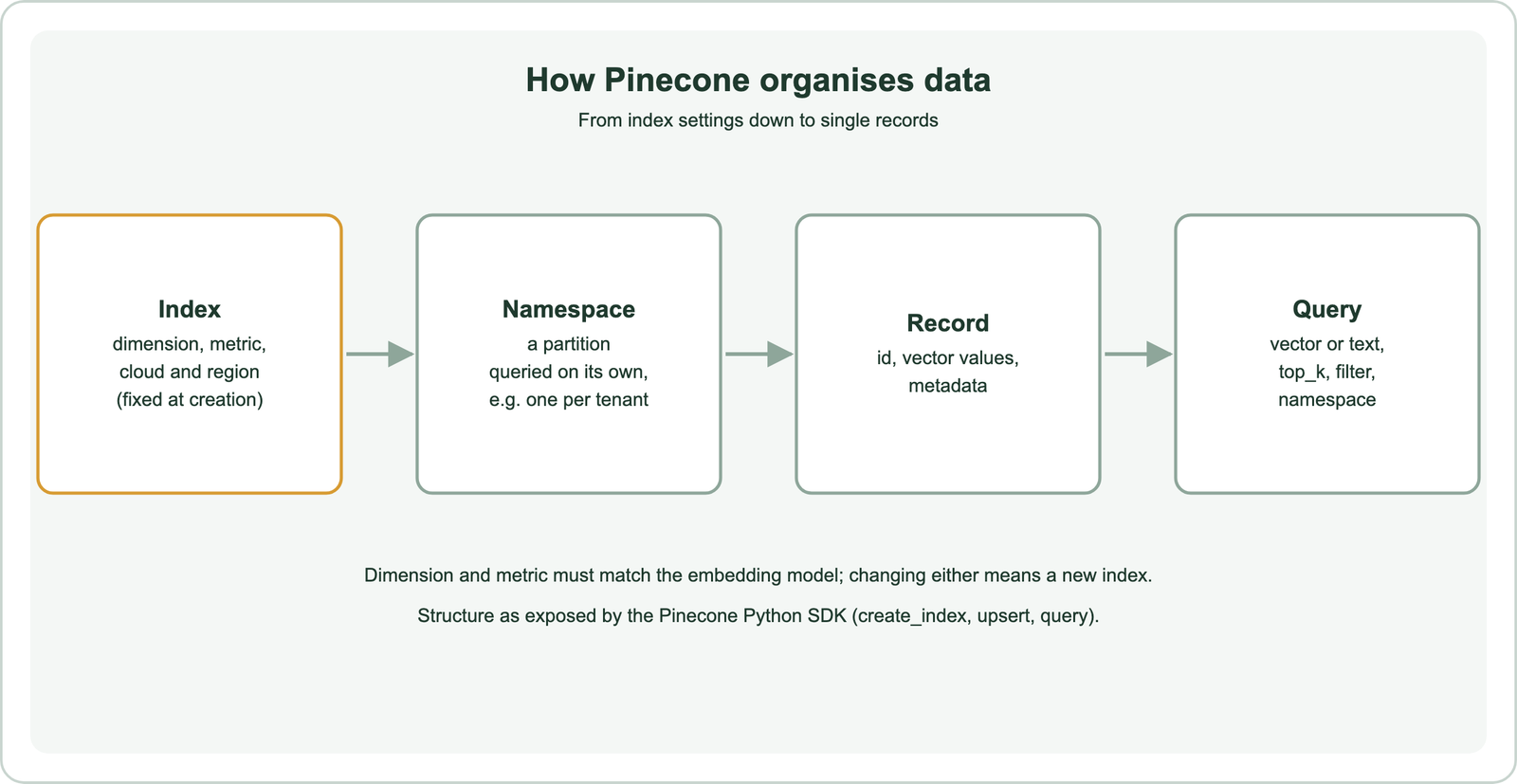
The index holds settings that cannot change later: the vector dimension, such as 384 or 1,536, and the distance metric, such as cosine, dot product or Euclidean. They must match the embedding model. Switching to a model with a different dimension means creating a new index and re-embedding everything, as covered in migrating to a new vector database.
Namespaces are partitions inside an index. A query names one namespace and searches only its records, which makes namespaces a natural fit for one partition per customer or per language. Metadata is a set of key-value pairs on each record, used for filtering and for returning text with results. Schema planning is covered in search index schema design.
How do you create a Pinecone index for semantic search?
You create a Pinecone index by calling create_index with a name, the embedding model’s dimension, a metric and a serverless spec naming the cloud and region. The API key comes from the Pinecone console.
import os
from pinecone import Pinecone, ServerlessSpec

pc = Pinecone(api_key=os.environ["PINECONE_API_KEY"])
if not pc.has_index("articles"):
    pc.create_index(
        name="articles",
        dimension=384,          # all-MiniLM-L6-v2 outputs 384 dimensions
        metric="cosine",
        spec=ServerlessSpec(cloud="aws", region="us-east-1"),
    )
index = pc.index(name="articles")
The example uses all-MiniLM-L6-v2, a small open Sentence Transformers model with 384-dimension output, so the dimension is 384. Pick the metric the model was trained for; cosine is the usual choice for sentence embeddings, as explained in cosine vs dot product vs Euclidean distance. Keep the API key in an environment variable, never in code.
Recent SDK versions open an index with pc.index(name=...); older code uses pc.Index(...), which still works as a compatibility shim. Check the installed SDK version, since Pinecone’s Python client has changed its interface across major versions.
How do you add documents to Pinecone?
You add documents to Pinecone by embedding each text and upserting records with an id, the vector and metadata, into a namespace. Upsert inserts new ids and overwrites existing ones.
from sentence_transformers import SentenceTransformer

model = SentenceTransformer("all-MiniLM-L6-v2")
docs = [
    {"id": "a1", "text": "Refunds are issued within 14 days of a return.", "category": "billing"},
    {"id": "a2", "text": "Reset your password from the sign-in page.", "category": "account"},
]
index.upsert(
    vectors=[{"id": d["id"],
              "values": model.encode(d["text"]).tolist(),
              "metadata": {"text": d["text"], "category": d["category"]}}
             for d in docs],
    namespace="en",
)
Split long documents into chunks before embedding, with one record per chunk and the parent document id in metadata. Chunk design is covered in chunking for semantic search. Large imports should embed in batches; the SDK’s upsert also accepts a batch size. Batching strategy is in batch embedding.
Store the text, or a pointer to it, in metadata so results can be displayed without a second lookup. Keep metadata small, and only include fields you filter on or display.
How do you run a semantic search query in Pinecone?
You run a semantic search query by embedding the question with the same model and calling query with the vector, top_k, the namespace and include_metadata set to true. Results come back ordered by similarity score.
q = model.encode("how long do refunds take").tolist()
res = index.query(
    vector=q, top_k=5, namespace="en", include_metadata=True,
    filter={"category": {"$eq": "billing"}},
)
for m in res.matches:
    print(m.id, round(m.score, 3), m.metadata["text"])
Each match has an id, a score and metadata. With the cosine metric, higher scores mean more similar. Scores are useful for ranking within one query but are not calibrated probabilities, as discussed in relevance scores.
The filter uses MongoDB-style operators, such as $eq, $in, $gt and $lt, combined with $and and $or. Filters are applied during the search, so the top_k results all satisfy them. Filtered search behaviour across databases is covered in vector databases with metadata filtering.
How does Pinecone’s integrated embedding work?
Pinecone’s integrated embedding lets an index embed text itself with a hosted model, so you upsert and search with plain text instead of vectors. It removes the embedding step from application code.
pc.create_index_for_model(
    name="articles-text", cloud="aws", region="us-east-1",
    embed={"model": "llama-text-embed-v2", "field_map": {"text": "chunk_text"}},
)
idx = pc.index(name="articles-text")
idx.upsert_records(namespace="en", records=[
    {"_id": "a1", "chunk_text": "Refunds are issued within 14 days.", "category": "billing"},
])
hits = idx.search(namespace="en", query={"inputs": {"text": "refund time"}, "top_k": 5})
The field map tells the index which record field to embed. The hosted model’s dimension and metric are set automatically. Integrated search can also apply a hosted reranker in the same call. Check Pinecone’s documentation for the current list of hosted embedding and reranking models.
The trade-off is model choice. Integrated indexes use Pinecone-hosted models, while bringing your own vectors allows any model, including fine-tuned or domain models. Weaviate offers a similar convenience through vectorizer integrations with many model providers, as shown in semantic search with Weaviate.
How do you add hybrid search with Pinecone?
Pinecone supports hybrid search through sparse vectors, either stored alongside dense vectors in one index that uses the dot product metric, or in a separate sparse index whose results you merge. Sparse vectors carry keyword-style term weights.
Sparse vectors can come from BM25-style encoders or learned sparse models such as SPLADE, covered in SPLADE and learned sparse retrieval. A query then sends both a dense vector and a sparse vector, and the results reflect both. With separate indexes, the application runs two queries and fuses the result lists, for example with reciprocal rank fusion.
Weaviate takes a different route: it builds a BM25 inverted index over text properties automatically and fuses keyword and vector results in one hybrid query with an alpha weight. The concepts are explained in hybrid search. Either way, test the keyword-vector balance on your own queries.
How much storage does a Pinecone index need?
Raw vector storage is the record count times the dimension times 4 bytes, so dimension choice directly drives storage and cost on usage-billed services. Metadata and index structures add more on top.
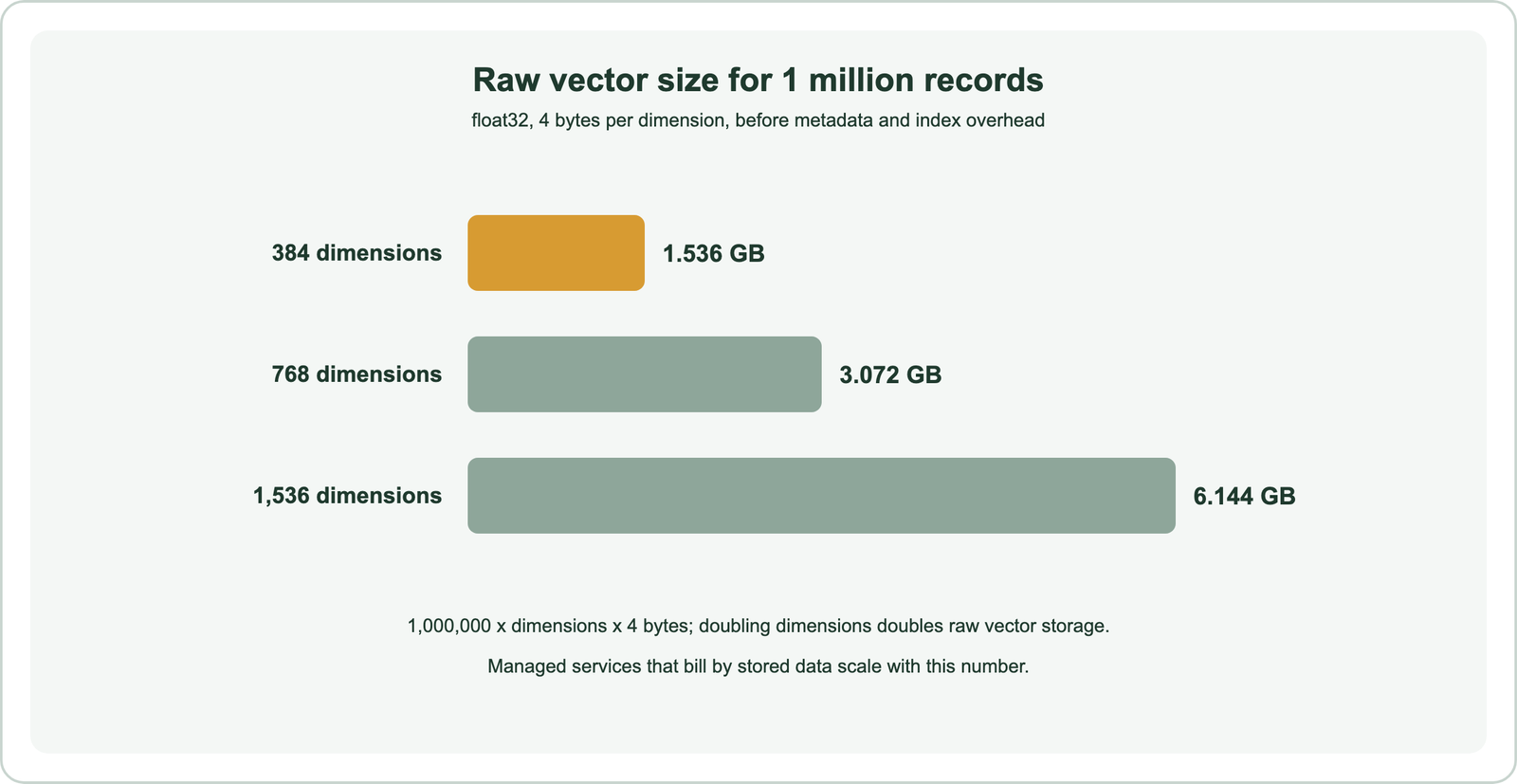
One million 384-dimension vectors take 1.536 GB as float32; 1,536 dimensions take 6.144 GB. Larger embedding models are not always more accurate on a given task, so test a smaller model before paying for four times the storage. Choosing dimensions is covered in embedding dimensions.
Large metadata fields, such as full article text, can outweigh the vectors themselves. Store long text elsewhere and keep an id in metadata if storage cost matters. Namespaces do not change total storage, but they reduce the data each query touches.
How does Pinecone compare with other vector databases?
Compared with Weaviate, Qdrant and Milvus, Pinecone is managed-first and closed source, with fewer tuning knobs but less operational work. The others are open source and can be self-hosted or used as managed cloud services.
Weaviate adds built-in BM25 hybrid search, model integrations for many providers, multi-vector and multi-tenant collections, and a choice of self-hosted or managed deployment. Like Weaviate, Qdrant and Milvus offer open-source engines with their own managed clouds. Weaviate has its own build guide, and step-by-step builds for the others are in semantic search with Qdrant and semantic search with Milvus. A self-hosting decision is covered in managed vs self-hosted search.
Beyond Weaviate, other build guides cover Elasticsearch, OpenSearch, Redis, Chroma and Postgres with pgvector. Framework wrappers are in semantic search with LangChain and LlamaIndex, plain code in semantic search with Python, and document pipelines in semantic search over documents and PDFs. The overall process is in how to build semantic search.
Semantic search with Pinecone takes four steps. Create a serverless index whose dimension and metric match the embedding model, upsert records with ids, vectors and metadata into namespaces, and query with an embedded question, top_k and optional filters. Integrated indexes can embed text with hosted models, and sparse vectors add keyword signals for hybrid search. Pinecone hides index internals such as HNSW settings, trading control for low operations work. Raw vector storage scales with dimension: 1.536 GB per million 384-dimension vectors. For self-hosting, open source or built-in BM25 hybrid search, Weaviate is the main alternative.