Home / Build it / Semantic Search With Weaviate: A Step-by-Step Tutorial
TutorialSemantic Search With Weaviate: A Step-by-Step Tutorial
To build semantic search with Weaviate, you create a collection, load your documents with vectors, and query by meaning with near_vector or near_text, adding metadata filters and hybrid search as needed. There are two ways to get vectors in. You can embed text in your own code with any model and pass the vectors in, or let a vectorizer integration have Weaviate call the model at import and query time. Metadata filters, such as category equals “billing” or year at least 2025, combine with any query type through the Python client’s Filter class. Hybrid search fuses BM25 keyword scores with vector scores, controlled by an alpha value from 0 for pure keyword to 1 for pure vector. The tutorial code here runs on a local, embedded or cloud instance and uses the Python client v4.
Semantic search with Weaviate in four facts
- A Weaviate collection stores properties, a vector index and an inverted index for keyword search and filters.
- Vectors come from your own model (bring your own vectors) or from a vectorizer integration.
- Metadata filters built with the Filter class work with vector, keyword and hybrid queries.
- In hybrid queries, alpha 0 means pure keyword search and alpha 1 means pure vector search.
What do you need to build semantic search with Weaviate?
To build semantic search with Weaviate you need a running Weaviate instance, the Python client, an embedding model, and documents with any metadata you want to filter on. The rest is a few dozen lines of code.
Weaviate runs as Weaviate Cloud, in Docker or Kubernetes, or as Embedded Weaviate, which the Python client launches for quick local tests. Install the client with pip install weaviate-client, and an embedding library such as sentence-transformers if you will embed text yourself. Semantic search with Python covers the embedding side without a database.
Plan the data before writing code. Decide which text is embedded, which fields are filtered or faceted, and which are only displayed. Long documents should be split into chunks first. Search index schema design covers these choices, and how to build semantic search covers the whole project.
How does a Weaviate semantic search setup fit together?
A Weaviate semantic search setup fits together as a collection that receives vectors from your model or a vectorizer, and answers vector, filtered and hybrid queries. The collection is the central object.
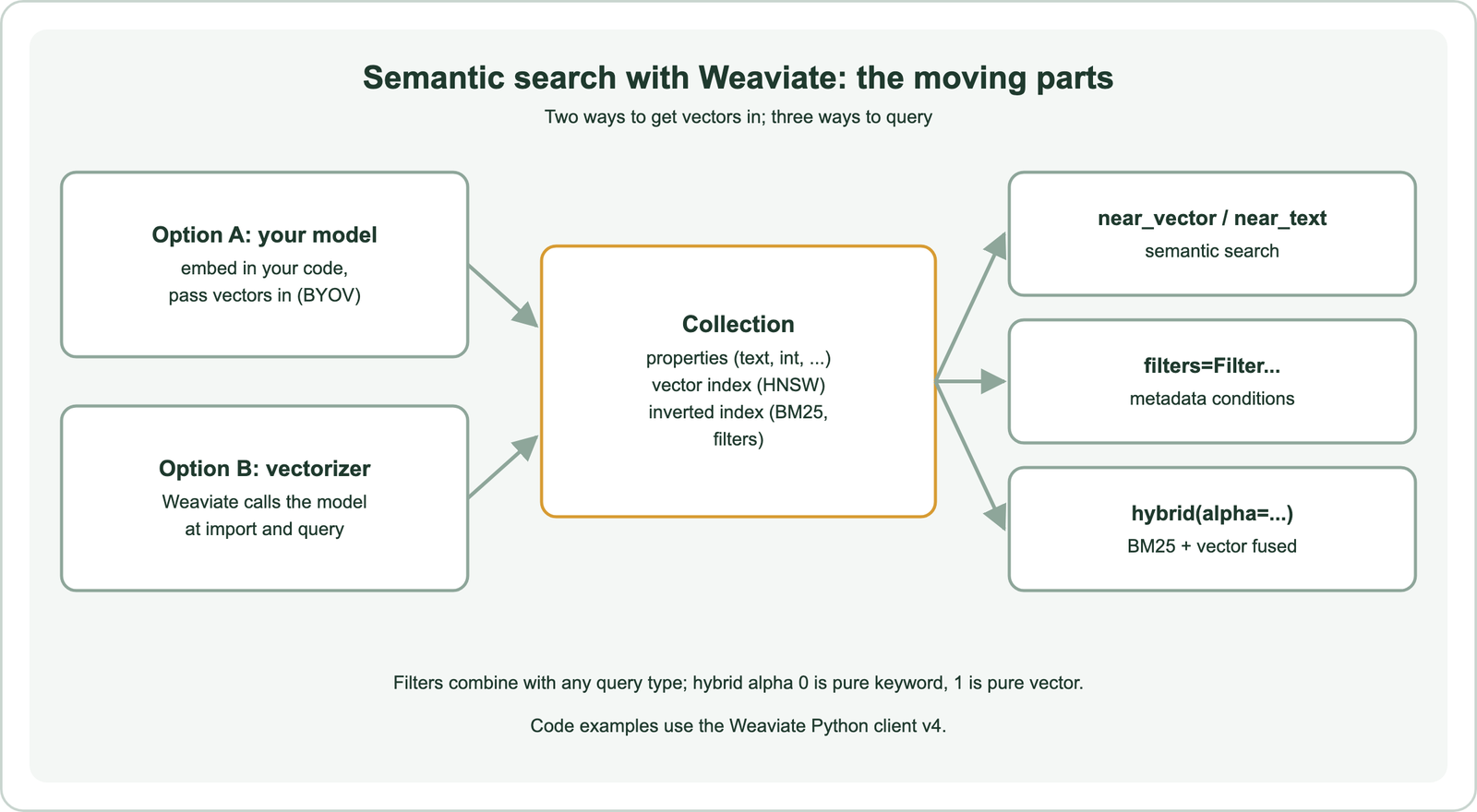
A collection is a set of objects with the same properties, similar to a table. Each object can hold a vector, and Weaviate indexes vectors with HNSW by default. Text properties are also indexed for BM25 keyword search and filtering. One collection therefore serves vector search, keyword search and filtered search without a second system.
Bringing your own vectors gives full control of the model and lets you use any model, including a fine-tuned one. A vectorizer integration removes embedding code from your application, because Weaviate embeds data at import and queries at search time. The rest of the tutorial uses your own vectors, then shows the vectorizer alternative.
How do you create a collection and import data?
You create a collection by naming it and defining its properties and vector configuration, then import objects in batches with their vectors. Batch import is the fast path for any real dataset.
import weaviate
from weaviate.classes.config import Configure, Property, DataType
from sentence_transformers import SentenceTransformer

model = SentenceTransformer("all-MiniLM-L6-v2")
client = weaviate.connect_to_local()   # or connect_to_weaviate_cloud(...) / connect_to_embedded()

articles = client.collections.create(
    name="Article",
    vector_config=Configure.Vectors.self_provided(),
    properties=[
        Property(name="title", data_type=DataType.TEXT),
        Property(name="body", data_type=DataType.TEXT),
        Property(name="category", data_type=DataType.TEXT),
        Property(name="year", data_type=DataType.INT),
    ],
)

texts = [d["title"] + ". " + d["body"] for d in docs]
vectors = model.encode(texts, normalize_embeddings=True)
with articles.batch.fixed_size(batch_size=100) as batch:
    for d, v in zip(docs, vectors):
        batch.add_object(properties=d, vector=v.tolist())
print(len(articles.batch.failed_objects), "failed")
Each document in docs is a dictionary with the four properties. Batch errors do not raise exceptions, so check failed_objects after every import. For large imports, tune batch size and concurrency as described in batch embedding, and give objects deterministic IDs so re-runs update rather than duplicate.
How do you run a semantic search query in Weaviate?
You run a semantic search query in Weaviate by embedding the query with the same model and passing it to near_vector, which returns the closest objects and their distances. With a vectorizer, near_text takes the query text directly.
from weaviate.classes.query import MetadataQuery

query_vector = model.encode("how do I get my money back", normalize_embeddings=True).tolist()
response = articles.query.near_vector(
    near_vector=query_vector,
    limit=5,
    return_metadata=MetadataQuery(distance=True),
)
for o in response.objects:
    print(o.properties["title"], o.metadata.distance)
A query such as “how do I get my money back” can match an article titled “Refunds for annual plans” although the two share no words. That is the core of vector search. Lower distance means closer meaning. Weaviate’s default distance for HNSW is cosine. Always embed queries with the same model and normalization as the documents.
How does metadata filtering work in Weaviate?
Metadata filtering in Weaviate restricts a search to objects whose properties meet conditions, written with the Filter class and passed to any query through the filters argument. Filters combine with vector, keyword and hybrid search.
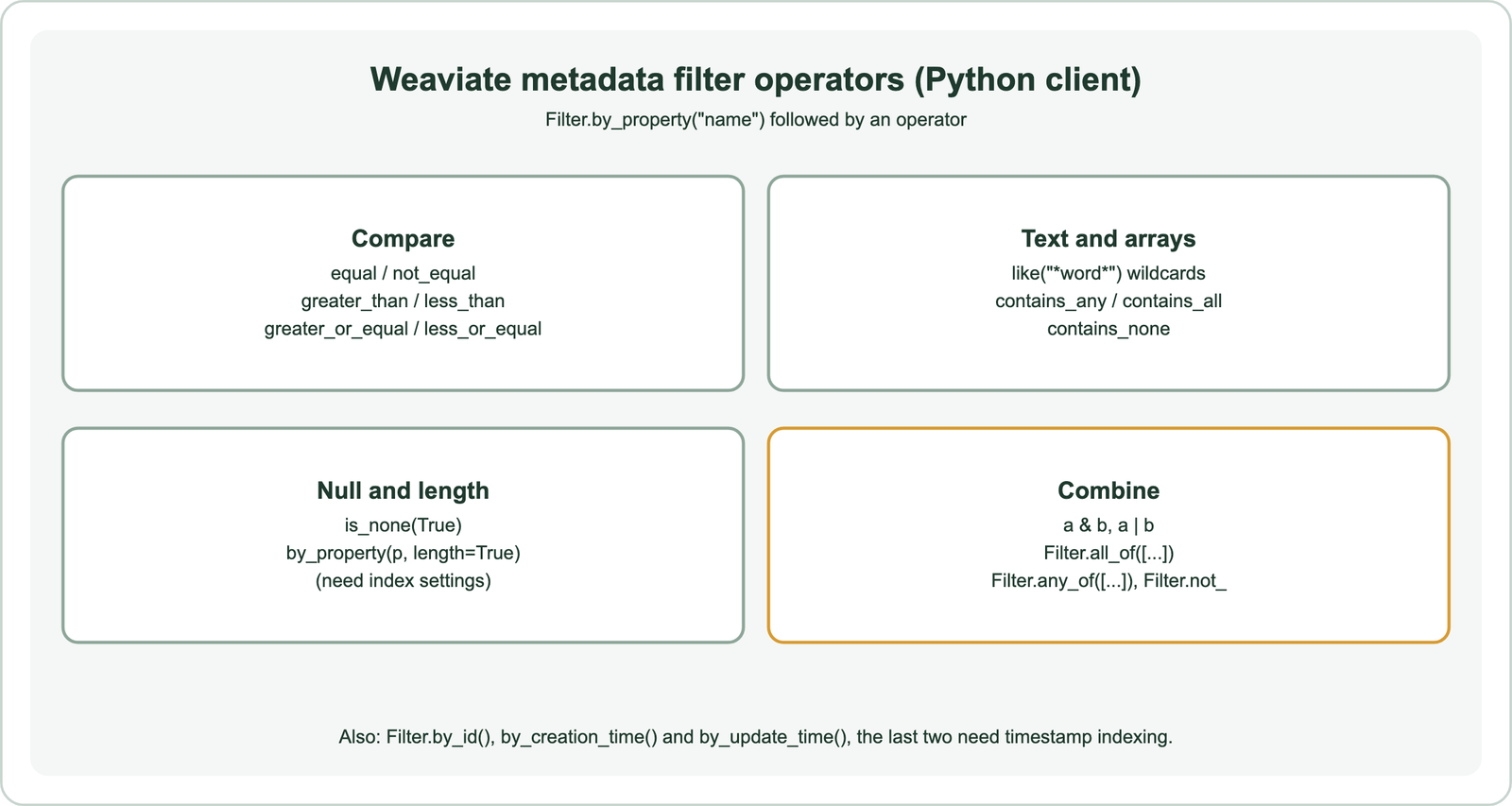
from weaviate.classes.query import Filter

response = articles.query.near_vector(
    near_vector=query_vector,
    limit=5,
    filters=Filter.by_property("category").equal("account")
            & Filter.by_property("year").greater_or_equal(2025),
)
Text equality follows the property’s tokenization, so with the default word tokenization a match ignores case and punctuation. Use field tokenization for exact values such as IDs. Filters on null state or property length need those indexes switched on in the collection’s inverted index settings. Filtering creation or update times needs timestamp indexing.
Weaviate applies filters during the vector search rather than after it, so a filtered query still returns the requested number of results when enough objects match. Very restrictive filters switch to a flat scan of the matching objects. Metadata filtering and pre-filtering vs post-filtering explain the mechanics.
How do you add hybrid search with filters?
You add hybrid search by calling hybrid with the query text, a query vector when you bring your own vectors, an alpha weight and optional filters. Weaviate runs BM25 and vector search and fuses the two rankings.
response = articles.query.hybrid(
    query="CSV invoices",
    vector=model.encode("CSV invoices", normalize_embeddings=True).tolist(),
    alpha=0.5,
    limit=5,
    filters=Filter.by_property("category").equal("billing"),
    return_metadata=MetadataQuery(score=True),
)
Alpha sets the balance: 0 is pure BM25, 1 is pure vector search, and values between blend them. Set it explicitly rather than relying on a default, and tune it on your own queries. Hybrid search keeps exact terms such as product codes and error strings at the top while vector search handles paraphrases. How hybrid search works covers the fusion methods.
How do you let Weaviate create the embeddings?
You let Weaviate create the embeddings by configuring a vectorizer integration on the collection, after which imports need no vectors and queries can use near_text with plain text. The model provider is chosen in the collection definition.
articles = client.collections.create(
    name="ArticleAuto",
    vector_config=Configure.Vectors.text2vec_weaviate(
        source_properties=["title", "body"],
    ),
    properties=[Property(name="title", data_type=DataType.TEXT),
                Property(name="body", data_type=DataType.TEXT)],
)
response = articles.query.near_text(query="how do I get my money back", limit=5)
This example uses Weaviate Embeddings, a hosted service available on Weaviate Cloud. Other integrations call providers such as OpenAI, Cohere, Google or Hugging Face, usually with an API key passed in request headers. Self-hosted deployments can run local models through the Transformers integration. Choosing a model is covered in choosing an embedding model.
How do you control how many results a query returns?
You control how many results a query returns with a fixed limit, a maximum distance, or autocut, which stops the list where the scores jump. Each suits a different interface.
A fixed limit suits a results page of known size. A distance cap drops matches that are too far away, which helps a chatbot avoid passing weak context to a language model. Distance values depend on the model, so set the cap from real queries rather than a general rule. Autocut, set with auto_limit, groups results by sudden jumps in score and returns that many groups. A setting of 1 keeps only the leading group of close matches.
response = articles.query.near_vector(
    near_vector=query_vector,
    distance=0.7,      # drop anything farther than this
    auto_limit=1,      # keep the first group of close results
    return_metadata=MetadataQuery(distance=True),
)
Return distances or scores during development and inspect them for a sample of queries. Patterns in the numbers show whether a query has a clear answer, several near ties or nothing relevant. Relevance scores explains what the numbers can and cannot tell you.
How do you update and delete objects?
You update objects with data.update, which changes the given properties of one object by its UUID, and delete them with data.delete_by_id or data.delete_many with a filter. Content changes must reach the index for search to stay accurate.
When the text of a document changes, update its properties and supply a new vector if you bring your own; a vectorizer re-embeds changed text automatically. When only metadata changes, such as a year or a category, the vector can stay. Bulk deletion with a filter removes, for example, every article older than a given year in one call. Weaviate’s data methods follow the same filter syntax as queries.
articles.data.update(uuid=obj_uuid, properties={"year": 2026})
articles.data.delete_many(where=Filter.by_property("year").less_than(2024))
Keep a source of truth outside the search index, such as the CMS or database the documents come from. Sync changes from it on a schedule or through events, so the index can always be rebuilt. Freshness requirements are covered in real-time indexing and index freshness.
What should you add before going to production?
Before production, add evaluation on real queries, compression and index settings sized for your data, replication for availability, and a plan for re-embedding. Each is easy to add early and hard to retrofit.
Build a small test set of real queries with judged results and measure recall and nDCG before and after each change. Turn on quantization to cut memory, choose shard counts for expected growth, and set a replication factor if downtime matters. Use collection aliases so a future model change can switch collections without code changes, as described in migrating to a new vector database.
Weaviate is one of several options. Choosing a vector database for semantic search compares Weaviate with Pinecone, Qdrant, Milvus, Chroma and Redis. Besides Weaviate, search-engine routes include Elasticsearch and OpenSearch, and SQL users can start with Postgres and pgvector. Framework users can follow LangChain and LlamaIndex, and document pipelines are in semantic search over documents and PDFs.
Semantic search with Weaviate takes three steps: create a collection, import documents with vectors, and query with near_vector or near_text. Bring your own vectors for full model control, or configure a vectorizer so Weaviate embeds data and queries for you. Add metadata filters with the Filter class to any query, and use hybrid search with an explicit alpha to combine BM25 and vector ranking. Before production, measure on real queries, size compression and shards, and use aliases so the model can change later.