Home / Hybrid search / When Should You Use Hybrid Search?
Decision guideWhen Should You Use Hybrid Search?
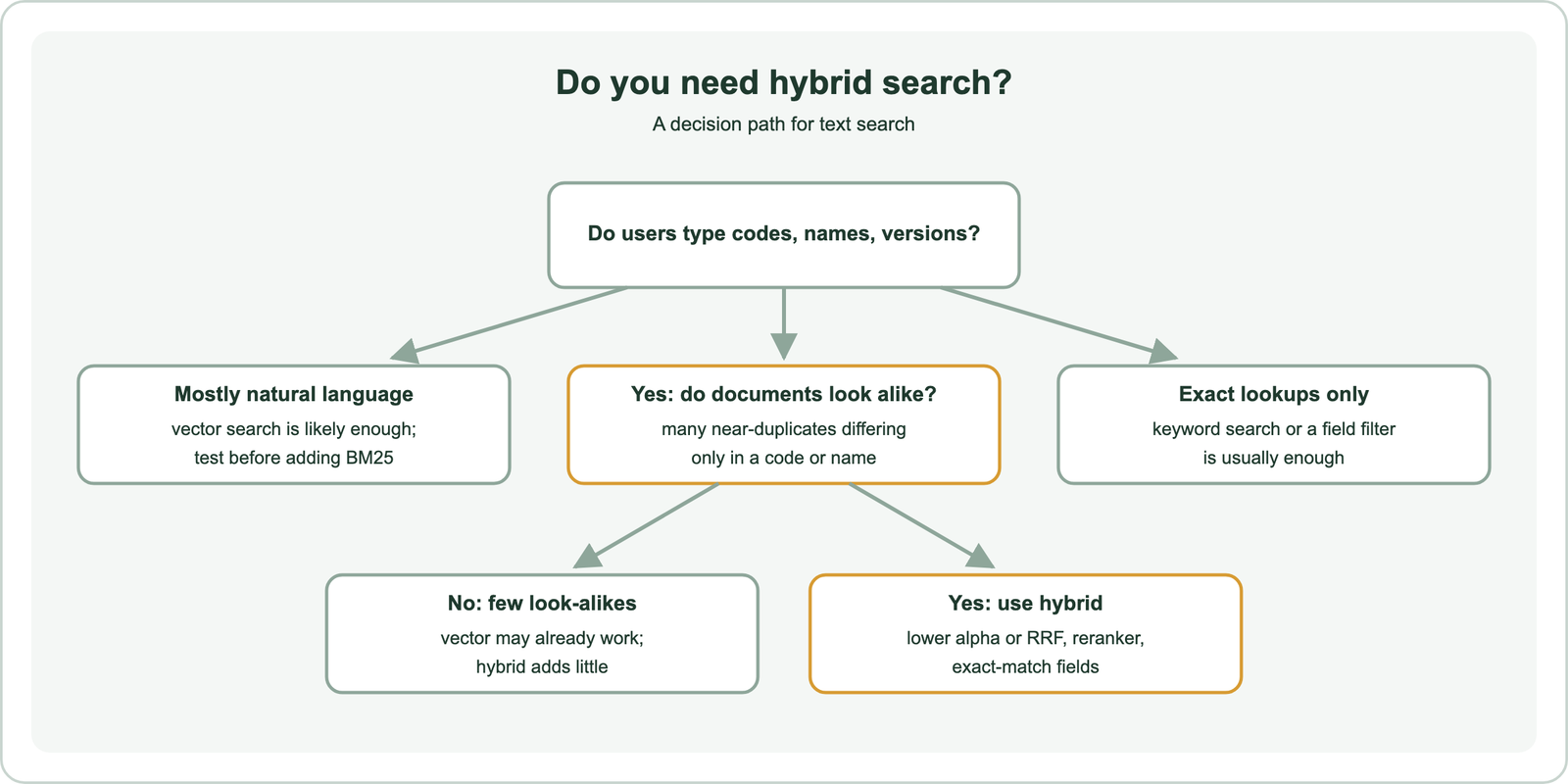
You should use hybrid search when users type exact identifiers, names, or jargon and your documents contain many look-alikes that differ only in those terms. In that case the keyword side finds what embeddings blur together. You can usually skip it when queries are natural language and documents are distinct. It is also optional when an embedding model is fine-tuned on your domain, or when all lookups are exact and a filter would do. Hybrid search costs a second search and a weight to tune. Across five test corpora on this site, the share of near-duplicate documents predicted the gain better than the share of queries containing codes. A support corpus where 62 percent of queries had identifiers gained nothing; a catalog of near-identical error pages gained a lot.
When to use hybrid search in four facts
- Hybrid search pays off when identifiers matter and documents look alike; either condition alone is weaker.
- Weaviate Academy recommends starting with hybrid for user-typed, unpredictable queries such as ecommerce search.
- Keyword search alone suits exact-citation tasks like legal search; vector search alone suits recommendations with no query text.
- On Home Depot product data, BM25 beat vector search, and hybrid retrieval with reranking beat both, per Qdrant’s benchmark.
When should you use hybrid search?
You should use hybrid search when your queries mix natural language with exact terms, and when your collection contains documents that only an exact term can tell apart. Those two conditions together are where vector search alone fails.
Hybrid search runs a BM25 keyword search and a vector search on the same query and fuses the results. What is hybrid search covers the basics, and how hybrid search works explains the fusion step. The question here is narrower: when is that second search worth its cost?
Weaviate Academy’s selection framework gives a starting point. Natural-language descriptions suit vector or hybrid search. Exact names, titles, and IDs suit keyword or hybrid. Mixed or unpredictable user-typed queries suit hybrid. For most user-facing search applications, the course recommends starting with hybrid search for its resilience to different query types, typos, and intent.
That default is sensible, but defaults are not free. The sections that follow show where hybrid search clearly helps, where it adds cost for nothing, and a quick way to tell which case you are in before you build anything.
What are the advantages of hybrid search?
The advantages of hybrid search are exact-match precision on names and codes, semantic recall on paraphrases, tolerance of typos and vocabulary gaps, and robustness when you cannot predict how users will phrase queries. Each comes from one of the two searches covering the other’s weakness.
- Exact matches: BM25 rewards rare terms such as product codes, error strings, and proper names that embeddings blur.
- Meaning matches: vector search finds “jumpers” for “sweatshirts” and answers questions phrased in the user’s own words.
- Typo tolerance: Weaviate Academy notes that hybrid inherits typo tolerance from its vector component.
- Coverage: hybrid returns more results than keyword search alone, which can return only one or none.
- Out-of-domain safety: when an embedding model meets vocabulary it was not trained on, BM25 still matches the words.
Weaviate’s hybrid search explainer adds that hybrid search reduces the need for perfectly phrased queries. It handles ambiguous phrases, domain terms, and misspellings while still honoring exact matches for critical keywords. Weaviate’s own example is “How to catch an Alaskan Pollock”. The vector side reads “catch” as fishing, and the keyword side pins the exact species name.
The out-of-domain point carries the most weight in practice. OpenSearch’s BEIR benchmark found a dense model alone averaged 3.52 percent lower than BM25 on nDCG@10, while the dense model combined with BM25 averaged 6.7 percent above it. Hybrid search versus vector search covers that benchmark in detail.
What are the drawbacks of hybrid search?
The drawbacks of hybrid search are extra query cost, an extra parameter to tune, scores that are harder to explain, and the risk that a badly weighted keyword side pushes good semantic results down. None is severe, but all are real.
Cost comes first. Weaviate’s search documentation lists hybrid search as costing both a vector search and an inverted index lookup, plus fusion. Weaviate Academy names “slower and higher load” as hybrid’s one disadvantage, and Weaviate’s web developer guide notes the performance cost for high-throughput applications. Weaviate runs both searches in parallel, which hides part of the latency.
Tuning is the larger risk. On this site’s 36-passage support test, an equal-weight hybrid at alpha 0.5 lost three of seven paraphrased questions that vector search had answered correctly. BM25 matched incidental words and pulled wrong passages up. Weaviate’s server default alpha of 0.75 avoided that loss, but on a catalog of near-identical error codes the same default left half the codes outside first place.
Fused scores are also harder to explain than a single similarity or BM25 score. Weaviate offers an explain_score option that shows each side’s contribution, which helps when debugging. Balancing keyword and vector scores covers how to tune the weight.
Which query and data patterns does hybrid search work best on?
The patterns hybrid search works best on are identifiers inside natural language, near-identical catalog items, unfamiliar domain jargon, and mixed traffic. In mixed traffic, some users type codes and others describe needs. Look for them in your query logs.
| Pattern | Example | Why vector search alone struggles |
|---|---|---|
| Codes in a question | “what does ERR-4012 mean” | Embeddings treat similar codes as near-identical |
| Templated look-alike documents | Hundreds of error pages, release notes, or SKUs | Vectors of look-alikes crowd each other out |
| Rare proper names | Team names, product names, people | Unseen names carry little meaning to the model |
| Domain jargon | Medication names, legal citations | General models miss specialized terms |
| Mixed traffic | Some shoppers type SKUs, others describe needs | No single method handles both well |
Weaviate’s advanced RAG article gives the medical case: medication names, anatomical terms, disease names, and diagnoses behave like keywords rather than concepts, and pure vector search might miss them. Anthropic’s contextual retrieval post gives the support case, an error code like TS-999 that an embedding model may not match exactly.
This site’s tests show the look-alike effect most clearly. On 300 error-message passages that differed only in their code, vector search ranked the right passage first for 15 of 40 codes, and BM25 for all 40. In a 315-chunk knowledge base padded with look-alike release notes and codes, vector search lost two answers entirely from its top 20. Hybrid search for RAG describes that run.
When does hybrid search add cost for nothing?
Hybrid search adds cost for nothing when queries are natural language, documents are distinct from each other, and the embedding model already handles the domain well. In those cases the keyword side mostly adds noise.
Weaviate’s web developer guide states the two cases plainly. With a model fine-tuned for your data, pure vector search might be good enough. If you are mostly matching patterns that rely on exact keywords, keyword search will probably be good enough. Hybrid search is for everything in between.
This site’s tests found several no-gain cases. On a 36-passage support corpus, vector search and the best hybrid both scored 22 of 24 first-place answers. On a 48-chunk knowledge base, vector search already put every answer chunk in the top 3. On a 40-product catalog, vector and default hybrid tied at 21 of 30: hybrid gained one brand query and lost one price query.
Some cases need neither hybrid nor vector search. Weaviate Academy’s scenarios recommend keyword search alone for legal citation lookup, where exact terms and transparency matter most. They recommend vector search alone for content recommendation, where there is no query text to match. Exact lookups by ID are best served by a filter, not a search.
How can you tell in advance whether hybrid search will help?
You can tell in advance whether hybrid search will help by measuring two cheap signals: how many of your documents have a near-duplicate, and how many of your queries contain identifiers. In our tests, the first signal mattered more.
We computed both signals for five corpora from this site’s earlier tests and compared them with the hybrid gain each test had measured. Look-alike density was the share of documents whose most similar other document had a cosine similarity above 0.9, using all-MiniLM-L6-v2. Identifier rate was the share of queries containing a token with a digit, a hyphenated code, or an underscore key.
| Corpus | Documents | Docs with a look-alike above 0.9 | Queries with identifiers | Measured hybrid gain |
|---|---|---|---|---|
| Support corpus | 36 | 0% | 62% | None |
| Product catalog | 40 | 0% | 40% | Mixed, net zero |
| RAG knowledge base | 48 | 0% | 29% | None |
| RAG knowledge base with look-alikes | 315 | 74% | 29% | Large |
| Error-code catalog | 300 | 99% | 100% | Large |
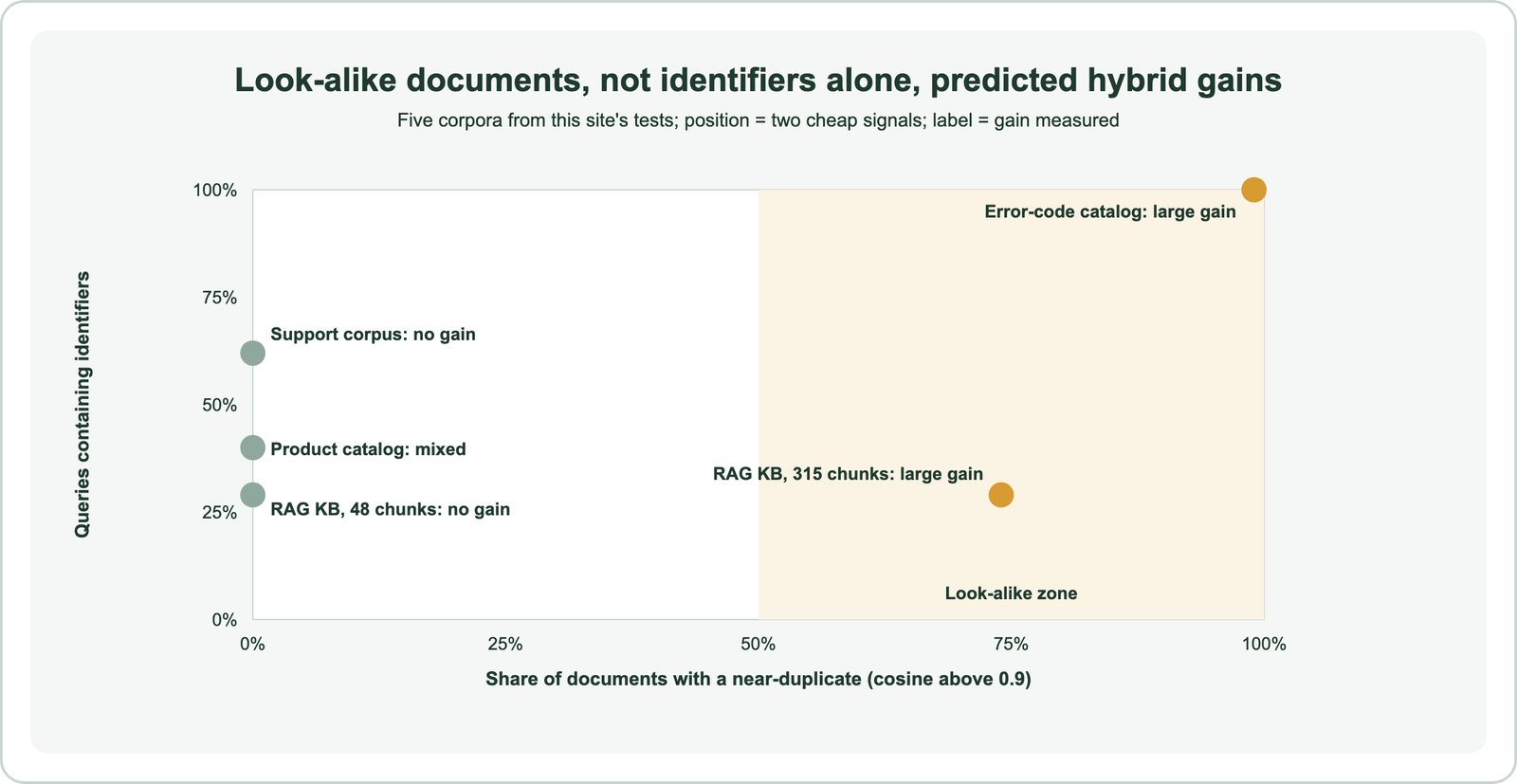
The support corpus is the telling case. Most of its queries contained identifiers, yet hybrid added nothing, because each code appeared in only one passage and the embedding could tell them apart. The same 24 questions over the same 48 chunks gained nothing, but gained a lot once 267 look-alike chunks were added. Identifiers matter when there are look-alikes to confuse them with.
Five corpora are a small sample, and the 0.9 cutoff is a judgment call, so treat this as a quick screen rather than a rule. It takes minutes to compute: embed your documents, find each one’s nearest neighbor, and scan your query log for codes.
What do benchmarks say about when hybrid search helps?
Benchmarks say hybrid search helps most on out-of-domain data and keyword-heavy queries, helps less where semantic matching already works, and helps most of all when combined with reranking. The dataset decides the size of the gain.
Qdrant’s benchmark compared vector search with all-MiniLM-L6-v2, BM25, and a hybrid that gathered candidates from both and reranked them with a cross-encoder. On the Home Depot product dataset, BM25 alone beat vector search alone, and the reranked hybrid beat both. On Wayfair’s WANDS dataset, which suited semantic search better, the reranked hybrid still improved results.
The same benchmark showed why both retrievers are needed. In the reranked hybrid on Home Depot, vector search supplied about 56 percent of the relevant items and BM25 about 59 percent; the numbers overlap because some items came from both. On WANDS, vector search supplied about 48 percent and BM25 about 67 percent. Neither retriever alone found everything the combination did.
Anthropic’s contextual retrieval study points the same way for RAG: adding BM25 to contextual embeddings cut top-20 retrieval failures from 3.7 to 2.9 percent, and reranking cut them to 1.9 percent. Weaviate uses hybrid search with reciprocal rank fusion as the baseline in its own Search Mode benchmarks. Score fusion methods compares the ways results are combined.
Which applications use hybrid search most?
Applications that use hybrid search most include product search, customer support, enterprise document search, academic search, job matching, and RAG over technical documentation. Each mixes exact terms with descriptive language.
Weaviate’s search concepts page lists examples: academic paper search, job matching that combines skill keywords with job descriptions, recipe search by ingredients and overall dish, and customer support using exact terms and conceptual similarity. Its Academy scenario for ecommerce product search recommends hybrid with property boosts so exact SKU matches rank high.
Enterprise search fits too, because internal documents are full of project codes, acronyms, and names. Hybrid search for enterprise search covers that case. For RAG over technical docs, the keyword side catches error codes and config keys in questions, as hybrid search for RAG shows.
Applications that rarely need it include recommendations based on an item rather than a query, image or audio search where there is no text to match, and lookups by exact ID. Multilingual search leans on the vector side, since BM25 cannot match across languages.
What is an example of a hybrid search engine?
Examples of hybrid search engines include Weaviate, Elasticsearch, OpenSearch, and MongoDB Atlas, each able to run keyword and vector search in one query and fuse the results. PostgreSQL can do it with extensions.
In Weaviate, one hybrid query runs both searches with an alpha weight and a fusion type. Elasticsearch pairs a BM25 query with a kNN query and can fuse them with reciprocal rank fusion. OpenSearch uses a hybrid query with a normalization processor. PostgreSQL combines full-text search with the pgvector extension, as hybrid search in SQL databases shows.
A concrete example query is Weaviate’s “black canine” over animal descriptions. Keyword search matches “black” in “black bear” and “small domestic black cat”. Vector search matches “brown dog”, which shares the meaning of “canine” but not the word. Hybrid search returns all three. Databases that support hybrid search compares engines, and hybrid search on distributed databases covers scale-out setups.
What is the difference between semantic search and hybrid search?
The difference between semantic search and hybrid search is that semantic search matches meaning, usually with vector search alone, while hybrid search adds keyword matching and fuses both rankings. Hybrid search is semantic search with an exact-match layer.
Choosing between them depends on your traffic and your data. If your traffic is conversational and your documents are distinct, semantic search alone is often enough. If users type codes and your documents look alike, the exact-match layer earns its keep.
Weaviate’s blog describes semantic search as the user experience and vector search as the mechanism. Hybrid search changes the mechanism, not the goal: results should still match intent, with exact terms respected.
What is BM25 in hybrid search?
BM25 in hybrid search is the keyword-ranking function that scores documents by how often the query’s terms appear, weighted by how rare each term is and adjusted for document length. It supplies the exact-match half.
Weaviate uses BM25F, a variant that scores several properties with separate weights, so a match in a title can count more than one in a body. Its default parameters are k1 of 1.2 and b of 0.75. Rare terms, such as an error code that appears in one document, receive the highest weight, which is why BM25 finds identifiers so reliably.
Tokenization decides what BM25 can match. Weaviate’s default word tokenization splits on every non-alphanumeric character, so ERR-4012 becomes “err” and “4012”. Fields such as SKUs can use field tokenization so the whole code is one token. The BM25 algorithm explains the scoring formula.
What can you try instead of hybrid search?
Instead of hybrid search, you can route exact lookups to a filter, fine-tune the embedding model, add a reranker, or rewrite queries, depending on which failure you are fixing. Sometimes a narrower fix is cheaper.
- Exact-lookup routing: if identifier queries are bare codes, detect the pattern and filter on the field directly, skipping ranking.
- Fine-tuning: a model trained on your domain learns its vocabulary; fine-tuning embedding models covers how.
- Reranking: a cross-encoder reorders candidates more precisely, but cannot add ones the first stage missed; see reranking in RAG.
- Query rewriting: expand vague or conversational queries before search; see query rewriting.
These options combine well with hybrid search too. A common production setup routes bare codes to a filter, sends everything else to hybrid retrieval, and reranks the top candidates. That keeps hybrid search for the queries that actually need both signals.
The order of fixes matters. Start with the cheapest change that addresses the failure you measured. If bare codes fail, a pattern check and a field filter cost almost nothing. If paraphrases fail, the embedding model is the problem, and hybrid search will not fix it. If the right result is retrieved but ranked too low, a reranker is the better tool. Hybrid search is the right fix when exact terms are missed among look-alike documents.
How do you add hybrid search without breaking what works?
You add hybrid search safely by measuring your current search on labeled queries, then testing hybrid settings on the same queries, and switching only when no query type gets worse. Weaviate makes the comparison easy because both run on one collection.
import weaviate

client = weaviate.connect_to_local()
docs = client.collections.use("Doc")

def compare(query, k=10):
    vector = docs.query.near_text(query=query, limit=k)
    hybrid_default = docs.query.hybrid(query=query, alpha=0.75, limit=k)
    hybrid_keyword = docs.query.hybrid(query=query, alpha=0.4, limit=k)
    return [[str(o.uuid) for o in r.objects] for r in (vector, hybrid_default, hybrid_keyword)]

# Run compare() over labeled queries, tagged by type, and score hit@1 and recall@k per type.
client.close()
Tag each labeled query by type, such as identifier, paraphrase, or mixed, and compare per type. A hybrid setting that raises the overall score while lowering paraphrase accuracy may still be the wrong choice for a chat assistant. The hybrid search tutorial walks through setup, and relative score fusion, reciprocal rank fusion, and score normalization explain the tuning choices.
Use hybrid search when exact terms matter and your documents look alike: codes, names, versions, and jargon among many near-duplicates. Skip it, or test before adding it, when queries are conversational, documents are distinct, or a fine-tuned model already covers your domain. This site’s five test corpora pointed to a quick screen: check how many documents have a near-duplicate before assuming identifier queries will benefit. When hybrid is warranted, set alpha explicitly, consider rank fusion, and rerank the top candidates.