Home / Use cases / Semantic Product Search for Ecommerce
ExplainerSemantic Product Search for Ecommerce
Semantic product search matches a shopper’s query to products by meaning, using embeddings, so vague requests like “something to keep my coffee hot on the drive to work” find a travel mug. Keyword search misses those queries because the words do not overlap. But semantic search is weak where ecommerce needs precision: SKUs, model numbers, prices, and “not” conditions. A working product search therefore combines semantic retrieval with exact matching and filters. In this site’s 40-product test, vector search found the right product first for 6 of 6 vague queries against 3 for keyword search. It still ranked an excluded product first for 5 of 6 negation queries.
Semantic product search in four facts
- Embeddings match intent (“can’t sleep” finds a sunrise alarm clock) where keywords find nothing.
- SKUs and model numbers need an exact path: a field-tokenized property, a filter, or hybrid search.
- Prices and sizes belong in structured filters; vector search does not understand “under $30”.
- Amazon’s KDD 2019 semantic product search model raised MAP by 14.5 percent over its baselines.
What is semantic product search?
Semantic product search is ecommerce search that ranks products by how closely their meaning matches the shopper’s query, rather than by shared keywords. An embedding model turns the query and each product’s text into vectors, and the store returns the products whose vectors sit closest.
The idea is simple to state. A shopper typing “jumpers” should see sweatshirts, and Weaviate’s own example makes exactly that point: the contextual meaning matches although the keywords do not. A shopper typing “gift for someone who can’t sleep” should see a weighted blanket, blackout curtains, and a sunrise alarm clock, none of which contain the word “sleep” in their titles.
Product search is a harder setting than document search. Product text is short and structured: a title, a brand, a SKU, a price, and a few lines of description. Queries are short too, often two or three words. What is semantic search covers the general idea; a catalog changes the details.
Why does keyword search fail shoppers?
Keyword search fails shoppers when they describe a need in their own words instead of the catalog’s words, because it can only return products that contain the query terms. Shoppers rarely know the catalog’s vocabulary.
Amazon’s search team documented the gap at scale. Their KDD 2019 paper, Semantic Product Search, by Nigam and colleagues, trained a neural model on purchase logs to go beyond lexical matching. It reported at least a 4.7 percent gain in Recall@100 and a 14.5 percent gain in mean average precision over baseline methods. The paper also confirmed the gains in online A/B tests.
The paper’s design choices show what product search needs. Its loss function separated three kinds of examples: random negatives, products shown but not bought, and purchased products. It also used word n-grams and hashing for unseen tokens, since catalogs are full of brand names and model codes a vocabulary has never seen. Pure semantic matching, in other words, was never the whole answer.
How does semantic search perform on a product catalog?
Semantic search performed best on vague, intent-style queries and worst on negations in our catalog test, with exact SKUs and prices in between. We built a small catalog to see the pattern query type by query type.
The catalog had 40 products across kitchen, outdoor, audio, fitness, sleep, cycling, and pet categories, each with a title, brand, SKU, price, and description. We wrote 30 queries in five types, six each, and marked which products counted as acceptable. Keyword search used BM25 with Weaviate’s default k1 of 1.2 and b of 0.75. Vector search used the open all-MiniLM-L6-v2 model.
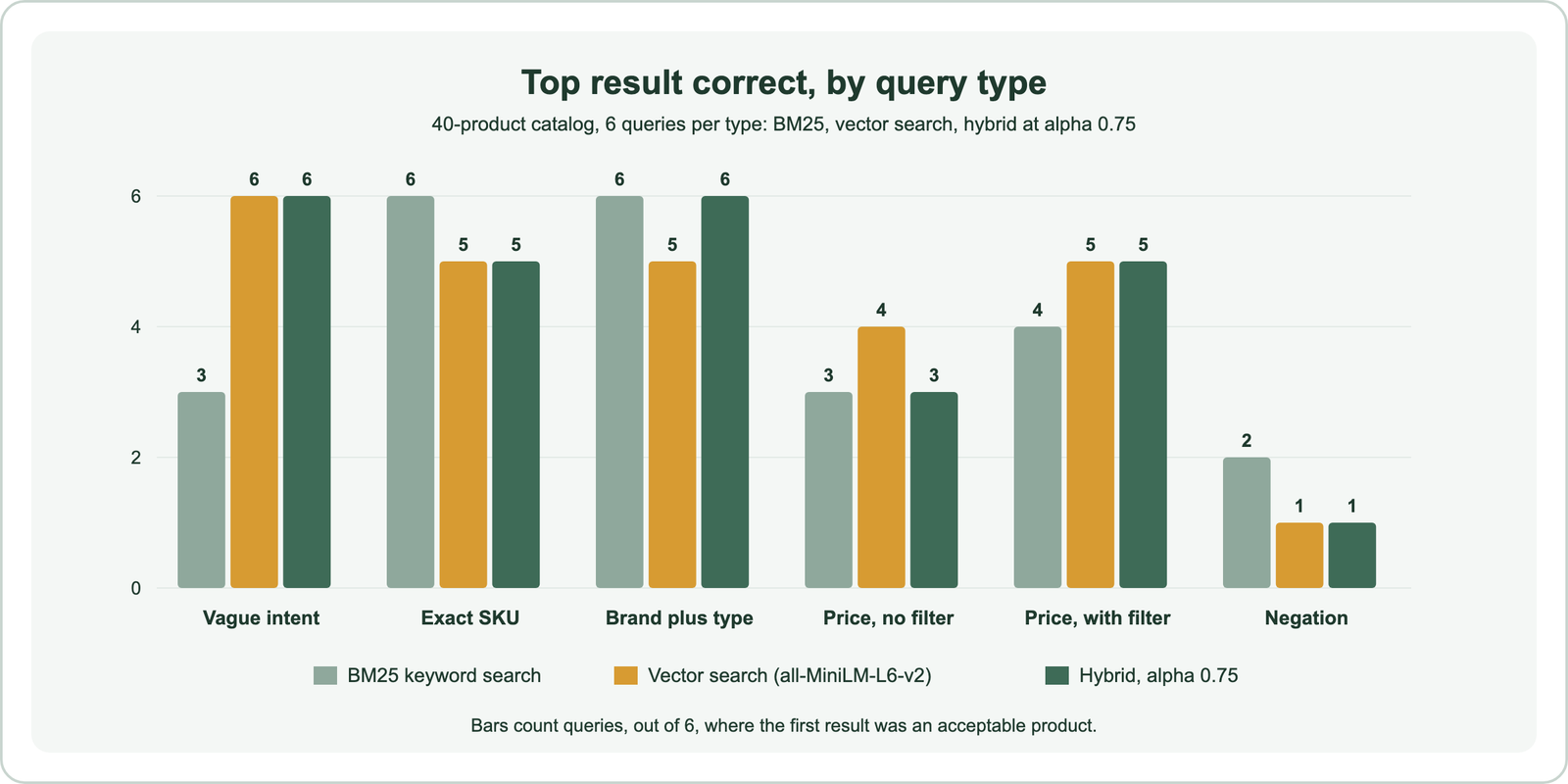
Vector search put an acceptable product first for all six vague queries, such as “help my old dog’s sore joints”, which found the orthopedic dog bed. BM25 managed three, and for “gift for someone who can’t sleep” it returned nothing at all. Hybrid search at Weaviate’s default alpha of 0.75 matched vector search on vague queries and recovered one brand query that vector search missed.
The test is small and hand-written, so read it as a map of failure modes rather than a benchmark. Each weak spot it found has a standard fix, and those fixes shape the rest of a product search design.
How do you keep SKU and brand matches exact?
You keep SKU and brand matches exact by storing identifiers in properties with exact-match tokenization and giving them a keyword path, through hybrid search, a boost, or a direct filter. Embeddings alone do not guarantee it.
In our test, vector search missed the travel mug’s SKU, TQ-1601, entirely: its top three were earbuds, earphones, and a bike lock. BM25 found every SKU first. Hybrid search at alpha 0.75 still missed TQ-1601, because the vector side’s wrong answers outweighed the keyword match. At alpha 0.4, hybrid search found all six.
Tokenization caused a subtler failure. Weaviate’s default word tokenization splits TQ-1601 into “tq” and “1601”. The brand’s water bottle, TQ-1000, also contains “tq”. Reciprocal rank fusion, which rewards appearing in both result lists, put that sibling product first. Weaviate Academy’s schema guidance avoids this by storing SKUs as text with field tokenization, so the whole code is one token.
Weaviate Academy’s ecommerce scenario recommends hybrid search with property boosts, such as sku^3 and name^2, so exact matches rank high. A further step is routing: if a query matches your SKU pattern, filter on the SKU field directly and skip ranking. Hybrid search versus vector search shows the same identifier problem on a larger set of codes.
Why do price and attribute constraints need filters?
Price and attribute constraints need filters because an embedding captures what a product is, not whether it costs under a stated amount. Numbers in a query are mostly noise to both vector and keyword search.
We ran six budget queries, such as “waterproof jacket under $100”, with and without a structured price filter. Without the filter, 10 of the 18 top-three results from vector search were over the stated budget. BM25 fared no better, at 9 of 18, and made a telling error. For “fitness gear under $30” it ranked noise-cancelling headphones first, because their description mentions a “30 hour battery”.
With the price filter applied, every result was in budget by construction, and vector search’s hit@1 rose from 4 to 5 of 6. The fix is to extract constraints from the query and apply them as filters. Weaviate’s Query Agent does this in Search Mode: for “vintage shoes under $70”, it runs a semantic search for vintage shoes and applies a filter for prices under 70. Vector databases with metadata filtering explains how filtering interacts with the vector index.
Does semantic search understand “not” queries?
Semantic search does not reliably understand “not” queries, because an embedding of “boots not made of leather” sits close to leather boots. Negation is one of its clearest blind spots.
In five of our six negation queries, vector search ranked the excluded product first. “Hiking boots not made of leather” returned the leather boots before the vegan pair. “Mug that is not insulated” returned the insulated travel mug. “Jacket that is not down” returned the down puffer. Hybrid search did no better, and BM25 got two right partly by chance.
Negations are better handled as filters or attributes. Store material, insulation, and similar facets as structured properties, and let a query parser or a language model turn “not leather” into a filter. A cross-encoder reranker reads the query and product together, so it can sometimes catch negation that a bi-encoder misses. Bi-encoder versus cross-encoder explains the difference.
How does a semantic product search pipeline work?
A semantic product search pipeline works by parsing the query, retrieving candidates with hybrid search under structured filters, reranking them, and applying business rules before display. Each stage covers a weakness of the one before.
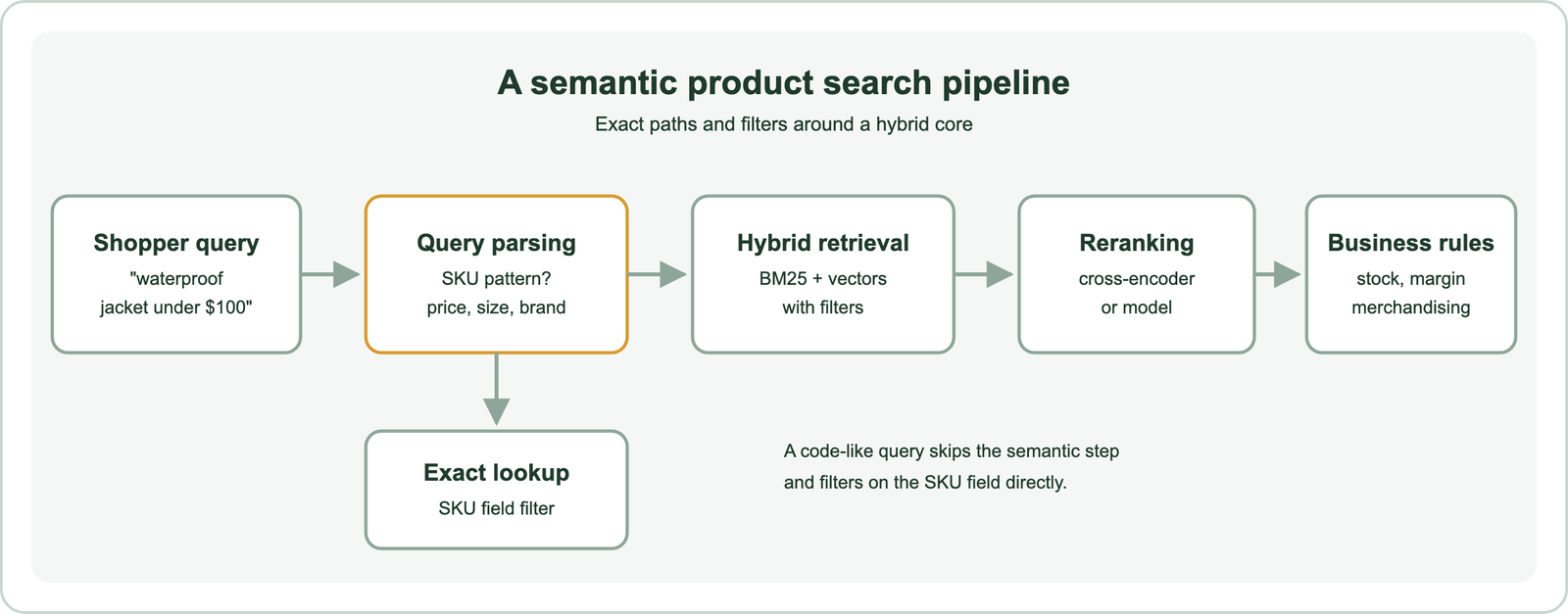
Weaviate Academy’s ecommerce pattern describes the storage side. It suggests one Products collection for cross-category search, so “bathroom accessory” can find a Bluetooth speaker as well as a soap tray. Brand, category, price, and availability are denormalized onto each product for fast filtering. And each product carries several named vectors: one for the description, one for categories, and a multimodal one for image similarity.
The ranking side follows a two-stage pattern. Hybrid retrieval gathers a broad candidate set quickly, and a reranker reorders the top results more carefully. Stock levels, margins, and merchandising rules then adjust the final order, so an out-of-stock item does not lead. Semantic search architecture describes the general pipeline.
What is maximum inner product search?
Maximum inner product search (MIPS) is the problem of finding the stored vectors with the largest dot product against a query vector, which is how many retrieval and recommendation models score products. It is vector search with the dot product as the score.
Many two-tower retrieval models score a query and a product by the dot product of their embeddings, so serving them means solving MIPS over the catalog. When all vectors are normalized to length 1, the dot product equals cosine similarity. MIPS then becomes ordinary nearest neighbor search.
Weaviate supports both. Its dot distance returns the negative dot product, so smaller still means more similar, and its default cosine distance normalizes vectors and uses the dot product internally for speed. Weaviate’s documentation advises using the metric the embedding model was trained with. Similarity search compares the metrics.
How does RAG work for ecommerce product search?
RAG for ecommerce product search retrieves matching products with semantic or hybrid search, then passes them to a language model that answers the shopper’s question or compares the options. Retrieval quality still decides the answer.
A shopper might ask “which of your jackets works for hiking in the rain?” The search layer retrieves candidate jackets with filters applied, and the language model writes a short comparison grounded in their descriptions. A Weaviate tutorial built with Databricks shows the pattern: a generative query over retrieved products that explains why each one fits the request.
The same weaknesses carry over. If retrieval ignores a price limit or returns the leather boots for a “not leather” request, the model will describe the wrong products convincingly. Apply filters before generation, and evaluate retrieval on its own. Semantic search in RAG covers the general pattern.
Which database works best for ecommerce search?
The database that works best for ecommerce search is one that supports hybrid search, fast structured filtering, and frequent updates to price and stock in the same system. No single product suits every catalog.
Product data changes constantly: prices, stock, and promotions update daily or faster. A search database needs to update those fields without rebuilding its vector index. It must filter on them inside the vector search rather than after it, which can otherwise empty the result list. Weaviate, which stores objects, vectors, and an inverted index together, fits this pattern. Weaviate aside, options include OpenSearch, Elasticsearch, and PostgreSQL with pgvector.
Scale matters too. Weaviate Academy’s ecommerce pattern assumes catalogs from 1 million to over 1 billion products and recommends vector quantization to control memory costs. Choosing a vector database for semantic search walks through the selection questions.
How do you build semantic product search in Weaviate?
You build semantic product search in Weaviate by defining a product collection with a vectorizer, storing SKUs with field tokenization, and querying with hybrid search plus filters. The same collection serves vague and exact queries.
import re
import weaviate
from weaviate.classes.config import Configure, Property, DataType, Tokenization
from weaviate.classes.query import Filter

client = weaviate.connect_to_local()
client.collections.create(
    "Product",
    vector_config=Configure.Vectors.text2vec_openai(source_properties=["title", "description"]),
    properties=[
        Property(name="title", data_type=DataType.TEXT),
        Property(name="description", data_type=DataType.TEXT),
        Property(name="brand", data_type=DataType.TEXT, tokenization=Tokenization.LOWERCASE),
        Property(name="sku", data_type=DataType.TEXT, tokenization=Tokenization.FIELD),
        Property(name="price", data_type=DataType.NUMBER),
    ],
)
products = client.collections.use("Product")

def search(query, max_price=None):
    if re.fullmatch(r"[A-Z]{2}-[A-Z0-9]+", query.strip()):      # SKU pattern: exact lookup
        return products.query.fetch_objects(filters=Filter.by_property("sku").equal(query.strip()))
    price = Filter.by_property("price").less_or_equal(max_price) if max_price else None
    return products.query.hybrid(query=query, alpha=0.6, filters=price, limit=10,
                                 query_properties=["title^2", "description", "brand"])

print(search("waterproof jacket", max_price=100).objects)
client.close()
The SKU check routes code-like queries to an exact filter, and the price filter applies inside the search. The alpha of 0.6 is a starting point, not a recommendation: tune it on a labeled sample of your own queries. Balancing keyword and vector scores covers that tuning.
How do you measure product search quality?
You measure product search quality offline with labeled queries and ranking metrics, then online with A/B tests on clicks, add-to-cart, and purchases. Amazon’s paper used both.
Offline, sample real queries from search logs, label acceptable products, and compute hit@1, mean reciprocal rank, and recall at the depth the page shows. Break results down by query type, as in our test, so a strong average does not hide failing SKU or negation queries.
Online, purchases are the strongest signal but also the sparsest. Amazon’s loss function treated products that were shown but not bought differently from purchased ones for that reason. How to evaluate semantic search covers test-set design.
Semantic product search earns its place on the queries keyword search cannot handle: vague needs, synonyms, and descriptions in the shopper’s own words. In our 40-product test it found the right item first for every vague query, while keyword search managed half. The same test showed where it fails: SKUs, prices, and negations. The design that works pairs embeddings with exact SKU lookup, structured filters, hybrid ranking, and reranking, measured on your own query logs.