Home / Build it / Semantic Search With Milvus: A Step-by-Step Tutorial
TutorialSemantic Search With Milvus: A Step-by-Step Tutorial
To build semantic search with Milvus, define a collection schema with a text field and a vector field, create a vector index, insert documents with their embeddings, and query with the search method. Metadata filters are written as boolean expressions, such as category == “billing”. For hybrid search, Milvus can compute a sparse BM25 vector from the text field through a built-in function. A hybrid_search call then fuses the dense and sparse results with a reciprocal rank fusion or weighted ranker. The pymilvus MilvusClient API covers all of this. Milvus Lite runs the same code against a local file, which makes it easy to try before deploying a server or a managed service. Each example runs end to end on Milvus Lite with pymilvus. For teams comparing options, each Weaviate concept is mapped to its Milvus equivalent.
Semantic search with Milvus in four facts
- A Milvus collection is defined by a schema of typed fields, including one or more vector fields.
- Milvus Lite stores a collection in a local file and uses the same MilvusClient API as a server.
- A BM25 function turns a text field into a sparse vector, enabling keyword search inside Milvus.
- hybrid_search combines dense and sparse searches with RRFRanker or WeightedRanker.
What do you need to build semantic search with Milvus?
To build semantic search with Milvus you need a Milvus instance or Milvus Lite, the pymilvus client, an embedding model and documents to index. Milvus Lite needs no server.
Milvus is an open-source vector database. It can run as Milvus Lite inside a Python process for development, as a standalone server or cluster, or as a managed cloud service. Install the client with pip install "pymilvus[milvus_lite]", plus an embedding library such as sentence-transformers if you will embed text yourself. Semantic search with Python covers embeddings without a database.
Plan the data first: which text gets embedded, which fields are filtered, and whether you need keyword search alongside vectors. Long documents should be chunked before indexing, as described in semantic search over documents and PDFs. Search index schema design covers field choices that apply to any database.
What are the steps to build semantic search on Milvus?
The steps to build semantic search on Milvus are defining a schema, adding a BM25 function if you want keyword search, creating indexes, inserting rows and searching. Each step maps to one or two client calls.
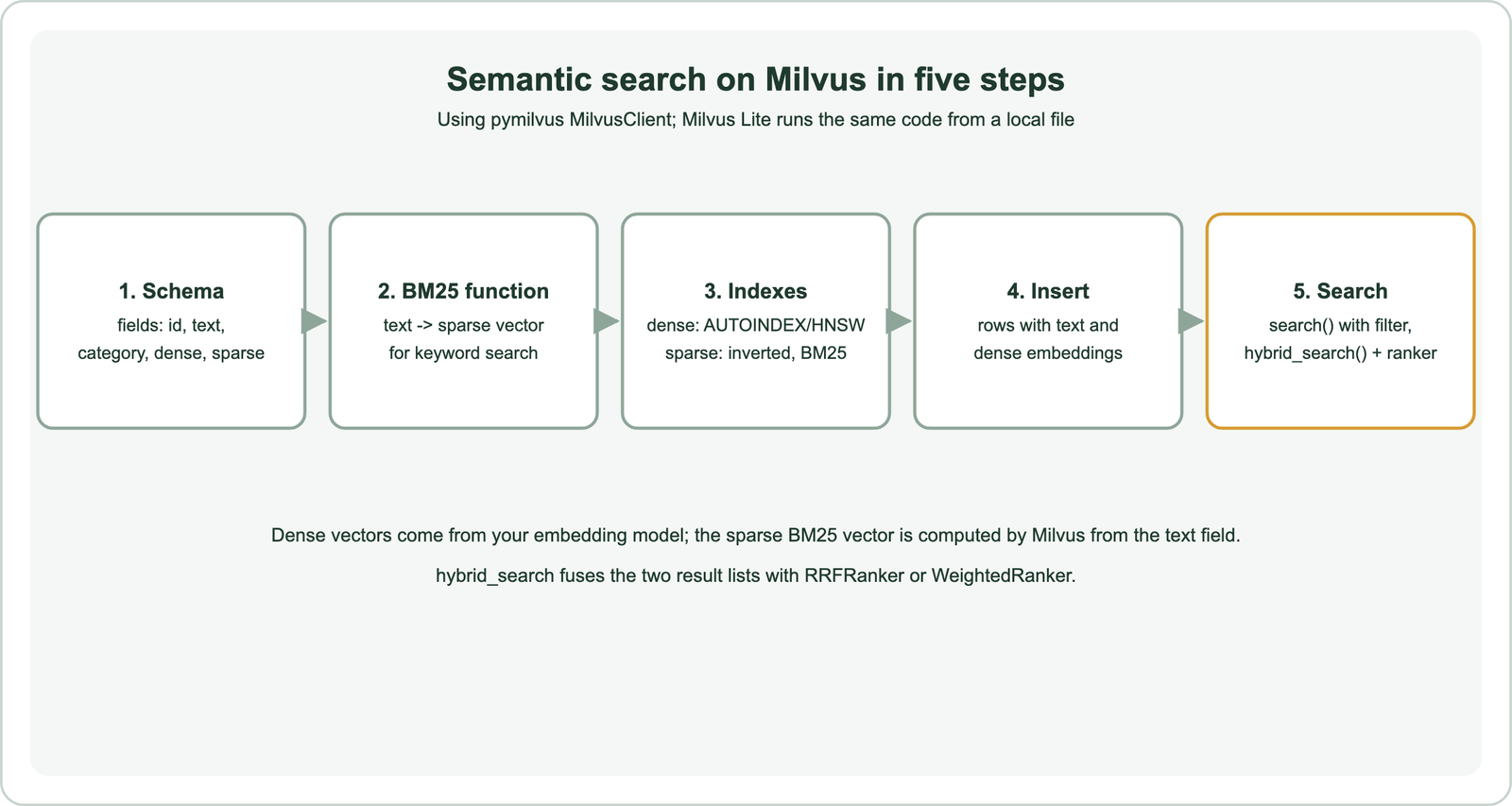
The schema declares each field’s type: an integer primary key, a VARCHAR for text, VARCHARs or numbers for metadata, a FLOAT_VECTOR with the embedding dimension, and optionally a SPARSE_FLOAT_VECTOR for BM25. Indexes are created per vector field. AUTOINDEX lets Milvus choose, and explicit types such as HNSW or IVF variants give more control.
Embeddings for the dense field come from your model. The sparse BM25 field is filled by Milvus from the text, so you insert only text, metadata and the dense vector. That keeps keyword and vector search in one collection.
How do you create a Milvus collection for semantic search?
You create a Milvus collection for semantic search by building a schema, attaching a BM25 function, preparing index parameters and calling create_collection. It runs unchanged on Milvus Lite.
from pymilvus import MilvusClient, DataType, Function, FunctionType

client = MilvusClient("./milvus_demo.db")      # Milvus Lite; use a URI for a server
schema = client.create_schema(auto_id=True)
schema.add_field("id", DataType.INT64, is_primary=True)
schema.add_field("text", DataType.VARCHAR, max_length=2000, enable_analyzer=True)
schema.add_field("category", DataType.VARCHAR, max_length=50)
schema.add_field("dense", DataType.FLOAT_VECTOR, dim=384)
schema.add_field("sparse", DataType.SPARSE_FLOAT_VECTOR)
schema.add_function(Function(name="bm25", function_type=FunctionType.BM25,
                             input_field_names=["text"], output_field_names=["sparse"]))

index = client.prepare_index_params()
index.add_index(field_name="dense", index_type="AUTOINDEX", metric_type="COSINE")
index.add_index(field_name="sparse", index_type="SPARSE_INVERTED_INDEX", metric_type="BM25")
client.create_collection("articles", schema=schema, index_params=index)
The dimension must match your embedding model; all-MiniLM-L6-v2 produces 384 numbers. Setting enable_analyzer=True on the text field lets the BM25 function tokenize it. Choose the metric your model was trained with, as covered in cosine vs dot product vs Euclidean distance.
Milvus serves searches only from collections loaded into memory. Creating a collection with index parameters loads it straight away, but after a restart or a release you must call load_collection before searching. Field types and the primary key are fixed once the collection exists, so settle the schema before importing large volumes. If you expect to filter often on a field, give it an appropriate type rather than storing it inside free text.
How do you run semantic search and filters on Milvus?
You run semantic search on Milvus by inserting rows with embeddings, then calling search with a query vector, the vector field name and an optional filter expression. Filters use a string syntax.
from sentence_transformers import SentenceTransformer
model = SentenceTransformer("all-MiniLM-L6-v2")

rows = [{"text": t, "category": c, "dense": model.encode(t).tolist()} for t, c in docs]
client.insert("articles", rows)

results = client.search(
    "articles",
    data=[model.encode("get my money back").tolist()],
    anns_field="dense",
    filter='category == "billing"',
    limit=5,
    output_fields=["text", "category"],
)
Each result includes the matched entity and its distance, so you can show scores during development and log them in production. Filter expressions support comparisons, IN lists and boolean combinations, and are applied during the vector search, so filtered queries still return up to the requested limit when enough rows match. Metadata filtering explains the general mechanics.
How do you add hybrid search on Milvus?
You add hybrid search on Milvus by sending one dense search request and one sparse BM25 request to hybrid_search, with a ranker that fuses their results. RRFRanker uses ranks; WeightedRanker uses weighted scores.
from pymilvus import AnnSearchRequest, RRFRanker

query = "refund within 30 days"
requests = [
    AnnSearchRequest(data=[model.encode(query).tolist()], anns_field="dense",
                     param={"metric_type": "COSINE"}, limit=20),
    AnnSearchRequest(data=[query], anns_field="sparse",
                     param={"metric_type": "BM25"}, limit=20),
]
hits = client.hybrid_search("articles", reqs=requests, ranker=RRFRanker(60),
                            limit=5, output_fields=["text"])
The sparse request takes raw query text, because Milvus applies the same BM25 function to it. RRFRanker takes the RRF constant, here 60. WeightedRanker takes one weight per request, similar to an alpha setting. Fetch more candidates per request than the final limit so fusion has room to work. Tune the ranker on judged queries, because the best balance between keyword and vector results depends on how often users search for exact names and codes. How hybrid search works compares fusion methods.
How do you choose a Milvus index type?
You choose a Milvus index type by weighing recall, query speed, memory and build time for your collection size, starting with AUTOINDEX or HNSW and changing only when measurements justify it. Each family makes a different trade.
HNSW builds a graph that gives fast, high-recall queries at the cost of memory and build time, the same family Weaviate uses by default. IVF indexes cluster vectors and search only nearby clusters, which saves memory, and variants that compress vectors save more at some cost in recall. DiskANN keeps most of the index on disk for collections too large for memory. A flat index compares every vector and gives exact results for small sets or ground-truth tests.
Test candidates on your own vectors. Measure recall against exact search and latency at your expected load, then pick the cheapest setting that meets both targets. Approximate nearest neighbor search explains the algorithms, and exact vs approximate search covers when exact search is enough.
How do you update and delete data in Milvus?
You update data in Milvus with upsert, which inserts or replaces rows by primary key, and delete rows with delete, either by ID or by a filter expression. Re-embed changed text before upserting.
When a document changes, compute its new embedding and upsert the row with the same primary key. When documents are removed from the source, delete them with a filter such as category == "archived" or by their IDs. Use your own stable IDs rather than auto-generated ones if you need to update rows later, because the source system can then find the matching row. A common choice is the document ID from the CMS or database the content comes from, combined with a chunk number for long documents. Keeping the index in step with the source is covered in real-time indexing and index freshness.
How does Milvus compare with Weaviate for semantic search?
Weaviate and Milvus cover the same core features, vector search, keyword search, filters and hybrid fusion, with different APIs, defaults and configuration styles. The concepts map closely.
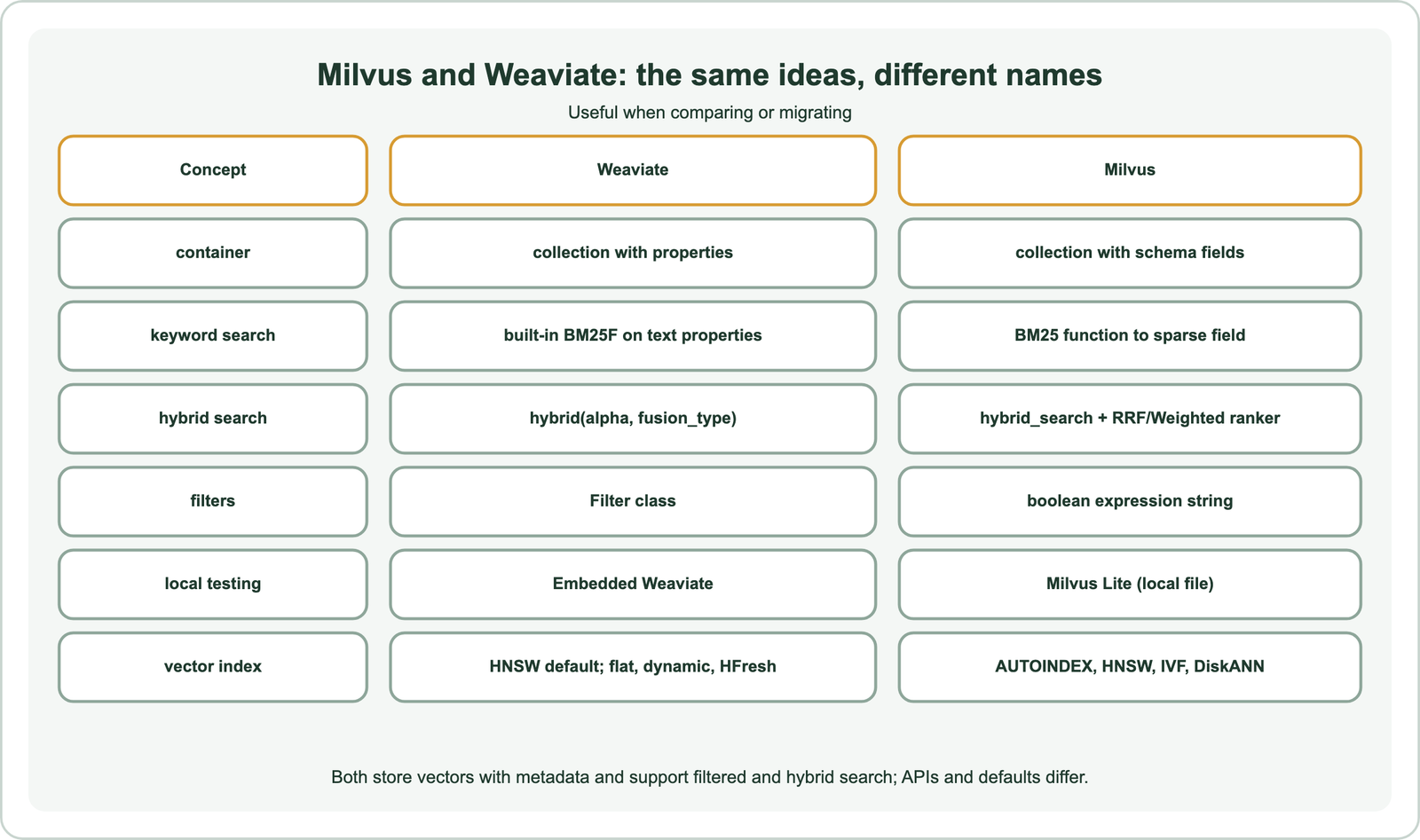
In Weaviate, keyword search works on any text property without extra setup, hybrid search is one call with an alpha weight, and vectorizer integrations can embed data for you. In Milvus, you declare a BM25 function and sparse field, build separate search requests and pick a ranker. Weaviate defaults to HNSW and adds flat, dynamic and HFresh options, while Milvus offers a wide menu of index types.
Both run locally for testing, as Embedded Weaviate or Milvus Lite, and both offer managed services. Choose by fit with your team and requirements, tested on your own data, as described in choosing a vector database for semantic search. Semantic search with Weaviate shows the same tutorial on Weaviate.
What should you check before running Milvus in production?
Before running Milvus in production, check index choice and parameters against recall and latency targets, memory sizing, deployment mode, and how you will evaluate and migrate. Milvus Lite is for development, not production scale.
Measure recall against exact search for your index settings, as covered in ANN recall, and size memory for vectors plus index overhead. Decide between a self-managed cluster and a managed service, and plan backups and upgrades for whichever you choose; managed vs self-hosted search covers the trade. Build a test set of real queries and judge results before launch. Run it again after every change to the model, index or ranker, so regressions show up before users notice them.
If you may switch databases later, keep stable IDs and the raw text, so data can move, as described in migrating to a new vector database. Besides Weaviate, other databases have similar guides: Pinecone, Qdrant, Chroma, Redis, Elasticsearch, OpenSearch and Postgres with pgvector. Framework users can connect Milvus through LangChain and LlamaIndex, and the full project is in how to build semantic search.
Semantic search on Milvus takes five steps: define a schema with text and vector fields, add a BM25 function for keyword search, create indexes, insert rows with embeddings, and search. Filters are boolean expression strings, and hybrid_search fuses dense and sparse results with RRFRanker or WeightedRanker. Milvus Lite runs the same code from a local file for development. Weaviate and Milvus share the same core ideas with different APIs: Weaviate builds in BM25 and one-call hybrid search, while Milvus composes them from fields, functions and rankers.