Home / Semantic Search Examples: 12 Real Queries Compared With Keyword Search
ExplainerSemantic Search Examples: 12 Real Queries Compared With Keyword Search
A semantic search example is any query that finds the right result by meaning when the words differ. The query I forgot my login and now I'm locked out finding a page titled Steps to unlock your account is one. Keyword search needs shared words, so it misses that match. Semantic search compares meaning through embeddings, so it finds it. To show where the difference matters, 12 queries of different types were run against the same 16 short documents, once with BM25 keyword search and once with a small open embedding model. Semantic search put the right document first for all 12. Keyword search did so for 6, found nothing for 4, and ranked the right answer low for 2. Exact codes and part numbers worked both ways. The pattern holds in real systems: semantic search wins on paraphrase and description, and keyword matching still matters for identifiers.
Semantic search examples in four facts
- Semantic search finds results by meaning even when the query and the document share no words.
- In a 12-query test, semantic search ranked the right document first every time, and BM25 did so 6 times.
- Paraphrases, symptom descriptions, and natural questions gained the most from semantic search.
- Exact codes and part numbers matched with both methods, which is why hybrid search keeps keywords.
What is an example of semantic search?
An example of semantic search is a query that describes a need in its own words and still finds the document that meets it. The query “how do I stop paying every month” finds a page titled “Cancel your plan at any time from the billing settings page,” even though neither “cancel” nor “plan” appears in the query.
Weaviate’s explanation of vector embeddings gives a food example. A keyword or synonym search for wine for seafood will not find a wine described as good with fish. A meaning-based search should, because fish relates to seafood and “good with” means “for.” Another Weaviate example makes the same point. A vector search for seafood pasta returns a lobster linguine recipe, while keyword search only returns recipes that contain those exact words.
These examples work because an embedding model places related meanings near each other. The query and the document become vectors, and the search returns the closest ones. The what is semantic search guide explains the idea, and how semantic search works follows the pipeline.
Single examples show the idea but not its limits. A side-by-side test across different query types shows both.
How do semantic and keyword search compare on 12 example queries?
On 12 example queries, semantic search ranked the right document first for all 12, while BM25 keyword search did so for 6. The test is small and illustrative, but it shows clearly which query types each method handles.
The setup was simple. Sixteen short documents covered unrelated topics, from account unlocking to pet care. Each query had one intended answer. Keyword search used BM25 with Weaviate’s default settings, k1 of 1.2 and b of 0.75. Semantic search used the open all-MiniLM-L6-v2 embedding model with cosine similarity. The rank column shows where the right document landed; “none” means BM25 found no shared words at all.
| Query type | Query | Keyword (BM25) | Semantic |
|---|---|---|---|
| Paraphrase | I forgot my login and now I’m locked out | None | 1 |
| Synonym | money back guarantee for returns | 7 | 1 |
| Descriptive need | jacket that keeps me dry on a rainy bike ride | None | 1 |
| Symptom | my notebook gets really hot when gaming | None | 1 |
| Natural question | how do I stop paying every month | None | 1 |
| Conceptual | meatless meals for busy weeknights | 4 | 1 |
| Related concept | can’t fall asleep at night | 1 | 1 |
| Typo | intenational shiping fees | 1 | 1 |
| Ambiguous word | python feeding | 1 | 1 |
| Error code | ERR_CONN_RESET | 1 | 1 |
| Part number | BT-4410 | 1 | 1 |
| Plain keywords | router password | 1 | 1 |
The table splits cleanly into two groups. The first six rows depend on meaning, and keyword search failed or struggled on all of them. The last six share at least one exact word with the right document, and both methods found it.
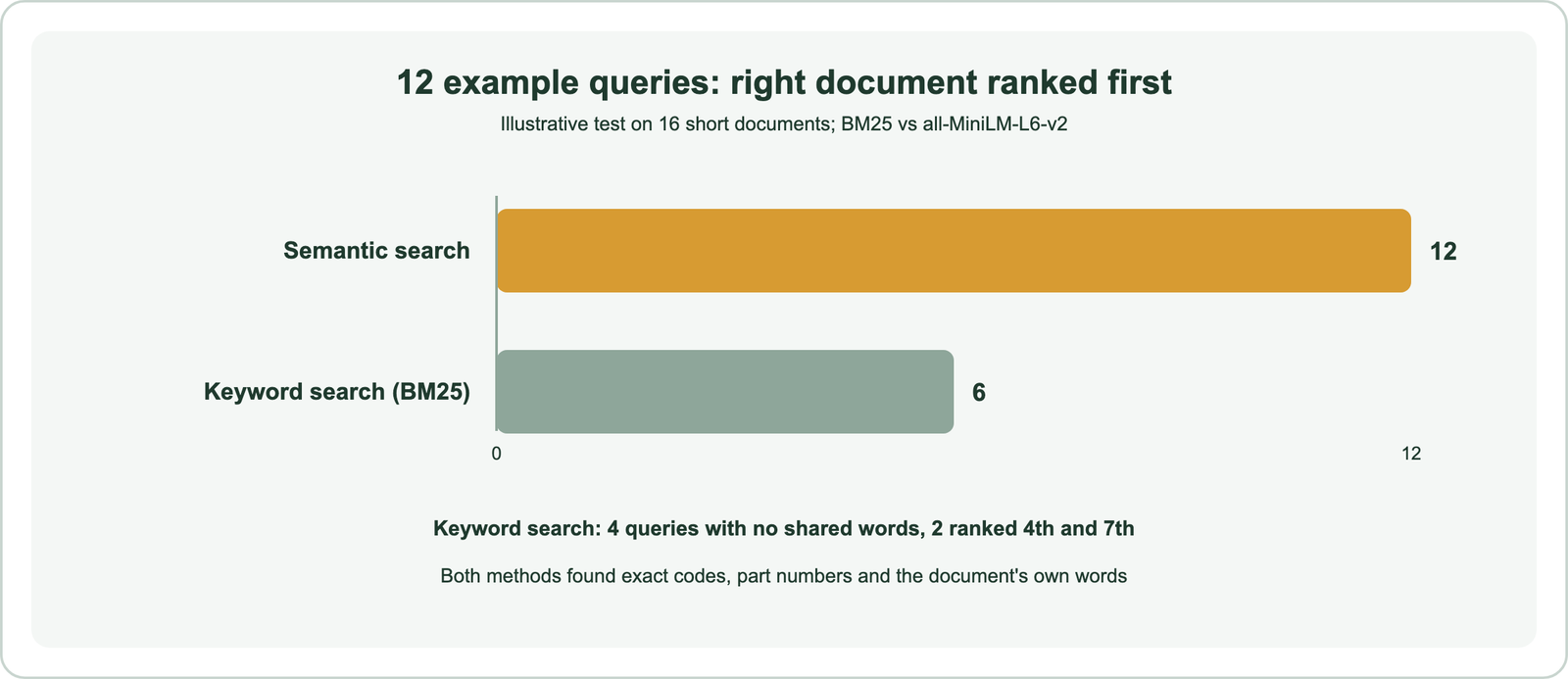
A caution keeps the result honest. With only 16 very different documents, the right answer has few close rivals, which makes semantic search look stronger than it would on a large, crowded collection. The value of the test is the pattern by query type, not the score.
Which queries does semantic search handle better?
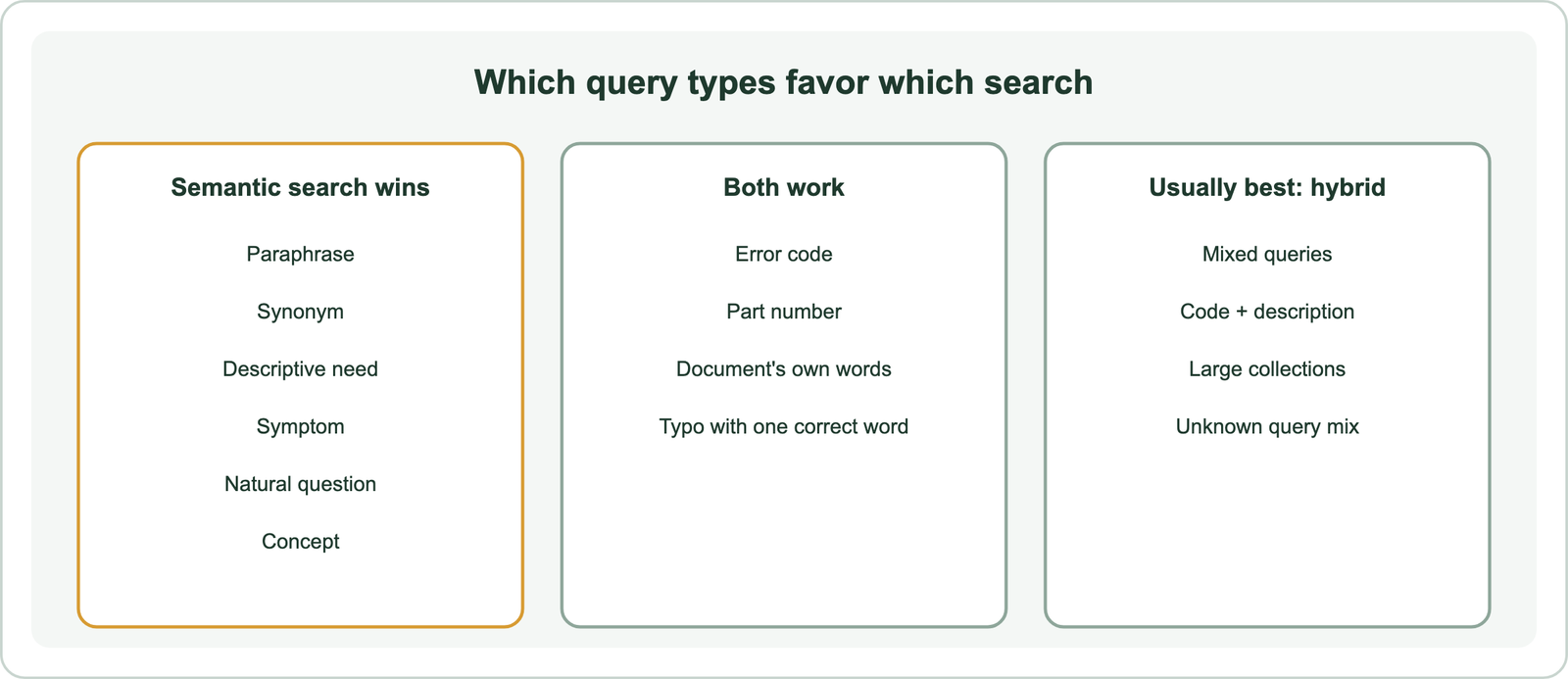
Semantic search handles paraphrases, synonyms, descriptions of needs, symptoms, natural questions, and concepts better, because these queries carry meaning in different words from the answer. In the test, these six types produced every keyword miss.
Paraphrase is the clearest case. “I forgot my login and now I’m locked out” and “steps to unlock your account after too many failed sign-in attempts” describe the same problem. They share no meaningful words, so BM25 returned nothing. The embedding model scored the pair at a cosine similarity of 0.622 and ranked it first.
Descriptions of needs behave the same way. A shopper asking for a jacket that keeps me dry on a rainy bike ride wants a waterproof insulated parka for cold, wet weather and daily commuting. Symptoms map to fixes the same way. The query my notebook gets really hot when gaming found the laptop cooling tips, even though notebook and laptop are different words.
Synonyms and concepts show partial overlap. “Money back guarantee for returns” shares only the word “for” with the refund policy, so BM25 ranked it seventh. “Meatless meals for busy weeknights” ranked fourth under BM25 and first under semantic search, which connects “meatless” with “vegetarian.” Synonyms and related terms explains why. Keyword search still has strengths.
Which queries does keyword search already handle well?
Keyword search already handles exact identifiers, error codes, part numbers, and queries that use the document’s own words. In the test, both methods found the right answer for all six of these.
The error code “ERR_CONN_RESET” and the part number “BT-4410” each appeared in exactly one document, so BM25 found them at once. The query “router password” used the document’s own vocabulary. Even the typo query “intenational shiping fees” worked for BM25, because the word “fees” was spelled correctly and matched.
Semantic search also found these, but that result does not generalize well. In a large collection with many similar codes, an embedding can blur “BT-4410” into nearby part numbers that look alike. Weaviate’s search guide recommends keyword search for names, codes, error strings, and any term that must appear literally, and hybrid search as a good default for text.
That is the practical lesson of the second half of the table. Keyword evidence costs little and protects exact matches. Semantic versus keyword search covers the trade-off in depth, and hybrid search shows how to combine the two. One query type sat between the groups.
How does semantic search handle ambiguous words?
Semantic search handles ambiguous words by using the rest of the query as context, so “python feeding” points to snake care rather than programming. The other words decide which meaning wins.
The test collection held both meanings. One document explained Python list comprehensions, and another covered ball python care, including feeding schedules. Both methods ranked the pet-care page first for “python feeding.” BM25 got there because “feeding” appeared only in that document. Semantic search got there because the whole query sits closer in meaning to animal care.
The difference shows when the helpful word is missing. A query like “python care tips” shares “python” with both documents and “care” with the pet page, so BM25 still has a clue. A query phrased as “what does my python eat” has fewer literal clues, and embedding models carry more of the load.
Ambiguity has limits for both methods. A one-word query such as “python” gives no context to use. Systems handle that with intent detection or by showing results for several meanings, as query understanding explains. Real products face the same trade-offs at a much larger scale.
What are real-world examples of semantic search?
Real-world examples of semantic search include web search engines interpreting natural queries, shops matching descriptions to products, support sites matching symptoms to fixes, and AI assistants retrieving evidence. Each applies the same idea to a different collection.
Web search provides the best-documented example. Google’s 2019 BERT announcement described the query “2019 brazil traveler to usa need a visa,” where the word “to” changes the meaning. Earlier systems treated it as noise. Google Cloud’s guide adds simpler cases: a search for running shoes can return related terms, and “trail maps” on a national park site should use the park’s context.
Other examples come from specific collections:
- Ecommerce: a shopper’s description of a need finds products with different catalog wording.
- Customer support: a described symptom finds the help article or past ticket that fixes it.
- Enterprise documents: staff find policies, contracts, or bid documents by meaning across large archives.
- RAG assistants: a question retrieves passages that a language model uses to write an answer.
Searching across bid content, for example, lets a team find past proposals that answered a similar requirement, even when the wording changed. Semantic search use cases covers each of these in depth. The idea behind all of them can be put very simply.
Can you explain semantic search in a simple way?
Semantic search, put simply, finds what you mean instead of only what you typed. It works like a knowledgeable librarian who understands that a request for “books about saving money” should include a title on “personal budgeting.”
Behind the scenes, a model reads every document and turns it into a list of numbers that captures its meaning. It does the same with your question. Documents whose numbers sit close to your question’s numbers are treated as similar in meaning and shown first. That list of numbers is called an embedding, and the guide to embeddings explains them.
Keyword search is the older approach. It looks for documents that contain your exact words. It is fast and reliable for names and codes, but it misses answers phrased differently. Most modern systems use both.
The underlying algorithms are covered in retrieval models explained, and the related terms in semantic versus vector search and similarity search. Two familiar products raise the most common questions.
Does Google or ChatGPT use semantic search?
Google uses semantic techniques in its search, and ChatGPT-related tools can use semantic search, but neither is a single pure semantic search engine. Both combine meaning with other signals.
Google introduced its Knowledge Graph in 2012 to understand entities, described as “things, not strings.” In 2019 it said BERT helped it understand one in 10 English searches in the US. Google still uses many other ranking signals, so semantic understanding is one part of its system, not all of it. The semantic search engine guide covers this in more depth.
For ChatGPT, the verifiable example is narrower. OpenAI’s API documentation describes a File Search tool that retrieves from uploaded files using semantic and keyword search. That confirms one tool uses semantic retrieval. It does not establish that every ChatGPT answer runs through the same search.
Both cases show the same design choice as the test: meaning plus keywords, not meaning alone. The last step is checking how semantic search performs on your own content.
How can you test semantic search on your own queries?
You can test semantic search on your own queries by running the same set of real queries through keyword search and semantic search, then checking where the right answer ranks in each. The method behind the 12-query comparison works at any size.
A small test needs four steps:
- Collect 20 to 50 real queries from search logs or support tickets.
- Mark the right document for each query.
- Run each query through BM25, semantic search, and hybrid search.
- Compare where the right document ranks, grouped by query type.
Grouping by type matters more than the overall score. A collection full of product codes will favor keyword search. A collection full of how-to questions will favor semantic search. Most mix both, which is why hybrid search usually wins. Weaviate’s evaluation course notes that even a small, representative set can give meaningful results.
The evaluation guide turns this into a repeatable method, and the build guide shows how to set up keyword, semantic, and hybrid search in one system to compare them.
Semantic search examples share one feature: the query and the right answer use different words for the same meaning. Across 12 test queries, semantic search ranked the right document first every time, while keyword search did so for half, failing on paraphrases, symptoms, descriptions, and natural questions. Exact codes, part numbers, and the document’s own words worked both ways. The decision is to use semantic search where people describe what they need, keep keyword matching for identifiers, and test both on your own queries before trusting either.