Home / Use cases / Semantic Search Use Cases: Where It Pays Off
Semantic Search Use Cases: Where It Pays Off
Semantic search use cases are search and discovery tasks where meaning, context, or similarity must bridge a gap between how people ask and how content is written. The pattern pays off in product discovery, workplace knowledge, support, legal and research material, code, recommendations, retrieval for AI answers, and image or video search. In each case, a person describes a need in their own words and the right item uses different words, or no words at all. Semantic retrieval does not replace everything else. Exact identifiers still need keyword matching, hard business rules still need filters, and mixed queries usually need hybrid search. The useful question is which part of a task needs meaning, which part needs literal evidence, and how the result will be measured.
Semantic search use cases in four facts
- Semantic retrieval fits tasks where query wording differs from content wording or the data is not text.
- Hybrid retrieval protects names, codes, and error strings that must match literally.
- Filters enforce hard constraints such as price, date, and permissions instead of ranking them.
- A nearest result always exists, so success must be measured on judged queries rather than assumed.
Where does semantic search pay off compared with keyword search?
Semantic search pays off compared with keyword search when relevant items express the right concept in different words. Weaviate’s search guide states the rule plainly. Vector search fits when query wording and data wording differ, or when the data is not text. Keyword search fits names, codes, error strings, and terms that must appear literally. Hybrid search is a good default for text that must handle both.
Five signals suggest a task will benefit:
- Vocabulary mismatch: users and authors describe the same thing with different terms.
- Natural-language intent: queries read as goals or problems rather than product names.
- Ambiguity: short queries need context to separate their possible meanings.
- Similarity or discovery: the user wants items like a known example.
- Cross-modal input: a text query must find images, or an image must find related items.
Each signal points to a gap that literal matching cannot close. An illustrative shop query such as warm jacket for a rainy commute may need a product described as a “waterproof insulated parka.” The two phrases share no product terms, yet they describe the same need. A query for a SKU, a legal citation, or a function name works the other way. The literal string is the evidence, and a close paraphrase is a wrong answer.
Google Cloud describes semantic search as focusing on contextual meaning and intent rather than only literal keyword matching. That matches what large web engines do. Google’s Search team has said it uses several language-understanding systems, including BERT, for synonyms and complex queries. That makes Google a user of semantic techniques, not a single semantic algorithm. The comparison with keyword search covers the mechanisms side by side.
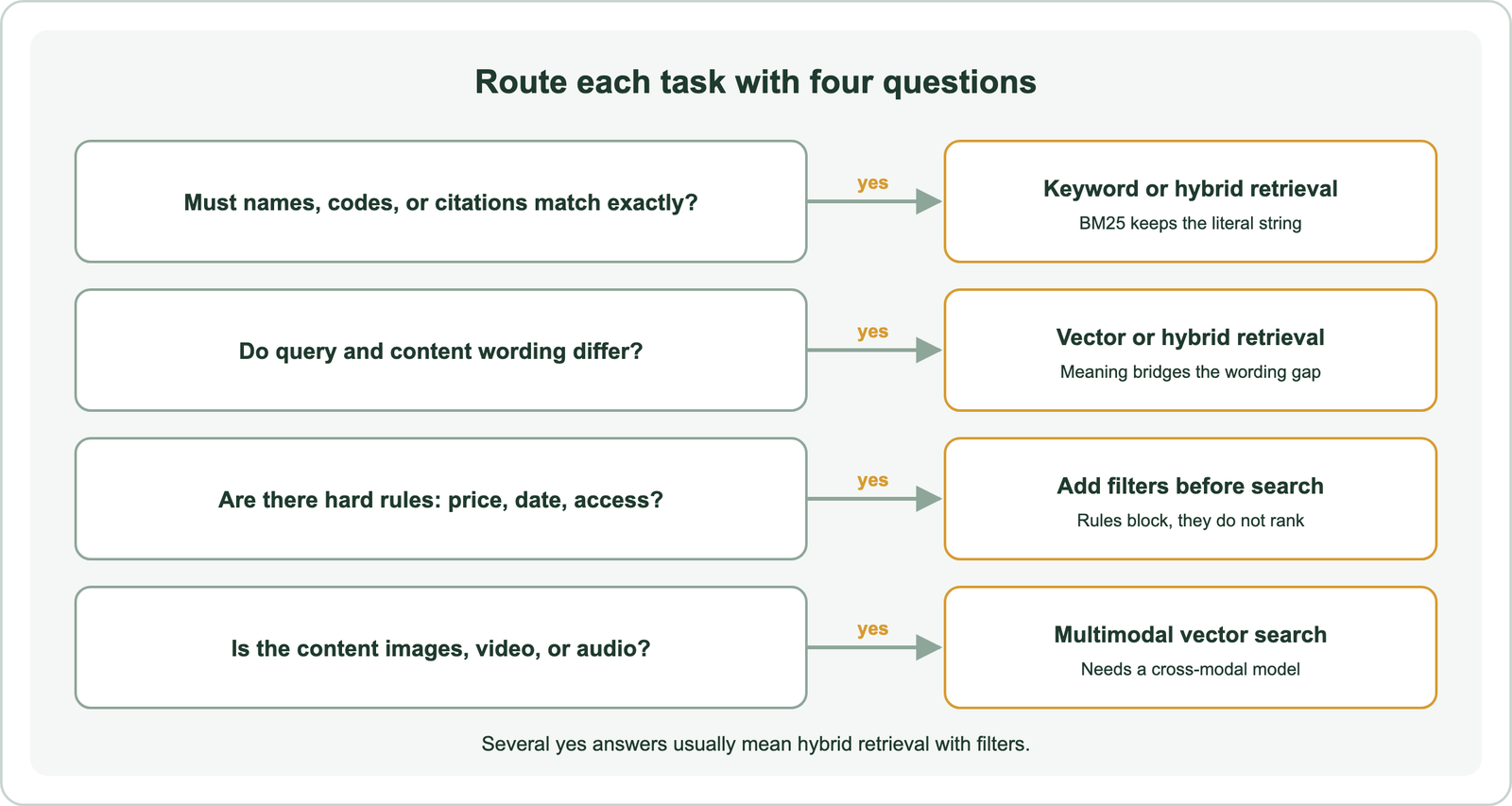
Fit alone does not settle the design. The same retrieval method needs different supporting parts in different applications.
What design requirements change across semantic search use cases?
Design requirements change across semantic search use cases with the query form, the indexed unit, exact-term needs, constraints, permissions, freshness, and the measure of success. Two systems can share an embedding model and still need different architectures. A product search and a legal search fail in different ways and cost different amounts when they fail.
The indexed unit comes first. Chen and colleagues’ 2024 EMNLP paper on retrieval granularity treats documents, passages, and sentences as separate design choices. A support system may return one answer passage. A patent search may need a whole claim. A code search may need one function. The unit decides what a result can contain.
Constraints come next. Weaviate’s search documentation explains that a filter passes or blocks objects by exact criteria rather than ranking them. Price, stock, dates, categories, and locations belong there. Weaviate applies filters before vector search, so only eligible objects can compete. Its multi-tenancy feature places each tenant in its own shard to isolate customer or project data.
Precision needs vary as well. Weaviate’s reranking documentation describes a second model that reorders a small candidate set after retrieval. High-cost errors justify that extra step. Freshness and seasonality need explicit ranking signals, because similarity knows nothing about time.
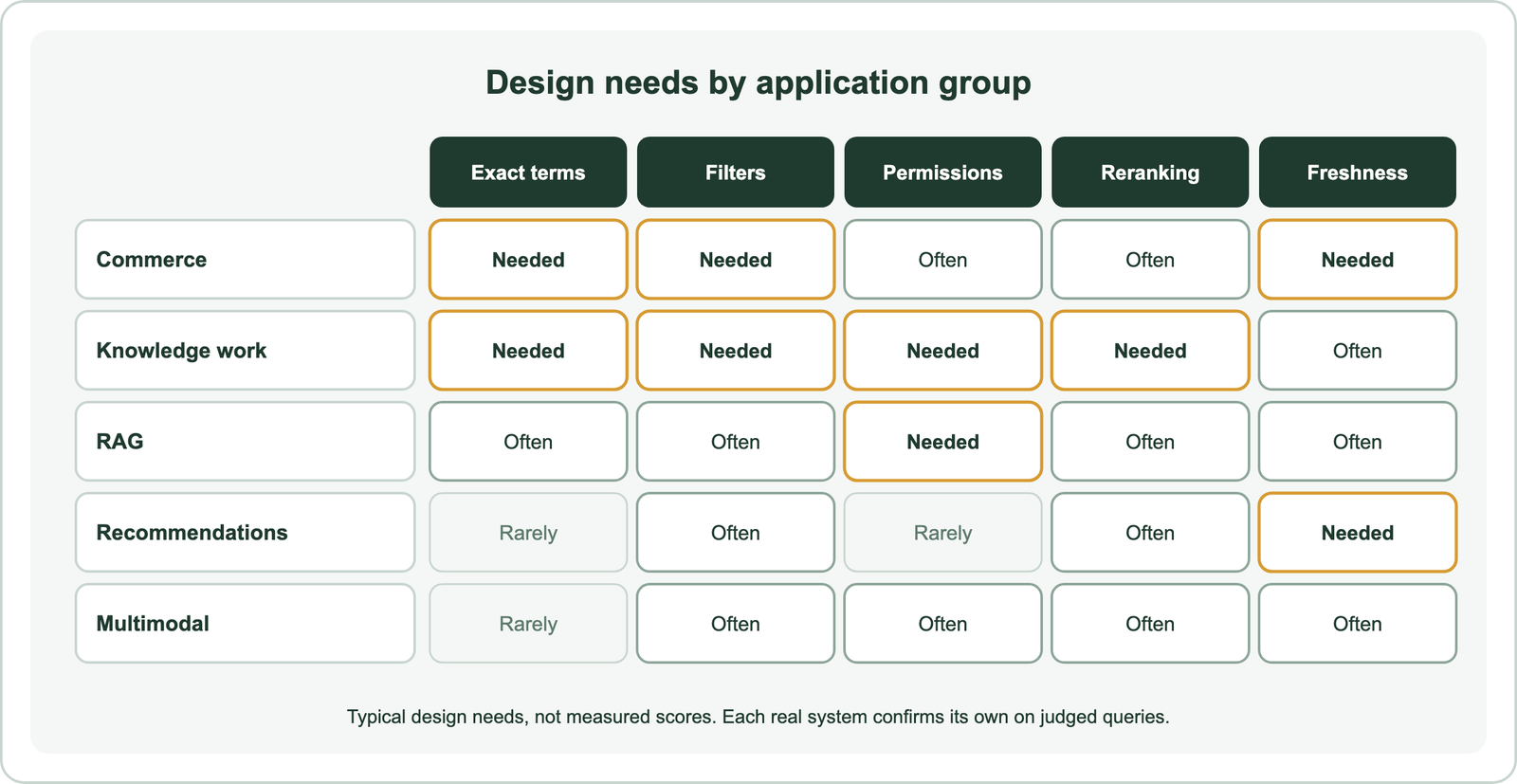
The matrix shows why no single template fits. Commerce is the clearest place to see those requirements meet.
How does semantic search help commerce journeys?
Semantic search helps commerce journeys when buyers describe goals, problems, styles, or occasions that catalog text does not repeat. Google Cloud lists ecommerce product discovery among its main semantic search examples. A shopper who types a use case rather than a product name is the typical beneficiary.
Semantic product search for ecommerce handles queries such as gifts, outfits, or fixes for a problem. The model can relate “quiet” to “low noise” without a hand-built synonym list. That behavior comes from training data, so it is tested rather than guaranteed. Product names, brands, and SKUs still need literal matching, which is why Weaviate recommends hybrid search for text that mixes both kinds of query.
Semantic site search applies the same idea to a public website. Visitors ask questions in plain language, and the answer may sit in a help article, a pricing page, or a blog post. The retrievable unit is often a page section rather than a whole page.
B2B semantic search adds account rules. Buyers search long technical catalogs, specifications, and request-for-proposal content. Contract pricing, regional availability, and customer-specific catalogs are hard constraints. Weaviate’s multi-tenancy and pre-filtering keep each account inside its own eligible set before similarity runs.
Across all three journeys, price, stock, and availability stay deterministic. Similarity decides which items match the need. Filters decide which items may appear at all. Workplace knowledge raises the stakes, because a wrong result can mean a wrong decision rather than a lost sale.
Which knowledge-work searches benefit from semantic retrieval?
Knowledge-work searches benefit from semantic retrieval when a person describes a problem differently from the policy, ticket, clause, function, or paper that holds the answer. Google Cloud names enterprise information retrieval as a core example. The common thread is expensive expertise spent hunting for text that uses other words.
Enterprise and internal document search covers wikis, policies, and shared drives. Permissions matter more than ranking here. A result the user may not open is a failure, however relevant it is. Pre-filtering by access rules keeps restricted documents out of the candidate set.
Customer support and help center search connects a customer’s description of a symptom with the article or past ticket that solves it. Passages work better than whole articles, because the fix is usually one paragraph. Error codes still need keyword evidence.
Patent and legal search needs the highest precision. Citations, defined terms, and exact clauses must match literally, and jurisdiction and version are filters. Hybrid retrieval followed by reranking suits this work, with a professional reviewing every result.
Semantic code search lets a developer describe behavior, such as “retry a failed upload,” and find the function that does it. Symbols and identifiers still need exact matching. The indexed unit is usually a function or class.
Academic and research paper search relates a research question to papers that frame it differently. Karpukhin and colleagues’ 2020 Dense Passage Retrieval paper showed that dense retrieval can find passages with no lexical overlap. Author names and paper titles remain keyword tasks. AI systems use the same retrieval for a different consumer, which is a model rather than a person.
Which AI and multimodal products use semantic retrieval?
Retrieval-augmented generation, recommendation engines, and multimodal search all use semantic retrieval, but each sends results to a different consumer. A person reads search results. A language model reads RAG context. A recommendation feed ranks items for one user’s tastes. Those consumers change what counts as a good result.
Semantic search in RAG retrieves evidence and passes it to a generator with the task prompt. Weaviate’s RAG guide describes that flow and notes that the retrieval step can use similarity, keyword, or hybrid search with filters. Good retrieval does not guarantee a good answer. Trappolini and colleagues’ 2026 EACL paper argues that rank metrics such as nDCG and MRR model how people read lists, while a language model consumes context differently.
Semantic recommendations use similarity to suggest items like ones a user viewed or liked. Weaviate’s example use cases include recommendation systems built on vector similarity. Relevance here also depends on user context and history, so the query is often a profile vector rather than typed text.
Image, video, and audio search compares embeddings across media. Weaviate’s vector search documentation states that the same mechanism searches text, images, video, and audio. Its search operators accept text, image, and video inputs when a compatible vectorizer is configured. Cross-modal models let a text query find images, or an image find related text.
These products blur the vocabulary. Separating the terms makes each design decision clearer.
How do semantic search, vector search, recommendations, and RAG differ?
Semantic search, vector search, recommendations, and RAG differ in their goal: semantic search finds relevant information, vector search measures similarity, recommendations personalize ranking, and RAG feeds evidence to a generator. Weaviate’s documentation defines vector search as similarity search over embeddings. It is a technique that several of these products share.
Each term answers a different question:
| Term | Goal | Typical input | Output | Failure test |
|---|---|---|---|---|
| Semantic search | Find relevant information | A typed need | Ranked results for a person | Judged relevance of the list |
| Vector search | Find the nearest vectors | A query vector | Closest stored objects | Recall against exact search |
| Recommendations | Suggest items for one user | A user or item profile | A personalized list | Engagement with quality checks |
| RAG | Ground a generated answer | A question | Context for a model | Answer correctness and citations |
The table shows that one technique serves several goals. Filters and rerankers are supporting operators that any of them can add.
The ChatGPT question needs the same care. OpenAI’s API documentation says its File Search tool retrieves from uploaded files through semantic and keyword search. That verifies one OpenAI retrieval tool. It does not establish that every ChatGPT response runs through the same pipeline. Clear boundaries also make failure easier to locate.
Where does semantic search fail or need safeguards?
Semantic search fails when similarity is mistaken for truth, permission, exact compliance, or guaranteed relevance. Weaviate’s vector search documentation warns that a search always has a closest result, even when nothing is relevant. Without a limit, threshold, automatic cutoff, or filter, the system returns its nearest guess with confidence.
The common failures each need a specific safeguard:
- Nearest but irrelevant results need a distance threshold or an automatic cutoff.
- Exact-token misses on codes, citations, or SKUs need keyword or hybrid retrieval.
- False neighbors that share a topic but answer another question need reranking and judged tests.
- Stale or outdated content needs version fields, dates, and re-embedding schedules.
- Access leakage needs permission filters applied before retrieval, never after.
- Model or index changes need full re-embedding and a regression run on the same queries.
- Over-personalized feeds need diversity rules and quality checks beside engagement.
The list separates what similarity can do from what rules must do. Vector retrieval should never replace strict Boolean or structured filtering where a rule is the requirement. A legal discovery search that must include every document with a term is a Boolean task. Thresholds trade misses against false positives, and the right setting depends on the task’s cost of error. Weaviate’s indexing guidance adds that index choice balances recall, speed, and memory, so a faster index can lose candidates. Those trade-offs matter most when semantic search is the wrong tool entirely.
Some tasks should not use semantic retrieval alone, or at all. A small catalog where every query names a product works well with keyword search and a good analyzer. An exhaustive discovery task, such as finding every contract that contains one defined term, needs Boolean completeness that similarity ranking cannot promise. A task where one false positive is costly, such as a compliance check, needs exact rules and human review rather than a nearest neighbor. A corpus with very little text, such as a parts table, gives an embedding model almost nothing to represent. In each case, Weaviate’s own guidance points toward keyword search or filters for the literal part of the job. Semantic retrieval earns its cost where a vocabulary gap is real and frequent. Where that gap is rare, a keyword baseline with synonyms may already be enough, and the extra model, index memory, and re-embedding work add cost without adding answers. That is why a rollout should start small and measured.
How should a team prioritize its first semantic search rollout?
A team should prioritize a first semantic search rollout by picking one frequent task with clear vocabulary mismatch, bounded content, safe permissions, and a measurable outcome. A narrow pilot produces evidence. A broad launch produces anecdotes.
A defensible rollout follows six steps:
- Inventory real queries and mark the ones that fail today.
- Label relevant results for a sample under one written policy.
- Choose the retrievable unit: document, passage, or function.
- Build a keyword baseline before adding anything else.
- Compare vector and hybrid retrieval against that baseline on the same queries.
- Validate the business outcome, not only the retrieval metric.
The steps put measurement before scale. Retrieval metrics come from the labels. Qu and colleagues’ 2021 RocketQA paper defines recall at k as the share of questions whose top k passages contain an answer. It defines reciprocal rank as the inverse rank of the first relevant result, averaged across questions as MRR. Wang and colleagues’ 2013 analysis covers nDCG at k, which rewards graded relevance near the top.
Pair each retrieval metric with an outcome the use case cares about. Commerce tracks conversion. Support tracks resolution with a quality check. Legal and research work track citation correctness. RAG needs answer evaluation on top of retrieval scores. The evaluation guide covers judgment design, and the build guide covers implementation. Go ahead only if the pilot beats the keyword baseline on both.
Semantic search use cases pay off where meaning must bridge a gap in wording or media between a person’s need and the content that meets it. Commerce, workplace knowledge, support, legal and research material, code, recommendations, RAG, and media search all share that gap, but each needs its own design. Exact identifiers still need keyword evidence, hard rules still need filters, and high-cost errors need reranking and review. The decision is whether a bounded pilot beats the keyword baseline on judged relevance and on a real user outcome, without breaking latency, cost, or access constraints.