Home / Calculators / Reciprocal Rank Fusion (RRF) Calculator
CalculatorReciprocal Rank Fusion (RRF) Calculator
A reciprocal rank fusion (RRF) calculator merges two ranked result lists into one by giving each document a score of 1 divided by k plus its rank in each list and adding the scores. Documents ranked high in both lists rise to the top, and a document missing from one list still scores from the other. The constant k, usually 60, controls how much rank 1 outweighs lower ranks. Gordon Cormack, Charles Clarke and Stefan Büttcher introduced the method in 2009, and it is now the standard way to fuse keyword and vector results in hybrid search. The calculator shows every intermediate score, so you can check a fusion by hand. It also handles two details that change the numbers: whether ranks start at 0 or 1, and whether each list is weighted, as Weaviate’s alpha parameter does. RRF ignores raw scores entirely, which makes it robust but blind to how far ahead a top result is.
Reciprocal rank fusion in four facts
- RRF scores each document as the sum, over all lists, of 1 divided by k plus the document’s rank.
- Cormack, Clarke and Büttcher introduced reciprocal rank fusion in 2009, with k set to 60.
- Weaviate’s ranked fusion uses 1 divided by rank plus 60, with ranks counted from 0.
- Weaviate weights each list’s rank scores by alpha before adding them, so alpha 0.5 halves both.
How do you fuse two ranked lists with the RRF calculator?
You fuse two ranked lists with the RRF calculator by entering each list as document IDs in rank order, separated by commas, then setting k, the first rank number and the weighting. The table recalculates as you type.
| Fused rank | Document | Rank in A | Rank in B | Score from A | Score from B | RRF score |
|---|---|---|---|---|---|---|
| 1 | 2 | 2 | 0 | 0.008065 | 0.008333 | 0.016398 |
| 2 | 1 | 0 | 3 | 0.008333 | 0.007937 | 0.016270 |
| 3 | 0 | 1 | 2 | 0.008197 | 0.008065 | 0.016261 |
| 4 | 4 | 3 | 1 | 0.007937 | 0.008197 | 0.016133 |
| 5 | 3 | 4 | 4 | 0.007813 | 0.007813 | 0.015625 |
The default lists come from Weaviate’s documentation. A keyword search returns documents 1, 0, 2, 4, 3, and a vector search returns 2, 4, 0, 1, 3. With k = 60, ranks counted from 0 and alpha 0.5, document 2 wins with 0.016398, just ahead of document 1 at 0.016270. Those are the values Weaviate’s documentation reports for ranked fusion.
Document 2 wins because it is first on vector search and third on keyword search. Document 1 is first on keyword search but fourth on vector search. RRF rewards being near the top of both lists over being first in one. Switch the weighting to plain sum and every score doubles, while the order stays the same.
How does the reciprocal rank fusion formula work?
The reciprocal rank fusion formula works by turning each rank into a score of 1 divided by k plus the rank, then adding a document’s scores across all the lists it appears in. Higher totals rank higher.
Cormack, Clarke and Büttcher described the method in their 2009 SIGIR paper, “Reciprocal rank fusion outperforms Condorcet and individual rank learning methods”. They set k to 60 after a pilot study, and the method beat the more complex fusion methods they compared it with. The formula needs no training, no score normalization and no knowledge of how either system computes its scores.
Only rank matters. A keyword score of 5 and one of 2.6 become rank 0 and rank 1, no matter how far apart the raw scores were. That makes RRF safe for combining systems whose scores live on different scales, such as BM25 scores and cosine distances. It also means RRF cannot tell a narrow lead from a large one.
The method extends to any number of lists. Three retrievers, or the results of several rewritten queries, fuse the same way, as in multi-query retrieval. The fusion family is compared in score fusion methods. The constant k sets how sharply scores fall with rank.
How does the k constant change RRF scores?
The k constant changes RRF scores by setting how fast they fall with rank: a small k makes rank 1 dominate, while a large k makes neighbouring ranks nearly equal. At k = 60 the curve is very flat.
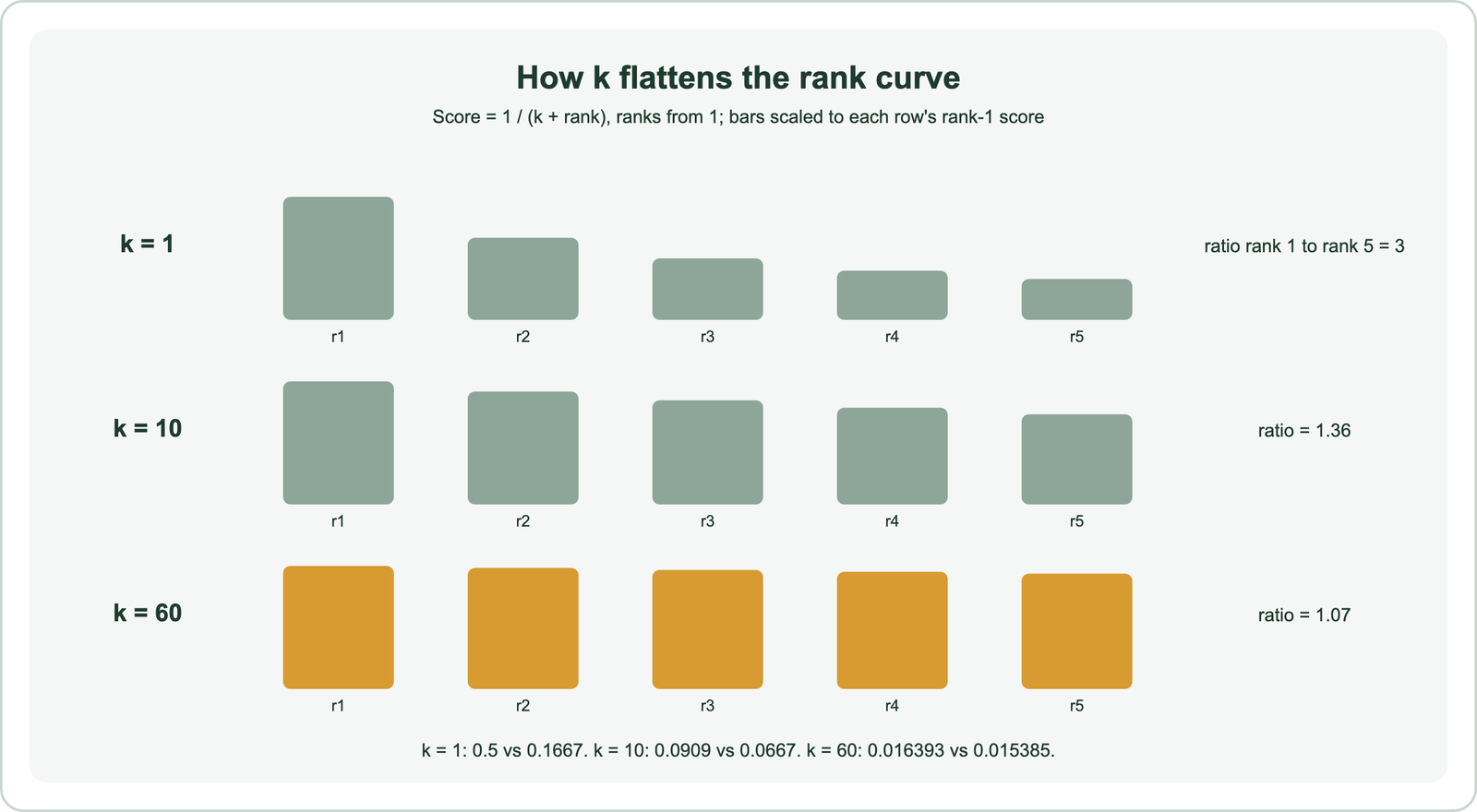
With ranks counted from 1, k = 1 gives rank 1 a score of 0.5 and rank 5 a score of 1/6, about 0.1667, three times less. At k = 10 the scores are 1/11 and 1/15, a ratio of about 1.36. At k = 60 they are 1/61 and 1/65, a ratio of about 1.07. The calculator shows the same shift: lower k and the first-place results pull ahead.
A flat curve means agreement between lists matters more than position in any one list. A document at rank 3 in both lists beats a document at rank 0 in one list and absent from the other. That is often what hybrid search wants, since a document found by both keyword and vector search is likely relevant.
Cormack and colleagues reported that results were not sensitive to the exact value, which is one reason 60 became the default. A smaller k suits cases where one list is much more reliable at the top. The numbering of ranks also shifts every score.
Why do RRF scores differ between rank 0 and rank 1 numbering?
RRF scores differ between rank 0 and rank 1 numbering because the top result scores 1 divided by k in one convention and 1 divided by k plus 1 in the other. The order of results rarely changes, but the numbers do.
Weaviate’s hybrid search documentation computes ranked fusion as 1 divided by rank plus 60, and its example gives the top result 0.016667, which is 1/60. That means ranks are counted from 0. The 2009 paper and many engines count the first result as rank 1, so the top result scores 1/61, about 0.016393.
The difference matters when comparing numbers across systems or when reproducing a published example. Set the calculator’s first rank to 1 and the default example’s winner, document 2, scores 0.5 × (1/61 + 1/63), about 0.016133, instead of 0.016398. The ranking stays the same in this case.
When writing your own fusion code, decide the convention once and document it. Off-by-one differences make scores look wrong when they are only shifted. The way Weaviate combines the two lists adds one more factor, a weight per list.
How do weights such as Weaviate’s alpha change RRF?
Weights change RRF by multiplying each list’s rank scores by a factor before adding them, so one search type can count more than the other. In Weaviate, alpha weights the vector side and one minus alpha weights the keyword side.
Weaviate’s hybrid search documentation explains that before the scores are added, they are weighted by alpha. With alpha 0.5, both are multiplied by 0.5. With alpha 0.75, the server default according to Weaviate’s documentation, vector ranks count three times as much as keyword ranks. An alpha of 1 is pure vector search and 0 is pure keyword search.
Try alpha 0.75 in the calculator with the default lists. Document 2 stays first, because it is first on vector search. Document 4, second on vector search, overtakes documents 1 and 0, because the vector side now dominates. Weaviate’s documentation also advises setting alpha explicitly, because client libraries differ in what they send when it is left unset.
Equal weights in the plain sum and alpha 0.5 always give the same order, since alpha 0.5 just halves every score. Tuning alpha is covered in balancing keyword and vector scores. Documents that appear in only one list need a rule of their own.
How does RRF handle documents found by only one search?
RRF handles documents found by only one search by giving them the score from that list alone, with nothing added for the list where they are missing. They can still rank high if their one rank is good.
Enter list A as “1, 0, 2” and list B as “2, 5, 6” in the calculator. Document 5 appears only in list B, at rank 1. Its score comes only from that list, while document 2, present in both, collects two scores. Agreement is rewarded automatically, because a document can only gain from appearing in more lists.
List depth matters for this reason. If each search returns only its top 5, a document at rank 6 in one list counts as missing from it. Fusing deeper lists, such as the top 50 from each, gives fairer scores before trimming to the final count.
Very long lists add little, because ranks far down score almost the same as missing at k = 60. The candidate depth question is discussed in top-k retrieval. Rank fusion is one of two broad approaches, and the other keeps the scores.
How does RRF compare with relative score fusion?
RRF compares with relative score fusion as rank-only against score-aware: relative score fusion rescales each list’s raw scores to 0 to 1 and adds them, keeping the size of each lead. The two can pick different winners.
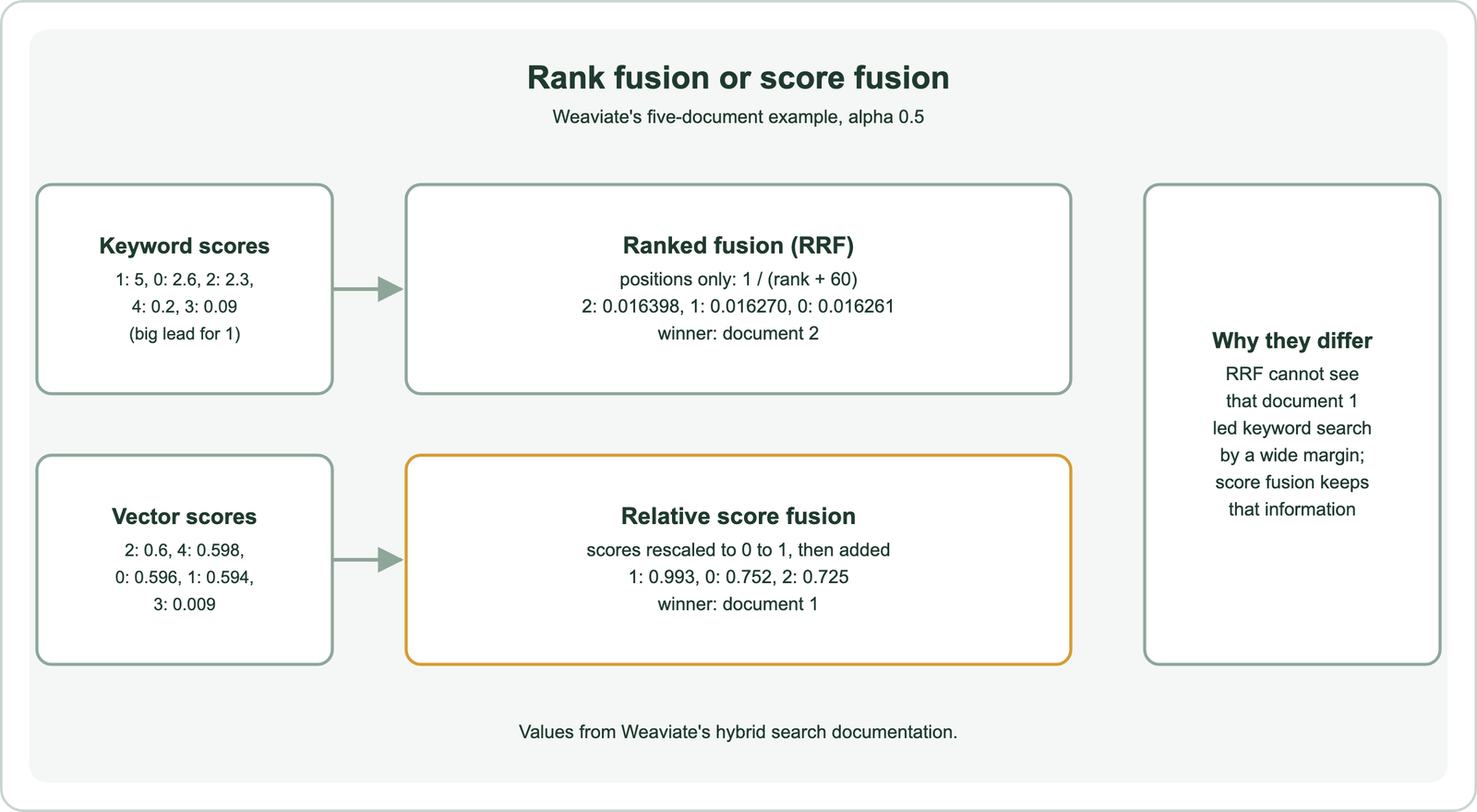
In Weaviate’s example, the keyword scores were 5, 2.6, 2.3, 0.2 and 0.09, so document 1 led keyword search by a wide margin. The vector scores of the top four documents were nearly identical. Relative score fusion keeps that information and puts document 1 first at 0.993. Ranked fusion sees only positions and puts document 2 first.
Weaviate made relative score fusion its default from version 1.24, and its documentation explains that it keeps more information from the original searches. Ranked fusion remains available and is steadier when one search produces scores on a very different scale. The trade-offs are detailed in relative score fusion and score normalization.
A sensible approach is to test both on judged queries and keep the one that ranks better, as described in how hybrid search works.
Which other calculators support hybrid search planning?
Other calculators support hybrid search planning by checking similarity scores, sizing memory, pricing embeddings and choosing chunk sizes. Each covers a step that rank fusion depends on.
The vector similarity calculator shows cosine distance, dot product and Euclidean distance for any two vectors, the scores behind the vector list. The vector storage and memory calculator estimates index size. The embedding cost calculator prices embedding a corpus. The chunk size calculator works out how many chunks a document produces.
Together they cover the numbers behind a hybrid system, from embedding a corpus to merging its results. The full concept is in hybrid search.
Reciprocal rank fusion scores each document as the sum of 1 divided by k plus its rank in every list, so documents near the top of several lists win. k = 60 keeps the curve flat, rank numbering shifts every score by one step, and Weaviate’s alpha weights each list before adding. The calculator reproduces Weaviate’s ranked fusion example, where document 2 wins with 0.016398. RRF is robust because it ignores raw scores, and limited for the same reason, so compare it with relative score fusion on your own judged queries.