Home / Query understanding / Query Understanding in Semantic Search
Query Understanding in Semantic Search
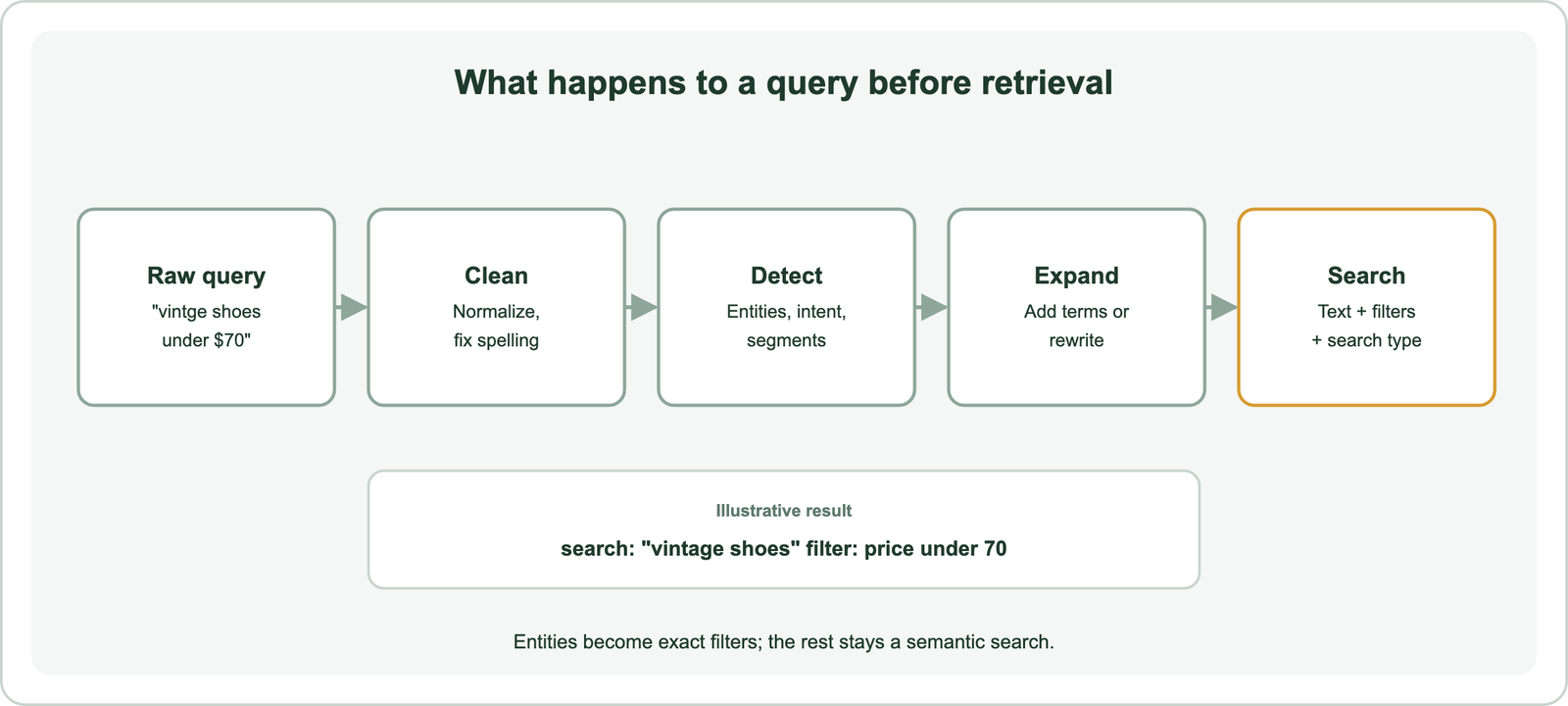
Query understanding is everything a search system does to a query before retrieval: cleaning it, correcting it, working out its intent and entities, and expanding or rewriting it so it matches the right content. Most queries are short and ambiguous. A user types three words, and the system must guess whether they want to buy, learn, or find one exact item. Query understanding turns that raw text into a better search: corrected spelling, recognized names that become filters, added related terms, or a rewritten question that matches how documents are written. In semantic search, the embedding model already captures some meaning. Query understanding adds what the model cannot see, such as the user’s goal, hard constraints, and several intents packed into one question. Each step should be added only when testing shows it fixes a real failure.
Query understanding in four facts
- Query understanding happens before retrieval and changes what the search engine is asked to find.
- Some steps change matching, such as expansion, while others change constraints, such as entity-based filters.
- Query2doc’s generated pseudo-documents improved BM25 retrieval by 3 to 15 percent in its 2023 tests.
- LLM-based query understanding adds capability but also adds latency to every search it touches.
What is query understanding in semantic search?
Query understanding in semantic search is the stage that interprets a user’s query and prepares it for retrieval. It sits between the search box and the index. Everything it does changes the request the index receives, not the index itself.
A query is the text, or other input, that a person gives a search system to describe what they want. That is different from a question in everyday speech. A question is a full sentence aimed at a person, such as asking which laptop stays cool when gaming. A query is often a fragment, such as cool gaming laptop, shaped by years of typing into search boxes. In research, a query means the same thing: the search string or structured request run against a database or literature index. A semantic query is one the system interprets by meaning rather than by exact words.
Query understanding works on two levels. Holistic understanding treats the whole query as one unit, for example by embedding it or classifying its overall intent. Reductive understanding breaks it into parts: words, phrases, names, and attributes. Most systems use both.
The semantic search pipeline shows where this stage sits among the others. Its value comes from a basic problem with real queries.
Why do queries need understanding before retrieval?
Queries need understanding before retrieval because they are usually short, ambiguous, and missing context that the retrieval model cannot infer. Liu and colleagues at LinkedIn open their CIKM 2025 paper on job search with this point: user queries are often short, ambiguous, and highly context-dependent.
Three kinds of gap appear again and again. Vocabulary gaps occur when users and documents use different words for the same thing. Constraint gaps occur when a query hides a hard rule, such as a price limit or a location, inside free text. Intent gaps occur when the same words could mean several goals, such as “python” for a language or a snake.
An embedding model closes some vocabulary gaps on its own. That is the strength of semantic search. It cannot turn “under $70” into a price filter, decide that “jaguar” here means a car, or split “compare refund and exchange policies” into two searches. Those need explicit processing.
Errors also compound. A misspelled product name may match nothing in a keyword index and match the wrong product in a vector index. A missing filter returns items the user cannot buy. Query understanding catches these problems before they become bad results. The simplest fixes come first.
How is a query cleaned and corrected?
A query is cleaned by normalizing its text and corrected by fixing likely spelling mistakes, so it matches the same forms the index stores. These steps are cheap and help almost every system.
Normalization makes query text comparable with indexed text. It includes lowercasing, splitting into tokens, and sometimes reducing words to shared forms through stemming or lemmatization. In keyword search the query must use the same rules as the index. Weaviate’s tokenization options show the choices: word splits on non-alphanumeric characters and lowercases, whitespace preserves case, and field treats a whole value as one token, which suits codes and IDs.
Spelling correction handles typos. Weaviate’s text-spellcheck module checks query text at search time and returns a suggested correction. Its documentation shows the query “houssing prices” returning “housing prices,” with each changed word listed. The module can also correct the query automatically before searching. Typo tolerance and spelling correction compares this with fuzzy matching, which tolerates errors instead of fixing them.
Correction has a risk. Product codes, names, and new terms can look like typos. Correcting “Zyrtec” to a common word would break a pharmacy search. Protect known vocabulary, such as product names and brands, from correction. With clean text, the system can look for meaning.
How do search systems detect query intent and entities?
Search systems detect query intent by classifying the whole query into a goal or category, and detect entities by finding names, attributes, and values inside it. Both turn free text into structure the search can act on.
Intent classification predicts what kind of answer the user wants. A shop might separate product searches, order-status questions, and policy questions. A support site might separate how-to questions from error reports. The predicted intent can route the query to a different collection or search type. Query intent classification covers the models and labels.
Entity recognition finds the parts of a query that name things. In “red leather couch under $500,” a system might find a color, a material, a category, and a price limit. Weaviate’s ner-transformers module extracts entities with transformer models. Query segmentation, which groups words that belong together such as “new york” or “machine learning,” helps entity recognition find multi-word names.
The payoff is filters. Extracted values become exact constraints rather than fuzzy hints. Weaviate’s Query Agent does this with a language model. Its documentation lists filter construction from natural language among its features and gives the example “Find me some vintage shoes under $70.” The price becomes a filter, and “vintage shoes” becomes the semantic search. Metadata filtering explains how those filters run. Changing the words of the query itself is the next lever.
How do expansion and rewriting change a query?
Expansion adds related terms or text to a query to raise recall, while rewriting replaces the query with a clearer version that better matches how content is written. Both change what gets matched, and both can drift from the user’s meaning.
The main techniques differ in what they produce:
| Technique | Output | Helps when | Main risk |
|---|---|---|---|
| Query expansion | Query plus related terms | Vocabulary differs | Added terms add noise |
| Query rewriting | A clearer replacement query | Query is vague or conversational | Rewrite changes intent |
| HyDE | Embedding of a generated answer | Short questions, long documents | Generated text misleads |
| Multi-query | Several query variants | One phrasing misses results | More searches, more cost |
| Decomposition | Sub-questions searched separately | One query holds several asks | Pieces lose shared context |
The table shows that each technique answers a different failure. Query expansion can use synonym lists or a model. Wang, Yang, and Wei’s Query2doc paper at EMNLP 2023 generated a pseudo-document with a large language model and added it to the query. It reported BM25 gains of 3 to 15 percent on MS MARCO and TREC DL.
Query rewriting replaces rather than adds. It turns “that thing for cold coffee” into “iced coffee maker.” HyDE, from Gao and colleagues at ACL 2023, goes further: it embeds a generated answer-like passage instead of the query. Multi-query retrieval runs several phrasings and merges results, and query decomposition splits a compound question into parts. Language models now drive most of these techniques.
How do large language models change query understanding?
Large language models change query understanding by handling many tasks in one model, such as tagging, rewriting, and filter extraction, at the cost of added latency. Before them, each task usually needed its own trained model.
LinkedIn’s job search work shows the shift. Liu and colleagues describe replacing task-specific entity recognition models with one language model. It reads the query together with context such as profile attributes and produces a structured interpretation. Their system covers a query planner, a query tagger, a query rewriter, and facet suggestion. They report better relevance in online A/B tests and lower system complexity.
Weaviate’s Query Agent packages the same idea for search over a database. Its documentation lists routing across collections, query expansion, query decomposition, filter construction, and reranking. One natural-language question can become several searches with filters and sorts.
The cost is time. Weaviate notes that complex Query Agent runs can take around 10 seconds, because they call language models several times. That suits an assistant that writes an answer, and it rarely suits a search box that must respond instantly. A common split uses fast rules and small models on every query, and calls a language model only for long or complex ones. Semantic autocomplete shows another way to guide queries before they are even submitted. Choosing among all these options needs a method.
How should a team choose query understanding techniques?
A team should choose query understanding techniques by finding where its queries fail, then adding the cheapest technique that fixes each failure and proving it with a test. Adding every technique at once makes results harder to explain and slower to return.
A practical sequence keeps the work focused:
- Sample failed queries from logs: zero results, quick reformulations, and low clicks.
- Label each failure as spelling, vocabulary, missing constraint, ambiguous intent, or compound question.
- Match each label to a technique: correction, expansion, entity filters, intent routing, or decomposition.
- Test each technique on judged queries against the system without it.
- Watch latency, because every model call adds time to every search.
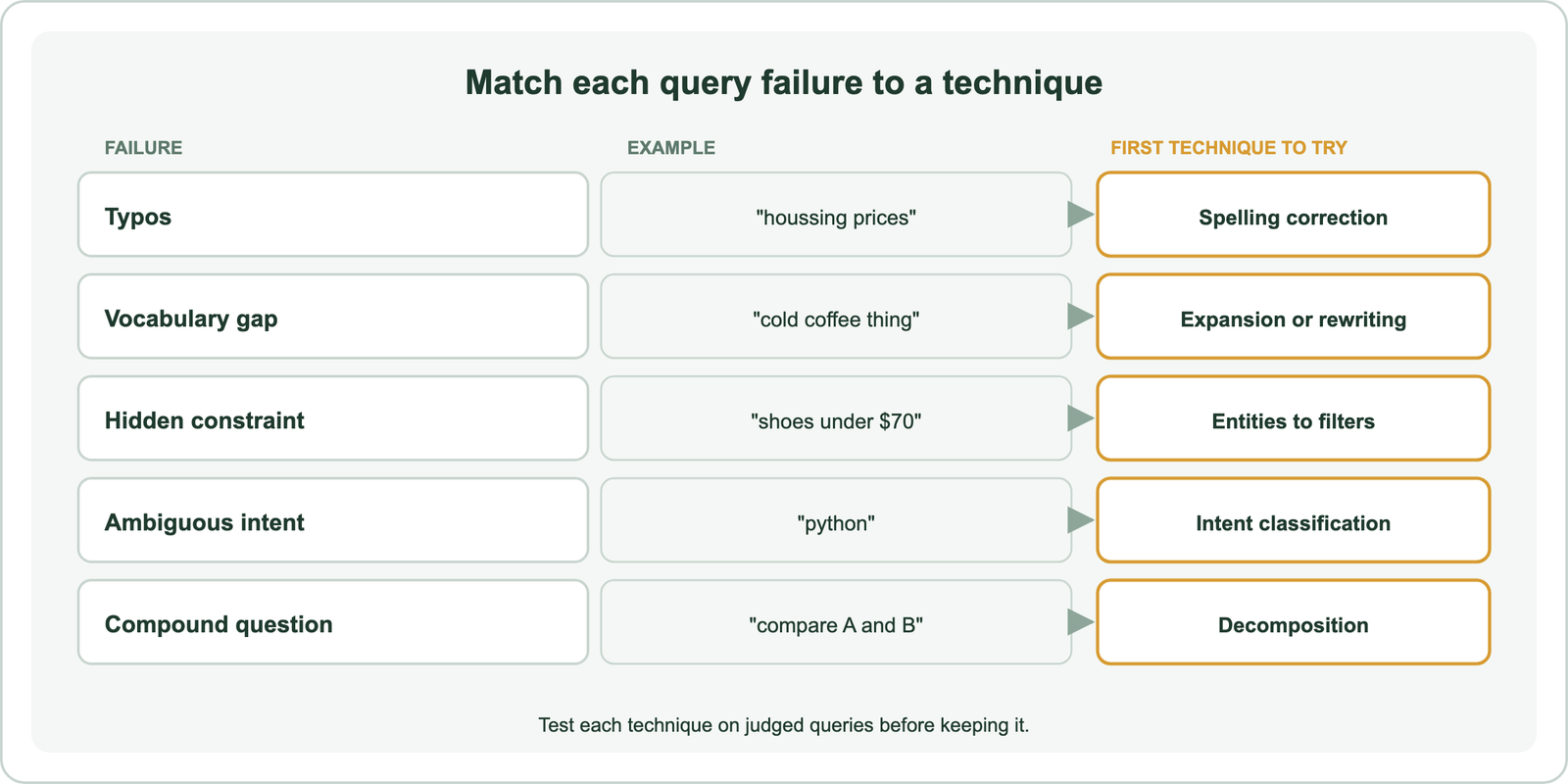
The sequence ties each technique to evidence. The evaluation guide covers how to build the judged set. Hybrid search often reduces the need for heavy query processing, because keyword matching already protects exact names and codes.
Query by example deserves a mention here. Instead of typing text, a user points to an item and asks for more like it. Weaviate supports this directly: a search can use an existing object as the query with nearObject, or a supplied vector with nearVector. No text needs understanding at all, because the example already carries the meaning.
Query understanding is everything a search system does to a query before retrieval: cleaning, correcting, detecting intent and entities, and expanding or rewriting. It closes the gaps an embedding model leaves, such as hidden constraints, ambiguous goals, and compound questions. Language models now handle many of these steps in one place, at a cost in latency. The decision is to sample failing queries, label why they fail, and add only the techniques that measurably fix those failures within the response time users expect.