Home / Semantic caching / Semantic Caching in AI Gateways
ComparisonSemantic Caching in AI Gateways
Semantic caching in an AI gateway is a cache built into the proxy between applications and language model providers. It returns a stored response when a new prompt means nearly the same as an earlier one. The gateway embeds each incoming prompt and searches a vector store of past prompts. If the closest match is within a similarity threshold, it returns the cached answer without calling the model. Because the gateway already handles authentication, rate limits, routing and logging for every application, adding the cache there lets all of them share it without code changes. The key design work is the cache key. A hit must also share the model, system prompt, generation settings and tenant, or the gateway may serve one customer’s answer to another. Expiry rules and per-request bypass keep answers fresh. A vector database such as Weaviate can serve as the cache store, with filters for scope and a distance threshold for meaning.
AI gateway semantic caching in four facts
- An AI gateway is a proxy that every model request passes through, so one cache can serve every application.
- A semantic cache hit needs the same scope and settings, a close enough meaning, and an entry that has not expired.
- In Weaviate, cosine distance is 1 minus cosine similarity, so a distance threshold of 0.1 means similarity of at least 0.9.
- Weaviate’s Healthsearch demo used Weaviate as a semantic cache for generated query results.
What is an AI gateway?
An AI gateway is a proxy service that applications call instead of calling language model providers directly, which forwards each request to a model and adds shared controls on the way. It is the single entry point for model traffic.
Without a gateway, every application holds its own provider keys, retry logic and logging. With one, applications send requests to the gateway in a common format. The gateway checks who is calling, applies rate limits and budgets, picks a provider or model, retries or falls back on errors, and records usage. Teams adopt gateways to control cost and access across many applications and models.
Caching fits naturally into that position. The gateway sees every prompt and every response, so it can store responses and reuse them. The simplest form is an exact cache keyed on a hash of the request. Identical requests return the stored response, but a prompt that differs by one word misses.
Semantic caching extends that idea to prompts that differ in wording but not in meaning. The concept is introduced in what is semantic caching. Inside a gateway, the lookup follows a fixed path.
How does semantic caching work in an AI gateway?
Semantic caching works in an AI gateway by embedding each incoming prompt, searching stored prompt vectors for the nearest match in the same scope, and returning the stored response when the match is close enough. On a miss, the gateway calls the model and stores the new pair.
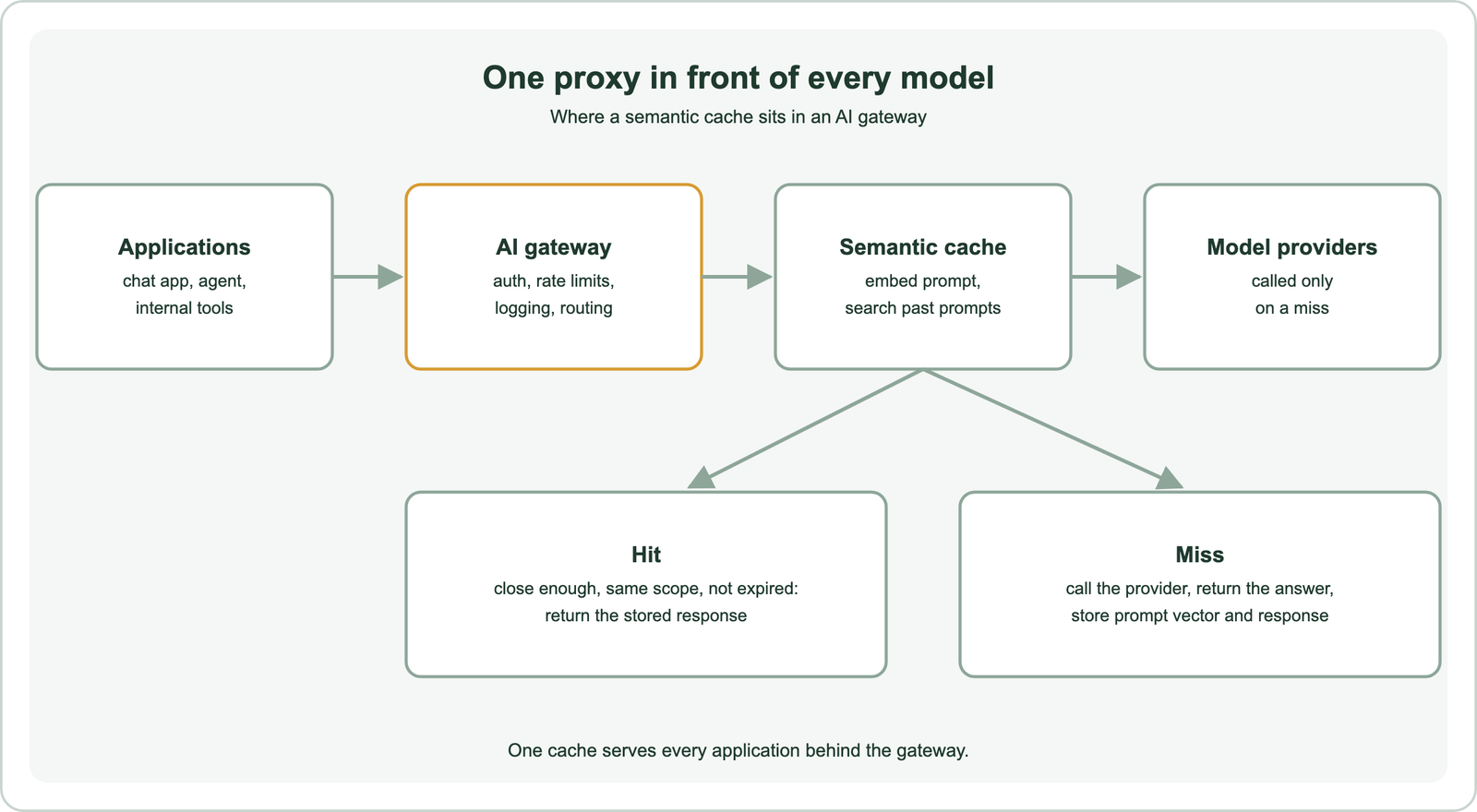
The lookup starts with an embedding of the prompt, usually from a small, fast model, since it runs on every request. The gateway searches a vector index of earlier prompts and takes the nearest neighbour. Weaviate’s Healthsearch demo describes the motivation with two queries, “Helpful for joint pain” and “Good for joint pain”. String matching treats them as different, while their meaning is the same.
A hit returns the stored response at once, skipping model latency and cost. A miss forwards the request to the provider as usual, returns the answer, and writes the prompt vector, response and metadata to the cache. Weaviate’s demo article also notes a side benefit: cached results keep working during model API outages.
The same design works inside a single application, as covered in semantic caching for LLM apps. Libraries such as GPTCache package it for applications. The gateway’s version differs in what it must check before a near match counts.
Which checks does a gateway run before serving a cached response?
Before serving a cached response, a gateway checks that the request matches the cached one on scope and settings exactly, and on meaning within the similarity threshold, and that the entry is still fresh. Similarity alone is never enough.
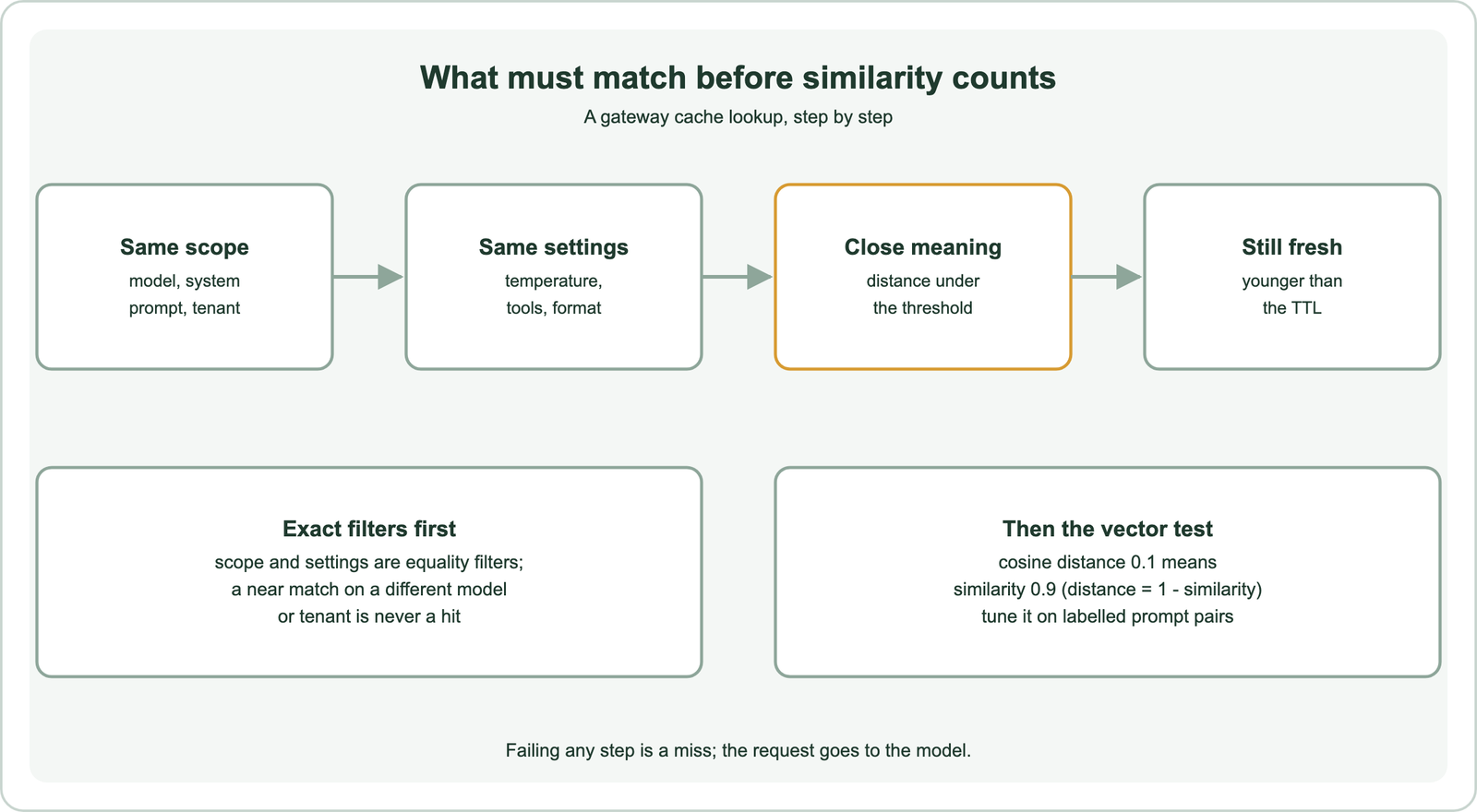
Scope comes first. Two applications behind one gateway may ask the same question with different system prompts, and the right answer differs. The model matters too, since answers from different models are not interchangeable. The tenant or user matters most: a response built from one customer’s data must never reach another customer.
Settings come next. A request with a higher temperature, different tools or a required JSON format expects a different kind of output. Many gateways cache only requests whose settings make reuse safe, and include the settings in the cache key.
Meaning and freshness come last. The nearest stored prompt must be within the distance threshold, a value tuned as described in similarity thresholds for caching. In Weaviate, cosine distance equals 1 minus cosine similarity, so a threshold of 0.1 accepts matches with similarity of at least 0.9. Expired entries are skipped, which is the subject of semantic cache invalidation. Conversations make the meaning test harder.
How do gateways handle multi-turn conversations?
Gateways handle multi-turn conversations by deciding what part of the conversation to embed and compare, because the last message alone often does not carry the full question. Getting this wrong is a common source of bad hits.
A follow-up message such as “and for annual plans?” means nothing without the earlier turns. Embedding only that message would match any earlier “and for annual plans?”, whatever the conversation was about. Embedding the whole conversation is safer but makes matches rare, since few conversations repeat in full.
Common compromises include embedding the last user message together with a short summary or the previous turn, or caching only the first turn of a conversation, where questions are most self-contained. Some systems rewrite the follow-up into a standalone question first, then cache on that. The rewrite costs a model call, so it pays only if it raises the hit rate.
Retrieval-augmented requests raise a related issue. If the gateway sees a prompt that includes retrieved documents, the documents become part of the meaning. When documents change, an old answer may no longer match them. Including a document version or index timestamp in the scope avoids serving stale grounded answers. Gateways also need ways to opt out.
Which controls should a gateway semantic cache offer?
A gateway semantic cache should offer per-request bypass, configurable thresholds and expiry per route, scope isolation, and logging of hits with their similarity scores. These controls keep a shared cache safe for many applications.
Bypass lets an application force a fresh answer, for example when a user clicks regenerate or a request depends on live data. A request header or parameter usually carries it. Without bypass, a wrong cached answer can repeat with no way out except clearing the cache.
Per-route settings matter because applications differ. A support assistant with stable answers can use a long expiry and a moderate threshold. A pricing or inventory assistant needs short expiry or no caching at all. Code generation and creative writing often should not be cached.
Logging closes the loop. Recording each hit with its distance, the cached prompt and the new prompt lets teams sample hits and find false ones. That review feeds threshold tuning. Gateways also differ from provider-side prompt caching, which reuses computation for repeated prompt prefixes rather than whole answers, as compared in semantic caching vs prompt caching. The store behind the cache is usually a vector database.
How do you build a gateway cache lookup with Weaviate?
You build a gateway cache lookup with Weaviate by storing each prompt vector with its response, scope and timestamp, then running a near-vector query with a distance threshold and filters on scope and age. The filters enforce exact matches; the distance enforces meaning.
import time
from weaviate.classes.query import Filter, MetadataQuery

cache = client.collections.use("LLMCache")   # properties: prompt, response, scope, created

def lookup(vec, scope, max_distance=0.1, ttl_s=86400):
    res = cache.query.near_vector(
        near_vector=vec, distance=max_distance, limit=1,
        filters=Filter.by_property("scope").equal(scope)
                & Filter.by_property("created").greater_than(time.time() - ttl_s),
        return_metadata=MetadataQuery(distance=True),
    )
    return res.objects[0].properties["response"] if res.objects else None

def store(vec, prompt, response, scope):
    cache.data.insert({"prompt": prompt, "response": response,
                       "scope": scope, "created": time.time()}, vector=vec)

# scope joins model, system prompt version and tenant, for example "model-a|support-v3|tenant-1"
The scope string packs model, system prompt version and tenant into one exact-match property, and the created timestamp supports expiry. The distance parameter makes Weaviate return nothing when the nearest prompt is too far, which the gateway treats as a miss. The pattern was run on toy vectors as an API check. A near-duplicate prompt in the same scope hit, while the same prompt under another tenant missed, as did a prompt with a different meaning.
For strong tenant isolation, Weaviate’s multi-tenancy can keep each tenant’s cache in its own shard instead of relying on a filter. Old entries can be deleted in batches by timestamp. Measuring the cache comes next.
How do you measure a gateway semantic cache?
You measure a gateway semantic cache by tracking hit rate, the share of false hits among sampled hits, latency saved per hit, and model calls avoided, per route. A high hit rate with many false hits is a failure, not a success.
Hit rate is the share of requests answered from the cache. In an illustrative case, 3,000 hits out of 10,000 requests is a 30 percent hit rate and 3,000 avoided model calls. Savings depend on what those calls would have cost, which varies by model and prompt length.
False hits are cached answers that did not fit the new prompt. They are found by sampling hits and judging them, by hand or with a language model as judge. Track them by threshold, since tightening the threshold trades hit rate for accuracy.
Latency saved is the model’s response time minus the cache lookup time, which includes the embedding call and the vector search. If the embedding call is slow, small savings on short answers can vanish. Measure all of these per route, since one shared number hides applications where caching hurts.
When should you put semantic caching in a gateway?
You should put semantic caching in a gateway when many applications send overlapping prompts and a central team owns model access, and keep it in the application when caching needs application context. Both can coexist.
The gateway is the right place when several teams ask similar questions of the same models, when you want one place to set policy, and when applications should not each build their own cache. Central logging also makes false hits easier to find.
The application is the right place when correctness depends on context the gateway cannot see, such as which documents were retrieved, the user’s permissions or the state of a workflow. The application can build a richer cache key and invalidate entries when its own data changes.
Start conservatively in either place. Cache only routes with stable answers, set a strict threshold, isolate tenants, log every hit and allow bypass. Loosen the threshold only after sampled hits show it is safe.
Semantic caching in an AI gateway returns stored model responses for prompts that mean nearly the same as earlier ones, for every application behind the proxy. A hit requires the same scope and settings, a distance under the threshold and an unexpired entry; in Weaviate, a cosine distance threshold of 0.1 means similarity of at least 0.9. Conversations need care over what to embed, and grounded prompts need document versions in the scope. Offer bypass, per-route settings and hit logging. Measure hit rate together with false hits, and keep application-specific caching where the gateway lacks context.