Home / Calculators / Chunk Size Calculator for Semantic Search
CalculatorChunk Size Calculator for Semantic Search
A chunk size calculator shows how the size and overlap of text chunks change the number of chunks, the tokens you embed, the memory your vectors need and the context each search result brings. Enter your document count, average document length in tokens, chunk size, overlap, vector dimensions and how many results you retrieve. A document of T tokens, split into C-token chunks with O tokens of overlap, produces 1 + ceil((T − C) / (C − O)) chunks. The overlaps add (chunks − 1) × O tokens to the embedding bill. Smaller chunks give more precise hits but more vectors; larger chunks give fewer vectors and more context per hit, but blur the meaning of each vector. Weaviate’s chunking guide suggests starting at 512 tokens with 50 to 100 tokens of overlap, then testing retrieval on your own queries.
Chunk size in four facts
- Chunks per document are 1 + ceil((T − C) / (C − O)) for documents longer than one chunk.
- Overlap tokens are embedded twice, so overlap raises the embedding bill as well as the context kept.
- Weaviate’s chunking guide puts typical overlap at 10 to 20% of the chunk size.
- Halving chunk size roughly doubles the number of vectors to store and index.
How do you use the chunk size calculator?
You use the chunk size calculator by entering your document count, average tokens per document, chunk size, overlap, vector dimensions, bytes per value and the number of results you retrieve. It returns chunk counts, embedded tokens, vector memory and context size.
| Chunks per document | 3 |
|---|---|
| Total chunks (vectors) | 30,000 |
| Tokens embedded | 13,280,000 |
| Extra tokens from overlap | 10.67% |
| Raw vector memory | 122.88 MB |
| Context tokens for top k | 2,560 |
| Chunk fits model input | yes |
With the defaults, each 1,200-token document splits into 3 chunks of up to 512 tokens. Ten thousand documents give 30,000 chunks. The two overlaps per document add 128 tokens, so 13,280,000 tokens are embedded instead of 12,000,000, which is 10.67% more. At 1,024 float32 dimensions, the 30,000 vectors need 122.88 MB of raw storage, and five retrieved chunks bring up to 2,560 tokens of context.
The calculator uses the average document length, which is an approximation when lengths vary widely. A collection mixing very short and very long documents produces a different total than its average suggests, because every short document still makes one chunk. For a precise count, run the formula per document or chunk a sample.
What formula does the chunk size calculator use?
The chunk size calculator uses a sliding window: each chunk starts C − O tokens after the previous one, so a document of T tokens needs 1 + ceil((T − C) / (C − O)) chunks. A document no longer than one chunk makes exactly one.
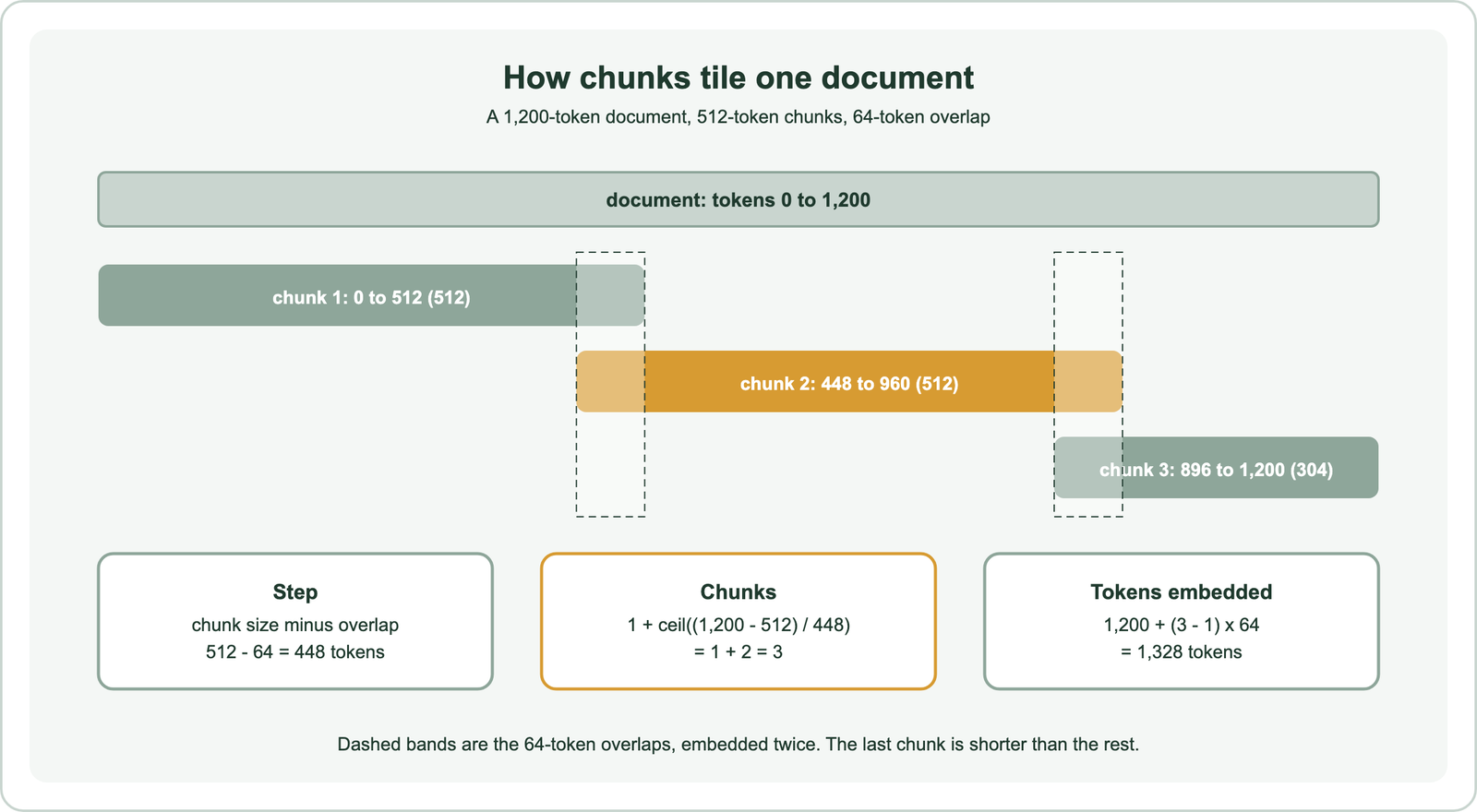
The step is the chunk size minus the overlap. With 512-token chunks and a 64-token overlap, each new chunk starts 448 tokens after the last. The first chunk covers the first 512 tokens, and every further chunk covers 448 new tokens, so the remaining 688 tokens need ceil(688 / 448) = 2 more chunks. The last chunk is usually shorter than the others.
Tokens embedded follow directly. Every token is embedded once, and each overlap region is embedded a second time, so a document with n chunks costs T + (n − 1) × O tokens. Memory is the number of chunks times dimensions times bytes per value. The cost of those tokens is estimated with the embedding cost calculator, and full memory sizing, including the index, with the vector storage and memory calculator.
How does chunk size change retrieval and cost?
Chunk size trades precision against context: small chunks match specific questions precisely but carry little context, while large chunks carry context but blur the meaning of each vector. Size also sets how many vectors you store.
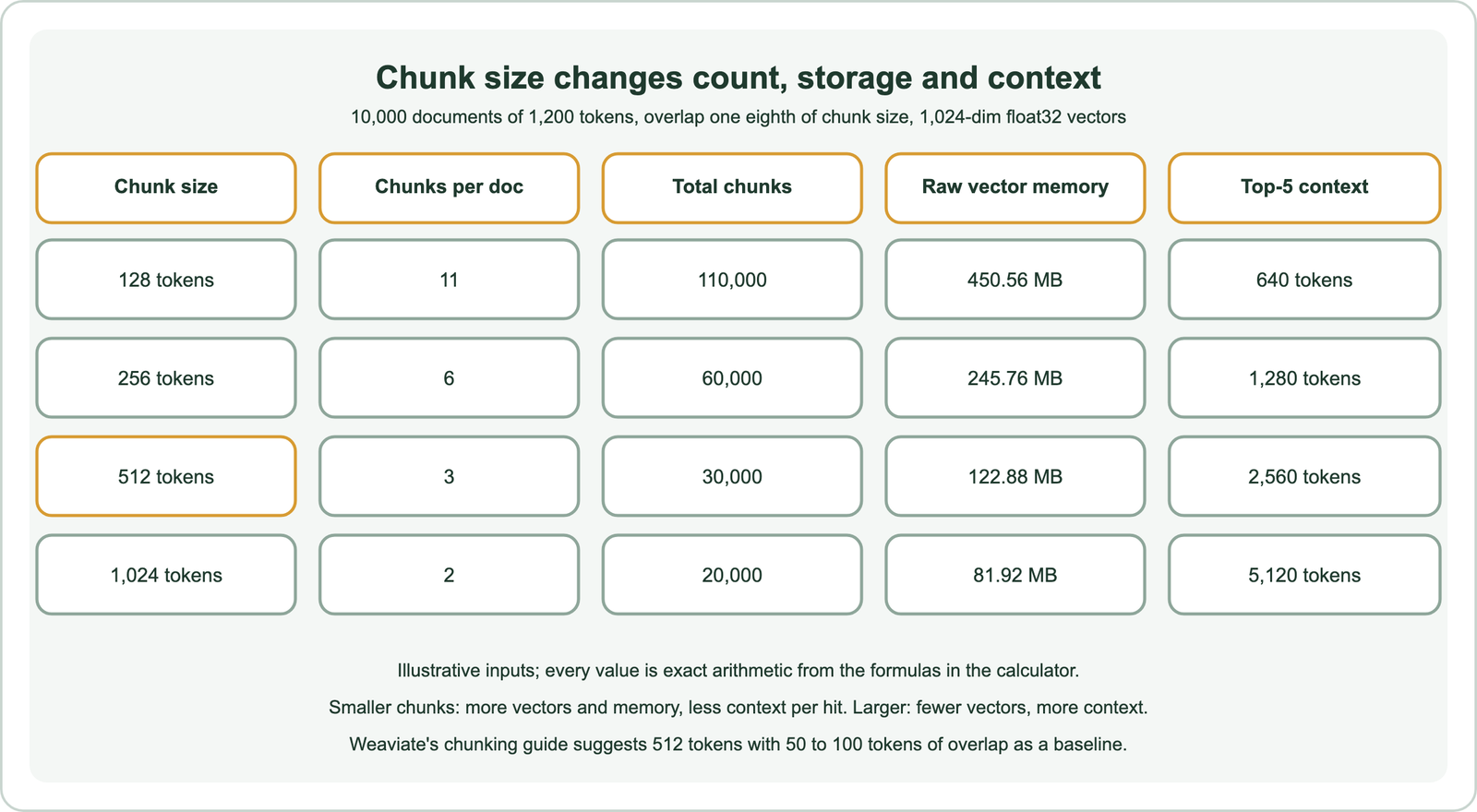
An embedding compresses its whole chunk into one vector. A short chunk about one idea gives a sharp vector that matches questions about that idea. A long chunk covering several ideas gives a vector that sits between them, so it may match none of them well. Weaviate’s academy course on chunking observes that as chunks grow longer, their embeddings become more general until they stop being useful for search.
The storage side runs the other way. In the illustrative table, moving from 512-token to 128-token chunks raises the vector count from 30,000 to 110,000 and raw memory from 122.88 MB to 450.56 MB. Context per result shrinks from 512 tokens to 128, so a RAG prompt with five results holds 640 tokens instead of 2,560. The general principles are covered in chunking for semantic search.
What chunk size should you start with?
You should start with a chunk size close to the length of a useful search result, commonly around 512 tokens or 100 to 200 words, and adjust after testing retrieval on real queries. No single size suits every collection.
Weaviate’s guidance gives several baselines. Its blog on chunking strategies suggests starting with 512-token chunks and 50 to 100 tokens of overlap as a reproducible baseline. Its academy course suggests 100 to 150 words, or 100 to 200 words with a 20% overlap when using a sliding window. Its RAG starter guide uses 150-word chunks with a 25-word overlap in its worked example.
Several factors move the choice. Weaviate’s course lists the text you want per search result, the typical query length, database size, the model’s input limit and how much context a RAG prompt can hold. Short queries tend to match short chunks better, and long queries, such as pasted paragraphs, match longer chunks. Collections with natural structure, such as sections or paragraphs, can chunk along that structure instead of fixed sizes.
How much chunk overlap should you use?
You should use a modest overlap, typically 10 to 20% of the chunk size, which keeps sentences that cross a boundary intact without embedding much text twice. More overlap costs tokens and adds near-duplicate results.
Overlap protects boundaries. Without it, a fact split across two chunks may be missing from both. Weaviate’s chunking blog gives 10 to 20% as the typical range, and its Verba article notes that overlap brings neighbouring chunks closer together in vector space while keeping information at the edges.
Overlap has costs. Every overlap token is embedded twice, which the calculator shows as extra tokens. Heavily overlapping chunks also tend to appear together in results, filling the top k with near-duplicates. Diversifying results, as described in maximal marginal relevance, can help when that happens.
How do model limits constrain chunk size?
Model limits constrain chunk size from two sides: a chunk must fit the embedding model’s input limit, and the retrieved chunks must fit the language model’s context alongside the prompt. Exceeding either loses text.
Embedding models accept a maximum number of input tokens. Text beyond the limit is cut off or rejected, depending on the provider. Weaviate’s documentation for its own embedding service notes that input exceeding the model’s context window is truncated from the right, so the end of an oversized chunk would never be embedded. The calculator flags chunk sizes above the limit you enter.
RAG adds a second budget. If a prompt retrieves k chunks of C tokens, the context grows by up to k × C tokens. Larger chunks therefore allow fewer results per prompt. Tokens and embeddings are distinguished in tokenization vs embedding.
How do you chunk text by tokens in code?
You chunk text by tokens in code by tokenizing the document once, then slicing the token list with a step of chunk size minus overlap until the end of the document. The slicing matches the calculator’s formula exactly.
def chunk_tokens(tokens, size=512, overlap=64):
    step = size - overlap
    chunks, start = [], 0
    while True:
        chunks.append(tokens[start:start + size])
        if start + size >= len(tokens):
            return chunks
        start += step

parts = chunk_tokens(list(range(1200)))
print(len(parts), [len(p) for p in parts], sum(len(p) for p in parts))   # 3 [512, 512, 304] 1328
The function was run on a list of 1,200 placeholder tokens as a code check and returned 3 chunks of 512, 512 and 304 tokens, 1,328 tokens in total, matching the formula. In practice, tokenize with the same tokenizer as your embedding model, and store each chunk with its document ID and position so neighbouring chunks can be fetched for extra context, as Weaviate’s academy course suggests.
Comparing other inputs in the same way, such as similarity or fusion settings, is covered by the vector similarity calculator and the reciprocal rank fusion calculator.
Where are the calculator’s estimates approximate?
The calculator’s estimates are approximate where documents vary in length, where tokenizers count differently, and where chunking follows document structure instead of fixed sizes. Arithmetic is exact; the inputs are estimates.
Average length hides variation: a collection of many short notes and a few long manuals has the same average as one of medium documents, but a very different chunk count. Token counts depend on the tokenizer, so measure them with your embedding model’s tokenizer on a sample. Structure-based chunking, by paragraph or section, gives variable chunk sizes, so the calculator’s fixed size becomes a rough average.
The calculator also says nothing about quality. Two chunk sizes with the same cost can retrieve very differently. Test candidates with real queries and measure recall, as described in recall at k, before settling on a size.
A chunk size calculator turns chunking choices into numbers. A document of T tokens split into C-token chunks with O tokens of overlap makes 1 + ceil((T − C) / (C − O)) chunks and embeds T + (n − 1) × O tokens. Smaller chunks mean more vectors, more memory and less context per hit; larger chunks mean fewer vectors and more context but blurrier meaning. Start near 512 tokens with 10 to 20% overlap, as Weaviate’s guidance suggests, keep chunks within the embedding model’s input limit, and check that k retrieved chunks fit your prompt. Then test retrieval on real queries before fixing the size.