Home / Filtering / Pre-Filtering vs Post-Filtering in Vector Search
ComparisonPre-Filtering vs Post-Filtering in Vector Search
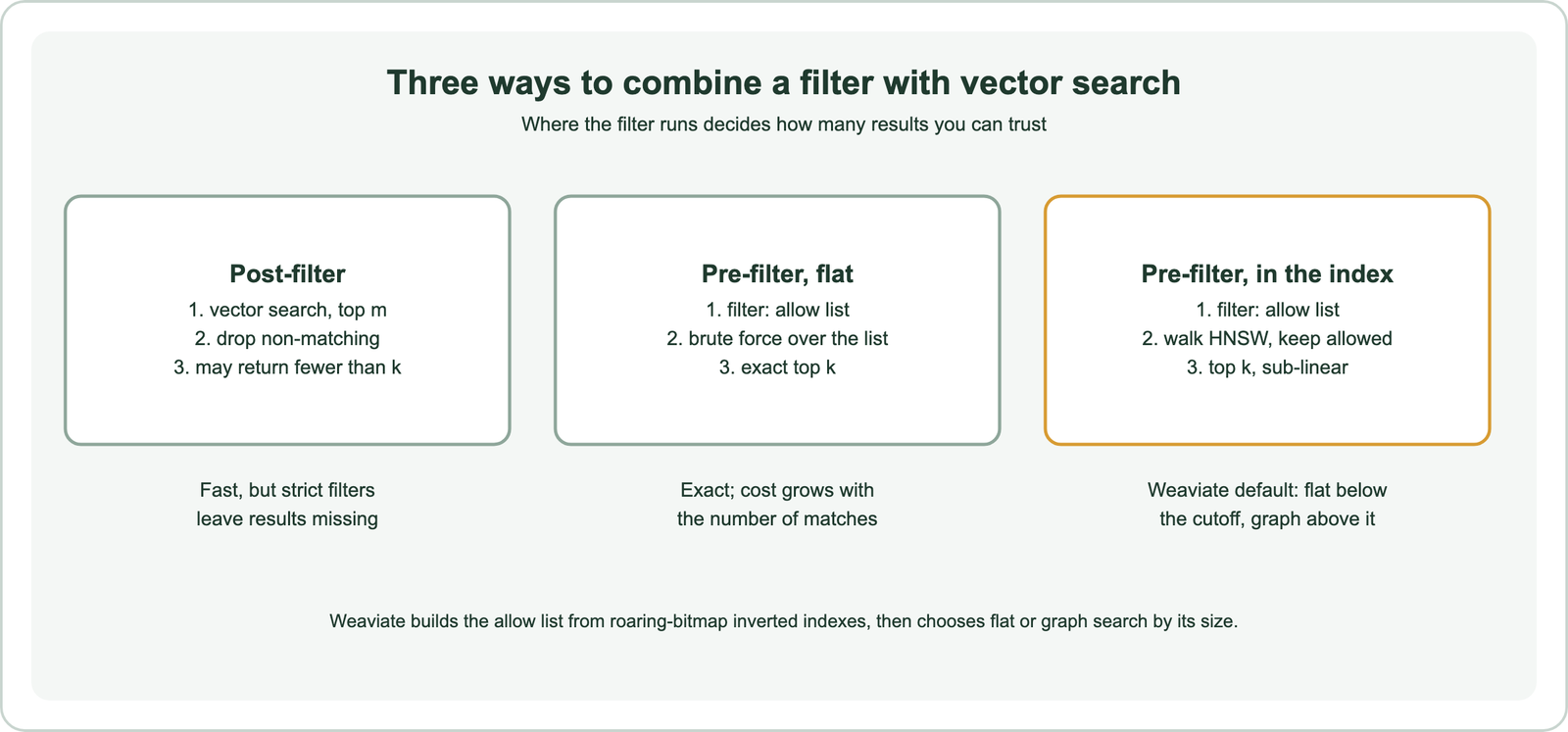
Pre-filtering applies a metadata filter before the vector search, so only matching items are searched; post-filtering runs the vector search first and removes non-matching results afterward. Post-filtering is simple and fast when most items match, but strict filters can leave it with too few results or none. Pre-filtering always returns the requested number of matches. A naive version must brute-force every matching item, while index-aware versions keep the speed of an approximate index. In this site’s simulation over 100,000 vectors, post-filtering needed 5,000 candidates to fill a top 10 when 1 percent of items matched. Brute force over the matches needed only 1,000 distance computations. Weaviate pre-filters every filtered search.
Pre-filtering versus post-filtering in four facts
- Post-filtering needs roughly 50 divided by the match rate in candidates to fill a top 10, in our simulation.
- When a filter excludes the query’s neighborhood, post-filtering returned nothing correct until it fetched 5,000 candidates.
- Weaviate builds an allow list from its inverted index first, then searches only allowed objects.
- Under 40,000 matches by default, Weaviate scores matches directly; above that, it walks the HNSW graph.
What is pre-filtering in vector search?
Pre-filtering in vector search is the approach of resolving the filter first, building the set of objects that match, and then running the similarity search only over that set. It is also called filter-then-search.
Weaviate’s filtering documentation describes the idea: eligible candidates are determined before a vector search starts, and the search then considers only candidates on the “allow” list. Because the filter has already removed everything else, the search can return the full number of results requested, as long as enough items match.
The simplest pre-filter computes the distance from the query to every matching item and sorts them, an exact brute-force search over the allow list. That is fast when few items match and slow when many do, because the cost grows with the number of matches. Index-aware pre-filtering avoids that cost by passing the allow list into the approximate index. Metadata filtering covers the filters themselves.
What is post-filtering in vector search?
Post-filtering in vector search is the approach of running the similarity search first, retrieving the top candidates, and then discarding any that fail the filter. It is also called search-then-filter.
Weaviate’s documentation names its two drawbacks. You cannot predict how many results will remain, because the filter runs on an already reduced list. And with a restrictive filter, the vector search may contain no matches at all. The term “post filter” in this sense simply means filtering after retrieval.
Post-filtering stays common because it is easy to bolt onto any vector index or library. A RAG pipeline might retrieve the top 20 chunks and drop those from the wrong department, for example. That works when most chunks belong to the right department and fails quietly when few do. Searching versus filtering explains how the two operations differ.
How do pre-filtering and post-filtering compare?
Pre-filtering and post-filtering compare as a trade between guaranteed results and simplicity: pre-filtering always fills the result list, while post-filtering is simpler but unreliable under strict filters. Speed depends on the implementation.
| Aspect | Post-filtering | Pre-filtering, flat | Pre-filtering in the index |
|---|---|---|---|
| Order | Search, then filter | Filter, then brute force | Filter, then filtered index search |
| Result count | Unpredictable, can be zero | Always k if k items match | Always k if k items match |
| Cost with many matches | Low | High, linear in matches | Low |
| Cost with few matches | Low, but results missing | Low | Can rise; flat search often used |
| Needs database support | No | A filter index | A filter-aware vector index |
The naming varies by vendor. Weaviate’s documentation notes that some authors distinguish “pre-filtering”, meaning brute force, from “single-stage filtering”, meaning filtering inside the index. Weaviate does not make that distinction, because its pre-filtering does not need a brute-force search. Qdrant’s blog describes its own approach as neither pre- nor post-filtering, since it applies the filter inside the graph walk.
How much does post-filtering need to over-fetch?
Post-filtering needs to over-fetch roughly in inverse proportion to the share of items that pass the filter, and far more when the filter excludes the query’s own neighborhood. A simulation shows how many candidates it takes.
The simulation used 100,000 vectors in 64 dimensions, grouped into 100 clusters, with 300 queries and exact search. Post-filtering took the top m unfiltered results and kept the matches. We varied m from 10 to 20,000 and counted how often a query still got 10 results, and recall against the exact filtered top 10.
| Share passing the filter | Fetch 100 | Fetch 1,000 | Fetch 5,000 | Fetch 20,000 | Pre-filter work |
|---|---|---|---|---|---|
| 50%, uncorrelated | 1.00 | 1.00 | 1.00 | 1.00 | 50,000 |
| 10%, uncorrelated | 0.89 | 1.00 | 1.00 | 1.00 | 10,000 |
| 1%, uncorrelated | 0.10 | 0.91 | 1.00 | 1.00 | 1,000 |
| 0.1%, uncorrelated | 0.01 | 0.10 | 0.51 | 1.00 | 100 |
| 10%, negatively correlated | 0.00 | 0.09 | 1.00 | 1.00 | 10,000 |
Values are recall@10. With uncorrelated filters, a full and correct top 10 arrived at about 50 candidates at 50 percent, 500 at 10 percent, 5,000 at 1 percent, and 20,000 at 0.1 percent. The rule of thumb that falls out is roughly 50 divided by the match rate. With a negatively correlated filter at 10 percent, nothing correct arrived until 5,000 candidates.
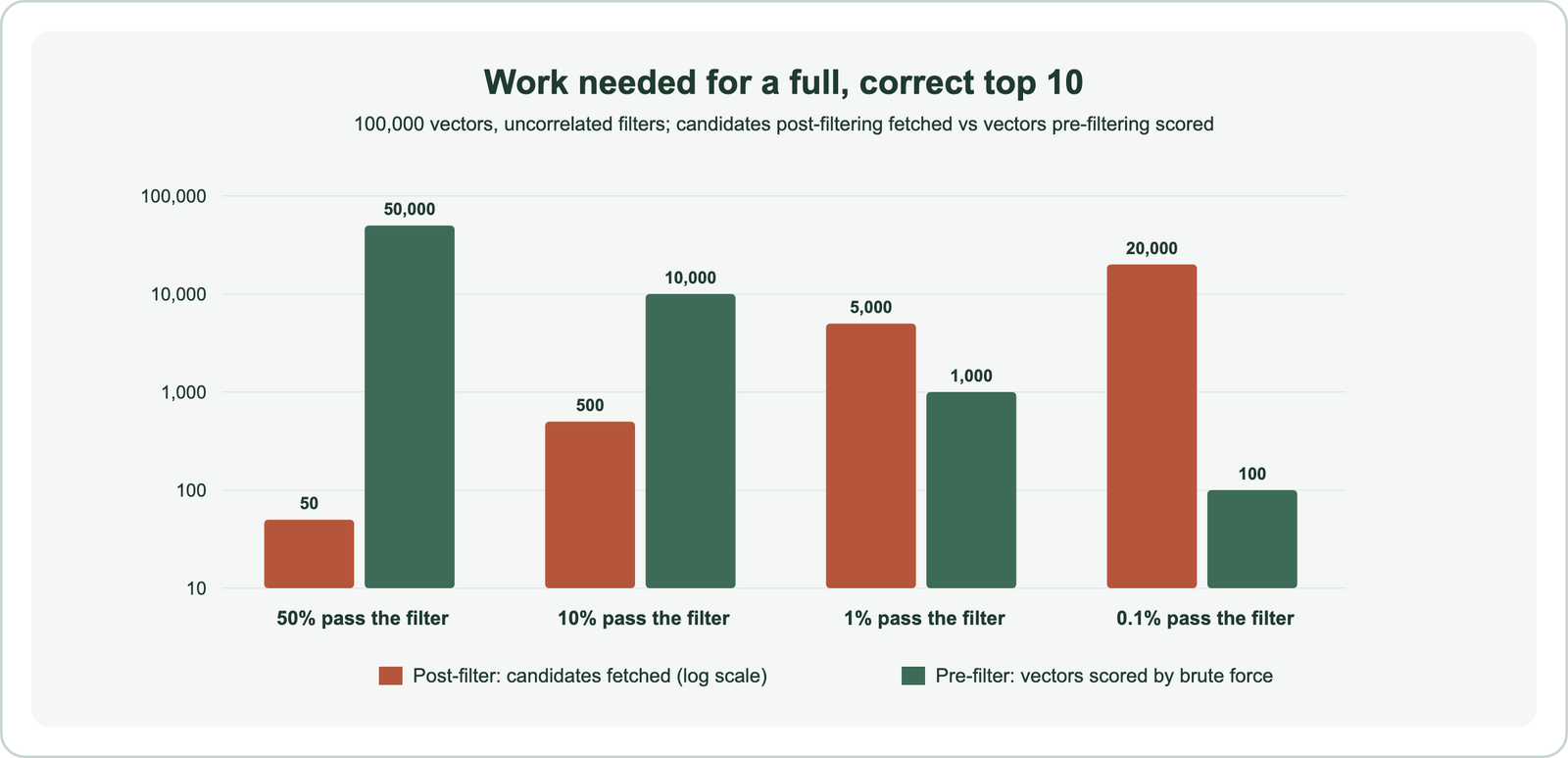
The comparison flips with selectivity. For broad filters, post-filtering fetches a handful of extra candidates while brute-force pre-filtering scores tens of thousands. For strict filters, brute force over the few matches is far cheaper than fetching thousands of candidates. And in an approximate index, fetching m candidates means a search list of at least m, which costs more than a typical search.
Can you use a pre-filter with vector search queries?
You can use a pre-filter with vector search queries in Weaviate, and every filtered search uses one: Weaviate’s FAQ states that it uses pre-filtering exclusively on filtered ANN search. You add a filter to the query, and the database handles the rest.
The process has two steps, per Weaviate’s documentation. First, the inverted index produces an allow list of matching object IDs. Second, the vector search runs with that allow list. The HNSW search follows graph links normally but adds only allowed IDs to the result set, and it does not stop early until the top k allowed results are found.
Weaviate stores the allow list efficiently. Its filterable inverted indexes use roaring bitmaps, which Weaviate introduced in version 1.18 and reported as up to 1,000 times faster in some cases. Its internal tests saw queries drop from 3 to 4 seconds to 3 to 4 milliseconds. Range filters on numbers and dates can use a separate indexRangeFilters index, which is off by default. Bitmap filters explains the data structure.
The size of the allow list then picks the search path. Under flatSearchCutoff, 40,000 by default, Weaviate scores the allowed objects directly. Above it, the graph walk uses a filter strategy, ACORN by default since version 1.34. Weaviate’s documentation reports that recall of a filtered search is typically no worse than an unfiltered one. Filtered ANN search covers those strategies.
Which filtering approach should you use?
You should use pre-filtering inside the database whenever it is available, and post-filtering only for broad filters or when your vector store offers nothing else. The deciding factor is how many items your filters typically match.
- Check your filters: log real queries and how many objects each filter matches.
- Broad filters, over about 20 percent: post-filtering with modest over-fetching works, though pre-filtering still guarantees counts.
- Restrictive filters, 1 to 20 percent: use pre-filtering in the index; post-filtering needs large over-fetch.
- Sparse filters, under 1 percent: pre-filter with brute force over the matches, which is both exact and cheap.
- Security filters: always pre-filter, so forbidden items never become candidates.
The last point matters beyond recall. For tenant isolation or access control, post-filtering means forbidden documents are retrieved and then dropped, which is fragile if a later code path forgets the drop. Pre-filtering keeps them out of the search entirely. Permission-aware search and multi-tenant semantic search cover those cases.
How does filtering apply in RAG pipelines?
In RAG pipelines, filtering decides which chunks can reach the language model, so a post-filter that leaves too few chunks starves the prompt of context. The failure is easy to miss because the model still answers.
A typical post-filtered pipeline retrieves the top 10 chunks, then keeps only those from the user’s product version. If the version covers 5 percent of the corpus, our simulation suggests a fetch of 10 returns almost no matching chunks. The model then answers from whatever survives, or from nothing. Pre-filtering on version returns 10 chunks from the right version every time.
Date, source, language, and access filters behave the same way. Apply them as pre-filters, and check the number of chunks actually passed to the model in your logs. Semantic search in RAG covers the retrieval step, and faceted semantic search covers filters exposed to users.
How do you write a pre-filtered query in Weaviate?
You write a pre-filtered query in Weaviate by passing a Filter to any search method; the database applies it before the vector search. No extra setting is needed.
Filters combine with AND and OR, and each property used in a filter should keep its filterable index, which is on by default. The example restricts a documentation search to one product version and one department, the kind of scope a RAG assistant or support search usually needs.
import weaviate
from weaviate.classes.query import Filter

client = weaviate.connect_to_local()
chunks = client.collections.use("DocChunk")

response = chunks.query.near_text(
    query="how do I rotate API keys",
    filters=(Filter.by_property("product_version").equal("4.21")
             & Filter.by_property("department").equal("platform")),
    limit=10,
)
print(len(response.objects))   # 10 whenever at least 10 chunks match the filter
client.close()
The same filters work with hybrid and bm25 queries. For numeric or date ranges, enable indexRangeFilters on those properties for faster comparisons. Filter selectivity explains why strict filters behave differently, and vector databases with metadata filtering compares how other databases handle them.
What does the term filtering mean in search?
Filtering in search means including or excluding items by exact conditions on their properties, without ranking them, as opposed to searching, which ranks items by relevance. Filters answer yes or no.
Weaviate’s documentation draws the line clearly: a filter passes or blocks objects, so it produces no ranking. A filter for “black” returns only black items, in no meaningful order, while a search ranks items by how well they match. Combining the two, filtered search, is what pre- and post-filtering are about.
The word appears in other software too. Microsoft Dynamics 365 reports, for example, use “pre-filtering” for limiting report data before it runs. The idea is similar, but the vector search meaning is specific: when the filter runs relative to the similarity search.
Pre-filtering applies the filter first and searches only the matches; post-filtering searches first and drops non-matches. Post-filtering is fine for broad filters, but our simulation showed it needs about 50 divided by the match rate in candidates to fill a top 10, and far more for negatively correlated filters. Pre-filtering guarantees a full result list and, done inside the index, stays fast. Weaviate pre-filters every filtered search, scoring small allow lists directly and walking the graph for large ones.