Home / Build it / Semantic Search With Chroma: A Step-by-Step Tutorial
TutorialSemantic Search With Chroma: A Step-by-Step Tutorial
Semantic search with Chroma works by adding documents to a collection that embeds and indexes them, then querying it with text to get the nearest documents. Each result comes back with its distance from the query. Chroma is an open-source vector database that runs inside a Python process, as a local server or as a hosted service. A collection holds IDs, documents, metadata and embeddings together. Queries can combine vector similarity with metadata filters, written with operators such as $eq and $gte, and with document filters such as $contains. The tutorial uses Chroma’s Python client with a local sentence-transformers model, so it runs with no API key and no separate server. Chroma suits prototypes, notebooks, small applications and RAG experiments. For larger deployments that need BM25 and vector ranking fused in one query, a server such as Weaviate is a common next step.
Semantic search with Chroma in four facts
- A Chroma collection stores IDs, documents, metadata and embeddings, and embeds documents with its embedding function.
- Chroma’s PersistentClient saves data to a local folder, while its EphemeralClient keeps data in memory only.
- Chroma queries return distances, so smaller values mean closer documents for the configured space.
- Chroma’s where_document filter with $contains restricts results by text but does not rank them by keyword relevance.
How does semantic search with Chroma work?
Semantic search with Chroma works by storing each document with an embedding in a collection and returning the documents whose embeddings are nearest to the query’s embedding. Chroma calls the embedding model for you when you pass raw text.
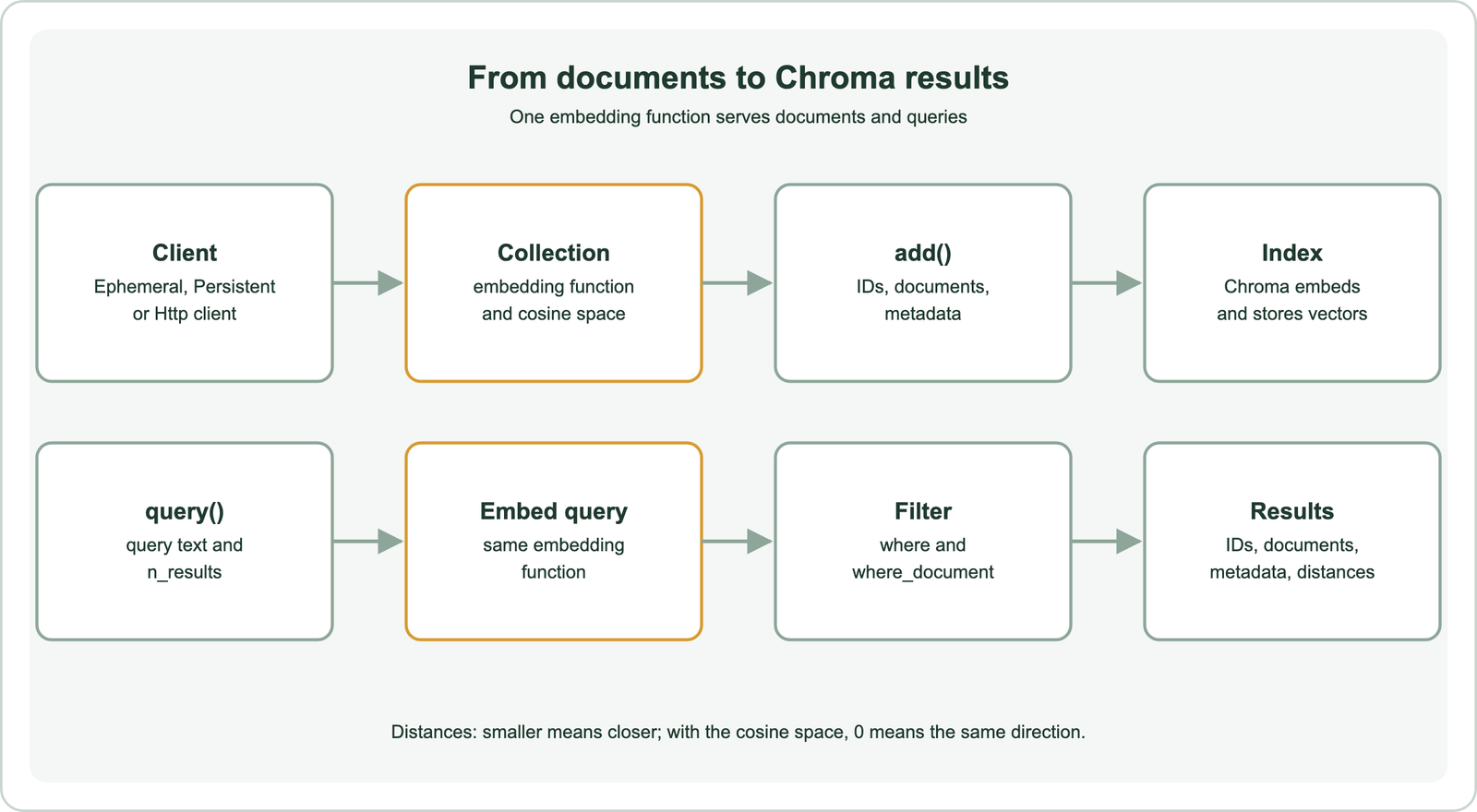
A collection is Chroma’s unit of storage, comparable to a table or an index. Each record has a string ID, an optional document text, an optional metadata dictionary and an embedding. If you add documents without embeddings, the collection’s embedding function creates them. If you supply your own embeddings, Chroma stores them as given.
A query sends text or a vector, a result count and optional filters. Chroma embeds the text with the same function, searches its vector index and returns the nearest records with their distances. The general pipeline is described in how to build semantic search. Chroma’s appeal is how little setup that pipeline needs.
What do you need to set up Chroma for semantic search?
You need Python, the chromadb package and an embedding model, which can be a local sentence-transformers model or a hosted embedding API. No separate database server is required for local use.
Install the packages with pip: chromadb and sentence-transformers. The code was run with chromadb 1.5.9 as a check that the calls work as written. Chroma offers several clients. EphemeralClient keeps everything in memory and loses it when the process ends. PersistentClient saves to a folder on disk. HttpClient connects to a Chroma server started separately, which several processes can share.
import chromadb
from chromadb.utils.embedding_functions import SentenceTransformerEmbeddingFunction

client = chromadb.PersistentClient(path="./chroma_db")
embed = SentenceTransformerEmbeddingFunction(
    model_name="all-MiniLM-L6-v2",
    normalize_embeddings=True,
)
The embedding function wraps the all-MiniLM-L6-v2 model, the same model used in semantic search with Python. It downloads once and runs on the CPU. Normalizing the embeddings keeps cosine distances consistent. Hosted embedding providers have their own embedding function classes in the same module. With a client and a model, the next step is the collection.
How do you create a Chroma collection for semantic search?
You create a Chroma collection with get_or_create_collection, passing a name, the embedding function and an index configuration that sets the distance space. The space should match the metric the embedding model was trained for.
articles = client.get_or_create_collection(
    name="articles",
    embedding_function=embed,
    configuration={"hnsw": {"space": "cosine"}},
)
get_or_create_collection returns the collection if it exists and creates it otherwise, which makes scripts safe to rerun. The configuration sets the HNSW index to cosine distance. Chroma’s default space is l2, squared Euclidean distance, so models trained for cosine similarity should set cosine explicitly. With normalized vectors, the two give the same order.
Use the same embedding function every time the collection is opened. If queries are embedded with a different model than the documents, the distances mean nothing. The reason is explained in cosine vs dot product vs Euclidean distance. Property design for larger systems is covered in search index schema design. An empty collection is ready for documents.
How do you add documents and metadata to Chroma?
You add documents to Chroma with the collection’s add method, passing parallel lists of IDs, document texts and metadata dictionaries. Chroma embeds each document with the collection’s embedding function.
docs = [
    {"id": "a1", "title": "Refund policy", "body": "Refunds are issued within 14 days of a return request.",
     "category": "billing", "year": 2026},
    {"id": "a2", "title": "Reset your password", "body": "Use the sign-in page link to set a new password.",
     "category": "account", "year": 2025},
    {"id": "a3", "title": "Invoices", "body": "Download invoices as CSV from the billing page.",
     "category": "billing", "year": 2024},
]

articles.add(
    ids=[d["id"] for d in docs],
    documents=[d["title"] + ". " + d["body"] for d in docs],
    metadatas=[{"title": d["title"], "category": d["category"], "year": d["year"]} for d in docs],
)
IDs must be unique strings. The document text is what gets embedded, so the title is prepended to the body to give each vector more context. Metadata values are simple types such as strings, numbers and booleans. They are stored for filtering and display but are not embedded.
For larger loads, add records in batches rather than in one call, so memory stays bounded and a failure loses less work. Embedding is usually the slow part, which batch embedding covers. Long documents should be split before adding, as described in semantic search over PDFs and documents. With records in place, the collection can answer queries.
How do you run a semantic search query in Chroma?
You run a semantic search query in Chroma with the collection’s query method, passing the query text and the number of results. It returns lists of IDs, documents, metadata and distances for each query.
res = articles.query(query_texts=["how do I get my money back"], n_results=2)

for doc_id, dist, meta in zip(res["ids"][0], res["distances"][0], res["metadatas"][0]):
    print(doc_id, round(dist, 3), meta["title"])
Results come back as nested lists, one inner list per query text, because query_texts accepts several queries at once. The [0] picks the first query’s results. They are ordered by distance, closest first.
The distances are distances, not similarities. With the cosine space, a distance of 0 means the same direction, and larger values mean less similar. The query “how do I get my money back” shares no words with “Refund policy”, yet the refund article ranks first, which is the point of semantic search. The idea is explained in semantic matching. Most applications also need to narrow results by metadata.
How do you filter Chroma results by metadata and text?
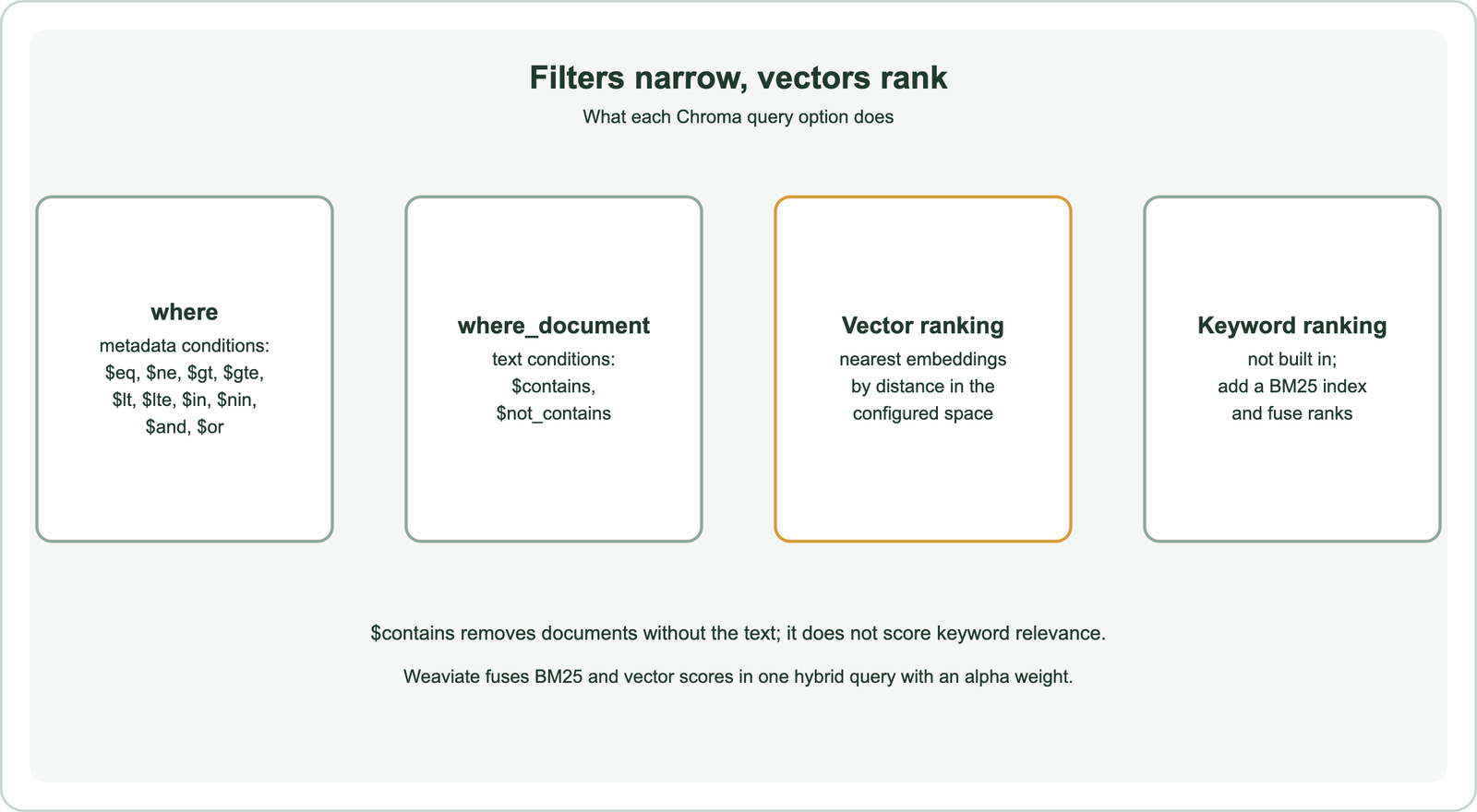
You filter Chroma results with a where argument for metadata conditions and a where_document argument for conditions on the document text. Filters restrict the candidates; vector distance still ranks them.
res = articles.query(
    query_texts=["billing question"],
    n_results=3,
    where={"$and": [{"category": "billing"}, {"year": {"$gte": 2025}}]},
)

res = articles.query(
    query_texts=["export"],
    n_results=3,
    where_document={"$contains": "CSV"},
)
The where filter supports comparison operators such as $eq, $ne, $gt, $gte, $lt and $lte, set operators $in and $nin, and logical $and and $or. The first query keeps only billing articles from 2025 onward. The where_document filter matches text inside the stored documents, so the second query keeps only documents containing “CSV”.
$contains is a filter, not keyword ranking. It removes documents without the string but does not score documents by how well their words match, as BM25 does. Very selective filters also interact with the HNSW index, a problem covered in filter selectivity. For genuine keyword ranking alongside vectors, a hybrid approach is needed.
How do you combine keyword and vector search with Chroma?
You combine keyword and vector search with Chroma by running a separate keyword ranker, such as a BM25 library, and fusing its results with Chroma’s vector results. Reciprocal rank fusion is the simplest way to merge the two lists.
The pattern has three steps. Run the query against a BM25 index built over the same documents. Run the same query in Chroma. Merge the two ranked lists with reciprocal rank fusion, which adds 1 divided by a constant plus the rank for each list a document appears in. The reciprocal rank fusion calculator shows the arithmetic.
Keeping two indexes in sync is extra work. Every add, update and delete must reach both. Frameworks such as LangChain and LlamaIndex provide ensemble retrievers that wrap this pattern, as shown in semantic search with LangChain and LlamaIndex.
Weaviate runs BM25 and vector search in one hybrid query, with an alpha weight that sets the balance, as shown in semantic search with Weaviate. The methods for merging scores are compared in score fusion methods. The index behind Chroma’s vector search has settings of its own.
How do you update, delete and tune a Chroma collection?
You update records with upsert, delete them by ID or by a where filter, and tune search through the HNSW settings in the collection configuration. Upsert re-embeds the new document text automatically.
articles.upsert(
    ids=["a2"],
    documents=["Reset your password. Use the link on the sign-in page."],
    metadatas=[{"title": "Reset your password", "category": "account", "year": 2026}],
)
articles.delete(where={"year": {"$lt": 2025}})
print(articles.count())
upsert inserts records that do not exist and replaces those that do, so an ingestion job can rerun safely. delete accepts IDs or the same where syntax as queries, which makes it easy to remove a whole document’s chunks or expire old records.
The HNSW configuration exposes the space plus build and search settings named ef_construction, ef_search and max_neighbors. They play the same roles as efConstruction, ef and maxConnections in Weaviate’s HNSW index. Higher values raise recall at the cost of build time, query time or memory. The trade-off is covered in the recall vs latency trade-off. With the mechanics covered, the remaining question is when Chroma fits.
When should you use Chroma for semantic search?
You should use Chroma for semantic search when you want the shortest path from documents to working vector search, such as prototypes, notebooks, tests, desktop tools and small RAG applications. It runs in-process with a single pip install.
Weaviate offers a comparable local option. Embedded Weaviate starts a Weaviate instance from Python code and persists data to a folder, though Weaviate’s documentation marks it as experimental and suited to evaluation and prototyping. For development and production, Weaviate recommends Docker, Kubernetes or Weaviate Cloud. A prototype built on either can move to a server later.
Requirements such as hybrid ranking in one query, fine-grained access control and replication across nodes are reasons to compare dedicated servers. The decision criteria are in choosing a vector database for semantic search, and moving data later in migrating to a new vector database.
Besides Weaviate, other databases have similar guides: Qdrant, Milvus, Pinecone, Redis, Elasticsearch, OpenSearch and Postgres with pgvector.
Semantic search with Chroma takes a few calls. Create a client and a collection with an embedding function and a cosine space, add documents with IDs and metadata, and query with text to get the nearest documents and their distances. Metadata filters use operators such as $eq and $gte, and $contains filters by text without ranking by keywords. True hybrid ranking needs a separate BM25 index and rank fusion. Use Chroma for prototypes and small applications, and keep the same embedding function for documents and queries. When hybrid search, access control or scale become requirements, compare servers, with Weaviate as one option.