Home / Calculators / Vector Storage and Memory Calculator
CalculatorVector Storage and Memory Calculator
A vector storage and memory calculator estimates how much RAM and disk a vector index needs. It works from four inputs: the number of vectors, their dimensions, the precision each value is stored at, and the index’s graph settings. The core formula is simple. Raw vector size is vectors times dimensions times bytes per value, which is 4 bytes for float32. An HNSW index adds graph links on top, and Weaviate’s documentation gives a rule of thumb of about twice the raw vector size for total memory. Quantization shrinks the in-memory vectors, for example to 1 byte per dimension at 8 bits. Replicas multiply everything. The calculator applies these formulas so you can size a deployment before loading data, then compare the effect of a smaller embedding model or compression. Treat the result as a planning estimate and confirm it on a sample of real data.
Vector storage and memory in four facts
- Raw vector size is vector count times dimensions times 4 bytes for float32 values.
- Weaviate’s resource planning rule of thumb puts total memory at about twice the memory footprint of all vectors.
- Weaviate’s more exact estimate adds about 10 bytes per graph connection, using the maxConnections setting.
- One million 1,536-dimension float32 vectors take 6,144,000,000 bytes, which Weaviate’s tables show as 5,859 MB.
How do you estimate vector index memory with the calculator?
You estimate vector index memory with the calculator by entering the vector count, dimensions, stored precision, maxConnections and number of replicas. It returns the raw vector size, two memory estimates and the disk needed for original vectors. All results update as you type.
| Raw float32 vectors | 6.14 GB |
|---|---|
| Memory, rule of thumb (2 x vectors in memory) | 12.29 GB |
| Memory, vectors plus graph links | 6.46 GB |
| Disk for original vectors | 6.14 GB |
The default inputs describe one million vectors from a 1,536-dimension model stored as float32, with Weaviate’s default maxConnections of 32. Raw vectors take 1,000,000 times 1,536 times 4 bytes, which is 6.14 GB. The rule of thumb doubles that to 12.29 GB. The graph estimate, vectors times the sum of vector bytes and maxConnections times 10 bytes, gives 6.46 GB before overhead.
Change the precision to 8-bit and the in-memory vectors drop to 1,536 bytes each, so the graph estimate falls to 1.86 GB. Weaviate keeps the original vectors on disk for rescoring and retrieval, so the disk line does not shrink. The sections that follow explain each input.
What formula does a vector memory calculator use?
A vector memory calculator uses the formula vectors times dimensions times bytes per value for raw size, then adds graph links or applies a rule-of-thumb multiplier for the whole index. Weaviate’s documentation gives both forms.
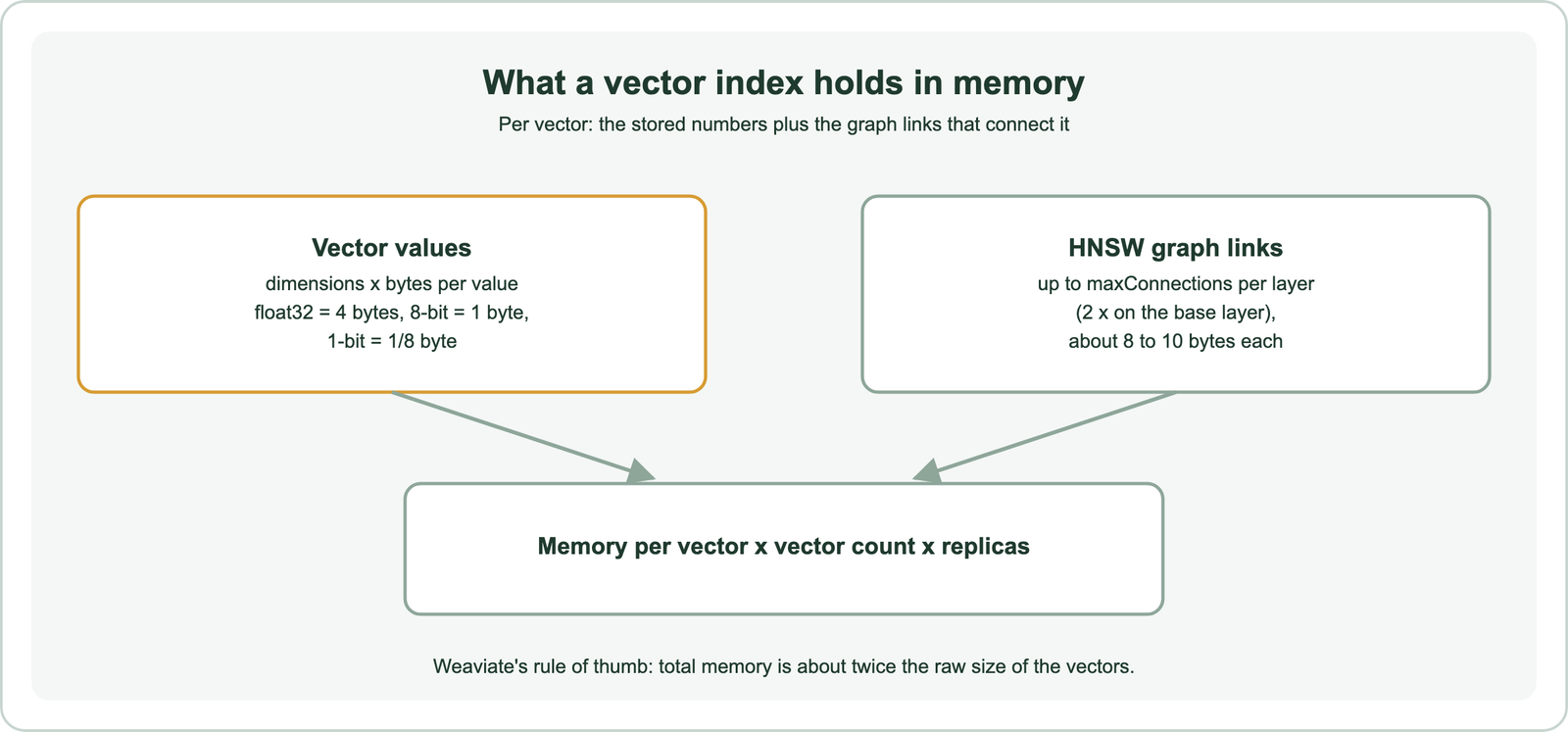
Weaviate’s resource planning page works the arithmetic. One million 384-dimension float32 vectors take 384 times 4 bytes, or 1,536 bytes each, so 1.5 GB in total, and the rule of thumb doubles that to 3 GB. For a closer estimate it adds graph links: with maxConnections of 64 and 10 bytes per link, one million vectors need about 1e6 times (1,536 plus 640) bytes, or 2.2 GB. The page notes that this smaller figure leaves out garbage collection overhead.
Weaviate’s best-practice page gives the same picture at another size: about 6 GB for one million 1,024-dimension vectors, and about 2 GB with quantization enabled. The calculator follows these formulas, so its output matches those worked examples. Dimensions are the input with the biggest effect.
How do dimensions and vector count change memory?
Dimensions and vector count change memory in direct proportion: doubling either doubles the raw vector size. Choosing the embedding model is therefore a memory decision.
Common embedding models output 384, 768, 1,024, 1,536 or 3,072 dimensions. At float32, those are 1,536, 3,072, 4,096, 6,144 and 12,288 bytes per vector. A 1,536-dimension model needs four times the memory of a 384-dimension model for the same collection. Weaviate’s academy course on embedding models makes the same point: a roughly tenfold difference in dimensions is a roughly tenfold difference in memory.
Vector count depends on chunking. A collection of 100,000 documents split into 10 chunks each holds one million vectors, and each named vector on an object adds another set. Weaviate’s academy formula for vectors only is objects times vectors per object times dimensions times 4 bytes. Before reducing dimensions, check retrieval quality; a smaller model can cost more in relevance than it saves in memory. The chunk size calculator helps estimate chunk counts. Compression is the other lever.
How does quantization change vector memory?
Quantization changes vector memory by storing each dimension in fewer bits, cutting the in-memory vector size by 4 times at 8 bits, 8 times at 4 bits and 32 times at 1 bit. The graph links are not compressed.
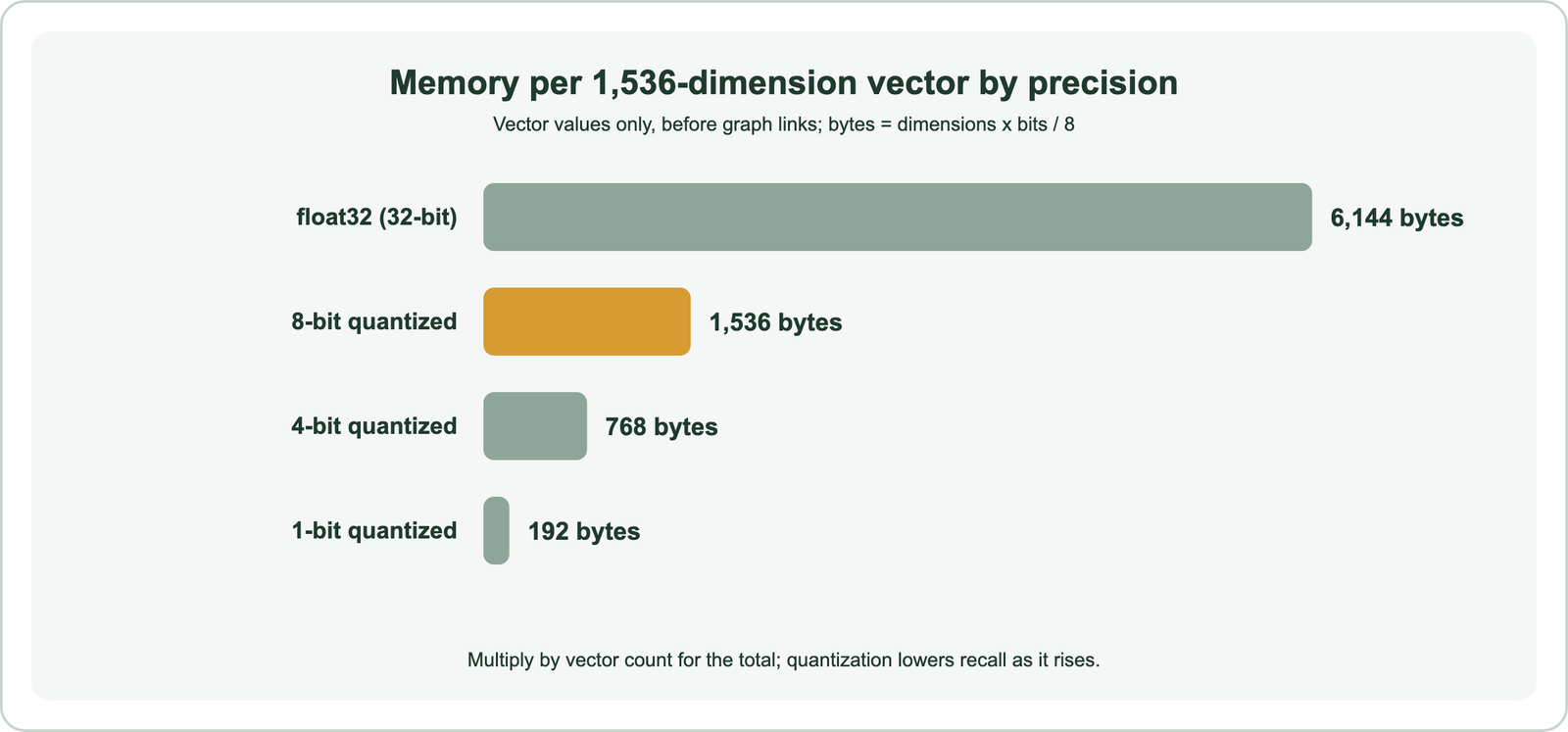
Weaviate’s article on 8-bit rotational quantization gives totals for one million 1,536-dimension vectors. They take 5,859 MB uncompressed, 1,465 MB at 8 bits, 732 MB at 4 bits and 183 MB at 1 bit. Expected recall falls from 97 to 99.9 percent at 8 bits to 70 to 90 percent at 1 bit. Those MB figures use 1,048,576 bytes per MB; the calculator reports decimal GB, so 5,859 MB appears as 6.14 GB.
Because graph links stay the same size, compression helps most when vectors are large. For 1,536 dimensions at 8 bits, each vector shrinks from 6,144 to 1,536 bytes while 32 links still add about 320 bytes. Weaviate’s documentation recommends 8-bit rotational quantization as a starting point for HNSW. The cost of semantic search explains why memory dominates the bill. Graph settings make up the rest.
How do HNSW settings and replicas affect memory?
HNSW settings affect memory through maxConnections, the number of links each vector keeps per layer, and replicas multiply the whole index because each holds a full copy. Both are easy to overlook in planning.
Weaviate’s documentation states that each vector has at most maxConnections links per layer, each using 8 to 10 bytes, and that the base layer allows twice maxConnections. Its default maxConnections is 32. Raising it improves recall and graph quality at a memory cost; lowering it saves memory but hurts recall, which the documentation suggests offsetting by raising efConstruction or ef. The calculator uses 10 bytes per link, matching the documentation’s worked example.
Replication raises query throughput and availability, according to Weaviate’s scaling documentation, but each replica stores its shards in full. A replication factor of three needs three times the memory of one copy. Sharding spreads the index across nodes without adding copies, so it changes memory per node rather than total memory. Disk has its own sizing.
How much disk does a vector database need?
A vector database needs disk for the original vectors, the stored objects and their inverted indexes, write-ahead logs and backups, on top of any in-memory index. Disk is cheaper than memory, but it is not free.
Weaviate stores original vectors even when quantization is enabled, according to its academy course, so full-precision vectors can be retrieved and used for rescoring. The calculator’s disk line shows that raw size. Object text, metadata and inverted indexes for keyword search and filters come on top and depend on how much text each object carries. Backups and snapshots multiply storage again.
Memory-mapped files let Weaviate read from disk efficiently, but Weaviate’s documentation notes that disk is much slower than memory. Disk-based indexes such as HFresh keep a compressed index in memory and the rest on disk, trading some latency for much lower memory. A Weaviate analysis of AWS instance prices found that memory costs roughly 100 times more per gigabyte than NVMe SSD, which is why moving data to disk matters at scale. The estimate is only a start.
How do you check a memory estimate against reality?
You check a memory estimate by loading a representative sample, measuring actual memory and disk use, and scaling the measurement to the full collection. Real usage depends on data, settings and version.
Load one or two percent of the data with the planned model, compression and index settings, then read the process memory and disk usage from your monitoring. Scale by the ratio of full to sample size and add headroom for growth, garbage collection and query load. Weaviate exposes Prometheus metrics for this, and its resource planning documentation explains which factors drive memory.
Repeat the check when anything changes: a new embedding model, a compression setting, more named vectors or more replicas. Related tools help with the neighbouring questions. The embedding cost calculator prices the embedding step, the vector similarity calculator explains how vectors are compared, and the reciprocal rank fusion calculator shows how hybrid results are merged.
A vector storage and memory calculator turns vector count, dimensions, precision, graph settings and replicas into a memory and disk estimate. Raw size is vectors times dimensions times bytes per value, and Weaviate’s rule of thumb doubles that for total memory, while its graph estimate adds about 10 bytes per connection. Quantization cuts in-memory vectors by 4 to 32 times, dimensions scale memory directly, and replicas multiply it. Use the calculator to compare options before loading data, then confirm the estimate on a representative sample and keep headroom for growth.