Home / Build it / Semantic Search With Qdrant: A Step-by-Step Tutorial
TutorialSemantic Search With Qdrant: A Step-by-Step Tutorial
To build semantic search with Qdrant, create a collection with a vector size and distance metric, upsert points that carry a vector and a JSON payload, and query with query_points. Metadata filtering uses Qdrant’s Filter object with must, should and must_not conditions on payload fields, such as category equals “billing” or year at least 2025. Creating a payload index on fields you filter often keeps filtered search fast. For hybrid search, store a dense vector and a sparse vector per point under different names. Query both with prefetch, and fuse the results with reciprocal rank fusion or distribution-based score fusion. The qdrant-client library’s local mode runs the same code in memory or against a local folder, so the examples here run without a server. The page also maps Weaviate concepts to their Qdrant equivalents for teams comparing the two.
Semantic search with Qdrant in four facts
- Qdrant stores points: an ID, one or more vectors, and a JSON payload of metadata.
- Filters combine must, should and must_not conditions on payload fields.
- Payload indexes on frequently filtered fields speed up filtered search.
- Hybrid search uses prefetch on dense and sparse vectors, fused with RRF or DBSF.
What do you need to build semantic search with Qdrant?
To build semantic search with Qdrant you need a Qdrant server or local mode, the qdrant-client Python library, an embedding model and documents to index. Local mode needs no server.
Qdrant is an open-source vector database written in Rust. It runs as a server, a cluster or a managed cloud service, and the Python client also has a local mode that keeps data in memory or in a folder for development. Install it with pip install qdrant-client, plus an embedding library such as sentence-transformers. Semantic search with Python covers the embedding side on its own.
Decide early what goes in the vector and what goes in the payload. Text that should be matched by meaning gets embedded; fields used for filtering, sorting or display go in the payload. Long documents should be split into chunks first, as covered in semantic search over documents and PDFs and chunking for semantic search.
What are the steps to build semantic search on Qdrant?
The steps to build semantic search on Qdrant are creating a collection, upserting points, indexing payload fields, querying with filters, and adding hybrid search if needed. Each maps to one client call.
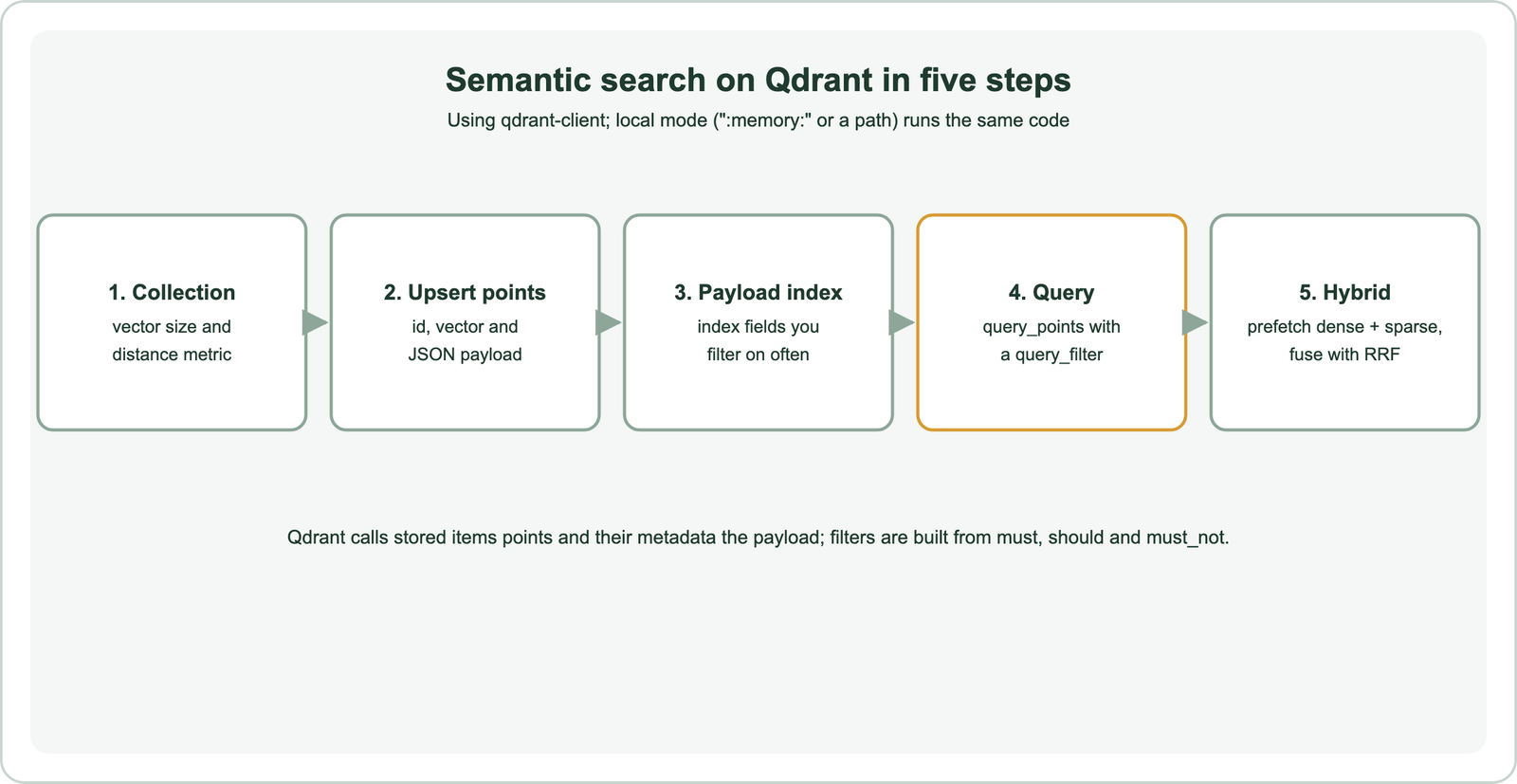
A collection fixes the vector size and distance metric. Points are upserted, meaning inserted or replaced by ID, so re-running an import updates rather than duplicates. Payload indexes are optional but matter at scale. Queries combine a vector with a filter. Hybrid search adds a second, sparse vector and a fusion step.
The same structure appears in other vector databases with different names. Search index schema design covers the decisions that apply everywhere, such as which fields to filter on and how to assign stable IDs.
How do you create a collection and add data in Qdrant?
You create a collection by setting the vector size and distance, then upsert points, each with an ID, a vector and a payload dictionary. The code runs in local mode.
from qdrant_client import QdrantClient, models
from sentence_transformers import SentenceTransformer

model = SentenceTransformer("all-MiniLM-L6-v2")
client = QdrantClient(":memory:")              # or QdrantClient(url="http://localhost:6333")

client.create_collection(
    "articles",
    vectors_config=models.VectorParams(size=384, distance=models.Distance.COSINE),
)
client.upsert("articles", points=[
    models.PointStruct(id=i, vector=model.encode(text).tolist(),
                       payload={"text": text, "category": cat, "year": year})
    for i, (text, cat, year) in enumerate(docs)
])
client.create_payload_index("articles", field_name="category",
                            field_schema=models.PayloadSchemaType.KEYWORD)
The size must match the embedding model, here 384 for all-MiniLM-L6-v2. Point IDs are integers or UUIDs; use IDs derived from your source records so updates replace the right points. A keyword payload index on “category” lets Qdrant use the index when filtering on that field.
Payloads are free-form JSON, which is convenient but means types are not enforced. Keep field names and types consistent across points, especially for numbers and dates used in range filters, or filters will silently miss points stored with the wrong type.
How does metadata filtering work in Qdrant?
Metadata filtering in Qdrant uses a Filter with must, should and must_not lists of conditions on payload fields, passed to the query as query_filter. Must conditions all apply; should conditions need at least one.
flt = models.Filter(must=[
    models.FieldCondition(key="category", match=models.MatchValue(value="billing")),
    models.FieldCondition(key="year", range=models.Range(gte=2025)),
])
result = client.query_points(
    "articles",
    query=model.encode("download my bills").tolist(),
    query_filter=flt,
    limit=5,
    with_payload=True,
)
for point in result.points:
    print(point.score, point.payload["text"])
Conditions include exact matches, matches against any of several values, numeric and date ranges, geo conditions and checks for empty or missing fields. Nested payload fields are addressed with dotted keys. Qdrant applies the filter during the vector search, so filtered queries can still return up to the requested limit when enough points match. Metadata filtering explains the general approach, and filtered ANN search covers how databases keep it fast.
Index every payload field you filter on regularly, choosing the index type that matches the data: keyword for exact strings, integer or float for numbers, datetime for dates. Without an index, Qdrant must check payloads one by one, which slows queries as the collection grows. Very selective filters affect any vector database, as covered in filter selectivity.
How do you add hybrid search on Qdrant?
You add hybrid search on Qdrant by storing a named dense vector and a named sparse vector per point, prefetching candidates from each, and fusing them in one query. RRF and DBSF are the built-in fusion methods.
client.create_collection(
    "hybrid",
    vectors_config={"dense": models.VectorParams(size=384, distance=models.Distance.COSINE)},
    sparse_vectors_config={"sparse": models.SparseVectorParams(modifier=models.Modifier.IDF)},
)
# each point: vector={"dense": [...], "sparse": models.SparseVector(indices=[...], values=[...])}

result = client.query_points(
    "hybrid",
    prefetch=[
        models.Prefetch(query=dense_query, using="dense", limit=20),
        models.Prefetch(query=sparse_query, using="sparse", limit=20),
    ],
    query=models.FusionQuery(fusion=models.Fusion.RRF),
    limit=5,
)
The sparse vector holds term weights. You produce it yourself, with a BM25-style tokenizer or a learned sparse model such as SPLADE; the IDF modifier tells Qdrant to apply inverse document frequency on its side. RRF fuses by rank, and DBSF, distribution-based score fusion, normalises scores before combining them. How hybrid search works compares fusion approaches, and SPLADE and learned sparse retrieval covers learned sparse vectors.
Fetch more candidates in each prefetch than the final limit, so fusion has room to reorder. Evaluate the hybrid setup against dense-only and sparse-only queries on the same judged queries before adopting it. Report exact-term queries such as product codes separately, because that is where the sparse side usually earns its place, and keep the tokenizer used for documents and queries identical.
How do you store document chunks in Qdrant?
You store document chunks in Qdrant as separate points, each with the chunk’s vector and a payload that records its parent document, position and text. The payload ties chunks back to documents.
Give each chunk a deterministic ID built from the document ID and chunk number, so re-chunking a changed document replaces its points cleanly. Store the parent document ID and title in the payload, index the parent ID field, and use it to delete all chunks of a document with a single filtered delete when the source changes. Keep the chunk text in the payload so results can be shown or passed to a language model without a second lookup.
At query time, several chunks of one document may rank highly. Qdrant can group results by a payload field with query_points_groups, returning the best chunks per document, which keeps one long document from filling every slot. Chunk size and overlap follow the same trade-offs as in any database, covered in chunking for semantic search.
How does Qdrant compare with Weaviate for semantic search?
Weaviate and Qdrant cover the same core features, vector search, filtering and hybrid search, but differ in how keyword search is provided and how queries are composed. The concepts map closely.
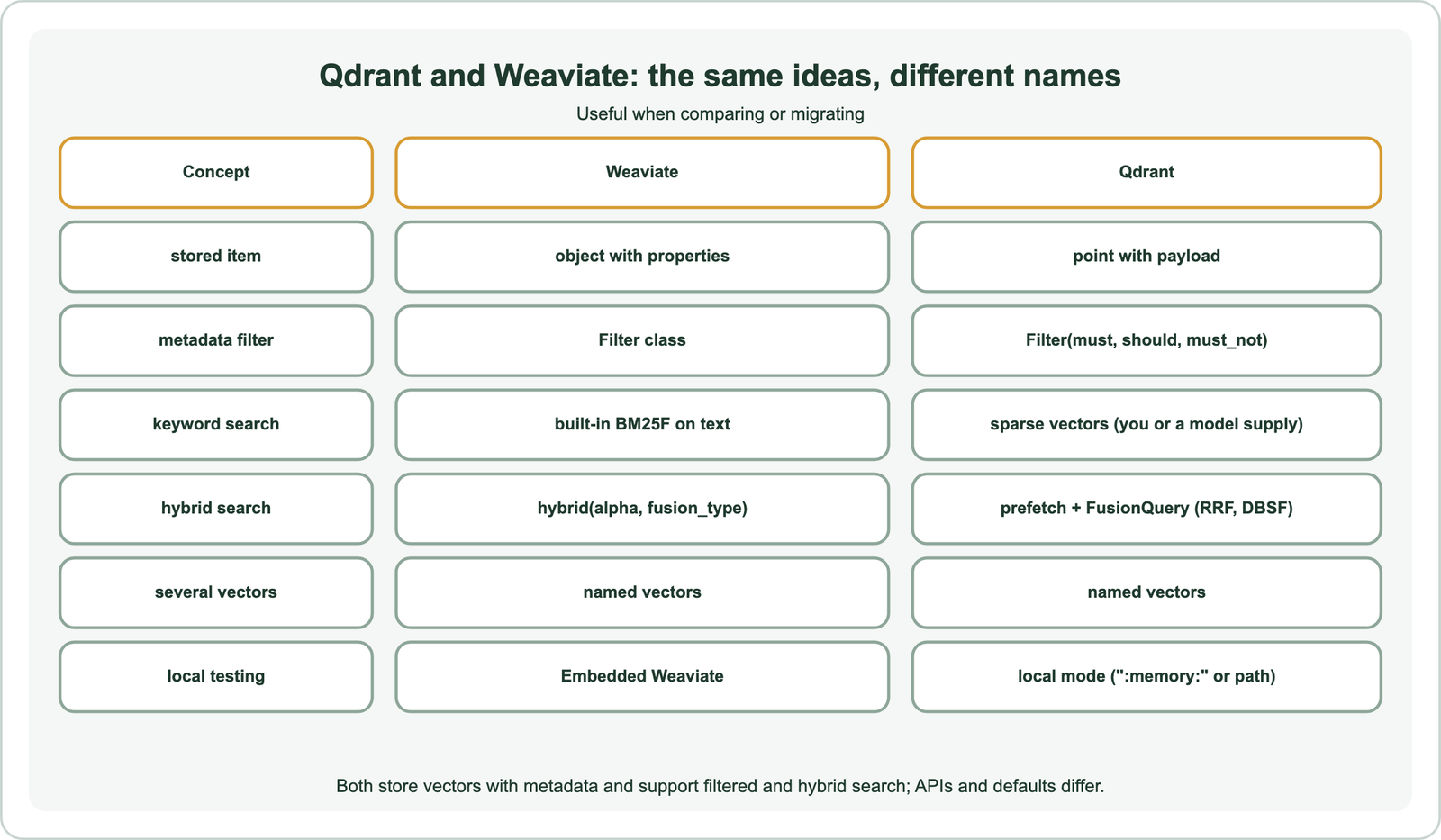
In Weaviate, text properties get a BM25F keyword index automatically, and hybrid search is one call with an alpha weight. Vectorizer integrations can embed data for you, as shown in semantic search with Weaviate. In Qdrant, keyword search comes from sparse vectors that you or a model generate, and hybrid queries are composed from prefetch stages and a fusion step, which is flexible but needs more setup.
Both run locally for testing and offer managed cloud services. Choose by fit with your data, team and operations, tested on your own queries, as described in choosing a vector database for semantic search. When looking at alternatives, teams often compare Weaviate, Milvus and Postgres with pgvector.
What should you check before running Qdrant in production?
Before running Qdrant in production, check payload indexes, vector index and quantization settings, deployment mode, and how you will evaluate and migrate. Local mode is for development, not production load.
Index the payload fields you filter on, measure recall and latency for your index and quantization settings, and size memory for vectors plus the index, as covered in ANN recall. Decide between self-hosting and a managed service, compared in managed vs self-hosted search. Keep stable IDs and raw text so data can move later, as described in migrating to a new vector database.
Plan for updates as well as the first import. Decide how changed documents reach Qdrant, through scheduled syncs or events from the source system, and how deletions are handled. Build a small set of judged queries before launch and rerun it after every change to the model, chunking or fusion settings. A query log with scores and payload fields helps trace bad results back to their cause.
Besides Weaviate, other databases have similar guides: Milvus, Pinecone, Chroma, Redis, Elasticsearch, OpenSearch and Postgres with pgvector. Framework users can connect Qdrant through LangChain and LlamaIndex, and the whole project is covered in how to build semantic search.
Semantic search on Qdrant takes five steps. Create a collection with a vector size and metric, upsert points with vectors and JSON payloads, and index frequently filtered payload fields. Query with query_points and a filter built from must, should and must_not. Add hybrid search with named dense and sparse vectors fused by RRF or DBSF. Local mode runs the same code without a server. Weaviate and Qdrant share the same core ideas; Weaviate builds in BM25 and one-call hybrid search, while Qdrant composes hybrid queries from sparse vectors and prefetch stages.