Home / Calculators / Cosine, Dot Product and Euclidean Distance Calculator
CalculatorCosine, Dot Product and Euclidean Distance Calculator
A vector similarity calculator takes two vectors and returns cosine similarity, dot product, Euclidean distance and related measures side by side. Each measure answers a different question. Cosine similarity compares direction only, so it ignores vector length. The dot product combines direction and length. Euclidean distance measures the straight-line gap between the two points, and squared Euclidean skips the root. Manhattan distance adds up the gaps along each axis, and Minkowski distance generalizes both with a power p. Hamming distance counts the dimensions that differ. The calculator also shows the values Weaviate reports, such as cosine distance and the negative dot product, so you can check scores from a real search. Enter vectors of the same length, compare the rows, and use the metric your embedding model was trained with.
Vector similarity in four facts
- Cosine similarity is the dot product divided by the product of the two vector lengths.
- Weaviate reports cosine distance as one minus cosine similarity, with a range from 0 to 2.
- Weaviate reports the dot metric as the negative dot product, so smaller still means closer.
- For vectors of length 1, squared Euclidean distance equals 2 minus 2 times cosine similarity.
How do you compare two vectors with the similarity calculator?
You compare two vectors with the similarity calculator by pasting each one as a list of numbers separated by commas or spaces. Both vectors must have the same number of dimensions. Every row of the result table updates as you type.
| Dimensions | 3 |
|---|---|
| Length of A, length of B | 3.0000, 3.0000 |
| Cosine similarity | 0.8889 |
| Cosine distance (Weaviate cosine) | 0.1111 |
| Dot product | 8.0000 |
| Negative dot product (Weaviate dot) | -8.0000 |
| Euclidean (L2) distance | 1.4142 |
| Squared Euclidean (Weaviate l2-squared) | 2.0000 |
| Manhattan (L1) distance | 2.0000 |
| Minkowski distance with power p | 1.2599 |
| Chebyshev distance (largest gap) | 1.0000 |
| Hamming distance (dimensions that differ) | 2 |
| Squared L2 after normalizing both | 0.2222 |
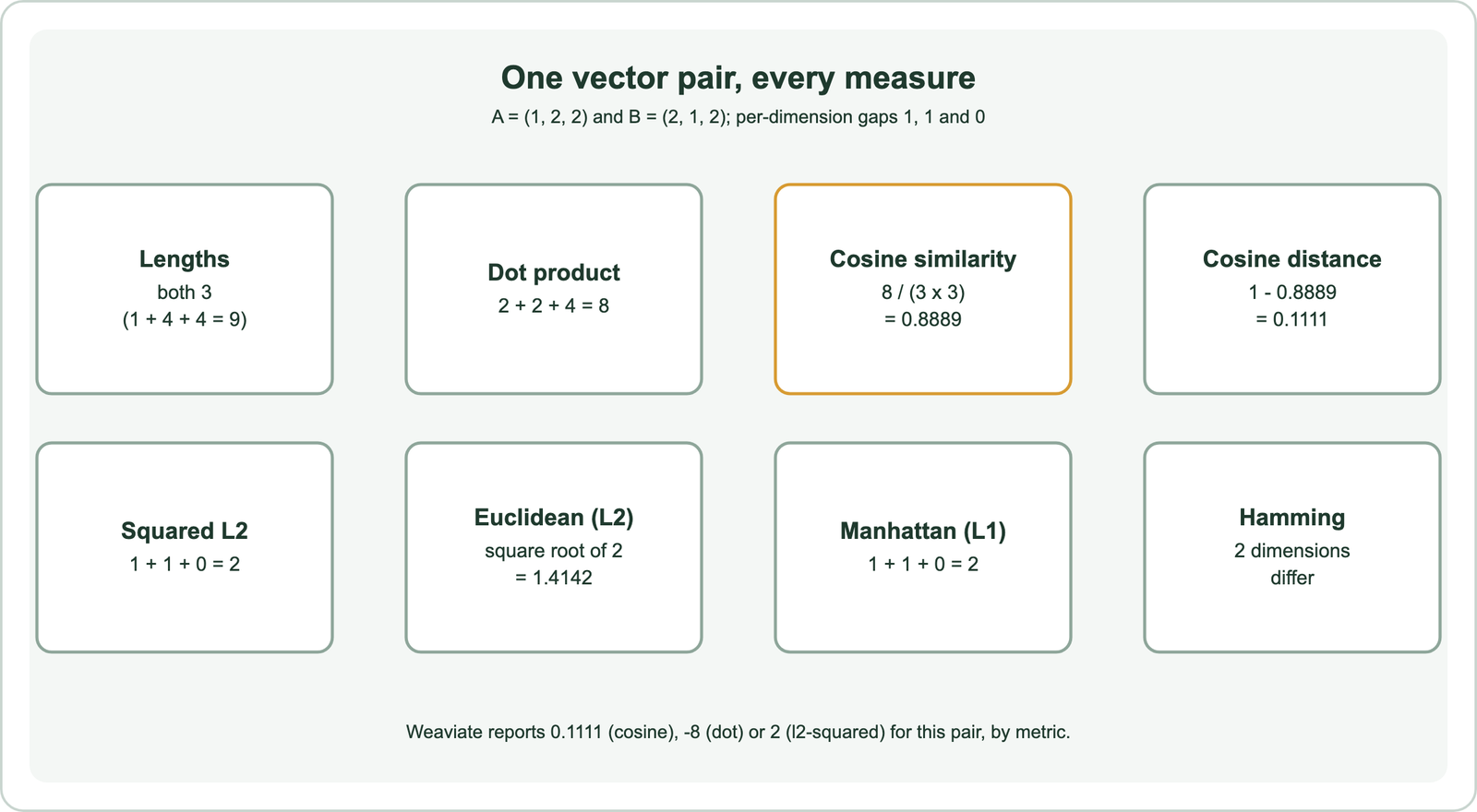
The default pair is A = (1, 2, 2) and B = (2, 1, 2). Each vector has length 3, because 1 + 4 + 4 is 9. Their dot product is 2 + 2 + 4, which is 8. Cosine similarity is 8 divided by 9, about 0.8889, so the two point in nearly the same direction.
The gaps per dimension are 1, 1 and 0. Squared Euclidean distance is therefore 2, and the Euclidean distance is the square root of 2, about 1.4142. Real embeddings have hundreds of dimensions, and the calculator accepts any length you paste.
How does the calculator compute cosine similarity and cosine distance?
The calculator computes cosine similarity by dividing the dot product of A and B by the product of their lengths. The result runs from -1 for opposite directions to 1 for the same direction. Length plays no part.
Cosine distance turns the score into a distance where smaller means closer. Weaviate’s distance metrics reference defines it as 1 minus cosine similarity, with a range from 0 for identical vectors to 2 for opposing ones. In the default example, cosine distance is 1 minus 0.8889, which is 0.1111. That is the number Weaviate returns as the distance of a result when a collection uses its default cosine metric.
Older Weaviate versions exposed a certainty value instead. Weaviate’s FAQ gives the conversion as cosine similarity equals 2 times certainty minus 1, and its reference notes that certainty only works with cosine. A certainty of 0.9444 therefore corresponds to a cosine similarity of 0.8889 for the default pair. Weaviate also normalizes vectors to length 1 when the cosine metric is chosen and then uses the dot product, which gives the same ranking more cheaply. The theory behind these choices is in cosine vs dot product vs Euclidean distance. The next measure, the dot product, keeps the length information that cosine discards.
How does the dot product row differ from cosine similarity?
The dot product row differs from cosine similarity because it multiplies matching dimensions and sums them without dividing by the lengths. Longer vectors therefore get larger scores even at the same angle.
Try A = (1, 2, 2) and B = (2, 4, 4). B is A doubled, so the cosine similarity is exactly 1. The dot product is 2 + 8 + 8, which is 18, more than twice the 8 from the default pair. A model trained with the dot product can use length to encode extra information, such as how strongly a text matches a topic.
The dot product is a similarity, not a distance. Weaviate’s reference explains that its dot metric returns the negative dot product to keep the rule that a smaller distance means a closer result. A result with distance -18 is closer than one with distance -8. The calculator prints both signs so you can match the numbers from a Weaviate query directly. When both vectors have length 1, the dot product and cosine similarity are the same number. Many embedding models return normalized vectors for that reason, as covered in what are embeddings. Euclidean distance looks at the same pairs from a third angle, the gap between the points.
How does the calculator compute Euclidean and squared Euclidean distance?
The calculator computes Euclidean distance by squaring the gap in each dimension, summing the squares and taking the square root. Squared Euclidean distance is the same sum without the root. Both are 0 for identical vectors.
Weaviate’s l2-squared metric uses the squared form, defined in its reference as the sum of squared differences. Skipping the root saves work and never changes which result is nearest, because the root keeps the order of positive numbers. The values differ, so a distance threshold set for one form does not apply to the other.
For vectors of length 1, squared Euclidean distance and cosine similarity are tied together. Expanding the sum gives the length of A squared plus the length of B squared minus 2 times the dot product. With both lengths equal to 1, that is 2 minus 2 times the cosine. The last row of the calculator normalizes both inputs first. For the default pair it shows 0.2222, which is 2 minus 2 times 0.8889. That identity is why cosine, dot product and Euclidean distance rank normalized embeddings the same way. The axis-by-axis measures in the next rows behave differently.
What do the Manhattan, Minkowski and Chebyshev rows measure?
The Manhattan, Minkowski and Chebyshev rows measure distance along the axes rather than in a straight line. Manhattan adds up absolute gaps. Chebyshev takes only the largest gap. Minkowski sits between them, controlled by the power p.
Manhattan distance, also called L1 or taxicab distance, is the sum of absolute differences. Weaviate added it as the manhattan metric in version 1.15. The release notes give a worked example: comparing [1, 9, 3, 4, 5] with [1, 2, 3, 9, 5] gives 0 + 7 + 0 + 5 + 0, which is 12. Paste those two vectors into the calculator to see the same 12.
Minkowski distance raises each absolute gap to the power p, sums the results and takes the p-th root. With p = 1 it equals Manhattan distance, and with p = 2 it equals Euclidean distance. As p grows, the largest gap dominates, and the limit is Chebyshev distance. For the default pair with p = 3, the gaps 1, 1 and 0 give the cube root of 2, about 1.2599. Weaviate does not offer Minkowski as an index metric, so treat this row as a way to understand the family. Hamming distance, the next row, ignores the size of each gap altogether.
When does the Hamming distance row apply?
The Hamming distance row applies when vectors hold discrete values, such as bits from binary quantization, rather than continuous floats. It counts the dimensions where A and B differ. The size of the difference does not matter to the count.
Weaviate’s reference defines hamming as the number of differences between vectors at each dimension, with a range from 0 up to the number of dimensions. The release notes for version 1.15 give an example: [1, 9, 3, 4, 5] and [1, 2, 3, 9, 5] differ in two positions, so the Hamming distance is 2. For the default pair, the first two dimensions differ, so the count is also 2.
On raw float embeddings, Hamming distance is rarely useful. Two floats almost never match exactly, so nearly every dimension counts as different. It becomes meaningful after each value is reduced to a bit, where the count of differing bits approximates angular distance. Weaviate’s reference also notes that hamming and manhattan run without SIMD optimizations, while cosine, dot and l2-squared use them. Compression and binary codes are explained in embedding and vector quantization. Knowing what each row measures leads to the practical question of which one to use.
Which similarity metric should you pick for an embedding model?
You should pick the similarity metric your embedding model was trained with, which its model card usually states. Weaviate’s documentation gives that rule, because each vectorizer model is trained with a specific distance metric. Weaviate uses cosine as its default for that reason.
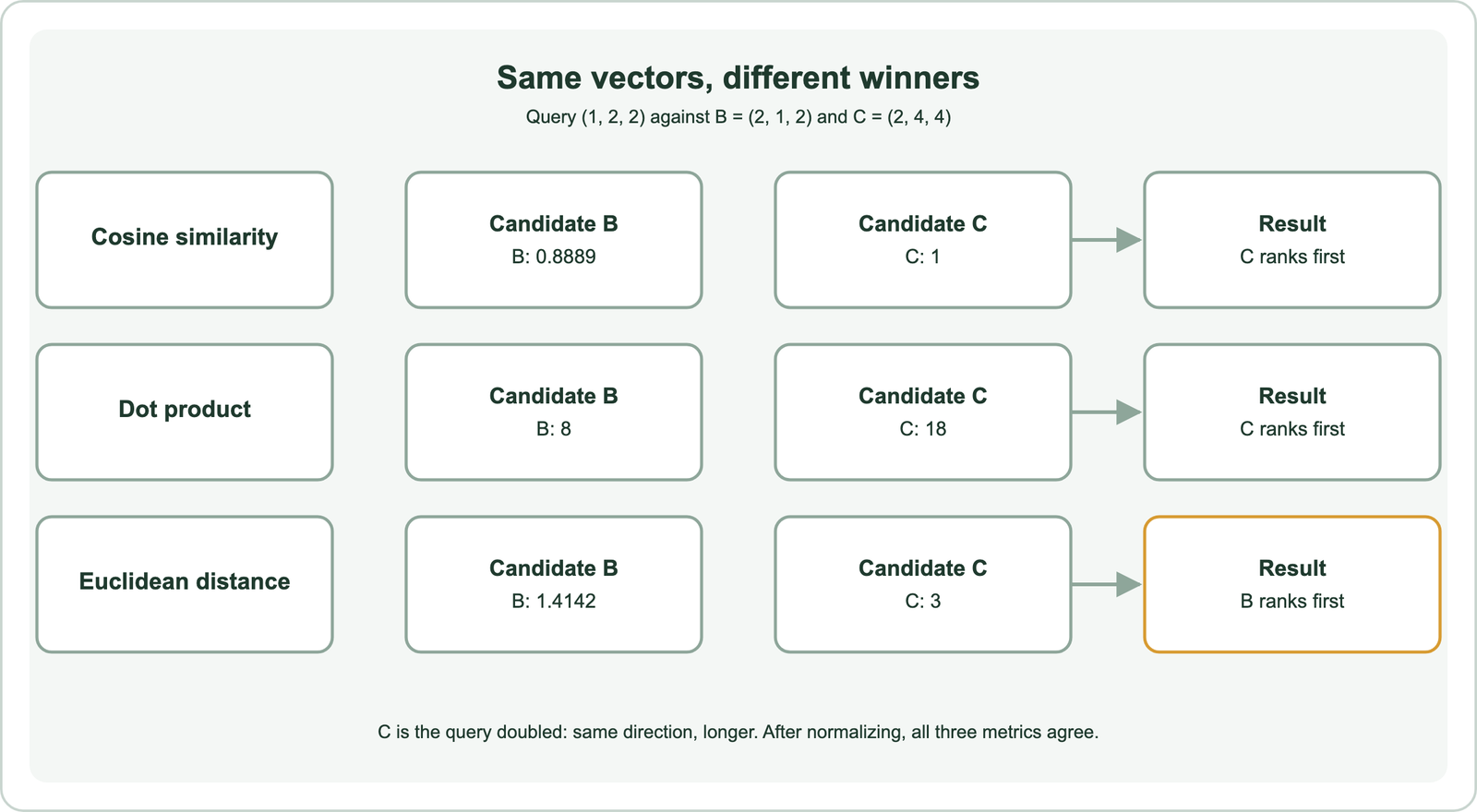
The choice matters most for vectors of different lengths. Take a query (1, 2, 2) and two candidates, B = (2, 1, 2) and C = (2, 4, 4). Cosine similarity ranks C first with 1 against 0.8889. The dot product also ranks C first with 18 against 8. Euclidean distance ranks B first, with 1.4142 against 3, because C lies further away.
With normalized vectors, the three agree. Each vector then has length 1, and the identity from the Euclidean section makes their rankings identical. In practice the metric is set once per vector index. In Weaviate it is part of the vector index configuration, and changing it means building a new index. The full set of options is listed in similarity search and vector search. Before trusting any result, though, a few input problems are worth ruling out.
Which inputs make a vector similarity calculation fail?
A vector similarity calculation fails when the vectors have different lengths, when one is all zeros, or when they come from different models. The calculator flags the first two. The third produces numbers that look valid but mean nothing.
A dimension mismatch has no answer. Every formula pairs dimension i of A with dimension i of B, so a 384-number vector cannot be compared with a 768-number one. The calculator stops and shows a message. A zero vector has length 0, so cosine similarity divides by zero and is undefined. Distances still work in that case.
Vectors from two different embedding models live in different spaces even when their lengths match. Their cosine similarity is a valid number with no meaning. This is a common cause of poor results after a model change, as covered in re-embedding when the model changes. Pasted vectors also lose precision when rounded. Copy the full values your database returns before comparing them with its reported distance. The other tools in the calculators section help with the rest of the planning.
Which other calculators support vector search planning?
Other calculators support vector search planning by sizing the index, pricing the embeddings, fusing ranked lists and choosing chunk sizes. Each covers one step that the similarity calculator does not. All of them use published formulas rather than estimates.
The vector storage and memory calculator estimates RAM and disk from vector count, dimensions and compression. The embedding cost calculator estimates what it costs to embed a corpus from its token count. The reciprocal rank fusion calculator combines keyword and vector result lists the way hybrid search does. The chunk size calculator works out how many chunks a document produces.
Together they cover the path from raw text to a ranked result. Similarity scores also feed thresholds in other parts of a system. Semantic caching, for example, decides whether two queries are close enough to share an answer, as explained in similarity thresholds for caching. The basics of each measure sit in the vector space model.
A vector similarity calculator shows, for one pair of vectors, how cosine similarity, the dot product, Euclidean distance and the axis-based distances each judge closeness. Cosine compares direction, the dot product adds length, and Euclidean distance measures the gap. Weaviate reports cosine distance and the negative dot product, and the calculator prints those values so you can check real results. For normalized embeddings the main three metrics rank results identically; for unnormalized ones they can disagree. Use the metric your embedding model was trained with, keep dimensions equal, and compare only vectors from the same model.