Home / Use cases / Semantic Search for Internal Docs and Enterprise Data
ExplainerSemantic Search for Internal Docs and Enterprise Data
Semantic search for internal docs and enterprise data finds information across wikis, tickets, shared drives and chat by meaning, so employees get the right document even when they do not know its exact wording. It works by indexing text from each source as embeddings alongside keyword indexes, then ranking by similarity to the question. Enterprise data adds three requirements that public search does not have. Results must respect who may see each document. The index must follow edits and deletions closely. And exact terms such as project codes, product names and acronyms still matter, which is why enterprise systems usually run hybrid search rather than vectors alone. The same index often feeds an internal assistant that answers questions with retrieval-augmented generation. In Weaviate, role-based access control and multi-tenancy isolate data sets, and per-document permissions are enforced with a filter on each query.
Enterprise semantic search in four facts
- Enterprise search must enforce each user’s document permissions at query time, not only at login.
- Hybrid search keeps exact matches on codes, names and acronyms that pure vector search can miss.
- Weaviate’s role-based access control works at collection, tenant and operation level, and is generally available from version 1.29.
- Deletions and permission changes must reach the index quickly, or search can expose stale or revoked content.
What is semantic search for internal documents and enterprise data?
Semantic search for internal documents and enterprise data is search across an organisation’s own content that matches the meaning of a question rather than only its words. It is the modern form of enterprise search, the long-standing practice of making company knowledge findable.
Enterprise search covers everything employees produce and consult: wiki pages, policy documents, support tickets, engineering designs, shared drive files, chat threads and records in business systems. Internal search usually means the same thing seen from inside a company, as distinct from search on its public website, covered in semantic site search. The defining problem is scattered knowledge: the answer exists, but in a system the person did not think to check, under words they did not use.
Semantic search attacks the wording problem. An employee asking “how do I get reimbursed for a conference” can find the “travel and expense policy” page even though it never says “reimbursed for a conference”. The scattering problem is solved by connectors that pull each source into one index. Semantic search use cases places enterprise search among the other applications. The difference from keyword search is where most teams start.
How does semantic search differ from keyword search for internal docs?
Semantic search differs from keyword search for internal docs by matching documents that mean the same thing as the question, while keyword search matches documents that share its words. Each fails where the other succeeds.
Keyword search, usually BM25, ranks documents by how often and how distinctively they contain the query’s terms. It is precise for exact terms: a ticket number, an error code, a person’s name, an internal product codename. It fails when people describe a thing differently from the document, which inside companies is constant, since every team has its own vocabulary and acronyms drift over time.
Semantic search embeds the question and the documents as vectors and ranks by closeness of meaning. It handles paraphrase and loose phrasing well. It is weaker on exact identifiers and rare internal jargon, because a general embedding model may never have seen “Project Halcyon” or “ERR-4012” and treats them as noise. For enterprise data the answer is rarely one or the other. The general comparison is in semantic search vs keyword search. Combining both is the norm, for a specific reason.
Why does enterprise search need hybrid search?
Enterprise search needs hybrid search because internal questions mix natural language with exact identifiers, and only the combination of keyword and vector ranking handles both in one query. A question like “rollback steps for ERR-4012 in the billing service” needs the code matched exactly and the rest matched by meaning.
Hybrid search runs BM25 and vector search in parallel and fuses their rankings. Weaviate’s hybrid query does this in one call, with an alpha weight between keyword and vector scores; how hybrid search works explains the fusion. For knowledge management, hybrid search lets the same search box serve the engineer pasting an error and the new hire asking a vague question.
Tokenization matters for enterprise identifiers. Weaviate’s default word tokenization splits on non-alphanumeric characters, so “ERR-4012” becomes two tokens. A property that holds codes can use a tokenization that keeps symbols, such as lowercase or field, so exact codes match as whole tokens. Getting this right often matters more than the choice of embedding model. With the ranking approach settled, the pipeline has to bring the content in.
How does an enterprise semantic search pipeline work?
An enterprise semantic search pipeline pulls content and metadata from each source through connectors, splits and embeds it, indexes it with permission fields, and filters by the user’s permissions at query time. Sync jobs keep the index in step with the sources.
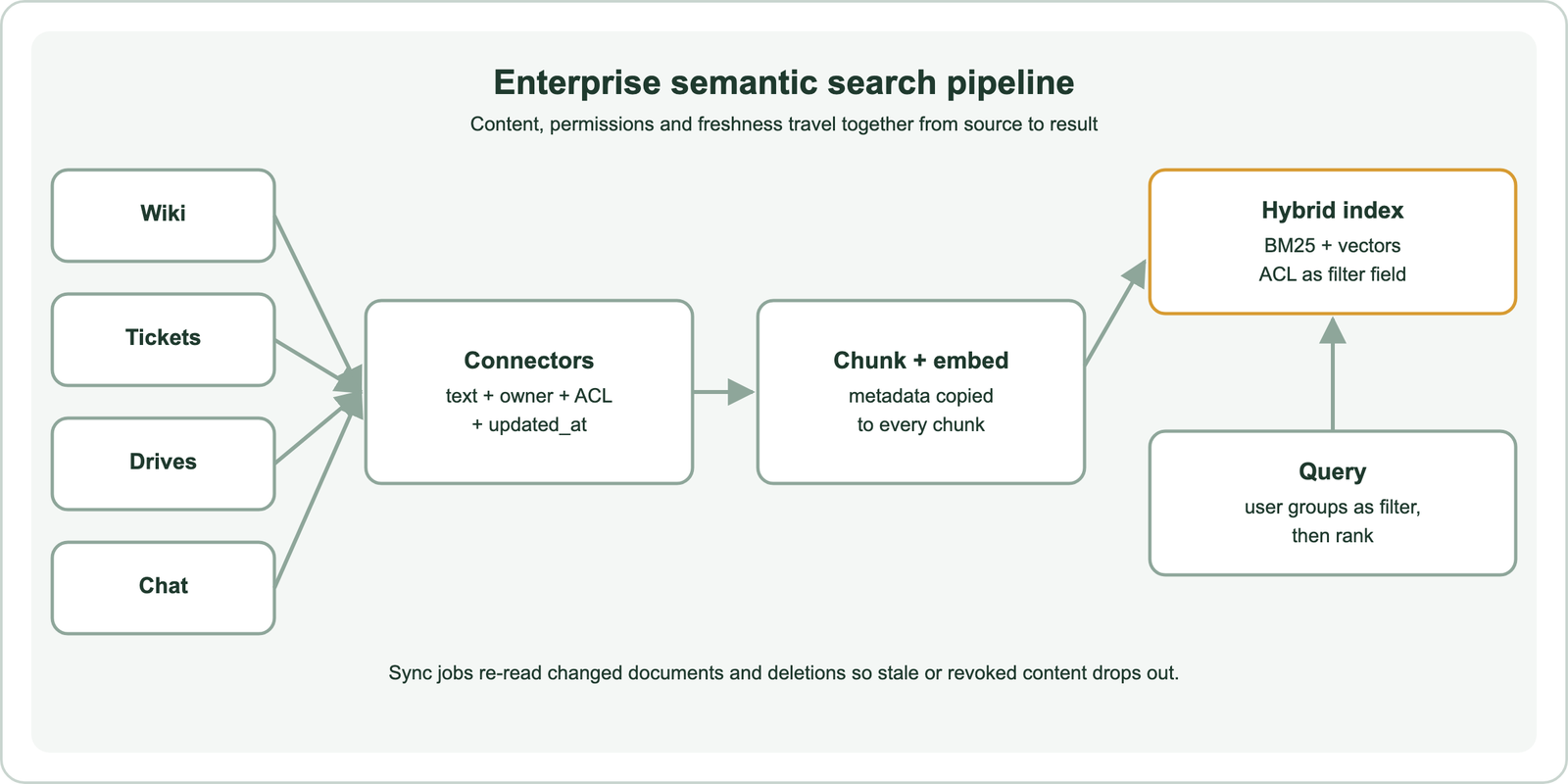
Connectors are the unglamorous core. Each source has its own API, rate limits and permission model, and the connector must extract not only text but also the document’s access list, owner, source link and last-updated time. Long documents are split into chunks so that a search returns the relevant passage, and every chunk carries the parent document’s metadata. Chunk size and overlap are covered in chunking for semantic search.
Attachments and scanned files need text extraction before chunking. Images, recordings and diagrams can be indexed with multimodal models, covered in image, video and audio search. The metadata copied onto every chunk is what makes the next step possible.
How do you enforce permissions in enterprise semantic search?
You enforce permissions in enterprise semantic search by storing each document’s allowed users or groups on every chunk and filtering every query by the current user’s identity before results are returned. Access control in the database protects the data set; the filter protects individual documents.
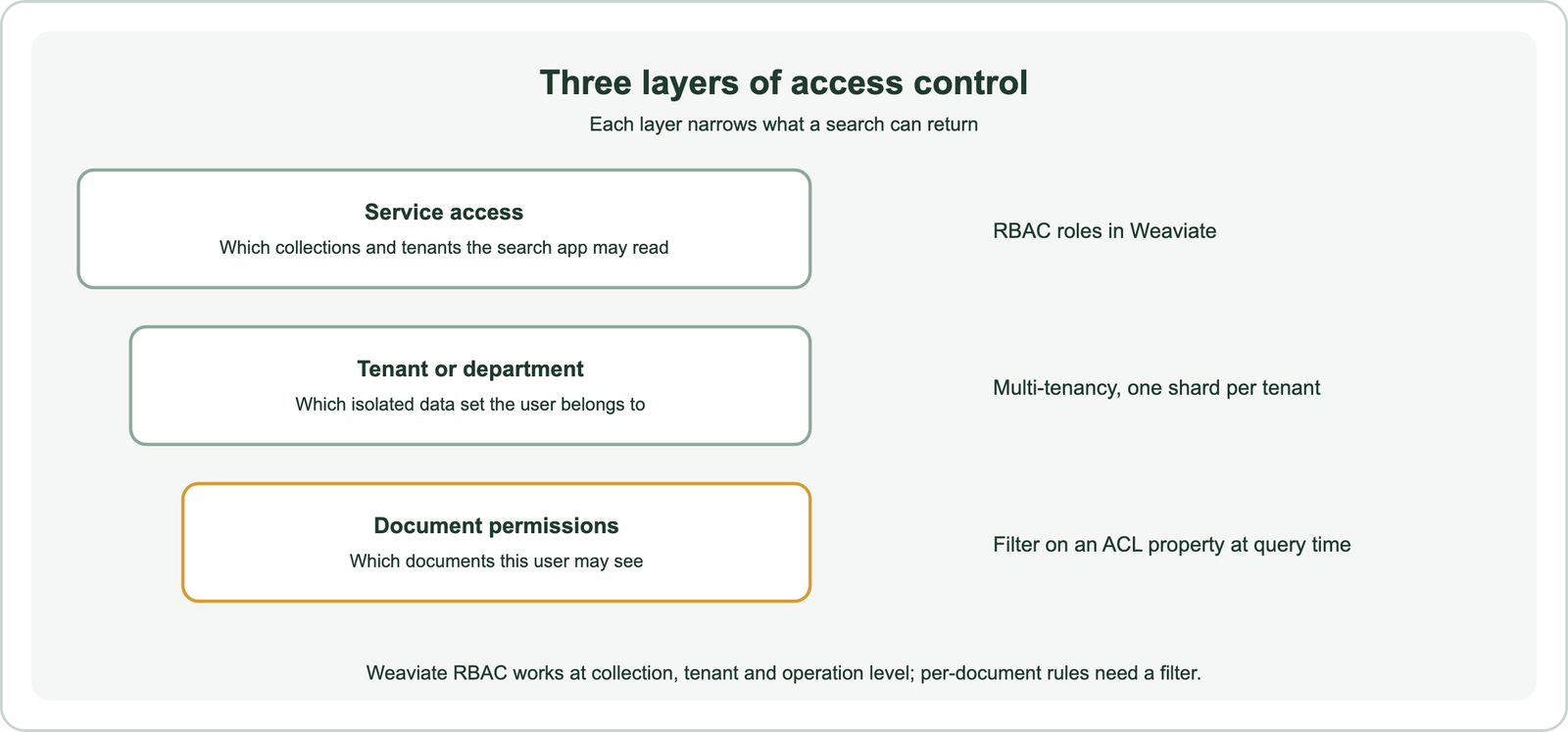
Weaviate’s documentation describes role-based access control, generally available from version 1.29, with permissions on collections, tenants, data objects and other resources, plus audit logging of authorization decisions. Roles can be assigned to OIDC groups. Multi-tenancy isolates whole data sets, such as departments or subsidiaries, in separate shards, and tenant-scoped roles keep one tenant’s users out of another. These controls work at collection, tenant and operation level, not per document, so document permissions need a filter.
from weaviate.classes.query import Filter

docs = client.collections.use("CompanyDoc")
user_groups = ["eng-billing", "all-staff"]          # resolved from your identity provider

response = docs.query.hybrid(
    query="rollback steps for ERR-4012 in the billing service",
    alpha=0.5,
    filters=Filter.by_property("allowed_groups").contains_any(user_groups),
    limit=10,
)
The filter runs as part of the search, so restricted documents never enter the ranking. Weaviate builds an allow-list from the filter before the vector search, so even users with access to a small share of documents get full result lists. Two rules keep this safe: resolve the user’s groups on the server from the identity provider, never from the client, and re-sync access lists whenever they change. B2B semantic search covers the same pattern for customer-facing products. Re-syncing leads to freshness.
How do you keep enterprise search results fresh?
You keep enterprise search results fresh by syncing changed and deleted documents from each source on a schedule or through change events, re-embedding only what changed, and removing deleted or revoked content immediately. Stale results erode trust faster than missing ones.
Most sources expose a way to list changes since a time, or send webhooks on edits. A sync job uses that to update only changed documents: re-extract the text, re-chunk, re-embed and replace the old chunks. Using a stable object ID per chunk, derived from the source document ID and chunk position, makes updates idempotent. Real-time indexing and index freshness covers the indexing side.
Deletions and permission changes are the urgent cases. A document deleted at the source, or one whose access was revoked, must leave the index or lose its permission before the next search, or the search becomes a leak. Many teams run a fast path for deletions and access changes and a slower path for content edits. A last-updated field also lets ranking favour recent versions when an old and a new policy both match. Fresh, permission-aware results are what an internal assistant needs too.
How does enterprise search power internal AI assistants?
Enterprise search powers internal AI assistants as the retrieval step of retrieval-augmented generation, supplying the passages the language model reads before it answers. The assistant inherits every strength and gap of the search.
An internal assistant takes a question, retrieves the most relevant permitted chunks, and asks a language model to answer from them with citations back to the source documents. Because retrieval runs with the user’s permission filter, the assistant can only quote what the user could open anyway. Weaviate’s generative queries run retrieval and generation in one call. Semantic search in RAG covers the retrieval design.
The common failure is retrieval, not generation. If the right policy is outdated in the index, or a code was split by tokenization, the model answers from the wrong passage with confidence. Citations let employees check the source. The same patterns serve support teams through customer support and help center search. Enterprise search shows up in many forms.
What are common use cases for enterprise search?
Common use cases for enterprise search are employee self-service, engineering knowledge, support resolution, sales and proposal reuse, compliance lookups, and expert finding. Each mixes natural questions with exact terms.
The common thread is that the knowledge already exists in writing but sits in the wrong place for the person who needs it. The value grows with the size of the organisation and the turnover of its people, since every departure takes context that only documents can preserve. The main patterns are listed in order of how often teams start with them.
- Employee self-service answers HR, IT and policy questions from handbooks and wikis.
- Engineering knowledge finds design documents, runbooks, incident reports and code, as in semantic code search.
- Support resolution surfaces similar past tickets and their fixes.
- Sales and proposals reuse approved answers from earlier bids and contracts.
- Compliance and legal locate clauses and precedents, covered in patent and legal search.
- Research searches internal reports and papers, as in academic and research paper search.
Expert finding reverses the direction: instead of documents, it returns the people who wrote or edited the most relevant ones. Related patterns power internal semantic recommendations, such as suggesting related documents while someone writes. Product teams use the same techniques externally in semantic product search for ecommerce. Choosing a platform for these depends on a few criteria.
How do you choose enterprise search software?
You choose enterprise search software by checking connector coverage, permission enforcement, hybrid ranking quality, freshness, deployment model and cost against your own sources and questions. No product is best for every organisation, so test with real queries.
Packaged enterprise search products bundle connectors, permission sync and a search interface, and suit teams that want a finished tool. Building on a database such as Weaviate suits teams that need custom ranking, their own embedding models, an internal assistant, or data that must stay in their own infrastructure. Weaviate can be self-hosted under its open-source license or used as a managed service.
Whatever the choice, run an evaluation before committing. Collect real questions from employees, mark which documents answer them, and score each candidate with metrics such as recall at 5 and nDCG at 10, using a test user with realistic permissions. The method is in how to evaluate semantic search. After launch, track queries with no clicks or no results; they show where content or vocabulary is missing.
Semantic search for internal docs and enterprise data finds company knowledge by meaning across every source, and works best as hybrid search so exact codes and names still match. Build it as a pipeline that carries permissions and timestamps with every chunk, enforce access with database roles for data sets and a query filter for documents, and sync edits, deletions and access changes quickly. The same permission-aware index powers internal assistants through retrieval-augmented generation. Choose packaged software or a database such as Weaviate by testing real employee questions against your own sources, and measure quality before and after launch.