Home / Semantic caching / Semantic Cache Invalidation and Freshness
ExplainerSemantic Cache Invalidation and Freshness
Semantic cache invalidation is the practice of removing or bypassing cached LLM answers once they may no longer be correct, because the source data, the model or the prompt behind them has changed. A semantic cache returns a stored answer whenever a new question is close enough in meaning to an old one, so a single stale entry can serve many users before anyone notices. Three methods cover most needs. A time to live expires entries after a set period. A version key, stored with each entry and checked at lookup, retires all answers from an old knowledge base or model at once. A selective purge deletes only the entries built from a source document that just changed. Most systems combine a TTL as a safety net with versions or purges for known changes. Weaviate supports each: object TTL became generally available in version 1.36, and filters and delete_many handle versions and purges.
Semantic cache invalidation in four facts
- One cached entry answers every paraphrase within the threshold, so staleness spreads widely.
- With a TTL alone, an answer can stay stale for up to the full TTL after its source changes.
- Weaviate’s object TTL deletes expired objects only when a deletion schedule is set on the instance.
- Weaviate’s delete_many removes up to 10,000 matching objects per call by default.
What is semantic cache invalidation?
Semantic cache invalidation is the set of rules that decide when a cached question-and-answer pair must stop being served, so users never receive an answer that the current data or model would no longer give. It is the freshness half of semantic caching.
A semantic cache stores each question as a vector alongside the answer an LLM produced. When a new question arrives, the cache searches for a stored question within a similarity threshold and, if it finds one, returns the saved answer without calling the model. That saves time and money, as explained in what is semantic caching and semantic caching for LLM apps.
The saved answer is a snapshot. It reflects the documents retrieved, the model used and the prompt in place when it was generated. If the refund policy changes from 30 to 14 days, every cached answer that quoted 30 days becomes wrong, yet it still matches new questions perfectly well. Invalidation is how the system notices and stops serving it.
Getting this wrong has two failure modes. Invalidate too little and users receive outdated answers. Invalidate too much and the cache rarely hits, so it costs storage without saving model calls.
Why is invalidating a semantic cache harder than a normal cache?
Invalidating a semantic cache is harder than a normal cache because entries have no exact key and each entry answers many different questions. Answers also depend on hidden inputs such as retrieved documents and the model. Simple key deletion does not work.
A traditional cache maps an exact key, such as a URL, to a value. When the underlying data changes, the application deletes that key. A semantic cache has no such key: a stored question matches every paraphrase within the threshold. You cannot list the questions that will hit an entry, so you cannot delete by question.
The dependencies are also invisible. An answer may draw on three documents, a system prompt and a specific model version. None of that is in the question text. Unless the cache records those inputs when it stores the answer, there is no way to find the entries affected by a change.
Stale answers also look right. A cached answer is fluent and was once correct, so neither the user nor a monitoring system can easily tell it is out of date. The comparison in semantic caching vs prompt caching shows why prompt caches, which key on exact prompt prefixes, avoid this problem.
Which invalidation methods work for semantic caches?
Three invalidation methods work for semantic caches: time to live, version keys and selective purges, each triggered by a different event. They are complementary rather than competing.
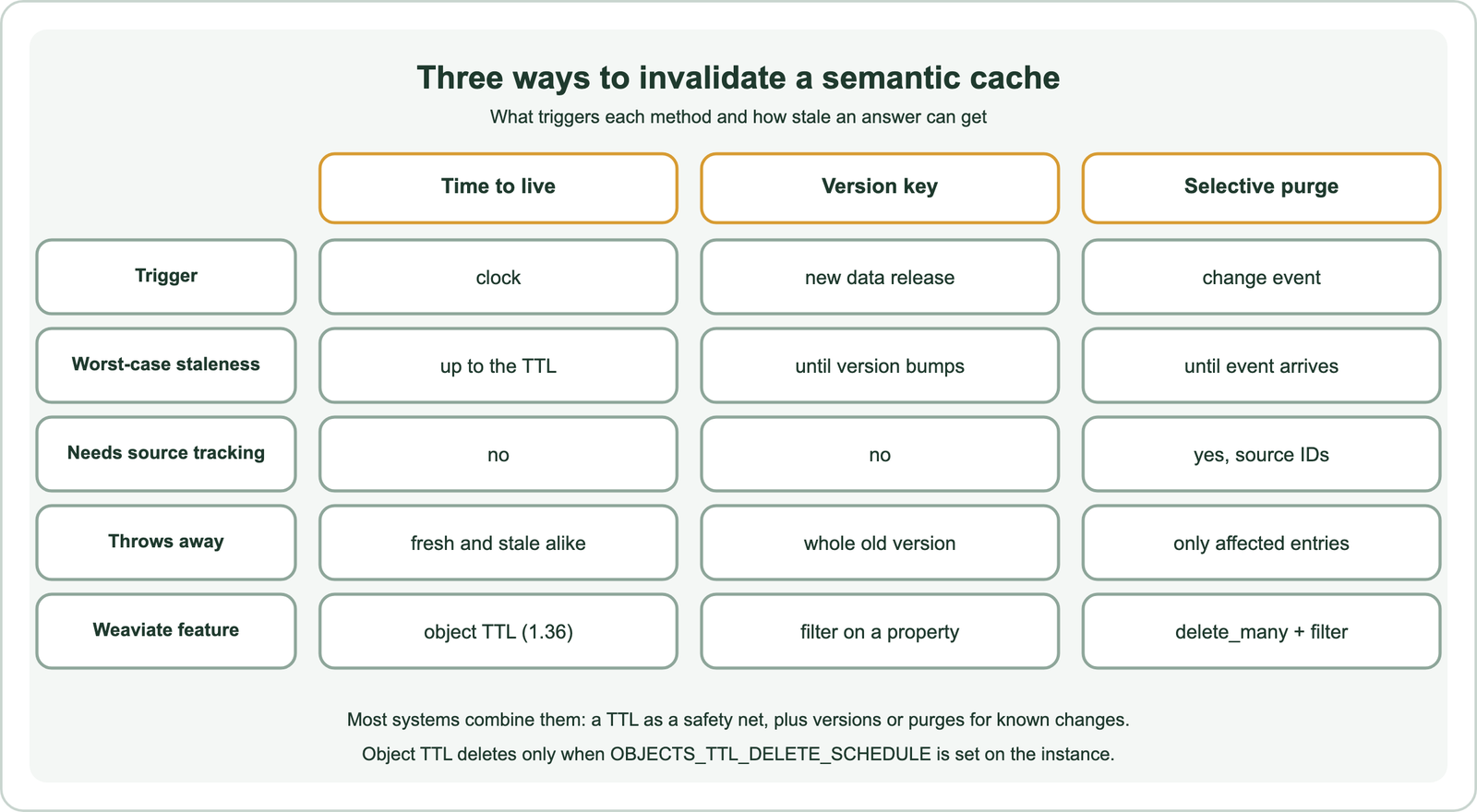
A time to live is the simplest. Every entry expires a fixed time after it was created or last updated. It needs no knowledge of the answer’s sources, but it is blunt: it discards fresh entries along with stale ones, and it lets a stale entry live until its time runs out.
A version key handles planned releases. Each entry records the version of the knowledge base, model or prompt that produced it, and lookups only accept entries with the current version. Publishing a new version retires all old entries in one step. A selective purge handles individual changes: when a document changes, the system deletes the entries that used it, leaving the rest of the cache intact.
How should you set a TTL for cached answers?
You should set a TTL for cached answers to the longest staleness you can accept for that kind of content, because in the worst case a changed answer is served for the full TTL. Different content can carry different TTLs.
The worst case is simple arithmetic. If an answer is cached one second before its source changes, it stays wrong until it expires, which is almost the whole TTL. A 24-hour TTL therefore means a changed policy may be quoted wrongly for up to 24 hours. Fast-changing content, such as prices or stock levels, needs short TTLs or should not be cached at all; stable reference content can live much longer.
Weaviate’s object TTL offers three anchors for expiry. Objects can expire a set time after creation, after their last update, or relative to a date property, where the offset may even be negative so that objects expire before the stored date. Weaviate’s documentation sets a minimum TTL of 60 seconds and notes that, in multi-tenant collections, deletion runs only for active tenants. The feature arrived as a technical preview in 1.35 and became generally available in 1.36, and its release notes name cache invalidation as a use case.
Two settings matter. Expired objects are deleted only if the OBJECTS_TTL_DELETE_SCHEDULE environment variable is set; without it, Weaviate’s documentation says, nothing is deleted. Enabling filter_expired_objects excludes expired but not yet deleted objects from query results, which keeps lookups correct between deletion runs. The same TTL idea appears in AI gateway semantic caching.
How does versioning invalidate a semantic cache?
Versioning invalidates a semantic cache by storing a version number with each entry and only accepting entries whose version matches the current one at lookup time. Changing the current version instantly retires every older entry.
Several things deserve a version. The knowledge base changes when documents are re-indexed. The embedding model changes the meaning of every stored vector, so old entries cannot even be compared reliably with new queries. The generation model and the prompt template change the style and content of answers. Recording each, or a single combined version, lets the cache ignore entries produced under old conditions.
In Weaviate, the version is just a property, and the lookup adds a filter on it. Because filters run before the vector search, entries from old versions never compete with current ones. Old entries can then expire through the TTL rather than being deleted in one large operation. Changing the embedding model is a special case covered in re-embedding when the model changes.
How do you purge cache entries when source data changes?
You purge cache entries when source data changes by storing the IDs of the source documents with every cached answer, then deleting all entries whose source IDs include a changed document. This removes only what the change affects.
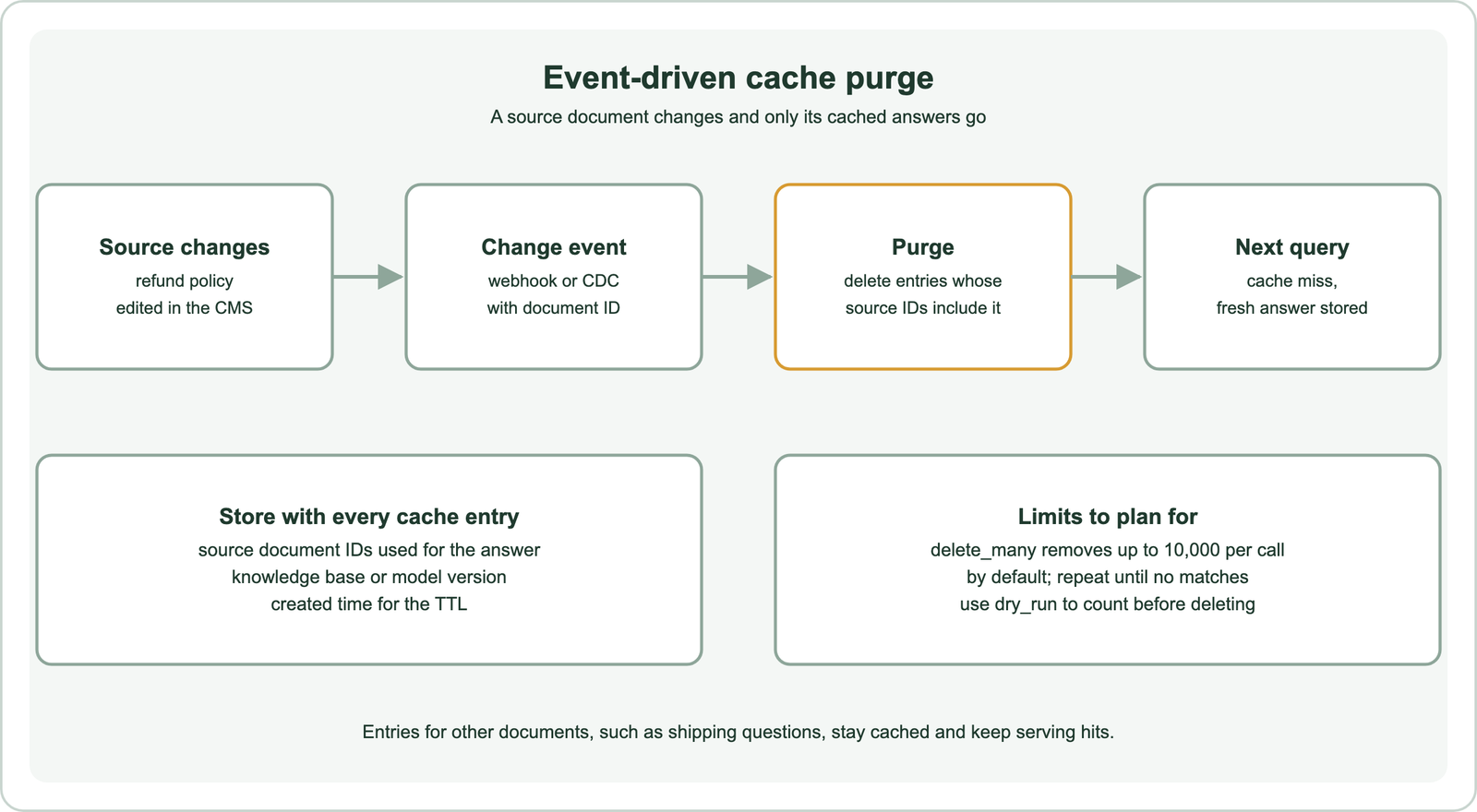
The key step happens at write time. When the application generates an answer with retrieval, it already knows which documents it retrieved. Saving their IDs with the cached answer costs almost nothing and makes every later purge precise. Without them, the only safe response to a document change is to flush the whole cache.
The purge itself is a filtered delete. Weaviate’s delete_many takes the same filters as a query, so a contains_any filter on the source ID array finds every affected entry. Weaviate’s documentation notes a default limit of 10,000 objects per call, set by QUERY_MAXIMUM_RESULTS; larger purges repeat the call until nothing matches. A dry run reports the count without deleting.
Events can come from a content system’s webhooks, a database’s change feed or a scheduled diff of documents. Whatever the source, the event must carry the document ID used in the cache entries.
How do you implement semantic cache invalidation in Weaviate?
You implement semantic cache invalidation in Weaviate with an object TTL on the cache collection, a version filter on every lookup, and a filtered delete_many when a source document changes. The three pieces work together.
import datetime
from weaviate.classes.config import Configure, Property, DataType, Tokenization
from weaviate.classes.query import Filter

cache = client.collections.create(
    "LLMCache",
    vector_config=Configure.Vectors.self_provided(),
    properties=[
        Property(name="question", data_type=DataType.TEXT),
        Property(name="answer", data_type=DataType.TEXT),
        Property(name="source_ids", data_type=DataType.TEXT_ARRAY,
                 tokenization=Tokenization.FIELD),
        Property(name="kb_version", data_type=DataType.INT),
    ],
    object_ttl_config=Configure.ObjectTTL.delete_by_creation_time(   # Weaviate 1.36+
        time_to_live=datetime.timedelta(hours=24),
        filter_expired_objects=True,
    ),
)

def lookup(query_vector, current_version):
    res = cache.query.near_vector(query_vector, distance=0.1, limit=1,
        filters=Filter.by_property("kb_version").equal(current_version))
    return res.objects[0].properties["answer"] if res.objects else None

def purge(doc_id):
    cache.data.delete_many(where=Filter.by_property("source_ids").contains_any([doc_id]))
The version filter and the purge were run on Embedded Weaviate 1.30.5 with two toy entries as an API check. The lookup hit for version 7 and missed for version 8, and the purge removed only the refund entry. The TTL configuration follows Weaviate’s documentation for 1.36 and later and was not run locally, because the local server predates TTL.
The distance threshold in the lookup decides how many questions each entry answers. Choosing it is covered in similarity thresholds for caching.
How do invalidation and similarity thresholds interact?
Invalidation and similarity thresholds interact because a looser threshold lets each entry answer more questions, which raises both the hit rate and the number of users a stale entry can reach. The two settings should be chosen together.
A tight threshold confines each entry to close paraphrases. A stale entry then reaches few users, so a longer TTL may be acceptable. A loose threshold spreads each entry across a wider neighbourhood of questions, multiplying the impact of any stale answer, which argues for shorter TTLs or more precise purges.
Some libraries bundle these controls. GPTCache, for example, separates similarity evaluation from eviction policy. Whatever the tool, record which inputs each answer depended on, because thresholds and TTLs alone cannot tell which entries a particular change affected.
How do you know whether cached answers are stale?
You know whether cached answers are stale by sampling cache hits, regenerating their answers with the current data and model, and comparing the two. Disagreements reveal entries that invalidation missed.
Sample a small share of hits each day. Regenerate the answer as if the cache did not exist, and compare the facts in both answers, either by hand or with an automatic check. A rising disagreement rate means sources are changing faster than the cache notices, or a purge path is broken.
Track the age of served entries and user feedback on cached answers. An entry that keeps receiving negative feedback is a good purge candidate even before a formal change event arrives.
Semantic cache invalidation keeps cached LLM answers from outliving the data, model and prompt behind them. Because one entry answers many paraphrases, stale answers spread widely and look convincing. Use a TTL as a safety net, knowing an answer can stay stale for up to the full TTL. Store a version with each entry and filter on it at lookup, so new releases retire old answers at once. Store source document IDs and purge affected entries when a document changes. In Weaviate, object TTL from 1.36 needs OBJECTS_TTL_DELETE_SCHEDULE, and delete_many removes up to 10,000 entries per call. Choose thresholds and TTLs together, and sample hits to catch what invalidation misses.