Home / Retrieval models / Dense vs Sparse Retrieval: Which Should You Use?
ComparisonDense vs Sparse Retrieval: Which Should You Use?
Dense retrieval finds documents by comparing short, fixed-length embedding vectors that capture meaning; sparse retrieval finds them by matching terms through an inverted index, as BM25 does. Dense retrieval handles paraphrases and synonyms. Sparse retrieval handles exact names, codes, and rare terms. Sparse retrieval also holds up better on out-of-domain data and on long documents. In this site’s test on real text, dense retrieval found planted answers well in short documents but faded as documents grew. At 24 sentences it ranked only 11 of 20 identifier answers first, while BM25 ranked all 20. Neither is better everywhere, so most production systems combine them as hybrid search.
Dense versus sparse retrieval in four facts
- Dense vectors encode meaning in a few hundred numbers; sparse vectors weight the words a document contains.
- Luan and colleagues showed fixed-length dense encodings lose precision as documents get longer; our test reproduced the effect.
- A one-sentence document took 1,536 bytes as a 384-dimension float vector, against about 67 bytes of uncompressed postings.
- Hybrid search combines both; Weaviate’s retrieval guidance names it a consistent improvement over vector-only retrieval.
What is the difference between dense and sparse retrieval?
The difference between dense and sparse retrieval is how documents are represented. Dense retrieval uses compact learned vectors where every dimension carries meaning, while sparse retrieval uses vocabulary-sized vectors where only the document’s own terms are non-zero. That choice decides what each can match.
Weaviate’s hybrid search explainer puts it simply: sparse vectors have mostly zero values with a few non-zero ones, while dense vectors are mostly non-zero. Sparse embeddings come from algorithms like BM25 and SPLADE; dense embeddings come from neural models such as transformers. Weaviate also calls keyword search “sparse vector search” and vector search “dense vector search”.
| Aspect | Dense retrieval | Sparse retrieval |
|---|---|---|
| Representation | Embedding of a few hundred to a few thousand dimensions | Term weights over the vocabulary, mostly zeros |
| Matches | Meaning, paraphrases, other languages | Exact terms, names, codes |
| Index | Vector index such as HNSW | Inverted index |
| Out-of-domain data | Can degrade on unfamiliar vocabulary | Robust, needs no training |
| Long documents | Meaning diluted into one vector | Every term still indexed |
| Explainability | Hard to say why a result matched | Shows which terms matched |
The terms “dense search” and “sparse search” mean the same thing as dense and sparse retrieval. Retrieval models explained places both in the wider family of retrieval methods, and dense versus sparse vectors covers the representations in more depth.
How does sparse retrieval work?
Sparse retrieval works by indexing which documents contain each term, then scoring documents by how well their terms match the query’s, weighting rare terms most. BM25 is the standard scoring function.
An inverted index maps each term to the documents containing it, so a query only touches the documents that share at least one term. BM25, as Weaviate’s explainer describes, builds on TF-IDF and adds a penalty for document length relative to the average. Weaviate uses BM25F, which scores several fields, such as title and body, with separate weights.
Learned sparse models keep the inverted index but learn the term weights with a neural network, and can add related terms a document does not literally contain. SPLADE is the best-known example. Sparse retrieval and SPLADE and learned sparse retrieval cover both kinds.
How does dense retrieval work?
Dense retrieval works by encoding each document and each query into a vector with a neural model, then finding the document vectors closest to the query vector with an approximate nearest neighbor index. Similar meanings land close together.
The encoder is usually a bi-encoder: the same or paired transformer models embed queries and documents separately, so documents can be embedded once in advance. At query time only the query is embedded. In this site’s timing test, all-MiniLM-L6-v2 embedded a query in about 2.2 ms on a laptop CPU.
Dense retrieval is trained on pairs of queries and relevant passages, so it learns that “reset my password” and “I forgot my login” belong together. That training is also its weakness: vocabulary it never saw carries little meaning. Dense retrieval and bi-encoders explain the models.
Which is more accurate, dense or sparse retrieval?
Neither dense nor sparse retrieval is more accurate everywhere: dense retrieval usually wins on in-domain, conversational queries, while sparse retrieval often matches or beats it out of domain and on exact-term queries. The data decides.
The BEIR benchmark, published by Thakur and colleagues in 2021, found BM25 a strong zero-shot baseline that many dense retrievers failed to beat on unfamiliar domains. OpenSearch’s later BEIR experiments showed the same pattern: the TAS-B dense model alone averaged 3.52 percent lower than BM25 on nDCG@10 across ten datasets. Combined with BM25, it averaged 6.7 percent above.
Qdrant’s product-search benchmark found BM25 beating all-MiniLM-L6-v2 on Home Depot data, while the Wayfair WANDS data suited dense search better. Our own earlier tests on this site point the same way: dense retrieval led on paraphrased questions and lost on near-identical identifiers. Hybrid search versus vector search collects those results.
How does document length affect dense and sparse retrieval?
Document length hurts dense retrieval more than sparse retrieval, because a dense model squeezes a whole document into one fixed-size vector, diluting any single fact, while an inverted index keeps every term. Longer documents mean weaker dense matches.
Luan, Eisenstein, Toutanova, and Collins studied this in “Sparse, Dense, and Attentional Representations for Text Retrieval”, a 2020 paper later published in TACL. They showed that fixed-length dual-encoder vectors have limited capacity to tell relevant from irrelevant documents as document length grows. They proposed a multi-vector model, ME-BERT, and found sparse-dense hybrids strong in large-scale retrieval.
A run on real text reproduced the effect. The filler was 2,956 sentences from Python standard library docstrings. We planted 20 invented facts, such as “The warmup_cycles setting controls how many requests run before timing starts”, one per document, among filler sentences. Each fact had an identifier query, “what does warmup_cycles control”, and a paraphrase query with no rare term, “how many requests are sent before measurement begins”. Each length had 300 documents.
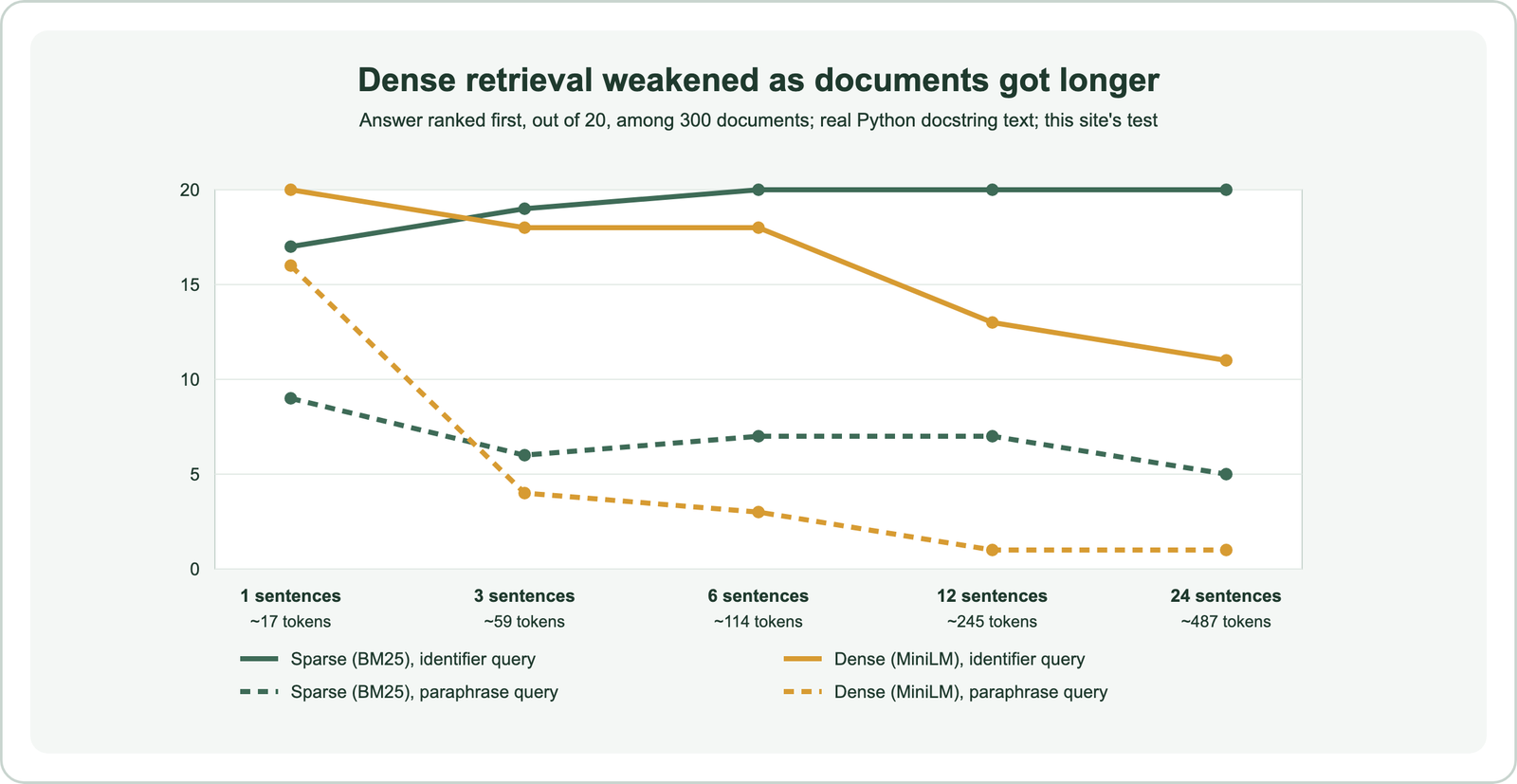
| Document length | BM25, identifier | Dense, identifier | BM25, paraphrase | Dense, paraphrase |
|---|---|---|---|---|
| 1 sentence (~17 tokens) | 17 | 20 | 9 | 16 |
| 3 sentences (~59 tokens) | 19 | 18 | 6 | 4 |
| 6 sentences (~114 tokens) | 20 | 18 | 7 | 3 |
| 12 sentences (~245 tokens) | 20 | 13 | 7 | 1 |
| 24 sentences (~487 tokens) | 20 | 11 | 5 | 1 |
With one-sentence documents, dense retrieval led on both query types. By 12 sentences, still within the model’s 256-token input, dense retrieval ranked 13 of 20 identifier answers first and 1 of 20 paraphrase answers. BM25 held at 20 of 20 for identifiers. At 24 sentences truncation added to the loss, a separate but real limit of dense models.
The practical lesson is about chunking. Dense retrieval works best on short, focused passages, which is one reason RAG systems split documents into chunks. Chunking for semantic search covers chunk sizes, and ColBERT and late interaction and multi-vector search cover models that keep more than one vector per document.
Why does sparse retrieval handle exact matches better?
Sparse retrieval handles exact matches better because a rare term such as a product code gets its own dimension and a high weight. A dense model maps it into the same few hundred dimensions as everything else. Rarity helps sparse and hurts dense.
In BM25, a term that appears in one document out of thousands has a high inverse document frequency, so matching it dominates the score. In our test, invented identifiers like warmup_cycles and ZK-4471 put the answer first for 17 to 20 of 20 queries with BM25 at every length. A dense model has no special dimension for an unseen code; it represents the code through sub-word pieces mixed with the rest of the text.
Weaviate’s retrieval quality article summarizes the split: dense retrieval handles semantic similarity, sparse retrieval handles exact-match and rare-term queries. Its advanced RAG article gives medicine as the example, where medication and disease names act as keywords that pure vector search might miss.
How do latency and index size compare?
Dense and sparse retrieval differ in cost mainly through storage and model inference. Dense indexes store a fixed-size vector per document and need an embedding call per query, while sparse indexes grow with text length and need none. Both can answer in milliseconds.
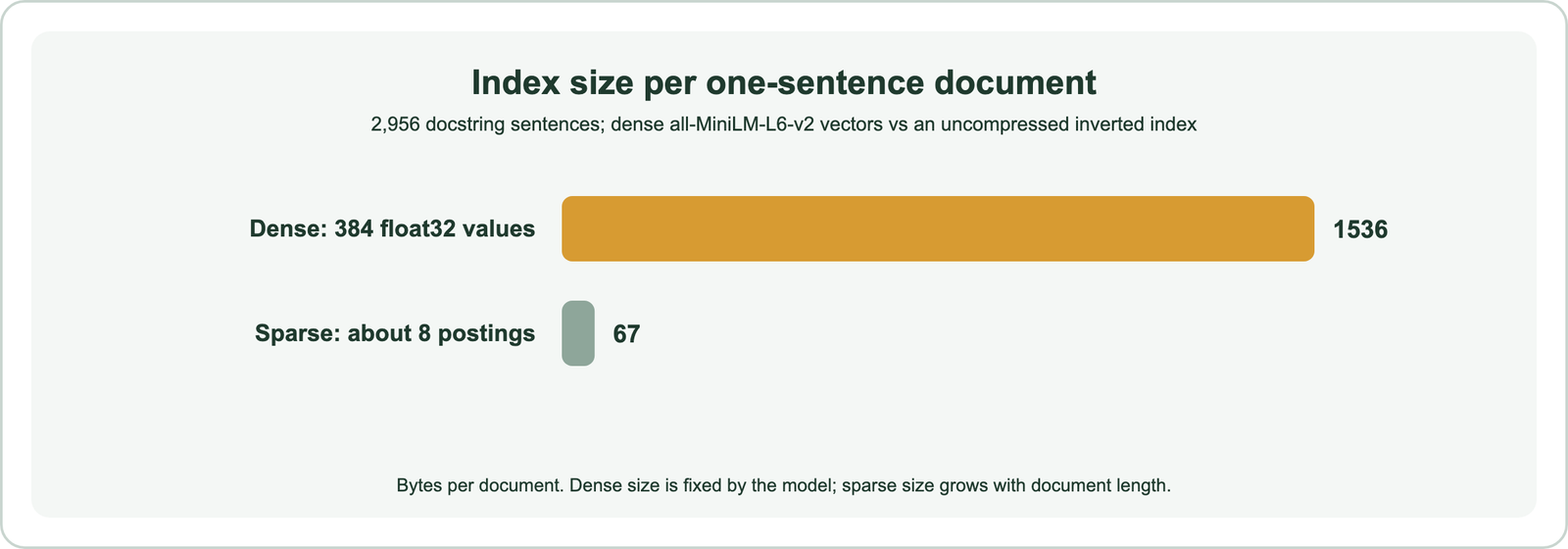
For one-sentence documents, a 384-dimension float32 vector took 1,536 bytes, while the sparse postings averaged 8.4 terms, about 67 bytes before compression. Longer documents shift the balance: the dense vector stays the same size, while postings grow with every new term. Vector indexes such as HNSW also hold a graph in memory, which Weaviate’s documentation notes as a main memory cost; quantization can cut vector size by 75 to 97 percent.
Query latency is usually small for both. Inverted indexes touch only the postings of query terms; HNSW visits a small fraction of vectors. Dense retrieval adds the query embedding, about 2.2 ms with a small local model in our timing test, more with a hosted API. The recall versus latency trade-off covers dense index tuning.
Should RAG use dense or sparse retrieval?
RAG should usually use both, as hybrid retrieval, because questions mix natural language with exact terms and a missed chunk cannot be recovered by the language model. Dense-only retrieval is the common default and the common failure.
Weaviate’s retrieval quality article lists hybrid search first among enhancements that consistently improve retrieval precision over naive top-k vector retrieval, alongside cross-encoder reranking and relevance thresholds. In this site’s hybrid RAG test, dense retrieval missed two error-code chunks entirely from its top 20 in a 315-chunk knowledge base, and hybrid retrieval with reranking found every answer.
Chunk length matters here too. Our length test suggests dense retrieval favors short chunks, while BM25 tolerates long ones. A hybrid setup lets you chunk for the dense model without losing exact matches. Hybrid search for RAG describes a reference setup, and cross-encoders and bi-encoder versus cross-encoder cover the reranking step.
What does a sparse retrieval model mean?
A sparse retrieval model is one that represents text as a sparse vector, with non-zero weights only for a small set of terms, as BM25 and SPLADE do. The phrase means something different elsewhere in machine learning.
In general machine learning, “sparse model” can also describe a network where most weights are zero, or a mixture-of-experts model where only part of the network runs for each input. Those uses concern how a model computes, not how it represents a document. In search, “sparse” and “dense” describe the vectors that get indexed and compared.
“Dense and sparse” together usually means a system that uses both kinds of vector, which is hybrid search. Weaviate’s hybrid search combines a dense vector search with BM25, its sparse component. Agentic retrieval and agentic search covers systems that choose between retrieval methods per query.
How do you run dense, sparse, and hybrid retrieval in Weaviate?
You run dense, sparse, and hybrid retrieval in Weaviate with near_text, bm25, and hybrid queries on the same collection, so comparing them takes three calls. One collection holds both indexes.
import weaviate

client = weaviate.connect_to_local()
docs = client.collections.use("Doc")
query = "what does warmup_cycles control"

dense = docs.query.near_text(query=query, limit=5)    # dense vector retrieval
sparse = docs.query.bm25(query=query, limit=5)        # sparse BM25F retrieval
both = docs.query.hybrid(query=query, alpha=0.5, limit=5)   # fused

for name, res in (("dense", dense), ("sparse", sparse), ("hybrid", both)):
    print(name, [o.properties.get("title") for o in res.objects])
client.close()
Weaviate builds the inverted index for BM25 at import by default and the vector index from the configured vectorizer. Run your labeled queries through all three and compare by query type and document length before choosing.
Dense retrieval matches meaning through compact embeddings; sparse retrieval matches terms through an inverted index. Dense wins on paraphrases in short, in-domain text; sparse wins on exact terms, unfamiliar vocabulary, and long documents. Our test on real docstring text showed dense accuracy fading as documents grew, while BM25 held steady on identifiers. The usual answer is both: chunk for the dense model, keep BM25 for exact matches, and fuse them with hybrid search.