Home / Foundations / Cache Basics: Hits, Misses, Cold and Warm Caches
ExplainerCache Basics: Hits, Misses, Cold and Warm Caches
A cache hit happens when requested data is already in a cache and can be returned at once; a cache miss happens when it is not. On a miss the system computes or fetches the data from slower storage and usually keeps a copy. The hit rate is hits divided by all lookups, and it largely sets a cache’s value. With illustrative costs of 1 millisecond for a hit and 20 for a miss, a 90 percent hit rate gives an average of 2.9 milliseconds, while 50 percent gives 10.5. A cold cache is empty, after a start or a flush, so nearly every request misses. A warm cache holds the items people ask for most, so most requests hit. When a cache is full, an eviction rule such as least recently used decides what to drop. Weaviate, for example, keeps vectors in an in-memory vector cache sized by vectorCacheMaxObjects.
Cache hits and misses in four facts
- Hit rate is the number of hits divided by the total number of lookups.
- Average cost equals hit rate times hit cost plus miss rate times miss cost.
- Weaviate’s vectorCacheMaxObjects defaults to one trillion objects, and a full vector cache is dropped as a whole.
- Weaviate’s documentation says a disk lookup for a vector is orders of magnitude slower than a memory lookup.
What are cache hits and misses?
Cache hits and misses are the two outcomes of a cache lookup: a hit finds the requested item in the cache, and a miss does not. Every request to a cached system ends in one or the other.
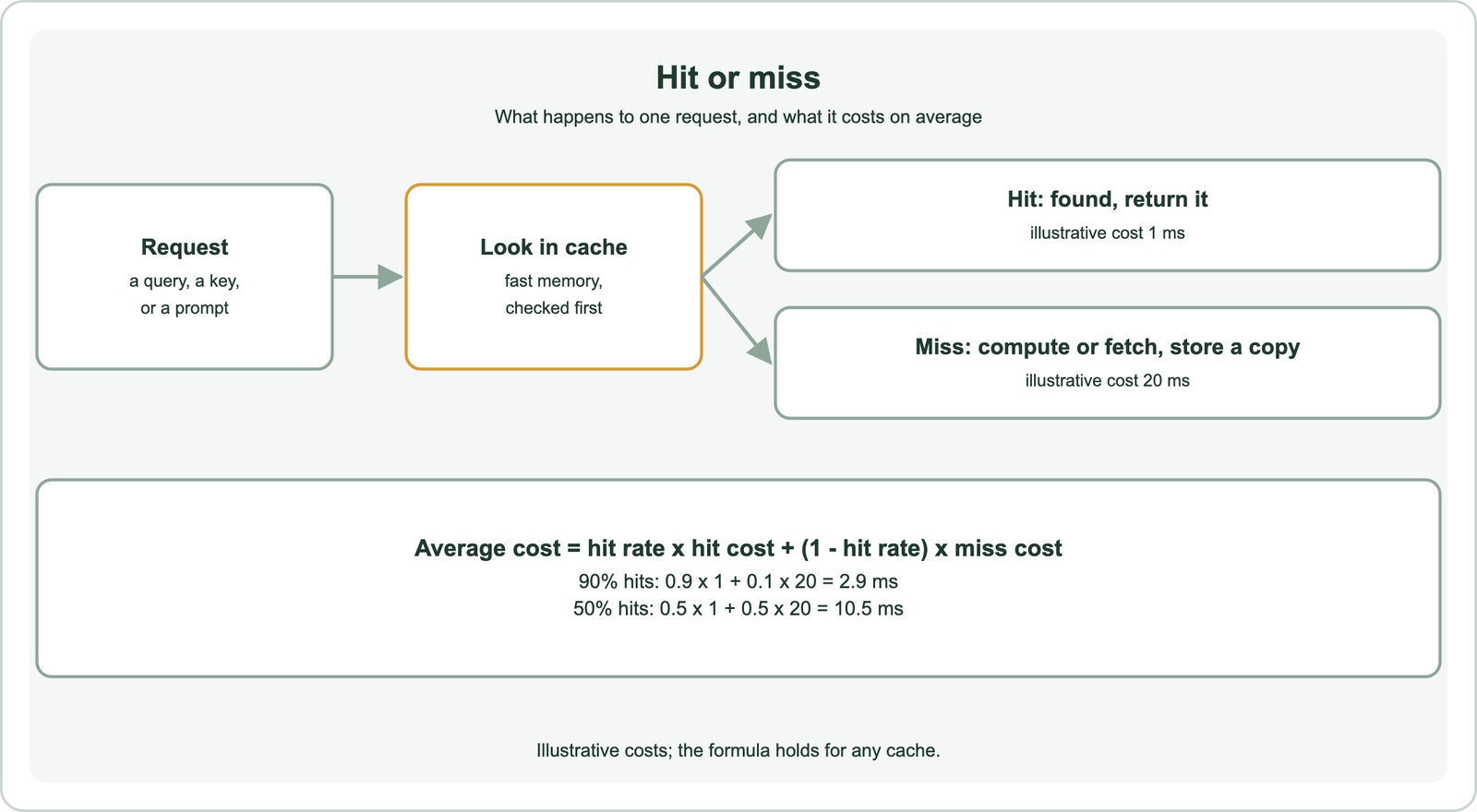
A cache is a small, fast store placed in front of a slower source. The source might be a disk, a database, a remote API or a computation such as running a neural network. On each request, the system checks the cache first. If the item is there, it returns it. If not, it goes to the source, returns the result and normally stores a copy for next time.
The idea is old and general. Processors cache memory, operating systems cache disk pages, browsers cache web files and databases cache query results. Search systems use the same pattern at several layers, which is why the basic terms matter for understanding them.
A cache helps only if requests repeat. If every request is new, every lookup misses, and the cache adds a little overhead with no benefit. If a small set of requests is very popular, a small cache can serve most traffic. That is why the hit rate is the first number to measure.
How do you calculate a cache hit rate?
You calculate a cache hit rate by dividing the number of hits by the total number of lookups, hits plus misses. The miss rate is one minus the hit rate.
If a cache serves 900 hits and 100 misses, its hit rate is 900 divided by 1,000, or 90 percent, and its miss rate is 10 percent. The rate should be measured over a meaningful period and per type of request, since a single overall number can hide a busy route that never hits.
The hit rate turns into speed through a simple average. Average cost equals the hit rate times the hit cost plus the miss rate times the miss cost. With illustrative costs of 1 millisecond for a hit and 20 for a miss, a 90 percent hit rate gives 0.9 × 1 + 0.1 × 20, which is 2.9 milliseconds. At 50 percent the average is 0.5 × 1 + 0.5 × 20, or 10.5 milliseconds.
The formula shows where effort pays. When misses are far slower than hits, a few points of hit rate change the average a lot. It also shows that a cache whose lookups are slow can make things worse at low hit rates. Misses themselves come in different kinds.
What kinds of cache misses are there?
The kinds of cache misses are compulsory misses on first access, capacity misses when the cache is too small, and invalidation misses when an entry has been removed because it went stale. Each points to a different fix.
Compulsory misses, also called cold misses, happen the first time an item is requested. Nothing can be cached before it is seen, so these are unavoidable unless the cache is filled in advance. Their number equals the number of distinct items requested.
Capacity misses happen when the cache cannot hold everything in use, so an item is evicted and then requested again. A larger cache or a better eviction rule reduces them. Invalidation misses happen when an entry is deliberately removed, for example because its time to live expired or the source data changed. They are the price of serving fresh data.
Semantic caches, which match by meaning rather than exact keys, add a failure that is not a miss at all: the false hit. A false hit returns a cached answer for a request that only looks similar. Similar is not the same as related, a distinction covered in semantic similarity vs relatedness. The state of the cache explains many misses.
What is the difference between a cold cache and a warm cache?
A cold cache is empty or nearly empty, so most requests miss, while a warm cache already holds the frequently requested items, so most requests hit. Every cache starts cold.
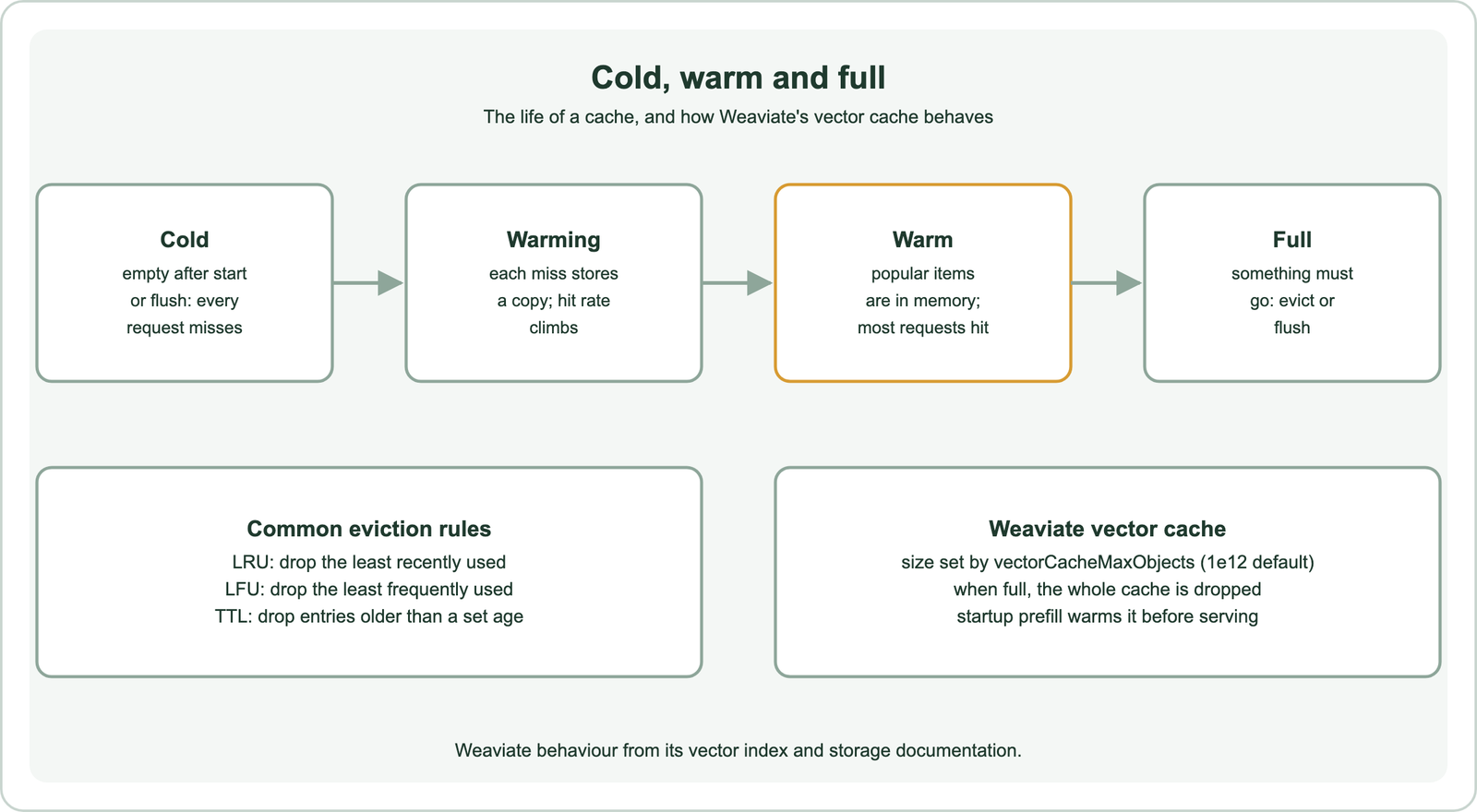
A cache is cold after a restart, a deployment or a full flush. Early requests all miss and pay the full cost, so a freshly restarted service is slower until traffic warms it. As misses store copies, the hit rate climbs. Once the popular items are in memory, the cache is warm and performance settles.
Warming a cache on purpose avoids the slow start. A system can preload known popular items, replay recent traffic or read data into memory before accepting requests. Weaviate does this for its vector cache. Its storage documentation describes a startup setting, HNSW_STARTUP_WAIT_FOR_VECTOR_CACHE, that controls whether the vector cache is prefilled before the node serves, and notes that its default became true in version 1.36.6.
Warm caches can also go cold unexpectedly. A flush, a change of cache key format or a model upgrade that changes every key empties the useful contents at once. Planning for these events avoids latency spikes. When a warm cache fills, an eviction rule takes over.
How does a cache decide what to evict?
A cache decides what to evict with an eviction policy, such as removing the least recently used item, the least frequently used item, or items older than a time to live. The best policy depends on the request pattern.
Least recently used, or LRU, assumes that items used recently will be used again soon. It keeps a recency order and drops the oldest. Least frequently used, or LFU, keeps counts and drops the least popular, which suits stable popularity but reacts slowly to change. Time to live, or TTL, drops entries after a fixed age, which bounds staleness rather than size.
Some systems use simpler rules. Weaviate’s vector index documentation explains that vectors not in the cache are added while there is room. When the cache fills, Weaviate drops the whole cache, and later vectors are read from disk until it fills again. The documentation notes that this still serves well when a large share of users query a specific subset of vectors.
The policy matters most when the cache is small relative to the working set. A short worked example in code shows how capacity alone changes the hit rate. Before that, the layers where search systems cache are worth listing.
Where do caches appear in a semantic search system?
Caches appear in a semantic search system at four main layers: vectors and index data in memory, query embeddings, result lists, and whole language model answers. Each layer saves a different cost.
The vector layer keeps vectors and index structures in memory. Weaviate’s documentation says a disk lookup for a vector is orders of magnitude slower than a memory lookup, and recommends a vector cache large enough to hold all vectors during import. Its default limit, vectorCacheMaxObjects, is one trillion objects. Memory is the constraint, because vectors in a high-dimensional vector space are large. Weaviate’s resource guide estimates one million 384-dimension float32 vectors at 1.5 GB, and 3 GB by its doubling rule of thumb. The cost of dimensions is discussed in the curse of dimensionality.
The embedding layer stores the vector for repeated query text, so the embedding model does not run again. Running a transformer model, as described in transformers and BERT in search and Sentence-BERT, costs far more than a dictionary lookup. Older static models such as those in Word2Vec and GloVe were themselves lookup tables, with one vector per word.
The result layer stores ranked lists for repeated queries, and the answer layer stores language model responses. The answer layer is where semantic caching applies, matching new prompts to old ones by meaning, as described in what is semantic caching. Entity lookups for knowledge graphs in search also repeat and cache well. A small example makes the mechanics concrete.
How do you count cache hits and misses in Python?
You count cache hits and misses in Python by wrapping lookups in a small cache class that increments a counter on each outcome. An ordered dictionary gives least recently used eviction in a few lines.
from collections import OrderedDict

class LRUCache:
    def __init__(self, capacity):
        self.capacity, self.data = capacity, OrderedDict()
        self.hits = self.misses = 0

    def get(self, key, compute):
        if key in self.data:
            self.hits += 1
            self.data.move_to_end(key)          # mark as most recently used
            return self.data[key]
        self.misses += 1
        value = compute(key)
        self.data[key] = value
        if len(self.data) > self.capacity:
            self.data.popitem(last=False)       # evict the least recently used
        return value

    def hit_rate(self):
        total = self.hits + self.misses
        return self.hits / total if total else 0.0

queries = ["refund", "shipping", "refund", "returns", "shipping", "refund"]
for cap in (2, 3):
    cache = LRUCache(cap)
    for q in queries:
        cache.get(q, compute=lambda k: f"results for {k}")
    print(cap, cache.hits, cache.misses, round(cache.hit_rate(), 3))
# 2 1 5 0.167
# 3 3 3 0.5
The six queries contain three distinct terms, so three misses are compulsory. With room for three entries, the cache reaches that floor: 3 hits and 3 misses, a 50 percent hit rate. With room for two, it keeps evicting a term just before it is requested again, giving 1 hit and 5 misses, about 16.7 percent. The two extra misses are capacity misses. The code was run and prints those counts.
The same counters belong in any production cache, broken down by request type. They show whether a cache is cold, too small or simply facing requests that never repeat. Measured hit rates also explain search latency in ways averages alone cannot.
How do caches relate to classic information retrieval?
Caches relate to classic information retrieval because search engines have always had repeated queries and expensive lookups, so caching result pages and index data has long been part of retrieval systems. The structures changed; the pattern did not.
Early retrieval systems, introduced in what is information retrieval, read postings lists from slow disks. Keeping popular lists in memory was the obvious speed-up. Models such as the vector space model and latent semantic indexing added vector computations whose results could also be reused.
Web search raised the stakes. Query streams show strong repetition, with some queries asked very often, so caching result pages for them saves a large share of work. The shift to entity results and answers, described in semantic search at Google, added more layers worth caching.
Language models brought the newest layer. A generated answer can cost far more than a search, so reusing answers for repeated questions saves the most. The same terms apply throughout: hits, misses, warm and cold, eviction and expiry.
A cache hit returns stored data immediately; a miss goes to the slower source and usually stores a copy. Hit rate is hits divided by lookups. Average cost is the hit rate times hit cost plus the miss rate times miss cost, so 90 percent hits at illustrative costs of 1 and 20 milliseconds average 2.9 milliseconds. Misses are compulsory, capacity or invalidation misses, and semantic caches add false hits. Caches start cold, warm with traffic or prefill, and evict by rules such as LRU, LFU or TTL. Weaviate keeps vectors in a memory cache sized by vectorCacheMaxObjects, drops it whole when full, and can prefill it at startup.