Home / Use cases / Semantic Search for Patents and Legal Documents
ExplainerSemantic Search for Patents and Legal Documents
Semantic search for patents and legal documents finds contracts, clauses, case law and patents by meaning as well as by exact terms, so a researcher can find relevant material even when it uses different wording. Legal and patent work puts unusual demands on search. Citations, case names and patent numbers must match exactly. The same idea is often written in very different terms across documents and decades. Results must respect scope rules such as date, jurisdiction and document type, and every answer must point back to its source. Missing a relevant prior patent or precedent can be costly, so recall matters as much as precision. A good system therefore combines keyword search for exact references, vector search for meaning, metadata filters applied before ranking, and reranking for the final order. Weaviate’s legal RAG app, built in 36 hours, used its Query Agent to apply filters before searching and returned cited source passages with each answer.
Patent and legal search in four facts
- Legal and patent search must match exact citations while also finding the same idea in different words.
- Weaviate’s academy recommends keyword search with a boosted citation field for legal citation lookups.
- Weaviate’s legal app article shows a query about 2024 agreements returning 2022 clauses when no filter is applied.
- The legal app split contracts into three collections so its Query Agent could route each question.
What is semantic search for legal and patent documents?
Semantic search for legal and patent documents is the use of embedding-based retrieval, usually combined with keyword search and filters, to find legal texts and patents that match the meaning of a question. It supplements the Boolean and keyword searches that legal professionals have long used.
The document types vary. Contracts and their clauses, court decisions, statutes, regulations, internal memos and patents each have their own structure and vocabulary. A patent has claims, a description and classification codes. A contract has numbered sections and defined terms. A decision has a citation, a court, a date and a holding.
The common thread is precise language read by experts. A lawyer searching for indemnification clauses wants every clause that shifts liability, whether it says “indemnify”, “hold harmless” or “defend”. A patent examiner looking for prior art needs earlier inventions that do the same thing in different terms. Keyword search alone misses many of these.
The wider set of applications is covered in semantic search use cases. Legal and patent work differs from most of them in how much each kind of mistake costs.
Why is legal and patent search harder than general search?
Legal and patent search is harder than general search because it needs exact matches and meaning matches at once, must obey scope rules, and must show its sources. Missing a document can also have serious consequences. Each demand rules out a simple approach.
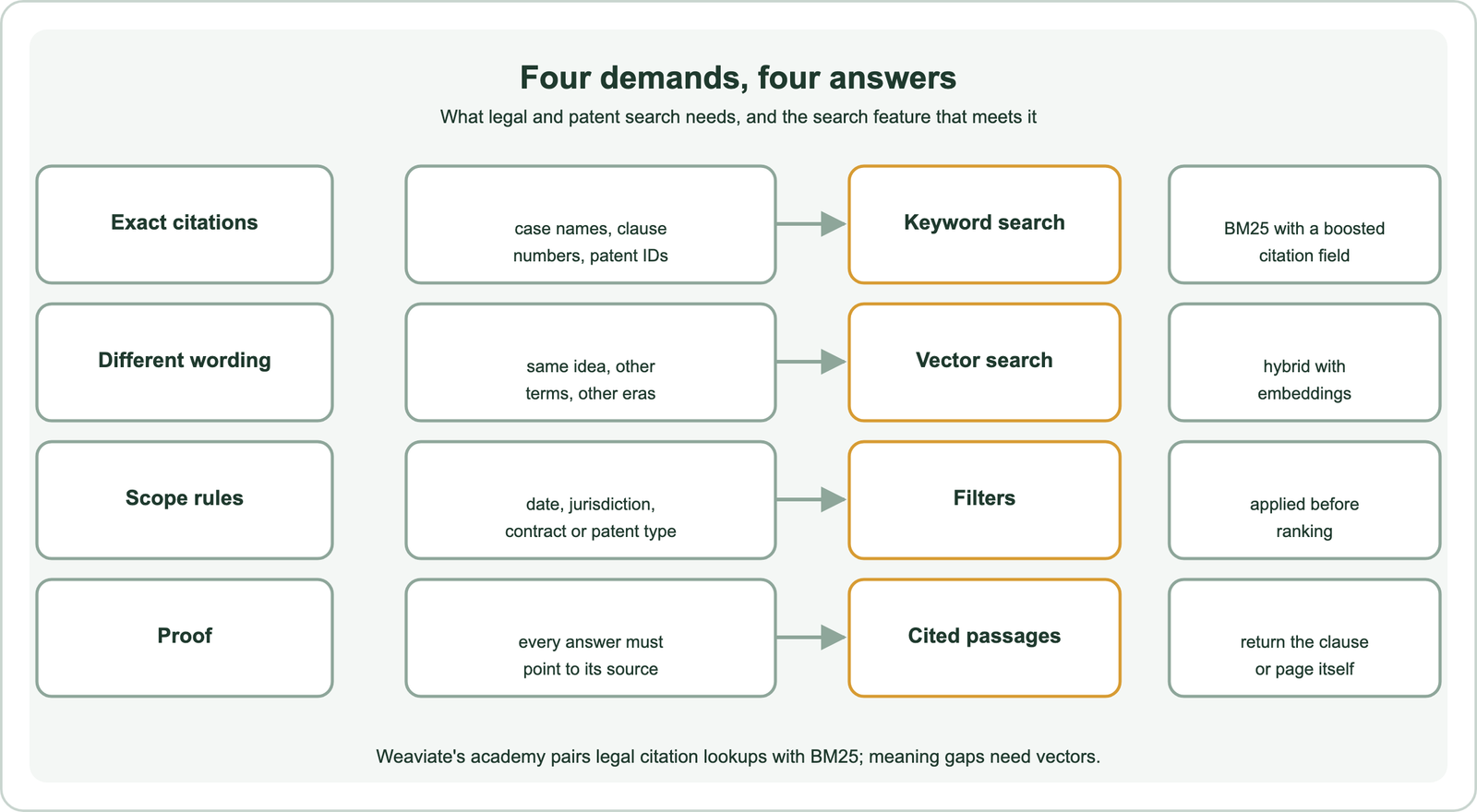
Exact references come first. Weaviate’s academy course on search types uses legal document search as its example of a keyword-first case. Lawyers search for specific citations, exact terminology is critical and query patterns are predictable. Its example query, “Diamond v. Diehr”, boosts a citation property three times over the summary.
Different wording comes next. Legal and technical concepts are expressed in many ways, and drafting styles change over time. A patent from decades ago may describe a mechanism without any of the terms used today. This is the problem described in the vocabulary mismatch problem, and it is where embeddings help.
Scope and proof complete the list. A clause from the wrong jurisdiction or year is a wrong answer, however similar its text. Every result must be traceable to a document, page and section, because professionals must check it. Recall matters most in patent searches, where a missed prior patent can undermine an application. Filters are the first defence against scope errors.
Why do legal searches need filters before ranking?
Legal searches need filters before ranking because semantic similarity ignores dates, jurisdictions and document types, so an unfiltered search can rank a very similar but legally irrelevant clause first. Filters remove those candidates before ranking.
Weaviate’s article on building a legal RAG app gives a concrete case. Asked “What are the notice periods in our 2024 service agreements?”, a plain retriever might return clauses from 2022, simply because their text is semantically similar. Without a reasoning step, the system does not apply the date and contract type filters before searching.
The fix is to store scope as structured properties, such as contract type, effective date, jurisdiction, court or patent classification, and filter on them. Weaviate’s search documentation distinguishes the two operations: a filter passes or blocks objects, while a search ranks them. Applying filters first keeps the ranking within legally valid material.
Extracting that metadata is part of the work. Contract types and dates may be in file names, cover pages or a document management system. Patent offices publish classification codes and dates with each patent. The ingestion and parsing side is covered in enterprise and internal document search. Filtering then works together with ranking.
How do you build a legal search pipeline?
You build a legal search pipeline by indexing clauses or pages with metadata, running filtered hybrid search for each query, reranking the candidates, and returning each result with its citation and source. Generation, if used, must stay within the retrieved passages.
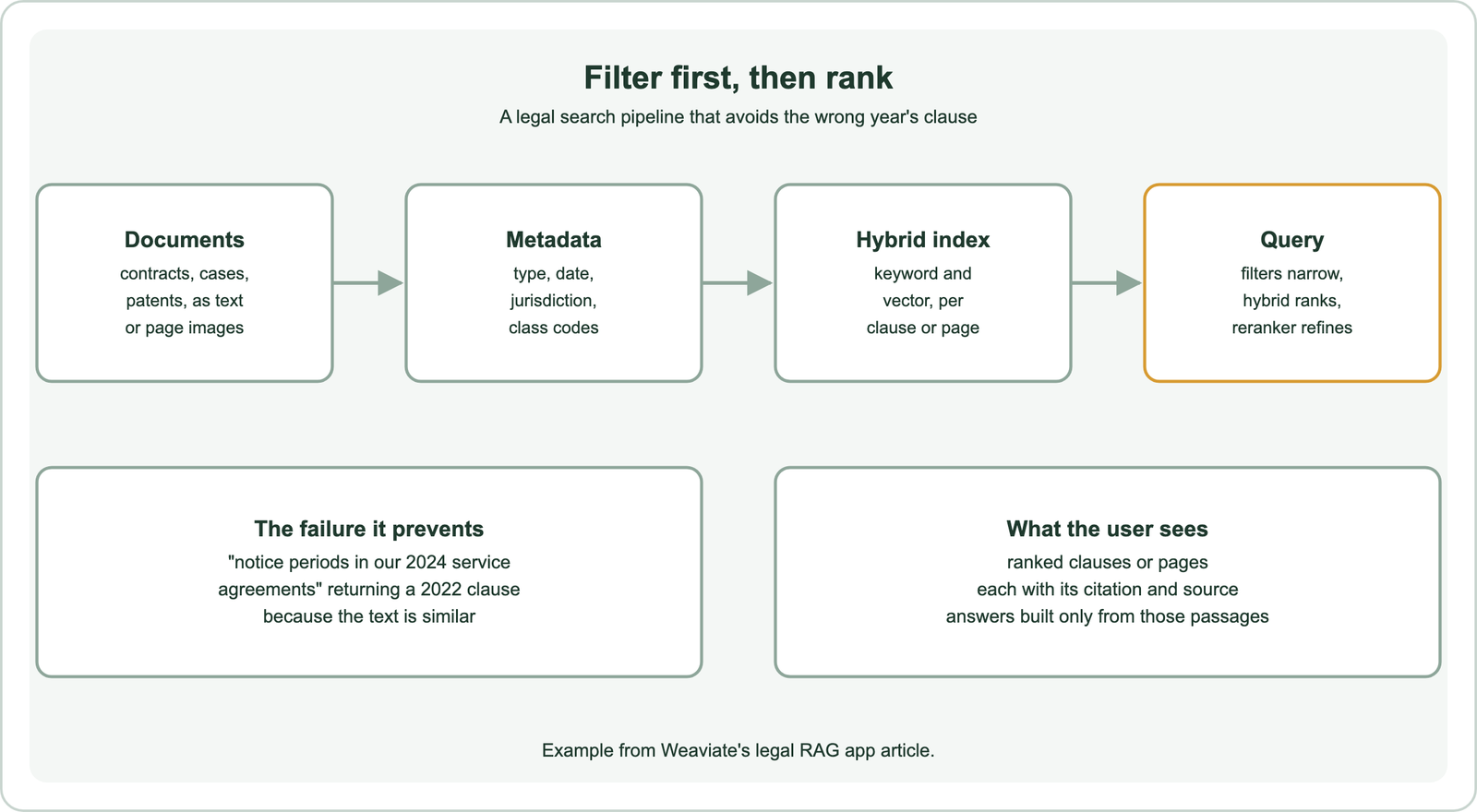
The unit of indexing matters. Clauses and sections suit contracts, because questions target specific provisions. Pages suit scanned or visually complex documents. Weaviate’s legal app embedded each PDF page directly as image patches with a multi-vector model, compressed with MUVERA, so tables and layout were kept without OCR and chunking.
Structure helps routing. The app split contracts into three collections, commercial, corporate and IP, and operational agreements, so its Query Agent could send each question to the most relevant collection. The agent builds filters and aggregations, reranks results with a rerank sub-agent, and writes answers with an answer sub-agent.
The last step is provenance. The app streams answers with cited source passages from the underlying contracts, which Weaviate’s article says gives users transparency and constrains generation to the retrieved context. The general pattern is described in semantic search in RAG. The search call itself is compact.
How do you run a filtered hybrid search over legal clauses?
You run a filtered hybrid search over legal clauses in Weaviate by combining a text query with filters on contract type and date, and boosting the citation property so exact references rank high. One call covers exact terms, meaning and scope.
from weaviate.classes.query import Filter

clauses = client.collections.use("Clause")   # text, citation, contract_type, jurisdiction, year

res = clauses.query.hybrid(
    query="notice period for termination",
    vector=query_vector,                      # or omit when a vectorizer is configured
    alpha=0.5,
    query_properties=["citation^3", "text"],  # exact references weigh more
    filters=(Filter.by_property("contract_type").equal("service agreement")
             & Filter.by_property("year").equal(2024)),
    limit=5,
)
for o in res.objects:
    print(o.properties["citation"], "|", o.properties["text"])
The filters keep only 2024 service agreements, so a similar clause from 2022 cannot appear. The hybrid query matches both the words “notice” and “termination” and their meaning, and the citation boost lifts results whose reference matches the query. The pattern was run on a toy collection of two clauses as an API check, and returned only the 2024 clause.
A reranker can follow, as covered in cross-encoder rerankers. Weaviate’s search concepts note that legal, medical and scientific searches often need the more nuanced understanding a reranker provides. Patents add their own requirements.
How does semantic search help patent and prior art search?
Semantic search helps patent and prior art search by finding earlier patents and publications that describe the same invention in different words, which keyword and Boolean queries often miss. It works best alongside classification codes and expert queries.
Prior art search asks whether an invention has been described before. The earlier document may use different terms, come from another field or describe the idea as part of something larger. Professional searchers build long Boolean queries with synonyms and classification codes to cover these gaps. Embeddings let a searcher paste a claim or abstract and retrieve documents similar in meaning.
Classification codes remain essential. Patent offices assign codes that group inventions by technical field, and filtering or boosting by code narrows a search to the right area. Combining a semantic query with code filters joins the strengths of both. Similar techniques apply to scientific literature, as described in academic and research paper search.
Recall is the priority. A searcher would rather review extra documents than miss the one that matters, so systems retrieve deep candidate lists and let experts judge. Measuring recall at those depths is covered in recall at k. Long, dense documents also suit models that compare at token level, which Weaviate’s overview of late interaction models recommends for legal text-based RAG. Legal and patent search shares patterns with other professional domains.
How does legal search compare with other search use cases?
Legal search is one of the strictest search use cases: it shares the exact-term needs of code and catalogue search and the meaning gap of support search. It also adds scope rules and proof. Lessons transfer in both directions.
Exact identifiers matter in many domains. B2B buyers search part numbers, as in B2B semantic search, and developers search function names, as in semantic code search. The same hybrid approach with boosted identifier fields applies.
The meaning gap appears wherever users and authors write differently. Customers describe problems in their own words in customer support and help centre search, as shoppers do in semantic product search for ecommerce. Legal researchers face a sharper version, with formal drafting and decades of changing terms.
Other use cases rely less on proof. Semantic recommendations and image, video and audio search can tolerate loose matches. Semantic site search rarely needs jurisdiction filters. Legal systems need every result to be traceable and in scope, which shapes how they are evaluated.
How should legal search quality be evaluated?
Legal search quality should be evaluated with expert-judged queries, measuring recall at the depth reviewers actually read, precision at the top, and whether every answer cites a correct, in-scope source. General benchmarks are not enough.
Build the test set with practitioners. Collect real questions, such as clause lookups, precedent searches or prior art queries, and have experts mark the relevant documents. Public datasets can help early on. Weaviate’s legal app recipe uses CUAD, a public dataset of 510 contract PDFs, as a stand-in for private contracts.
Measure the right depth. For contract review, precision in the first few results matters, since users act on them. For prior art, recall over deep lists matters, since missing a document is the costly error. Track scope errors separately: any result outside the requested date, type or jurisdiction should count as a failure.
Check generated answers too. Every statement should trace to a cited passage, and the citation should support it. Sampling answers for unsupported claims is the legal equivalent of a faithfulness check in RAG evaluation.
Semantic search for patents and legal documents combines exact matching with meaning matching. Keyword search with boosted citation fields handles case names, clause numbers and patent IDs. Vector search finds the same idea in different words. Filters on date, jurisdiction, contract type or classification code run before ranking, so similar but out-of-scope text cannot win, as Weaviate’s 2024-versus-2022 example shows. Rerank the candidates and return every result with its citation and source. Patent searches favour deep recall with classification codes. Evaluate with expert-judged queries, and count any out-of-scope result as a failure.