Home / Scale and cost / Managed vs Self-Hosted Semantic Search
Decision guideManaged vs Self-Hosted Semantic Search
Managed semantic search means a vendor runs the vector database for you; self-hosted means your team runs it on your own servers or cloud account. The search features can be identical. Weaviate’s documentation says self-managed instances run the same database as Weaviate Cloud. What changes is who handles the operational work: provisioning, upgrades, scaling, backups, monitoring and security patches. Self-host when you must keep data inside your own network, need air-gapped or regulated deployments, or have the platform skills and scale to run the cluster for less. Choose a managed service when engineering time is scarcer than infrastructure budget, when uptime matters but nobody wants the pager, or when you need cloud-only features. Compare total cost of ownership, not the infrastructure bill alone, because people time and incidents are part of the price.
Managed vs self-hosted search in four facts
- Weaviate’s self-managed instances run the same core database as Weaviate Cloud; operational overhead is the main difference.
- Self-hosting moves upgrades, scaling, backups, monitoring and on-call duty to your team.
- Weaviate’s Query Agent and Weaviate Embeddings run in Weaviate Cloud only.
- Weaviate lists a 99.95 percent SLA for Dedicated Cloud and 99.5 to 99.9 percent for Shared Cloud.
What is the difference between managed and self-hosted vector search?
The difference between managed and self-hosted vector search is who operates the database: a vendor in the managed case, your own team in the self-hosted case. The query features, APIs and client code are often the same.
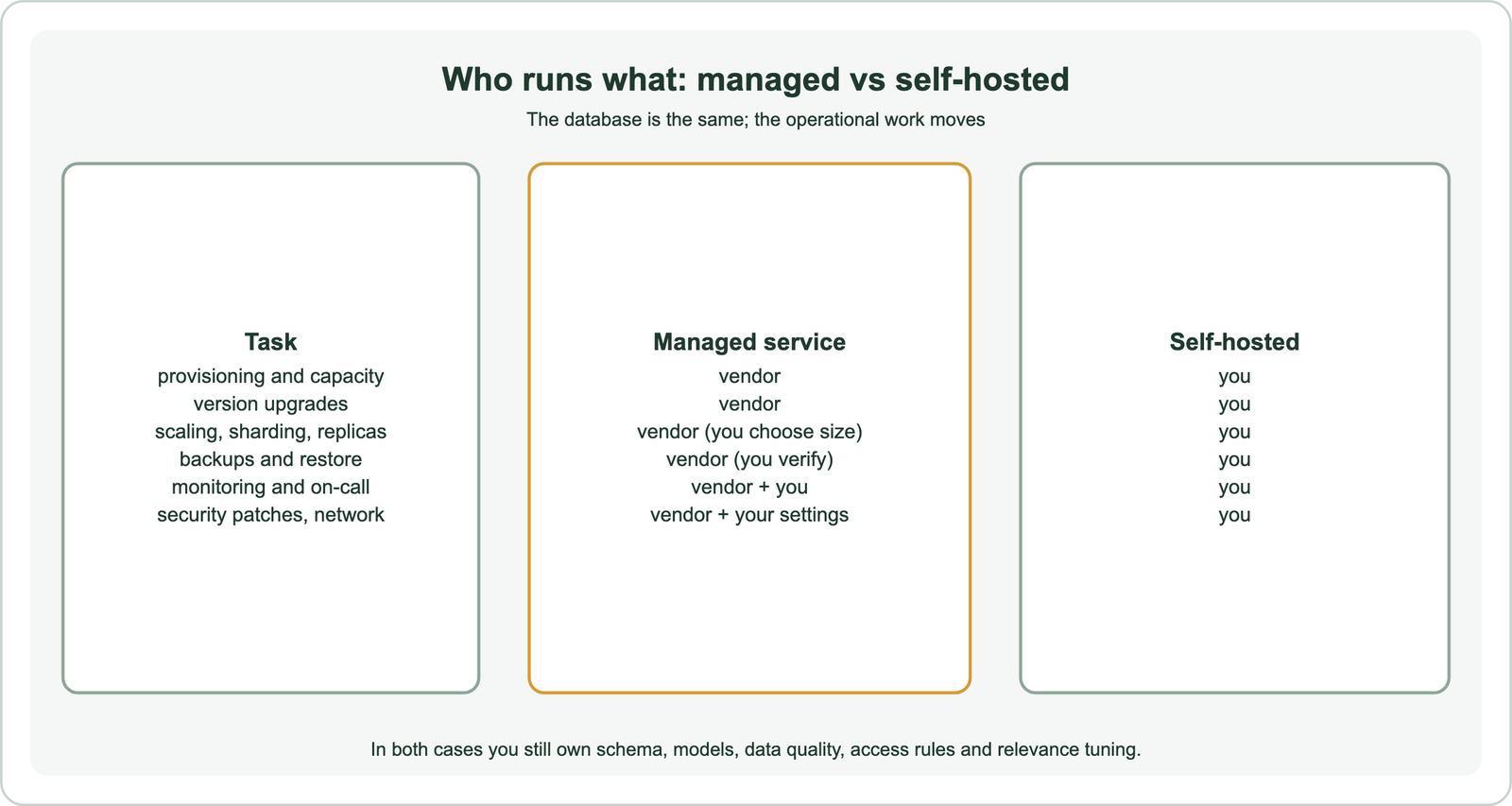
A managed service hands you an endpoint and credentials. The vendor provisions machines, applies upgrades, replaces failed nodes, runs backups and watches the system. Self-hosting gives you the software, usually as containers or a Helm chart, and leaves running it to you. Weaviate supports both. It offers Weaviate Cloud with Shared and Dedicated tiers, and self-managed deployment on Docker, Kubernetes or cloud marketplaces.
Some responsibilities never move. Your team still designs the schema, chooses embedding models, controls data quality, sets access rules and tunes relevance. A managed service does not make search good; it makes the database run. Choosing a vector database for semantic search covers the product choice that comes before the hosting choice.
When should you self-host a vector database?
You should self-host a vector database when data must stay inside your own network or no outside party may access it. It can also pay off when you have the platform skills and scale to run it more cheaply than a vendor. Control is the main reason.
Regulated industries, government work and air-gapped environments often rule out third-party hosting. Weaviate’s architecture guidance names air-gapped environments and settings where no external party may be involved as the case for self-hosting. Self-hosting also allows local inference containers, such as running embedding models beside the database. Weaviate’s documentation notes that its Transformers module is not available on Weaviate Cloud.
The cost case depends on scale and skills. A team already running Kubernetes, with monitoring, backups and on-call in place, adds a database to an existing practice. A team without that practice must build it first. The same guidance puts the condition plainly: self-host if you must have full control and have DevOps capacity and resources.
When is a managed search service the better choice?
A managed search service is the better choice when engineering time is your scarcest resource, when you need high availability without building it, or when you depend on features that only the managed service offers. Most early products fit here.
A startup building its product, not its infrastructure, rarely gains from running a database cluster. Managed services shorten time to production, include upgrades and backups, and offer replication for high availability as an option. Weaviate’s guidance suggests Shared Cloud for self-service deployment, and Dedicated Cloud for large datasets, high throughput or bespoke managed setups.
Cloud-only features can decide the question. In Weaviate, the Query Agent, which turns natural-language questions into searches, and the Weaviate Embeddings service run only in Weaviate Cloud. A design that depends on them requires the managed option. Dedicated deployments add network isolation, private connectivity and compliance support, including HIPAA, according to Weaviate’s security overview.
How do the costs of managed and self-hosted search compare?
The costs compare on total cost of ownership: infrastructure plus the people time to run it, plus the cost of incidents, against the managed service’s price. The infrastructure bill alone always favours self-hosting.
A managed price bundles machines, storage, network and the vendor’s operations team. A self-hosted bill shows only machines, storage and network; the operations work is paid in salaries. Count the time for upgrades, capacity planning, backup testing, security patching, monitoring and on-call rotations. Add the expected cost of outages, which depends on how much downtime the business can tolerate.
Memory is usually the largest infrastructure cost in either model, so the same levers apply to both. Quantization, smaller vectors and disk-based indexes cut the hardware needed. The cost of semantic search breaks the bill into its parts. The vector storage and memory calculator sizes a collection. Prices change often, so compare current quotes against your own sizing rather than published examples.
What operational work does self-hosting add?
Self-hosting adds capacity planning, upgrades, scaling, backups, monitoring, security and on-call response to your team’s work. Each needs a plan before production, not after the first incident.
Capacity planning means sizing memory for vectors and indexes, and choosing shard counts that allow growth. Weaviate’s guidance warns that existing collections cannot be re-sharded. Scaling means adding nodes, setting replication factors and rebalancing, covered in scaling semantic search and hybrid search on distributed databases. Upgrades without downtime need replication and rolling updates.
Monitoring starts with metrics. Weaviate exposes Prometheus metrics for latency, memory and errors, and its hardening guidance recommends alerting on pods going down, high error rates, resource exhaustion and backup failures. Latency targets are covered in search latency. Backups must be restored in practice, not only taken.
How do security and compliance affect the choice?
Security and compliance affect the choice by setting where data may live, who may access it and what network paths are allowed. Strict rules push towards self-hosting or dedicated managed tiers.
Questions to settle include data residency, encryption, identity provider integration, audit logging and network isolation. Weaviate’s security overview lists API keys, role-based access control and OIDC on Shared Cloud. It adds SSO for the console, private connectivity and HIPAA compliance on Dedicated deployments. Self-hosting gives full control of these settings, along with full responsibility for them.
Tenant separation and access rules apply in every model. A product serving many customers needs isolation inside the database, as covered in multi-tenant semantic search. Hosting choices do not replace permission checks at query time.
How should you decide between managed and self-hosted search?
You should decide by checking hard constraints first, such as air-gap rules or cloud-only features, then comparing total cost of ownership and team capacity. The first hard constraint usually settles it.
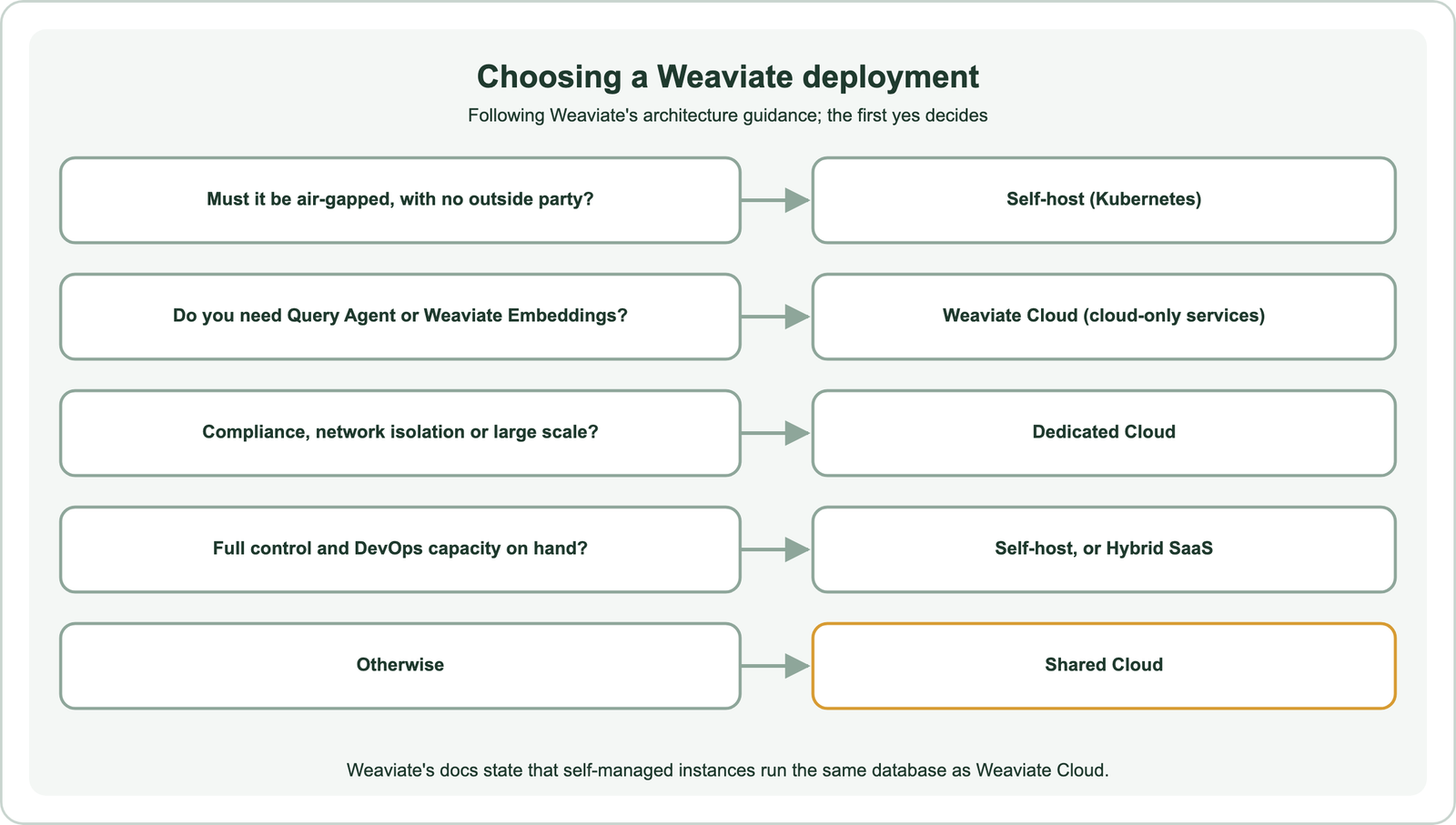
Weaviate also lists hybrid arrangements between the two. Its documentation describes Hybrid SaaS for teams that want more configuration control without managing the deployment themselves. Marketplace deployments on AWS and Google Cloud let billing run through an existing cloud account. Managed Weaviate on DigitalOcean is another hosted route.
Write down the requirements, score each option, and revisit the choice as scale changes. Index freshness and recall targets, covered in real-time indexing and index freshness and the recall vs latency trade-off, apply in either model. GPU needs, covered in GPU acceleration for vector search, may favour one route.
Which questions should you ask a managed search provider?
The questions to ask a managed search provider cover availability, data location, backups, security controls, scaling limits and how to leave. The answers turn a price list into a fair comparison.
Ask what the service level agreement guarantees and what credit it gives when missed. Ask which regions host the data and whether replicas can cross borders. Ask how often backups run, how long they are kept, and how a restore is requested and tested. Ask which identity, network and encryption options each tier includes, and whether audit logs are available.
Then ask about growth and exit. Find out how the service scales a collection, whether resizing causes downtime, and which settings are fixed at creation. Confirm that you can export collections with their vectors, and in what format. A provider that answers these clearly makes both the start and a later move easier to plan.
Can you switch between managed and self-hosted later?
You can switch between managed and self-hosted later, especially when both run the same database, because the client code and schema stay the same and only the data must move. Plan the move like any migration.
Because Weaviate’s self-managed and cloud deployments share the same core database, a move between them changes the connection settings rather than the application. The data still has to move. Export collections with their vectors, import them into the new cluster, verify results and switch traffic, as described in migrating to a new vector database.
A common path starts on a managed tier for speed, then moves to dedicated or self-hosted infrastructure as scale or compliance needs grow. The reverse also happens when a team decides operations are not its strength. Keeping configuration in code makes either move easier.
Managed and self-hosted semantic search can run the same database; the difference is who operates it. Self-host when data must stay in your network, when air-gapped or no-third-party rules apply, or when your team already runs similar systems at scale. Choose managed when engineering time is scarce, when you need availability without building it, or when you rely on cloud-only features such as Weaviate’s Query Agent. Compare total cost of ownership, including people time and outage risk, and check hard constraints first.