Home / Use cases / Semantic Search for Help Centers and Support
ExplainerSemantic Search for Help Centers and Support
Semantic search for help centers and customer support matches a customer’s question to the right article even when they share no words, by comparing meanings through embeddings instead of keywords. A customer types “I can’t get into my account” and finds “Reset your password”. The usual design combines vector and keyword search, so error codes and product names still match exactly. Articles are split by section, filtered by product, version and language, and reranked before results are shown or passed to a language model for a cited answer. Testing comes from the support history itself. Past tickets where an agent linked an article give real question and answer pairs, which measure recall and tune settings such as the hybrid weight. Weaviate supports this stack in one system, with hybrid search, filters, reranking and generative answers.
Help center semantic search in four facts
- Customers describe symptoms; articles describe procedures, so keyword overlap between them is often low.
- Hybrid search keeps exact matches for error codes, product names and setting labels.
- Resolved tickets that link an article form a ready-made relevance test set.
- Labelling each failed query with one cause turns quality work into a prioritised list.
What is semantic search for help centers?
Semantic search for help centers is retrieval over support content, articles, FAQs, guides and resolved tickets, that ranks results by closeness in meaning to the customer’s question. It powers help center search boxes, contact-form suggestions, chat assistants and agent tools.
The core problem is a vocabulary gap. Customers describe what they see: “the app keeps logging me out”, “charged twice”, “button is grey”. Articles are written by product teams in procedure language: “Managing session settings”, “Understanding duplicate authorisations”, “Enabling the export feature”. Keyword search fails when the two sides use different words, and in support they often do.
Embeddings place both texts in the same space, so a symptom and the procedure that fixes it can sit close together. The general idea is covered in what semantic search is, and the full range of applications in semantic search use cases.
How does semantic search match support questions to articles?
It matches support questions to articles by embedding article sections and the incoming question, retrieving close sections with hybrid search, reranking them, and showing the best articles or a generated answer that cites them. Each step solves a specific support problem.
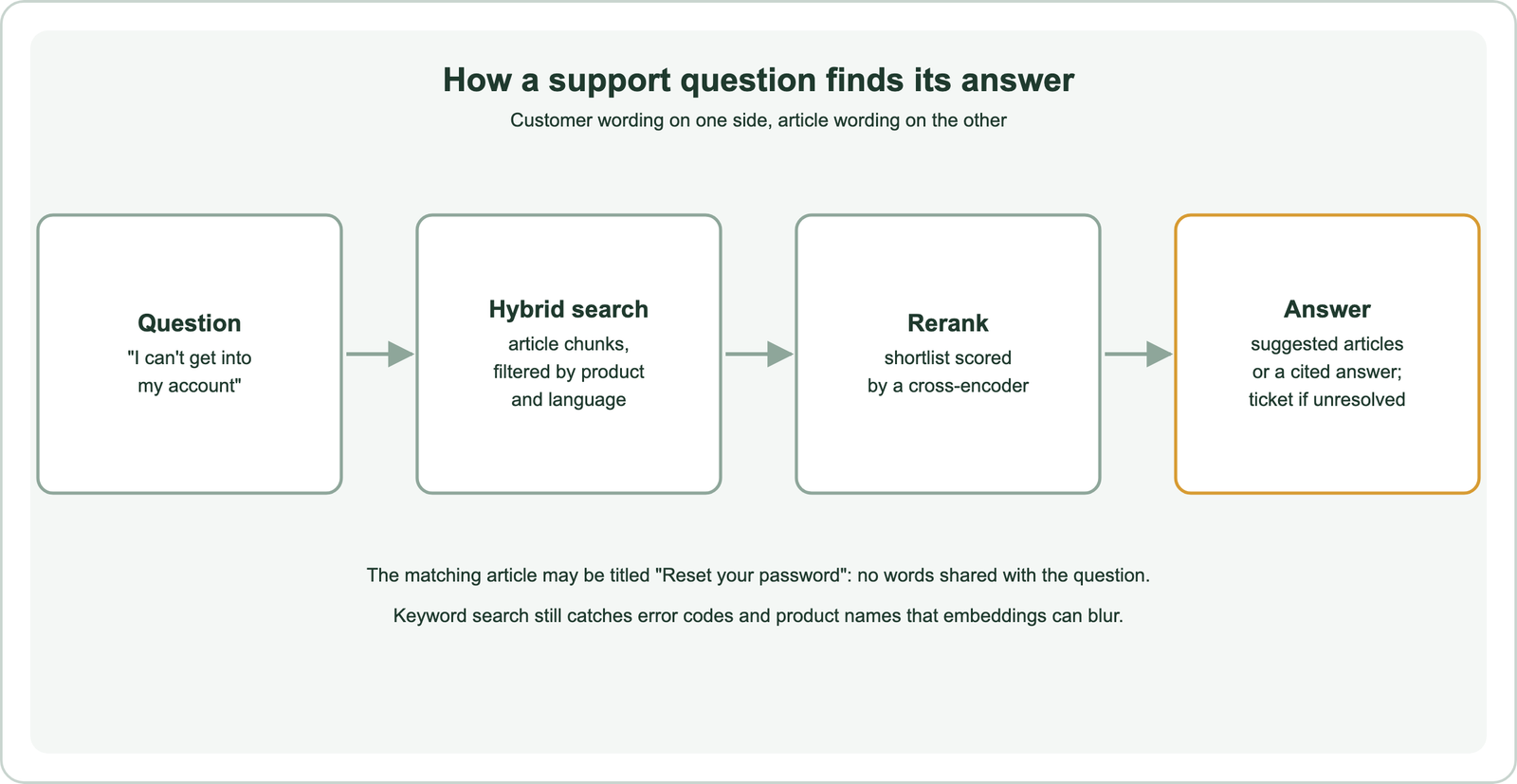
Help articles are usually long and cover several tasks, so they are split into sections by heading, with the article title kept in each chunk for context. Methods are covered in chunking for semantic search. Each chunk carries metadata: product, plan, version, language, audience and last review date.
At query time, filters restrict results to the customer’s product and language, and hybrid search combines vector similarity with BM25. A reranker then reorders the shortlist. In a search box, the top articles are shown. In a chat assistant, the top sections go to a language model that writes an answer with links, the pattern described in semantic search in RAG.
Why do help centers need hybrid search?
Help centers need hybrid search because support queries mix natural descriptions with exact tokens, error codes, product names, setting labels and plan names, that embeddings may not match precisely. Keyword search catches those exact tokens reliably.
A query such as “error 0x80070005 when syncing” has one decisive token. An embedding model may place it near other sync errors with different codes, which looks plausible but is wrong. BM25 matches the exact code. Conversely, “my invoices vanished” needs semantic matching to find “Viewing billing history”. Fusing both lists covers both cases, as explained in hybrid search.
In Weaviate, a hybrid query takes an alpha weight between keyword and vector scores, plus filters, in one call. The right alpha depends on how many of your queries contain exact identifiers, which is why it should be tuned on your own data rather than guessed.
How do you test and tune vector search relevance for support articles?
You test and tune relevance for support articles by building a test set from resolved tickets, where an agent linked the article that solved the problem, and measuring how often search finds that article. The history provides real questions with known answers.
from weaviate.classes.query import Filter

articles = client.collections.use("HelpChunk")

def recall_at_5(pairs, alpha):
    hits = 0
    for question, article_id, product in pairs:
        res = articles.query.hybrid(
            query=question, alpha=alpha, limit=5,
            filters=Filter.by_property("product").equal(product),
        )
        hits += article_id in {o.properties["article_id"] for o in res.objects}
    return hits / len(pairs)

for alpha in (0.25, 0.5, 0.75):
    print(alpha, recall_at_5(test_pairs, alpha))
Take the customer’s first message from each ticket as the query, and the article the agent linked as the relevant answer. Clean the set: remove tickets about account-specific issues no article can answer, and check a sample by hand. Measure recall at 5 for the search box and recall at the retrieval depth used for a chat assistant. Recall at k and mean reciprocal rank suit this single-answer setup.
Then tune one setting at a time against that set: the hybrid alpha, chunk size, which fields are embedded, the embedding model and whether a reranker is used. Keep a held-out part of the set to confirm the final choice. The general method is in how to evaluate semantic search.
What defect taxonomy helps improve support search?
A defect taxonomy for support search labels each failed query with one cause, such as content gap, retrieval miss, ranking error, stale scope, answer error or escalation need, so fixes go to the right owner. Counting causes shows where effort pays off.
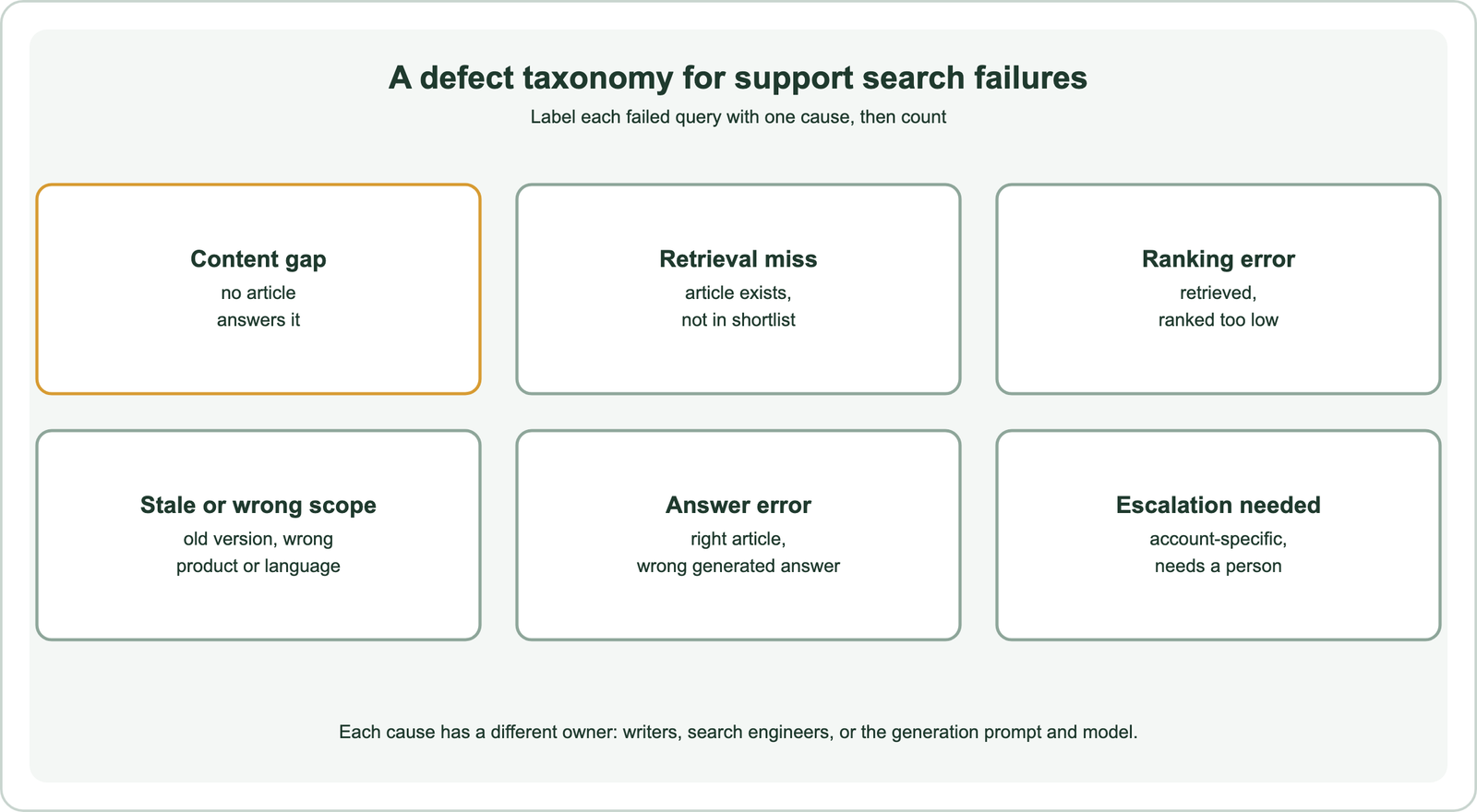
Content gaps go to the writers: no ranking change can return an article that does not exist. Retrieval misses and ranking errors go to search engineers, who adjust chunking, models, hybrid weights or reranking. Stale or wrong-scope results point to missing metadata or filters. Answer errors belong to the generation step, its prompt and model. Escalation needs mean the bot should hand over sooner.
Review a sample of failed queries each week, from zero-result searches, low ratings and tickets opened after a search. Label each with one cause and track the counts over time. This turns vague complaints that “search is bad” into a ranked list of concrete fixes. Ongoing measurement is covered in monitoring search quality in production.
How can an LLM judge evaluate support search?
An LLM can judge support search by rating whether retrieved articles answer a customer question and whether a generated reply is supported by those articles, using a written rubric. It scales review beyond what support staff can label by hand.
Give the judge the customer question, the retrieved sections and a rubric with clear grades, such as “fully answers”, “partly answers” and “does not answer”. For generated replies, ask separately whether each claim is supported by the provided articles. Store the judge’s reasoning with each grade so disagreements can be inspected.
Calibrate before trusting it. Have experienced agents grade a sample of a few hundred cases, compare their grades with the judge’s, and refine the rubric until agreement is acceptable. Keep the judge model and rubric fixed while tracking trends, and recheck agreement after any change. Methods for building judged sets are in search test sets and relevance judgments.
What stack do teams use to build support assistants?
A support assistant stack usually combines a vector database with hybrid search, an embedding model, a reranker, a language model for answers, and connectors to the help center and ticketing system. Many teams also add evaluation and monitoring tooling.
Weaviate covers retrieval in one system. It stores article chunks with metadata, runs hybrid search with filters and calls embedding and reranker models through integrations. It can also pass results to a generative model in the same query. Orchestration frameworks such as LangChain and LlamaIndex can wrap it, as shown in semantic search with LangChain and LlamaIndex. The ticketing integration decides when to hand over to a person.
Choose components by testing on your own ticket-derived set rather than by popularity. Embedding models trained on support or question-answer data tend to suit the symptom-to-procedure gap. Multilingual support teams need a multilingual model or per-language collections, as covered in multilingual and cross-lingual semantic search.
How does semantic search help human support agents?
Semantic search helps human support agents by suggesting relevant articles and similar resolved tickets while they read a new ticket, so they reuse past solutions instead of searching manually. The same index serves customers and agents with different filters.
When a ticket arrives, its text is used as a query against both the article collection and a collection of past resolved tickets. The agent sees the closest matches beside the ticket. Similar-ticket search is valuable because many issues are solved in tickets long before an article exists. Those patterns also reveal content gaps worth turning into new articles.
Internal content needs permission controls: internal runbooks, private notes and customer data must never appear in customer-facing search. Filter by audience and access rights at query time, as described in permission-aware search. Agent-facing search across wider company knowledge is covered in enterprise and internal document search.
How do you keep help center search accurate over time?
You keep help center search accurate by re-indexing articles as soon as they change, removing retired content, tagging versions, and re-running the ticket-based test set after every content or model change. Support content changes with every product release.
Connect the help center’s publish and unpublish events to the indexing pipeline, so search never serves a deleted article. Store a last-reviewed date, and flag articles that fall behind the product. When a release renames a feature, add the old name to the article text or metadata, since customers keep using the old name for months.
Refresh the test set regularly from recent tickets, because new products bring new questions. Patterns transfer from semantic site search, semantic product search for ecommerce, B2B semantic search and semantic recommendations. Others appear in semantic code search, academic and research paper search, patent and legal search and image, video and audio search.
Semantic search for help centers matches customer symptoms to procedure-style articles by meaning, closing a vocabulary gap that defeats keyword search. Combine it with keyword matching in hybrid search for error codes and product names, chunk articles by section, filter by product and language, and rerank. Test with resolved tickets that link the solving article, tune one setting at a time, and label failures with a defect taxonomy so each goes to the right owner. LLM judges scale review once calibrated against agents. Weaviate provides hybrid search, filters, reranking and generative answers in one system for both customers and agents.