Home / Use cases / Semantic Search for Images, Video and Audio
ExplainerSemantic Search for Images, Video and Audio
Semantic search for images, video and audio lets people find media by describing it in words, or by giving an example clip, instead of relying on file names and manual tags. It works by turning media into vectors with multimodal embedding models. These models place a picture of a red car at night and the words “red car at night” close together in one vector space. Images are usually embedded whole. Video is split into clips or scenes, and audio into short overlapping chunks with timestamps. Speech is often also transcribed so names and quotes can be found with keyword search. A practical index stores each segment with several signals: a visual or audio vector, transcript text and metadata for filters. Weaviate supports this with multimodal integrations such as CLIP, ImageBind and Google’s Gemini embeddings, and with near_image and near_media queries.
Image, video and audio search in four facts
- Multimodal models embed text and media into one vector space, so text can search media directly.
- Video and audio are searched as segments with start and end times, not as whole files.
- Transcripts add exact names, numbers and quotes that embeddings of sound or pixels may miss.
- Weaviate’s near_media query accepts audio, video and other media types, depending on the model.
What is semantic search for images, video and audio?
Semantic search for images, video and audio is retrieval of media by meaning: finding a photo, a scene or a sound from a description or an example. It does not depend on words in file names or tags. It extends semantic search beyond text.
Traditional media search depends on metadata: titles, captions and tags typed by people. It fails when tags are missing, inconsistent or in another language. Semantic media search looks at the content itself. A query such as “a dog catching a frisbee at the beach” can find a matching photo that was uploaded as IMG_2041.jpg with no description.
The same approach powers several use cases: photo libraries, stock media, product images in shops, broadcast archives, meeting recordings, podcasts and security footage. Semantic search use cases places these among the wider set, and semantic product search for ecommerce covers image-led shopping.
How do multimodal models make media searchable?
Multimodal models make media searchable by mapping text and media into a shared vector space, trained so that matching pairs, such as an image and its caption, land close together. Text queries can then retrieve images, sounds or clips directly.
CLIP, from Radford and colleagues at OpenAI in 2021, trained an image encoder and a text encoder on image-caption pairs from the web, so both produce comparable vectors. ImageBind, from Meta in 2023, binds several modalities, including audio, video, depth and thermal data, into one space. Weaviate’s multi2vec-bind integration uses it, and Weaviate’s announcement lists seven modalities, counting text. Newer API models, such as Google’s Gemini embeddings, accept image, video and audio inputs, according to Weaviate’s documentation.
These shared spaces enable “any-to-any” search: text to image, image to image, audio to image and so on. The model, not the database, decides which pairs work well, so test the directions you need. Multimodal embeddings covers the models in more depth.
How do you prepare images, video and audio for search?
You prepare media for search by splitting it into searchable units, then indexing each unit with a native embedding, text derived from it, or both. The right unit differs by media type.
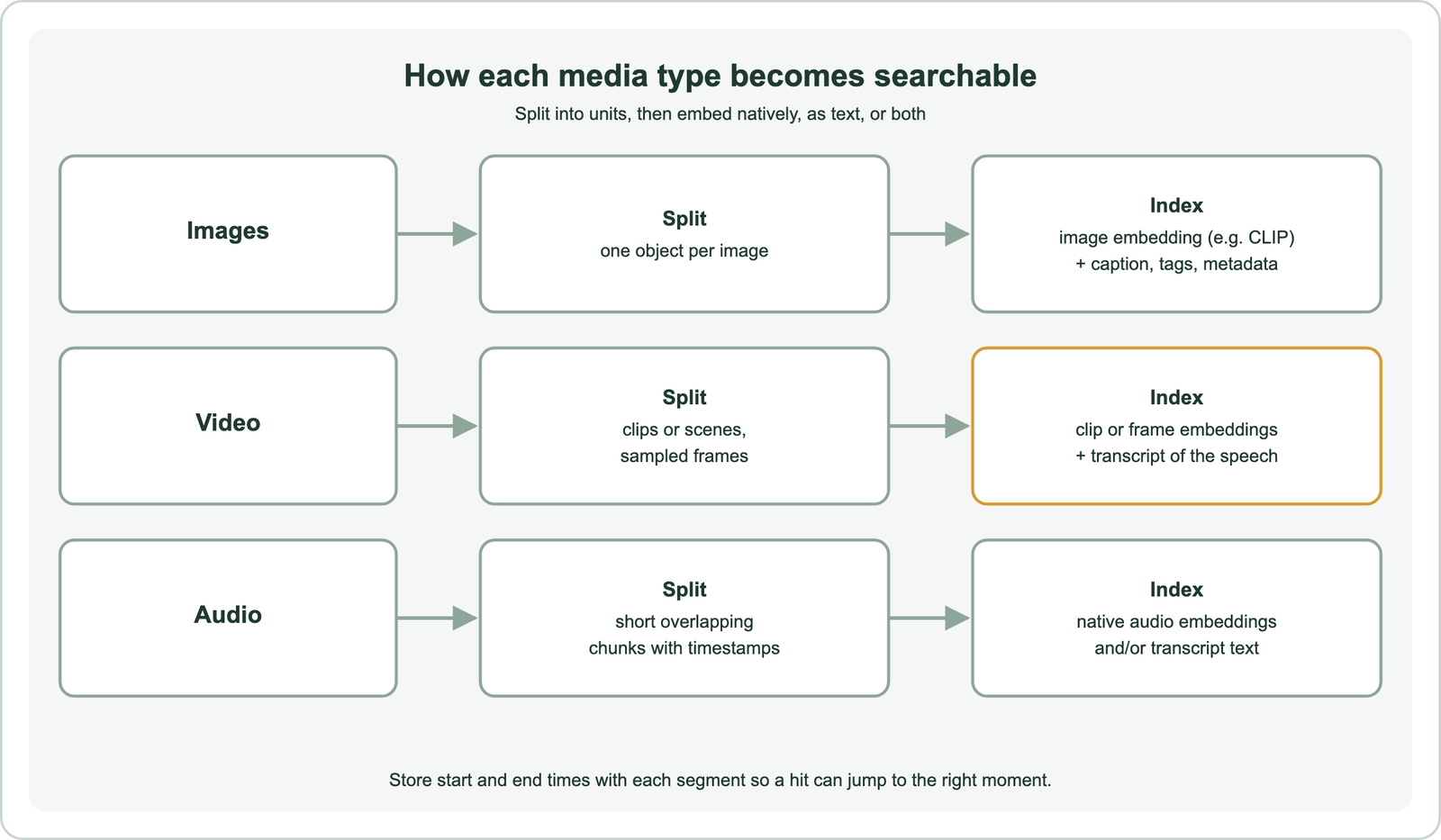
An image is usually a single unit. Embed it whole, and add any caption, alt text or tags as text properties. A long video holds many moments, so split it into clips, by fixed length or detected scene changes. Embed each clip natively, or embed sampled frames. Audio is split into short chunks with a little overlap, so a phrase that crosses a boundary appears whole in one chunk.
Speech is a special case. A transcription model, such as OpenAI’s Whisper, turns speech into text with timestamps, which then supports exact keyword search and text embeddings. Weaviate’s multimodal guide also shows the other route: embedding audio chunks natively, without a transcript, so tone and delivery carry into the search. Many systems keep both.
Captions are a third route. A vision-language model can describe each image or keyframe in a sentence, and the description is indexed as ordinary text. This makes media searchable with any text search setup and gives judges readable labels, at the cost of an extra model call per item. Descriptions can miss details a direct embedding would keep, so they work best alongside native vectors rather than instead of them.
What is hybrid media indexing?
Hybrid media indexing stores each media segment with several searchable signals, such as a visual vector, transcript text and metadata, and combines them at query time. Each signal catches what the others miss.
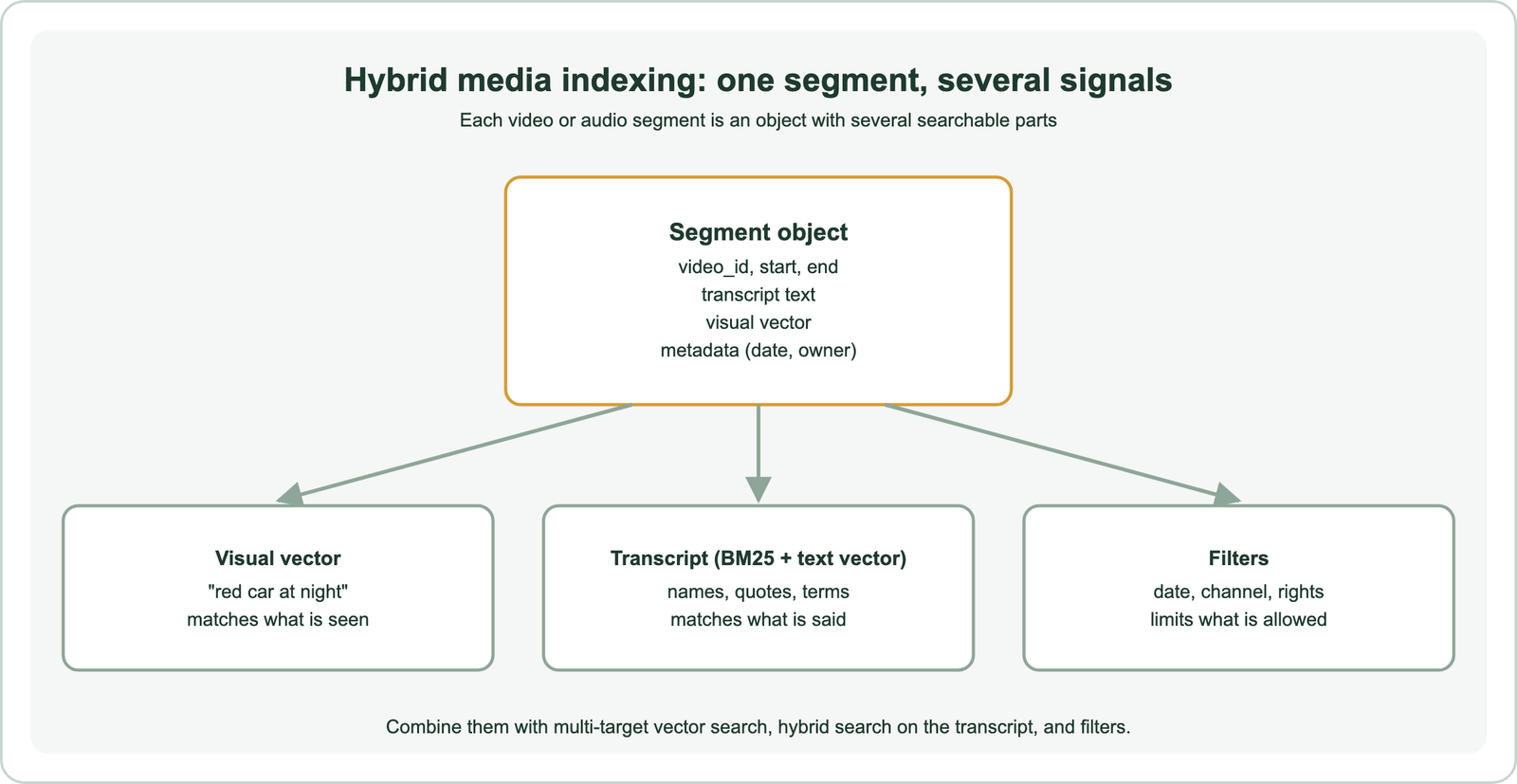
Visual vectors match what is seen but not who is speaking or what product code appears in a sentence. Transcripts match names, numbers and quotes exactly through keyword search, which embeddings of sound or pixels may blur. Metadata adds hard limits, such as date range, channel or usage rights, applied as filters. Together they cover far more queries than any one alone.
In Weaviate, a collection can hold several named vectors per object, for example one for visuals and one for transcript text. Multi-target search queries them together, as described in multi-vector search. Hybrid search combines BM25 on the transcript with vector search, and filters restrict by metadata. Results come back as segments with timestamps, ready to play from the right moment.
How do you build media search with Weaviate?
You build media search with Weaviate by defining a collection with a multimodal vectorizer and blob properties for the media, importing segments, and querying with near_text, near_image or near_media. The integration embeds media at import.
from weaviate.classes.config import Configure, Property, DataType
from weaviate.classes.query import NearMediaType

client.collections.create(
    name="Clips",
    properties=[Property(name="title", data_type=DataType.TEXT),
                Property(name="video", data_type=DataType.BLOB),
                Property(name="start", data_type=DataType.NUMBER)],
    vector_config=Configure.Vectors.multi2vec_google_gemini(
        model="gemini-embedding-2", text_fields=["title"], video_fields=["video"]),
)
clips = client.collections.use("Clips")
by_text = clips.query.near_text(query="crowd cheering at a goal", limit=5)
by_clip = clips.query.near_media(media="query.mp4", media_type=NearMediaType.VIDEO, limit=5)
This follows Weaviate’s documented pattern for Gemini multimodal embeddings. Other integrations work the same way with different modalities. Weaviate’s client notes that multi2vec-bind supports every near_media type, while multi2vec-clip supports images only. Self-hosted deployments can run CLIP locally; the Gemini integration calls Google’s API. Blob properties are not returned by default, which keeps result payloads small.
Why is media search hard to get right?
Media search is hard to get right because of segment boundaries, storage and embedding cost, fine-grained details that general models miss, and evaluation without text labels. Each needs a deliberate choice.
Segment size trades precision for context: short clips pinpoint moments but lose the story around them. Media files are large, and embedding every frame or chunk costs compute or API fees, so sample frames and cache embeddings. General models may not separate fine categories, such as two similar machine parts or bird species, where fine-tuning or domain models help.
Evaluation needs judged examples, just as for text: a set of queries with the clips or images that should be found. Rights and privacy matter too. Faces, voices and private recordings may need filters, consent records or exclusion from the index, much like enterprise and internal document search handles access.
How do you evaluate image, video and audio search?
You evaluate media search the same way as text search: with a set of real queries, judged relevant media for each, and ranking metrics such as recall and nDCG. The difference is that judging takes longer.
Collect queries from users or from the people who search the archive today, including descriptive queries (“aerial shot of a harbour at dawn”) and exact ones (“interview with the mayor, March”). For each query, pool the top results from a few configurations, such as visual vectors only, transcripts only and the combined index, and have people mark which segments are relevant. Judges need to watch or listen, so keep segments short and provide timestamps.
Then compare configurations on the same queries. Look at which query types each signal wins, because that shows where hybrid indexing earns its cost. Track query latency as well, since media embeddings and large result payloads can be slower than text. Search test sets and relevance judgments covers building the query set.
Where is semantic media search used?
Semantic media search is used in stock and photo libraries, ecommerce, broadcast and video archives, podcast and meeting search, and multimodal RAG systems. The pattern repeats across domains.
Shops use image search to find visually similar products and to answer “find this but in blue”. Newsrooms and archives search years of footage by describing a scene. Podcast and meeting platforms let users jump to the moment a topic was discussed. Semantic recommendations use the same vectors to suggest similar items, and semantic search in RAG can feed retrieved images or audio to a multimodal language model.
Other use cases borrow pieces of the approach. Research paper search can index figures as images. Patent search can search drawings, and support search can include tutorial videos. Site search, B2B search and code search remain mostly text, but can add screenshots or diagrams the same way.
Semantic search for images, video and audio finds media by meaning, using multimodal models that place text and media in one vector space. Images are embedded whole, while video and audio are split into timestamped segments. Speech is often transcribed so names and quotes can be found exactly. Hybrid media indexing stores each segment with a visual or audio vector, transcript text and metadata, combined through multi-target search, hybrid search and filters. Weaviate supports this with multimodal integrations such as CLIP, ImageBind and Gemini, and with near_image and near_media queries.