Home / Scale and cost / What Semantic Search Costs to Run
ExplainerWhat Semantic Search Costs to Run
The cost of semantic search is the sum of three parts: one-time embedding, standing infrastructure, and per-query processing. Embedding the corpus happens once per model, vectors sit in memory and on disk all the time, and every query pays for embedding, search, reranking and any generated answer. Each part has its own driver. Embedding cost follows the number of tokens in the corpus, and memory cost follows the number of vectors times their dimensions. Query cost follows traffic and every model call a query triggers. For most deployments memory dominates the standing bill, because HNSW indexes keep vectors in RAM. Weaviate’s documentation puts 1 million 1,536-dimension vectors at about 5,859 MB uncompressed and 1,465 MB with 8-bit quantization. The biggest levers are therefore smaller embeddings, quantization, fewer replicas than reflex suggests, and skipping per-query model calls that do not improve results.
The cost of semantic search in four facts
- Weaviate’s resource planning rule of thumb is memory use of about twice the memory footprint of all vectors.
- One million 1,536-dimension float32 vectors take about 5,859 MB, and about 1,465 MB with 8-bit quantization, per Weaviate.
- A Weaviate analysis of AWS instance prices found 1 vCPU costs about the same as 10 GB of RAM or 1,000 GB of NVMe SSD.
- Re-embedding the whole corpus is required whenever the embedding model changes.
What are the costs of running semantic search?
The costs of running semantic search fall into one-time embedding, standing infrastructure, and per-query processing, and each grows with a different number. Separating them shows which lever moves the bill.
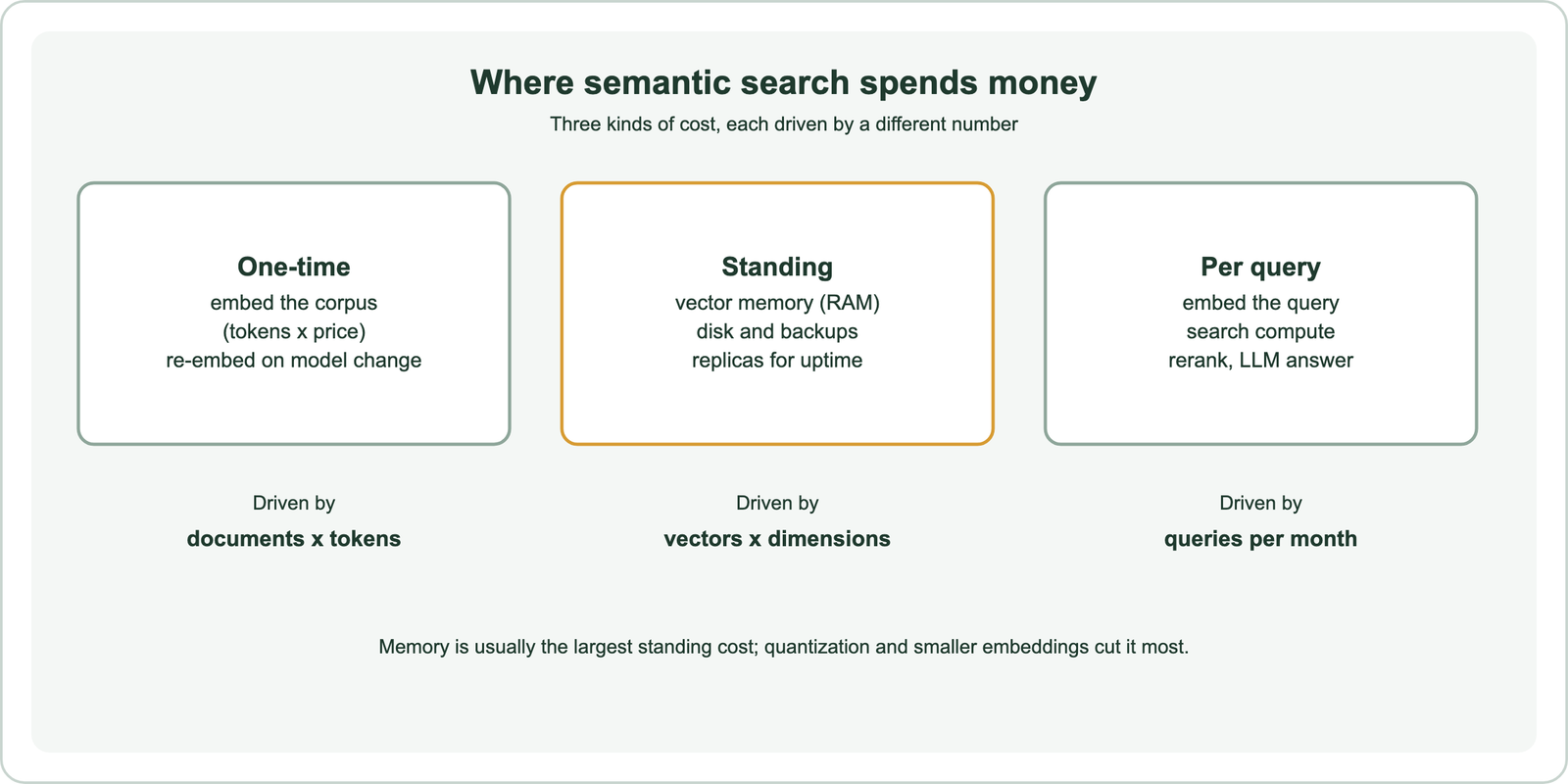
One-time cost is mostly embedding. Every document, or every chunk of every document, passes through an embedding model once. With a hosted model, the bill is tokens times the provider’s price per token; with a self-hosted model, it is GPU or CPU time. The cost recurs in full whenever the model changes, because vectors from different models cannot be mixed.
Standing cost is infrastructure that runs whether or not anyone searches: memory for the vector index, disk for objects and backups, and extra replicas for availability. Per-query cost is everything a search triggers: embedding the query, the search itself, and any reranker or language model call. A search-only system has light per-query costs; a RAG system with an LLM answer per query can have per-query costs that dwarf everything else. Each part can be priced on its own, starting with embedding.
How much does embedding a corpus cost?
Embedding a corpus costs the total token count of every chunk multiplied by the embedding model’s price per token, or the equivalent compute time when the model runs on your own hardware. Chunking choices change the token count more than most teams expect.
The formula is simple. Total tokens equal the number of chunks times the average tokens per chunk. Illustrative example: a corpus of 1 million chunks averaging 300 tokens holds 300 million tokens. At a hosted price of P per million tokens, the one-time embedding cost is 300 times P. Overlapping chunks add tokens: a 20 percent overlap raises the total by roughly a fifth, since each overlapped span is embedded twice.
Prices for hosted embedding models change often and differ widely by model, so check the provider’s current price list and keep the formula. Self-hosting turns the price into GPU or CPU hours; small open models embed quickly on modest hardware but may retrieve less well. The embedding cost calculator runs the arithmetic for your own numbers.
Two habits keep this cost from recurring. Store the source text and the model name with every vector, so a migration does not require reprocessing raw files. And evaluate a model on your own queries before embedding everything with it, since switching later means paying the whole bill again. Once embedded, vectors need somewhere to live.
How much memory does a vector index need?
A vector index needs memory roughly equal to twice the raw size of its vectors, where raw size is the vector count times dimensions times 4 bytes for float32 values. Weaviate’s resource planning documentation gives this as its rule of thumb.
The documentation works an example. One million 384-dimension float32 vectors take 384 times 4 bytes, or 1,536 bytes each, so 1.5 GB in total; doubling for the index and overhead gives about 3 GB. A more exact estimate adds the graph links: with maxConnections of 64 and about 10 bytes per connection, the estimate becomes about 2.2 GB, before garbage collection overhead. Weaviate’s best-practice page gives about 6 GB for 1 million 1,024-dimension vectors, and about 2 GB with quantization enabled.
Dimensions matter as much as count. Weaviate’s academy notes that a model with about ten times more dimensions needs about ten times more memory for the same number of vectors. A 1,536-dimension model costs four times the memory of a 384-dimension model for the same data, before any compression. The vector storage and memory calculator applies the formula to your own counts.
Memory matters more than disk because of price. A Weaviate analysis of AWS EC2 on-demand prices found that 1 vCPU costs about the same as 10 GB of RAM, which in turn costs about the same as 1,000 GB of NVMe SSD. That ratio is why compression is the first lever to pull.
How much does quantization reduce the cost of semantic search?
Quantization reduces the cost of semantic search by shrinking each stored vector. Memory falls by about 4 times at 8 bits per dimension and up to 32 times at 1 bit, with some loss of recall at higher compression. It is usually the largest single saving.
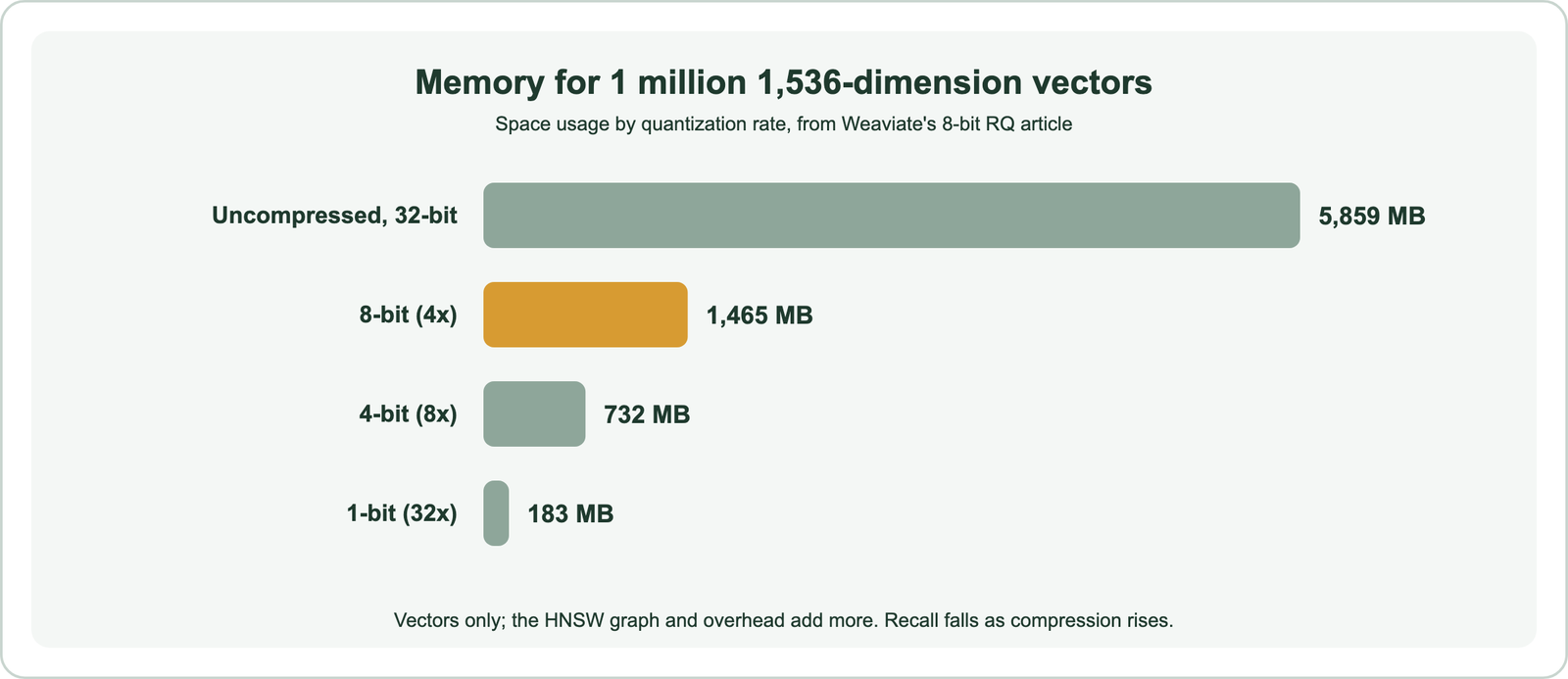
Weaviate’s article on 8-bit rotational quantization gives the numbers for 1 million 1,536-dimension vectors. Uncompressed they take 5,859 MB. At 8 bits they take 1,465 MB with expected recall of 97 to 99.9 percent. At 4 bits they take 732 MB with 90 to 97 percent, and at 1 bit 183 MB with 70 to 90 percent. Weaviate’s documentation describes 8-bit RQ as reaching 98 to 99 percent recall with no training, and Weaviate Cloud applies it to new collections by default.
Compression trades memory for recall, and rescoring buys some recall back by reranking a shortlist with the full vectors from disk. The right setting comes from measuring recall on your own queries. The recall vs latency trade-off covers the measurement. Disk-based indexes are the other way to escape RAM.
Weaviate’s documentation describes its HFresh index as keeping only a compressed centroid index in memory and the rest on disk, as an alternative when memory is the main constraint. Disk-based designs cost less to host and more in latency per query.
What does each semantic search query cost?
Each semantic search query costs one query embedding, a share of the search cluster’s compute, and any reranking or language model calls the pipeline adds. In RAG systems the model calls usually cost far more than the search.
The query embedding is small: a short query is a few dozen tokens, so even at hosted prices it is a minor line until traffic is very high. The search itself is paid through the cluster, whose size is set by memory for data and by CPU for throughput. Weaviate’s documentation notes that memory sets the maximum dataset size, while CPU affects query and import speed, so more traffic means more CPU or more replicas, not more memory.
Reranking adds a model pass per candidate. Reranking 50 candidates per query means 50 forward passes of a cross-encoder, or a hosted reranker fee per query; search latency covers its time cost. A generated answer adds an LLM call whose input includes every retrieved passage, so passages per prompt multiply the token bill directly.
The pattern is that per-query costs scale with traffic and with every model call in the path. Removing a call that does not improve results, or caching answers to repeated questions, saves money on every query. Scaling the cluster is the other part of the bill.
How does cost grow as semantic search scales?
Cost grows with scale along two separate axes: data size drives memory and shards, and query load drives CPU and replicas. Planning them separately avoids paying for one when the other is the bottleneck.
Weaviate’s scaling documentation separates the two. Sharding spreads a dataset too large for one node and speeds up imports, but does not raise query throughput. Replication raises query throughput near-linearly and provides high availability, but does not speed imports. A large, quiet archive needs shards; a small, busy product search needs replicas. Each replica holds a full copy of its shards, so a replication factor of three triples memory.
Multi-tenant products have a third axis. Weaviate’s multi-tenancy can set tenants inactive or offload them to cloud storage, so memory pays only for active tenants. Products where most customers are idle most of the time save heavily this way. Scaling semantic search covers the architecture, and GPU acceleration for vector search covers when specialised hardware pays off.
Freshness adds cost too. Keeping an index current with constant updates uses compute for embedding and indexing, which real-time indexing and index freshness covers. The hosting model decides who pays for all of this.
Is managed or self-hosted semantic search cheaper?
Managed semantic search is usually cheaper for small and medium workloads once engineering time is counted, while self-hosting can be cheaper at large, steady scale for teams that already run databases well. The comparison must include people, not just servers.
Self-hosting pays only for machines, but someone must size them, patch them, back them up, monitor them and handle failures. Managed services price that work into the bill, often by vector dimensions, storage or capacity units. Weaviate offers both: the open-source database under the BSD 3-Clause license, which can run anywhere, and Weaviate Cloud as a managed service.
The fair comparison takes a year’s total: instances or service fees, storage, backups, egress, and the hours of engineering time each option needs. Pricing pages change often, so compare current figures at decision time. Managed vs self-hosted search walks through the comparison in detail. Whatever the hosting, a few changes cut cost in almost every system.
How do you reduce the cost of semantic search?
You reduce the cost of semantic search by shrinking what you store, removing model calls that do not improve results, and matching infrastructure to the real bottleneck. Measure quality before and after each change.
- Choose smaller embeddings: a lower-dimension model, or truncated Matryoshka embeddings, cuts memory in proportion.
- Turn on quantization: 8-bit compression gives about 4 times less vector memory for a small recall cost.
- Chunk deliberately: fewer, better chunks mean fewer vectors and fewer tokens to embed.
- Cache repeated work: cache query embeddings and, for LLM answers, use semantic caching.
- Rerank fewer candidates: find the smallest candidate count that keeps recall.
- Size by bottleneck: add shards for data, replicas for traffic, and offload idle tenants.
Each step trades something, usually a little recall, for money, so each needs a check against a fixed set of real queries. The order matters: compression and embedding size cut the biggest standing cost, while caching and fewer model calls cut the biggest per-query cost. With those in place, the remaining bill reflects real use.
The cost of semantic search is one-time embedding, standing infrastructure and per-query processing, each driven by its own number. Embedding cost follows corpus tokens and recurs with every model change. Standing cost follows vectors times dimensions, roughly doubled for the index, which is why Weaviate’s rule of thumb and quantization matter most. Per-query cost follows traffic and every model call in the path, and in RAG the language model usually dominates. Shrink vectors with smaller models and 8-bit quantization, remove model calls that do not raise quality, size shards for data and replicas for traffic, and verify each saving against real queries.