Home / Tools / Semantic Search APIs Compared
ComparisonSemantic Search APIs Compared
A semantic search API is a web service interface that accepts a query and returns results ranked by meaning, so an application can add semantic search without building the retrieval stack itself. The term covers four kinds of service. Embedding APIs turn text into vectors. Search APIs, usually offered by vector databases, store data and return ranked results for vector, keyword or hybrid queries. Rerank APIs reorder a candidate list, and generation APIs write an answer from retrieved passages. Comparing APIs means comparing them on the same points. These are what you send, which search types are supported, how filters work, which protocols and client libraries exist, where data is hosted, and whether the service can call models for you. Weaviate, for example, offers REST, gRPC and GraphQL interfaces with official clients in five languages, and can call embedding, reranking and generation models from inside one query.
Semantic search APIs in four facts
- Semantic search APIs fall into embedding, search, rerank and generation APIs.
- Weaviate exposes REST, gRPC and GraphQL APIs, with official clients for Python, TypeScript, Go, Java and C#.
- Weaviate’s gRPC API has been stable since version 1.23.7 and uses port 50051 by default.
- New Weaviate Cloud clusters are created with the GraphQL API disabled.
What is a semantic search API?
A semantic search API is a programmatic interface to a service that finds results by meaning rather than exact words. The application sends a query and receives ranked objects, usually as JSON or through a client library.
Behind the interface sit the parts of a semantic search system: an embedding model, an index of vectors, often a keyword index, and ranking logic. The API hides them. A developer writes a query call and a data import call instead of training models and running nearest neighbour search by hand.
The phrase is used loosely, which causes confusion when comparing products. Some services only produce embeddings and leave storage and search to you. Others store your data and answer queries but expect you to bring vectors. Still others combine embedding, search, reranking and answer generation behind one endpoint.
Comparing them fairly starts with knowing which kind each one is. Broader product comparisons are in semantic search tools compared. The four kinds line up as stages of a single request.
What are the main kinds of semantic search API?
The main kinds of semantic search API are embedding APIs, search APIs, rerank APIs and generation APIs, each covering one stage of a search request. Many products combine several stages.
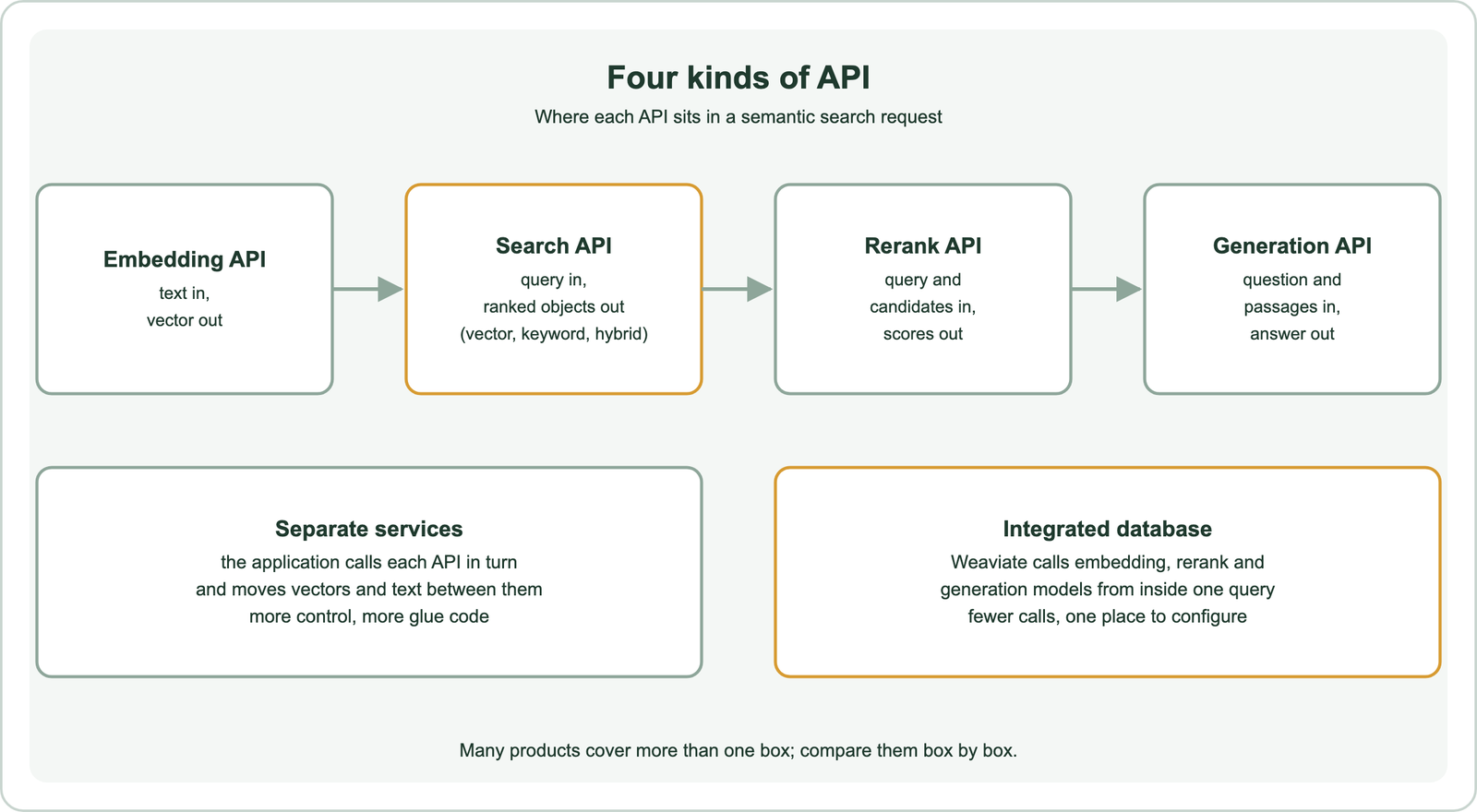
Embedding APIs take text, or sometimes images, and return vectors. They are offered by model providers, and the vectors must then be stored and searched somewhere. Choosing a model is covered in choosing an embedding model.
Search APIs are the core. A vector database or search engine stores objects with their vectors and returns ranked results for a query. Rerank APIs take a query and a short candidate list and return relevance scores, as described in what is reranking. Generation APIs take a question and retrieved passages and return a written answer, the final step of RAG.
Integration changes the shape of the work. With separate services, the application embeds the query, sends the vector to a search API, sends candidates to a rerank API and passes passages to a generation API. With an integrated database, one query can do all of this. Comparing either setup needs a fixed checklist.
What should you compare between semantic search APIs?
You should compare semantic search APIs on input type, supported search modes, filtering, protocols and client libraries, model integrations, hosting and data location, and limits on size and rate. Price and speed only make sense after those.
Input type comes first. Does the API accept raw text and embed it for you, or only vectors? Accepting text keeps the query and document models in step automatically. Accepting only vectors gives full control over the model, at the cost of running it yourself.
Search modes come next. Pure vector search misses exact terms such as product codes, so hybrid search, which combines keyword and vector results, is a common requirement, as explained in hybrid search. Filtering matters just as much. Check whether filters run inside the vector search or only after it, since post-filtering can return fewer results than requested.
Operational points close the list. Protocols and client libraries decide how easily the API fits your stack. Hosting decides where data lives, which matters for privacy rules. Limits on object size, batch size and request rate decide whether bulk imports and traffic peaks will fit. Weaviate makes a useful worked example of these points.
Which APIs does Weaviate provide for semantic search?
Weaviate provides three API surfaces, REST, gRPC and GraphQL, plus official client libraries for Python, TypeScript, Go, Java and C#. Each surface has a different main purpose.
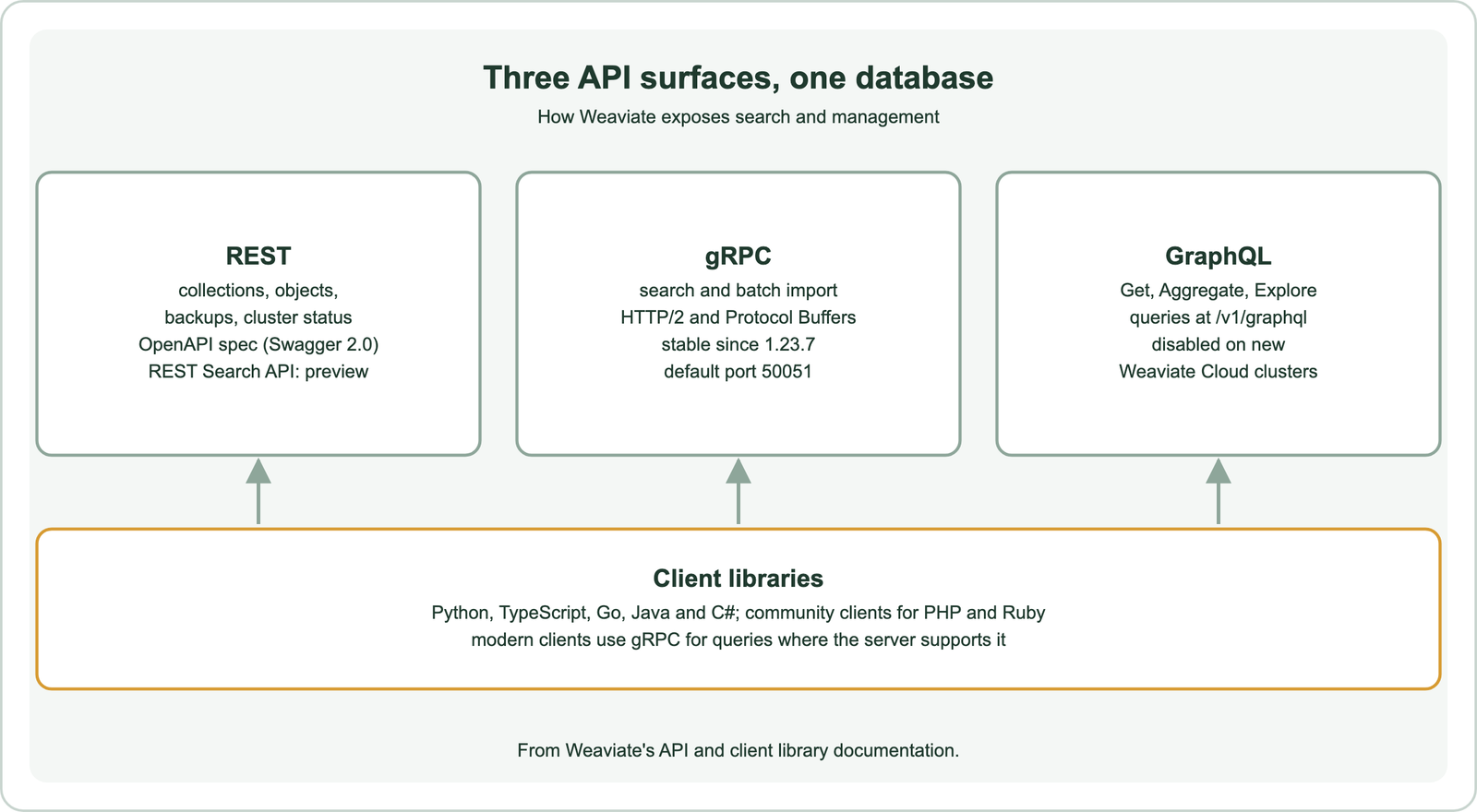
Weaviate’s API documentation describes the REST API as enabling almost complete management of an instance. It covers collections, object CRUD, node status, backups and cluster health. Its specification is published as an OpenAPI document in Swagger 2.0 format. A REST Search API is listed as a preview feature.
The gRPC API is the high-performance path for search and batch imports. Weaviate’s documentation says it was introduced in version 1.19.0, has been considered stable since 1.23.7, and uses port 50051 by default, with Weaviate Cloud using port 443. The GraphQL API was the original query interface. New Weaviate Cloud clusters are created with it disabled, so the documentation points to client libraries or the REST Search endpoints instead.
The client libraries sit on top. Weaviate’s documentation notes that modern clients use the gRPC interface for search when the server supports it. Community clients exist for PHP and Ruby. A browser client, @weaviate/web, is in alpha and carries the same API over gRPC-Web. The next question is what you send through these interfaces.
Do semantic search APIs embed your text or expect vectors?
Some semantic search APIs embed your text through built-in model integrations, while others expect you to send vectors you computed yourself; Weaviate supports both. The choice affects consistency and control.
With a model integration, Weaviate’s vector search documentation explains, you configure a vectorizer for a collection and Weaviate generates vectors when objects are inserted and when searches run. The application sends text. Because the same configured model embeds both data and queries, the two always match. The documentation also notes that the vectorizer setting cannot be changed later; switching models means a new collection and a data migration.
With bring your own vectors, the application computes embeddings and sends them with each object and query. Weaviate’s documentation recommends setting the vectorizer to none in that case, to avoid generating incompatible vectors by accident. This route suits teams with an existing embedding pipeline or a model that has no integration.
Either way, the query and document vectors must come from the same model, a point covered in what are embeddings. Integrated models remove one source of mistakes. Seeing the calls side by side makes the difference concrete.
How do you call a semantic search API from Python?
You call a semantic search API from Python through the provider’s client library, which handles connection, serialization and protocol choice. With Weaviate, one hybrid call can carry the text query, an optional vector and a filter.
import weaviate
from weaviate.classes.config import Configure, Property, DataType
from weaviate.classes.query import Filter, MetadataQuery

client = weaviate.connect_to_local()          # or connect_to_weaviate_cloud(...)
articles = client.collections.create(
    name="Article",
    properties=[Property(name="text", data_type=DataType.TEXT),
                Property(name="lang", data_type=DataType.TEXT)],
    vector_config=Configure.Vectors.self_provided(),   # bring your own vectors
)
articles.data.insert({"text": "Refunds are issued within 14 days", "lang": "en"},
                     vector=[0.9, 0.1, 0.0])

res = articles.query.hybrid(
    query="refund",                 # keyword side
    vector=[0.8, 0.2, 0.0],         # vector side, from your own model
    alpha=0.5,
    filters=Filter.by_property("lang").equal("en"),
    limit=5,
    return_metadata=MetadataQuery(score=True),
)
for o in res.objects:
    print(o.properties["text"], o.metadata.score)
client.close()
The collection is created with self-provided vectors, so every insert and query passes a vector. The toy three-dimensional vectors only show the shape of the call; real ones come from an embedding model. The pattern was run against a local Weaviate instance as an API check. With a vectorizer configured instead, the vector arguments are simply left out and Weaviate embeds the text itself.
Without a client library, the same operations go over REST, gRPC or, where enabled, GraphQL. Weaviate’s GraphQL migration guide suggests REST Search for stacks without an official client, such as no-code tools. Similar patterns for other engines appear in the build guides, such as semantic search with Python. Where the API runs is the next decision.
Should you use a hosted API or run the engine yourself?
You should use a hosted API when you want no infrastructure to operate, and run the engine yourself when you need full control over data location, versions and cost at scale. Open-source engines allow both.
A hosted service handles scaling, upgrades, backups and availability. You get an endpoint and credentials, and the provider’s limits and regions define what is possible. Data leaves your network, which some privacy rules restrict.
Self-hosting keeps data in your environment and lets you pin versions and tune resources. It also makes you responsible for operations. Open-source engines, compared in open-source semantic search engines, can usually run either way. Weaviate, for example, runs as open-source software in your own environment or as Weaviate Cloud, with the same client libraries for both.
Some features exist only in hosted form. Weaviate’s search documentation marks its Query Agent, which turns natural-language questions into database queries, as Weaviate Cloud only. Check such features against your hosting choice early. Different users need different levels of packaging.
Which semantic search API should you choose?
The semantic search API you should choose depends on whether you are adding search to a website, building an application on your own data, or deploying search across an organisation. Each case favours a different kind of product.
For a website’s search box, packaged site search tools are often enough. They crawl pages and provide a search widget, and are compared in semantic site search tools. For an application on your own data, such as a product catalogue or a RAG assistant, a vector database API gives the control you need over schema, hybrid ranking and filters.
For search across company systems, enterprise platforms add connectors, permissions and admin tools, as covered in enterprise semantic search platforms. Their APIs are often less flexible but cover more of the problem.
Whatever the category, test before committing. Load a sample of real data, run real queries, check hybrid search and filters, and measure latency from your own region. The checklist in the criteria section turns that test into a fair comparison.
Semantic search APIs come in four kinds: embedding, search, rerank and generation. Compare them on input type, search modes, filtering, protocols, clients, hosting and limits. Weaviate offers REST for management, gRPC for fast search and imports, and GraphQL for queries where it is enabled. Its official clients cover Python, TypeScript, Go, Java and C#. It can embed text through model integrations or accept your own vectors, and one hybrid call can carry a text query, a vector and a filter. Choose by use case, site search, application data or enterprise systems, and test with real data before you commit.