Home / Retrieval models / Multi-Vector Search: Several Vectors per Document
ExplainerMulti-Vector Search: Several Vectors per Document
Multi-vector search stores several vectors per document instead of one, and scores a query against all of them, so that different parts or aspects of a document can each be matched. The term covers three related ideas. Named vectors give each field or modality its own vector, such as a title vector, a description vector and an image vector. A multi-target search then combines their distances with a join strategy such as minimum, sum, average or weights. Token-level multi-vectors, used by ColBERT-style late-interaction models, keep one vector per token and score with MaxSim, which matches each query token to its best document token. Chunk vectors split a long document into passages, each with its own vector. Weaviate supports named vectors with multi-target search from version 1.26, and multi-vector embeddings from version 1.30.
Multi-vector search in four facts
- One vector per document compresses all of its meaning into a single point; multi-vector search keeps several.
- Weaviate’s multi-target join strategies are minimum (the default), sum, average, manual weights and relative score.
- Late-interaction models such as ColBERT score with MaxSim: each query token’s best match, summed.
- Token-level multi-vectors cost far more storage than one vector per document, which encodings such as MUVERA reduce.
What is multi-vector search?
Multi-vector search is retrieval in which each document is represented by more than one vector, and a query’s score combines its similarity to several of them. It addresses the limits of squeezing a whole document into one vector.
Standard dense retrieval uses a bi-encoder to turn each document into one vector. That vector must represent everything the document says, so a long or varied document gets an averaged representation. A query about one detail may sit far from that average. Multi-vector search keeps more than one representation, so the detail can still be found.
The phrase is used for three setups that share this idea but differ in what each vector covers. Knowing which one a tool or paper means avoids confusion, especially because Weaviate uses “multi-target vector search” for the first and “multi-vector embeddings” for the second.
What are the kinds of multi-vector search?
The kinds of multi-vector search are named vectors per field or modality, token-level multi-vectors from late-interaction models, and chunk vectors for passages of long documents. They suit different problems.
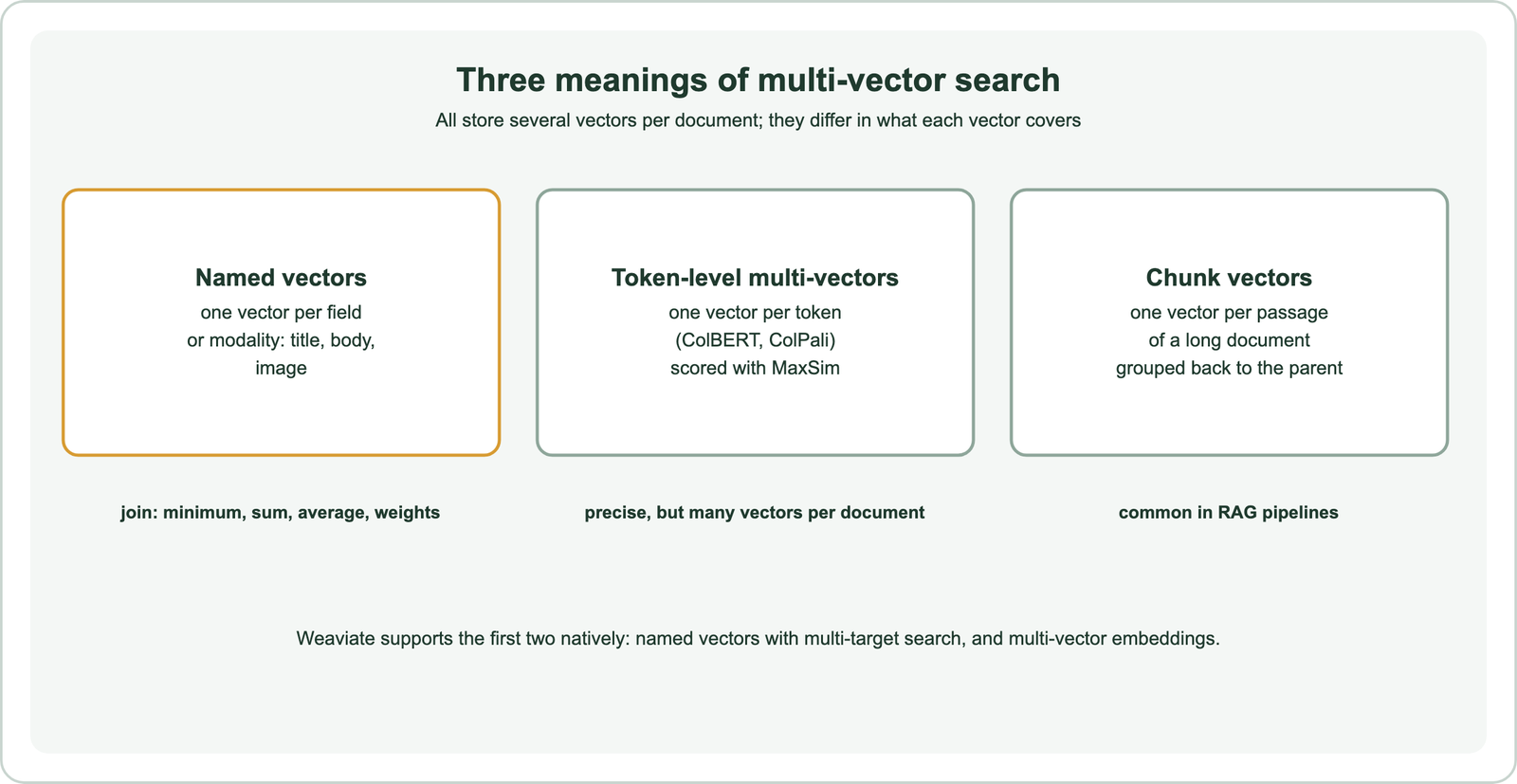
Named vectors fit structured objects. A product can have a vector for its title, one for its description and one for its photo, possibly from different models. A query can target one of them or several at once. Token-level multi-vectors fit precise text matching, where every word should find its own evidence. Chunk vectors fit long documents in RAG, where the goal is to retrieve the right passage and then the document it came from.
The three can be combined. A collection can hold a title vector, a body vector and a token-level vector, and long bodies can still be chunked first. Each added vector type adds storage and query cost, so add them only where tests show a gain.
How does search across multiple named vectors work?
Search across multiple named vectors runs a separate vector search in each target space, then joins the distances into one score per object using a join strategy. Weaviate calls this multi-target vector search.
Weaviate’s documentation lists five join strategies. Minimum, the default, uses the smallest distance, so an object matches if any of its vectors is close. Sum and average combine distances across all targets. Manual weights sum distances with a weight per target, and relative score normalises distances before weighting, much like relative score fusion in hybrid search. An object with no vector for a selected target is left out of the results.
from weaviate.classes.config import Configure, Property, DataType
from weaviate.classes.query import TargetVectors

products = client.collections.create(
    "Product",
    vector_config=[Configure.Vectors.self_provided(name="title"),
                   Configure.Vectors.self_provided(name="description")],
    properties=[Property(name="title", data_type=DataType.TEXT),
                Property(name="description", data_type=DataType.TEXT)],
)
q = model.encode("shoes for muddy trails").tolist()
response = products.query.near_vector(
    near_vector={"title": q, "description": q},
    target_vector=TargetVectors.manual_weights({"title": 0.3, "description": 0.7}),
    limit=5,
)
Multi-target search works with near queries from Weaviate 1.26 and hybrid queries from 1.27. Each named vector has its own index and can use its own model, compression and settings. Weights let a team say, for instance, that description matches matter more than title matches. Tune them on judged queries rather than by intuition.
The choice of join strategy changes behaviour in visible ways. Minimum rewards an object that matches strongly on any one field, which suits queries that may target either a title or a description. Sum and average reward objects that match on every field, which suits queries that describe the whole item. Relative score keeps the size of gaps within each field before weighting, so one very strong match is not hidden by raw distance scales.
How do token-level multi-vectors and MaxSim work?
Token-level multi-vectors keep one vector per token of a document, and MaxSim scores a query by matching each query token to its most similar document token and summing those best matches. This is called late interaction.
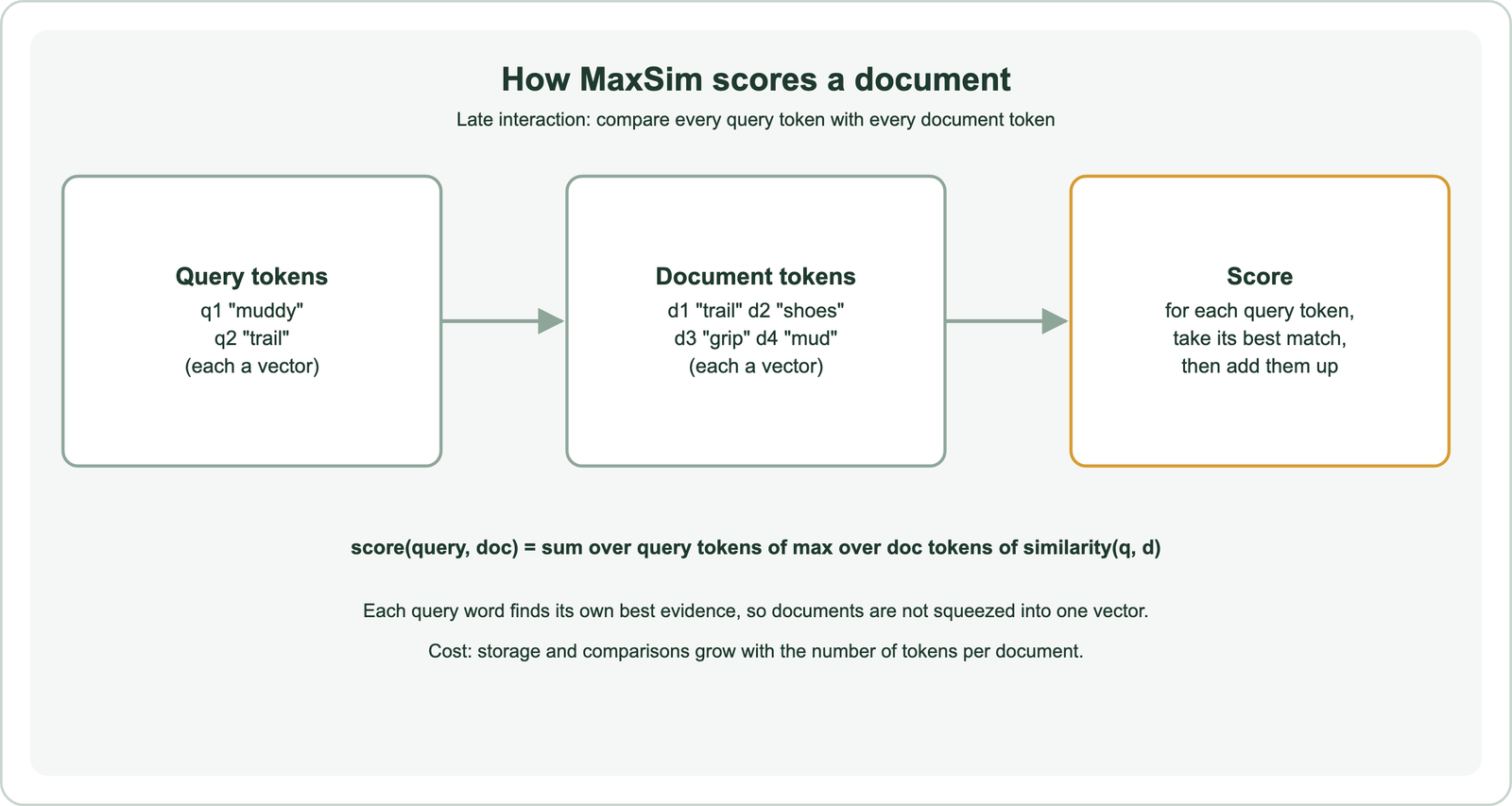
ColBERT, from Khattab and Zaharia in 2020, introduced this design. Documents are encoded once into token vectors and stored. At query time the query is encoded into token vectors, and MaxSim compares them. Each query word finds its own evidence, which helps with long documents and precise terms. Interaction happens late, after encoding, so it costs far less than a cross-encoder that reads query and document together. ColBERT and late interaction covers the model family, and bi-encoder vs cross-encoder places it between the two.
The same idea extends to images. ColPali, from Faysse and colleagues in 2024, embeds patches of page images, so scanned PDFs can be searched without text extraction. Weaviate’s documentation lists ColBERT, ColPali and ColQwen as multi-vector models it can store.
How does Weaviate store multi-vector embeddings?
Weaviate stores multi-vector embeddings as a named vector whose value is a matrix, one row per token, on an HNSW index, and scores matches with MaxSim. The feature was added in version 1.30.
passages = client.collections.create(
    "Passage",
    vector_config=[Configure.MultiVectors.self_provided(name="tokens")],
    properties=[Property(name="text", data_type=DataType.TEXT)],
)
# each object's "tokens" vector is a list of token vectors (a 2-D array)
response = passages.query.near_vector(near_vector=query_token_vectors,
                                      target_vector="tokens", limit=5)
Model integrations can produce the multi-vectors for you; Weaviate’s example uses a Jina ColBERT integration, and self-provided matrices work too. Compression is supported. During the first search phase Weaviate uses compressed vectors, then computes MaxSim with uncompressed vectors for precise final scores. Scores come from MaxSim, so their scale differs from single-vector cosine distances, and thresholds tuned on one do not carry over.
Storage is the main cost. A document of a few hundred tokens stores a few hundred vectors instead of one. Weaviate offers MUVERA encoding, which turns a set of multi-vectors into a single fixed-size vector to cut memory, with some loss of precision. Weigh that trade against the accuracy gain on your own data.
How do chunk vectors relate to multi-vector search?
Chunk vectors relate to multi-vector search because a long document split into passages ends up with many vectors, one per passage, and retrieval must decide how those passage matches roll up to the document. This is the most common multi-vector setup in RAG.
Each chunk is usually stored as its own object with a reference or property pointing to its parent document. Search returns the best chunks, and the application can group them by parent, return the parent with its best passage, or pass the chunks straight to a language model. Grouping by a property, as Weaviate’s group_by query option does, keeps one document from filling every slot.
Chunk size decides how much each vector has to represent, which is the same trade-off as named and token vectors at a coarser grain. Chunking for semantic search covers sizing and overlap. Agents that search repeatedly over chunks are covered in agentic retrieval and agentic search.
How much does multi-vector search cost in storage?
Multi-vector search costs storage in proportion to the number of vectors kept per document, which for token-level vectors can be tens of times more than one vector per document. The arithmetic is simple to check.
ColBERT projects each token to a 128-dimension vector. A 300-token passage therefore stores 300 times 128 numbers. At 4 bytes each, that is 153,600 bytes, against 3,072 bytes for a single 768-dimension float32 vector, a factor of 50. Named vectors add far less: two or three vectors per object roughly double or triple vector memory. Chunk vectors scale with the number of chunks.
Compression narrows the gap. Quantizing token vectors, as described in embedding quantization, or encoding them into one fixed vector with MUVERA, cuts memory at some cost in precision. Estimate totals before committing, because memory is usually the largest cost of a vector index.
When should you use multi-vector search?
You should use multi-vector search when one vector per document misses relevant matches: for documents with distinct fields, for long or varied text, for precise term matching, or for image-heavy pages. Measure the gain against the added cost.
Named vectors are the low-cost step. They add one vector per field and let you weight fields, which often helps product catalogues and records with titles and bodies. Token-level multi-vectors cost more but can lift precision on hard queries and visual documents. Hybrid search with keyword matching, covered with sparse retrieval and SPLADE, is an alternative fix for missed exact terms.
Compare options on judged queries with the same metrics. Track storage per million documents and query latency next to recall and nDCG. Retrieval models explained and dense vs sparse retrieval place multi-vector methods among the other retrieval families.
Multi-vector search represents each document with several vectors instead of one. Named vectors give each field or modality its own vector, combined by a join strategy such as minimum, sum, average or weights. Token-level multi-vectors from ColBERT-style models keep a vector per token and score with MaxSim, trading storage for precision. Chunk vectors split long documents into passages for RAG. Weaviate supports multi-target search over named vectors from 1.26 and multi-vector embeddings from 1.30. Choose the lightest option that fixes the matches a single vector misses.