Home / Use cases / Semantic Search for B2B Catalogs and Data
ExplainerSemantic Search for B2B Catalogs and Data
B2B semantic search applies meaning-based search to business catalogues and data, such as industrial parts, components, chemicals or software products, where queries mix loose descriptions with exact codes and specifications. A buyer might type “stainless M8 hex bolt 40 mm DIN 933”. That one query holds a material, numeric dimensions, a product type and a standard number. Semantic search handles the description, matching “hex bolt” to “hexagon head screw”, while exact matching and filters must handle the rest. A practical B2B search engine stores part numbers and cross-references as exact fields, and technical attributes as structured, filterable values. Descriptions are indexed for hybrid keyword and vector search. Customer-specific catalogues and prices become filters or separate tenants. Semantic recall without that structure returns plausible but wrong parts, a costly error when orders are specific.
B2B semantic search in four facts
- B2B queries combine descriptions, which suit semantic search, with codes and specs, which need exact matching.
- Part numbers and standards should be stored as exact-match fields, not left to embeddings.
- Numeric attributes such as size, voltage or pressure belong in typed fields with range filters.
- Hybrid search over descriptions plus structured filters gives both recall and precision.
What is B2B semantic search?
B2B semantic search is search over business-to-business product catalogues and data that understands what a buyer means, while still matching part numbers, standards and specifications exactly. It serves distributors, manufacturers and marketplaces.
B2B catalogues differ from consumer shops. They can hold very large numbers of similar items that differ only in size, material or rating. Buyers are often professionals who know exactly what they need but describe it in their own terms, or who search by another manufacturer’s or a legacy part number. Product data comes from many suppliers in inconsistent formats. A search that only matches words fails on synonyms; a search that only matches meaning fails on specifications.
Semantic search adds understanding of descriptions and synonyms, such as “hex bolt” and “hexagon head screw”, or “drive” and “motor controller” where a catalogue uses one and buyers use the other. Semantic product search for ecommerce covers the consumer side, and semantic search use cases places B2B among the rest.
What does a B2B search query contain?
A B2B search query usually contains several kinds of information at once: a product type, attributes such as material and dimensions, and sometimes a code or standard. Each part needs a different matching method.
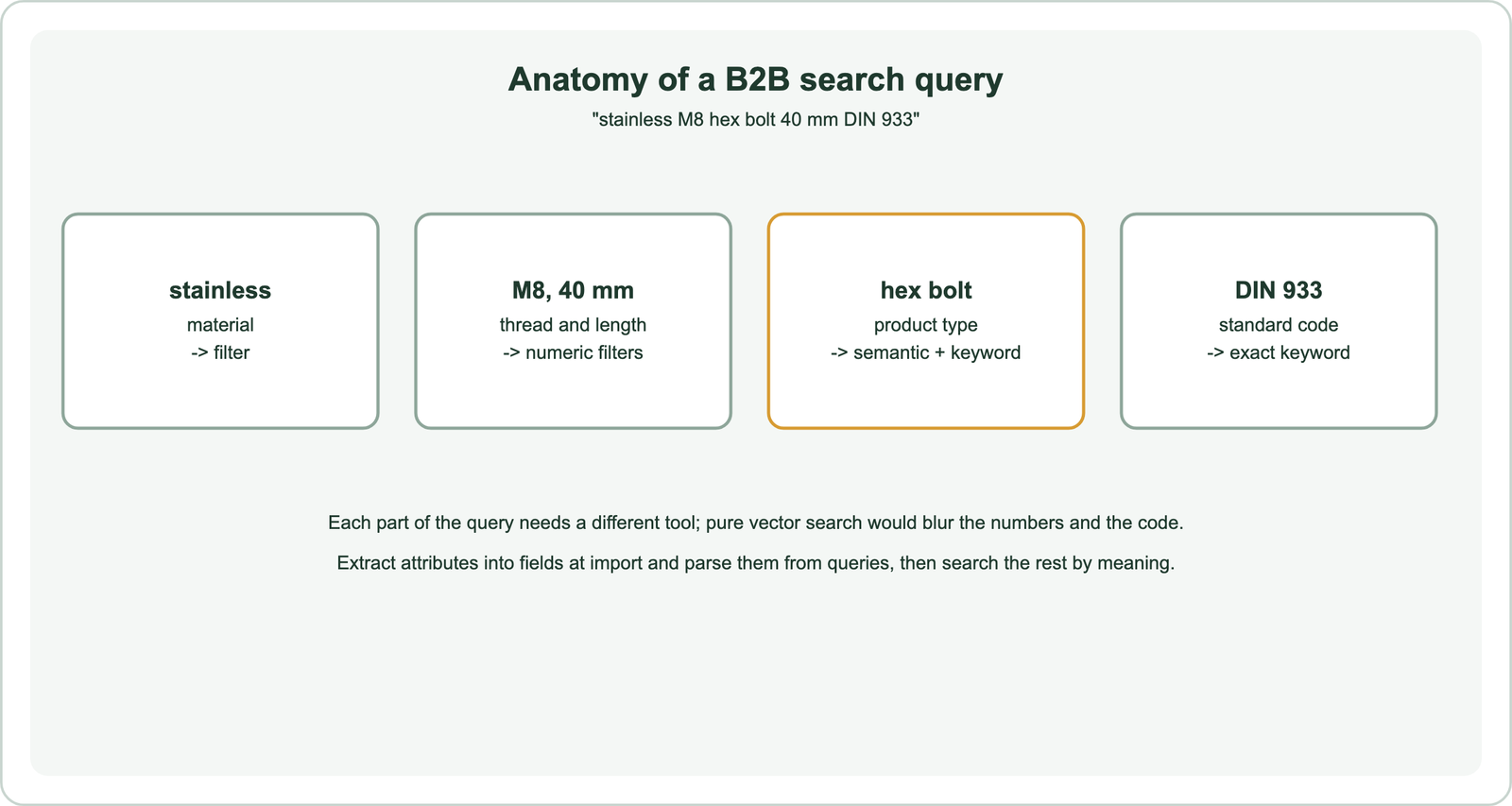
An embedding of the whole query captures “a stainless hex bolt” well. It does not reliably separate M8 from M10, or 40 mm from 45 mm, because numbers and codes carry little meaning for a language model. Semantic matching explains this weakness. A bolt that is 45 mm long is a wrong answer, however similar it looks.
The fix is to split the query. Recognise attributes and codes, by rules or a language model, and turn them into filters and exact-match terms. Send the remaining description to hybrid search. Query understanding covers parsing techniques, and searching vs filtering explains which parts belong where.
How should a B2B catalogue be indexed?
A B2B catalogue should be indexed with exact-match fields for codes, typed fields for attributes, searchable text for descriptions, and visibility fields for customer-specific catalogues. Structure provides the precision that embeddings lack.
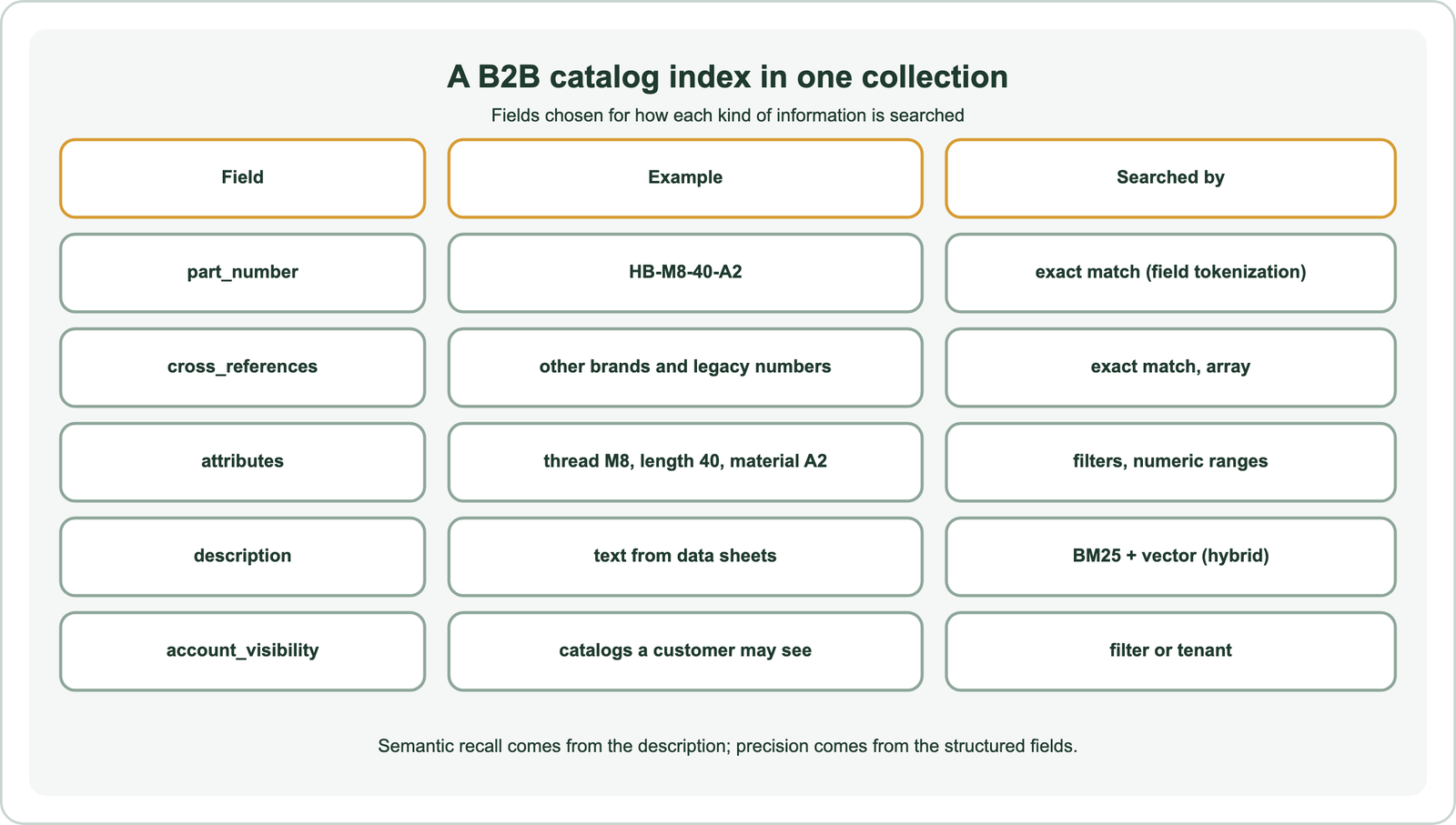
In Weaviate, a text property with field tokenization stores a part number as one exact token, so “HB-M8-40-A2” is not split into pieces. Number and date properties support range filters, and Weaviate offers a range-filter index for faster numeric ranges on large collections. Description text gets both a BM25 index and an embedding for hybrid search. Cross-references from other manufacturers or older catalogues go in an array property, so a buyer’s legacy number still finds the current item.
Attribute data is often messy: the same dimension written as “40mm”, “40 mm” or “1.57 in”. Normalise units at import, and consider using a language model to extract attributes from free-text data sheets into fields. Search index schema design covers field choices, and metadata filtering covers filter behaviour.
How do you handle units and synonyms in technical catalogues?
You handle units and synonyms in technical catalogues by normalising values at import, keeping a curated synonym list for trade terms, and letting semantic search cover the long tail of phrasing. Each layer catches different variation.
Units are the clearest case for normalisation. Convert every length to one unit, every pressure to one unit, and store the number separately from its unit, so a filter for “40 mm” also finds items listed as “4 cm”. Apply the same conversion to query values before filtering. Keep the original text in the description too, so keyword search still matches the supplier’s wording.
Trade terms, abbreviations and regional names vary by industry. A short curated list of the most important synonyms, such as “SS” for stainless steel, helps keyword search and costs little to maintain. Semantic search then handles the many paraphrases nobody thought to list. Synonyms and related terms covers how the two approaches combine, and domain-specific embeddings covers models trained on technical language.
How do semantic and exact matching work together in B2B search?
Semantic and exact matching work together in B2B search by running hybrid search on descriptions within the set allowed by attribute filters, while giving exact code matches priority. Each covers the other’s blind spot.
A practical query flow has three steps. First, if the query contains something that looks like a part number or standard, look it up exactly and show those matches first. Second, apply extracted attributes as filters. Third, run hybrid search on the remaining description, weighting keyword matching more heavily than in consumer search, because technical terms matter. What is hybrid search covers the fusion step.
When filters leave too few results, relax the least important one and say so, rather than showing an empty page. Rerank the top candidates with a cross-encoder if precision at the top still falls short, keeping exact code matches pinned above reranked results. Log which filters and codes each query used, so failures can be traced. Over time those logs show which attributes buyers use most, which tells you where cleaner product data will pay off first.
How do customer-specific catalogues and prices fit in?
Customer-specific catalogues and prices fit in as filters on account visibility, or as separate tenants when each customer’s data must be isolated. Buyers should only see what they can order.
Many B2B sellers offer negotiated assortments and prices per customer. The simplest approach stores a visibility field listing which catalogues or accounts may see each item, and filters every query by the buyer’s account. When customers upload their own data, such as their own part numbers mapped to yours, stronger isolation through multi-tenancy may fit better, as covered in multi-tenant semantic search.
Prices often change faster than descriptions. Store them in fields that can be updated without re-embedding, or fetch them from the pricing system at display time. Only text that affects meaning needs to be embedded again when it changes. Stock levels and lead times follow the same rule: keep them as fields, filter or boost on them, and update them as often as the source system allows.
How do you evaluate B2B semantic search?
You evaluate B2B semantic search with real buyer queries, judged by people who know the products, measuring whether the exact right item appears at the top, not merely a similar one. Near misses count as failures.
Collect queries from search logs, sales inquiries and support tickets, including part numbers, other brands’ codes, misspellings and vague descriptions. Ask product specialists to mark the correct items. Measure success at one and three, because buyers rarely scroll far, and track how often filters empty the result list. How to evaluate semantic search covers the method.
Split results by query type. Code lookups should be near perfect through exact matching. Descriptive queries are where semantic search earns its place, and the gap between keyword-only and hybrid search on them shows its value. Report both, since a gain on one type can hide a loss on the other.
Where else does B2B semantic search help?
B2B semantic search also helps in support, documentation and sales tools, where the same product knowledge answers technical questions. One well-structured index can serve several uses.
Technical support teams search manuals and past tickets, covered in customer support and help center search. Sales engineers search data sheets and specifications through internal tools, covered in enterprise and internal document search. Assistants that answer “which pump fits this pressure range?” use the catalogue as RAG context, as described in semantic search in RAG, and can suggest alternatives through semantic recommendations.
Related specialist cases include patent and legal search, research paper search, code search and media search, where drawings and photos of parts can be searched by image. Semantic site search covers the public website search box.
B2B semantic search brings meaning-based search to technical catalogues, where queries mix descriptions with exact codes and specifications. Store part numbers and cross-references as exact-match fields, attributes as typed fields with range filters, and descriptions for hybrid keyword and vector search. Parse queries into codes, attributes and description, match codes exactly, filter by attributes, and search the rest by meaning. Filter by account for customer-specific catalogues. Evaluate with specialists on real buyer queries, counting near misses as failures, and report code lookups and descriptive queries separately.