Home / Hybrid search / Hybrid Search for Enterprise Knowledge Search
ExplainerHybrid Search for Enterprise Knowledge Search
Hybrid search for enterprise knowledge search combines keyword matching and vector search in one query, so employees find documents by exact ticket IDs, acronyms and project codenames as well as by plain-language questions. Enterprise content is full of terms that general embedding models have rarely seen, such as internal product names, customer codes and abbreviations. Keyword search matches those exactly, while vector search handles questions written in everyday words. A hybrid query runs both and fuses their scores, which covers the mixed and unpredictable queries that employees type into an intranet search box. A working deployment also needs connectors that keep content and permissions in sync, filters that hide documents a user cannot open, and an explicit balance between the two legs. Weaviate’s hybrid search runs BM25 and vector search in parallel, and has used relative score fusion as its default since version 1.24.
Enterprise hybrid search in four facts
- Ticket IDs, acronyms and codenames match exactly in BM25 but are weak spots for embeddings.
- Weaviate’s academy recommends hybrid search for mixed or unpredictable user-typed queries.
- Weaviate applies filters before ranking, so permission rules hold in hybrid queries too.
- Weaviate’s server default alpha is 0.75, but its docs advise setting alpha explicitly per client.
What is hybrid search for enterprise search?
Hybrid search for enterprise search is the use of combined keyword and vector retrieval over a company’s internal content, such as wikis, documents, tickets, chat and records. The goal is one search box that answers both lookups and questions.
The idea of hybrid search is general. A keyword leg, usually BM25, scores documents by how often the query terms appear. A vector leg scores them by how close their embeddings are to the query embedding. A fusion step merges the two ranked lists into one. The mechanics are covered in what is hybrid search and how hybrid search works.
Enterprise search applies that idea to a hard corpus. Content comes from many systems, each with its own format and access rules. The vocabulary is local: a project called Atlas, a ticket prefix such as PROJ, a team acronym that means something different in another company. Users range from new hires asking basic questions to specialists searching for one exact record.
The wider problem of searching internal content, including parsing and connectors, is described in enterprise and internal document search. The focus here is why the retrieval step should be hybrid and how to run it.
Why does enterprise content need hybrid retrieval?
Enterprise content needs hybrid retrieval because it mixes private vocabulary that only exact matching handles well with natural-language questions that only semantic matching handles well. Neither leg alone serves both.
Private vocabulary is the first problem. An embedding model learns meaning from its training data, and internal codenames, part numbers and ticket IDs were never in it. The model may place “PROJ-4821” near other ticket-like strings rather than near the one document that mentions it. BM25 has no such problem: the token either appears in a document or it does not. Weaviate’s advanced RAG article makes the same point about medicine, where drug and disease names are specific keywords that pure vector search might miss.
Natural-language questions are the second. An employee asking “how do I get reimbursed for a client dinner” may not use the words in the expense policy. Keyword search can miss the policy entirely, while vector search finds it by meaning. This is the gap described in when to use hybrid search.
Query mix is the third. Weaviate’s academy course on choosing search types sends mixed or unpredictable user-typed queries to hybrid search. An intranet search box receives exactly that mix, often within the same hour from the same person. Comparing the approaches in detail is the subject of hybrid search vs vector search.
Which enterprise queries does each retrieval leg handle?
The keyword leg handles identifiers, acronyms, error strings and exact names, while the vector leg handles questions, paraphrases and topic searches written in everyday words. Many real queries mix both.
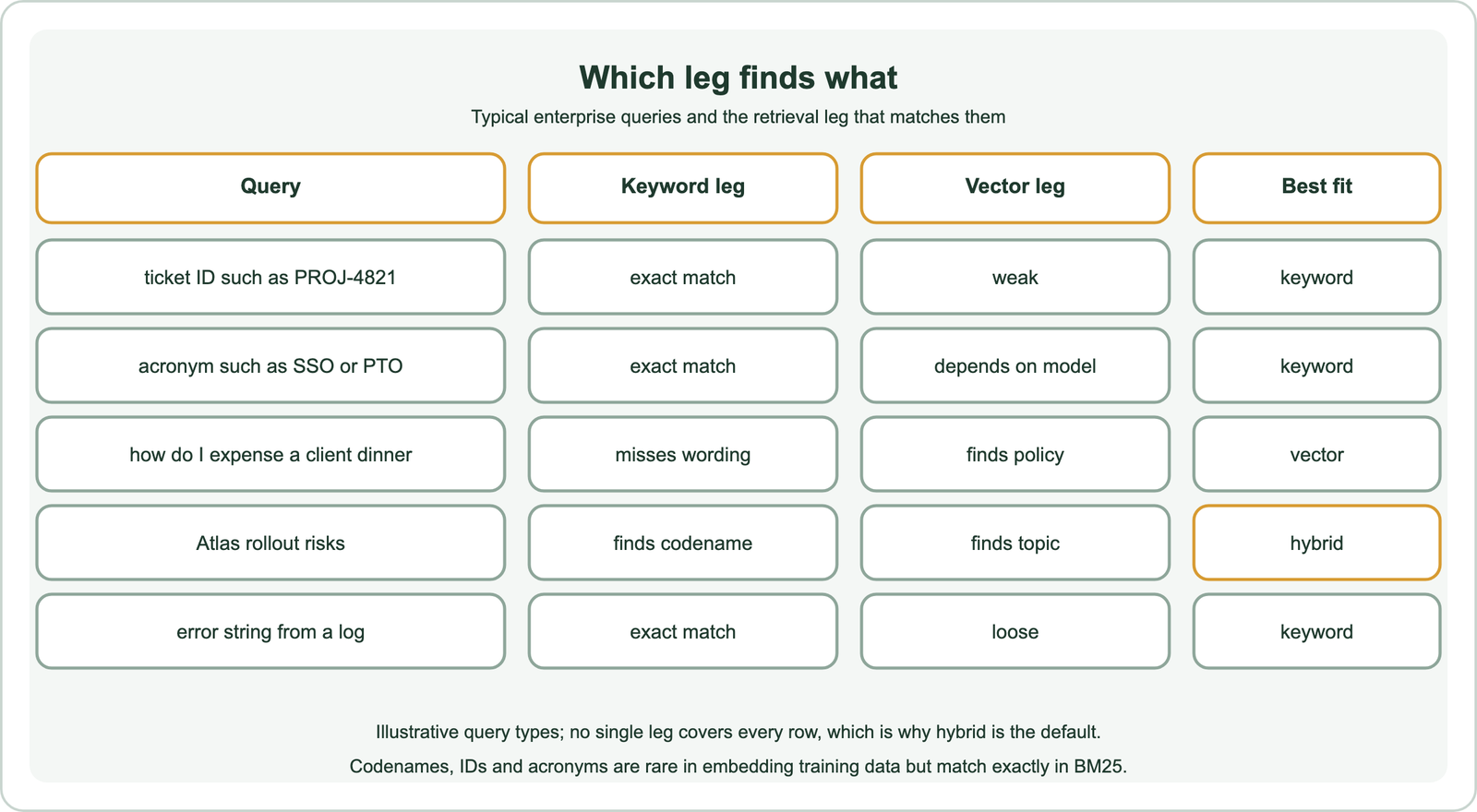
Identifier queries need exact matching. Ticket numbers, invoice numbers, customer IDs and error codes either match or they do not, and a near miss is a wrong answer. Acronyms sit in between: a widely used one such as SSO may be known to the embedding model, while a team’s private acronym will not be.
Question queries need meaning. Policy questions, how-to questions and searches for a topic rather than a name depend on the vector leg. The mixed case is common: “Atlas rollout risks” contains a codename that only keyword search can anchor and a concept, risks, that matches documents saying “blockers” or “open issues”.
Hybrid search handles all of these without asking users to choose a mode. Documents that score well in either leg rise, and documents that score well in both rise furthest. Tuning how much each leg counts is the next step.
How should alpha and fusion be tuned for enterprise data?
Alpha and fusion should be tuned on a test set of real employee queries, starting from Weaviate’s defaults and adjusting alpha toward keyword search if identifier lookups dominate. Set both values explicitly in code.
Alpha sets the weight of the vector leg, from 0 for keyword only to 1 for vector only. Weaviate’s server default is 0.75. Its documentation adds a caution: the default applies only when a request reaches the server with no alpha, and some client libraries send their own value. Set alpha explicitly whenever the weighting matters. Practical tuning advice is in balancing keyword and vector scores.
Fusion decides how scores combine. Relative score fusion, Weaviate’s default since 1.24, scales each leg’s scores between 0 and 1 and adds them with the alpha weights. Ranked fusion scores each result by 1/(rank + 60) and ignores score gaps. In Weaviate’s worked example with alpha 0.5, relative score fusion ranks first the document that was far ahead in keyword search, while ranked fusion puts a different document first. The methods are compared in score fusion methods, relative score fusion, reciprocal rank fusion and score normalization.
Two more controls help with enterprise data. Property boosting, such as title^2, lets a match in a document title count more than one in the body. The max_vector_distance parameter drops results whose vector distance is too large, but Weaviate notes there is no equivalent threshold for the keyword leg, because BM25 scores are unbounded.
How do you deploy hybrid search across enterprise sources?
You deploy hybrid search across enterprise sources by syncing each source through a connector, chunking and tagging the content with metadata and permissions, indexing it for both BM25 and vectors, and querying with filters first. Freshness and permissions need as much care as ranking.
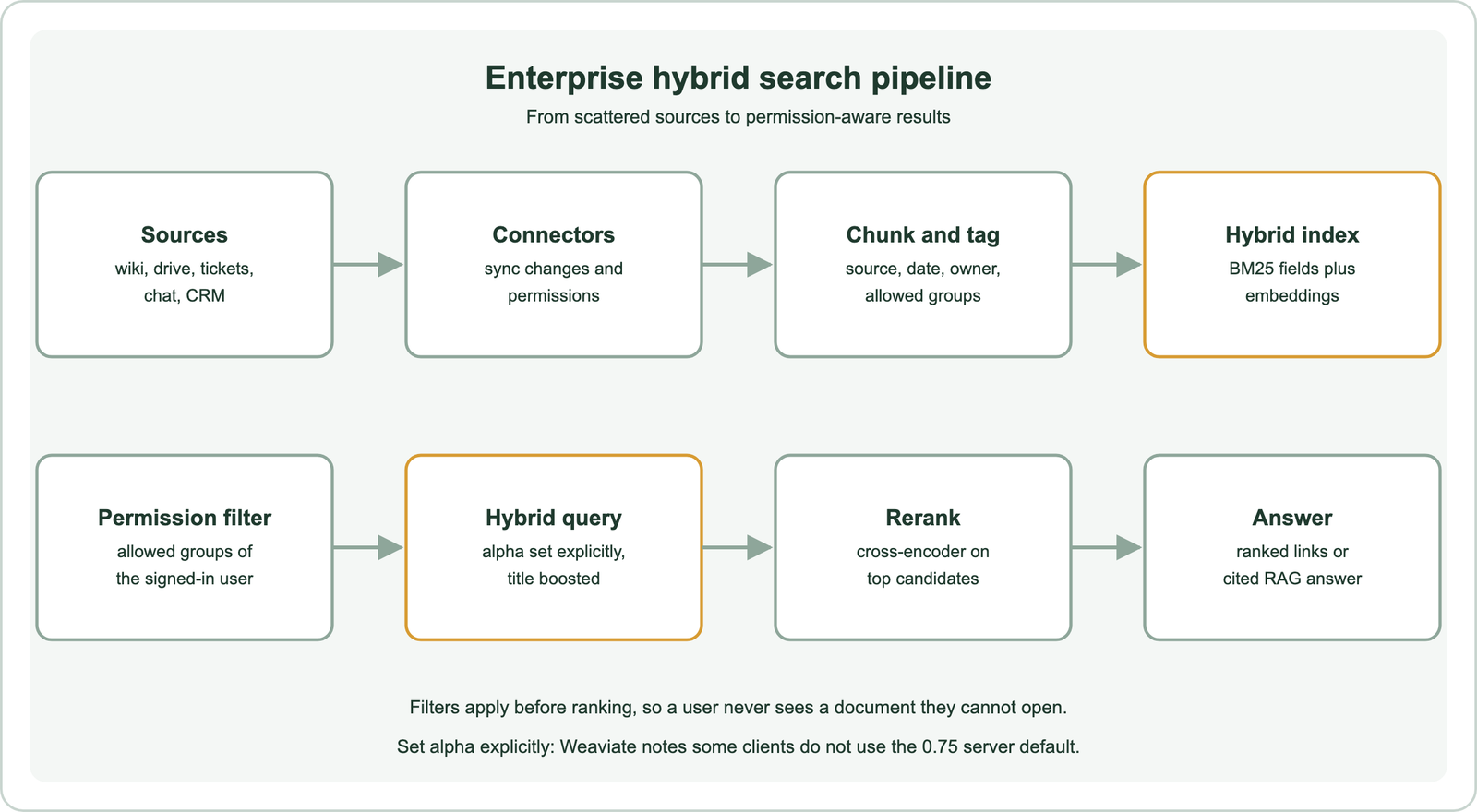
Connectors bring in content and its access rules together. Each record should carry its source, author, last update, a link back to the original and the groups allowed to read it. Chunk long documents so each piece covers one topic, and keep the document title on every chunk, since titles carry many of the codenames and IDs that keyword search needs.
Scale and isolation come next. Large deployments spread data across shards and nodes, a topic covered in hybrid search on distributed databases. Companies serving many customers can use multi-tenancy; Weaviate’s enterprise article notes that each tenant is a separate shard. Teams already on a relational database can compare options in hybrid search in SQL databases and databases that support hybrid search.
A reranker usually finishes the pipeline. Hybrid retrieval finds a good candidate set, and a cross-encoder reorders the top few dozen by reading query and document together, as described in cross-encoder rerankers.
How do you run permission-aware hybrid search in Weaviate?
You run permission-aware hybrid search in Weaviate by storing allowed groups on each chunk and passing a filter on the user’s groups to the hybrid query. An explicit alpha, fusion type and boosted title complete the query, and the filter applies before ranking.
from weaviate.classes.query import Filter, HybridFusion

chunks = client.collections.use("KnowledgeChunk")   # title, body, source, allowed_groups

user_groups = ["all", "sales"]
acl = Filter.by_property("allowed_groups").contains_any(user_groups)

res = chunks.query.hybrid(
    query="PROJ-4821 rollout status",
    alpha=0.5,                                 # set explicitly
    fusion_type=HybridFusion.RELATIVE_SCORE,
    query_properties=["title^2", "body"],
    max_vector_distance=0.6,                   # vector leg only
    filters=acl,
    limit=10,
)
for o in res.objects:
    print(o.properties["source"], o.properties["title"])
A user in sales sees nothing from an engineering-only ticket, however well it matches. An engineer running the same query gets the ticket first, because the ID matches in its title. The pattern was run on Embedded Weaviate 1.30.5 with two toy documents as an API check only. A step-by-step build of the same query type is in the hybrid search tutorial.
Group lists change as people join and leave teams, so connectors must update them on every sync. The design choices, including where to resolve group membership, are covered in permission-aware search.
How does hybrid search support RAG over internal documents?
Hybrid search supports RAG over internal documents by retrieving passages that match both the exact terms and the meaning of a question, which gives the language model the right internal context to answer from. Missing context is the most common cause of wrong internal answers.
Internal questions often hinge on one exact term. A question about what was agreed with Acme on a renewal needs the documents that mention Acme, not documents about renewals in general. A vector-only retriever can return plausible but wrong passages, and the model will answer from them confidently. The keyword leg anchors retrieval to the named customer, project or ticket.
The answer should cite its sources, and those sources must respect permissions. Retrieval with filters ensures the model never sees text the user could not open, so it cannot leak it into an answer. Patterns for retrieval in RAG pipelines are covered in hybrid search for RAG.
How do you evaluate enterprise hybrid search?
You evaluate enterprise hybrid search with a test set of real employee queries, split by query type, judged by people who know the content, and rerun whenever alpha, fusion or the embedding model changes. Averages hide the failures that matter.
Collect queries from search logs and help desk tickets, then group them: identifier lookups, acronym queries, how-to questions and topic searches. Judge the top results for each. Report metrics per group, because a change that helps questions can quietly hurt ticket lookups. Track permission errors separately: any result the user cannot open is a failure, whatever its relevance.
Watch the zero-result rate and queries where users click nothing. Those often reveal codenames or acronyms that neither leg handles, which can be fixed with synonym lists, title boosts or a lower alpha for queries that look like identifiers.
Hybrid search suits enterprise knowledge search because internal content mixes private vocabulary with everyday questions. BM25 matches ticket IDs, acronyms, codenames and error strings exactly, while vector search finds policies and how-to documents by meaning. Run both, fuse with relative score fusion, set alpha explicitly and tune it on real employee queries. Sync content and permissions through connectors, filter by the user’s groups before ranking, boost titles, and rerank the top candidates. Use the same retrieval for internal RAG, and evaluate each query type separately so improvements for questions do not break lookups.