Home / Hybrid search / How Hybrid Search Works, Step by Step
ExplainerHow Hybrid Search Works, Step by Step
Hybrid search works by running a keyword search and a vector search on the same query at the same time, then merging the two ranked lists into one. The keyword leg scores documents with BM25 on exact tokens. The vector leg embeds the query and finds the nearest document vectors. Because the two legs score on different scales, a fusion step either rescales the scores or converts them to ranks, then adds them with a weight called alpha. A reranker can reorder the top results afterwards. In Weaviate, both legs run in parallel inside one query, and relative score fusion has been the default since version 1.24. In this site’s test on 300 SciFact queries, fusion lifted nDCG@10 from 0.663 for BM25 alone to 0.710. The steps that decide the result are candidate depth, score normalization and the alpha weight.
How hybrid search works in four facts
- Weaviate runs the BM25F keyword search and the vector search in parallel, then fuses their scores into one ranking.
- Relative score fusion, the Weaviate default since version 1.24, rescales each leg so its best score is 1 and its worst is 0.
- Each leg of a Weaviate hybrid query fetches at least 100 candidates before fusion, a value set by QUERY_HYBRID_MAXIMUM_RESULTS.
- In this site’s SciFact test, relative score fusion at alpha 0.5 scored 0.710 nDCG@10, against 0.663 for BM25 and 0.648 for vectors alone.
What steps does a query go through in hybrid search?
A query in hybrid search goes through five steps: query analysis, two parallel retrievals, score normalization, weighted fusion, and an optional rerank. Each step changes which documents survive and in what order, so each one is a place to tune or to break the system.
Weaviate’s documentation describes the core of that path in three steps. It executes a vector search and a BM25 search in parallel, combines the normalized scores with a fusion method, and returns results ranked by the combined score. Query analysis happens before those steps, and reranking is an optional stage after them. The concept itself is covered in what is hybrid search; the focus here is the mechanics, one step at a time.
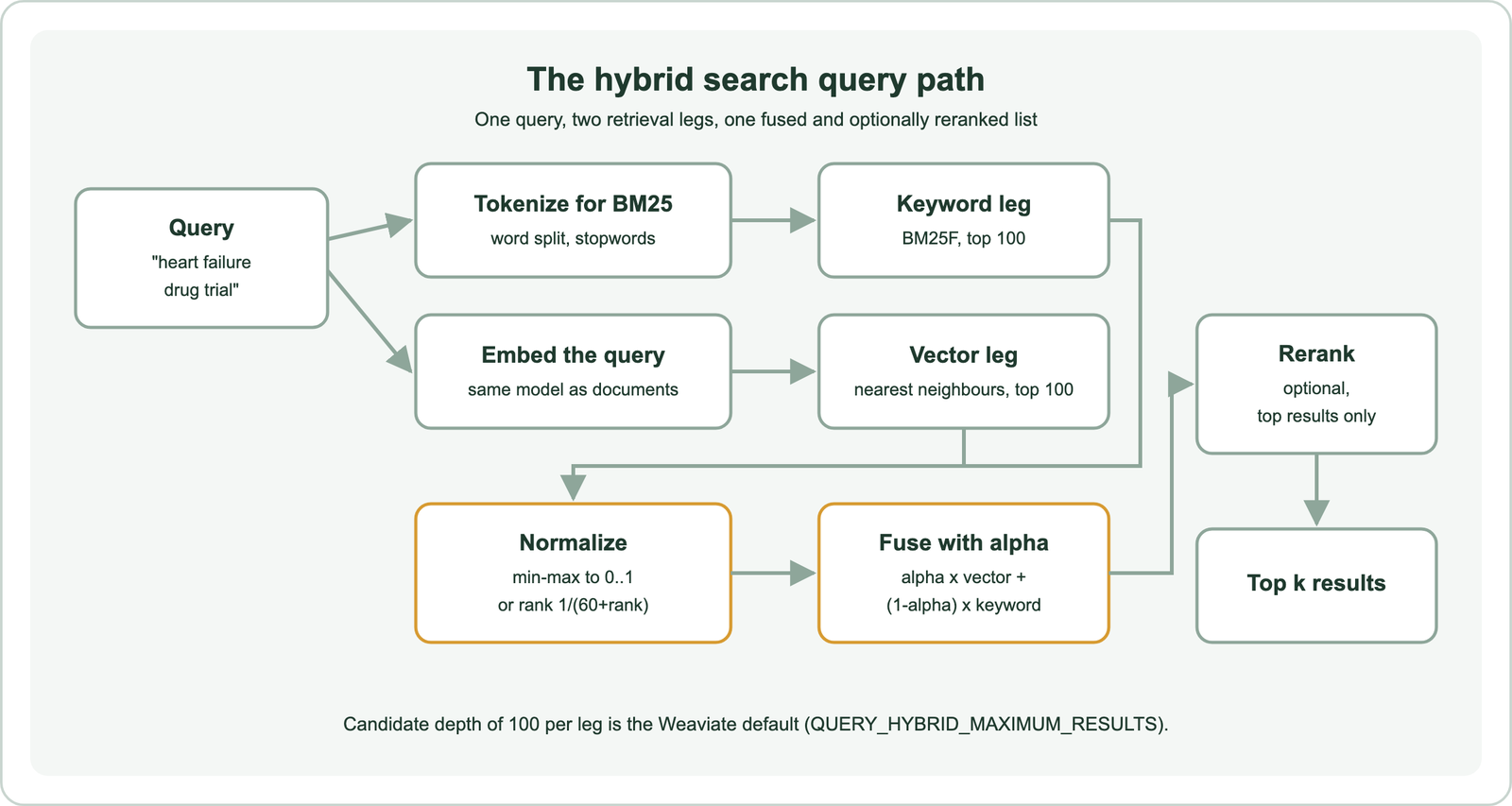
Each leg contributes a different kind of evidence. The keyword leg rewards documents that share the query’s exact words, including rare identifiers and product codes. The vector leg rewards documents whose meaning is close to the query’s, even when no word matches. Fusion decides how much each kind of evidence counts. The result is a single list in which a document can rank highly by doing well in one leg or fairly well in both.
The steps run in a fixed order, so mistakes compound. A document that neither leg retrieves cannot be rescued by fusion, and a document that fusion ranks 50th cannot be rescued by a reranker that only sees the top 20. The first step to examine is therefore the one that turns a single query string into two different query forms.
How does hybrid search prepare one query for two indexes?
Hybrid search prepares one query for two indexes by tokenizing the text for the keyword index and embedding the same text into a vector for the vector index. The two forms share nothing except the original string, and each must match how the documents were processed at indexing time.
For the keyword form, Weaviate tokenizes the query with the same method used for the searched property. Its documentation gives the example “A red Nike shoe”: the default word tokenization produces a, red, nike and shoe, and stopword removal then drops a. Word tokenization splits on non-alphanumeric characters and lowercases. Other methods, such as lowercase, whitespace and field, keep symbols or case, which matters for codes like variable names. Weaviate’s search operator reference says stemming is not yet supported, so “trials” and “trial” stay different tokens.
For the vector form, the query goes through the embedding model that produced the document vectors. In Weaviate, a configured vectorizer embeds the query automatically; an application can also pass its own vector. Using a different model for queries than for documents breaks the vector leg silently, because the vectors still return nearest neighbours that look plausible.
The two forms fail in opposite ways. A misspelled word produces a token that matches nothing in the keyword index, while the embedding may still land near the right documents. A rare part number produces a strong keyword match, while the embedding may treat it as noise. Hybrid search exists to cover both failures, which is the trade-off discussed in hybrid search vs vector search. With both query forms ready, the keyword leg can score documents.
How does the keyword leg of hybrid search score documents with BM25?
The keyword leg of hybrid search scores documents with BM25, which rewards documents containing the query’s tokens, weights rare tokens more, and dampens repeated tokens and long documents. Weaviate uses BM25F, a field-aware variant that can weight properties such as a title more than a body.
BM25 has two free parameters. Weaviate’s documentation sets k1 to 1.2 by default; it controls term frequency saturation, so a word repeated ten times does not score ten times higher. The parameter b defaults to 0.75 and controls document length normalization, so one match in a short abstract counts for more than one match in a long report. Both are set per collection in the inverted index configuration. The documentation advises changing them only with a good reason.
The keyword leg returns any object that matches at least one query token, ranked by score. A search operator, available from Weaviate version 1.31, can require that a minimum number of query tokens match within a property. Property boosting uses a caret, so a property list of title^2 and abstract counts title matches twice. Hybrid search in Weaviate accepts all of these keyword parameters, including tokenization, stopwords, k1, b and boosting.
BM25 scores are unbounded. A query with five rare tokens can score 30 on one document, while a query with one common token can top out under 2. Weaviate’s documentation gives this as the reason there is no threshold for the keyword component: the scores are not normalized or bounded like vector distances. That property matters later, when fusion has to combine BM25 numbers with similarity numbers. The other leg, meanwhile, produces scores on a fixed scale.
How does the vector leg of hybrid search find similar documents?
The vector leg of hybrid search finds similar documents by comparing the query vector with stored document vectors and returning the nearest ones by a distance metric such as cosine. An approximate nearest neighbour index, HNSW by default in Weaviate, makes the search fast at the cost of occasionally missing a true neighbour.
Vector search always returns something. Weaviate’s documentation explains that every compatible vector is similar to some degree, so a query for “SkyBlue” in a collection of red shades still returns the closest red. For hybrid search, this means the vector leg fills its candidate list even when nothing is relevant. The keyword leg behaves differently: if no token matches, it returns nothing at all.
The only threshold Weaviate offers inside a hybrid query is max vector distance, which applies to the vector component. Objects farther than that distance are dropped from the hybrid results even if their keyword scores are high. The documentation uses a distance of 0.3 as its example. This is the one place where a hybrid query can say a semantic match is too weak to count, and the value depends on the embedding model, so it needs calibration on real queries.
Vector scores sit in a narrow band. In Weaviate’s own fusion example, the top four vector results score 0.600, 0.598, 0.596 and 0.594, almost a tie, while the keyword scores range from 5 down to 0.09. Ties like that are common with general-purpose embedding models, where many documents on the same topic sit at similar distances. Before fusion can resolve them, each leg must decide how many candidates to hand over.
How many candidates does each hybrid search leg return before fusion?
Each hybrid search leg in Weaviate returns at least 100 candidates before fusion, plus any offset, even when the query asks for only 10 results. The setting is the environment variable QUERY_HYBRID_MAXIMUM_RESULTS, added in version 1.32 with a default of 100.
The reason is that fusion depends on the candidate pool. Weaviate’s documentation notes that relative score fusion with a small limit is very sensitive to that limit, because the minimum and maximum used for rescaling come from whatever each leg returned. It therefore searches with a higher limit of 100 and trims to the requested limit afterwards. Rank-based fusion is affected too: a document that sits 15th in one leg contributes nothing if that leg returned only 10.
We ran the same experiment at four depths on BEIR SciFact, a public set of 5,183 scientific abstracts and 300 test queries with relevance labels. Each leg returned 10, 20, 50 or 100 candidates, and we compared the fused top 10 with the depth-100 result at alpha 0.75. At depth 10, 19 percent of the top 10 differed for relative score fusion and 26 percent for rank fusion. At depth 50, the differences fell to 3 and 7 percent.
The ranking quality moved less than the membership. nDCG@10 for relative score fusion went from 0.687 at depth 10 to 0.692 at depth 100. The lesson is stability more than accuracy: a shallow candidate pool makes results shift when a limit or page changes. Weaviate’s documentation recommends raising the setting if hybrid results shift between pages. The candidates from each leg also turn out to be surprisingly different documents.
Why do the two legs of hybrid search return different documents?
The two legs of hybrid search return different documents because they measure different things: shared tokens for BM25 and closeness of meaning for vectors. Their disagreement is the source of any gain from fusion, since two legs that agreed would add nothing.
In this site’s SciFact run, the BM25 top 20 and the vector top 20 shared an average of 6.0 documents per query. Three of the 300 queries shared none. The legs were nearly matched on their own, at 0.663 nDCG@10 for our BM25 and 0.648 for the all-MiniLM-L6-v2 vector leg. They reached that quality through largely different documents.
| Found by | Relevant abstracts | Share |
|---|---|---|
| Both legs | 288 | 85% |
| Vector leg only | 28 | 8% |
| Keyword leg only | 13 | 4% |
| Neither leg | 10 | 3% |
The table shows that most relevant abstracts were reachable by both legs at depth 100, but 12 percent were reachable by only one. Those 41 abstracts are what fusion can add over the better leg alone. The 10 found by neither leg are out of reach for any fusion method or reranker; only better tokenization, a better embedding model, or query rewriting could recover them.
Overlap differs by corpus. Collections full of look-alike documents and exact codes tend to favour the keyword leg, as when to use hybrid search shows with a five-corpus diagnostic. Whatever the overlap, the two lists arrive with scores that cannot be added as they are.
How does hybrid search normalize scores that use different scales?
Hybrid search normalizes scores that use different scales either by rescaling each leg’s scores into the same range, usually 0 to 1, or by discarding scores and using rank positions instead. Without one of these, unbounded BM25 scores would swamp similarity scores between 0 and 1.
Weaviate’s relative score fusion uses min-max scaling per leg. Its documentation describes the rule plainly: the highest value becomes 1, the lowest becomes 0, and the rest fall in between according to their relative distance from those ends. In the documentation’s example, keyword scores of 5, 2.6, 2.3, 0.2 and 0.09 become 1.0, 0.511, 0.450, 0.022 and 0.0. The near-tied vector scores 0.600, 0.598, 0.596 and 0.594 become 1.0, 0.996, 0.993 and 0.986, because the last result, at 0.009, anchors the zero.
Ranked fusion, the Weaviate default up to version 1.23, ignores the raw scores. Each result receives 1 divided by its rank plus 60, so the top result in either leg gets the same credit regardless of how far ahead it was. Reciprocal rank fusion covers that formula and the origin of the constant 60. Other systems use z-scores or distribution-based scaling; score normalization in hybrid search compares the methods.
Min-max scaling has a known weakness: the result depends on the worst candidate in each list. One outlier at the bottom stretches the range and compresses everything else. That is the mechanical reason the candidate depth from the previous step changes the fused order. Once both legs share a scale, fusion can weight and add them.
How does hybrid search fuse two result lists into one ranking?
Hybrid search fuses two result lists into one ranking by adding each document’s normalized keyword and vector scores, weighted by alpha, and sorting by the total. In Weaviate, alpha is the weight on the vector score and 1 minus alpha is the weight on the keyword score.
Alpha runs from 0, pure keyword search, to 1, pure vector search. Weaviate’s server default is 0.75, but its documentation warns that client libraries do not all leave alpha unset, so the effective weighting can differ and should be set explicitly. With alpha at 0.5 in the documentation’s example, relative score fusion ranks document 1 first at 0.993. That document was the clear keyword winner and inside the near-tie at the top of the vector list. Ranked fusion puts document 2 first instead, at 0.016398, because it ignores the size of document 1’s keyword lead.
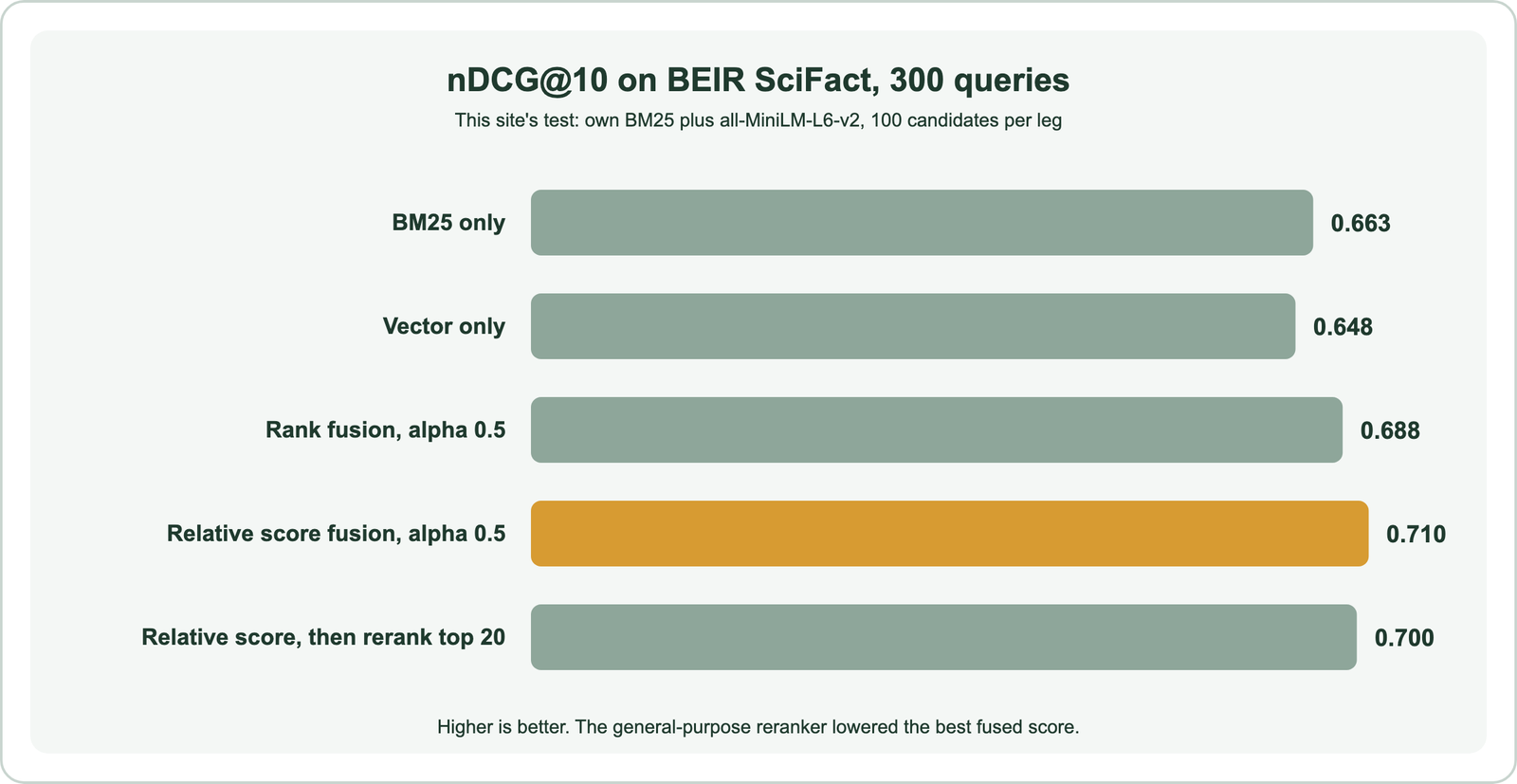
In our SciFact run, every fusion setting beat both legs alone. Relative score fusion scored 0.710 at alpha 0.5 and 0.692 at alpha 0.75; rank fusion scored 0.688 and 0.671. The lower alpha won because the keyword leg was slightly stronger on this scientific text. Weaviate’s engineering team reported a similar direction on the FIQA dataset, where relative score fusion gave about 6 percent better recall than ranked fusion in internal benchmarks.
The right alpha is corpus-specific. Balancing keyword and vector scores covers how to tune it, and score fusion methods and relative score fusion cover the formulas in depth. The fused list can then pass to one more optional step.
Where does reranking fit after hybrid search fusion?
Reranking fits after hybrid search fusion as a second stage that rescores the top fused results with a slower, more precise model, usually a cross-encoder that reads the query and each document together. It reorders only what fusion hands it; it cannot add documents.
Weaviate’s reranker modules work with vector, BM25 and hybrid searches. Its academy course spells out a detail that is easy to miss: the reranker’s input is exactly the query’s limit, with no separate, wider candidate pool. To let the reranker choose from 50 candidates and return 10, an application sets the limit to 50 and keeps the top 10 itself. The cost is latency, since a cross-encoder runs once per candidate.
A reranker is not guaranteed to help. In our SciFact run, we reranked the top 20 from relative score fusion at alpha 0.5 with the public cross-encoder ms-marco-MiniLM-L-6-v2. nDCG@10 fell from 0.710 to 0.700. That model was trained on web search questions, not scientific claims, so it brought less domain knowledge than the fused score already held. A reranker trained on in-domain pairs might reverse the result; this one did not.
The safer order is to measure fusion first and add a reranker only when it beats fused results on your own labelled queries. For retrieval-augmented generation, where the top few chunks go straight into a prompt, hybrid search for RAG shows a case where reranking recovered missing chunks. The remaining question is how to see what each step did for a single query.
How do you trace each step of a hybrid search query?
You trace each step of a hybrid search query by running each leg alone, reading the per-leg scores that the system exposes, and comparing the fused list against labelled relevant results. Most hybrid problems show up as one leg dominating or one leg returning nothing.
Weaviate can return a score and an explanation for each result. Setting alpha to 0 gives the keyword leg alone and alpha to 1 gives the vector leg alone, so three queries reveal what each leg found and what fusion did with it. The example uses Weaviate’s Python client v4 against a collection of abstracts.
import weaviate
from weaviate.classes.query import HybridFusion, MetadataQuery

client = weaviate.connect_to_local()
papers = client.collections.use("Paper")

for alpha in (0.0, 1.0, 0.5):  # keyword leg, vector leg, fused
    response = papers.query.hybrid(
        query="statin therapy and heart failure outcomes",
        alpha=alpha,
        fusion_type=HybridFusion.RELATIVE_SCORE,
        query_properties=["title^2", "abstract"],
        limit=10,
        return_metadata=MetadataQuery(score=True, explain_score=True),
    )
    print("alpha", alpha)
    for o in response.objects:
        print(round(o.metadata.score, 3), o.properties["title"])
        print(o.metadata.explain_score)

client.close()
Read the three lists side by side. A relevant document missing from both legs points to tokenization or the embedding model. One present in a leg but missing from the fused list points to alpha or to normalization. The fused order shifting between page sizes points to candidate depth. Score every change with a metric such as nDCG@10 over a set of real queries, as described in how to evaluate semantic search, rather than judging single queries by eye.
The same steps apply outside Weaviate, though the names change. The next question is which engines run hybrid search this way.
Which search engines support hybrid search with two retrieval legs?
Search engines that support hybrid search with two retrieval legs include Weaviate, Elasticsearch, OpenSearch, Qdrant, Milvus, Pinecone, MongoDB Atlas, Vespa, Meilisearch and PostgreSQL with extensions. They share the two-leg design but differ in how the keyword leg is stored and where fusion happens.
Three families appear across their documentation, as of October 2026. Weaviate, Elasticsearch and OpenSearch pair an inverted index for BM25 with a vector index and fuse inside the engine. Qdrant, Milvus and Pinecone represent keywords as sparse vectors stored next to dense ones and fuse with RRF or a weighted formula. PostgreSQL leaves fusion to SQL that the application writes, which is the approach in hybrid search in SQL databases. The full comparison is in databases that support hybrid search.
Architecture changes the mechanics at scale. In a sharded cluster, each shard runs both legs on its own data, and the coordinator must merge per-shard results before or after fusion. Merging after per-shard normalization can give a different order than normalizing over the whole collection. Hybrid search on distributed databases covers that problem, and hybrid search for enterprise search covers permissions and mixed document types.
For a first build, the hybrid search tutorial walks through indexing and querying end to end. The mechanism is the same whichever engine runs it.
Hybrid search works by turning one query into a token list and a vector, running a BM25 keyword search and a vector search in parallel, and putting their scores on one scale. It then adds them with an alpha weight and optionally reranks the top results. Each step has a lever. Tokenization and the embedding model decide what each leg can find, and candidate depth decides how stable the fused order is. Normalization decides whether score gaps count, and alpha decides which leg wins ties. In this site’s SciFact test, fusion beat both legs, relative score fusion beat rank fusion, and an off-the-shelf reranker made things slightly worse. Set alpha explicitly, keep each leg’s candidate pool at 100 or more, and test every change on your own labelled queries before trusting it.