Home / Filtering / Searching vs Filtering: What Is the Difference?
ComparisonSearching vs Filtering: What Is the Difference?
Searching ranks documents by how relevant they are to a query; filtering includes or excludes documents by exact conditions, without ranking them. A search for “waterproof hiking boots” orders every boot by how well it matches the meaning or words of the request. A filter such as in_stock = true removes everything that is out of stock, whatever its relevance. Many real queries need both: a filter for hard requirements and a search to order what is left. Mixing them up causes two classic failures. Treating a requirement as search text lets non-matching items rank highly. Treating a preference as a filter removes good results and can leave the page empty. Weaviate applies filters during the vector search, so ranked results respect them. From version 1.38 it also offers Boost, which promotes matching items without removing others.
Searching vs filtering in four facts
- Search produces an order; a filter produces a set. Neither does the other’s job.
- Filters suit hard requirements such as price caps, dates, tenants and permissions.
- Search suits descriptions of what the user wants, where wording and meaning vary.
- Boosting sits between them: matching items rank higher, but nothing is removed.
What is the difference between searching and filtering?
The difference between searching and filtering is that searching scores and orders documents by relevance, while filtering applies yes-or-no conditions that decide which documents may appear at all. One is graded, the other is binary.
Search answers “which documents best match this request?” It uses vector similarity, keyword scoring or both, and returns the top results in order. Every document has some score, so search never says a document is impossible, only that it is less relevant. Metadata filtering answers “which documents are allowed?” It checks properties such as category, price, date or owner against exact rules, and the result is a set with no order of its own.
The distinction matters because the two fail differently. Search is forgiving: a misspelling or a paraphrase still finds good matches. Filters are strict: a document that misses a condition by one cent or one day is gone. Good systems use each where its behaviour fits.
What happens when you search, filter or combine them?
Searching alone orders everything, filtering alone returns an unordered set, and combining them orders only the documents that pass the filter. A boost is a fourth option that reorders without removing.
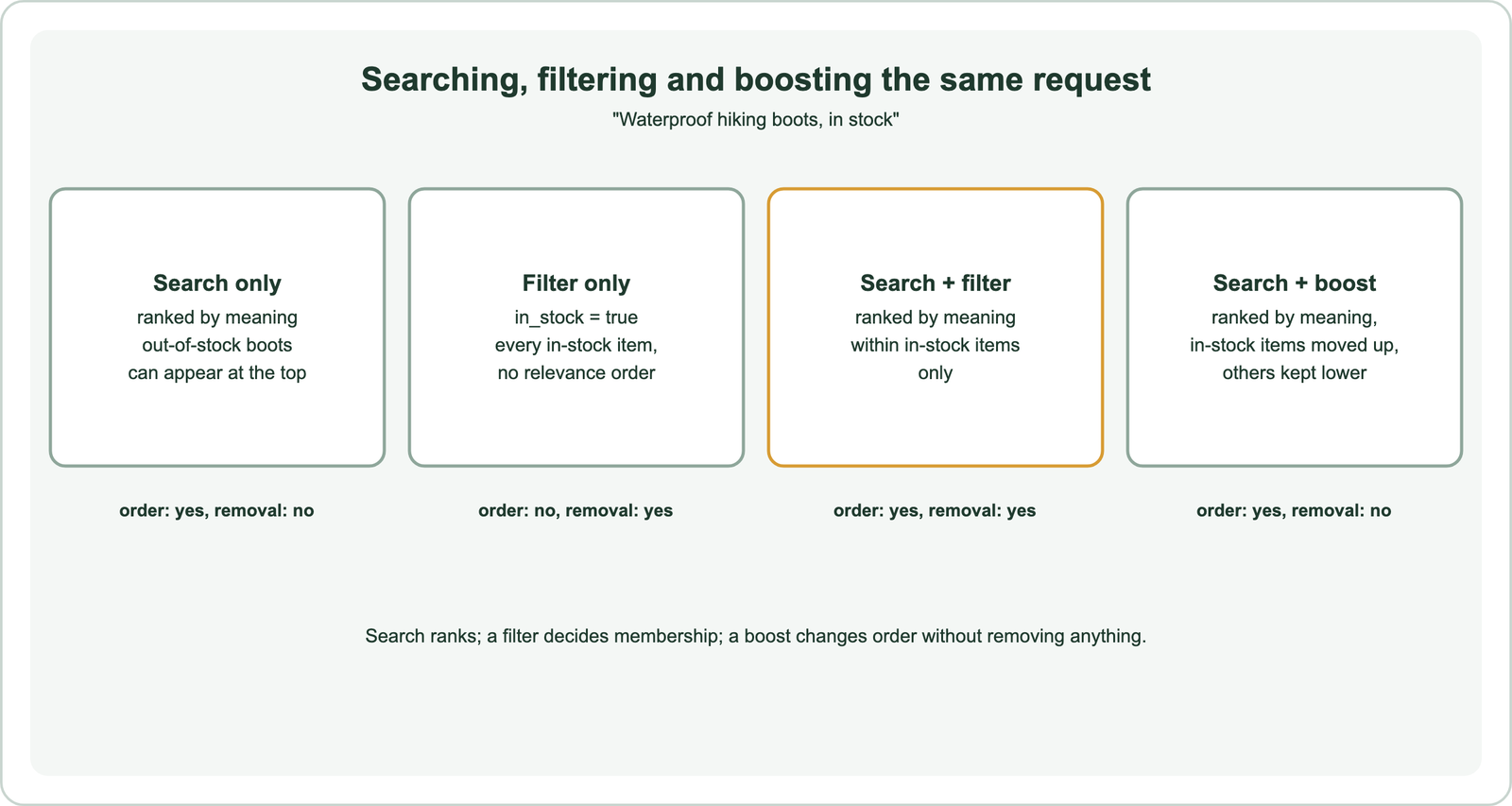
Take the request “waterproof hiking boots, in stock”. Search alone may put a perfect but sold-out boot first, which frustrates a shopper. A filter alone returns every in-stock product in arbitrary order, including sandals. Search with a filter returns in-stock items ordered by how well they match “waterproof hiking boots”, which is what the user meant.
If “in stock” were only a preference, say for a catalogue that also takes back orders, a boost fits better. Weaviate’s Boost, added in version 1.38, rescores the search’s candidates so matching items move up while the rest stay in the list. Its documentation describes a boost filter as a soft WHERE: matches score 1, others score 0, and the two are blended with the search score.
When should a condition be a filter?
A condition should be a filter when every result must meet it, such as a price limit, a date range, a language, a tenant or a user’s access rights. If showing a non-matching result would be wrong, filter.
Security and isolation conditions must always be filters. A user’s permissions, covered in permission-aware search, and a customer’s tenant boundary, covered in multi-tenant semantic search, cannot be preferences. Explicit user choices are filters too: a shopper who ticks “under 100 dollars” or a reader who picks “2025 only” expects those limits to hold. Faceted semantic search builds those choices into the interface.
Structured facts belong in properties, not in the search text. Putting “in stock” into the query asks the embedding model to understand stock levels, which it cannot see. Storing stock as a property and filtering on it is exact and cheap. The same goes for dates, prices, regions and document types, which are easy to store as fields and hard for a model to read reliably from text.
When should a condition stay in the search?
A condition should stay in the search when it describes what the user wants in words that vary, such as style, topic, purpose or quality. These are matched by meaning, not by exact values.
“Comfortable”, “for beginners”, “about climate risk” or “something like this photo” have no clean property to filter on. They belong in the query text or vector, where semantic search can match paraphrases. Forcing them into filters, such as a “beginner” tag, only works if every document is tagged reliably, and fails silently when tags are missing.
Soft preferences can also stay in ranking. Recency, popularity and brand preference often work better as ranking signals than as filters. A filter on “last 30 days” hides the excellent article from day 31; a recency boost keeps it but ranks it lower. Weaviate’s Boost supports time decay and numeric signals for this purpose.
Why does mixing up searching and filtering cause bad results?
Mixing up searching and filtering causes bad results because requirements treated as search terms are only weakly enforced, and preferences treated as filters remove good results or empty the page. Both are common in AI search.
The first failure shows up as irrelevant-looking top results. A RAG system asked about “the 2024 policy” may retrieve the 2022 policy because the text is nearly identical and the year is only a weak signal in the embedding. A year filter fixes it. Why vector search returns irrelevant results lists more cases.
The second failure shows up as empty or thin result pages. Stacking strict filters for colour, size, brand and price can leave nothing, especially in small catalogues. Very selective filters can also strain vector search; filter selectivity explains why and how databases cope. Relax preferences into boosts, and keep filters for true requirements.
How do databases combine search with filters?
Databases combine search with filters either by filtering first and searching the allowed set, by searching first and dropping disallowed results, or by filtering during the index traversal. The method affects result counts and speed.
Post-filtering searches first and then removes results that fail the filter, which can return fewer results than requested. Pre-filtering builds the allowed set first and then searches within it. Weaviate builds an allow-list from its inverted index and uses it during the vector search. It switches to a flat scan when a filter matches few objects. Pre-filtering vs post-filtering and filtered ANN search cover the mechanics, and bitmap filters cover the data structures that make allow-lists fast.
from weaviate.classes.query import Filter

response = products.query.hybrid(
    query="waterproof hiking boots",
    filters=Filter.by_property("in_stock").equal(True),   # hard requirement
    limit=10,
)
Support and speed vary by product, compared in vector databases with metadata filtering. Whatever the database, test filtered queries separately from unfiltered ones, because their recall and latency can differ.
How does a boost work as a soft filter?
A boost works as a soft filter by rescoring the candidates a search already found, raising those that match a condition and leaving the rest in the list. It changes order, never membership.
In Weaviate, the primary search first fetches a pool of candidates, 100 by default, set by the boost’s depth. Each candidate then gets a boost score: 1 or 0 for a filter condition, or a value from a decay curve for dates and numbers. Both scores are min-max normalised, and the final score is (1 minus weight) times the search score plus weight times the boost score, with a default weight of 0.5. A boost can blend up to 20 conditions, and a negative condition weight pushes matches down instead of up.
response = articles.query.near_text(
    query="transformer architectures",
    limit=5,
    boost=Boost.filter(Filter.by_property("category").equal("research"), weight=0.5),
)
Two limits follow from the design. A boost cannot add documents the search did not retrieve, so a relevant item outside the candidate pool stays missing; raise depth if needed. And because nothing is removed, a boost is the wrong tool for permissions or any rule that must hold. Weaviate’s documentation puts it plainly: use a filter when a condition must remove objects instead of demoting them.
How do you decide between search, filter and boost?
You decide by classifying each part of a request: hard requirements become filters, soft preferences become boosts or ranking signals, and descriptions of need become the search. Many requests contain all three.
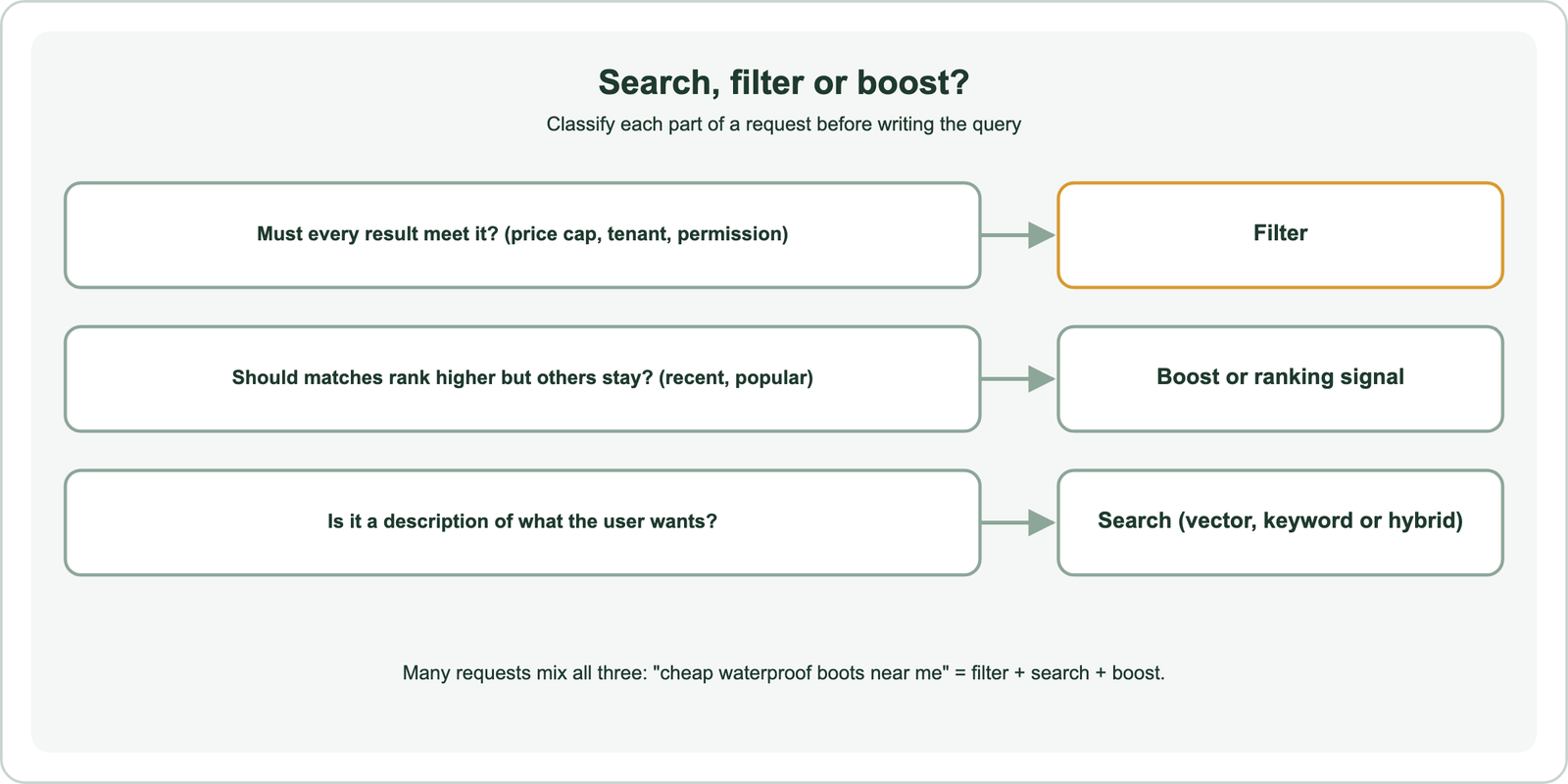
Language models can help with the split. A query parser or agent can turn “waterproof boots under 100 dollars from this year” into a search phrase plus a price filter and a date filter. Weaviate’s Query Agent does this kind of translation in Weaviate Cloud, and self-built parsers can do the same. Validate the extracted filters, since a wrong filter silently removes good results.
Then measure. Compare filtered and boosted variants on real queries, watch for empty result pages, and log which filters users apply. The right split often differs between a store, a document archive and a help centre.
Searching ranks documents by relevance; filtering decides which documents are allowed. Use filters for hard requirements such as price caps, dates, tenants and permissions, and keep descriptions of need in the search. Treat soft preferences such as recency and popularity as boosts or ranking signals, which Weaviate supports with Boost from version 1.38. Combining a search with a filter gives ranked results that all meet the requirement. Mixing the two up leads to irrelevant top results or empty pages, so classify each part of a request before writing the query.