Home / Comparisons / BM25 vs Vector Search: Which Retrieves Better?
ComparisonBM25 vs Vector Search: Which Retrieves Better?
BM25 retrieves documents by counting shared words with a weighting formula, while vector search retrieves documents by comparing embeddings that encode meaning. Neither one retrieves better in every case. BM25 is fast, needs no model, and excels when the query contains exact terms such as names, codes, or part numbers. Vector search excels when the query uses different words from the answer, such as a paraphrase or a description of a problem. Benchmarks show both sides: the BEIR study found BM25 a robust baseline across 18 datasets, while Dense Passage Retrieval beat BM25 by 9 to 19 points on question answering. Most modern systems therefore run both and fuse the results with hybrid search. Weaviate does this in one query, with an alpha setting that slides between pure keyword and pure vector.
BM25 versus vector search in four facts
- BM25 scores shared words, while vector search scores closeness of meaning between embeddings.
- BM25 was a robust baseline across the 18 datasets of the BEIR benchmark.
- Dense Passage Retrieval beat BM25 by 9 to 19 points in top-20 accuracy on its question-answering tests.
- Hybrid search runs both and fuses the scores, which suits most text collections.
What is the difference between BM25 and vector search?
The difference between BM25 and vector search is what they compare: BM25 compares the words in a query and a document, and vector search compares learned representations of their meaning. They are often called sparse and dense retrieval for that reason.
BM25 uses an inverted index. Each word points to the documents that contain it, and a formula scores each document by how often and how distinctively it uses the query’s words. A document with none of the query’s words scores zero. Robertson and Zaragoza describe BM25 as a scoring function from the probabilistic relevance framework.
Vector search uses an embedding model. Every document and query becomes a dense vector, and the search returns the documents whose vectors sit closest to the query’s. Two texts can match with no shared words if the model learned that they mean similar things.
| Aspect | BM25 | Vector search |
|---|---|---|
| Matches | Shared words | Similar meaning |
| Needs a model | No | Yes, an embedding model |
| Index | Inverted index | Vector index such as HNSW |
| Strong on | Names, codes, exact terms | Paraphrases, descriptions, synonyms |
| Weak on | Different wording | Rare exact identifiers |
The table shows two complementary tools. The semantic versus keyword search comparison covers the broader approaches. The mechanics of each score explain their strengths.
How does BM25 score a document?
BM25 scores a document by adding up, for each query word, how rare that word is across the collection times how often it appears in the document, adjusted for document length. Two settings, k1 and b, shape the adjustment.
The rarity part is inverse document frequency. A word found in few documents carries more weight than a common one. The frequency part rises with each repeat of the word, but with diminishing returns controlled by k1. The length part, controlled by b, stops long documents from winning just because they contain more words.
Weaviate’s documentation gives the defaults: k1 of 1.2 and b of 0.75. Its training material explains the levers. Raise k1 when repetition signals relevance, such as in product catalogs. Lower b when document length should not matter. Weaviate applies BM25F, a field-aware version, so properties can be boosted, for example by weighting a product name four times more than its description.
The calculator shows how the score responds. With the defaults, a word appearing 3 times in an average-length document scores 7.229. Raising the count to 10 lifts the score only to 9.036, which is saturation at work. A document three times the average length scores 5.06 for the same count. A word found in half the collection scores 1.089, because it barely distinguishes anything.
How does vector search score a document?
Vector search scores a document by the distance between its embedding and the query’s embedding, so closer vectors rank higher. The embedding model decides what “close” means.
An embedding model reads each document once and produces a vector of hundreds or thousands of numbers. At query time, it embeds the query the same way. A distance metric, usually cosine, compares the query vector with stored vectors, and an approximate index such as HNSW finds the closest ones quickly. Libraries such as FAISS provide the index alone, and vector databases add storage, filtering, and keyword search around it.
The score has no direct link to words. A document can rank first without containing any query word, which is the point of semantic matching. It can also rank high for sharing a topic while missing a specific detail the user needed. That is the main weakness BM25 covers.
Weaviate’s search guide summarizes the division of labor. Vector search fits when the wording of the query and the data differ, or the data is not text. Keyword search fits names, codes, error strings, and any term that must appear literally. The semantic versus vector search comparison separates the related terms. Benchmarks show how the two compare at scale.
Which does better on benchmarks, BM25 or vector search?
On benchmarks, BM25 and vector search each win in different settings: dense retrievers win on tasks like their training data, while BM25 holds up better on unfamiliar domains. No benchmark crowns a universal winner.
The case for dense retrieval comes from in-domain tests. Karpukhin and colleagues’ Dense Passage Retrieval, published at EMNLP 2020, beat a Lucene BM25 baseline by 9 to 19 points in top-20 passage retrieval accuracy on its open-domain question-answering datasets. Trained on matching data, dense models find answers that BM25 misses.
The case for BM25 comes from zero-shot tests. Thakur and colleagues’ BEIR benchmark, presented at NeurIPS 2021, evaluated models across 18 datasets without retraining. It found BM25 a robust baseline, and dense models often underperformed when moved to new domains. Reranking and late-interaction models scored best on average, at a higher computational cost.
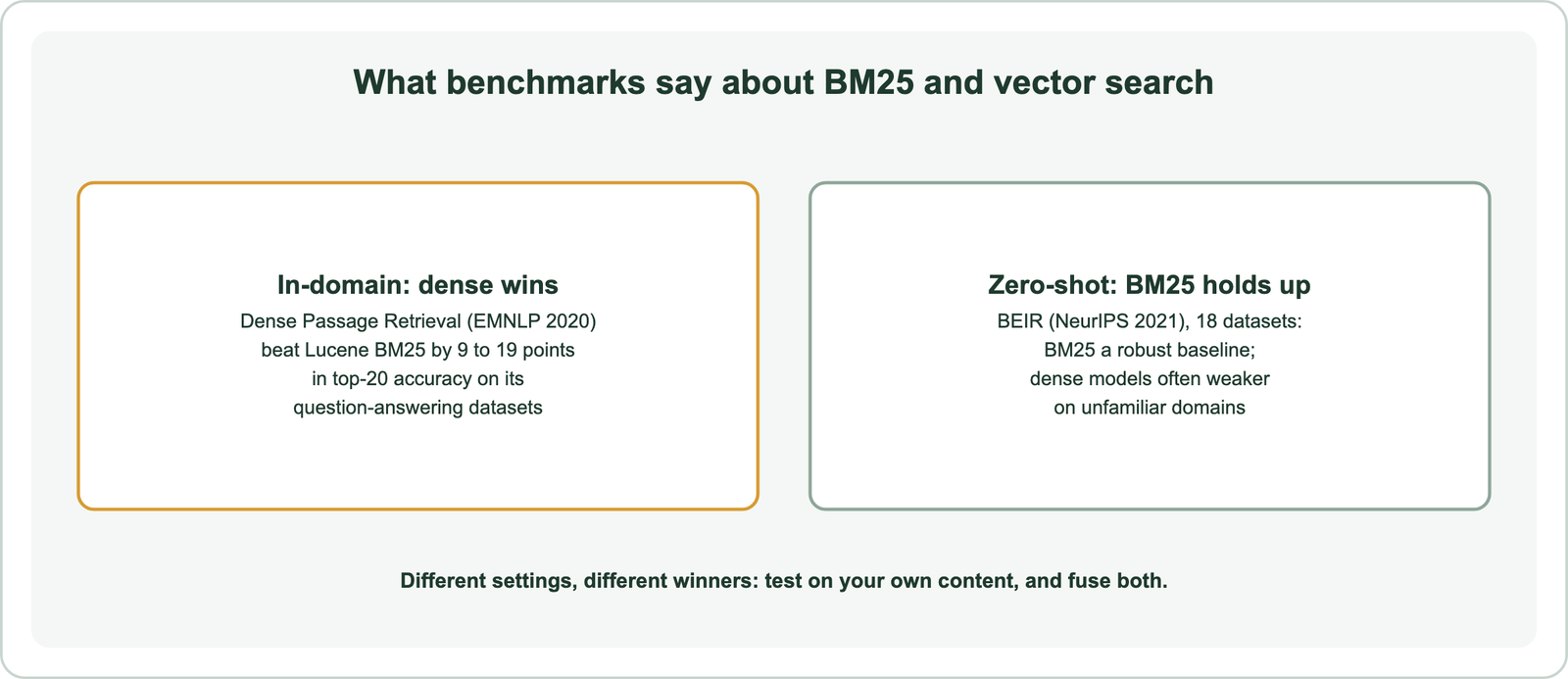
Read together, the results give a practical rule. If your content resembles what an embedding model was trained on, vector search should help. If it is specialized, such as legal clauses or internal product codes, BM25 may hold its own until the model is tested or tuned. Dense versus sparse retrieval covers the research in depth. Query type matters as much as domain.
Which query types does BM25 or vector search favor?
BM25 favors queries with exact identifiers and shared vocabulary, while vector search favors paraphrases, descriptions of needs, symptoms, and natural questions. The split follows whether the right document shares the query’s words.
A small reproducible test on this site shows the pattern. Twelve queries were run against 16 short documents with BM25 and with an open embedding model. Vector search ranked the right document first for all 12. BM25 did so for 6, found no shared words at all for 4, and ranked the answer fourth and seventh for 2 others. Every BM25 miss came from a query worded differently from its answer.
The six queries both methods handled shared at least one exact word with the answer: an error code, a part number, the document’s own phrasing, and a typo query with one correct word. On a large collection with many similar codes, BM25 has the edge for identifiers, because an embedding can blur close codes together. Weaviate’s keyword documentation also notes that its BM25 does not yet apply stemming, so word forms must match as tokens.
The full table is in semantic search examples. Real query logs contain both kinds, often in the same query, which is where fusion comes in.
How does hybrid search combine BM25 and vector scores?
Hybrid search combines BM25 and vector scores by running both searches, putting their scores on a common scale, and adding them with a weight called alpha. Weaviate’s alpha runs from 0, keyword only, to 1, vector only, with 0.75 as the default.
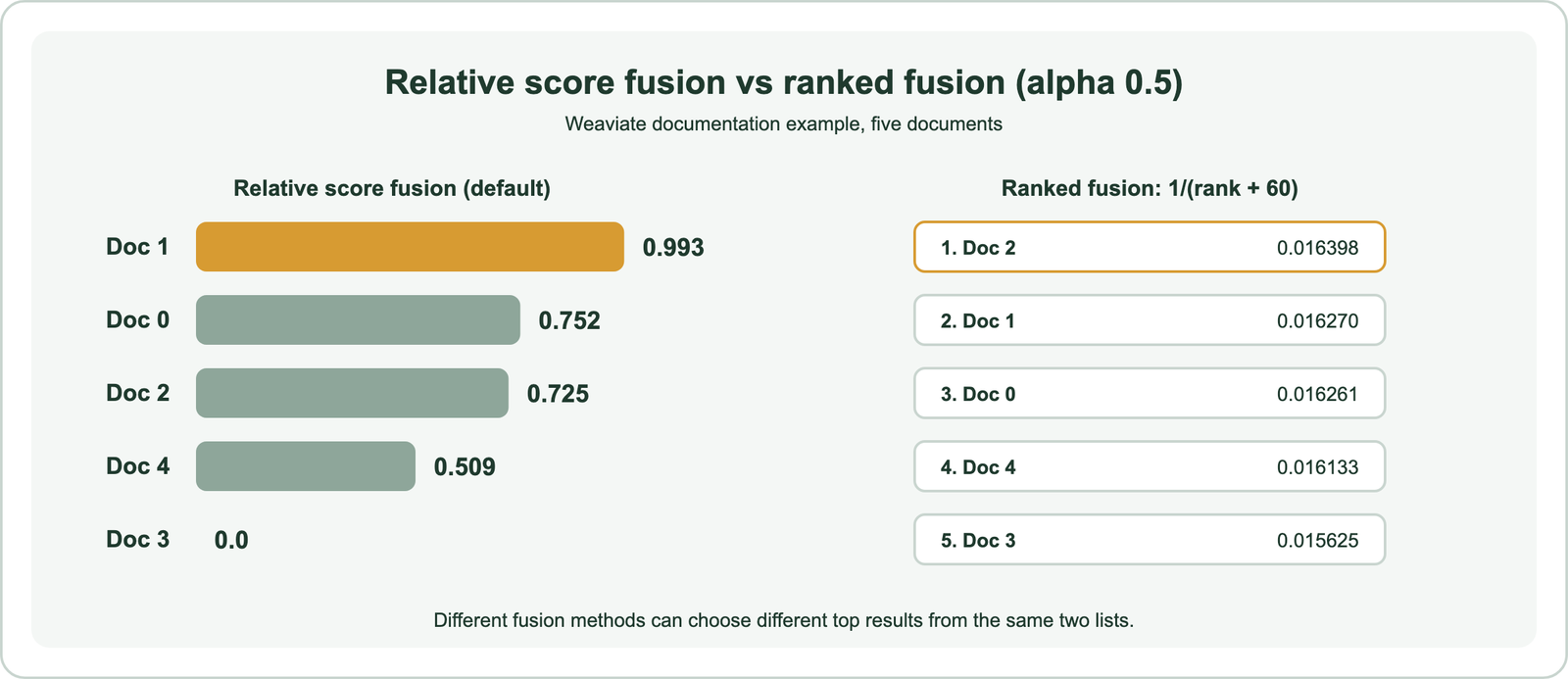
The scales differ, so fusion needs a method. Weaviate offers two. Relative score fusion, the default since version 1.24, rescales each result list so its best score becomes 1 and its worst becomes 0, then adds the weighted values. Ranked fusion ignores the raw scores and gives each result 1 divided by its rank plus 60.
Weaviate’s documentation shows why the choice matters with a five-document example at alpha 0.5. In the keyword list, one document scored far above the rest. In the vector list, the top four scored almost the same. Relative score fusion kept that gap and ranked the keyword winner first, with a fused score of 0.993. Ranked fusion treated both lists as plain orderings and put a different document first. Relative score fusion keeps more information from the original scores.
Hybrid search is not free. It runs two searches and needs a tuned alpha. But it removes the forced choice between exact terms and meaning. The hybrid search guide and reciprocal rank fusion explain the methods in depth. A related question concerns the databases underneath.
Is a vector database different from a traditional database?
A vector database differs from a traditional database by indexing embeddings for similarity search, while a traditional database indexes exact values for lookups and filters. Many systems now do both.
A traditional relational database answers questions like “find orders over $100 from last week.” Its indexes match exact values and ranges. A vector database answers “find documents similar to this one,” using a vector index over embeddings. Weaviate stores the original objects, a vector index, and inverted indexes in each shard, so it can serve keyword search, vector search, and filters together.
The boundary is blurring. Relational databases such as PostgreSQL with pgvector, and SQL Server with its vector type, now store vectors and build vector indexes. Weaviate keeps both index types in every shard, and search engines such as Elasticsearch and OpenSearch added vector fields beside their BM25 indexes. The question is less which kind of database, and more which features a workload needs.
The search engine versus vector database and pgvector versus a dedicated vector database comparisons cover the trade-offs. Related comparisons include semantic versus similarity search, natural language search, semantic search versus RAG, knowledge graph search, and the semantic web.
When should you use BM25, vector search, or both?
Use BM25 alone for exact-term lookups, vector search alone for meaning-heavy queries over familiar content, and both through hybrid search for most real text collections. The deciding evidence should come from your own queries.
A simple decision guide follows from the evidence:
- Choose BM25 when queries are mostly codes, names, or exact phrases, or when no embedding model is available.
- Choose vector search when users describe needs in their own words and the content suits a general model.
- Choose hybrid search when queries mix both, which is the common case, or when the query mix is unknown.
The guide maps query types to methods. Then measure. Run a set of real queries with judged answers through all three, and compare where the right answers rank. Weaviate’s search guide calls hybrid a good default for text, but a test settles it for a given collection. The evaluation guide explains how, and the build guide sets up all three in one system.
Open-source code for both methods is easy to find, and the BM25 formula in the calculator runs in a few lines of Python. The harder part is the judged query set, which decides every choice in this comparison.
BM25 and vector search retrieve in different ways: BM25 scores shared words with rarity, frequency, and length adjustments, and vector search scores closeness of meaning between embeddings. Benchmarks favor dense retrieval in familiar domains and BM25 in unfamiliar ones, and query type decides the rest. Exact codes favor BM25, while paraphrases and descriptions favor vector search. The decision for most text collections is hybrid search, with alpha and fusion tuned on judged queries, so exact terms and meaning both count.