Home / Keyword search / BM25 Explained: The Ranking Formula Behind Keyword Search
ExplainerBM25 Explained: The Ranking Formula Behind Keyword Search
BM25 is a ranking function that scores how well a document matches a keyword query. It combines three things: how often each query term appears, how rare that term is across the collection, and how long the document is. It is the default way search engines such as Weaviate and Elasticsearch rank keyword matches. BM25 improves on TF-IDF by capping the reward for repeated terms and by normalizing for length, controlled by two parameters, k1 and b, usually set to 1.2 and 0.75. In a small worked example, a document that mentions “password” three times scores lower than a shorter one that mentions the rarer word “reset” once. BM25 matches words, not meaning, so modern systems often pair it with vector search in hybrid search.
BM25 in four facts
- BM25 scores term frequency, term rarity (IDF), and document length together.
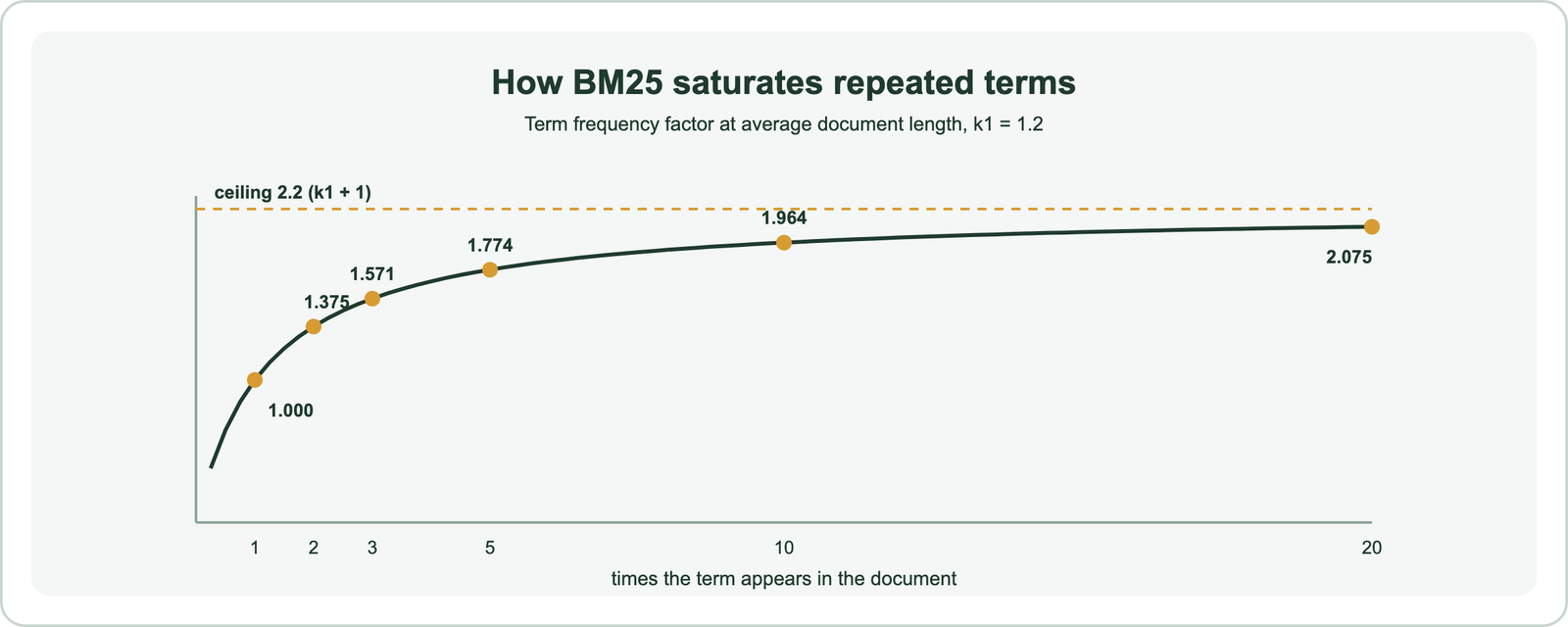
- Repeated terms help less and less: at k1 = 1.2 the term score can never pass 2.2 times its base.
- Weaviate and Elasticsearch both default to k1 = 1.2 and b = 0.75.
- Weaviate uses BM25F, which scores several fields and lets you boost them, such as
title^2.
What is the BM25 algorithm?
The BM25 algorithm is a bag-of-words ranking function from information retrieval that estimates how relevant a document is to a query from the query terms it contains. It is also called Okapi BM25, after the search system where it was developed.
“Bag of words” means BM25 ignores word order and grammar. It looks only at which query terms appear in a document, how often, and how common those terms are overall. Each query term contributes a score, and the document’s total is the sum of those contributions.
BM25 is the standard ranking function for keyword search. Weaviate’s documentation describes its keyword search as returning the objects with the highest BM25F scores. Elasticsearch, built on Apache Lucene, uses it for full-text relevance too. Its staying power comes from being simple, fast with an inverted index, and hard to beat on exact-term queries. Its name says something about where it came from.
Why is BM25 called BM25?
BM25 is called BM25 because “BM” stands for Best Matching and “25” marks it as one variant in a numbered series of weighting functions tried by its developers. The 25 is a version label, not a parameter.
The function came out of the Okapi information retrieval system at City University London. Stephen Robertson and colleagues developed and tested it in the 1990s, including in the TREC evaluation campaigns. Earlier members of the family carried other numbers. Two of them survive as special cases: setting b to 1 turns BM25 into BM11, and setting b to 0 turns it into BM15.
Weaviate’s release notes describe the name with a wink: “Best Match #25,” since it took quite a few iterations to arrive at. Robertson and Zaragoza’s 2009 review, “The Probabilistic Relevance Framework: BM25 and Beyond,” gives the theory behind it. The function itself has three parts.
How does the BM25 algorithm work?
The BM25 algorithm works by scoring each query term in a document from three parts, term frequency with saturation, inverse document frequency, and length normalization, then adding the term scores. Documents without any query term score zero.
- Term frequency: count how often the query term appears in the document. More is better, but with diminishing returns.
- Inverse document frequency (IDF): weight the term by how rare it is across the collection. Rare terms count more than common ones.
- Length normalization: adjust for document length, so a term in a short document counts more than the same term in a long one.
- Sum: add the scores of all query terms to get the document’s BM25 score.
Weaviate’s explainer puts the length idea simply: one occurrence in a tweet is much more significant than one occurrence in a book. IDF captures a similar intuition. If a term is rare in the collection, an occurrence of it probably matters. A word like “the” appears everywhere and carries almost no weight.
Before any of this, the text is split into tokens. In Weaviate, the default word tokenizer lowercases text and splits on non-alphanumeric characters, and stopwords are dropped from the query. How text is tokenized decides what counts as a match, as stemming and lemmatization explains. The formula pulls the three parts together.
What does the BM25 formula compute?
The BM25 formula computes, for each query term, its IDF multiplied by a saturated and length-adjusted term frequency, and sums those values over the query’s terms. Written out, it looks like this:
score(D, Q) = sum over terms q in Q of
    IDF(q) * f(q, D) * (k1 + 1) / ( f(q, D) + k1 * (1 - b + b * |D| / avgdl) )

IDF(q) = ln( 1 + (N - n(q) + 0.5) / (n(q) + 0.5) )| Symbol | Meaning |
|---|---|
f(q, D) | How many times term q appears in document D |
|D| | Length of document D, in tokens |
avgdl | Average document length in the collection |
N | Number of documents in the collection |
n(q) | Number of documents that contain term q |
k1 | Term frequency saturation; default 1.2 |
b | Length normalization strength, 0 to 1; default 0.75 |
The IDF shown is the variant Lucene and Elasticsearch use. Adding 1 inside the logarithm keeps IDF positive even for terms that appear in most documents. Other implementations use slightly different IDF forms, so absolute scores differ between engines even when the ranking is similar. Numbers make the formula easier to follow.
How does BM25 score a real query?
BM25 scores a real query by computing each term’s contribution in each document, and a small worked example shows rarity and length can outweigh repetition. We computed this one with the formula above, k1 = 1.2 and b = 0.75.
The collection has three short documents:
- D1 (8 tokens): “reset your password from the account settings page”
- D2 (15 tokens): “password rules password length and password expiry for admin accounts in the security policy document”
- D3 (9 tokens): “how to change the billing address on your invoice”
The query is “reset password.” “Reset” appears in one document, so its IDF is 0.981. “Password” appears in two, so its IDF is lower, 0.470. The average document length is about 10.7 tokens.
| Document | Matches | Term scores | BM25 score |
|---|---|---|---|
| D1 | reset once, password once | 1.093 + 0.524 | 1.616 |
| D2 | password three times | 0.679 | 0.679 |
| D3 | none | none | 0 |
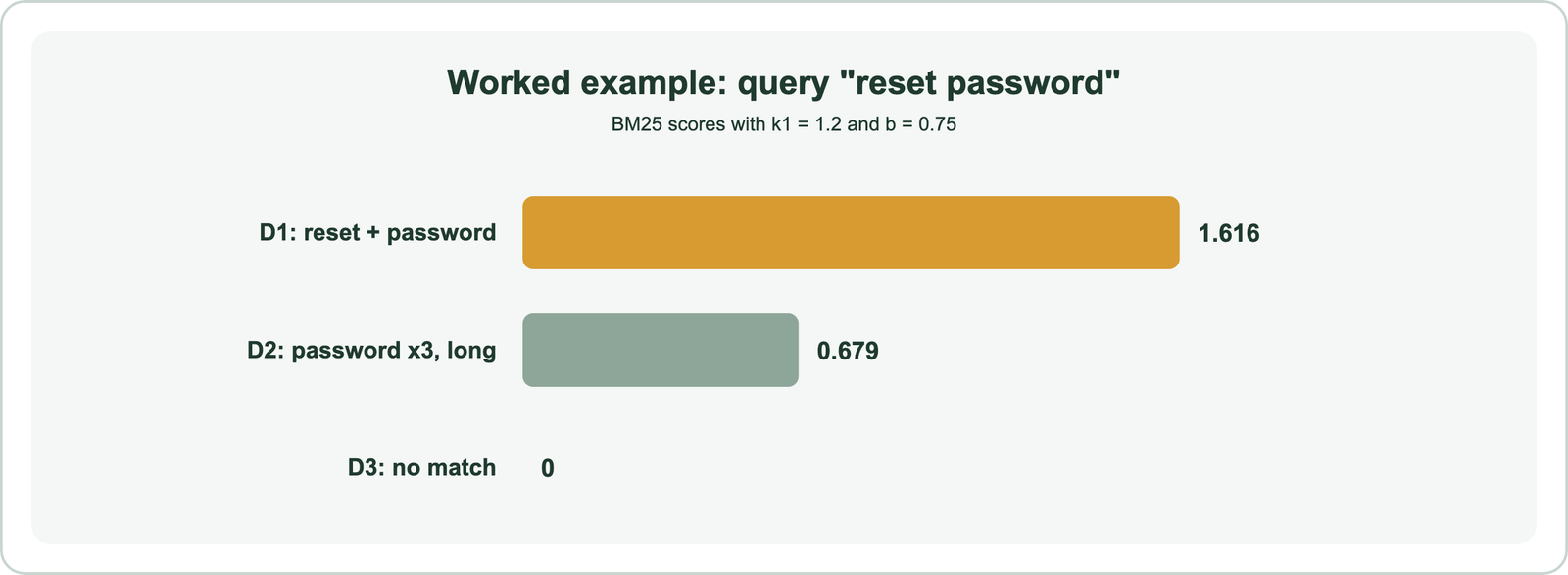
D2 repeats “password” three times, yet it scores far lower than D1. Three things work against it. “Password” is the more common term, so its IDF is lower. Saturation means the third mention adds little. And D2 is longer than average, so length normalization reduces each mention’s value. D1 wins because it contains the rarer term “reset.” That intuition, rare terms and focused documents first, is what BM25 is designed to capture. The two parameters control how strongly it applies.
How do k1 and b change BM25 scores?
The k1 parameter controls how quickly repeated terms stop adding score, and the b parameter controls how much document length matters. Both are usually left at k1 = 1.2 and b = 0.75.
k1 sets saturation. At average document length, a term’s frequency part equals f times (k1 + 1) divided by (f + k1). With k1 = 1.2, we computed the factor for increasing counts: 1.000 at one mention, 1.375 at two, 1.571 at three, 1.774 at five, 1.964 at ten, and 2.075 at twenty. It can never pass 2.2, which is k1 + 1. Elastic’s engineering blog describes k1 as the term frequency at which a term reaches half its maximum score.
b sets length normalization, from 0 to 1. At b = 0, length is ignored, which is BM15. At b = 1, length is fully normalized, which is BM11. Weaviate Academy suggests lowering b when document length should not matter, and raising k1 when repetition genuinely signals relevance, as in some product catalogs. In Weaviate, both are set per collection in the inverted index configuration. These two adjustments are exactly what TF-IDF lacked.
How does BM25 improve on TF-IDF?
BM25 improves on TF-IDF by adding term frequency saturation and tunable length normalization, so repeated terms and long documents no longer dominate the ranking. Both rank by term frequency times rarity at heart.
| Aspect | TF-IDF | BM25 |
|---|---|---|
| Term frequency | Grows without limit, often linearly | Saturates, controlled by k1 |
| Document length | Not handled, or handled by separate normalization | Built in, controlled by b |
| Rarity | IDF | A smoothed IDF |
| Tunable | Little | Two parameters, k1 and b |
Weaviate’s release notes summarize the refinement: if a term appears three times in one document and six times in another, the second is not automatically twice as relevant. TF-IDF covers the older method in full. Both methods belong to the same family, which raises a common question about naming.
Is BM25 the same as keyword search?
BM25 is not the same as keyword search; keyword search is the task of finding documents that contain the query’s words, and BM25 is the most common way to rank those documents. In practice, the terms are often used together.
A keyword search has two jobs. First, it finds candidate documents that contain query terms, usually through an inverted index. Second, it orders them. BM25 handles the second job. A keyword search without BM25 might just return matches in date order, or use plain TF-IDF.
Weaviate uses the names almost interchangeably. Its keyword search page says keyword search is also called BM25 search, or sparse vector search. That is because BM25 scores can be read as a sparse vector, with one weight per term. Full-text search and semantic versus keyword search place it in context. The engines that run it add their own details.
How do Weaviate and Elasticsearch use BM25?
Weaviate and Elasticsearch both use BM25 to rank keyword matches by default, with k1 = 1.2 and b = 0.75, but Weaviate applies the field-aware variant BM25F. Each adds controls on top.
In Weaviate, the bm25 query tokenizes the input, drops stopwords, and scores the selected properties with BM25F. Search is case-insensitive, and stemming is not supported. Properties can be boosted with a caret, so question^2 counts a match in the question twice as much. Since version 1.31, search operators control matching: or (the default, at least one token), and (all tokens in one property), and and_cross (all tokens, spread across properties). Since version 1.30, the BlockMax WAND algorithm skips blocks of the index that cannot make the top results.
import weaviate
from weaviate.classes.query import MetadataQuery, BM25Operator

client = weaviate.connect_to_local()
articles = client.collections.use("HelpArticle")

response = articles.query.bm25(
    query="reset password",
    query_properties=["title^2", "body"],      # a title match counts double
    operator=BM25Operator.or_(minimum_match=1),
    limit=5,
    return_metadata=MetadataQuery(score=True),
)
for obj in response.objects:
    print(round(obj.metadata.score, 3), obj.properties["title"])

client.close()
In Elasticsearch, BM25 is the default similarity for text fields, inherited from Lucene. Elastic’s documentation confirms the same defaults and lets k1 and b be changed per field. Both engines expose the BM25 score so you can inspect and tune results. In modern systems, BM25 rarely works alone.
How does BM25 work with vector search and RAG?
BM25 works with vector search through hybrid search, which runs both and fuses their rankings, and it serves RAG as one of the retrievers that feed passages to a language model. BM25 brings exact terms; vectors bring meaning.
The difference between BM25 and RAG is one of role. RAG, retrieval-augmented generation, is a pattern: retrieve passages, then let a language model answer from them. BM25 is one way to do the retrieval step. A RAG system can use BM25 alone, vectors alone, or both. When people describe “BM25 plus vector search plus an LLM,” they mean hybrid retrieval feeding a generator.
Weaviate’s guidance explains why the pairing works. BM25 is best for exact matches and for out-of-domain searches, where an embedding model was not trained on the content. Vector search handles synonyms and paraphrase. In a Weaviate hybrid query, alpha sets the balance: 0 is pure BM25, 1 is pure vector, and the default is 0.75. Hybrid search, BM25 versus vector search, and hybrid search for RAG cover the details. BM25’s limits explain why it needs a partner.
What are the limits of BM25, and what are the alternatives?
The limits of BM25 are that it matches only words, ignoring synonyms, word order, and meaning; the main alternatives are dense vector search, learned sparse models, and hybrid combinations. It remains a strong baseline despite those limits.
- Vocabulary mismatch: a query for “car” misses a document that only says “automobile.” This is the vocabulary mismatch problem.
- No meaning or order: “dog bites man” and “man bites dog” score the same.
- Tokenization dependence: results change with how text is split, and without stemming, “run” and “running” are different terms.
- Collection statistics: IDF depends on the whole collection, so scores shift as documents are added.
Alternatives address these gaps in different ways. Dense vector search matches meaning, as covered in dense vectors. Learned sparse models such as SPLADE keep the inverted index but learn term weights and expansions. Hybrid search runs BM25 next to vectors. Yet BM25 holds up well: the BEIR benchmark found it a robust baseline when retrieval models faced unfamiliar domains, which is why it remains in nearly every search stack.
BM25 ranks keyword matches by term frequency with saturation, term rarity through IDF, and document length normalization, tuned by k1 and b. Our worked example showed it in action: a document repeating a common term lost to one containing a rarer term once. Weaviate and Elasticsearch both use it by default, Weaviate in its field-aware BM25F form with property boosting. BM25 cannot match meaning, so it works best alongside vector search. The practical step is to start with default k1 and b, boost important fields, and add vector search through hybrid search where queries use varied wording.