Home / Embeddings / Asymmetric vs Symmetric Semantic Search
ExplainerAsymmetric vs Symmetric Semantic Search
Asymmetric semantic search matches a short query against longer passages that answer it, while symmetric semantic search matches texts of the same kind and length against each other. A question such as “how long do refunds take” searched against help articles is asymmetric. Finding duplicate questions on a forum, or similar products by description, is symmetric. The difference matters because embedding models learn one task or the other from their training pairs. A model trained on similar-sentence pairs places a question near other questions, not near the paragraph that answers it. A model trained on query and passage pairs, such as MS MARCO, learns to bridge that gap. Many current models handle both but expect a marker telling them which side each text is on, such as “query: ” and “passage: ” prefixes or a search_query and search_document input type. Using the wrong model or the wrong prefix quietly lowers retrieval quality.
Asymmetric and symmetric search in four facts
- Symmetric search compares texts of the same kind; asymmetric search compares short queries with longer answering passages.
- Models trained on query and passage pairs, such as MS MARCO, suit asymmetric search.
- E5 models expect “query: ” and “passage: ” prefixes on the two sides of an asymmetric search.
- Weaviate’s academy example embeds stored texts with Cohere’s search_document input type and queries with search_query.
What is the difference between asymmetric and symmetric semantic search?
The difference between asymmetric and symmetric semantic search is whether the query and the stored texts are the same kind of text. Symmetric search compares like with like; asymmetric search compares a question with an answer.
The Sentence-Transformers documentation, from the library’s authors Nils Reimers and colleagues, draws the distinction this way. In symmetric search the query and the corpus entries are about the same length and content, so the query could swap places with a result. In asymmetric search the query is usually short, such as a question or keywords, and the result is a longer paragraph that answers it.
Symmetric examples include finding duplicate questions, matching a product description to similar products and clustering support tickets by topic. Asymmetric examples include searching documentation with a question, finding passages for a RAG prompt and searching products with a few keywords. Most site search and RAG retrieval is asymmetric.
The two tasks reward different geometry. In symmetric search, two texts should be close if they say the same thing. In asymmetric search, a question should be close to its answer, even though a question and an answer do not say the same thing. Which geometry a model has depends on how it was trained. The basics of embeddings are covered in what are embeddings.
Why does asymmetry change what an embedding model must learn?
Asymmetry changes what an embedding model must learn because a query and its answer differ in length, wording and purpose, yet must still land close together. A model trained only on similarity of meaning does not learn that mapping.
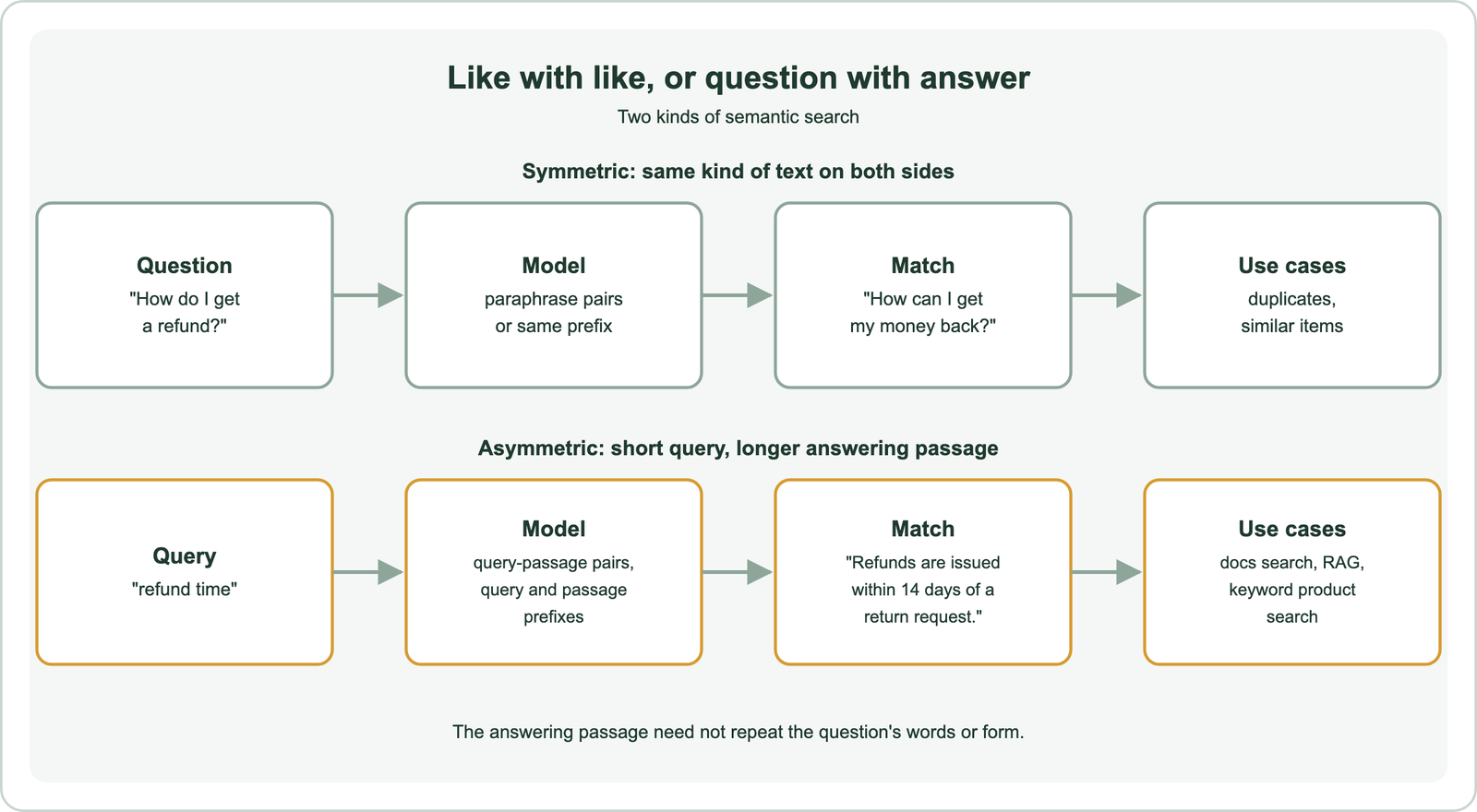
A question asks for information the passage supplies. “How long do refunds take” and “Refunds are issued within 14 days of a return request” share little wording and have different forms. A model that measures paraphrase similarity may place the question closer to another question, such as “how long does shipping take”, than to the passage that answers it.
Length adds to the gap. A one-line query and a 200-word passage produce embeddings from very different amounts of text. A passage covers several points, while the query asks about one. The model must learn that a passage containing the answer is close to the question, even when most of the passage is about something else.
That knowledge comes from training data. Models learn asymmetric matching from pairs of real queries and the passages that answered them. The contrast between word-level and sentence-level models is covered in word vs sentence embeddings. Which data teaches which task is the next question.
How does training data decide whether a model suits each task?
Training data decides the task because a model learns to place close together whatever its training pairs mark as matching. Paraphrase pairs teach symmetry; query and passage pairs teach asymmetry.
Symmetric training sets contain pairs that mean the same thing, such as duplicate questions from community forums, paraphrased sentences and natural language inference pairs where one sentence entails the other. A model trained on them learns that equivalent statements belong together.
Asymmetric training sets contain real search queries paired with passages judged to answer them. MS MARCO, released by Microsoft in 2016, is the best-known example, built from real search queries and web passages. The Sentence-Transformers documentation lists models trained on MS MARCO as suitable for asymmetric search and models trained on paraphrase data as suitable for symmetric search.
Many general-purpose models today are trained on a mix of both kinds of pairs, plus instructions or prefixes that tell them which task is in play. That is why a model card often specifies how to format queries and documents. Benchmarks report results separately for retrieval and for similarity tasks, as explained in the MTEB leaderboard. Those formatting rules are where asymmetry shows up in daily use.
How do query and passage prefixes handle asymmetric search?
Query and passage prefixes handle asymmetric search by adding a short marker to each text, so one model can embed questions and passages differently. The model learned these markers in training and expects them at inference.
The E5 models, introduced by Liang Wang and colleagues at Microsoft in 2022, expect “query: ” before queries and “passage: ” before documents. The BGE models from the Beijing Academy of Artificial Intelligence recommend an instruction before queries for retrieval, “Represent this sentence for searching relevant passages: “, and none before passages. ColBERT, as Weaviate’s overview of late interaction models explains, prepends special [Q] and [D] tokens to mark queries and documents.
Hosted APIs use a parameter instead of a text prefix. Weaviate’s academy course shows Cohere’s API with an input_type of search_document for the stored texts and search_query for the query. The vectors have the same dimensions and live in the same space, but each side is encoded for its role.
For symmetric tasks with the same models, both sides get the same marker. E5’s guidance is to use “query: ” on both texts for symmetric similarity. The rule is simple: follow the model card exactly, and use the same convention for every text on the same side. Applying this in code takes only a few lines.
How do you apply query and document prefixes in code?
You apply query and document prefixes in code by configuring them once on the model and calling separate encode methods for queries and documents. The Sentence-Transformers library supports this directly.
from sentence_transformers import SentenceTransformer

model = SentenceTransformer(
    "intfloat/e5-base-v2",
    prompts={"query": "query: ", "document": "passage: "},
)

doc_vecs = model.encode_document(
    ["Refunds are issued within 14 days of a return request."],
    normalize_embeddings=True,
)
query_vec = model.encode_query(["how long do refunds take"], normalize_embeddings=True)
scores = model.similarity(query_vec, doc_vecs)
The prompts dictionary maps each role to its prefix. encode_document adds “passage: ” and encode_query adds “query: “, so the prefixes never have to be typed by hand. The code was run as an API check with Sentence-Transformers 5.1.2, using a different small model, since the methods and the prompts argument are the same for any model.
The stored text should stay clean. Prefixes are added at embedding time only, not saved in the database, so results display normally. When a vector database embeds data for you, its vectorizer integration handles the input type for supported providers, generating document embeddings at import and query embeddings at search time, as Weaviate’s model provider pages describe. With self-provided vectors, the application is responsible. The batch embedding guide covers embedding large corpora. Mistakes here are easy to make and hard to spot.
Which mistakes does the wrong embedding mode cause?
The wrong embedding mode causes lower retrieval quality without any error, because the vectors still have the right size and searches still return results. The results are simply worse.
Three mistakes are common. Using a paraphrase model for question answering makes queries match other questions or short, similar-sounding snippets instead of the passages that answer them. Leaving prefixes off a model that expects them shifts every vector slightly away from where training put it. Adding the query prefix to documents, or the reverse, encodes each side in the wrong role.
A subtler problem appears after a model change. If documents were embedded with one prefix convention and queries are embedded with another, the two sides drift apart. Changing the convention means re-embedding the corpus, just as changing the model does, as covered in re-embedding when the model changes.
These mistakes rarely show up in a quick demo, because a few obvious queries still work. They show up in evaluation on real queries, as lower recall and more irrelevant results, a pattern discussed in why vector search returns irrelevant results. Testing which mode a workload needs prevents them.
How can you tell whether your search is asymmetric or symmetric?
You can tell whether your search is asymmetric or symmetric by asking whether a typical query could appear as a result in your corpus. If it could, the search is symmetric; if results answer queries rather than resemble them, it is asymmetric.
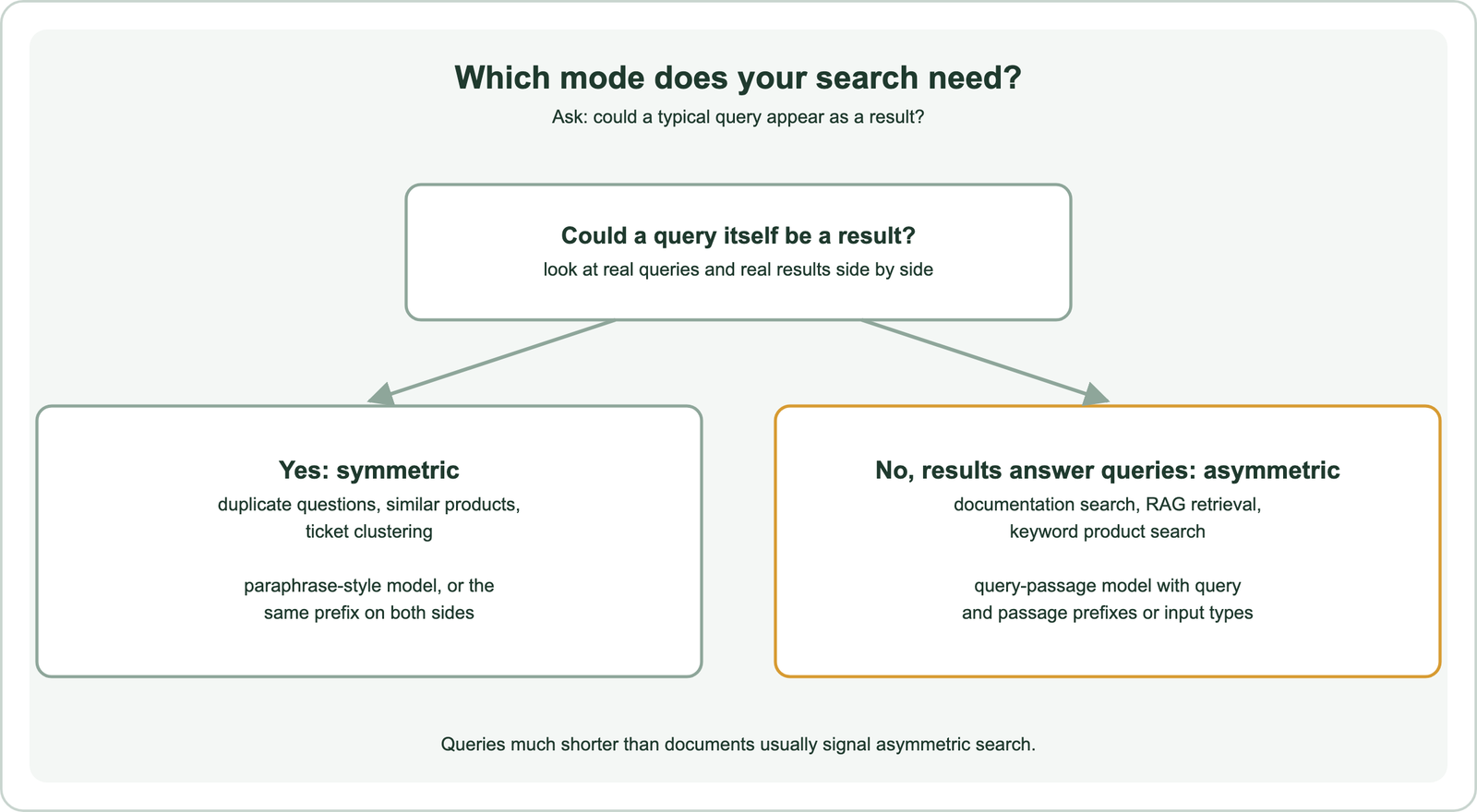
Look at real query logs and real results side by side. Duplicate detection, “more like this” features and recommendation by item description are symmetric. Question answering, documentation search, RAG retrieval and keyword-style product search are asymmetric. Length is a quick hint: queries much shorter than documents usually signal asymmetry.
Some systems need both. A help centre may answer questions from articles, which is asymmetric, and also suggest similar questions as the user types, which is symmetric. One model with prefixes can serve both, as long as each feature applies the right convention.
Chunking affects the balance too. Short chunks make documents closer in length to queries, though not closer in form. Chunk size is covered in chunking for semantic search. With the mode identified, the model can be chosen to match.
How do you choose an embedding model for each mode?
You choose an embedding model for each mode by checking what pairs it was trained on, following its prefix rules, and testing it on your own queries in the mode you need. A model’s overall benchmark rank is only a starting point.
For asymmetric search, look for models trained or evaluated on retrieval tasks, with clear instructions for query and document formatting. For symmetric search, look at semantic textual similarity and duplicate detection results. Leaderboards such as MTEB report these task groups separately, which helps match a model to the job. The full selection process is in choosing an embedding model.
Domain matters as much as mode. A model trained on web queries may not know your field’s vocabulary. Fine-tuning on your own query and passage pairs teaches both the domain and the asymmetric mapping at once, as described in fine-tuning embedding models and domain-specific embeddings.
Vector size and storage are separate choices that apply to both modes, covered in embedding dimensions, Matryoshka embeddings and embedding quantization. Images and text bring their own asymmetry, as described in multimodal embeddings, and the token limits behind long passages are explained in tokenization vs embedding.
Asymmetric semantic search matches short queries with longer passages that answer them, while symmetric search matches texts of the same kind. The difference decides which embedding model works: paraphrase-trained models suit symmetric tasks, and models trained on query and passage pairs, such as MS MARCO, suit asymmetric ones. Many current models handle both through prefixes such as “query: ” and “passage: ” or an input type such as search_query and search_document. Identify which mode your search needs, follow the model card’s formatting on both sides, and confirm the choice on your own queries.