Home / Embeddings / Fine-Tuning Embeddings for Better Retrieval
TutorialFine-Tuning Embeddings for Better Retrieval
Fine-tuning an embedding model means training an existing model further on pairs of your own queries and the passages that answer them, so it places those queries closer to the right documents. It is different from fine-tuning a large language model. LLM fine-tuning changes how a model writes, while embeddings with retrieval supply knowledge at question time. Embedding fine-tuning changes which documents retrieval finds in the first place. It helps most when a general model misses domain terms, product names or company-specific meaning. The usual method is contrastive training with in-batch negatives and some mined hard negatives. Always measure it against the base model on held-out queries. After training, every document must be re-embedded with the new model. Weaviate can then use the model through its Hugging Face integration, a custom Transformers image, or vectors you supply yourself.
Fine-tuning embedding models in four facts
- Training data is pairs of a query and a passage that answers it; other passages in the batch act as negatives.
- Fine-tuning helps when retrieval misses domain meaning, not when the answer is absent from the documents.
- A fine-tuned model produces new vectors, so the whole corpus must be re-embedded before use.
- Compare the tuned model with the base model on queries it never saw during training.
What is the difference between fine-tuning and embeddings?
The difference between fine-tuning and embeddings is that fine-tuning changes a model’s weights through extra training, while embeddings are the vectors a model produces to represent text for search. “Fine-tuning vs embeddings” usually compares LLM fine-tuning with retrieval-augmented generation.
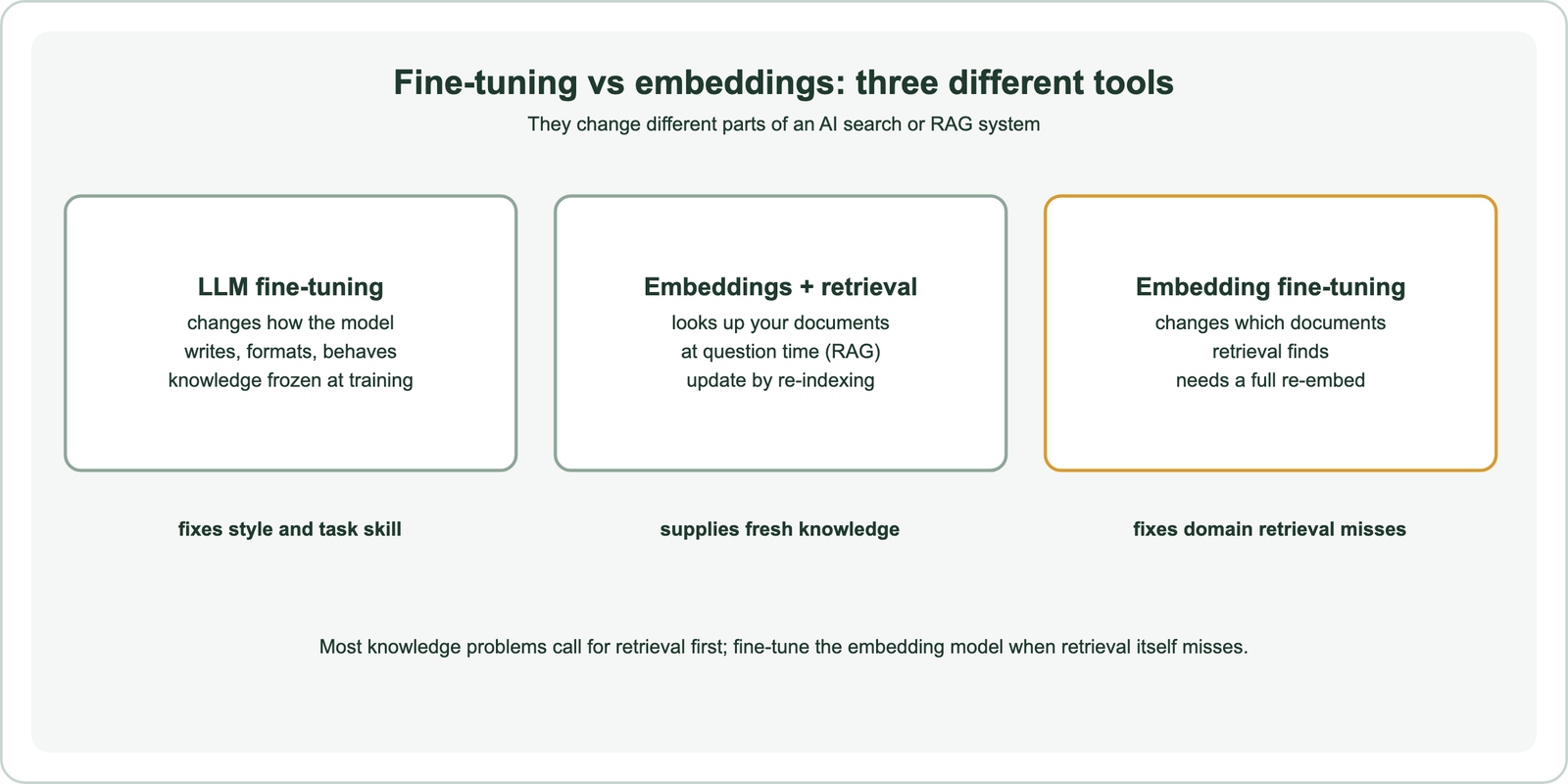
A team that wants a chatbot to answer from company documents has two broad options. Fine-tuning the language model on those documents bakes knowledge into its weights, which goes stale and is hard to trace to a source. Embedding the documents and retrieving relevant passages at question time keeps knowledge in a searchable store, which updates by re-indexing and can cite its sources. For knowledge, retrieval is usually the first choice; LLM fine-tuning suits style, format and narrow task skills.
Embedding fine-tuning is a third option inside the retrieval route. It leaves the language model alone and improves the retriever. If the RAG system answers badly because the right passage never reaches the model, a better embedding model can fix that. Reranking in RAG is another fix for the same symptom, and what are embeddings covers the basics.
When should you fine-tune an embedding model?
You should fine-tune an embedding model when a good general model still misses relevant documents because it does not understand your domain’s terms, abbreviations or notion of relevance. Rule out cheaper causes first.
Many retrieval failures have other causes. Poor chunking splits answers across pieces. Missing keyword search loses exact codes and names. A model with a short input limit truncates long passages. Check these first, along with hybrid search and reranking, since each is cheaper than training. Why vector search returns irrelevant results walks through the diagnosis.
Fine-tuning fits when failures share a domain pattern: internal product names, legal or medical phrasing, or queries whose idea of relevance differs from general web text. Weaviate’s guide on the topic makes the same point, and adds that a smaller fine-tuned model can sometimes beat a larger general one on domain tasks. Check whether a ready-made specialist exists first, as covered in domain-specific embeddings.
What training data does embedding fine-tuning need?
Embedding fine-tuning needs pairs of a realistic query and a passage that answers it, drawn from the same kind of text the system will search. Quality and realism matter more than raw volume.
The best pairs come from real use: search logs with clicked results, support tickets linked to help articles, or questions answered by known documents. When real queries are scarce, a language model can write synthetic questions for each passage, an approach behind methods such as GPL, from Wang and colleagues in 2022. Synthetic queries should be spot-checked, because a generator tends to copy the passage’s wording and makes the task too easy.
Set aside a test set before training: queries and judged passages that never enter the training data. Without it, the training loss can fall while real retrieval gets no better. Building such a set is covered in search test sets and relevance judgments. Keep the test queries realistic, including short, vague and misspelled ones.
How does embedding fine-tuning work?
Embedding fine-tuning works by contrastive learning: the model is trained to give each query a higher similarity to its own passage than to the other passages in the same batch. Those other passages serve as free negatives.
The common loss in sentence-transformers is MultipleNegativesRankingLoss, based on the in-batch softmax approach described by Henderson and colleagues in 2017. In a batch of N query-passage pairs, each query has one positive and N minus 1 negatives. Larger batches therefore give more negatives per step. The loss pushes each query toward its passage and away from the rest.
Hard negatives make training more effective. These are passages that look relevant but are not, often found by running the base model or BM25 and taking high-ranked wrong answers; the DPR paper by Karpukhin and colleagues used BM25 negatives this way. Check mined negatives for false negatives, passages that actually do answer the query, since training against them teaches the wrong lesson.
What are the steps to fine-tune an embedding model?
The steps to fine-tune an embedding model are collecting pairs, adding negatives, training, evaluating against the base model, re-embedding the corpus and deploying the model for both queries and documents. Evaluation gates the expensive steps.
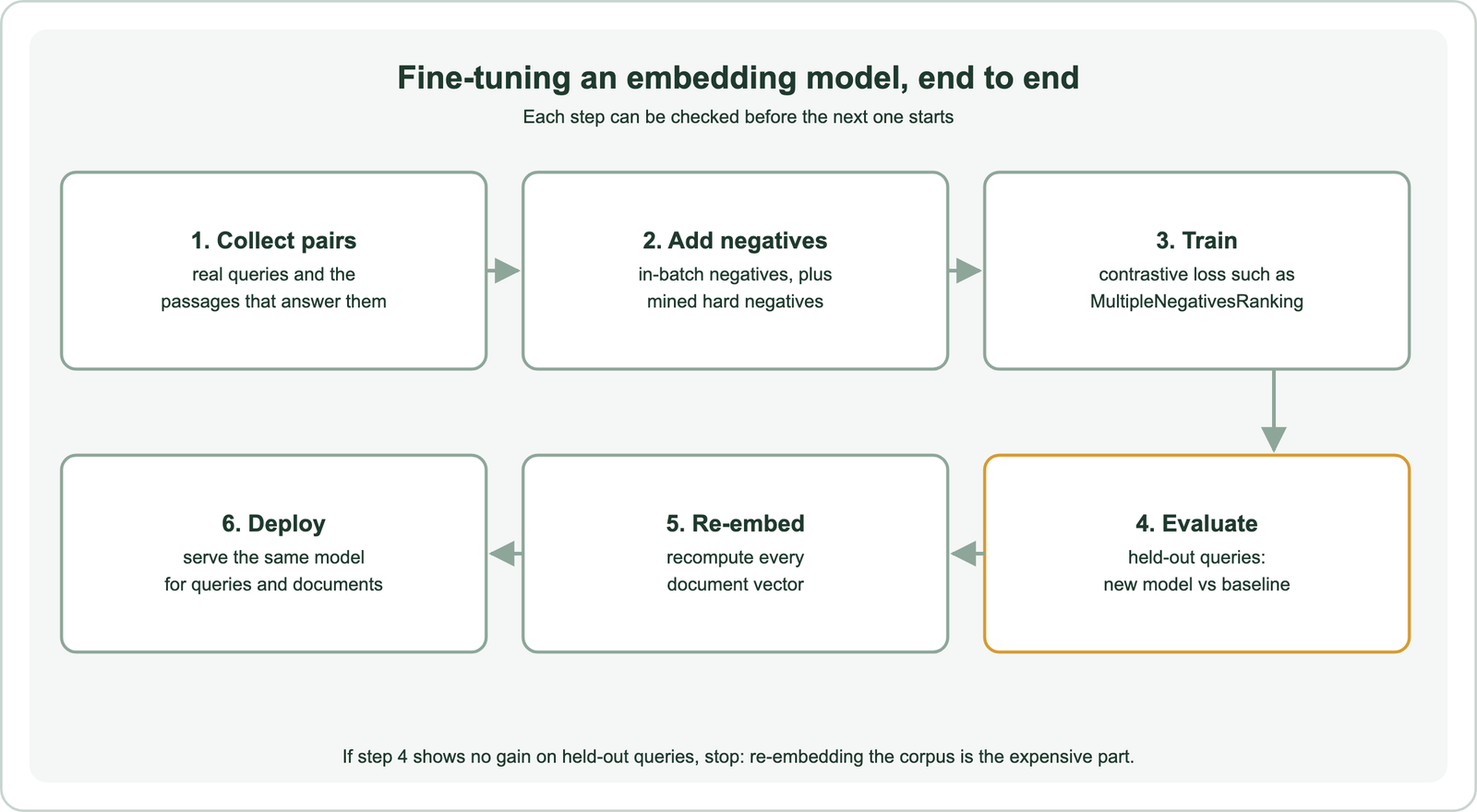
The sentence-transformers library covers steps 2 to 4. This code trains with in-batch negatives and evaluates nDCG at 10 on held-out queries. Replace the query, passage and test variables with your own data.
from datasets import Dataset
from sentence_transformers import (SentenceTransformer, SentenceTransformerTrainer,
                                   SentenceTransformerTrainingArguments)
from sentence_transformers.losses import MultipleNegativesRankingLoss
from sentence_transformers.evaluation import InformationRetrievalEvaluator

model = SentenceTransformer("all-MiniLM-L6-v2")
train = Dataset.from_dict({"anchor": queries, "positive": passages})
args = SentenceTransformerTrainingArguments(output_dir="ft-out", num_train_epochs=1,
                                            per_device_train_batch_size=64)
trainer = SentenceTransformerTrainer(model=model, args=args, train_dataset=train,
                                     loss=MultipleNegativesRankingLoss(model))
trainer.train()

ev = InformationRetrievalEvaluator(test_queries, corpus, relevant_docs, name="dev")
print(ev(model))   # compare with ev(SentenceTransformer("all-MiniLM-L6-v2"))
Run the same evaluator on the untouched base model and compare. Report the difference on held-out queries only. If the gain is small or negative, stop before step 5.
Training settings deserve a note. A larger batch gives more in-batch negatives per query, so use the largest batch the GPU memory allows. One or a few epochs are usually enough for a pretrained model, and a low learning rate protects what it already knows. Save each run with its data version and evaluation scores, so a later model can be compared with the same yardstick.
What can go wrong when fine-tuning embeddings?
Fine-tuning embeddings can go wrong through overfitting to a narrow query set, forgetting general knowledge, learning from bad negatives, and leaking test queries into training. Each looks like success until real users arrive.
A model trained on one type of query may get worse at others, so include varied query styles and check general queries as well as domain ones. Too many epochs or a high learning rate can erase what the base model knew. False negatives in mined data teach the model to push away correct answers. Duplicate or near-duplicate pairs shared between training and test sets inflate scores.
Operational risks follow training. The tuned model must embed both documents and queries; mixing it with the old model breaks search because the vector spaces differ. Truncating vectors needs a model trained for it, such as with a Matryoshka loss, covered in Matryoshka embeddings. If the model will be compressed, retest after embedding quantization.
How do you use a fine-tuned model in Weaviate?
You use a fine-tuned model in Weaviate by supplying its vectors yourself at import and query time, or by serving it through a vectorizer integration so Weaviate embeds data automatically. Either way, the corpus must be re-embedded.
Weaviate’s guide to fine-tuning lists the options. With bring-your-own-vectors, you embed documents and queries in your own code and pass the vectors in. A model pushed to the Hugging Face Hub can be used through the text2vec-huggingface integration by naming it as the model. Self-hosted deployments can build a custom image for the text2vec-transformers module from a local model folder. Weaviate’s documentation notes that module is not available on Weaviate Cloud.
Load the new vectors into a new collection rather than overwriting the old one. Compare the two on your test queries, then switch traffic with a collection alias. Weaviate recommends that pattern for changing vectorizers, and the full plan is in re-embedding when the model changes. Batch embedding covers the bulk job itself.
Which alternatives to fine-tuning should you try first?
The alternatives to try before fine-tuning are a stronger or domain-specific base model, hybrid search, a reranker, better chunking and query rewriting. Each needs no training and is easy to undo.
Shortlist models with the MTEB leaderboard and test them on your own queries, as described in choosing an embedding model. Larger embedding dimensions or a model built for asymmetric search may close the gap without training. Check how the model splits domain terms, as in tokenization vs embedding.
Fine-tuning earns its place when these steps leave a measurable, domain-specific gap. It applies to images too, as covered in multimodal embeddings, and to sentence models more than word models, as compared in word vs sentence embeddings. Keep the base model’s results as the baseline for every future change.
Fine-tuning an embedding model trains it further on your own query-passage pairs so retrieval finds the right documents for your domain. It differs from LLM fine-tuning, which changes how a model writes, and complements retrieval rather than replacing it. Use contrastive training with in-batch and checked hard negatives, keep a held-out test set, and compare with the base model before re-embedding anything. In Weaviate, supply the new vectors yourself or serve the model through a vectorizer integration, load a new collection, and switch with an alias.