Home / Build it / Semantic Search With LangChain and LlamaIndex Retrievers
TutorialSemantic Search With LangChain and LlamaIndex Retrievers
LangChain and LlamaIndex add semantic search to an application through retrievers, objects that take a query and return relevant document chunks from a vector store such as Weaviate. The framework handles loading documents, splitting them into chunks, embedding them and wiring the retriever into a chain, query engine or agent. Underneath, the retriever calls the vector database’s similarity or hybrid search. That convenience hides detail. Settings such as hybrid weighting, complex filters, multi-tenancy, batch error handling and compression may be exposed only partly, or not at all. A practical pattern is to create and manage the collection with the database client, then hand it to the framework for querying. Drop down to the client whenever you need a setting the framework does not pass through. The LangChain and LlamaIndex examples here run against Weaviate with their official integration packages.
Framework retrievers in four facts
- A retriever is the framework’s interface for search: query in, relevant chunks out.
- LangChain’s Weaviate integration is the langchain-weaviate package; LlamaIndex’s is llama-index-vector-stores-weaviate.
- Both integrations can run hybrid search with an alpha weight, as well as pure vector search.
- LangChain’s text splitters measure chunk size in characters by default, not tokens.
What does a framework retriever do in semantic search?
A framework retriever turns a query into a list of relevant document chunks by calling a vector store’s search, giving the rest of the application one consistent interface. It is the search step inside a RAG pipeline or agent.
LangChain and LlamaIndex both sit between application code and the services it uses: language models, embedding models and vector databases. The retriever is the piece that talks to search. Application code calls the retriever with a question and gets back documents with text and metadata, without writing database queries. That makes it easy to switch databases or models, and to plug retrieval into chains, query engines and agents.
The trade is control. A retriever exposes the options its authors chose to support. For straightforward semantic search that is enough. For tuned hybrid search, filters on many fields, or multi-tenant data, you may need the database client directly. How to build semantic search covers the parts a framework wraps.
How do frameworks connect application code to vector search?
Frameworks connect application code to vector search through layers: the application calls the framework, the framework calls a vector store integration, and the integration calls the database. Each layer hides some detail.
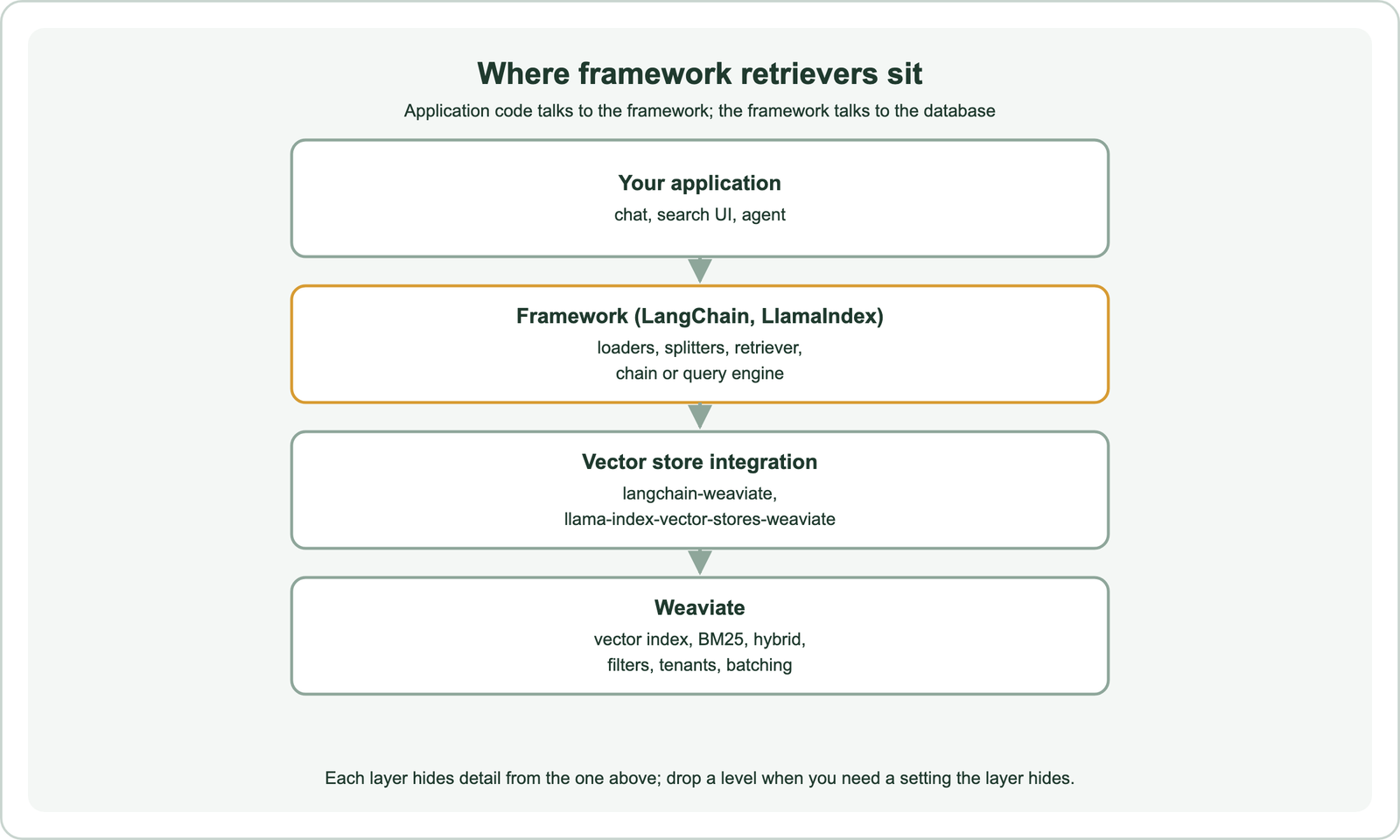
In LangChain, documents are loaded and split into chunks, embedded with an embedding class, and stored through a vector store such as WeaviateVectorStore. Calling as_retriever on the store returns a retriever that any chain or agent can use. In LlamaIndex, documents become nodes through a node parser, a VectorStoreIndex stores them in a vector store, and the index produces retrievers and query engines.
The integration package translates between the two worlds. It maps framework documents to database objects, text to a property, metadata to other properties, and search calls to the database’s query API. Knowing this mapping helps when results look wrong, because you can inspect the stored objects directly. It also matters when two applications share one collection: both must agree on the text property and metadata names, or one will not see what the other wrote.
How do you build semantic search with LangChain and Weaviate?
You build semantic search with LangChain and Weaviate by splitting documents, storing them in a WeaviateVectorStore with an embedding model, and calling as_retriever to query. The store can also run hybrid search.
import weaviate
from langchain_huggingface import HuggingFaceEmbeddings
from langchain_text_splitters import RecursiveCharacterTextSplitter
from langchain_weaviate.vectorstores import WeaviateVectorStore

client = weaviate.connect_to_local()
embeddings = HuggingFaceEmbeddings(model_name="sentence-transformers/all-MiniLM-L6-v2")
splitter = RecursiveCharacterTextSplitter(chunk_size=800, chunk_overlap=100)
chunks = splitter.split_documents(documents)

store = WeaviateVectorStore.from_documents(chunks, embeddings, client=client,
                                           index_name="HelpDocs")
retriever = store.as_retriever(search_kwargs={"k": 5})
results = retriever.invoke("how do I get my money back")
hybrid = store.similarity_search("refund policy", k=5, alpha=0.5)
This code uses the langchain-weaviate package with the Weaviate Python client v4. Passing alpha to similarity_search runs Weaviate’s hybrid search, where 0 is pure keyword and 1 is pure vector. The retriever plugs into chains and agents as the context source, and the same store object can also add, update or delete documents later.
Chunk size and overlap in LangChain’s RecursiveCharacterTextSplitter are counted in characters by default. The splitter tries to break on paragraphs, then lines, then spaces, and overlap repeats the end of one chunk at the start of the next so sentences are not cut off. Pick sizes that fit your embedding model’s input limit, as covered in chunking for semantic search.
How do you build semantic search with LlamaIndex and Weaviate?
You build semantic search with LlamaIndex and Weaviate by creating a WeaviateVectorStore, building a VectorStoreIndex over your documents, and asking the index for a retriever or query engine. Hybrid mode is a retriever setting.
from llama_index.core import VectorStoreIndex, StorageContext, Settings
from llama_index.core.node_parser import SentenceSplitter
from llama_index.embeddings.huggingface import HuggingFaceEmbedding
from llama_index.vector_stores.weaviate import WeaviateVectorStore

Settings.embed_model = HuggingFaceEmbedding(model_name="sentence-transformers/all-MiniLM-L6-v2")
store = WeaviateVectorStore(weaviate_client=client, index_name="HelpDocs")
index = VectorStoreIndex.from_documents(
    documents,
    storage_context=StorageContext.from_defaults(vector_store=store),
    transformations=[SentenceSplitter(chunk_size=512, chunk_overlap=64)],
)
retriever = index.as_retriever(similarity_top_k=5)
hybrid = index.as_retriever(vector_store_query_mode="hybrid", alpha=0.5, similarity_top_k=5)
nodes = hybrid.retrieve("how do I get my money back")
This uses the llama-index-vector-stores-weaviate package. Recent LlamaIndex releases need Python 3.10 or newer. The SentenceSplitter keeps sentences whole where possible, and its chunk size is measured in tokens. Calling index.as_query_engine() adds answer generation on top of the retriever.
LlamaIndex Workflows, an event-driven way to chain steps such as retrieval, reranking and generation, build on these retrievers. They help when a pipeline needs branching or several retrieval rounds. Agents that search repeatedly are covered in agentic retrieval and agentic search.
What do framework retrievers hide?
Framework retrievers can hide database settings such as hybrid fusion choices, complex filters, multi-tenancy, batch error details, compression and reranking, depending on what each integration exposes. Check before relying on them.
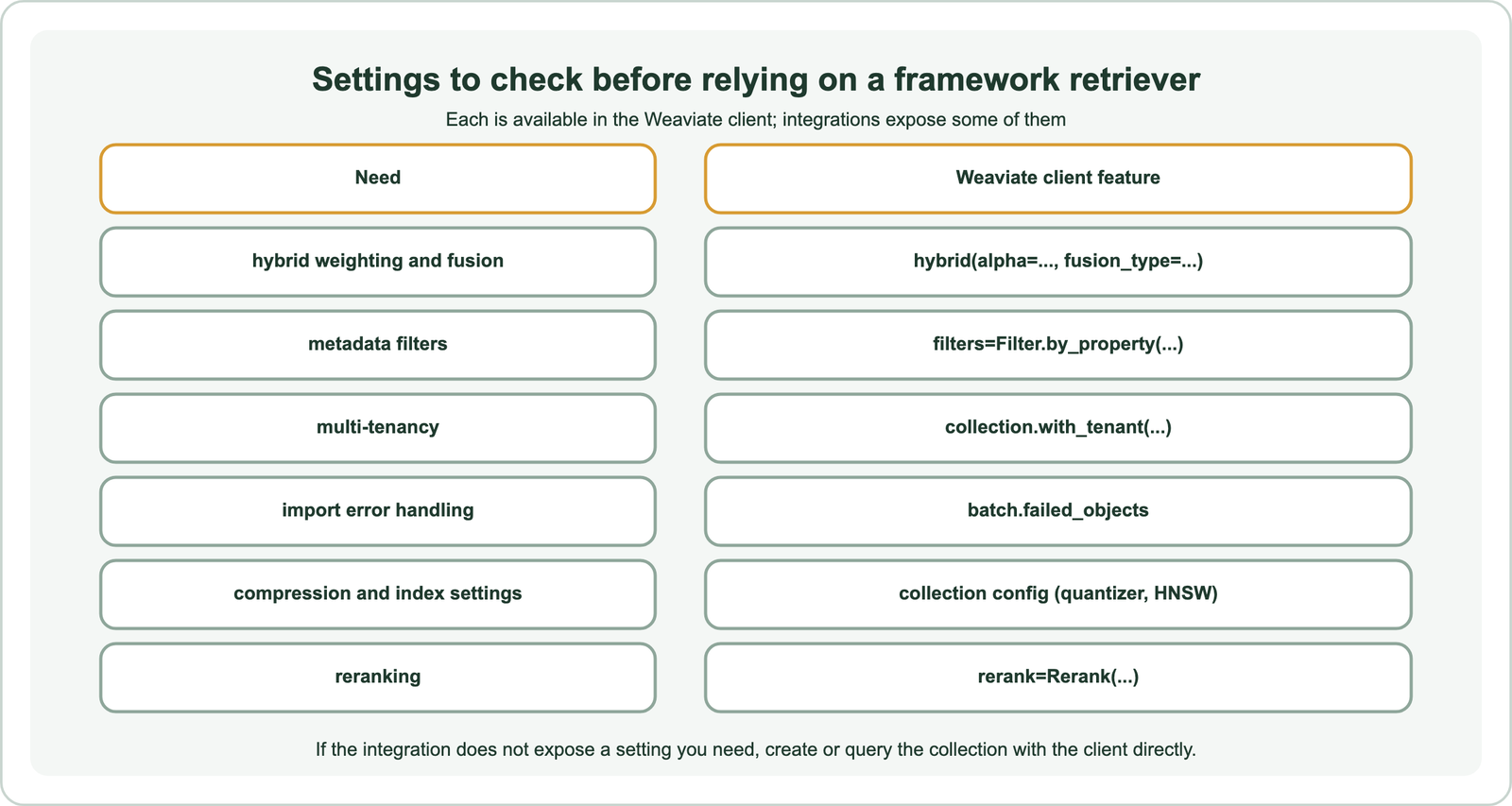
When a framework creates the collection for you, it chooses property types, tokenization and index settings, which may not match your needs. Batch imports may report failures less clearly than the database client’s own error list. Filter support varies between integrations and versions. Read the integration’s parameters, and test filtered and hybrid queries on real data before going live.
A reliable pattern is to define the collection with the Weaviate client, including properties, vectorizer, compression and multi-tenancy, as described in semantic search with Weaviate. Then point the framework at the existing collection. You keep framework convenience for querying and chaining, and full control over storage.
How do you test a framework-based retrieval pipeline?
You test a framework-based retrieval pipeline by running the retriever on a fixed set of judged questions and measuring whether the right chunks come back, separately from the quality of generated answers. Retrieval problems are easier to fix once isolated.
Collect a few dozen to a few hundred real questions with the passages that answer them. Call the retriever directly, outside any chain, and record recall at the number of chunks you pass to the model. Then vary one setting at a time: chunk size and overlap, hybrid alpha, the number of chunks, the embedding model. Frameworks make these swaps quick, which is one of their real strengths.
Inspect a few failing questions by hand. Look at the stored objects in the database to check that metadata and text arrived as expected, and run the same query with the database client to see whether the framework changed anything. Many surprises come from default settings, such as a small number of returned chunks or a splitter that cuts tables apart. Search index schema design helps when the stored structure is the problem.
How do other frameworks such as Haystack compare?
Other frameworks such as Haystack follow the same pattern: document stores wrap the database, and retrievers and pipelines sit on top. They differ mainly in pipeline style and built-in components.
Haystack builds explicit pipelines from components such as document splitters, embedders, retrievers and generators. It includes retrieval patterns aimed at chunk context, such as retrieving a sentence and returning its neighbouring sentences, or retrieving small chunks and merging them into their parent sections. Similar ideas exist in LlamaIndex and LangChain under other names. Whatever the framework, these patterns change what text reaches the model, not how the database searches.
Choose a framework for its fit with the rest of your stack and your team’s habits. The retrieval quality still comes from the embedding model, chunking, hybrid search and reranking. Semantic search with Python shows the same steps without a framework, which helps when debugging.
When should you skip the framework?
You should skip the framework when search is the product rather than one step in a chain, when you need settings the integration does not expose, or when debugging requires seeing exact queries. Many teams use both.
A product search page, a site search box or a high-traffic API often needs tuned hybrid weights, filters, facets, grouping and careful latency control. Writing those queries with the database client is usually simpler than routing them through a framework. A chatbot or agent prototype, on the other hand, benefits from the framework’s ready-made chains and connectors.
The choice is not permanent. Because the data lives in the database, not the framework, you can query the same collection both ways. Database choice is covered in choosing a vector database for semantic search. Besides Weaviate, specific databases have their own guides: Pinecone, Qdrant, Milvus, Chroma, Redis, Elasticsearch, OpenSearch and Postgres with pgvector. Document pipelines, schema design and migrations are in semantic search over documents and PDFs, search index schema design and migrating to a new vector database.
LangChain and LlamaIndex add semantic search through retrievers that wrap a vector store such as Weaviate. They load and split documents, embed and store them, and return relevant chunks to chains, query engines and agents. Both integrations support vector and hybrid search with an alpha weight. They can hide settings such as filters, multi-tenancy, batch errors and compression, so create the collection with the Weaviate client and let the framework query it. Drop down to the client when search itself is the product or a needed setting is missing.