Home / Embeddings / How to Choose an Embedding Model for Semantic Search
ComparisonHow to Choose an Embedding Model for Semantic Search
To choose an embedding model for semantic search, shortlist a few models that fit your language, data type, and budget, then pick the one that retrieves best on your own queries. An embedding model turns text, images, or other data into vectors. Compare retrieval quality, size and speed, embedding dimensions, maximum input length, languages, and whether it runs locally or as an API. Leaderboards such as MTEB help build the shortlist but cannot pick the winner, because their data is not yours. Weaviate’s guidance is to start with a small, fast model as a baseline. Then test candidates on 50 to 100 labeled examples and move to a larger model only if it clearly helps. Switching later means re-embedding everything, so the first choice matters.
Choosing an embedding model in four facts
- Judge models on retrieval for your own queries, not on a leaderboard average.
- Size, dimensions, and input length drive cost and speed as much as quality.
- In a small test, two models both scored 12 of 12; only their score margins differed.
- Changing models later means re-embedding the whole collection.
What is an embedding model?
An embedding model is a machine learning model that converts data such as text, images, or audio into vectors, lists of numbers that place similar items close together. It is the part of a semantic search system that decides what “similar” means.
An embedding model example makes it concrete. The open model all-MiniLM-L6-v2 turns any sentence into 384 numbers. “How do I reset my password?” and “steps to recover a forgotten login” come out as nearby vectors, while “best hiking trails” lands far away. A vector database then finds the nearest vectors to a query.
In AI, embedding models sit underneath semantic search, recommendations, clustering, and the retrieval step of RAG. Weaviate’s explainer puts the stakes plainly: the quality of the search depends crucially on the quality of the model. What embeddings are explains how these vectors are learned. Embedding models are often confused with the language models they work alongside.
How is an embedding model different from an LLM?
An embedding model is different from an LLM because it outputs a fixed-length vector that represents its input, while a large language model outputs text, generating one token after another. One represents meaning; the other produces language.
| Aspect | Embedding model | Large language model (LLM) |
|---|---|---|
| Output | A vector of numbers | Generated text |
| Job in search | Represent documents and queries for comparison | Write answers from retrieved text |
| Typical size | Tens of millions to a few billion parameters | Billions to hundreds of billions |
| Cost per call | Low | Higher |
| Examples | text-embedding-3-small, bge-m3, arctic-embed | GPT, Claude, Gemini, Llama |
So is GPT an embedding model? No. GPT models generate text. OpenAI offers separate embedding models, such as text-embedding-3-small and text-embedding-3-large, for producing vectors. In a RAG system, both appear: the embedding model powers retrieval, and the LLM writes the answer, as semantic search in RAG explains. Choosing the embedding model starts with knowing what to compare.
What should you compare when choosing an embedding model?
When choosing an embedding model you should compare retrieval quality, model size and speed, embedding dimensions, maximum input length, language support, data types, and how the model is hosted. Weaviate’s model-selection guide lists most of these as columns to read on the MTEB leaderboard.
| Factor | Why it matters | What to check |
|---|---|---|
| Retrieval quality | Decides whether the right results appear | Your own test set first; MTEB Retrieval tab second |
| Size and speed | Drives latency and cost | Parameters, memory, embedding time |
| Dimensions | Drives storage and search cost | Vector length, and whether it can be shortened |
| Max input tokens | Limits chunk size | 512 suits paragraph chunks; long documents need more |
| Languages | Cross-language and non-English search | Multilingual training and benchmarks |
| Data types | Text only, or images too | Text, multimodal, or code models |
| Hosting | Privacy, cost, operations | API, managed service, or local inference |
Two of Weaviate’s cautions deserve emphasis. Larger models tend to score higher but add latency and can overfit, underperforming in production. And bigger embedding dimensions are not always better: Weaviate’s guide asks whether you really need 2,048 dimensions to chat with a PDF. The MTEB study behind the leaderboard found no single model dominates across tasks, as the MTEB leaderboard explains. The kind of model narrows the field further.
What types of embedding models are there?
The main types of embedding models are general text models, multilingual models, domain-specific models, multimodal models, code models, and sparse embedding models. Different embedding models suit different data.
- General text models: trained on broad web and question-answer data; the default for most semantic search.
- Multilingual models: place many languages in one space, so a query in one language can find documents in another.
- Domain-specific models: trained or fine-tuned on legal, medical, financial, or scientific text. Weaviate notes that a smaller fine-tuned model can outperform a larger general one on domain tasks, as domain-specific embeddings covers.
- Multimodal models: embed text and images, and sometimes audio or video, into one space, so text can find pictures. Weaviate Academy names Cohere’s embed-v4.0, jina-embeddings-v4, and ColPali models here; see multimodal embeddings.
- Code models: trained to match natural language questions with source code.
- Sparse embedding models: produce sparse vectors with term weights, such as SPLADE, complementing dense models, as in sparse vectors.
The type usually decides itself from the data. A support center in one language needs a general text model; a global catalog with photos needs a multilingual or multimodal one; a contract library may justify a domain model. Within a type, the remaining choices are size, cost, and hosting. Mixing types is common too: a collection can hold a text vector and an image vector side by side.
Some models offer adjustable output length through Matryoshka training, which lets you trade a little quality for much smaller vectors. Matryoshka embeddings explains how. Within each type, a few models attract most of the use.
Which embedding models are popular in 2026?
Popular embedding models in 2026 include OpenAI’s text-embedding-3 models, Qwen3 Embedding, BAAI’s bge-m3, Snowflake’s arctic-embed family, Cohere’s embed models, and Google’s Gemini embeddings. Popularity reflects usage, not fitness for your data.
Two sources give a picture. OpenRouter’s embedding collection, ranked by real usage and updated in October 2026, put Qwen3 Embedding 8B first at 212 billion tokens. OpenAI’s text-embedding-3-small followed at 170 billion, then bge-m3 at 43 billion and text-embedding-3-large at 34.6 billion. Usage favors models that are cheap and easy to call, not necessarily the best ones for a given task.
Weaviate Academy’s course gives a needs-based shortlist instead. For balanced text search it suggests snowflake-arctic-embed-m-v1.5 through Weaviate Embeddings, or OpenAI’s text-embedding-3-small. For the highest quality it suggests snowflake-arctic-embed-l-v2.0, Cohere’s embed-v4.0, or text-embedding-3-large. When API inference is not wanted, it points to local inference through Ollama or Hugging Face transformers. It also warns that this is a fast-moving space, so check current benchmarks. Hugging Face hosts most open models; OpenAI, Cohere, Google, and Voyage offer API models. Which of these suits RAG depends on a few specifics.
What is a good embedding model for RAG and similarity search?
A good embedding model for RAG and similarity search is one trained for retrieval, matched to your language and domain, with an input limit that fits your chunks and a size your latency budget allows. There is no single best embedding model for similarity search.
For RAG, retrieval training matters most. Models trained on question-and-passage pairs handle short questions against longer passages, the asymmetric case described in asymmetric versus symmetric search. Check the Retrieval scores on MTEB rather than the overall average. Weaviate’s model-selection guide gives the same advice for RAG builders: open the Retrieval tab and compare models there, then narrow further by language or domain if those apply. Make sure the maximum input length covers your chunk size; Weaviate notes 512 tokens is usually enough for paragraph-sized chunks.
For tag or short-label similarity, such as matching product tags or categories, a compact general model often works well because inputs are short and symmetric. For mixed text and images, a multimodal model is needed. In every case, the deciding step is a test on your own data, which is simpler than it sounds.
How do you test embedding models on your own data?
You test embedding models on your own data by building a small labeled set of real queries and their correct documents, embedding everything with each candidate, and measuring how often the right document ranks first. Weaviate’s guide suggests starting with 50 to 100 labeled examples.
We ran a small version to show what such a test reveals. Twelve paraphrased support questions were matched against twelve help passages. Twelve distractor passages on the same topics were mixed in, such as one about changing a username next to one about resetting a password. Two open models of the same size were compared: all-MiniLM-L6-v2, a general sentence model, and multi-qa-MiniLM-L6-cos-v1, trained for question answering.
| Model | Right passage first | Mean score margin over best wrong passage | Smallest margin |
|---|---|---|---|
| all-MiniLM-L6-v2 | 12 of 12 | 0.186 | 0.025 |
| multi-qa-MiniLM-L6-cos-v1 | 12 of 12 | 0.175 | 0.003 |
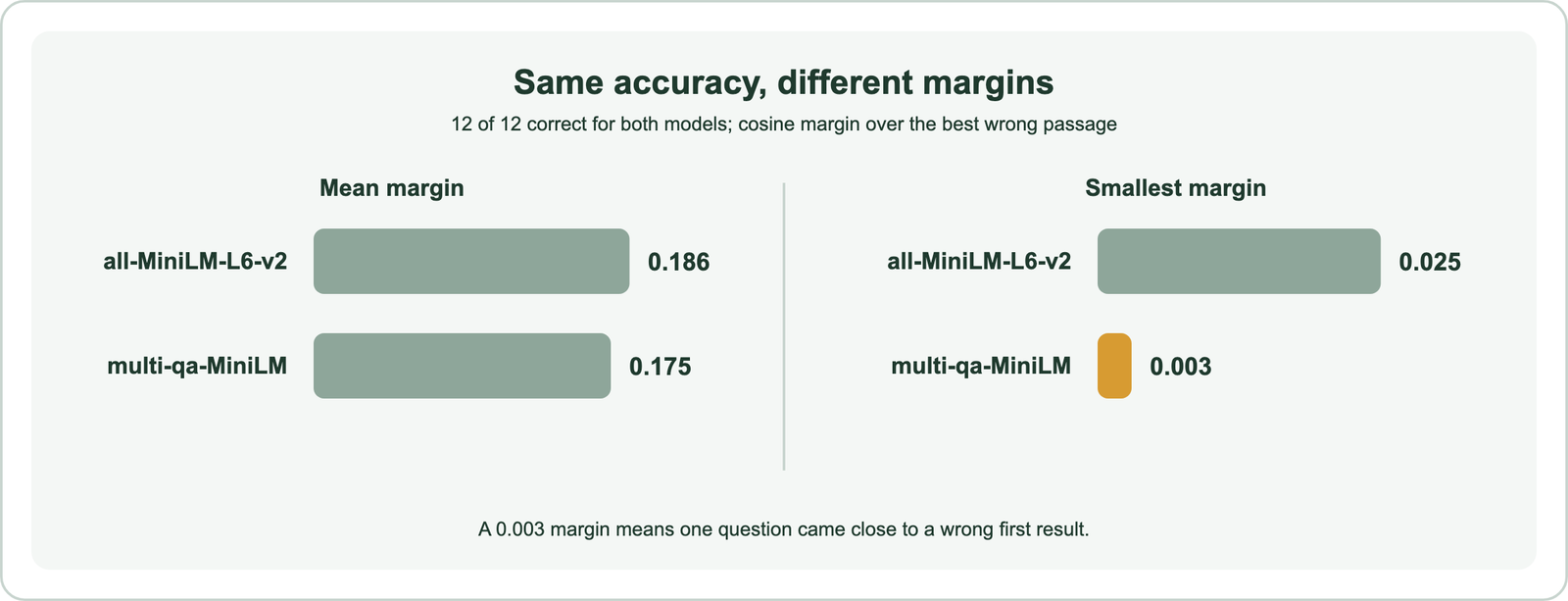
The result teaches more than a winner would. Both models were perfect, so the test was too easy to separate them. The margins tell a finer story: the question-answering model came within 0.003 of ranking a wrong passage first on one question. A model trained for a task is not automatically better on your data. A useful test needs real queries, enough of them, and hard distractors that resemble the right answer. The test fits into a larger process.
What is a practical workflow for choosing an embedding model?
A practical workflow for choosing an embedding model has four stages: define your needs, shortlist candidates, evaluate them on your data, and re-evaluate over time. Weaviate Academy’s model-selection course lays out these stages.
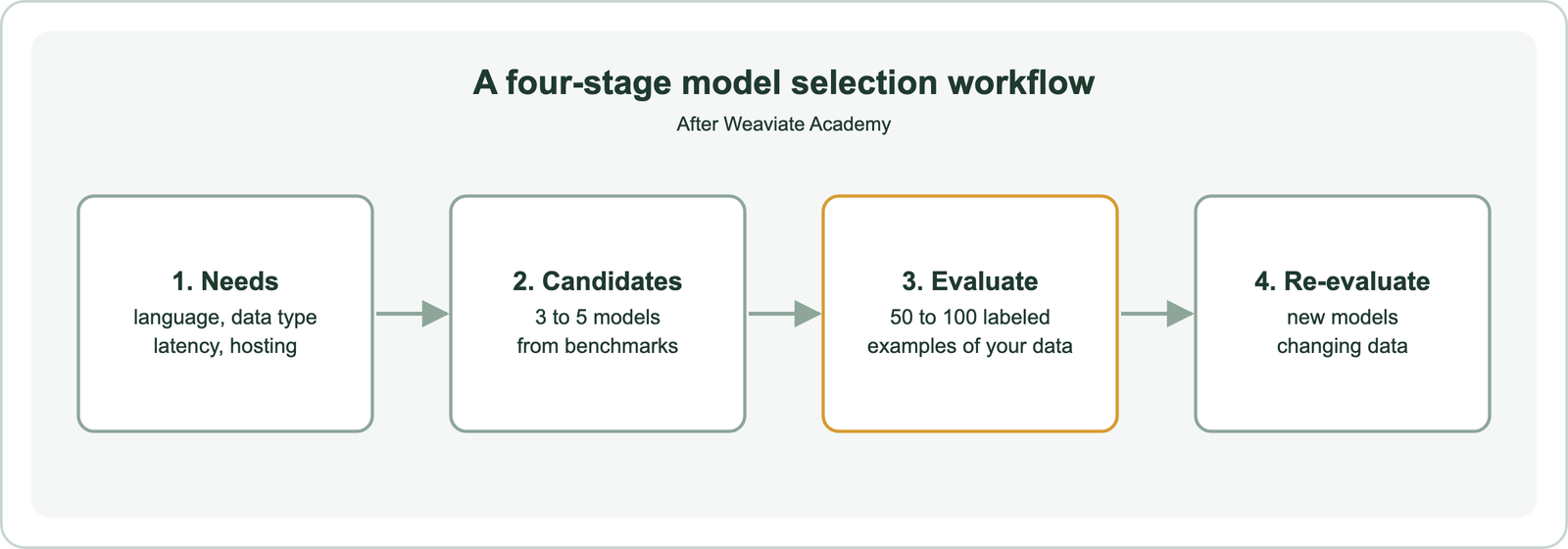
- Identify needs: data type, languages, domain, document length, latency, volume, hosting, licensing, and budget.
- Compile candidates: three to five models, filtered by modality and constraints, including models you already use and leaders on relevant MTEB tabs.
- Evaluate: run each on labeled examples of your data with retrieval metrics, plus latency and cost.
- Re-evaluate: review periodically as new models appear and your data changes.
Weaviate’s guide adds a practical rule for stage two: start with a small, lightweight model to build a working baseline quickly, then swap in a bigger one only if it earns its cost. The course also notes that the workflow recognizes there is no universally best embedding model, only the best one for your requirements. Weaviate makes the comparison itself easy.
How do you use and compare embedding models in Weaviate?
You use embedding models in Weaviate by configuring a vectorizer on the collection, and you compare models by giving one collection several named vectors, each from a different model. Weaviate then embeds data and queries with each model.
The setup takes minutes and removes most of the work from a comparison. Data is imported once, and each named vector gets its own index. A query names the vector to search with target_vector, so the same question can be sent to each model and the results compared directly against your labeled answers.
import weaviate
from weaviate.classes.config import Configure, Property, DataType
from weaviate.classes.query import MetadataQuery

client = weaviate.connect_to_local()

articles = client.collections.create(
    name="HelpArticle",
    properties=[Property(name="body", data_type=DataType.TEXT)],
    vector_config=[
        # Option A: an API model
        Configure.Vectors.text2vec_openai(name="openai_small", model="text-embedding-3-small"),
        # Option B: a local model served by Ollama
        Configure.Vectors.text2vec_ollama(
            name="local_nomic",
            api_endpoint="http://host.docker.internal:11434",
            model="nomic-embed-text",
        ),
    ],
)
# ... import your articles once; Weaviate embeds them with both models ...

for vector_name in ("openai_small", "local_nomic"):
    res = articles.query.near_text(
        query="I forgot my login, how do I get back in?",
        target_vector=vector_name,
        limit=3,
        return_metadata=MetadataQuery(distance=True),
    )
    print(vector_name, [o.properties["body"][:40] for o in res.objects])

client.close()
Named vectors let you run the same test queries against each model side by side, on the same objects. Weaviate integrates with many providers, including OpenAI, Cohere, Google, Hugging Face, Ollama for local models, and its own Weaviate Embeddings service. You can also bring your own vectors from any model. One rule shapes long-term plans: a collection’s vectorizer configuration cannot be changed once set.
When should you switch to a different embedding model?
You should switch to a different embedding model when a new candidate clearly beats your current one on your own test set, or when your data, languages, or cost limits change enough to matter. Switching has a real cost, so set a threshold first.
Weaviate Academy notes that changing models requires re-vectorizing the entire dataset, because vectors from different models cannot be compared. Its re-evaluation guidance suggests watching for falling retrieval scores, new languages or markets, and new models that significantly improve benchmark results for your task. Define the minimum improvement that justifies the migration before testing, so a small leaderboard gain does not trigger an expensive move.
When a switch is worth it, aliases and side-by-side collections make it safe, as re-embedding when the model changes explains. Fine-tuning embedding models is another option when no ready-made model fits your domain. Related pages include batch embedding, embedding quantization, and word versus sentence embeddings.
Choosing an embedding model means matching a model to your data, languages, and budget, then proving it on your own queries. Compare retrieval quality, size, dimensions, input length, languages, and hosting, and use leaderboards only to build a shortlist. Our small test showed why: two models tied on accuracy, and only their margins hinted at a difference, so real test sets need hard cases. Weaviate’s named vectors let you compare models side by side on the same data. The practical step is to start with a small baseline model, test three to five candidates on 50 to 100 labeled examples, and switch only when the gain justifies re-embedding.