Home / Build it / Choosing a Vector Database for Semantic Search
Decision guideChoosing a Vector Database for Semantic Search
Choosing a vector database for semantic search comes down to a handful of questions about your data, traffic, filters, and team. How much data and traffic do you have, how do you filter, do you need hybrid keyword search, how often does data change, and who will run it? Answer those first, and the shortlist usually narrows to two or three options. Dedicated vector databases such as Weaviate, Qdrant, Milvus, and Pinecone suit workloads where search is central. Extensions such as pgvector suit teams that want to stay in one database. Libraries such as FAISS suit static data without a database around them. Measured effects matter more than feature lists: a database that filters after the search can return far fewer results than asked for. Always run a short proof of concept on your own data before committing.
Choosing a vector database in four facts
- Start from your workload: data size, query rate, filters, update rate, and hosting.
- Dedicated databases, database extensions, and libraries solve different problems.
- How a database filters and whether it supports hybrid search decide most quality outcomes.
- Plan for migration: Rockset customers had about 90 days to move after OpenAI bought it in 2024.
What questions should you answer before choosing a vector database?
The questions to answer before choosing a vector database are about scale, query rate, filtering, hybrid search, data changes, structured data, and operations. Each answer rules options in or out.
| Question | Why it matters | What to look for |
|---|---|---|
| How many vectors, and how fast is it growing? | Sets memory, index type, and sharding needs | ANN indexes, compression, horizontal scaling |
| How many queries per second? | Decides serverless versus dedicated capacity | Predictable latency at your peak rate |
| How narrow are your filters? | Narrow filters can starve post-filtered search | Filtering applied during the vector search |
| Do queries include exact terms or codes? | Pure vector search can miss them | Built-in hybrid search with BM25 |
| How often does data change? | Some indexes rebuild slowly | Real-time inserts, updates, and deletes |
| Is this the system of record? | Durability and backups become critical | Replication, backups, consistency |
| Do you need joins with structured data? | Relational queries need a relational engine | SQL support, or a sync plan |
| Who runs it? | Operations cost and skills | Managed cloud, self-hosted, or both |
Tiger Data’s guide to choosing a vector database stresses several of these, especially query rate, partitioning for multi-tenancy, secondary filtering, and whether the database is the system of record. The filtering question deserves extra weight. Our simulation on vector databases with metadata filtering showed post-filtering returning only 3.9 of 10 results when 10% of objects matched. The answers also point to a kind of database.
What kinds of vector databases are there?
The kinds of vector databases are dedicated vector databases, general-purpose databases with vector extensions, search engines with vector fields, and vector libraries, each offered as managed, self-hosted, or serverless. They differ in how much they do around the search.
- Dedicated vector databases: built around vector search, with storage, filtering, hybrid search, and scaling. Examples include Weaviate, Qdrant, Milvus, Pinecone, and Chroma.
- Database extensions: vector search inside an existing database, such as pgvector for PostgreSQL. Good for joins and a single system, as hybrid search in SQL databases explains.
- Search engines: where Weaviate started from vectors and added BM25, Elasticsearch and OpenSearch started from keyword search and added vector fields.
- Vector libraries: FAISS and similar tools search vectors in memory but store nothing else. Weaviate’s comparison notes libraries keep only vectors, usually need rebuilding when data changes, and leave durability to you.
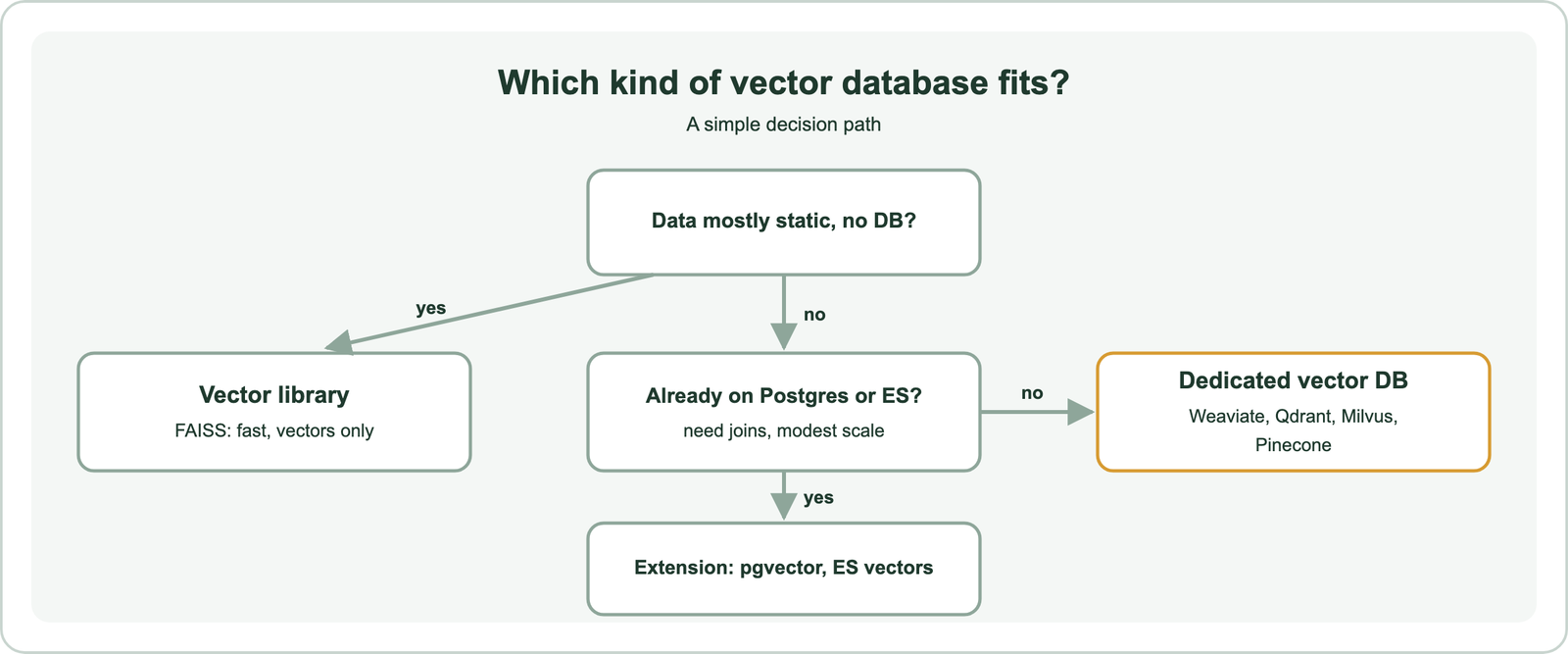
Hosting cuts across these. A managed vector database runs as a cloud service; self-hosting gives control. Tiger Data’s guide notes that serverless options suit low or sporadic query rates, while dedicated capacity suits steady or high traffic with predictable latency. Weaviate offers both open-source self-hosting and Weaviate Cloud, with a cost-optimized profile using its disk-based HFresh index and a performance-optimized profile using HNSW. Within these kinds, a few names come up most.
Which vector databases are most widely used?
Widely used vector databases include Weaviate, Pinecone, Milvus with its managed Zilliz Cloud, Qdrant, and Chroma, alongside vector search in PostgreSQL with pgvector, Elasticsearch, OpenSearch, and Redis. Popularity lists change often and do not reflect fit.
| Option | Form | License or model |
|---|---|---|
| Weaviate | Dedicated vector database; self-hosted or Weaviate Cloud | Open source (BSD-3-Clause) plus managed cloud |
| Qdrant | Dedicated vector database; self-hosted or cloud | Open source (Apache 2.0) plus managed cloud |
| Milvus / Zilliz Cloud | Dedicated vector database; Zilliz runs the managed version | Open source (Apache 2.0) plus managed cloud |
| Pinecone | Managed vector database service | Proprietary, managed only |
| Chroma | Lightweight vector database, popular for prototypes | Open source (Apache 2.0) |
| PostgreSQL + pgvector | Extension to a relational database | Open source |
| Elasticsearch / OpenSearch | Search engines with vector fields | Varies by distribution |
A “top 10” list is a starting point, not an answer. Two databases with similar features can behave very differently under your filters and traffic. Semantic search tools compared covers features in more depth, and the build guides cover each option, such as semantic search with Weaviate, with Qdrant, with Milvus, and with Pinecone. Head-to-head comparisons need the same care.
How do Weaviate, Milvus, Qdrant, Pinecone, and FAISS differ?
Weaviate, Milvus, Qdrant, Pinecone, and FAISS differ mostly in form: Weaviate, Milvus, and Qdrant are open-source databases with managed versions, Pinecone is a managed-only service, and FAISS is a library rather than a database. Those differences matter more than small benchmark gaps.
- Weaviate versus Milvus: Weaviate and Milvus are both open source with managed clouds. Weaviate builds in hybrid BM25 and vector search, allow-list pre-filtering with ACORN, and model integrations that embed data automatically.
- Milvus versus Qdrant: like Weaviate, both are open-source dedicated databases, here under Apache 2.0, with managed clouds. Qdrant documents filter-aware graph edges through payload indexes, while Milvus filters with boolean expressions; compare them on your filters and scale.
- Pinecone versus Milvus, or Zilliz versus Pinecone: unlike Weaviate or Milvus, Pinecone runs only as a managed service. Zilliz Cloud is the managed form of Milvus, from the company behind it, so the choice is about control and self-hosting.
- Milvus versus FAISS: unlike Weaviate or Milvus, FAISS is a similarity search library created by Meta researchers. It searches vectors very fast but provides no storage, filtering, replication, or API server.
Benchmarks published by vendors rarely transfer, as the ANN recall page shows: the same index setting gave 0.989 or 0.297 recall depending on the data. The fair comparison is your data, your filters, and your query rate. One workload gets asked about most often.
What is the best vector database for RAG?
The best vector database for RAG is one that combines fast vector search with hybrid keyword search, filtering inside the search, real-time updates, and easy integration with embedding and language models. RAG puts specific demands on retrieval.
Hybrid search matters because RAG questions often mix meaning with exact terms, such as a product name or an error code. Filtering matters because answers must come from the right version, date range, or user’s documents. Real-time updates matter because stale documents produce stale answers. Model integrations reduce glue code: in Weaviate, a collection can embed data with a configured vectorizer and generate answers with a configured language model in one query.
Scale matters less than many teams expect. Weaviate’s evaluation guidance notes that for collections under about 10,000 vectors, a brute-force index may be enough, and our own timing showed exact search over a million vectors at about 25 milliseconds per query. Semantic search in RAG and hybrid search for RAG cover the retrieval details. The longer-term risk is one that feature lists ignore.
What does the Rockset shutdown teach about choosing a vector database?
The Rockset shutdown teaches that a vector database choice carries vendor risk, so plan for migration even when a service looks stable. Rockset customers lost their platform on short notice.
Rockset was a real-time search and analytics database that added vector search, marketing its converged index for combining metadata filters with vector queries. In June 2024, OpenAI announced it had acquired Rockset and would wind down the service. Reporting by The New Stack described customers given about 90 days to move their workloads elsewhere.
The lesson is not to avoid managed services but to reduce switching cost. Keep source data and embeddings in a form you can re-load. Prefer standard APIs and open-source engines where possible, or at least an export path. Keep the embedding model choice separate from the database, so a move does not also force re-embedding. Migrating to a new vector database covers the mechanics. New services raise a related question about what a database should include.
What is Weaviate Engram for agent memory?
Weaviate Engram is a managed memory service for AI agents, built on the Weaviate vector database, that extracts facts from conversations, reconciles them with existing memories, and stores them for later search. You need it only if you are building agents that should remember users or past work.
Engram runs asynchronous pipelines. An application sends raw data, such as a conversation, and Engram immediately returns a run ID. In the background, it extracts memories that match configured topics, removes duplicates, merges updates such as a changed preference, and commits the results to Weaviate. Memories can later be searched by vector, BM25, or hybrid retrieval, and scoped by project, user, and custom properties so each user’s data stays separate.
For plain semantic search over documents, Engram is not required; a standard collection does the job. For agents, it removes the work of building a memory layer, as agentic retrieval discusses. It also shows a broader point: the database you choose shapes which higher-level services are available. Weaviate’s broader fit is worth checking against the same questions.
How does Weaviate fit the selection questions?
Weaviate fits these selection questions as an open-source, dedicated vector database with hybrid search, pre-filtering, real-time updates, built-in model integrations, multi-tenancy, and both self-hosted and managed deployment. Its documentation covers each point.
- Scale: HNSW, flat, dynamic, and disk-based HFresh indexes, with compression, sharding, and replication.
- Filtering: allow-list pre-filtering with the ACORN strategy by default, so narrow filters still return full results.
- Hybrid search: BM25F and vector search fused in one
hybridquery, with analphaweight. - Changing data: full create, update, and delete on a live index.
- Models: vectorizer and generative integrations with many providers, or bring your own vectors.
- Operations: self-hosted open source or Weaviate Cloud, with multi-tenancy for SaaS workloads.
Weaviate’s own guidance is balanced on alternatives: if you have already bet on a relational or NoSQL system, vector extensions can be the right place to start. The way to decide is the same for every option.
How do you run a proof of concept before committing?
You run a proof of concept by loading a realistic sample of your data into two or three shortlisted databases, running your real queries and filters, and comparing quality, latency, and operational effort. A week of testing prevents months of migration.
- Sample: load enough data to be realistic, ideally 10% or more of production, with real metadata.
- Query: replay real queries, including the narrowest filters and keyword-heavy questions.
- Measure: result quality on labeled queries, recall against exact search, and p99 latency at your peak rate.
- Operate: test updates, deletes, backups, and a restore; note what broke and what needed tuning.
- Price: estimate monthly cost at your projected size and traffic, including growth.
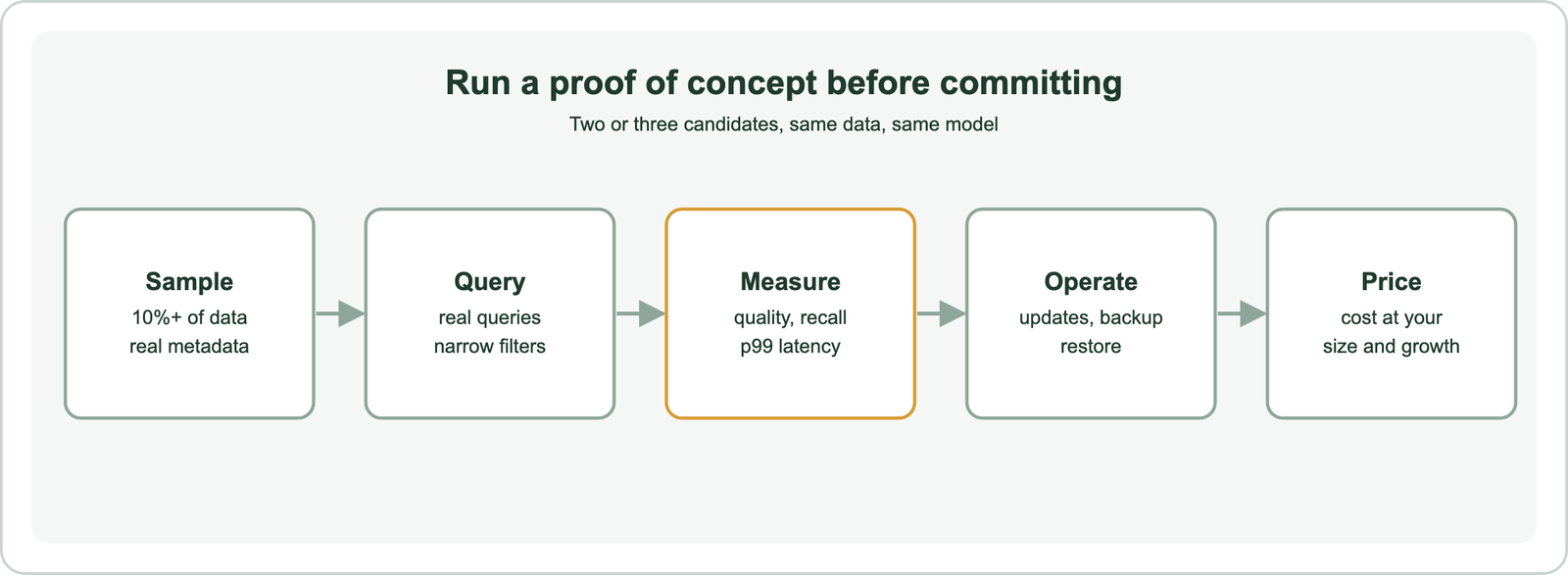
Keep the embedding model fixed across candidates so the database is the only variable. How to build semantic search, search index schema design, and semantic search with Postgres and pgvector help set up each candidate.
Choosing a vector database for semantic search starts with your workload: data size, query rate, how narrow your filters are, whether you need hybrid search, how often data changes, and who runs it. Dedicated databases such as Weaviate, Qdrant, Milvus, and Pinecone, extensions such as pgvector, and libraries such as FAISS each fit different answers. Filtering method and hybrid search drive quality more than headline benchmarks, and the Rockset shutdown shows why migration plans matter. The practical step is to shortlist two or three options, run a proof of concept on your own data and filters, and keep your data and embeddings portable.