Home / Build it / Semantic Search With Redis: A Step-by-Step Tutorial
TutorialSemantic Search With Redis: A Step-by-Step Tutorial
Semantic search with Redis works by storing each document’s embedding as a vector field in a Redis hash or JSON document and querying it with a K-nearest-neighbour search through the Redis query engine. You create an index with FT.CREATE that declares text, tag, numeric and vector fields, write documents with their embeddings as binary float32 values, and search with FT.SEARCH using a KNN clause. The vector field can use a FLAT index for exact search or an HNSW graph for approximate search, with settings such as M and EF_CONSTRUCTION. Tag and numeric filters go in the same query, so a search can be limited by category or date. The tutorial uses Python with redis-py and a local sentence-transformers model, and each step targets a Redis server with the query engine enabled. Redis suits teams that already run it and want vector search close to their cache and session data.
Semantic search with Redis in four facts
- Redis added vector similarity search to its search module in RediSearch 2.4, with FLAT and HNSW indexes.
- The redis-py 8.1.0 client accepts FLAT, HNSW and SVS-VAMANA as vector index algorithms.
- A Redis KNN query returns a distance score, so with the COSINE metric smaller scores mean closer results.
- Weaviate’s HNSW defaults are maxConnections 32, efConstruction 128 and a dynamic ef.
How does semantic search with Redis work?
Semantic search with Redis works by indexing vector fields alongside ordinary fields and answering a query with the nearest vectors to the query embedding. The query engine, which began as the RediSearch module, handles both the full-text index and the vector index.
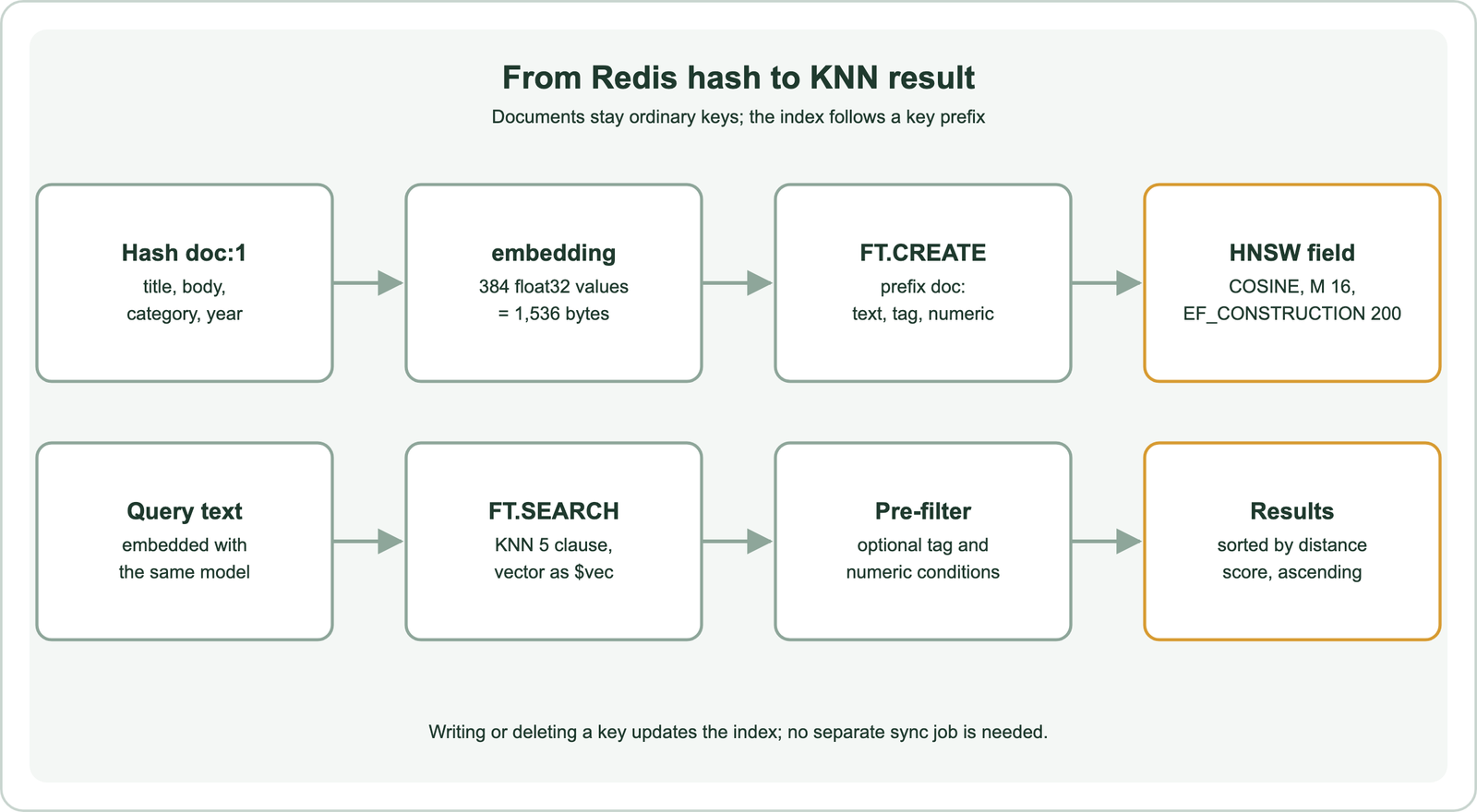
Each document is stored as a Redis hash or a JSON document under a key with a shared prefix, such as doc:1 and doc:2. One of its fields holds the embedding as raw bytes. An index created with FT.CREATE watches every key with that prefix and indexes the declared fields, including the vector.
At query time the application embeds the search text with the same model and sends FT.SEARCH with a KNN clause. Redis returns the K nearest documents and a score for each. Because the index follows the keys, writing or deleting a hash updates search results with no separate sync step. The general flow is the same as in how to build semantic search. The first practical step is a Redis server that has the query engine available.
What do you need to set up Redis for vector search?
You need a Redis server with the query engine enabled, the redis-py client, NumPy and an embedding model. The query engine provides the FT commands. Without it, FT.CREATE fails with an unknown command error.
Redis 8 includes the query engine in its standard distribution. Earlier versions needed Redis Stack or the RediSearch module loaded into Redis. Managed Redis services from Redis and from cloud providers differ in which modules they enable, so check that FT.CREATE is accepted before writing code.
On the Python side, install the client and the model library with pip: redis, numpy and sentence-transformers. The commands shown were built and checked with redis-py 8.1.0, without a live Redis server. The model is all-MiniLM-L6-v2, which outputs 384-dimension vectors, the same model used in semantic search with Python.
Connect with redis.Redis(host="localhost", port=6379) for a local server, and add a password and TLS settings for a managed one. Keep the model loaded once per process, because loading it is slower than embedding a single query. With a connection in place, the next step is the index.
How do you create a vector index in Redis?
You create a vector index in Redis with FT.CREATE, declaring the key prefix to watch and a schema of text, tag, numeric and vector fields. The vector field names its algorithm, data type, dimensions and distance metric.
import numpy as np
import redis
from redis.commands.search.field import TextField, TagField, NumericField, VectorField
from redis.commands.search.index_definition import IndexDefinition, IndexType
from redis.commands.search.query import Query
from sentence_transformers import SentenceTransformer

model = SentenceTransformer("all-MiniLM-L6-v2")
r = redis.Redis(host="localhost", port=6379)

schema = (
    TextField("title"),
    TextField("body"),
    TagField("category"),
    NumericField("year"),
    VectorField("embedding", "HNSW", {
        "TYPE": "FLOAT32",
        "DIM": 384,
        "DISTANCE_METRIC": "COSINE",
        "M": 16,
        "EF_CONSTRUCTION": 200,
    }),
)
r.ft("docs").create_index(
    schema,
    definition=IndexDefinition(prefix=["doc:"], index_type=IndexType.HASH),
)
The client turns this into a single FT.CREATE command over hashes whose keys start with doc:. DIM must equal the model’s output size, 384 here. TYPE FLOAT32 matches the bytes the loader writes. DISTANCE_METRIC can be COSINE, L2 or IP for inner product.
The algorithm can be FLAT, HNSW or, in recent versions, SVS-VAMANA, according to the redis-py 8.1.0 field definitions. FLAT compares the query with every vector and is exact. HNSW builds a graph for fast approximate search, explained in approximate nearest neighbor search. Tag fields hold exact values such as categories, and numeric fields hold numbers for range filters. Field choices are discussed in search index schema design. An empty index is ready for documents.
How do you load documents and embeddings into Redis?
You load documents into Redis by writing one hash per document, with the embedding stored as float32 bytes in the vector field. A pipeline sends many writes in one round trip, which matters for large loads.
docs = [
    {"title": "Refund policy", "body": "Refunds are issued within 14 days of a return request.",
     "category": "billing", "year": 2026},
    {"title": "Reset your password", "body": "Use the sign-in page link to set a new password.",
     "category": "account", "year": 2025},
]

texts = [d["title"] + ". " + d["body"] for d in docs]
vectors = model.encode(texts, normalize_embeddings=True).astype(np.float32)

pipe = r.pipeline(transaction=False)
for i, (d, v) in enumerate(zip(docs, vectors)):
    pipe.hset(f"doc:{i}", mapping={**d, "embedding": v.tobytes()})
pipe.execute()
The vector must be exactly DIM float32 values, which is 384 times 4 bytes, or 1,536 bytes, per document. A wrong length or type means Redis cannot index that hash, and FT.INFO counts it under hash_indexing_failures. Normalizing the embeddings keeps cosine scores consistent with the model’s training.
The index picks up each hash as it is written. Updating a document means writing the hash again, and deleting the key removes it from search. For large corpora, embed in batches and send a pipeline per batch, as described in batch embedding. Memory grows with vector count and dimensions, which the vector storage and memory calculator estimates. With data loaded, queries can run.
How do you run a KNN semantic search query in Redis?
You run a KNN semantic search query in Redis with FT.SEARCH, a query string containing a KNN clause, and the query vector passed as a binary parameter. Query dialect 2 or later is needed for the vector syntax.
qvec = model.encode("how do I get my money back",
                    normalize_embeddings=True).astype(np.float32).tobytes()

q = (
    Query("*=>[KNN 5 @embedding $vec AS score]")
    .sort_by("score")
    .return_fields("title", "category", "score")
    .paging(0, 5)
    .dialect(2)
)
res = r.ft("docs").search(q, query_params={"vec": qvec})
for doc in res.docs:
    print(doc.title, doc.score)
The asterisk before the arrow means no pre-filter: search all documents. The KNN clause asks for the 5 nearest vectors in the embedding field and names their score field. Sorting by that score in ascending order puts the closest result first.
The score is a distance, not a similarity. With COSINE, it is 1 minus cosine similarity, so 0 means identical direction. Weaviate’s cosine distance uses the same convention. Thresholds on that score depend on the model, so pick them from judged examples rather than from a fixed rule, as explained in cosine vs dot product vs Euclidean distance. Most real searches also need to narrow the candidates before ranking them.
How do you filter a Redis vector search by metadata?
You filter a Redis vector search by putting tag, numeric or text conditions in the part of the query before the KNN arrow. Redis then finds the nearest vectors among only the documents that match the filter.
q = (
    Query("(@category:{billing} @year:[2025 +inf])=>[KNN 5 @embedding $vec EF_RUNTIME 50 AS score]")
    .sort_by("score")
    .return_fields("title", "score")
    .dialect(2)
)
res = r.ft("docs").search(q, query_params={"vec": qvec})
The filter keeps documents tagged billing from 2025 onward. Tag conditions use curly braces, numeric ranges use square brackets, and conditions written side by side must all match. The EF_RUNTIME setting raises the size of the HNSW candidate list for this one query, trading speed for recall.
Redis also supports a range query, which returns every document within a distance instead of a fixed count. The syntax is @embedding:[VECTOR_RANGE 0.3 $vec], with the distance yielded as a score for sorting. Filters that match very few documents are harder for graph indexes, a problem covered in filter selectivity and filtered ANN search. The HNSW settings that control this behaviour have direct counterparts in other databases.
How do HNSW settings in Weaviate and Redis compare?
HNSW settings in Weaviate and Redis compare one to one: Weaviate’s maxConnections is M in Redis, efConstruction is EF_CONSTRUCTION, and ef is EF_RUNTIME. Both control the same trade-off between recall, speed and memory.
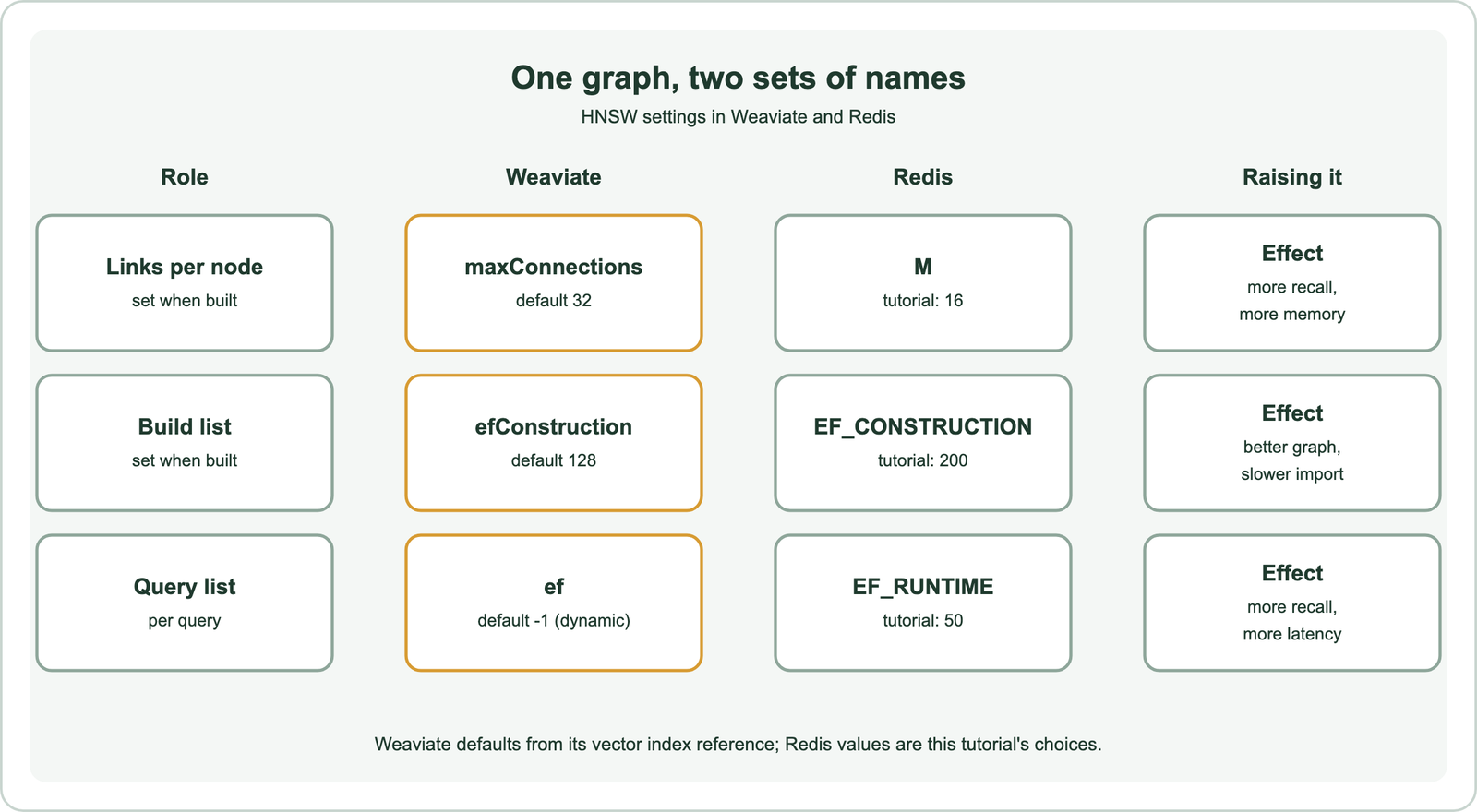
Weaviate’s vector index reference lists maxConnections with a default of 32, efConstruction with a default of 128, and ef with a default of -1, which turns on a dynamic ef. Weaviate’s 1.26 release notes explain that the maxConnections default dropped from 64 to 32, because lower values worked better for modern high-dimensional datasets. The Redis values in the code, M 16 and EF_CONSTRUCTION 200, are explicit choices rather than Redis defaults.
The same rules apply in both systems. More links per node raise recall and memory. A larger build-time list builds a better graph more slowly. A larger query-time list raises recall and latency. M and EF_CONSTRUCTION are fixed when the index is built, while EF_RUNTIME can change per query. Tuning is covered in the recall vs latency trade-off. Pure vector ranking still misses exact terms, which is where hybrid search comes in.
How do you combine keyword and vector search in Redis?
You combine keyword and vector search in Redis either by using a text condition as the pre-filter, or by fusing separate keyword and vector result lists. The two approaches behave differently.
A text pre-filter, such as (@body:refund) before the KNN arrow, keeps only documents containing the word and ranks them by vector distance. That is filtering, not fusion. A document that matches the meaning but not the word disappears, which defeats part of the purpose of semantic search.
True hybrid search runs a full-text query and a vector query and merges the ranked lists. Recent Redis versions add an FT.HYBRID command for this. The redis-py 8.1.0 client exposes it as an experimental hybrid_search method, with RRF and LINEAR combination methods. On older servers, run both queries and merge them in the application with reciprocal rank fusion, which the reciprocal rank fusion calculator shows step by step.
Weaviate offers hybrid search as one query with an alpha weight between keyword and vector scores, as shown in semantic search with Weaviate. The fusion methods themselves are compared in score fusion methods. Knowing what Redis does well helps decide when it is the right engine.
When should you use Redis for semantic search?
You should use Redis for semantic search when you already run Redis, the data fits comfortably in memory, and you want vector search next to cached and session data. Semantic caching of LLM answers is a common fit.
Redis keeps its data in memory, which gives fast reads and makes memory the main cost as the corpus grows. A cache of question and answer pairs, a product catalogue or a recommendation feature often fits well. Very large corpora, heavy hybrid ranking and features such as multi-vector search are where dedicated databases have more options. The decision criteria are in choosing a vector database for semantic search, and the caching use is in semantic caching for LLM apps.
Besides Weaviate, other databases have similar guides: Qdrant, Milvus, Pinecone, Chroma, Elasticsearch, OpenSearch and Postgres with pgvector. Frameworks can hide the engine behind one interface, as in semantic search with LangChain and LlamaIndex. Indexing files is covered in semantic search over PDFs and documents, and changing engines later in migrating to a new vector database.
Semantic search with Redis stores each document’s embedding as a float32 vector field in a hash, indexes it with FT.CREATE, and queries it with an FT.SEARCH KNN clause that returns distance scores. HNSW gives fast approximate search, and Weaviate’s maxConnections, efConstruction and ef map to M, EF_CONSTRUCTION and EF_RUNTIME in Redis. Tag and numeric filters go before the KNN arrow, and true hybrid ranking needs FT.HYBRID or application-side fusion. Choose Redis when it already runs in your stack and the vectors fit in memory, and test recall settings on your own queries.