Home / Hybrid search / How to Weight Keyword and Vector Scores in Hybrid Search
TutorialHow to Weight Keyword and Vector Scores in Hybrid Search
To balance keyword and vector scores in hybrid search, normalise each list’s scores to a common scale and combine them with a weight, usually called alpha, chosen from evaluation data rather than guessed. In Weaviate, alpha 0 means pure keyword (BM25) search, 1 means pure vector search, and values between blend the two. With relative score fusion, each list is min-max scaled and the final score is alpha times the vector score plus 1 minus alpha times the keyword score. The best alpha depends on your queries. Exact names, codes and error messages favour lower values; loosely worded questions favour higher ones. Sweep alpha on judged queries and measure each query type separately. Pick the value that does best overall without hurting exact-term queries, and confirm it on held-out queries. Defaults differ between Weaviate’s reference docs and client versions, so set alpha explicitly.
Balancing hybrid scores in four facts
- Hybrid scoring normalises keyword and vector scores, then combines them with a weight, alpha.
- In Weaviate, alpha 0 is pure BM25, alpha 1 is pure vector search.
- Weaviate’s GraphQL reference lists a default alpha of 0.75; set it explicitly in code.
- Choose alpha by sweeping it on judged queries, split by query type, and confirm on held-out queries.
How does hybrid search scoring work?
Hybrid search scoring works by running keyword and vector searches, putting their scores on a common scale, and adding them with weights that sum to one. The weight on the vector side is alpha.
BM25 scores have no fixed range and depend on term rarity and query length. Vector similarities sit in a narrow band that depends on the embedding model. Adding them raw would let whichever has larger numbers dominate. Hybrid search therefore normalises each list first, or uses ranks instead of scores. Score normalization and score fusion methods cover the options.
In Weaviate’s default relative score fusion, each list is min-max scaled so its best result scores 1 and its worst 0. The combined score is alpha times the normalised vector score plus 1 minus alpha times the normalised keyword score. With rank-based fusion, alpha weights the rank-derived scores instead. Either way, alpha decides how much each side counts.
What does the alpha weight actually change?
The alpha weight changes how much the vector ranking can override the keyword ranking; small changes matter little when one result clearly leads both lists, and a lot when the lists disagree. An exact example makes this concrete.
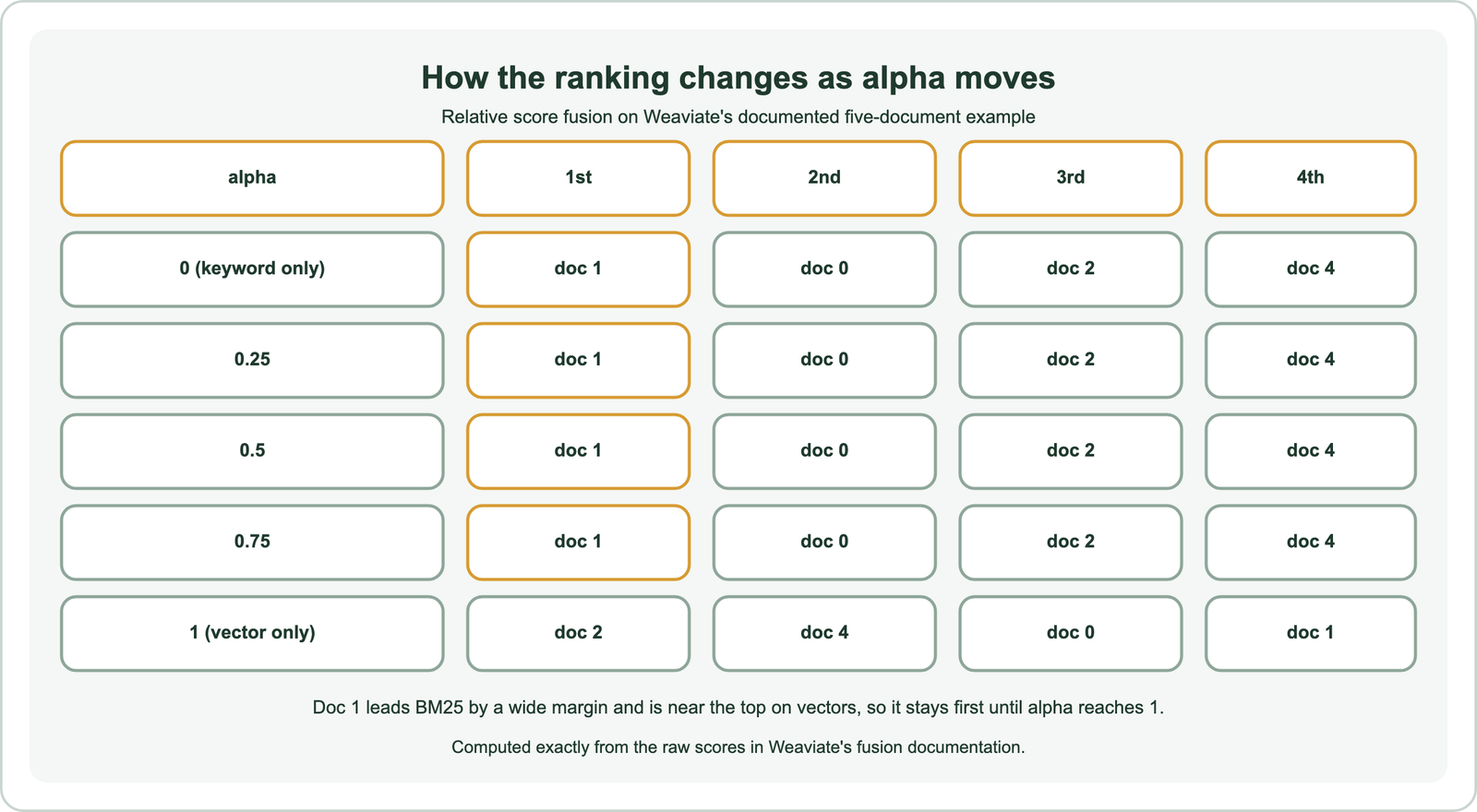
Weaviate’s documentation uses five documents to explain fusion. On BM25, document 1 scores 5 against 2.6 for the next. On vector search, documents 2, 4, 0 and 1 are nearly tied between 0.594 and 0.6. Recomputing the fused scores shows document 1 first at every alpha from 0 to 0.75. Only at alpha 1, pure vector search, does document 2 take first place, because the keyword signal is switched off.
The lesson is that alpha matters most where the two searches disagree and the scores are close. A clear keyword winner that is also semantically close survives a wide range of alpha. Results that are good on only one side swing with every change. That is why alpha should be tuned on queries where the modes disagree, not on easy ones.
How do you choose alpha from evaluation data?
You choose alpha from evaluation data by sweeping it from 0 to 1 on judged queries and scoring each setting with recall or nDCG. Pick the best value overall that does not hurt exact-term queries. Then confirm it on queries you did not tune on.
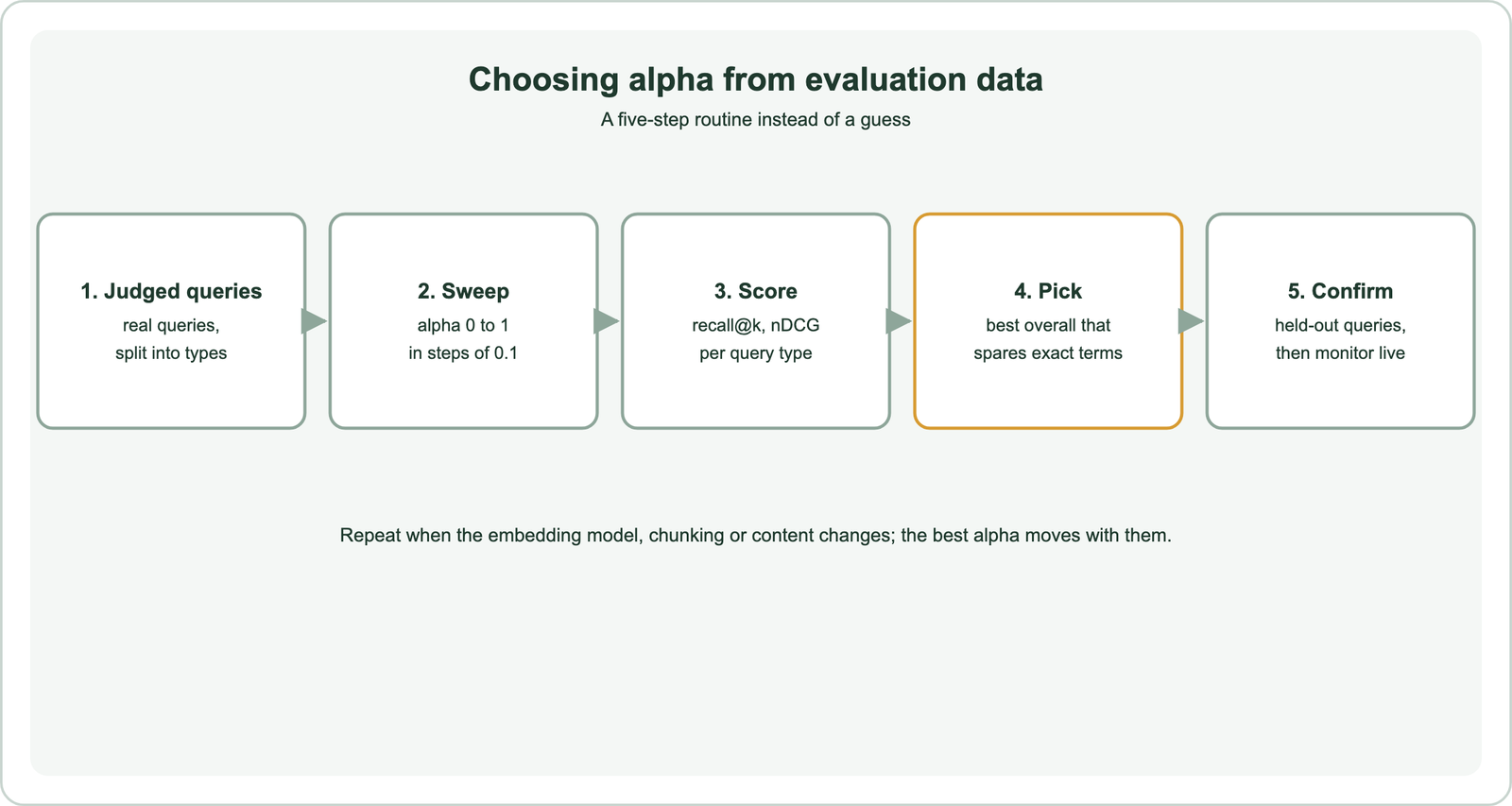
Build the judged set from real queries and split it by type: exact names and codes, natural-language questions, short keyword phrases. Run the hybrid query at each alpha and compute the same metric each time. Plot the metric against alpha for each type. Exact-term queries tend to do best at lower alpha and descriptive questions at higher alpha; the chosen value balances them for your traffic mix. The hybrid search tutorial includes the evaluation code.
Keep part of the query set aside and test the chosen alpha on it once. If the score drops sharply, the tuning set was too small or unrepresentative. Record the chosen alpha with the model name and date, because a new embedding model or a change in chunking can move the best value.
What alpha value should you start with?
You should start with an explicit middle value, such as 0.5, then move it based on evaluation, rather than relying on a library default. Defaults differ between sources.
Weaviate’s GraphQL search reference lists 0.75 as the default alpha, which leans towards vector search. Version 4.18.3 of the Python client sets 0.7 when alpha is omitted. Those values are reasonable for question-like queries, but setting alpha explicitly avoids surprises when versions change and makes experiments reproducible.
Content and query style shift the starting point. Catalogues with many codes and names often benefit from lower values. Knowledge bases queried with full questions often benefit from higher ones. When to use hybrid search discusses which collections need the keyword side most.
Can alpha change from query to query?
Alpha can change from query to query, because it is a query-time parameter, so an application can choose a lower value for code-like queries and a higher value for questions. A simple router is often enough.
A rule can detect codes and quoted phrases with a pattern, for example strings mixing letters, digits and dashes, and lower alpha for them. Longer queries phrased as questions can get a higher alpha. Some teams use a small classifier or a language model to label query type first. Keep the routing simple and evaluate it the same way as a single alpha, since a complex router can overfit the test set. Log which route each query took, so misrouted queries can be found and fixed.
Per-query alpha works alongside other levers. Restricting keyword search to specific properties, boosting some properties over others, and filtering by metadata all change the balance too. How hybrid search works covers these settings.
Which other settings can change the balance besides alpha?
Settings besides alpha that can change the balance include which properties keyword search covers, property boosts, the fusion method, candidate pool sizes and any reranker applied afterwards. Change them one at a time.
Keyword search can be limited to specific properties, such as title and product code, so long descriptions do not dilute exact matches. Boosting a property, for example weighting titles more than bodies, raises the keyword score of documents whose titles match. Switching between relative score fusion and rank-based fusion changes how score gaps carry through. Larger candidate pools give normalisation a fuller view of each list.
A reranker changes the picture again. Once a cross-encoder reorders the top candidates, alpha mainly decides which documents enter the shortlist, not their final order. In that setup, tune alpha for recall at the shortlist size rather than for precision at the top. Record every setting with each evaluation run so results can be reproduced later, including the client and server versions, since defaults can change between releases.
What goes wrong when balancing hybrid scores?
Balancing hybrid scores goes wrong when alpha is tuned on too few or unrepresentative queries, when normalisation is distorted by small result lists, or when score scales are mixed across systems. Each has a simple guard.
Min-max normalisation stretches every list to 0 to 1, so a single weak keyword match can look as strong as a perfect one. Larger candidate pools reduce that effect, and rank-based fusion avoids it, as covered in relative score fusion and reciprocal rank fusion. Never combine scores from two different systems without normalising both the same way, and never compare raw scores across collections that use different models.
Watch for silent drift. A content update can change BM25 statistics, and a model change alters vector scores, both shifting the best alpha. Rerun the sweep after such changes and compare with the recorded baseline. Hybrid search vs vector search and what is hybrid search give the background.
How does score balancing differ across use cases?
Score balancing differs across use cases because each has a different mix of exact and descriptive queries, so the best alpha for one system rarely transfers to another. Tune per collection.
RAG systems answering questions lean towards vector search but still need keyword matching for names and figures, as covered in hybrid search for RAG. Enterprise search over many document types needs balance across varied queries, covered in hybrid search for enterprise search. At scale, candidate pools across shards affect normalisation, as described in hybrid search on distributed databases.
Other databases expose similar weights under different names, compared in databases that support hybrid search and hybrid search in SQL databases. The routine stays the same: judged queries, a sweep, a held-out check.
Balancing keyword and vector scores means normalising both and weighting them with alpha, where Weaviate’s 0 is pure BM25 and 1 is pure vector search. Alpha matters most where the two searches disagree; a clear keyword winner that is also semantically close stays on top across a wide range. Choose alpha by sweeping it on judged queries split by type, and pick the best overall value that spares exact-term queries. Confirm on held-out queries and set it explicitly rather than trusting defaults. Revisit it when models, chunking or content change.