Home / How it works / Dense Vectors and Dense Embeddings Explained
ExplainerDense Vectors and Dense Embeddings Explained
A dense vector is a fixed-length list of numbers, produced by a machine learning model, in which almost every value is non-zero and the meaning is spread across all of them. Dense vectors, also called dense embeddings, are what semantic search compares. A model such as a sentence transformer turns a piece of text into, for example, 384 or 1,536 numbers. Texts with similar meaning get vectors that sit close together, so search becomes a question of distance. Weaviate’s documentation describes dense vectors as densely packed with information, with the meaning of each value set by the model. They contrast with sparse vectors, which are mostly zeros and track individual words. Dense vectors find meaning that keyword search misses, but they can blur exact terms, and they cost real memory at scale.
Dense vectors in four facts
- Every value in a dense vector is usually non-zero, and no single value has a readable meaning.
- The length is fixed by the model, such as 300 for word2vec or 1,536 for OpenAI’s ada-002.
- Dense Passage Retrieval beat BM25 by 9 to 19 points in top-20 passage retrieval accuracy.
- Each float32 value takes 4 bytes; binary quantization cuts memory by up to 32 times.
What is a dense vector?
A dense vector is a vector in which most or all positions hold a non-zero number, as opposed to a sparse vector, in which most positions are zero. In search and AI, dense vectors almost always mean embeddings produced by a neural network.
Dense embeddings are the same thing under another name. A model reads a text, an image, or an audio clip and outputs a list of numbers that captures its meaning. Weaviate’s hybrid search guide puts it simply: dense vectors are generated by machine learning models, are densely packed with information, and are mostly made up of non-zero values.
The word “dense” describes the shape of the data, not its size. A 768-dimensional dense vector has 768 active numbers. A sparse vector for the same text might have tens of thousands of positions, one per vocabulary word, with only a handful non-zero. The embeddings guide covers the broader idea.
Dense vectors are central to semantic search because they place similar meanings close together. That is why vector search is often called dense vector search, a usage Weaviate’s documentation shares. Seeing a real one makes the idea concrete.
What does a dense vector look like?
A dense vector looks like a long row of small decimal numbers, positive and negative, with no zeros to speak of and no obvious pattern. Weaviate’s bring-your-own-vectors quickstart shows real examples.
The quickstart embeds ten Jeopardy questions with OpenAI’s text-embedding-ada-002 model, which outputs 1,536 numbers per text. The question about the organ that stores glucose as glycogen, answer “liver,” begins and ends like this:
[-0.006632288, -0.0042016874, ..., -0.020163147] # 1,536 values in totalThree things stand out. Every value is a small float, so the vector is dense. The values carry no labels, so nobody can point to the “biology” position. And the vector only makes sense next to other vectors from the same model, because meaning lives in the distances between them.
The same holds for dense data in general. Images, product records, and user histories can all be encoded this way, as long as a model is trained to place similar items close together. The way those numbers come about explains their strengths.
How are dense vectors created?
Dense vectors are created by a neural network that reads the input and outputs a fixed-length list of numbers, learned during training so that related inputs end up close together. The method has evolved from word-level models to transformers.
Word2vec, published by Google researchers in 2013, introduced dense vectors to language processing at scale. Weaviate’s history of embeddings notes it was trained on 100 billion words and typically produced 300-dimensional vectors. Words used in similar contexts got nearby vectors, so run sat closer to ran than to coffee. Its limit was one vector per word, so “run” had a single vector for all its meanings.
Transformer models, beginning with BERT in 2018, fixed that by reading words in context. A sentence embedding model reads the whole passage, produces one vector per token, then pools them into a single vector for the passage. Weaviate’s overview of retrieval models calls these no-interaction or bi-encoder models, because queries and documents are embedded separately.
| Model family | What it embeds | Typical size |
|---|---|---|
| Word2vec, GloVe | Single words | About 300 dimensions |
| Compact sentence transformers | Sentences and short passages | 384 dimensions |
| BERT-base sized encoders | Passages | 768 dimensions |
| OpenAI text-embedding-3-small, ada-002 | Passages and documents | 1,536 dimensions |
The size is fixed by the model, as embedding dimensions explains. What all these vectors share is how they carry meaning.
How does a dense vector represent meaning?
A dense vector represents meaning through its position in a learned space, where nearness stands for similarity, rather than through any single value. Meaning is distributed across all dimensions at once.
That distributed representation is the core difference from a word list. A sparse representation says “this text contains the word catch.” A dense representation places the text in a region near other texts about the same idea. Weaviate’s example is the query “How to catch an Alaskan Pollock.” The dense vector places “catch” near fishing, not near baseball or catching a cold, because the surrounding words shift its position.
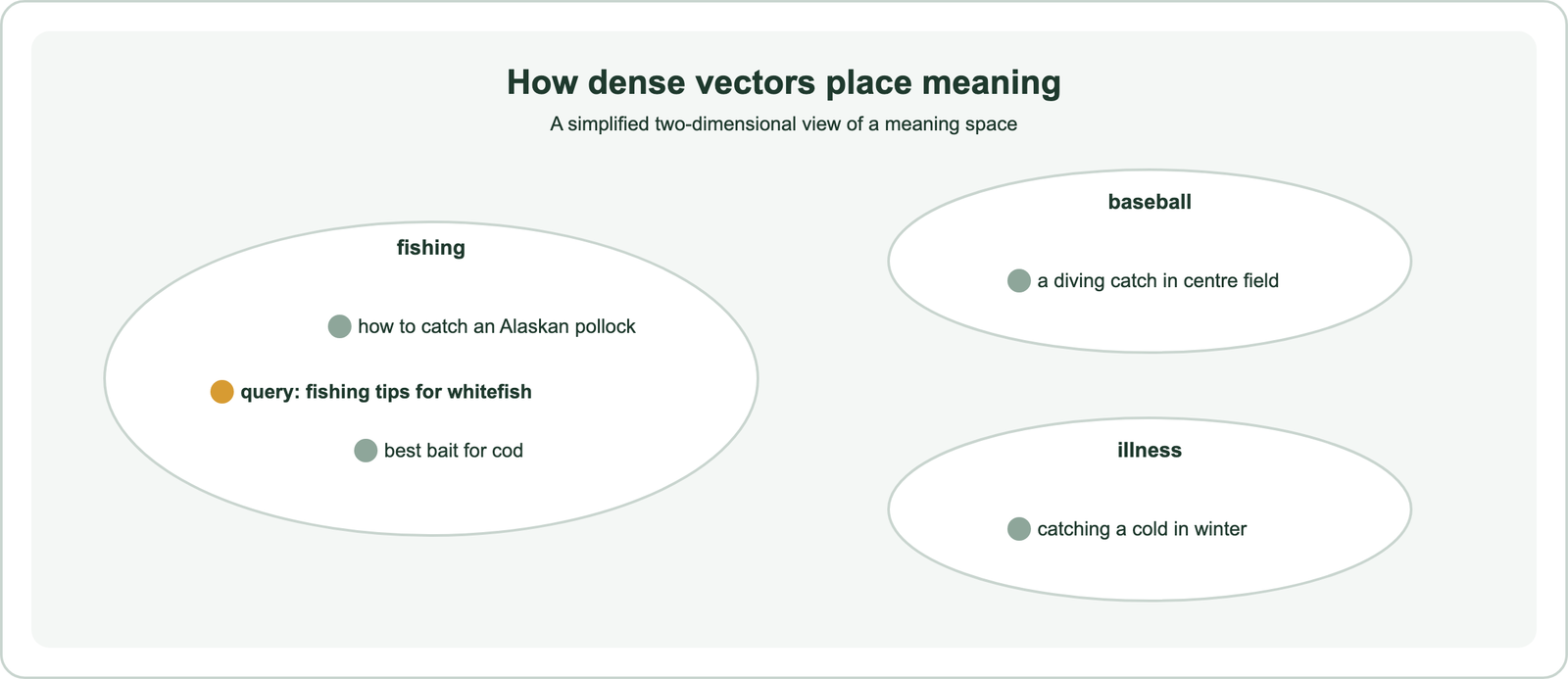
Because meaning is spread out, small changes in wording usually move a vector only a little. Synonyms, paraphrases, and even translations can land near each other. That property is what lets semantic search match “laptop sleeve” to “notebook case,” as the semantic matching page shows. It also means a dense vector cannot be read directly, which matters for debugging. Using those positions for retrieval is the next step.
How does dense vector search work?
Dense vector search works by embedding the query with the same model as the documents, then returning the stored vectors closest to it by a distance metric such as cosine. This is also called dense retrieval.
- Embed each document once, at indexing time, and store the vectors.
- Index them in an approximate nearest neighbor structure such as HNSW.
- Embed the query with the same model when a search arrives.
- Return the nearest vectors, ranked by distance.
Dense retrieval became a serious rival to keyword search with Dense Passage Retrieval, or DPR, published by Karpukhin and colleagues at EMNLP 2020. Trained on question and passage pairs, DPR outperformed a strong Lucene BM25 system by 9 to 19 points absolute in top-20 passage retrieval accuracy. The result showed that learned dense vectors could find answers that word matching missed.
Speed comes from the index. Comparing a query with every stored vector grows linearly with the collection, so production systems use approximate search, as approximate nearest neighbor search explains. The metric should match the model, as covered in cosine, dot product, and Euclidean distance. The main alternative to dense search uses a very different kind of vector.
How do dense vectors differ from sparse vectors?
Dense vectors differ from sparse vectors in that dense vectors have a few hundred to a few thousand non-zero values capturing meaning, while sparse vectors have one position per vocabulary term and are mostly zeros. Each suits a different kind of match.
| Aspect | Dense vectors | Sparse vectors |
|---|---|---|
| Values | Mostly non-zero | Mostly zero |
| Length | Fixed by the model, such as 384 or 1,536 | Size of the vocabulary |
| Produced by | Neural embedding models | BM25, TF-IDF, or learned models like SPLADE |
| Strength | Meaning, synonyms, paraphrase | Exact terms, codes, rare words |
| Readable? | No; meaning is distributed | Yes; each position is a word |
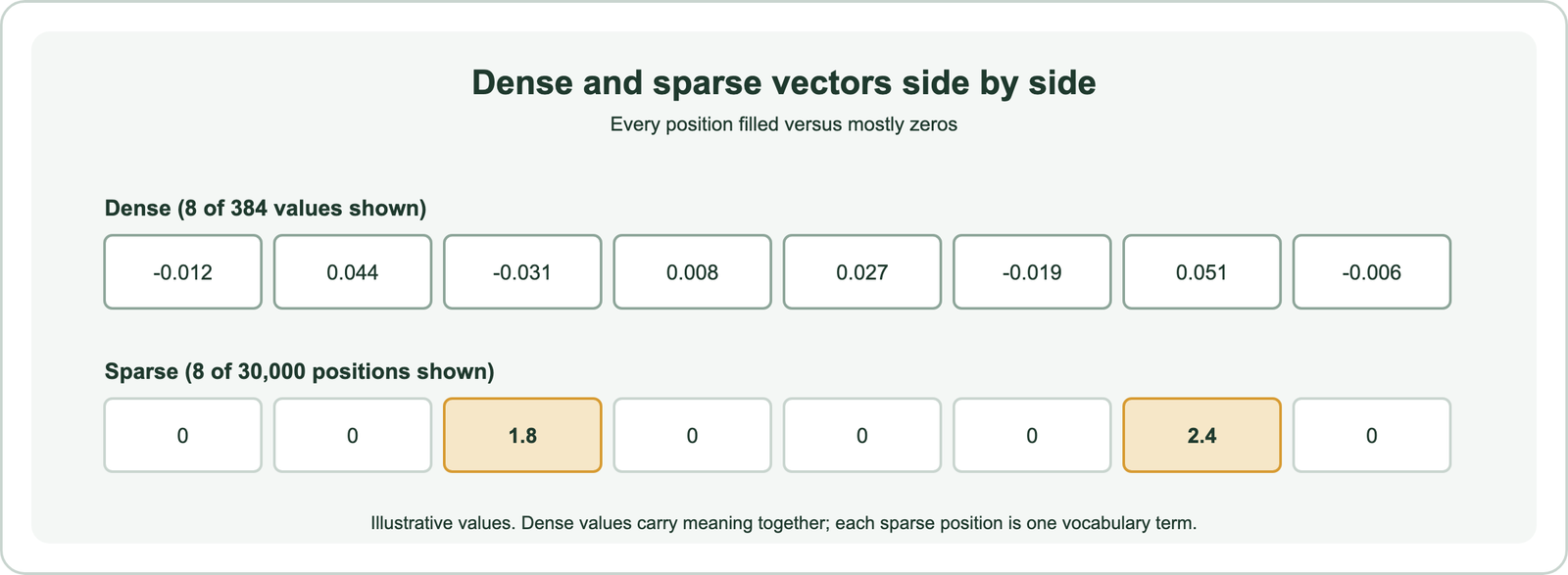
Weaviate’s hybrid search guide sums up the split: dense vectors excel at understanding the context of a query, while sparse vectors excel at keyword matches. In the pollock example, the dense side understands “catch,” and the sparse side matches “Alaskan Pollock” exactly. Hybrid search uses both, as hybrid search explains.
The full comparison, including learned sparse models, is on dense versus sparse vectors and sparse vectors. One practical difference deserves its own look: memory.
How much memory does a dense vector use?
A dense vector uses 4 bytes per dimension when stored as 32-bit floats, so a 768-dimension vector takes about 3 KB and a 1,536-dimension vector about 6 KB. Across millions of vectors, that adds up to gigabytes.
Because every value is stored, dense vectors cannot use the tricks that make sparse vectors cheap, such as skipping zeros. One million 1,536-dimension vectors need about 6 GB before any index overhead. That is why compression matters for dense vectors in particular.
Binary vectors are the most extreme form of compression. Binary quantization keeps only one bit per dimension, its sign. Weaviate’s engineering blog reports this cuts memory by 32 times compared with float32. Distance then becomes a fast bitwise operation: brute-force search over 768-dimension binary vectors took 13% of the uncompressed time. The cost is lower recall, which systems recover by fetching extra candidates and rescoring them with full vectors.
Search engines apply similar defaults. Elasticsearch’s dense_vector field, for example, quantizes float vectors by default, using 8-bit storage or, from 384 dimensions up, a binary-style format. Embedding quantization compares the options. With storage settled, the vectors still need a home.
How do you store and search dense vectors in Weaviate?
You store and search dense vectors in Weaviate either by letting a configured vectorizer create them, or by supplying your own vectors with a self_provided configuration and querying with near_vector. Both routes use the same index and search.
The bring-your-own route suits teams that already embed data elsewhere, in Python for example:
import weaviate
from weaviate.classes.config import Configure, Property, DataType
from weaviate.classes.query import MetadataQuery
from sentence_transformers import SentenceTransformer

model = SentenceTransformer("all-MiniLM-L6-v2")   # 384-dimension dense vectors
client = weaviate.connect_to_local()

docs = client.collections.create(
    name="Docs",
    properties=[Property(name="text", data_type=DataType.TEXT)],
    vector_config=Configure.Vectors.self_provided(),
)

texts = ["How to catch an Alaskan pollock", "Best bait for cod fishing", "Catching a cold in winter"]
with docs.batch.fixed_size(batch_size=100) as batch:
    for text, vec in zip(texts, model.encode(texts)):
        batch.add_object(properties={"text": text}, vector=vec.tolist())

query_vec = model.encode("fishing tips for whitefish").tolist()
response = docs.query.near_vector(near_vector=query_vec, limit=2,
                                  return_metadata=MetadataQuery(distance=True))
for obj in response.objects:
    print(round(obj.metadata.distance, 3), obj.properties["text"])

client.close()
Two rules from Weaviate’s documentation prevent common mistakes. Pass the vector through the vector argument, not as a property, or Weaviate treats it as ordinary data. And with self-provided vectors, the query vector must also be supplied, because Weaviate cannot embed the query for you. When a vectorizer is configured instead, Weaviate embeds both sides automatically and near_text works directly. Either way, dense vectors have limits worth knowing.
What are the limits of dense vectors?
The limits of dense vectors are weak handling of exact terms, uneven performance outside their training domain, dependence on a single model, high memory use, and results that are hard to explain. Most systems pair them with other signals for these reasons.
- Exact terms: product codes, names, and rare words can be blurred, because the vector encodes meaning rather than spelling. Sparse or keyword search covers this gap.
- Domain shift: the BEIR benchmark from Thakur and colleagues found BM25 to be a robust zero-shot baseline. Dense models that did well in training could fall behind it on unfamiliar domains, which is why domain-specific embeddings exist.
- Model lock-in: vectors from different models are not comparable, so changing models means re-embedding everything.
- Memory: every dimension is stored, so large collections need compression or more hardware.
- Explainability: a distance does not say why two items are close, which complicates debugging.
None of these limits removes the value of dense vectors. They explain why production search usually combines dense retrieval with keyword signals and reranking, as in hybrid search and dense retrieval. Related pages include vector search, similarity search, and vector indexes.
A dense vector is a fixed-length list of mostly non-zero numbers that a model uses to place meaning in space. Dense vectors come from neural models, from word2vec to modern transformers, and power semantic search by putting similar meanings close together. They beat keyword search on meaning, as DPR showed, but can lose to it on exact terms and unfamiliar domains, as BEIR showed. They also take 4 bytes per dimension unless compressed. The practical step is to pick a model that fits your domain, store its vectors in an indexed database such as Weaviate, and add keyword search where exact terms matter.