Home / Embeddings / Batch Embeddings: API Limits and Choosing a Batch Size
TutorialBatch Embeddings: API Limits and Choosing a Batch Size
Batch embedding means converting many texts into vectors in groups, rather than one text per call, so a large corpus is embedded faster, more cheaply and with fewer failed requests. Batching happens at three levels. A local model embeds a batch of texts in one forward pass, limited by device memory. A hosted embedding API accepts a list of inputs per request, limited by input counts, token counts and rate limits. A vector database imports objects in batches, limited by server load and timeouts. Each level has its own best batch size, found by measuring throughput and errors rather than by picking the largest number allowed. Weaviate’s Python client defaults to batches of 100 objects with 2 concurrent requests, and it offers a rate-limited mode for when Weaviate calls an external embedding API for you.
Batch embedding in four facts
- Batch size is the number of texts sent together in one forward pass, API request or database request.
- Larger batches raise throughput until memory, token limits or timeouts push back, so the best size is measured, not maximized.
- Weaviate’s Python client defaults to a batch size of 100 and 2 concurrent requests in fixed-size mode.
- From Weaviate 1.36, server-side batching lets the server control the sending rate through backpressure.
What is batch embedding?
Batch embedding is the practice of sending many texts to an embedding model at once and receiving one vector per text, in the same order. It is how every large corpus gets embedded in practice.
Embedding one text per call wastes most of the time on overhead. A network request has a round trip, an API has per-request processing, and a GPU sits mostly idle on a single short sentence. Grouping texts spreads that overhead across the whole batch. If a request has a fixed overhead and each text adds a small amount of work, sending 100 texts per request cuts the overhead per text a hundredfold.
The term covers several related ideas, which causes confusion in searches for “embedding batch size”. It can mean the batch passed to a local model or the list of inputs in one API call. It can also mean an asynchronous batch job offered by some providers, or the objects sent per import request to a vector database. The ideas share a goal but have different limits. What are embeddings covers the vectors themselves.
Where does batching happen in an embedding pipeline?
Batching happens in three places in an embedding pipeline: inside the model, at the embedding API, and at the vector database import. Each place is tuned separately.
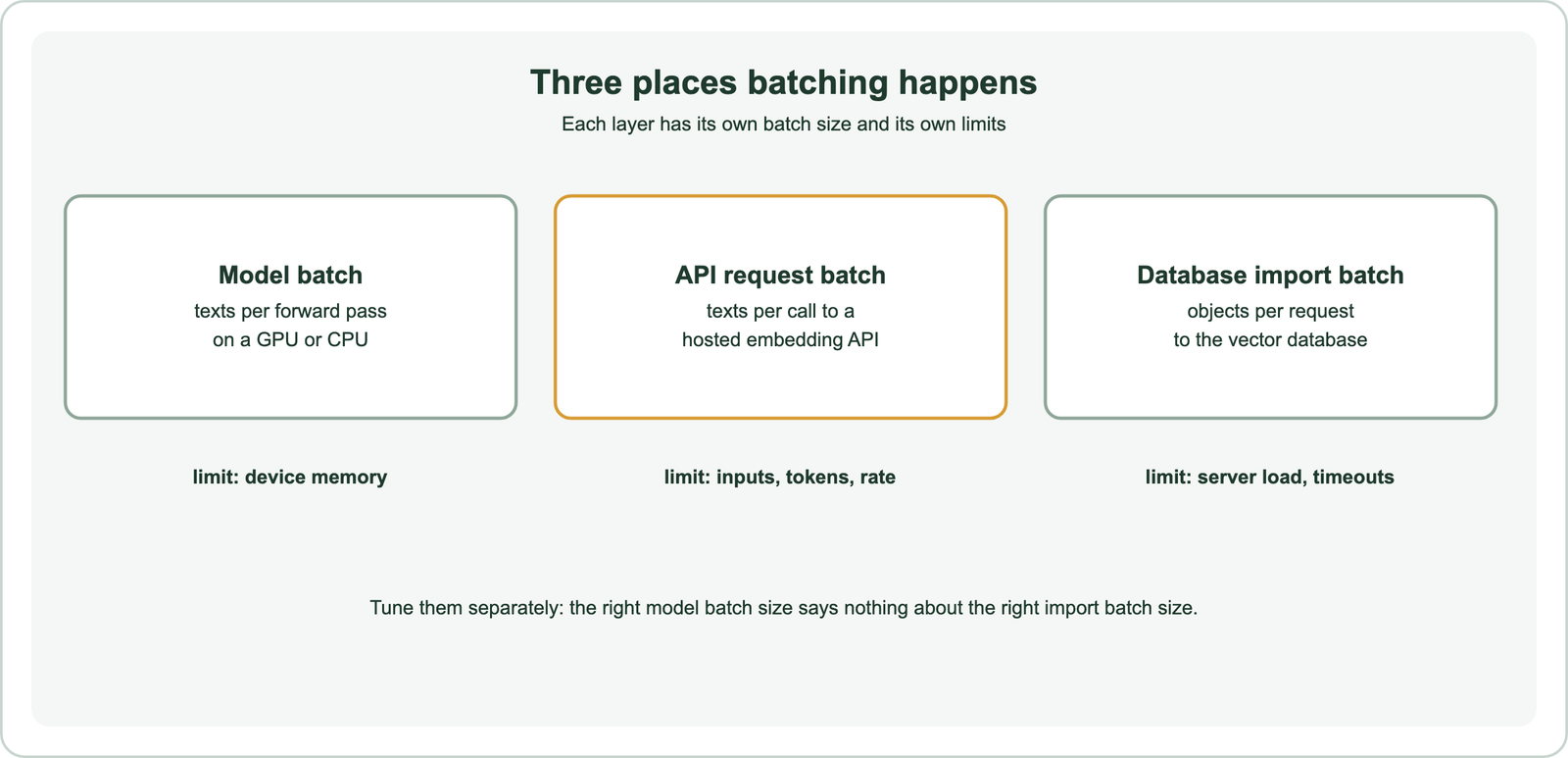
A pipeline that embeds documents locally and then loads them into Weaviate has two batch sizes: the model batch and the import batch. A pipeline that lets Weaviate call a hosted model at import time has all three, because Weaviate groups objects into requests to the embedding provider. Knowing which layer is slow or failing tells you which setting to change.
The rest of the page takes the layers in order, from the model outwards. The same principle runs through all of them. Throughput rises with batch size at first, then flattens, and past some point the batch fails on memory, token limits or timeouts.
How does batch size affect a local embedding model?
Batch size affects a local embedding model by trading memory for throughput: larger batches keep the GPU busier, but memory use grows with the batch and with the longest text in it. Too large a batch causes out-of-memory errors.
A transformer processes a batch as one tensor, so every text in the batch is padded to the length of the longest one. A batch of short sentences with one long paragraph pays for the paragraph’s length on every row. Sorting texts by length before batching reduces that waste. The sentence-transformers library does this inside its encode method, which uses a default batch size of 32.
from sentence_transformers import SentenceTransformer

model = SentenceTransformer("all-MiniLM-L6-v2")
vectors = model.encode(texts, batch_size=64, normalize_embeddings=True,
                       show_progress_bar=True)
On a CPU, batching helps less because there is less parallel hardware to fill. On a GPU, throughput usually rises quickly with batch size and then levels off. A practical way to choose is to time a few thousand representative texts at batch sizes such as 16, 32, 64 and 128, and keep the smallest size near the top of the curve. Model size and maximum sequence length change the answer, which is one of the costs weighed in choosing an embedding model.
How do embedding APIs handle batch requests?
Embedding APIs handle batch requests by accepting a list of texts in one call and returning a list of vectors in the same order. Limits apply to inputs per request, tokens per input and requests or tokens per minute. The exact limits vary by provider and change over time.
Hosted APIs such as OpenAI’s embeddings endpoint accept an array of strings as input. Each text must fit within the model’s maximum input length, and the whole request must fit within the provider’s per-request caps. Separately, accounts have rate limits on requests and tokens per minute. Read the current limits in the provider’s documentation before sizing batches, since they differ between providers, models and account tiers.
Some providers also offer an asynchronous batch service, where you upload a file of requests and collect results later. OpenAI’s Batch API works this way, with a completion window of up to 24 hours and a lower price than the synchronous endpoint. It suits backfills and nightly re-embedding, where nobody waits on the result. It does not suit query embedding, which must return in milliseconds. The cost of semantic search covers how embedding charges fit into the total bill.
How should you choose an embedding batch size?
You should choose an embedding batch size by starting from a moderate default, measuring throughput and error rate, and increasing the size only while throughput still improves and errors stay rare. The largest allowed size is rarely the best one.
A larger request takes longer, so it is more likely to hit a timeout, and a failure throws away more work. With rate limits measured in tokens per minute, bigger batches also reach the limit in fewer requests. That makes concurrency and batch size two levers on the same budget. Doubling either can double throughput until the rate limit or the server becomes the bottleneck.
A workable routine has four steps. First, pick a starting batch size within the provider’s documented caps. Second, run a sample of a few thousand texts and record texts per second and failures. Third, double the batch size or the concurrency and compare. Fourth, stop when throughput stops rising or errors appear, and step back one level. Token counts matter more than text counts, so batch by an estimated token budget when document lengths vary a lot.
Calculate cost and time before running a large job. The embedding cost calculator estimates the spend from token counts, and output size depends on the vector length, covered in embedding dimensions.
How do you handle failures in batch embedding jobs?
You handle failures in batch embedding jobs by retrying transient errors with backoff, recording failed items for a later pass, and making each batch safe to repeat. A long job will see some failures.
Rate-limit responses and timeouts are usually transient, so retry them after a growing delay. Errors caused by the input itself, such as a text longer than the model accepts, will fail on every retry. Split, truncate or chunk those texts first, as described in chunking for semantic search. Keep a record of which items finished, so a crash halfway through a million documents resumes rather than restarts.
Idempotent writes make retries safe. Give each object a deterministic ID derived from its source, so writing it twice updates rather than duplicates it. Check that the number of stored vectors matches the number of source items after the job. A silent gap, where some batch failed without anyone noticing, is a common cause of documents that never appear in search.
How does Weaviate batch imports and vectorization?
Weaviate batches imports through its client libraries, which group objects into requests and, when a vectorizer module is configured, have the server call the embedding provider for those objects. The client offers several batching methods.
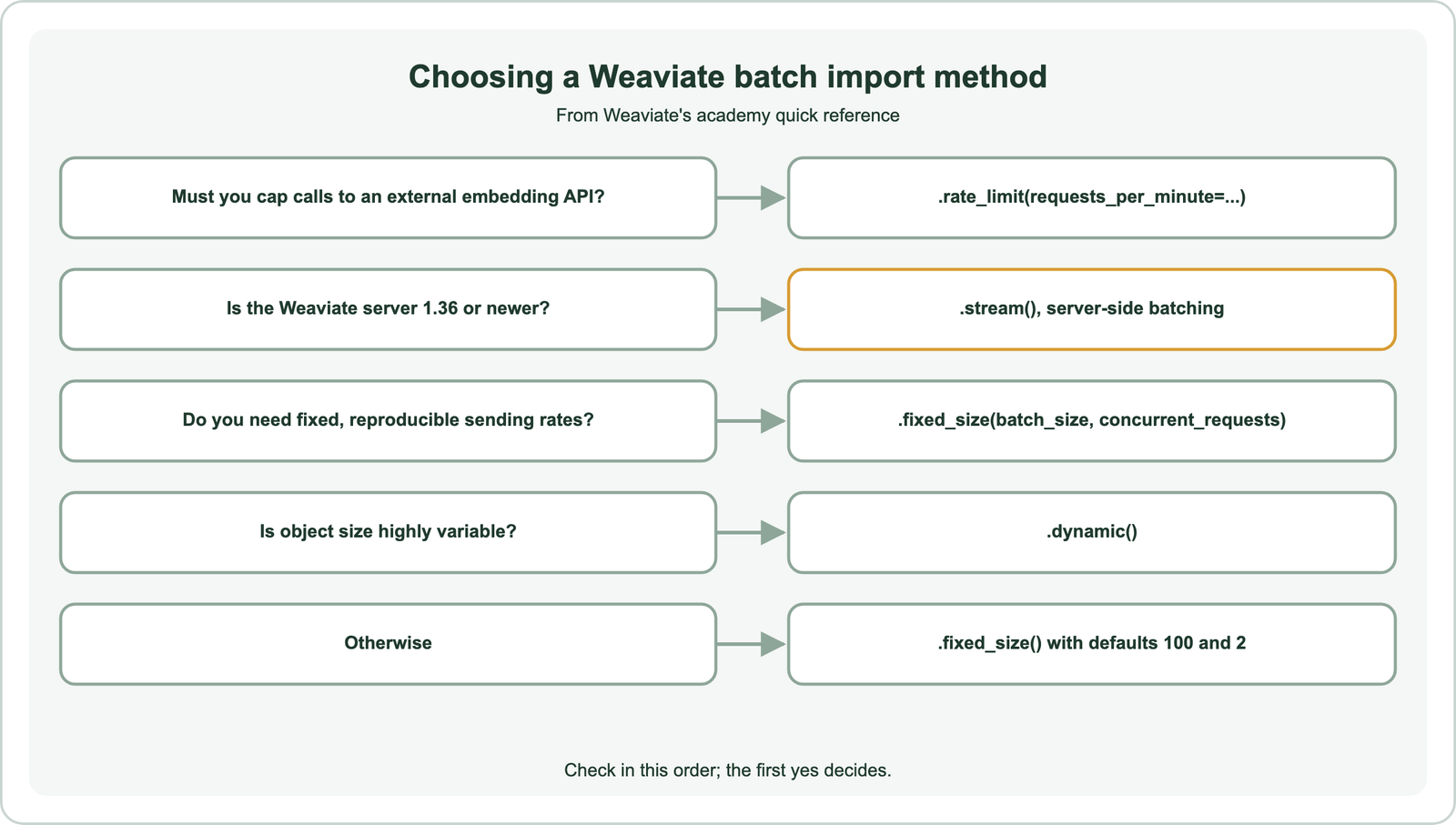
Weaviate’s documentation describes four context managers in the Python client. fixed_size sends batches of a set size, by default 100 objects with 2 concurrent requests. dynamic adjusts the batch size to the server’s load. rate_limit caps requests per minute, which suits a vectorizer whose provider enforces a strict rate limit. From Weaviate 1.36, server-side batching streams objects while the server signals how fast to send, so the client needs no batch size tuning.
from weaviate.util import generate_uuid5

with collection.batch.fixed_size(batch_size=100, concurrent_requests=2) as batch:
    for doc in docs:
        batch.add_object(properties={"title": doc["title"], "body": doc["body"]},
                         uuid=generate_uuid5(doc["id"]))

if collection.batch.failed_objects:
    print(len(collection.batch.failed_objects), "objects failed")
Errors in a batch do not raise exceptions by default; the documentation recommends checking the error count during the import and the list of failed objects afterwards. The batcher is not thread-safe, so raise concurrent_requests rather than sharing one batcher across threads. Weaviate’s tuning advice is simple: if the import is too slow, increase concurrency or batch size; if requests time out, decrease them.
When does batch embedding matter most?
Batch embedding matters most during the initial load of a corpus and whenever the whole corpus must be re-embedded, such as after changing the embedding model. Day-to-day updates are small by comparison.
A model change means every stored vector must be recomputed, because vectors from two models are not comparable. That job has the same shape as the first load, and it often runs while the old index keeps serving traffic. Re-embedding when the model changes covers the migration plan, and fine-tuning embedding models triggers the same job whenever a new checkpoint ships.
Several choices change the size of the job. Shorter vectors from Matryoshka embeddings and compressed vectors from embedding quantization reduce storage, though not the embedding calls. A domain-specific embedding model may be smaller and cheaper to run locally. Images and audio cost more per item, as covered in multimodal embeddings.
Which related ideas does batch embedding depend on?
Batch embedding depends on tokenization, model choice and the difference between query and document embedding. Each affects how batches are sized and sent.
Token counts drive both API limits and model memory, so it helps to know how a text becomes tokens before it becomes a vector, explained in tokenization vs embedding. Benchmarks such as the MTEB leaderboard rank quality but say nothing about throughput, which you measure yourself. Sentence models embed whole passages per item, unlike older word models, as compared in word vs sentence embeddings.
Some models use different instructions or prefixes for queries and documents. Batch jobs embed documents, while queries are embedded one at a time at search time, so the two paths must apply the right prefix each. Asymmetric vs symmetric semantic search explains why the two sides can differ.
Batch embedding groups texts so a corpus is embedded with less overhead per text. It happens inside the model, at the embedding API and at the vector database import, and each layer has its own limits on memory, tokens, rate and timeouts. Choose batch sizes by measuring throughput and errors, starting moderate and stepping up only while gains continue. Retry transient errors, fix oversized inputs, and use deterministic IDs so retries are safe. In Weaviate, start with server-side batching on 1.36 or newer, or fixed-size batches of 100 with 2 concurrent requests, and check failed objects after every import.